Client Airtable Sync: Master-Child Setup With Real-Time Filters
Set up bi-directional Airtable sync between a Master base and per-client Child bases with real-time filters, in 8 steps, for full client data isolation.
- Author
- Ruben Burdin · Founder & CEO
- Published
- Updated
- Read time
- 4 min read

Managing client data across separate Airtable bases creates a critical operational challenge: clients need access to their project information without exposing sensitive data from other clients. Traditional approaches require manual data exports, complex permission management across multiple bases, or expensive custom development - all creating bottlenecks and security risks.
Stacksync eliminates this integration complexity through true airtable bidirectional sync with intelligent filtering, enabling real-time synchronization between master and child bases while maintaining complete data isolation. This approach transforms manual, error-prone processes into automated, secure client data management.
How to Two-Way Sync Client Airtable Bases
Here's a step-by-step guide for setting up a "Master" base for your team and "Child" bases for clients using Stacksync's real-time data synchronization platform.
1. Setup Your Airtable Bases
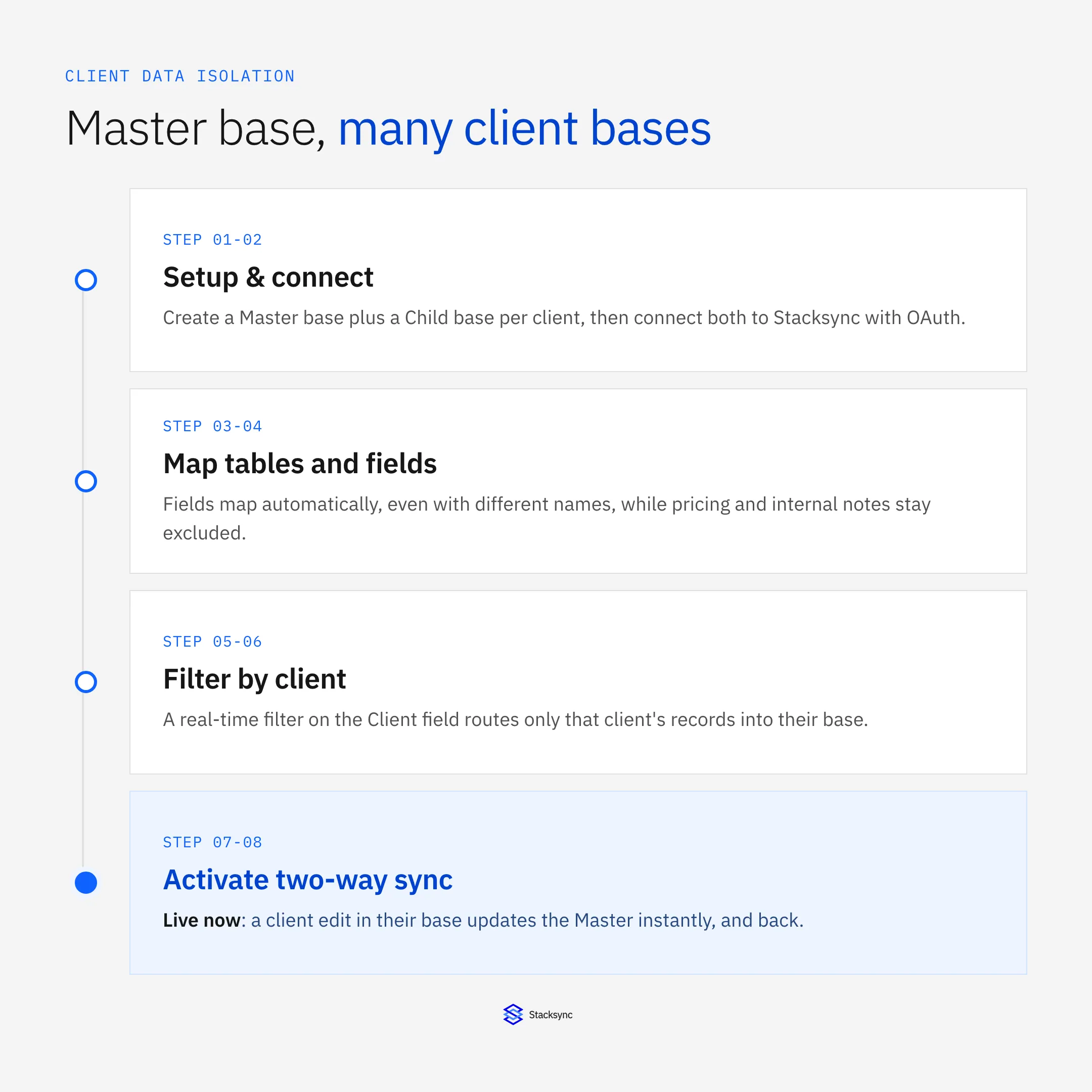
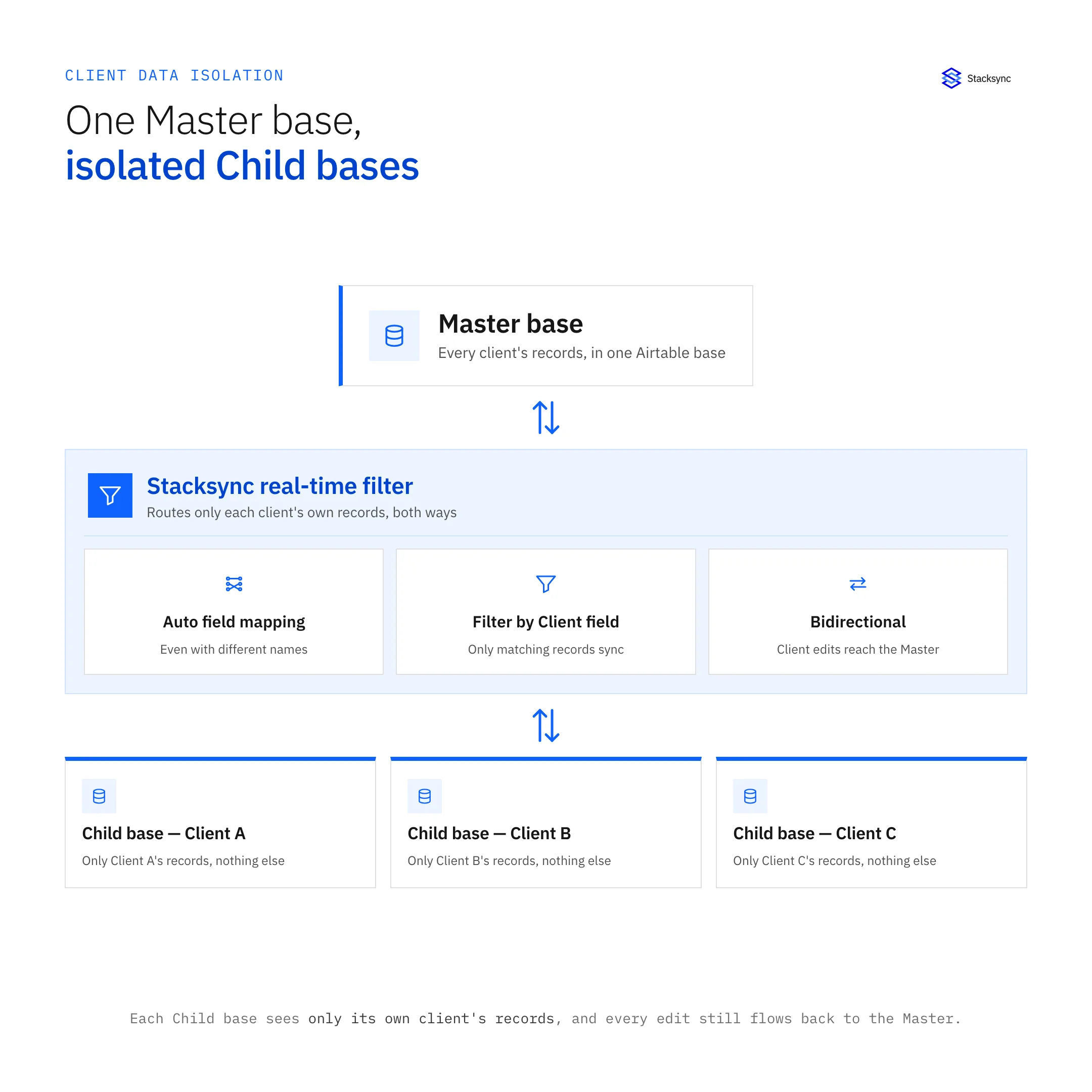
Create your "Master" Airtable base containing all client projects and data. Ensure you have a "Client" field that clearly identifies which records belong to each client (e.g., "Client Name" or "Client ID").
Set up individual "Child" Airtable bases for each client with field structures matching the relevant data from your Master base. Stacksync supports all standard and custom objects in your systems and automatically maps fields between your systems even when they have different names and data types, handling data transformation and type casting for you.
2. Go to Stacksync Platform and Create a New Sync
Navigate to Stacksync's platform and create a new sync configuration. Connect in one click your apps with OAuth or any secure connection option such as SSH tunneling, SSL Certificates and more.
3. Connect Both Your Airtable Databases
Connect your Master Airtable base and the first Client base through Stacksync's secure connection interface. The platform automatically detects available tables and fields, eliminating complex API configuration requirements that plague traditional integration approaches.
Unlike custom integration development requiring months of engineering work, configure and sync data within minutes without code.
4. Go to Table Mapping
Select the tables and fields you want to synchronize between the Master and Client bases. Sync your business system objects to existing tables in your database or let Stacksync create new tables with perfect data types to get started in seconds. If you don't have existing tables to sync with in your database, Stacksync will create a new table for you with the perfect schema and ideal data types.
Map the relevant fields from your Master base to the Client base while excluding sensitive internal information like pricing data or confidential notes.
5. After Mapping All Your Tables and Fields, Hit 'Filter'
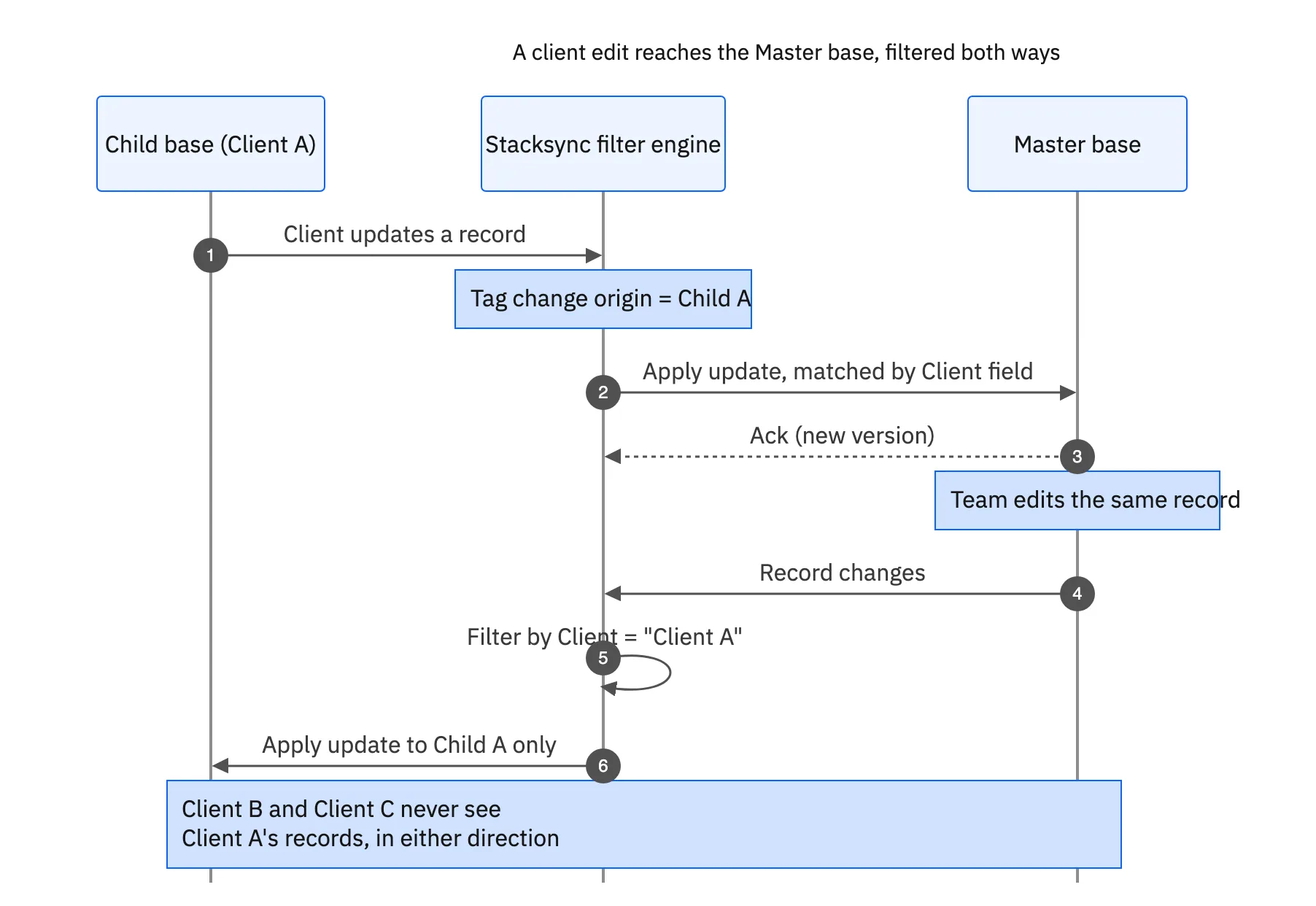
Configure Stacksync's advanced filtering system to enable client-specific data isolation. Unlike Airtable's limited native filtering which doesn't support complex conditions and creates referential issues, Stacksync provides dynamic, real-time filtering capabilities.
6. Add Your Filters
In the filter section, choose your "Client" field to specify which data to sync. For example, filter by "Acme Corp" to ensure only records related to this client are included in their dedicated base.
This automated data sync between applications ensures complete data isolation without manual intervention, addressing the core security challenge of multi-client data management.

7. Go Through the Initial Sync Stage
Stacksync handles initial data backfill for existing records while preparing the real-time synchronization infrastructure. Whether you sync 50k or 100M+ records, Stacksync handles all the dirty plumbing of infrastructure, queues and code so you don't have to. Integrations are non-invasive and do not require any setup on your systems.
8. Activate Your Sync!
Enable bi-directional synchronization to allow clients to update information directly in their bases. Stacksync's airtable real time synchronization ensures that changes made in either the master base or client bases propagate immediately, maintaining operational consistency.
Configure field-level permissions to determine which data clients can edit versus view-only information, maintaining operational control while enabling client collaboration.
You're Done! Real-Time Client Data Synchronization
You now have bi-directional sync between your Master and Client bases with intelligent filtering. Seamlessly manipulate data to match the different data models across your systems. Clients can update project requirements, delivery addresses, or status information directly in their bases, with changes instantly reflected in your Master operational system.
Immediately get alerted about record syncing issues over email, slack, Pagerduty and Whatsapp. Resolve issues from a centralized dashboard with retry and revert options.
Unlike traditional approaches requiring extensive engineering resources and ongoing maintenance, Stacksync connects all your systems saving 90% engineering time, no maintenance required.
Ready to Get Started?
Transform your client data management with Stacksync's enterprise-grade bi-directional sync tools. Start your implementation today and eliminate the manual overhead of managing multiple client bases while ensuring complete data security and real-time consistency.

FAQ
Frequently asked questions










Related articles