







Commissioning readiness
Gather installation requirements and unresolved prerequisites before a technician is dispatched.
Explore workflows ↗Stacksync MCP is here. Give Claude, Cursor, and any MCP client governed access to your syncs, workflows, and connections.
Set up MCP Salesforce
  HubSpot
  NetSuite
  Zendesk
  Microsoft Dynamics 365 Sales
  Dynamics 365 F&O
  Attio
Attio  Pipedrive
  Zoho CRM
  Campfire
  Rillet
  Front
Front  Shopify
  Amazon Seller Central
  SendGrid
 Industrial equipment and machinery
Connect configured equipment orders, serial records, commissioning readiness and aftermarket service without hiding engineering or commercial approvals.
A sold configuration, the machine that was built and the service team’s installed-base record disagree when a replacement part is needed.
Explore your process in a demo, or get our shared two-way sync architecture guide.
The platform, in operating order
Keep shared customer, order, and operational records aligned, with clear field ownership.
Explore two-way sync 02Move approved work between systems, assign exceptions, and confirm the result.
Explore workflows 03Investigate cross-system questions, assemble the evidence, and prepare the next action.
Explore ai agents (genies) 04Connect trading-partner documents to operational records and exception handling.
Explore ediBuilt around your operations
COOs, service directors and IT leaders at US equipment builders with 100–1,000 employees and a mix of manufacturing, distribution and service.
Gather installation requirements and unresolved prerequisites before a technician is dispatched.
Explore workflows ↗Match the installed asset, coverage decision and part compatibility before preparing a replacement.
Explore workflows ↗Assemble a supported replacement-part recommendation from the installed machine and service evidence.
Explore Genies ↗Your systems and records
| Record | Owner | Operating rule |
|---|---|---|
| Equipment configuration | Engineering | Preserve the approved options and revision independently from a sales description. |
| Machine serial | Manufacturing operations | Link the serial to its build and shipment without assuming the customer’s asset tag is the serial. |
| Commissioning task | Service operations | Record prerequisites, assigned owner and accepted completion evidence. |
| Warranty claim | Service and finance | Keep technical eligibility, commercial coverage and the replacement order as separate decisions. |
Preserve distributor PO lines, configured kits and partial shipments when equipment orders enter through EDI.
Evaluate your next process
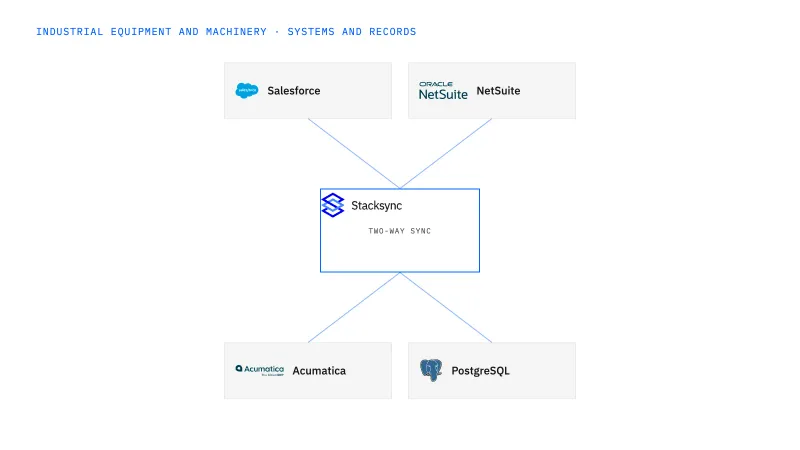
Connect approved equipment configurations and commercial orders across Salesforce and NetSuite.
Connect aftermarket requests and accepted parts quotes to Acumatica order status.
Bring sold service scope, equipment status and site prerequisites into one dispatch-readiness handoff.
Use a Genie to assemble the machine history, approved part references and commercial context behind an aftermarket request.
Implementation and operating guides
Equipment builders can tie a sold machine's accepted option set to its NetSuite order lines and route later option changes for review instead of overwriting the build.
Keep the manufacturer's serial stable across owner changes and customer asset tags, with a retrofit history that explains the installed configuration.
When two employees quote the same urgent component, a shared request reference across Salesforce and Acumatica keeps one accepted order and its compatibility evidence.
Before a technician travels, this workflow shows which accessory, site condition or customer confirmation is still missing and who owns resolving it.
Shipping a replacement should not close the return or decide the credit; each RMA obligation stays open until the owner who holds it confirms the outcome.
From a customer photo and asset label, the Genie prepares a review packet with the resolved serial, supported replacement, stock context and the questions still open.
A plausible active SKU is not a compatible part; these exceptions show which serial, retrofit or kit fact is missing before service engineering can sign off.
One repair kit ordered by a distributor should remain one commercial line in NetSuite, even when it ships as several components or the quantity later changes.
Give it to the service director, because service is where the disagreement surfaces when a replacement part is requested. That person can name the Machine serial the customer is calling about and see whether the Equipment configuration on file matches what was built. Engineering keeps ownership of the approved options and revision; manufacturing operations keeps the serial and its build link. Two-way sync shares those records with sales and service without letting a sales description overwrite the engineering record.
Choose the one where a wrong decision costs a wasted trip or an unrecovered part today. Commissioning readiness fits when each Commissioning task has a named owner and an agreed form of completion evidence, and service operations approves dispatch. Warranty replacement fits when the Warranty claim already separates technical eligibility from coverage and from the replacement order. Either way the workflow assembles the evidence, and the dispatch or coverage decision stays with service and finance.
Give it a real request with a customer asset tag instead of a Machine serial, a machine that was transferred and retrofitted, and a part with a conditional successor. The Genie should resolve the serial from approved evidence or ask for the nameplate, show the installed Equipment configuration it relied on, and prepare a parts request for the service owner. It does not approve compatibility, decide a Warranty claim or release the order; those remain with service engineering and finance.
Bring one real process
Bring the systems, record types, and exceptions your team handles today. We’ll scope the connections and actions, then walk through the path to a confirmed result.
Explore your process in a demo, or get our shared two-way sync architecture guide.


