







Replenishment review
Check accepted orders and incoming deliveries before authorizing another wholesale replenishment.
Explore workflows ↗Stacksync MCP is here. Give Claude, Cursor, and any MCP client governed access to your syncs, workflows, and connections.
Set up MCP Salesforce
  HubSpot
  NetSuite
  Zendesk
  Microsoft Dynamics 365 Sales
  Dynamics 365 F&O
  Attio
Attio  Pipedrive
  Zoho CRM
  Campfire
  Rillet
  Front
Front  Shopify
  Amazon Seller Central
  SendGrid
 Household consumables
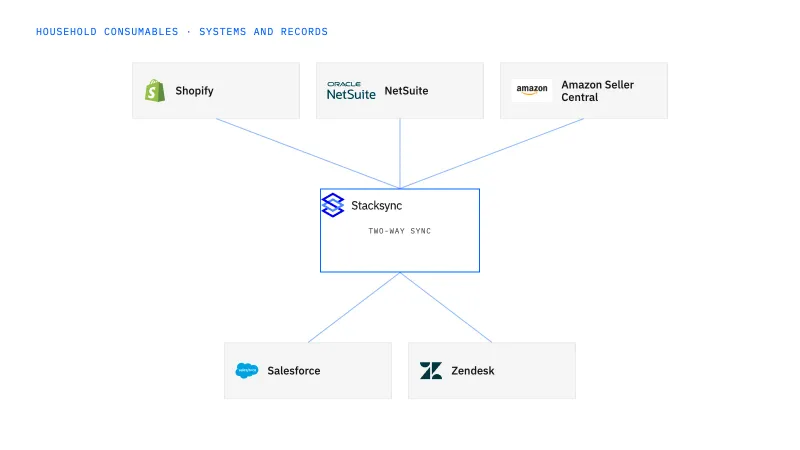
Connect household-product ecommerce, marketplace orders, janitorial distribution, replenishment, and quantity disputes.
Refills, concentrates, multipacks, and distributor cases create conflicting quantities and duplicate replenishment work.
Explore your process in a demo, or get our shared two-way sync architecture guide.
The platform, in operating order
Keep shared customer, order, and operational records aligned, with clear field ownership.
Explore two-way sync 02Move approved work between systems, assign exceptions, and confirm the result.
Explore workflows 03Investigate cross-system questions, assemble the evidence, and prepare the next action.
Explore ai agents (genies) 04Connect trading-partner documents to operational records and exception handling.
Explore ediBuilt around your operations
Cleaning, paper, refill, and household-consumable brands combining manufacturing, marketplaces, DTC, and wholesale distribution.
Check accepted orders and incoming deliveries before authorizing another wholesale replenishment.
Explore workflows ↗Route actual condition and disposition evidence to operations and finance before completing a remedy.
Explore workflows ↗A Genie job that compares ordered, shipped, and claimed refill or case quantities using approved product definitions.
Explore Genies ↗Your systems and records
| Record | Owner | Operating rule |
|---|---|---|
| Household sellable pack | Product operations | Distinguish refill, concentrate, ready-to-use product, and multipack as approved products. |
| Distributor account | Sales operations | Map the buyer, payer, and receiving location independently. |
| Replenishment request | Order operations | Keep the request identity and related open or incoming orders visible. |
| Quantity dispute | Finance operations | Preserve reported quantities and the approved pack conversion before deciding a remedy. |
Distributor purchase-order lines, case quantities, and actual shipment evidence.
Evaluate your next process
Connect household ecommerce purchases to the actual refill, concentrate, multipack, or kit represented in NetSuite.
Connect household marketplace evidence to the right ERP pack and physical quantity.
Coordinate household-product replenishment requests with existing orders and incoming deliveries before creating another commitment.
Configure a Genie to investigate refill, multipack, and case-quantity disputes using approved product relationships and actual shipment evidence.
Implementation and operating guides
Two refills ordered on Shopify stay two concentrate packages in NetSuite, and a starter kit keeps its approved bottle and refill components through fulfillment and returns.
Four three-packs sold on Amazon land in NetSuite as four marketplace units and twelve pouches, with the conversion on record for the return or fee adjustment that comes later.
Janitorial distributors stay the paying customer in NetSuite while Salesforce tracks the schools and offices they serve, so no facility turns into an accidental billing account.
One shared replenishment case shows the approver what is already ordered and in transit before a second distributor request turns into a second wholesale order.
A leaking case returned by a distributor is counted and dispositioned before any credit or stock movement, with support, warehouse, and finance each owning their own step.
A quantity-dispute Genie lines up cases, multipacks, and loose refills with their approved conversions and names the missing fact before anyone decides on a credit.
When two mixed cases lack item-level contents or a pack factor is absent, the Genie holds the comparison and asks the right owner instead of picking a number that balances.
Distributor item numbers resolve to the exact NetSuite case configuration, so EDI acknowledgments, ship notices, and invoices describe the pouches that shipped.
By checking what is already accepted or in transit before another order is authorized. Order operations owns the replenishment request, and the workflow keeps its identity visible next to any open or incoming orders for the same distributor account and household sellable pack. If an accepted order or an incoming delivery already covers the request, the workflow flags it for order operations rather than creating a second order. Authorization stays with a person; the workflow surfaces the overlap and records the decision in NetSuite.
It can show the difference, not decide the remedy. The Genie compares ordered, shipped, and claimed quantities for a quantity dispute, distinguishing refills, concentrates, multipacks, and cases through the approved household sellable pack and its effective conversion. It cites the order and shipment evidence, including the EDI shipment record where one exists, and lists any fact it could not confirm. Finance operations owns the remedy, so the Genie does not issue a credit or change a product definition; it prepares the review packet.
Nothing. The Amazon Seller Central connector has read-only access, so it imports marketplace evidence such as orders and their line quantities and does not update listings, cancel Amazon orders, or issue marketplace refunds. Any change to an Amazon listing is made in Seller Central by the team that owns it. What the import gives you is a marketplace quantity to compare with the household sellable pack in NetSuite, so a multipack is not booked as a single unit. Warehouse and commerce actions are scoped separately.
Bring one real process
Bring the systems, record types, and exceptions your team handles today. We’ll scope the connections and actions, then walk through the path to a confirmed result.
Explore your process in a demo, or get our shared two-way sync architecture guide.


