







Expose committed supply
Bring accepted orders and shipment evidence into the replenishment decision with destination and status intact.
 Salesforce
  HubSpot
  NetSuite
  Zendesk
  Microsoft Dynamics 365 Sales
  Dynamics 365 F&O
  Attio
Attio  Pipedrive
  Zoho CRM
  Campfire
  Rillet
  Front
Front  Shopify
  Amazon Seller Central
  SendGrid
 Household consumables
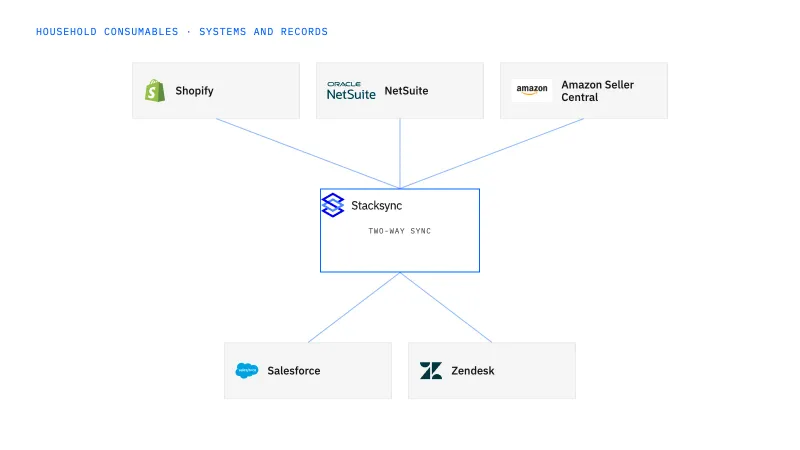
Coordinate household-product replenishment requests with existing orders and incoming deliveries before creating another commitment. This fits sales and operations teams that repeatedly receive overlapping requests from distributors or multiple reps. Give each review a stable identity and connect its approval to one accepted operational result.
A new request is processed without visibility into the same customer’s pending order or incoming shipment.
Explore your process in a demo, or get our shared two-way sync architecture guide.
When this fits
Cleaning, paper, refill, and household-consumable brands combining manufacturing, marketplaces, DTC, and wholesale distribution.
Bring accepted orders and shipment evidence into the replenishment decision with destination and status intact.
Link the approved decision to its accepted ERP reference and check for a prior result before retrying a create action.
The request originates in Salesforce, accepted orders and shipment evidence are read from NetSuite, and the replenishment case is kept in Postgres. The workflow assembles that view; it does not decide. The commercial owner records create, amend, defer, or reject, and only then does a scoped NetSuite action run, with its reference read back into the case. Each connector action and credential is confirmed before writes go live.
The process, end to end
A distributor asks two reps for more cleaning refills while a previous replenishment is still in transit. A demo should show how the requests are reviewed against the correct location and product history, then approved, amended, or deferred without automatically suppressing legitimate separate orders.
Scope your implementation
Review current platform pricing alongside the records, volume, and actions in your process. Use your own operating baseline to evaluate the economics.
Explore your process in a demo, or get our shared two-way sync architecture guide.
From foundation to action
Keep shared customer, order, and operational records aligned, with clear field ownership.
Explore two-way sync 02Move approved work between systems, assign exceptions, and confirm the result.
Explore workflows 03Investigate cross-system questions, assemble the evidence, and prepare the next action.
Explore ai agents (genies) 04Connect trading-partner documents to operational records and exception handling.
Explore ediGo deeper
One shared replenishment case shows the approver what is already ordered and in transit before a second distributor request turns into a second wholesale order.
A leaking case returned by a distributor is counted and dispositioned before any credit or stock movement, with support, warehouse, and finance each owning their own step.
Explore all household consumables integration and automation guides ↗
No. Similar orders may be legitimate. The workflow should use request identity, destination, timing, and the approved business context to decide.
A delay reopens the commercial decision; it does not authorize a second order on its own. The workflow shows the approver the accepted NetSuite order, the shipment evidence for it, and the new Salesforce request against the same customer and location, all attached to one case. The owner then chooses to wait, amend the open order, or approve a new one, and that choice is stored with its scope. If the request concerns a different location, it stays a separate requirement even when item and quantity match.
Put two-way sync first so Salesforce and NetSuite agree on the distributor account, the delivery location, and the open orders a request is checked against. Then add this workflow to hold each request in a Postgres-backed case, route it to the commercial owner, and read the accepted NetSuite reference back. Genies come after that, when a distributor disputes case or refill quantities on what was shipped and a reviewer wants the evidence assembled. EDI applies once distributor purchase orders and case-level shipments arrive as partner documents instead of emails.


