







Resin substitution requests
Collect material availability, specifications and approval evidence before planning adopts a substitute.
Explore workflows ↗Stacksync MCP is here. Give Claude, Cursor, and any MCP client governed access to your syncs, workflows, and connections.
Set up MCP Salesforce
  HubSpot
  NetSuite
  Zendesk
  Microsoft Dynamics 365 Sales
  Dynamics 365 F&O
  Attio
Attio  Pipedrive
  Zoho CRM
  Campfire
  Rillet
  Front
Front  Shopify
  Amazon Seller Central
  SendGrid
 Plastics and molding
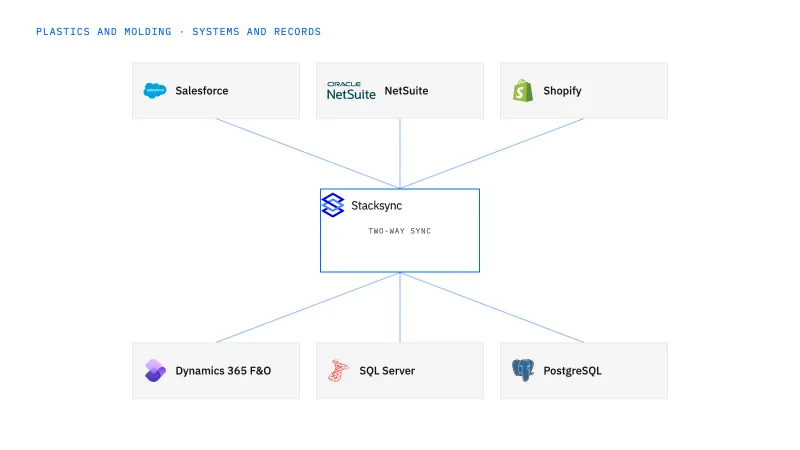
Keep tooling ownership, finished-goods availability, resin lots and molding changes connected across commercial and production systems.
A customer order looks ready in the CRM while resin approval, mold availability or a color change still blocks the run.
Explore your process in a demo, or get our shared two-way sync architecture guide.
The platform, in operating order
Keep shared customer, order, and operational records aligned, with clear field ownership.
Explore two-way sync 02Move approved work between systems, assign exceptions, and confirm the result.
Explore workflows 03Investigate cross-system questions, assemble the evidence, and prepare the next action.
Explore ai agents (genies) 04Connect trading-partner documents to operational records and exception handling.
Explore ediBuilt around your operations
Plant operations, customer service and IT teams at US injection molders, extruders and plastics manufacturers with 100–1,000 employees.
Collect material availability, specifications and approval evidence before planning adopts a substitute.
Explore workflows ↗Keep held production out of saleable quantities until the designated quality owner releases it.
Explore workflows ↗Collect missing resin documents and match them to the correct lot for quality review.
Explore Genies ↗Your systems and records
| Record | Owner | Operating rule |
|---|---|---|
| Tooling agreement | Program management | Keep mold ownership and engineering approval separate from finished-part demand. |
| Resin lot | Quality and inventory | Carry supplier lot, internal lot and release status without treating receipt as quality approval. |
| Molding order | Planning | Record the approved material, color and quantity before publishing a promise date. |
| Customer item cross-reference | Customer service | Match the customer part to the internal item and applicable revision or packaging convention. |
Separate blanket-order references from individual releases and normalize pack quantities before acknowledging mold-part demand.
Evaluate your next process
Connect customer programs, tooling commitments and production orders without collapsing them into one ambiguous sales status.
Connect direct-store variants and pack quantities to the approved NetSuite product and order model.
Bring resin shortages, candidate materials and affected molding orders into a controlled review handoff.
Use a Genie to locate missing resin documents and prepare receipt-to-certificate matches for quality review.
Implementation and operating guides
Injection molders that track a mold, a sample run and a first production order in one Salesforce opportunity need each commitment kept distinct when it reaches NetSuite.
A direct store that sells packs while NetSuite counts pieces needs a variant cross-reference, a versioned pack definition and a channel stock rule that excludes held lots.
Two lots of the same resin grade can arrive on one purchase order with different approval states; a readiness view built from Dynamics 365 entities keeps them apart for planning.
When a late resin delivery threatens a scheduled run, the workflow gathers the shortage, candidate grade and approvals so planning changes the run only on an accepted decision.
A finished molding run can still be partly on hold for color review; this workflow finds the affected allocations and recovery options before anyone promises a new date.
Receiving logs the internal lot while the supplier's certificate sits in another inbox; a Genie pairs the two and queues the match for a quality reviewer to confirm.
When a certificate's lot number disagrees with the receipt, the Genie keeps both values, gathers the correspondence and asks the right owner one bounded question.
Weekly distributor releases arrive in cartons while NetSuite plans in pieces; EDI intake keeps every release and its original unit intact before planning accepts demand.
Pick the customer service lead who fields the is-it-ready question, and pair them with the planner who owns the Molding order. Between them they can name the approved material, tool and quantity for one program, and they know when a Resin lot is still on hold. Loop in the NetSuite or Salesforce administrator before enabling changes. Quality keeps the release decision on the Resin lot; two-way sync makes that state visible without granting it.
It is ready when you can point to the Molding order it affects and name who approves the change. For a substitution, purchasing supplies the candidate material and availability, and engineering and quality decide suitability against the customer’s requirements. For a color hold, quality defines the held quantity and planning decides what still ships. The workflow collects the evidence and routes each decision; a substitute stays a proposal, not an approved material, until that decision is recorded.
Ask to follow one Customer item cross-reference through a pack-based Shopify order, a finished-goods color lot placed on hold after the order was accepted, and a repeated order message. You should see the store quantity kept in its original unit, the held lot removed from the saleable count, and no duplicate order after the replay. Shopify and NetSuite writes are scoped to specific objects, so ask which order and inventory operations are in scope before you sign off.
Bring one real process
Bring the systems, record types, and exceptions your team handles today. We’ll scope the connections and actions, then walk through the path to a confirmed result.
Explore your process in a demo, or get our shared two-way sync architecture guide.


