






















Twilio Sync Is Not This: Real Two-Way Sync Between Twilio and HubSpot
Twilio Sync replicates application state between your own clients. Keeping Twilio and HubSpot in agreement is record-level integration, and it is a different job. This guide covers why Twilio has no updated-since query, why opt-out state is the field that genuinely has to move both ways, what HubSpot's rate limits and search ceiling force you to design around, and how the usual options compare.
- Author
- Ignacio Malpartida · GTM Engineer
- Published
- Read time
- 11 min read

To keep Twilio and HubSpot in sync in real time, you run Twilio's push surfaces into a sync engine and let that engine write in both directions. A status callback or an Event Streams subscription carries every inbound message and every delivery status change out of Twilio as it happens, and the engine upserts it onto the matching HubSpot contact keyed on a normalised E.164 phone number. Changes going the other way, a contact edit or a consent change a marketer makes, come back through a HubSpot webhook subscription and land in Twilio. There is no polling schedule anywhere in that sentence, and that is deliberate.
Before any of that, one naming problem has to be cleared up, because it derails almost every search on this subject. Twilio Sync is a real Twilio product, and it is not the thing you are looking for. It replicates ephemeral application state between clients you wrote. Keeping Twilio and a CRM in agreement is record-level integration, which is a different job with different failure modes. The two share a word and nothing else.
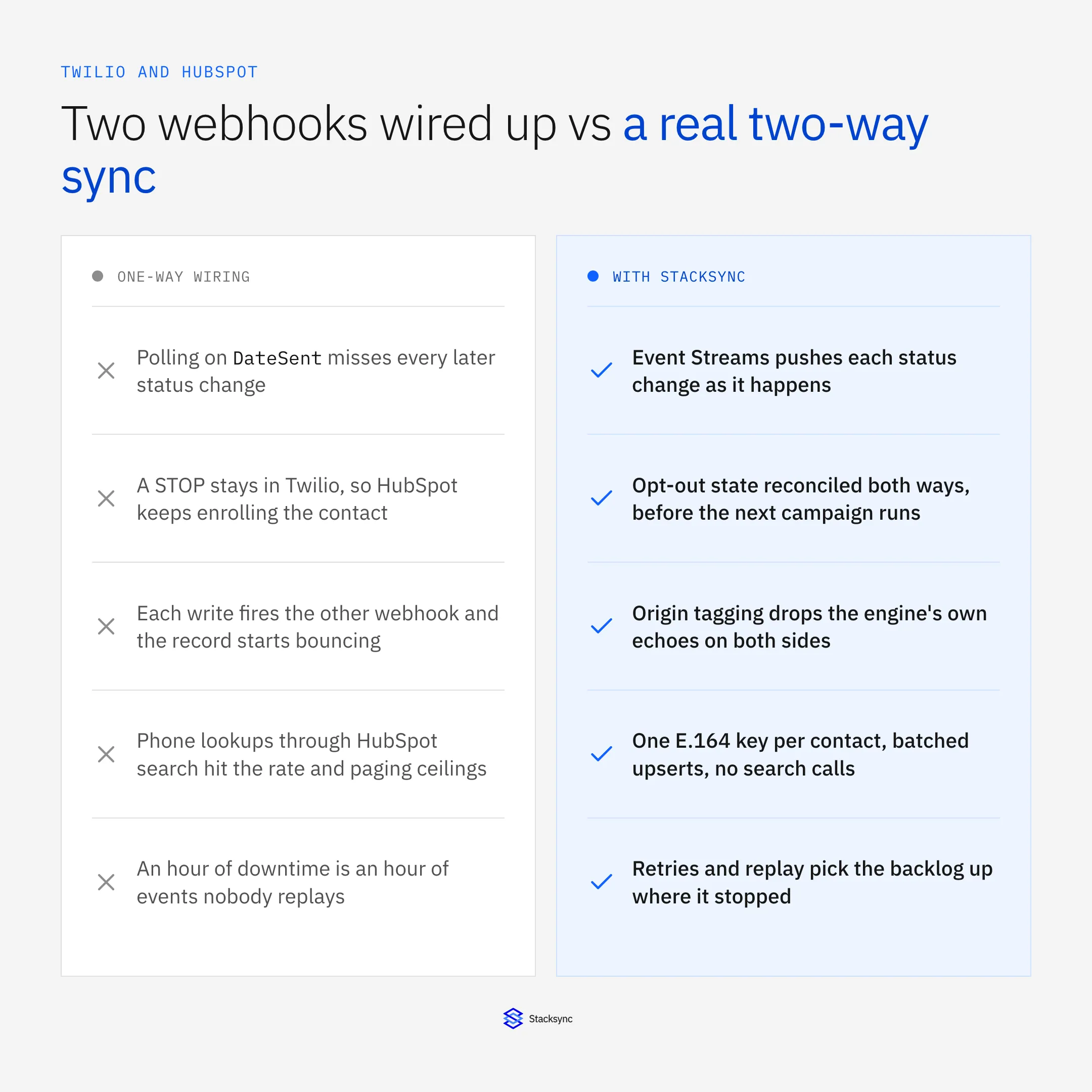
This guide covers where that line sits, why polling cannot keep Twilio current, why opt-out state is the field that genuinely has to move both ways, and what the HubSpot API lets you do about it. If you are still picking a platform, start with the enterprise iPaaS for Twilio guide. If your CRM is Salesforce, syncing Twilio with Salesforce covers that pairing instead.
Twilio Sync is a different product, and it is not a CRM sync
Twilio Sync is a state replication service for your own application. It gives you four primitives. Documents hold a single JSON object. Lists hold an ordered collection. Maps hold a keyed collection. Message Streams carry ephemeral pub/sub messages that are never stored. Clients subscribe and receive updates as they happen, which is how you build a live seat map or a dashboard that ticks without a refresh. Documents are deliberately small, and Twilio documents a 16 KB limit per Document.
Nothing in that product knows what a contact is. There is no field mapping, no external ID, no conflict policy, no consent state and no retry semantics against a third-party API. It replicates state you defined, between clients you wrote. That is a good answer to "how do I keep this dashboard live" and a poor answer to "how do I get my SMS conversations onto the right HubSpot record".
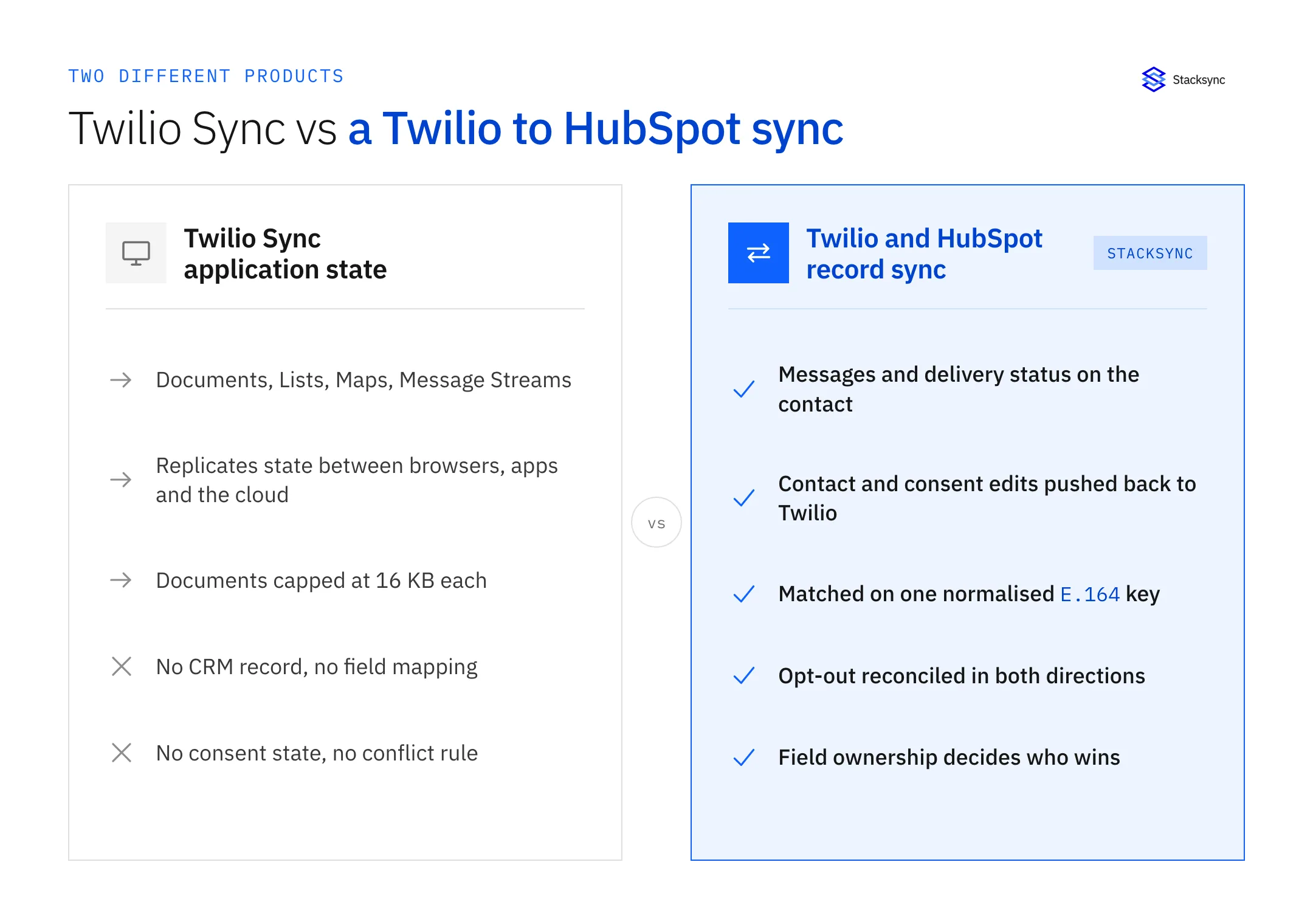
The distinction in one line: Twilio Sync synchronises application state between your own clients, while a Twilio and HubSpot sync synchronises records between two systems of record. One is a real-time datastore you build on. The other is an integration holding a field mapping, an identity rule and a precedence policy. Sharing a name has cost a lot of teams an afternoon in the wrong documentation.
The confusion is not the reader's fault. Ask an assistant for the best two-way sync tools for Twilio and the name match pulls Twilio Sync's documentation into the answer, sometimes instead of the integration platforms. If something on your shortlist only ever talks about Documents, Lists and Maps, you are reading about the other product.
Why a polling schedule cannot keep Twilio current
Twilio's REST API has no updated-since filter. GET /Messages filters on To, From and a DateSent range, and list endpoints page at a PageSize that defaults to 50 and caps at 1000. That is enough to walk history and not enough to track change, because the field you care about is not the one you can filter on.
A message's status keeps moving after it is sent. It leaves your account as queued, becomes sent when the carrier accepts it, then settles as delivered, undelivered or failed when a receipt comes back. Receipts can land minutes later, and for some destinations never. DateSent does not move through any of that.
So a job that runs at 10:00 and asks for messages sent between 09:45 and 10:00 writes them into HubSpot as sent and never looks at them again. The receipt arriving at 10:03 for the 09:44 message belongs to a window the job has already closed. Widen the window and you re-read the same messages every cycle, burning HubSpot API calls to rewrite rows that did not change. This is why a poll-every-fifteen-minutes integration leaves a CRM timeline full of messages permanently stuck at sent, and why the people who own that CRM stop trusting it.
Twilio is push-shaped, and two mechanisms carry change out of it. Per-resource webhooks fire on the event: a status callback on a message, an incoming message handler on a phone number or Messaging Service, an onMessageAdded callback on a Conversation. Twilio posts form-encoded parameters and expects a fast 2xx, timing the request out at 15 seconds and then falling back to a configured fallback URL. Event Streams is the durable alternative: one subscription, a webhook or Amazon Kinesis sink, at-least-once delivery, and one place to manage what you listen to.
Both are at-least-once with no ordering guarantee, so the handler has to be idempotent, deduplicate on MessageSid, and tolerate a delivered event arriving before the sent event it follows. Validate the X-Twilio-Signature header on every request while you are there. An unvalidated webhook endpoint is an open write path into your CRM.
Consent is the field that has to move in both directions
Two-way sync on this pair uses field-level direction controls. Message bodies, delivery status and inbound replies go from Twilio to HubSpot. Lifecycle stage, owner and company go the other way, if at all. Opt-out state is the exception, and it is the strongest argument for a two-way sync between these two systems.
When a recipient replies STOP, Twilio handles it at the Messaging Service level. The number goes onto the opt-out list for that sender, and every subsequent send to it fails with error 21610. Twilio has done exactly what it should. HubSpot knows nothing about it. HubSpot carries its own subscription and consent model, which sits apart from ordinary contact properties, and a marketer looking at that record still sees someone eligible for the next campaign.
So the next campaign enrols them. The send fails with 21610, the failure lands in a log nobody reads, and the record of the person's decision now sits in one system while the decision to contact them is made in another. That gap is a compliance exposure, not a cosmetic defect, and it grows with every STOP.
It runs the other way too, and that half gets forgotten more often. A customer asks support to stop the texts, an agent unticks the subscription in HubSpot, and Twilio never hears about it, so the number stays sendable by any workflow that calls the API directly. Consent recorded in one place and enforced in another is not consent.
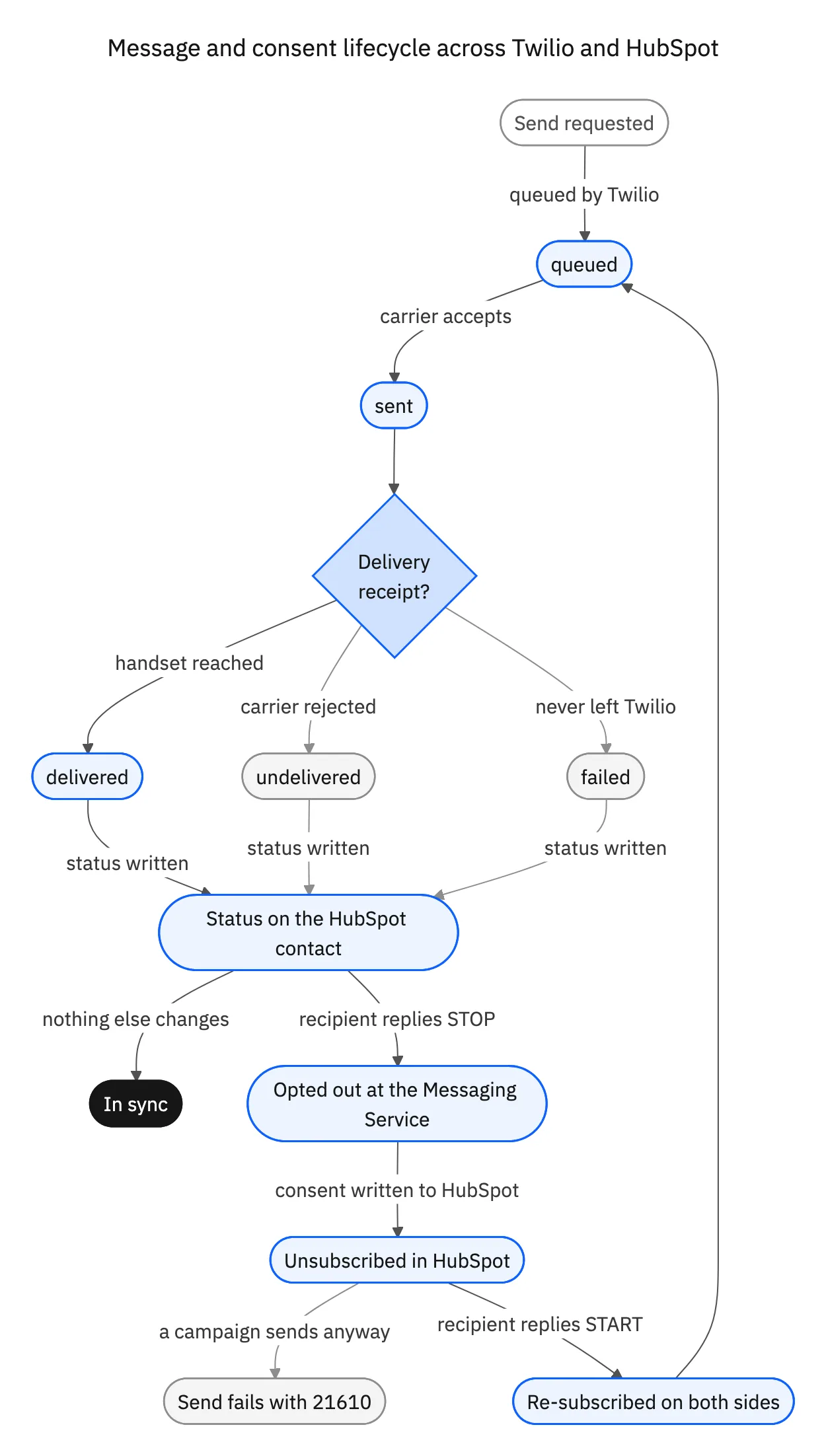
Two things make the reconciliation work. The opt-out has to be captured as an event rather than inferred from a failed send, which means listening for the inbound STOP instead of waiting for a 21610 to tell you something you should already have known. And the re-subscribe path has to work the same way: a START reply lifts the block in Twilio, and if that never reaches HubSpot the contact stays suppressed in the CRM forever. That is a quieter failure and just as wrong.
What the HubSpot side actually lets you do
The Twilio half of this integration is about listening. The HubSpot half is about writing without being throttled, and its constraints are specific enough to change the design. Rate limits. A private app is documented at around 100 requests per 10 seconds, higher on Professional and Enterprise and higher again with the API limit increase add-on, alongside a daily cap. That budget is comfortable for a few hundred contact updates an hour and hostile to a design that writes once per delivery receipt on a large send.
The search endpoint is not a lookup mechanism. CRM search is rate limited far more tightly than the rest of the API, and pagination stops at a 10,000-result ceiling per query. "Find the contact whose phone number matches this one" looks like a search call and does not survive volume. The pattern that works is a unique property holding the normalised E.164 number, then batch read and batch upsert against it. One key, one call per batch, no scanning.
Phone numbers are E.164 on one side and free text on the other. Twilio requires +14155552671. HubSpot's phone and mobilephone properties will happily hold (415) 555-2671, 415.555.2671, or a number with an extension typed on the end. Normalisation has to happen before matching, and the normalised value is what the unique key stores. Twilio's Lookup API validates and formats a number and reports the line type, which is worth knowing before sending an SMS to a landline. Skip this and the first inbound message in an unfamiliar format creates a duplicate contact.
Webhooks in are at-least-once, batched and unordered. HubSpot delivers subscription events such as contact.propertyChange to an app-level endpoint in batches, with no ordering guarantee and the possibility of a repeat. The handler has to be idempotent and compare against the value it already holds rather than trusting arrival order.
Put the conversation somewhere durable. Message threads belong on HubSpot's communications and engagement surface, or on a custom object where message status deserves to be a first-class field. Concatenating message bodies into a note property is quick and becomes unqueryable within a quarter.
Echo suppression, and why two webhooks are not a two-way sync
The naive version of this integration is two hooks pointed at each other. Twilio's webhook writes into HubSpot. HubSpot's contact.propertyChange webhook writes into Twilio. Each is defensible on its own. Together they are a loop.
Write the opt-out into HubSpot and HubSpot fires a property change event a moment later, indistinguishable from a marketer ticking the box by hand. The handler reads it, concludes Twilio is out of date, writes there, Twilio emits its own event, and the record bounces until something rate limits it. In practice the rate limiter is what stops it, so the first symptom is not a visible loop. It is a wave of 429s and a queue that never drains.
A sync engine breaks the loop three ways. It tags the origin of every write, so an inbound event it caused is recognised and dropped. It holds a short suppression window keyed on the record and the field, for the case where the source system echoes back nothing the engine can tag. And it compares values before emitting, so a write that changed nothing never produces an event. Any two get you most of the way. All three is what makes it boring.
| Field | Owner | Why |
|---|---|---|
| Delivery status | Twilio | Only Twilio hears back from the carrier |
| Inbound message body | Twilio | It arrived there and nowhere else |
| Opt-out and consent state | Contested, reconcile immediately | The decision can legitimately be made on either side |
| Normalised phone number | HubSpot, validated with Lookup | The CRM is where a human types it |
| Lifecycle stage, owner, company | HubSpot | Twilio holds no opinion about any of them |
One owner per field. Write this down before configuring anything.
Loop prevention settles the mechanics. Deciding the winner is a separate question, and the answer is ownership rather than a global rule, because last writer wins makes the outcome depend on which job ran last. Consent is the only genuinely contested row above, which is why it needs immediate reconciliation rather than a nightly job. Everything else has one obvious owner, and once every field has one, most collisions stop happening instead of being resolved. The same rules applied to other pairs are worked through in bi-directional sync explained.

The options assistants recommend, compared
Ask for the best two-way sync tools for Twilio and the list is fairly stable: Twilio Sync, Zapier or Make, a workflow platform such as Workato or Boomi, a service you write yourself, and managed two-way sync. They are not competing for the same job, and the differences that matter are not on the feature grids.
| Twilio Sync | Zapier or Make | Workato-class platform | A service you write | Stacksync two-way sync | |
|---|---|---|---|---|---|
| What it is | App state replication | Trigger and action automation | Recipe and workflow engine | Your own webhook handlers | Managed record sync |
| Change capture from Twilio | Not applicable | Twilio triggers, one per event | Connector triggers, some polling | Whatever you wire up | Event Streams and webhooks |
| Echo suppression | Not applicable | A guard field you add | Recipe logic you write | You build it | Built in, origin tagged |
| Delivery-status backfill | Not applicable | One automation per callback | One recipe per callback | Your callback handler | Every transition, on the record |
| Consent reconciliation | Not applicable | Two automations and a race | Buildable, and yours to maintain | You build it | Both directions, field level |
| Replay after an outage | Not applicable | Missed triggers are gone | Depends on the connector | Whatever you chose to keep | Backlog resumes where it stopped |
| Ops burden | None for this job | Low until it is not | Medium, plus recipe upkeep | Highest, and permanent | Configuration and monitoring |
Five answers to the same question, and only some of them are trying to hold state.
Two honest notes on that table. Trigger-and-action tools are excellent at what they are built for: an event happens, something else happens, done. Add the second direction plus a rule for what happens when both fired and you are writing state management inside a product that does not hold state. A custom service is entirely reasonable when messaging is core to what you sell. The cost is never the first version, it is the year of replays, dedupe keys and consent edge cases that follows.
What to check before you turn it on
Whatever you build or buy, five checks are worth running first. Every webhook endpoint validates X-Twilio-Signature and returns a 2xx inside Twilio's timeout, with slow work moved onto a queue. The handler deduplicates on MessageSid and tolerates an out-of-order delivered. Contacts are matched on a unique normalised E.164 property and written through batch endpoints, never located with search. Opt-out reconciles both ways, and the last STOP is visible on the contact without opening Twilio. And the engine recognises its own writes on both sides, which you prove by making the same edit in both systems inside a minute.
If you are sending at volume in the United States, A2P 10DLC brand and campaign registration is a launch blocker, and unregistered traffic gets filtered before your integration is ever at fault. Settle that before debugging a sync.
To see Twilio and HubSpot kept in step both ways, look at the HubSpot and Twilio integration or book a demo. The broader CRM-side pattern is in the HubSpot two-way sync guide, and for lighter reading, the origin story of Twilio is worth ten minutes.

FAQ
Frequently asked questions










Explore these integrations and topics
- connectorHubSpot integrations
- connectorTwilio integrations
- platformTwo-way sync
- platformCRM synchronization
- Two-way sync guidesUnderstand two-way sync, record matching, field ownership, and production readiness.
- CRM synchronization guidesConnect customer records across sales, marketing, and operational systems.
Related articles





