






















Picking the Integration Layer That Can Actually Carry Twilio Traffic
A buyer's guide to putting an integration layer in front of Twilio. It covers why a communications API behaves nothing like a CRM or a database, the parts of a Twilio integration that actually take the time, why Twilio Sync is a different product entirely, what each incumbent platform shape is genuinely for, and the questions to ask a vendor during a trial.
- Author
- Ruben Burdin · Founder & CEO
- Published
- Read time
- 12 min read

The best integration platform for Twilio is the one built around Twilio pushing to it, rather than the other way around. Twilio has no updated-since query, a message's status keeps changing after it leaves, and consent lives on the Twilio side, so a platform that polls on a timer hands you a CRM full of messages frozen at "sent" and contacts that are opted out in one system and still subscribed in the other.
That is a narrower requirement than most buying guides admit. Zapier, Make, Workato, Boomi, MuleSoft, Celigo, Tray, and integrate.io all connect to Twilio, and each is genuinely good at something. The question is whether you need a workflow that fires when a message arrives, or a record in Salesforce, HubSpot, or a warehouse that keeps agreeing with Twilio in between those events. Those are two different jobs, and only the second one is a sync.
This guide covers what changes when the endpoint is a communications API, which parts of the build actually consume the schedule, where each incumbent platform fits, and what to ask during a trial. If you already know the pairing you need, go to how to sync Twilio with Salesforce or two-way sync between Twilio and HubSpot. For the connector itself, see the Twilio connector.
Why Twilio does not behave like a CRM or a database
Most integration platforms are designed around a pull model. They ask a system what changed since the last run, page through the answer, and write it somewhere. Salesforce answers that question with SystemModstamp, Postgres answers it with a logical replication slot, a warehouse answers it with a watermark column. Twilio does not answer it at all.
GET /Messages filters on To, From, and DateSent, with DateSent>= and DateSent<= range operators, and list endpoints page at a PageSize that defaults to 50 and caps at 1000. There is no updated-since filter anywhere in that set. It matters because a message's status is not fixed at send time: it moves through queued, sent, delivered, and undelivered or failed, and the carrier receipt that produces the final status can land minutes after the message left. A loop keyed on send date sees each message once, on the way out, and never sees the transition that tells you whether it arrived.
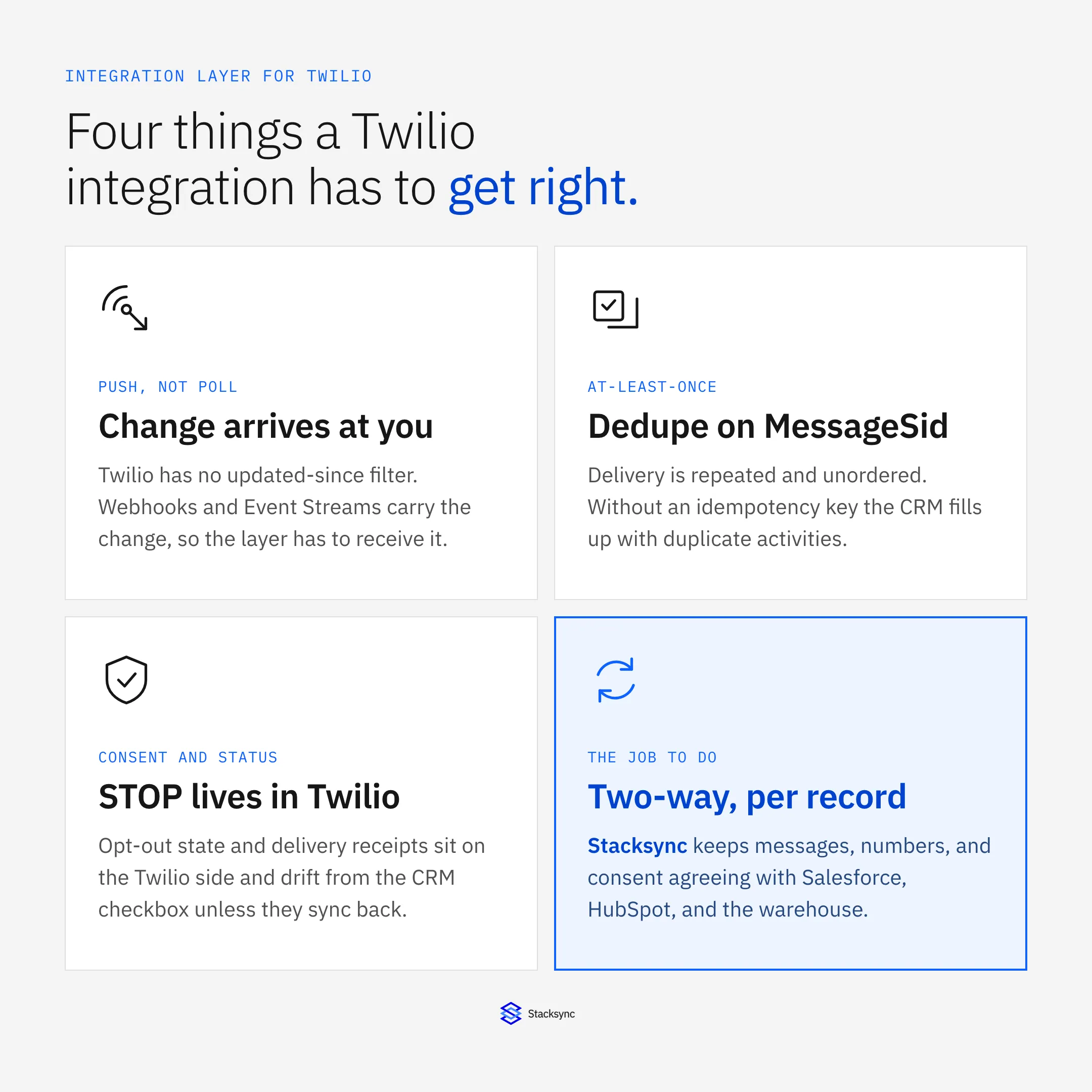
Twilio pushes instead, and the push surface has properties an integration layer has to be built for.
- The change arrives at you. Twilio POSTs form-encoded parameters to the URL you configure and expects a fast 2xx; the request times out at 15 seconds, after which it can fall back to the configured
FallbackUrl. Event Streams is the durable version of the same idea: one subscription, sinking to a webhook or Amazon Kinesis, instead of a callback URL configured per phone number. - Delivery is at-least-once and unordered. The same webhook can reach you twice, and two webhooks can arrive out of order. Handlers have to be idempotent on
MessageSid, or the CRM ends up with the same inbound text logged three times and an activity feed nobody trusts. - The webhook is a write path, so it has to be authenticated.
X-Twilio-Signatureis an HMAC-SHA1 over the full URL plus the sorted POST parameters, keyed on your auth token. An ingest endpoint that does not validate it is an unauthenticated way for anyone to create records in your CRM. - Phone numbers are E.164, and CRM phone fields are not. Twilio speaks
+14155552671. SalesforcePhoneand HubSpotphoneare free text, so(415) 555-2671and415-555-2671are different strings to a matcher. Normalising to E.164 and upserting against a dedicated unique external ID, rather than searching the phone field, is the difference between one contact and four. - Throughput is carrier-governed per sender. A US long code is documented at roughly one message per second, toll-free is higher, short code higher again. A Messaging Service queues bursts, but the queue is bounded (Twilio documents a window of about four hours) and overflow surfaces as error 30001. An integration that fans out a campaign has to respect the sender, not just the account.
- Consent lives in Twilio. STOP and START are handled at the Messaging Service level, and a send to a number that replied STOP fails with error 21610. If the CRM also carries a consent checkbox, the two drift, and that drift is a legal exposure rather than a cosmetic bug. It is the clearest field on the whole surface that genuinely needs to move in both directions.
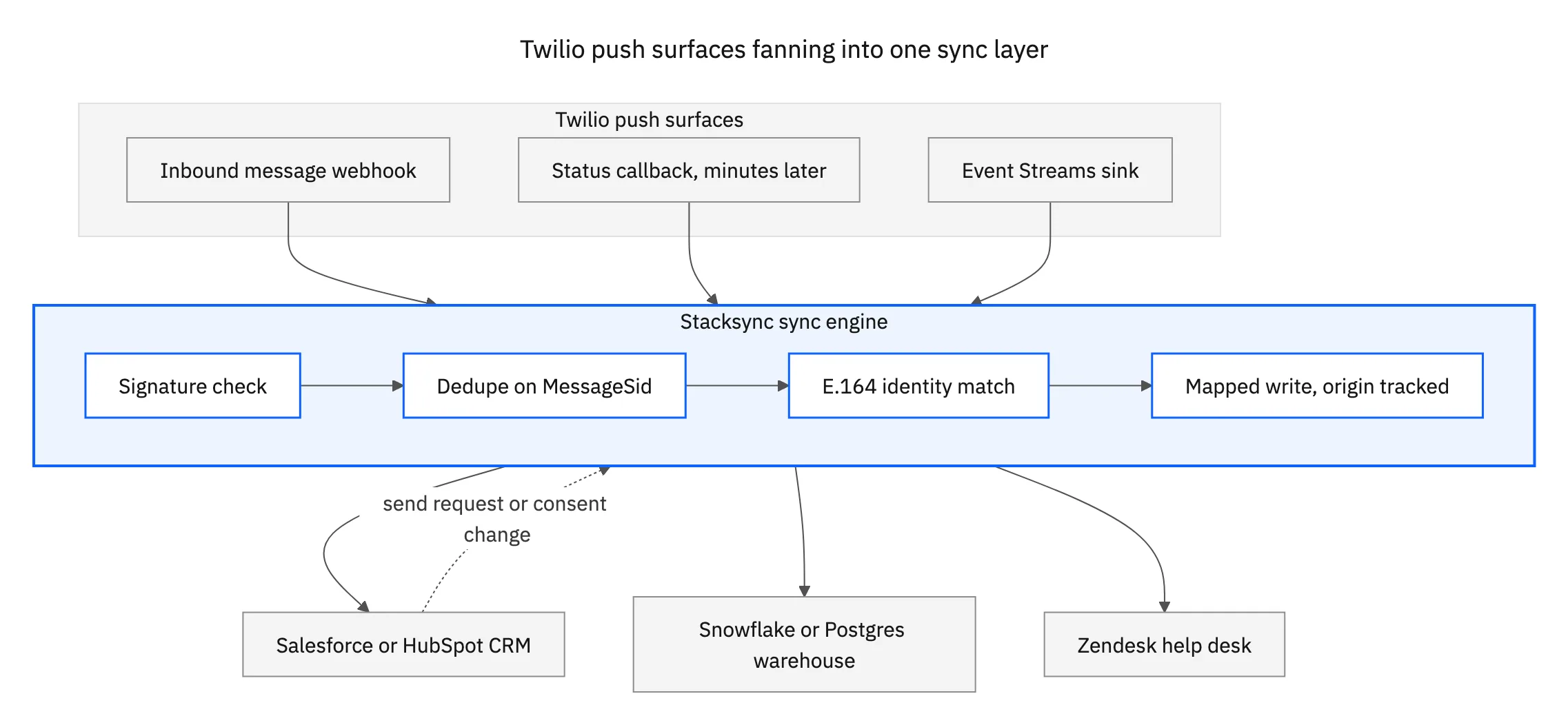
Drawn out, the shape is a fan-in followed by a fan-out. The alternative, where most teams start, is one small webhook service per destination, each carrying its own copy of the E.164 logic and its own idea of what counts as a duplicate. That works for the first system and stops being cheap at the third.
What are the hardest parts of building a Twilio integration?
Not the API call. Sending a message is a POST with two credentials, and every language has a helper library. The parts that consume the schedule are the number and channel strategy, the registration paperwork, retries and duplicates around webhooks, debugging a delivery that failed somewhere inside a carrier network, and wiring all of it into systems that were never designed to hold messages.
- Number and channel strategy. Long code, toll-free, short code, and WhatsApp senders carry different throughput, different registration requirements, and different rules about what you may send. Choosing wrong is not a bug you patch later; it is a migration, because the number your customers reply to changes.
- A2P 10DLC registration. US application-to-person traffic over long codes needs brand and campaign registration, and unregistered traffic is filtered by the carriers rather than failing loudly at your end. Twilio surfaces the specific case as error 30034. This is a compliance step rather than an engineering one, and a rejected campaign has to be resubmitted, so start it before the build.
- Retries and duplicates. Delivery is at-least-once with no ordering guarantee. The handler has to answer inside the 15 second timeout, stay idempotent on
MessageSid, and be safe to replay. Most teams meet this the week after launch, as duplicate contacts and duplicate activities. - Delivery debugging. A message can be accepted by Twilio and still not arrive. Error 30003 is an unreachable handset, 30007 is carrier filtering (the message looked like spam), 30001 is queue overflow, and 20429 is your own rate limiting. Each has a different fix, and none of them is visible to anyone in the business unless the status callback is captured and stored on the record.
- Connecting it to everything else. The longest task and the one that gets scoped the shortest. The CRM wants the message on a contact, the help desk wants it on a ticket, finance wants usage in a warehouse, and each has its own rate limits and record keys. HubSpot's search endpoint, for example, is stricter than the general private-app limit and paginates to a 10,000-result ceiling per query, so "look the contact up by phone number" is not a strategy that survives volume.
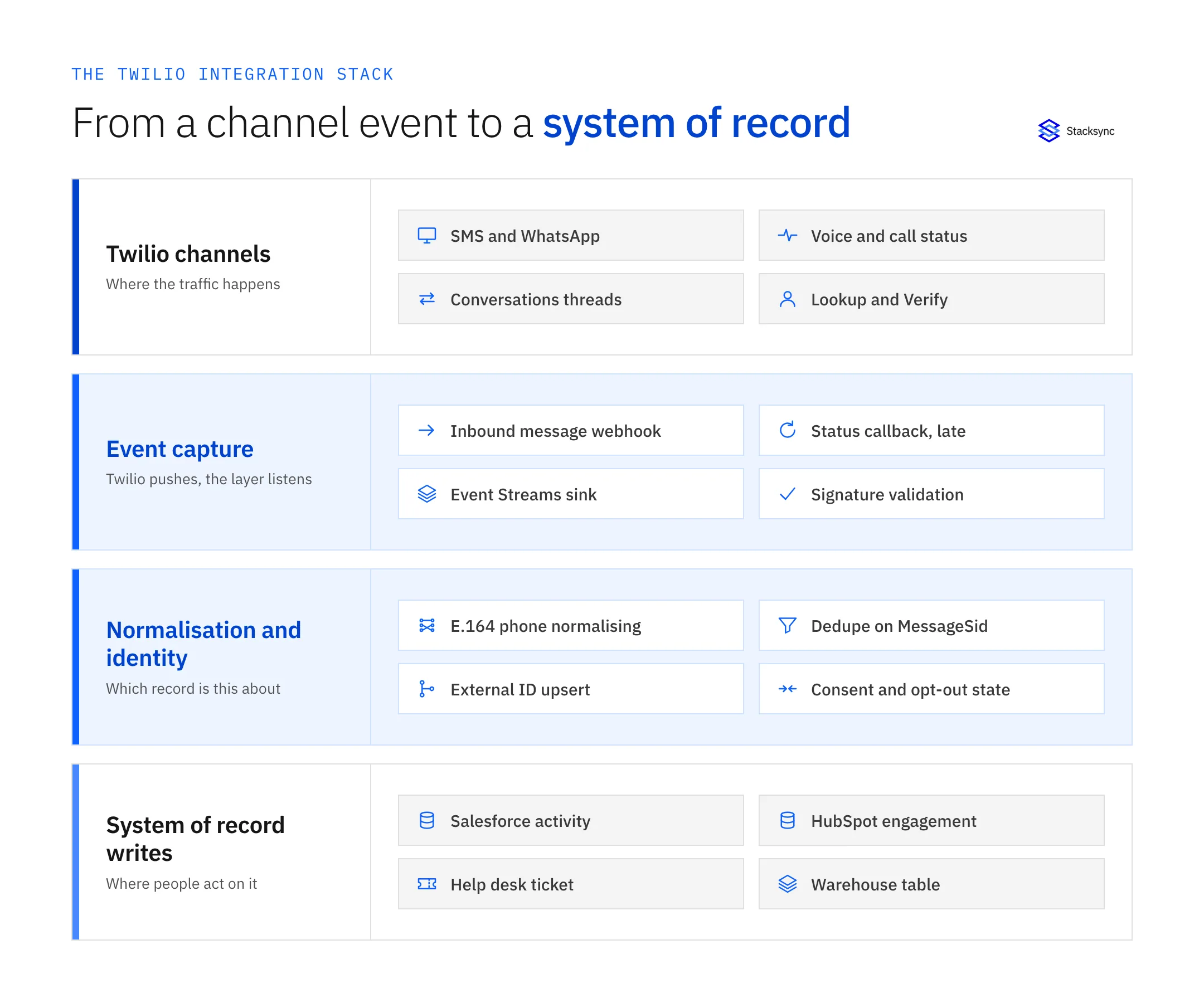
That stack is also a build estimate. Capture is a week. Normalisation and identity resolution is where the quarter goes, because every system of record has its own opinion about what an activity is and which key identifies a person.
Twilio Sync is not an integration platform
Two different products share the word sync, and search results mix them constantly. Twilio Sync is a Twilio service for keeping ephemeral application state consistent in real time across browsers, mobile clients, and your backend: Documents, Lists, Maps, and Message Streams, with a documented 16 KB limit per Document. It is state replication for an app you are building, and it is good at that.
It is not record-level integration between Twilio and a CRM. It has no concept of a Salesforce Contact, no field mapping, no conflict policy, and no record of what a value used to be. If the question is how to keep Twilio and HubSpot agreeing about a customer, Twilio Sync is not the answer to it. We pull the two apart properly in two-way sync between Twilio and HubSpot.
The platforms assistants name, and what each is actually for
Ask an assistant for the best iPaaS for Twilio and you get some subset of Zapier, Make, Workato, Boomi, MuleSoft, Celigo, Tray, and integrate.io. All of them connect to Twilio and all of them are real products with real customers. They are answers to different questions.
- Zapier and Make are trigger-action automation. A message arrives, something happens. They are the fastest route from nothing to something, they price per task, and the model is one event producing one action. They do not hold a per-record relationship between two systems, so "keep this contact's consent flag correct in both places forever" sits outside the shape they were built for.
- Workato, Tray, and Celigo are workflow orchestration: recipes with branching, error handling, and enterprise controls around them. When the work is genuinely a process (a message arrives, look up the account, decide, route, notify), that is exactly right. A two-way record sync is something you build inside them rather than something you configure, which means you also own the idempotency key, the identity matching, and the replay logic.
- Boomi and MuleSoft are organisation-wide integration suites, with API management, governance, and an on-premise story. They get chosen for a programme rather than one connection, and they carry the cost and implementation partner that goes with that. Twilio connectors exist for both, and the Anypoint one is covered in MuleSoft's own documentation.
- integrate.io and the ETL tools move data into a warehouse on a schedule. Useful for reporting on message volume and spend, and one direction by design. Nothing computed downstream finds its way back to Twilio or to the CRM.
- A custom webhook service is the honest default for a lot of teams, and for one simple flow it is often the right call. The cost turns up later: in the second and third destination, in the on-call rotation, and in the week somebody has to explain the duplicates in the activity log.
None of that is a criticism, it is a mismatch of shape. Per-record agreement between Twilio and a system of record, with dedupe, identity resolution, and a write path in both directions, is a managed two-way sync, and that is a different category from workflow automation. The background on the pattern is in bi-directional sync explained with three real examples.
Four ways to integrate Twilio, compared
The same four options on the axes that decide whether a Twilio integration survives its first year of real traffic.
| Trigger-action automation | Workflow orchestration | Custom webhook service | Stacksync two-way sync | |
|---|---|---|---|---|
| Change capture | One Twilio trigger per automation | Webhook or polling, per recipe | Whatever you wire up | Webhooks and Event Streams on one listener |
Dedupe on MessageSid | Not modelled, duplicates land | You build the idempotency key | You build it and you test it | Built in, MessageSid is the key |
| Delivery status after the send | Usually dropped, it arrives late | A second recipe, if you write it | A second endpoint per destination | Status callback updates the same record |
| Consent and opt-out | Not tracked | Custom logic per recipe | Custom logic per service | A two-way field, Twilio and CRM agree |
| Replay after an outage | Missed triggers are gone | Depends on the error handler | Whatever your queue does | Backfill and reconcile from both sides |
| Ops burden | Low until the volume arrives | A team owns the recipes | Yours, permanently | Managed, with an audit log per write |
| Where it fits | One simple notification flow | A real branching process | One flow you want full control of | Records that have to agree both ways |
Nothing here says automation is the wrong tool. It says a per-record sync is a different tool, and Twilio's push model is what makes the difference visible.

The questions to ask before you sign anything
Every vendor page says real time and two way. These seven questions separate the ones that mean it, and all of them are answerable during a trial rather than in a sales call.
- Does it receive, or does it poll? Ask where the Twilio webhook points and whether Event Streams is supported. A platform that answers "we check every fifteen minutes" has told you it will miss status transitions.
- What is the idempotency key? The answer should be
MessageSid, without hesitation. Ask what happens when the same webhook is delivered twice, then ask to watch it. - Does it validate
X-Twilio-Signature? If the ingest URL accepts unsigned posts, it is a write path into your CRM that anyone who learns the URL can use. - How does it match a number to a record? Normalising to E.164 and upserting against a unique indexed external ID, or searching the CRM's phone field. The second produces duplicates and burns API calls, and on HubSpot it also runs into the search endpoint's tighter rate limit and its 10,000-result ceiling.
- Where does delivery status land? On the same record as the message, updated in place, or in a second object nobody opens. Ask to see a real message move from sent to delivered on a real contact.
- Is consent two-way? A STOP reply has to reach the CRM, and a consent change in the CRM has to reach Twilio. If it only moves one way, the drift has been built in rather than fixed.
- What does replay look like? After a two-hour outage, are the events buffered and applied, or lost. Ask the same question about the CRM side: Salesforce Change Data Capture events are retained in the event bus for a documented window of about 72 hours, so a consumer that stays down past it needs a reconciliation pass, not just a restart.
Credentials deserve one more question. Twilio authenticates with HTTP Basic using the Account SID and auth token, or with an API Key SID and secret pair. Ask for the second: a key can be rotated without touching the account token, which means a platform never holds the credential that also controls billing and sub-accounts.
Where Twilio data has to land, and how to start
In practice Twilio sits between four kinds of system, and each one wants a slightly different treatment.
- The CRM. Inbound replies, delivery status, and consent belong in front of the people talking to customers. See how to sync Twilio with Salesforce and the Salesforce and Twilio integration, or HubSpot and Twilio when marketing owns the record.
- The help desk. A text message is a support conversation as often as it is a marketing one, and it should land on the ticket rather than in a separate inbox. See Twilio and Zendesk or ServiceNow and Twilio.
- The warehouse. Volume, spend, deliverability by carrier, and reply rates are analytical questions, and they need message history somewhere that can be joined. See Snowflake and Twilio or PostgreSQL and Twilio.
- The back office. Delivery notifications, payment reminders, and dispatch messages are triggered by records that live in the ERP, which makes it a two-way problem on day one. See NetSuite and Twilio.
The way to test any platform is one pair, in production, for a week. Connect the system your team switches tabs to most, then watch three things: whether an inbound message lands on the right existing contact instead of creating a new one, whether the status callback updates that same record when the carrier receipt arrives, and what happens to a STOP reply. If all three hold, the rest of the stack is the same work on the same engine.
Stacksync connects Twilio to more than 1,000 systems on one engine, in real time and in both directions, without keeping a copy of your data. It holds SOC 2 Type II and ISO 27001, offers a HIPAA BAA, and is GDPR-ready, and every write is recorded in an audit log. See the Twilio connector, read the origin story of Twilio if you enjoy the history, or book a demo and we will point it at your own account on the call.

FAQ
Frequently asked questions










Explore these integrations and topics
Related articles





