When HubSpot Says Opted Out and SendGrid Says Send Anyway
A survey of two-way sync solutions for SendGrid and HubSpot. It explains the failure mode that makes one-way sync unacceptable (two unsubscribe lists that disagree), the five problems any bidirectional sync has to solve explicitly, and an honest comparison of native connectors, Zapier-class automation, scheduled ETL, custom code, and a managed real-time two-way sync platform, plus a checklist a RevOps lead can use in a vendor call.
- Author
- Ignacio Malpartida · GTM Engineer
- Published
- Read time
- 10 min read

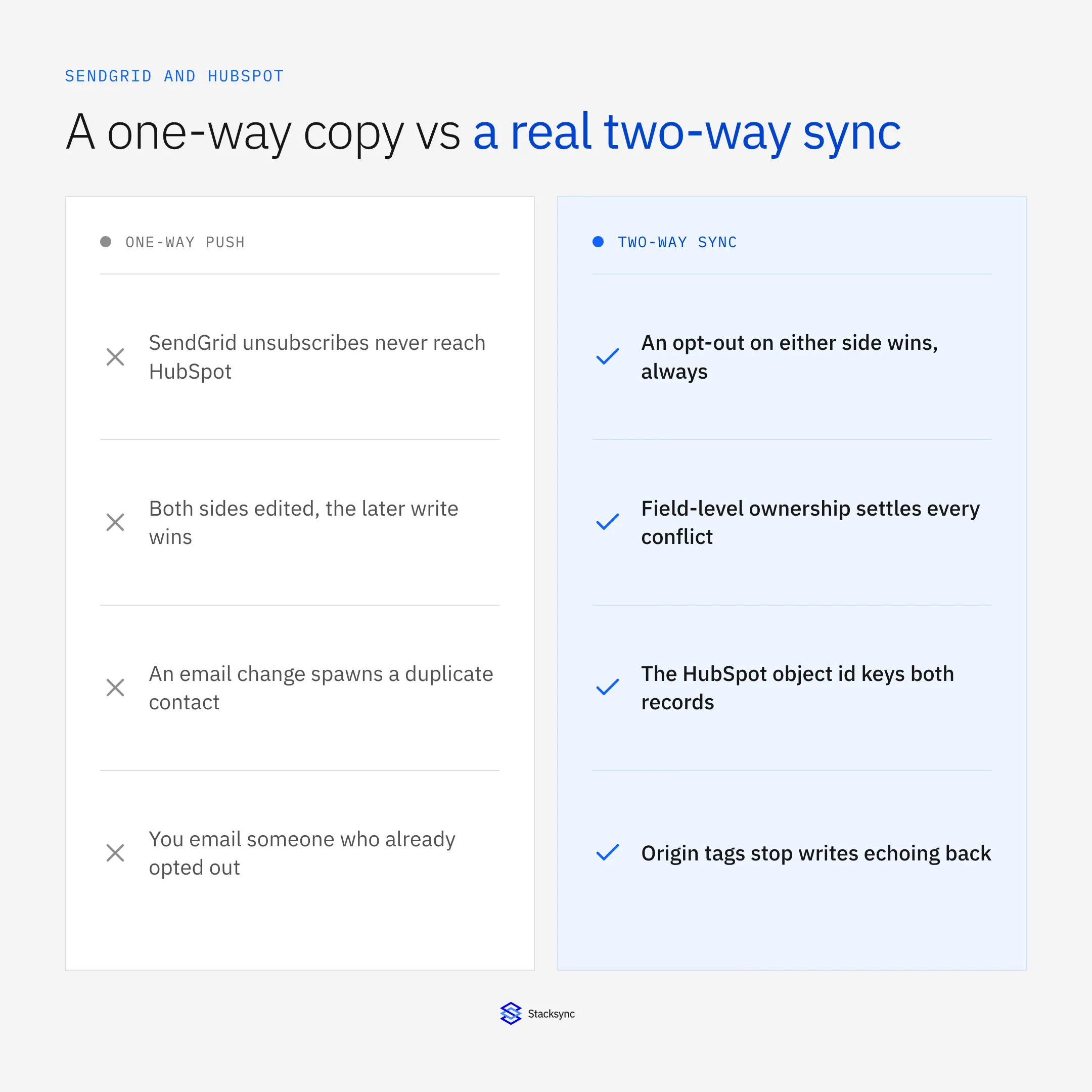
Two-way sync between SendGrid and HubSpot means a change made in either system reaches the other on purpose, with one rule deciding what happens when both changed in the same window. That is a different job from the usual HubSpot to SendGrid contact push, and a harder one, because the two systems disagree about who owns a contact, what identifies one, and what an unsubscribe means.
The reason it matters is not tidiness. HubSpot holds the lifecycle stage, the list membership, and the marketing email consent record your team looks at. SendGrid holds what actually happened to the message and its own suppression lists. Run that one way and the two unsubscribe records drift apart, and eventually you email somebody who told you to stop.
Below: the failure mode that motivates bidirectionality, the five problems any real two-way sync has to solve, and how the solution classes compare. For the platform view first, read the guide to an enterprise-grade iPaaS for SendGrid; for one pairing set up end to end, see how to sync SendGrid with Salesforce.
Why one-way breaks: two unsubscribe lists that disagree
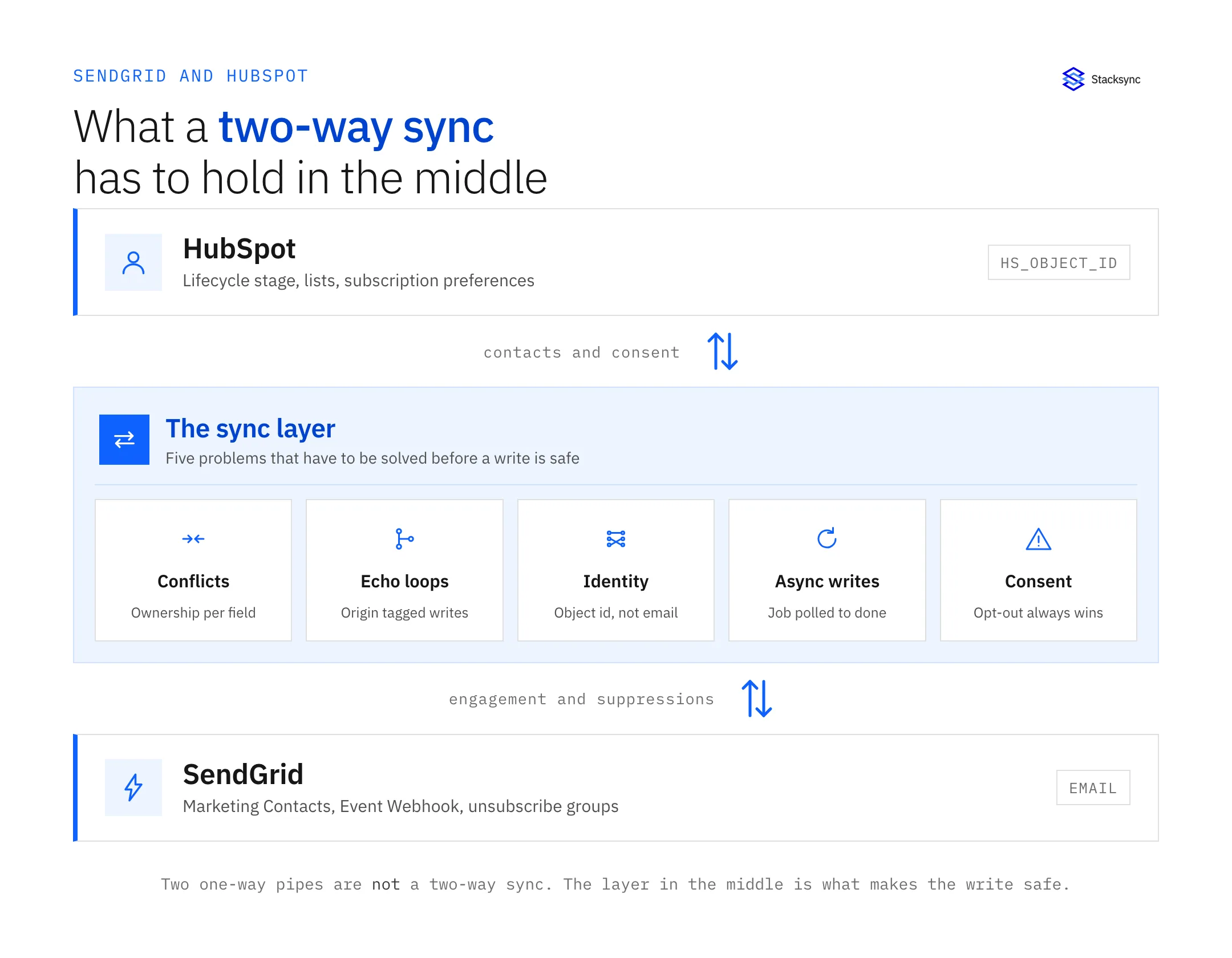
Start with what each system owns, because the split is what creates the bug. HubSpot holds the lifecycle stage, the lists, and the marketing email consent record: subscription types, opt-out state, and on GDPR-enabled portals the legal basis. SendGrid sends the message, receives delivery truth on the Event Webhook, and keeps suppressions on their own surface: global unsubscribes at /v3/asm/suppressions/global, group unsubscribes under /v3/asm/groups, plus bounces, blocks, and spam reports.
Now run a one-way push. HubSpot writes contacts into SendGrid on a schedule and nothing comes back. A recipient clicks the unsubscribe link in a SendGrid-sent email, SendGrid records a group_unsubscribe and stops sending to them, and HubSpot never hears about it. The contact stays marketable, someone adds them to a list, a campaign goes out through another sender, and the person who opted out gets emailed. That is not a data quality issue. It is a CAN-SPAM and GDPR issue with a timestamped paper trail on both sides.
The reverse gap is just as common and quieter. Someone unsubscribes on a HubSpot preference page and HubSpot marks them opted out. SendGrid never receives the suppression, so anything still routed through SendGrid keeps going. Both directions have to be closed, and closing one of them is the state most stacks are in.
There is a technical reason this keeps happening rather than a lazy one. SendGrid has no change-data-capture feed for Marketing Contacts: no endpoint answers "give me every contact modified since T". You either export the whole list through /v3/marketing/contacts/exports, itself an asynchronous job, or you drive changes from the other system. The return path is real work, so most teams ship the outbound half and stop.
What a two-way sync actually has to solve
Bidirectional is easy to say and specific to build. Below are the five problems a two-way SendGrid and HubSpot sync has to answer explicitly. If a tool cannot tell you its answer to each, it is running two one-way jobs behind a shared dashboard.
1. Conflict resolution when the same contact changed on both sides
The window is small and it is real. A rep edits the job title in HubSpot at 10:02. A preference-center update writes a custom field in SendGrid four seconds later. Both changes are legitimate, and something has to decide.
Three policies exist in practice. Last-write-wins compares timestamps and keeps the newer value. It is simple and wrong often enough to hurt, because SendGrid's contact write is an asynchronous job whose completion time has little to do with when the human acted. Source of truth per record picks one system as the winner for the whole contact, so the loser's genuinely better data is discarded on every collision. Field-level ownership gives each field a home: HubSpot owns lifecycle stage and list membership, SendGrid owns engagement-derived fields and its own suppression state, everything else has a declared owner.
Pick field-level ownership. It is the only one of the three that survives a real org chart, because the answer to "who wins" is almost never the same for lifecyclestage as it is for a last-open timestamp.
2. Echo loops, and the three ways to break them
The mechanic is simple. Your sync writes a value to SendGrid, reads it back on the next poll or export, does not recognise it as its own write, and pushes it into HubSpot. HubSpot's CRM change feed fires on that write, the sync picks it up, and sends it to SendGrid again. Round and round, burning both API budgets, until somebody notices a contact whose lastmodifieddate moves every few minutes untouched.
Three mechanisms break it, and a serious sync uses all three. Origin tagging marks every write the sync makes, so an inbound change carrying that marker is ignored. Change fingerprinting hashes the values you wrote, so a later read whose fingerprint matches is dropped instead of treated as an edit. Value comparison reads the target value before writing and skips the write when it already matches, which also cuts request volume. On the SendGrid side fingerprinting does most of the work, because with no change feed the loop risk comes from your own re-reads.
3. Identity: HubSpot keys on an object id, SendGrid keys on email
HubSpot contacts carry a numeric hs_object_id, and email is a secondary, mutable identifier that HubSpot itself uses for deduplication. SendGrid Marketing Contacts are keyed on email, with external_id and anonymous_id available as reserved fields you can populate. Two different primary keys, and the one SendGrid uses is the one that changes.
Naive syncs match on email and break the first time somebody changes theirs. The old address is still a SendGrid contact, the new one gets created as a second, and both sit in the list. Merges are worse: HubSpot merges two contacts into one object id and the loser's address lives on in SendGrid indefinitely, subscribed, with no HubSpot record to unsubscribe it from.
The fix is cheap and belongs on day one. Create a custom field through /v3/marketing/field_definitions, note the field ID it returns because custom fields are referenced by ID rather than name, write the HubSpot object id into it on every contact, and match on that instead of email. Email becomes just another synced attribute, which is what it should have been.
4. Latency, and SendGrid's asynchronous write problem
PUT /v3/marketing/contacts does not create a contact. It accepts up to 30,000 contacts or 6 MB per request and returns a job_id; you then poll /v3/marketing/contacts/imports/{id} until the job reports its status. A 202 means the batch was queued. Read the contact back immediately afterwards and you may get the old values, or nothing at all.
That single fact breaks more integrations than any rate limit. A script that writes and then verifies fails intermittently. A sync that treats the accepted response as confirmation records a success it does not have. Anything reconciling the two systems right after a write reports drift that is not there. The correct pattern is to hold the record as pending until the import job completes, and only then mark it synced.
The other side has a different shape. HubSpot exposes webhooks and a CRM change feed, so HubSpot-originated changes can be picked up in seconds, subject to its own API limits. Add SendGrid's segments, which refresh on SendGrid's schedule rather than yours, and honest "real time" here means seconds outbound from HubSpot, and import-job time plus a poll interval inbound. Any vendor promising instant in both directions has not read the API reference.
5. Consent and suppression, the field that is never last-write-wins
Every other field can take a policy. This one takes a rule: an unsubscribe on either side wins, always, in both directions, regardless of which timestamp is newer. There is no business case for the other outcome, and the cost of getting it wrong is not a stale field, it is a complaint.
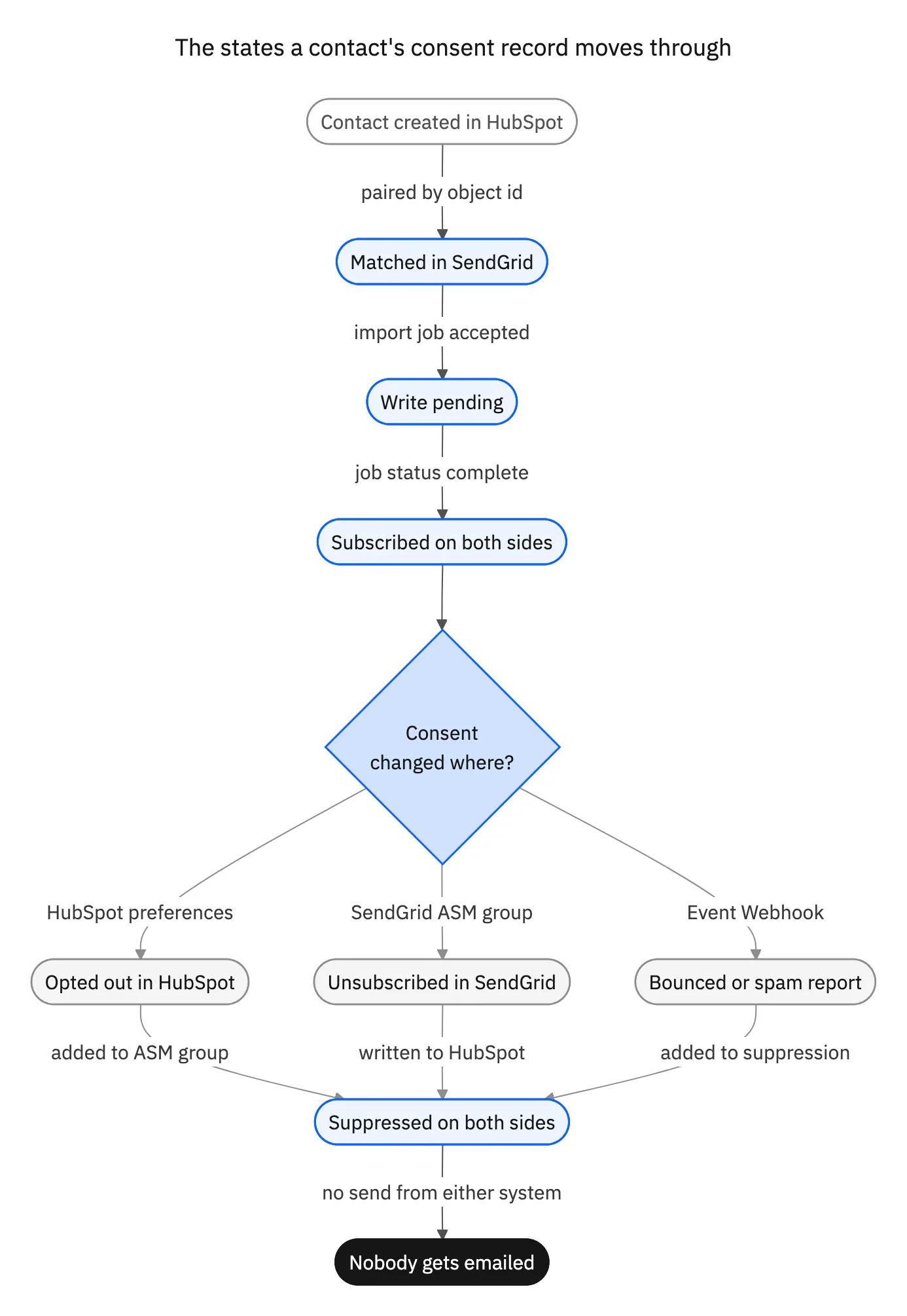
Concretely: a HubSpot opt-out, a subscription type turned off or a consent object withdrawn, writes into the matching SendGrid ASM unsubscribe group, or into the global suppression list when it applies to everything. A SendGrid unsubscribe, group_unsubscribe, or spamreport event on the Event Webhook writes back to HubSpot as an opt-out on the matching subscription type. Hard bounces and blocks travel the same path, because an address that cannot receive mail should not sit marketable in the CRM.
Two details people get wrong here. Event Webhook deliveries are at-least-once, batched, out of order, and retried, so dedupe on sg_event_id and order on timestamp before acting, or a retried batch will flip a contact back and forth. And turn on the Signed Event Webhook and verify X-Twilio-Email-Event-Webhook-Signature; an unauthenticated endpoint that writes opt-outs into your CRM is an obvious thing to abuse.
The solution classes, compared honestly
There are five ways to do this and four of them are the right answer for somebody. The question is which one matches your volume, the latency you need, and how much of the five problems above you want to own.
| Approach | Conflicts and loops | Latency | When this is fine |
|---|---|---|---|
| Native or marketplace connector | One-way contact push, no conflict policy | Minutes to hours | You only need HubSpot lists mirrored into SendGrid |
| Zapier-class automation | None. Each Zap is one trigger to one action | Seconds per event, no backfill | A handful of events a day, with someone watching for a Zap that turns itself off |
| ETL or reverse ETL on a schedule | Overwrites the target, no merge | Whatever the schedule is | The destination is a warehouse and nothing has to write back |
| Custom code against both APIs | Only what you build, and you must build all five | As good as your polling loop | Low volume, two or three fields, engineers who want to own polling and replay |
| Managed real-time two-way sync (Stacksync) | Field-level ownership, origin tracking, retries | Seconds from HubSpot, import-job time inbound | Both directions have to be correct, consent included, without owning the plumbing |
Five ways to connect SendGrid and HubSpot. Four of them are one-way tools being asked to do a two-way job.
Two of those deserve a fair word rather than a dismissal. A scheduled ETL or reverse-ETL job is the right tool when the destination is analytical rather than operational: pulling SendGrid engagement into a warehouse is a one-way problem and should stay one, which is the shape behind SendGrid and Snowflake or PostgreSQL and SendGrid. Custom code is defensible at low volume with a couple of fields in play. It stops being defensible the week you add a second CRM object, a second SendGrid subaccount, or the author changes teams.
What none of the first four give you is a single conflict policy shared by both directions. Two independent jobs, however well written, each believe they are authoritative. That is the specific thing a managed two-way sync sells, and it is why the comparison is not about which tool is faster. It is about which tool has an opinion on who wins.

How to evaluate a two-way sync for SendGrid and HubSpot
These are the questions that separate a real bidirectional sync from two one-way jobs sharing a logo. All seven are answerable inside a demo call, which is the point of asking them there.
- Ask for the conflict policy in writing. Per record or per field? If the whole answer is "last write wins", you know what happens to your lifecycle stage.
- Ask how it stops echo loops. Origin tagging, fingerprinting, or a pre-write value comparison. "It handles that" is not a mechanism.
- Ask what it matches on. If the answer is email, ask what happens on an email change and on a HubSpot merge.
- Ask how it handles the SendGrid import job. Does it poll
/v3/marketing/contacts/imports/{id}to completion, or call a 202 a success? - Ask whether an unsubscribe on either side propagates. Both directions, including group unsubscribes, hard bounces, and spam reports.
- Ask what happens on a 429. The Marketing Contacts endpoints are far tighter than Mail Send and return
X-RateLimit-Reset; a sync that does not back off will lose writes. - Ask for the replay story. When your webhook endpoint is down for an hour, does the missing window get reconciled, or is it gone?
One more, less technical and more important than it sounds: ask who changes the field mapping six months from now. If the answer is a ticket to engineering, the mapping stops matching reality within a quarter, and a sync nobody trusts gets bypassed with a CSV.
Get the two lists to agree
Two-way sync between SendGrid and HubSpot is worth doing for one reason above the others: it makes the consent record singular. Everything else, the lifecycle stage, the engagement fields, the list membership, is convenience and time saved. The unsubscribe is the one that turns into a complaint, a suppression, and eventually a deliverability problem you cannot buy your way out of.
Stacksync runs that sync in real time and in both directions, with field-level ownership rather than a single winner, origin tracking so writes do not echo, and retries built around SendGrid's job-based contact API. See the SendGrid connector and the HubSpot and SendGrid integration, read how two-way sync works underneath, or book a demo and bring the conflict question with you. If Salesforce is the CRM instead, the same five problems apply at Salesforce and SendGrid.

FAQ
Frequently asked questions










Explore these integrations and topics
- connectorHubSpot integrations
- connectorSendGrid integrations
- platformTwo-way sync
- platformCRM synchronization
- Two-way sync guidesUnderstand two-way sync, record matching, field ownership, and production readiness.
- CRM synchronization guidesConnect customer records across sales, marketing, and operational systems.
Related articles