






















Phone Numbers Are Not Record IDs: Wiring Twilio Into Salesforce
A build guide for syncing Twilio and Salesforce in both directions. It covers the identity mapping that decides whether the integration works at all, normalising to E.164 and upserting on a dedicated External ID instead of querying by phone, the inbound path over validated and deduplicated webhooks, the outbound path over Change Data Capture and its retention window, why a message status keeps changing after the send so a poll on DateSent misses it, how to keep the Salesforce API allocation intact, and what the failure codes an operations team sees actually mean.
- Author
- Ignacio Malpartida · GTM Engineer
- Published
- Read time
- 13 min read

Syncing Twilio with Salesforce in both directions is two flows, not one. Twilio to Salesforce: an inbound message or a delivery receipt arrives at your endpoint as a webhook and gets written onto a Salesforce record. Salesforce to Twilio: a record change, usually a rep sending a reply or an automation qualifying a lead, publishes a change event that becomes an outbound message through the Twilio API.
Neither direction is hard on its own. The pair is hard because the two systems identify the same person differently. Twilio knows a customer as an E.164 phone number. Salesforce knows them as a record ID, and its Phone field is free text that somebody typed. Nothing in either product reconciles the two for you, and every duplicate Contact, unmatched reply and permanently stuck message status traces back to that gap.
This guide starts with that identity mapping, then walks each direction, then covers the two things that quietly break an integration that already works: the message status lifecycle and the Salesforce API allocation. If you are still choosing a platform rather than building on one, start with the wider guide to an enterprise iPaaS for Twilio.
Phone numbers are not record IDs
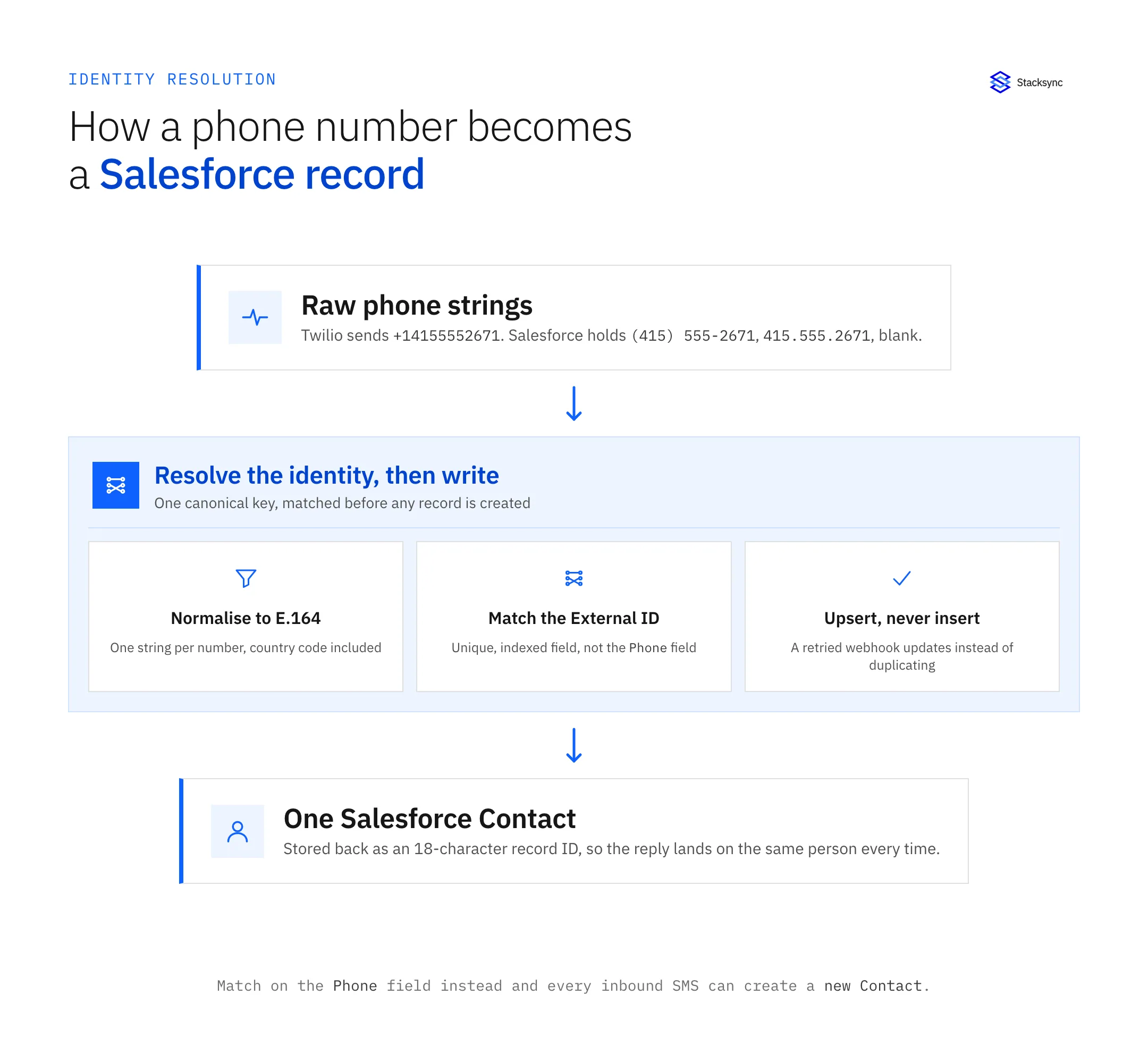
Twilio speaks E.164 and nothing else. Every webhook it sends carries From and To in that format: +14155552671, country code included, no spaces, no punctuation. Salesforce carries Phone and MobilePhone as free text, so the same customer can be (415) 555-2671 on one record, 415.555.2671 on another, and blank on a third.
The pattern that fails is the obvious one. An inbound SMS arrives, you query for a Contact WHERE Phone = :from, get nothing back because the formats do not match, and create a Contact. Do that on a busy number and you generate a duplicate for every conversation, while the reply a rep sends from the new record carries none of the history. Even when the format matches, a phone number is not a unique key: two people share a household line, a company switchboard sits on fifty Contacts, and the query hands back a list you have to guess your way through.
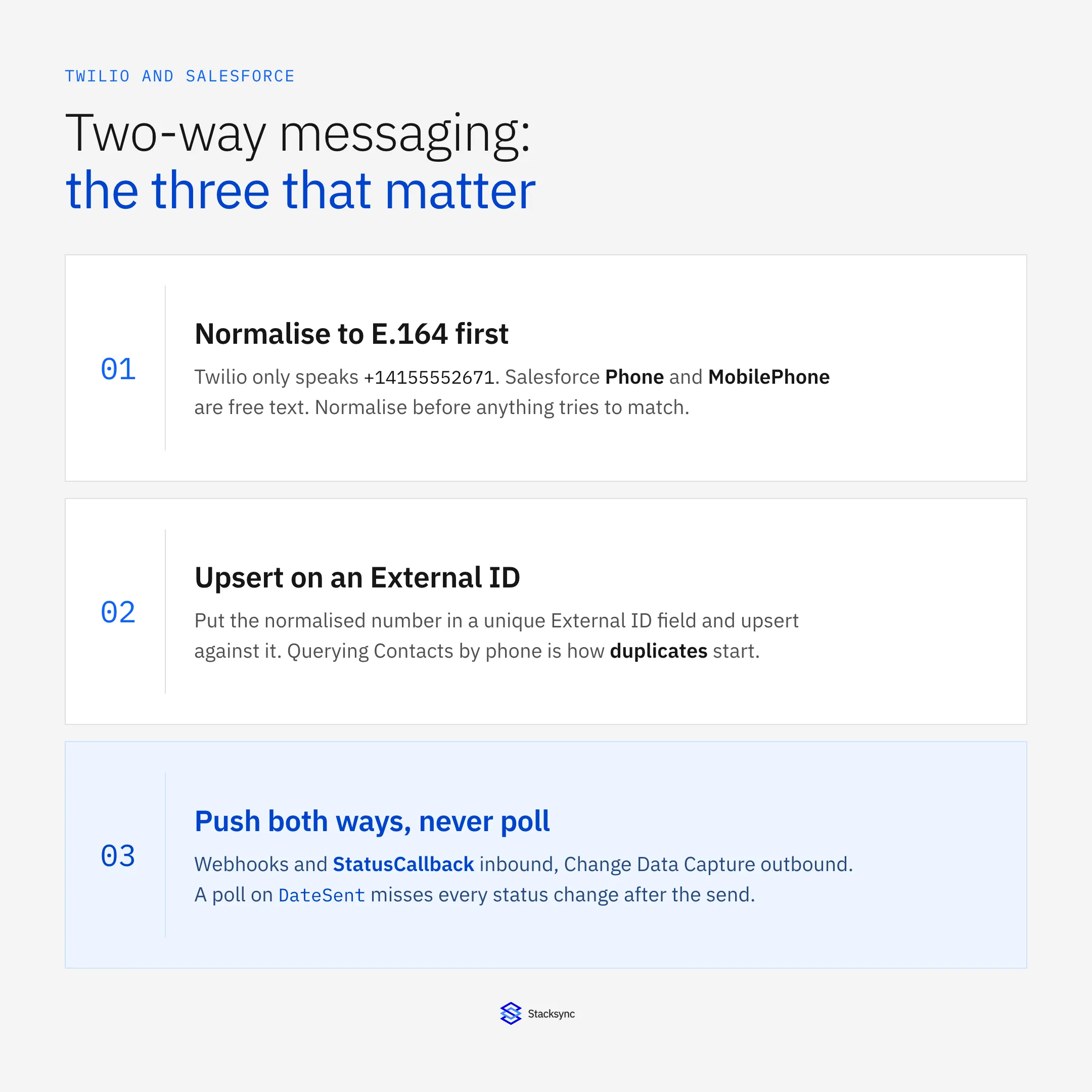
The pattern that works has three parts. Normalise every number to E.164 once, at the edge, before anything tries to match. Store the normalised value in a dedicated custom field on the Salesforce object, marked External ID and Unique, rather than relying on Phone. Then upsert against that External ID instead of querying and branching. An upsert is idempotent: if Twilio retries the webhook, or your handler dies after Salesforce committed but before it read the response, the retry updates the record that already exists rather than creating a second one. Twilio's Lookup API is the right tool for the one-off backfill, because it validates a number and returns its line type, which is how you find the free-text values that were never phone numbers at all.
Salesforce record IDs have a trap of their own. They come in a 15-character case-sensitive form and an 18-character case-insensitive form, where the 18-character version is the 15-character one plus a three-character checksum. Compare the two forms as strings and the match silently fails. Store 15-character IDs somewhere that compares case-insensitively and two genuinely different records can collide on what your unique index believes is one key. Keep the 18-character form everywhere and never compare across the two.
One honest caveat: a person with two numbers does not fit one External ID field. If a mobile and a desk line both route inbound messages to the same person, the right model is a child object holding one row per number with a lookup to the Contact, and the External ID lives on that child. The Twilio connector and Salesforce connector pages list what each side expects.
Twilio to Salesforce: webhooks, and what to do with them
Twilio is push-shaped. Two webhooks carry almost everything a CRM cares about: the incoming-message webhook configured on the phone number or the Messaging Service, which fires when somebody texts you, and the StatusCallback you set per message, which fires as an outbound message moves through its states.
Three rules for the handler, all of them learned expensively by somebody.
- Answer fast. Twilio POSTs form-encoded parameters and waits for a 2xx; the request times out at 15 seconds, after which it can fall back to the
FallbackUrlyou configured. Calling Salesforce synchronously inside the handler puts the Salesforce API's latency inside Twilio's timeout. Acknowledge, queue, then write. - Validate the signature. Twilio signs each request with an
X-Twilio-Signatureheader, an HMAC-SHA1 over the full request URL plus the sorted POST parameters, keyed on your auth token. An endpoint that skips the check is an unauthenticated write path into your CRM for anyone who learns the URL. - Deduplicate on
MessageSid. Webhook delivery is at-least-once and unordered. You will receive the same callback twice, and you will receivedeliveredbeforesent. Key every write on theMessageSidand rank the statuses, so a late-arrivingsentcannot overwrite adeliveredthat already landed.
At volume, Twilio's Event Streams is the durable version of the same idea: one subscription instead of a webhook per resource, delivering to an HTTP sink or Amazon Kinesis, also at-least-once. It earns its setup cost when more than one consumer needs the events.
Then the question every project argues about: where does a message go in Salesforce? A Task on the Contact puts it in the activity timeline reps already read, with no new tab and no new permission set. But a Task's Status field describes the task, not the message, so delivery state goes into a custom field anyway, and reporting on delivery rate turns into reporting on activities.
A custom object, say SMS_Message__c with MessageSid as its External ID, a status picklist, an error-code field and a lookup to the Contact, makes message status a first-class field you can report on, filter and automate against.
Which I would pick: the custom object as the record of messages, plus one Task per conversation rather than per message. The timeline is a display concern and delivery state is a data concern, and the moment you merge them, every delivery receipt becomes an activity write. That distinction also decides your API bill.
| Twilio event | What it carries | The Salesforce write it should trigger | How often it fires |
|---|---|---|---|
| Inbound message webhook | MessageSid, From, To, Body, NumMedia | Upsert the Contact on the E.164 External ID, then insert one linked message record | Once per inbound message |
StatusCallback: queued, sending, sent | MessageSid, MessageStatus | Update the existing message record only. No Contact write, and no new activity | Two or three times per outbound message |
StatusCallback: delivered | MessageSid, MessageStatus | Set the terminal status and stamp a delivered timestamp on the message record | Once per delivered message |
StatusCallback: undelivered, failed | MessageSid, MessageStatus, ErrorCode | Set the terminal status and put the numeric error code on a field a human reads | Once, when it happens |
| Send rejected with 21610 | ErrorCode, To | Set the opt-out field on the Contact and stop sending. This is a consent change, not a retry | Once per opted-out number |
| Salesforce change event | replayId, the changed fields | None. This one runs the other way: create the message in Twilio with a StatusCallback set | Once per qualifying record change |
Each Twilio event and the write it should produce in Salesforce. Most of them touch the message record, not the Contact.
Salesforce to Twilio: change events, or a poll you will regret
Going the other way, the choice is between events and polling, and it is not close.
Salesforce Change Data Capture publishes record changes as Platform Events on the Streaming API. Subscribe to the channel for the object you care about and each event carries a replayId your consumer stores, so it resumes from where it stopped after a disconnect. The catch is retention: change events sit in the event bus for a bounded window, documented at about 72 hours. A consumer down past that window cannot replay the gap, so an integration built on CDC needs a reconciliation pass it can run on demand rather than only at go-live: re-read the affected records over a SystemModstamp window and re-apply. Teams that skip building it find out they needed it on a Monday morning.
If you poll instead, filter on SystemModstamp rather than LastModifiedDate, because some automations do not touch LastModifiedDate. Polling also spends API requests on every cycle whether anything changed or not, which matters for reasons the next section but one makes concrete.
The send side has a limit that surprises people. Twilio throughput is per sender and carrier-governed: a US long code is documented at roughly one message per second, toll-free higher, short code higher again. A Messaging Service queues bursts across its sender pool, but that queue is bounded, and Twilio documents a window of about four hours; past it, messages drop with error 30001. So a Salesforce campaign that flips forty thousand records at once is not a retry problem. It is a sender-pool sizing problem, to be solved before the flow is switched on.
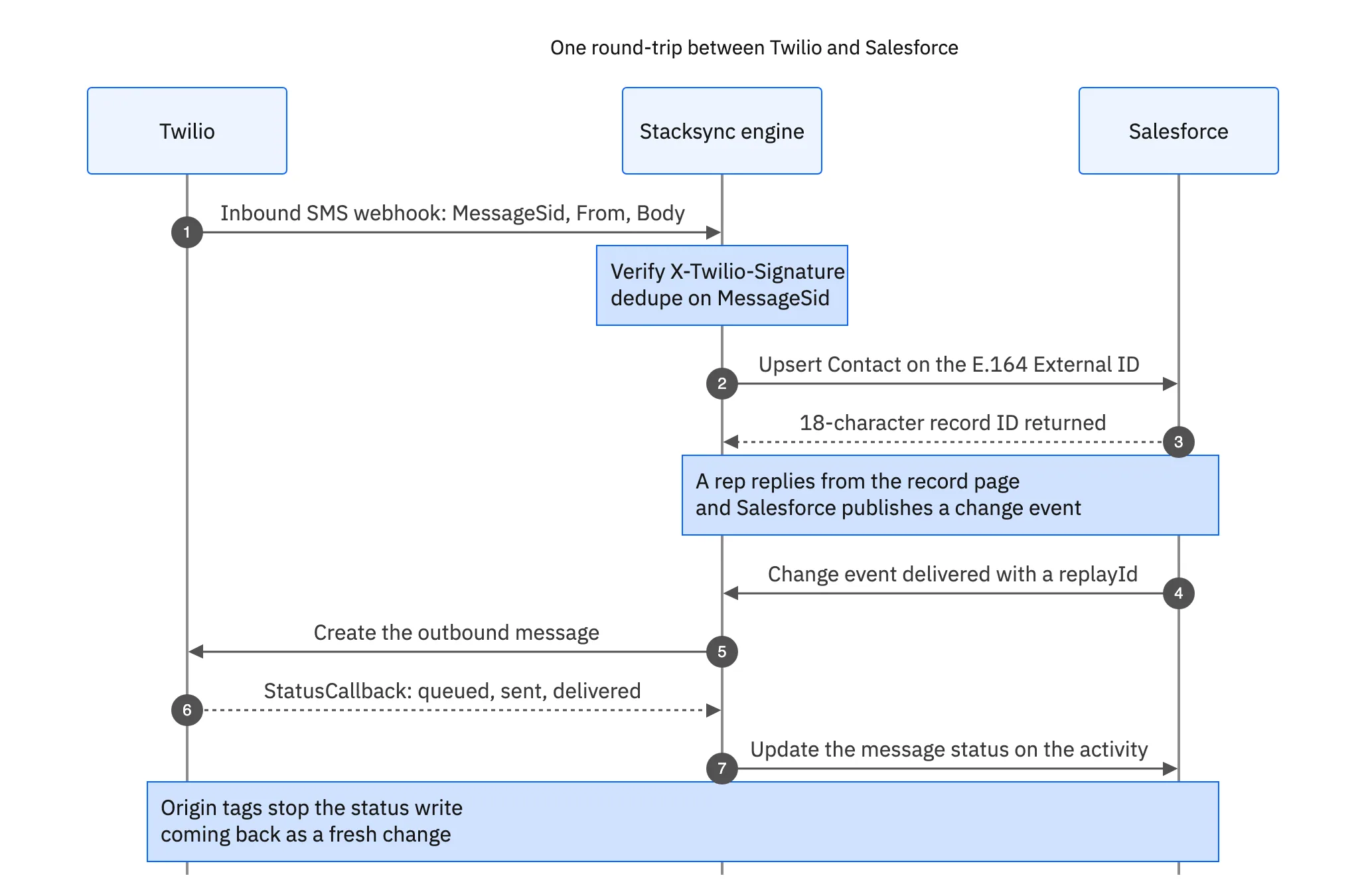
That round trip is what separates a sync from two scripts pointed at each other. Every write carries its origin, so the status update written back into Salesforce is not read a second later as a fresh change and pushed out as another SMS. Without origin tracking these integrations loop, and unlike a database loop this one costs money per iteration. The guide to bidirectional sync with real examples walks through the same mechanics on other systems.
Why the Salesforce record still says "sent"
A message is not finished when the Twilio API returns a 201. It moves through queued, sending and sent, then either delivered or undelivered, or it fails outright with failed. The delivery receipt comes from the carrier and lands later, sometimes seconds later, sometimes minutes.
Here is the part that breaks generic integration platforms. Twilio's GET /Messages endpoint filters on To, From and DateSent, with DateSent>= and DateSent<= for a range. There is no updated-since filter. A message's status changes without DateSent changing, so a polling loop keyed on send date reads the message once, at send time, when it says queued or sent, and never sees the delivered that arrives ninety seconds afterwards.
That is the real reason a CRM fills up with messages sitting permanently at "sent" under a poll-every-fifteen-minutes integration. It is not a poll interval that needs tuning, and shortening it does not help. Anyone building a delivery-rate report on that field is reporting on send attempts.
The fix is to set StatusCallback on every outbound message and treat those callbacks as the source of truth, with the rank check from earlier so an out-of-order callback cannot regress a record. Failed and undelivered messages also carry an ErrorCode, and that number is the field an operations person actually needs, because it decides whether the message can be retried at all.
The Salesforce API budget is the real constraint
Salesforce request allocations are counted per org over a rolling 24 hours, and they scale with edition and licence count rather than with how busy your integration is. Every callout draws from the same pool as every other integration in the org, and once it is exhausted the API stops answering.
Do the arithmetic before you build. One outbound message typically produces the send plus three or four status callbacks. If each callback becomes its own Salesforce update, one message costs four or five requests. Ten thousand messages a day is forty to fifty thousand requests before anything else in the org touches the API. That is how a messaging project ends up being the thing that broke the nightly ERP sync.
- Collapse the writes. One activity per conversation whose latest-status field gets updated, instead of one Salesforce record per event. Very few orgs need every intermediate state persisted in the CRM.
- Batch what is left. The Composite API and Bulk API 2.0 carry many records per request. A sync layer that buffers status callbacks for a few seconds and writes them together turns fifty requests into one.
- Filter at the edge. Keep
queuedandsendingin the sync layer and write only terminal states,delivered,undeliveredandfailed, into Salesforce. Nobody opens a record to learn that a message was queued.
Then alarm on API consumption as a percentage of the allocation rather than on error counts, because the failure mode here is a hard stop and not a gradual slowdown. And remember that your writes fire whatever Apex triggers and flows the org has on that object, so a write-heavy integration into an org with automation on Task is slower and more expensive than the request count alone suggests.

The failure codes you will actually see
Twilio returns a numeric error code on failure, and the useful thing about them is that most are not retry conditions. Treating everything as "retry with backoff" is how an integration spends its send budget on messages that were never going to deliver.
- 21610: the recipient replied STOP. Twilio holds the opt-out at the Messaging Service level and refuses the send. This is a consent update, not an error. Write it back onto the Salesforce record so the two sides do not drift, and stop attempting sends. Consent living in Twilio while a checkbox lives in the CRM is a legal exposure, not a cosmetic mismatch.
- 30003: unreachable handset. The device is off, out of coverage, or the number is no longer in service. An immediate retry does nothing; a retry hours later sometimes works.
- 30007: the carrier filtered the message, usually as suspected spam. This is content and sender reputation, not code. Resending the same body from the same sender reproduces it.
- 30034: US application-to-person traffic went over a long code without A2P 10DLC brand and campaign registration. It is a compliance step, it takes calendar time, and no retry logic fixes it. Find out about it long before launch week.
- 20429: too many requests. You are being rate limited on the API itself. Back off exponentially; tightening the loop makes it worse.
- 30001: queue overflow. The Messaging Service queue for that sender filled because the producer pushes faster than the sender pool drains inside the queue window. The fix is more senders or a slower producer.
The design consequence is worth stating plainly: 21610 belongs on the Contact as a consent field, 30034 belongs on a project plan, 30001 belongs on a capacity dashboard, and only 20429 belongs in a retry policy. An integration that routes all six into one "sync error" queue teaches its operators to ignore that queue.
Getting it running
The order matters more than the tooling. Normalise phone numbers and settle the External ID before you map a single message field. Take Twilio inbound over validated, deduplicated webhooks rather than a poll. Take Salesforce outbound over Change Data Capture, with a reconciliation path for the retention window. Treat StatusCallback as the source of truth, and count your Salesforce API calls before the allocation counts them for you.
To see it running against a real org, book a demo, look at the Salesforce and Twilio integration, or read the companion guides on an enterprise iPaaS for Twilio and two-way sync between Twilio and HubSpot. And if you want the story behind treating a phone number as an API call in the first place, there is the origin story of Twilio.

FAQ
Frequently asked questions










Related articles






