HubSpot NetSuite Integration: A Two-Way Sync Guide
Compare HubSpot's native NetSuite connector, Celigo, Workato and two-way sync, then set up field ownership, internal-ID matching and closed-won handoff.
- Author
- Ruben Burdin · Founder & CEO
- Published
- Updated
- Read time
- 13 min read

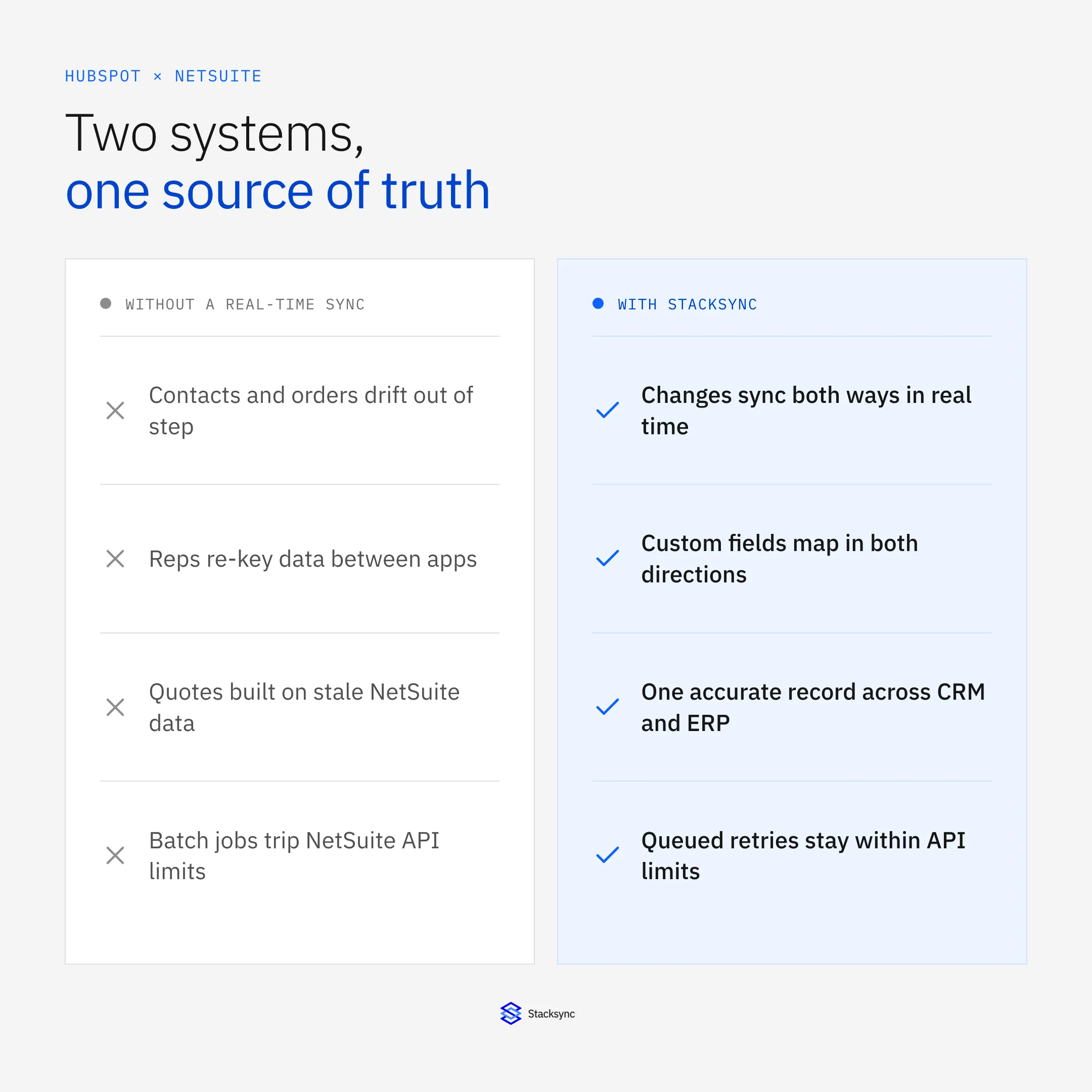
You can integrate HubSpot with NetSuite four ways: HubSpot's native NetSuite integration, an iPaaS such as Celigo or Workato, a custom API build, or a two-way sync platform such as Stacksync. If sales and finance both edit customers, contacts and deal outcomes, two-way sync keeps one matched record in each system, with write direction set per field and the NetSuite internal ID as the match key.
This guide compares the four routes, then walks through the Stacksync setup: which objects sync, how closed-won deals become NetSuite customers or projects, how conflicting edits and failed writes get handled, and what the integration costs. For the object-by-object mapping reference, see the HubSpot and NetSuite integration page.
| Question | Answer with Stacksync |
|---|---|
| Which NetSuite records can be written? | Customer, Contact, Vendor and Project (job) have documented read and write support. Sales Order, Invoice and Customer Payment are supported objects; confirm the direction for your account. |
| Which HubSpot records sync? | Companies, contacts, deals, line items, products, quotes, invoices, custom objects (on eligible HubSpot plans) and associations. |
| Who owns each field? | You set write direction per field, so HubSpot can own contact details while NetSuite owns the legal billing identity. |
| How are records matched? | On a stable ID, such as the NetSuite internal ID stored in a HubSpot property. Existing duplicates are not merged for you. |
| How do won deals reach NetSuite? | A Stacksync workflow, not the sync mapping, filters closed-won deals, and the sync creates the NetSuite customer or project. |
| What happens when a write fails? | The issues dashboard logs it, and you retry or revert. Email alerts come on every plan; Slack, PagerDuty and webhooks on Enterprise. |
| What does it cost? | Usage-based: active syncs plus records in sync. Starter starts at $1,000 a month billed annually for one active sync. See pricing. |
HubSpot NetSuite two-way sync at a glance
HubSpot native connector vs Celigo vs Workato vs Stacksync
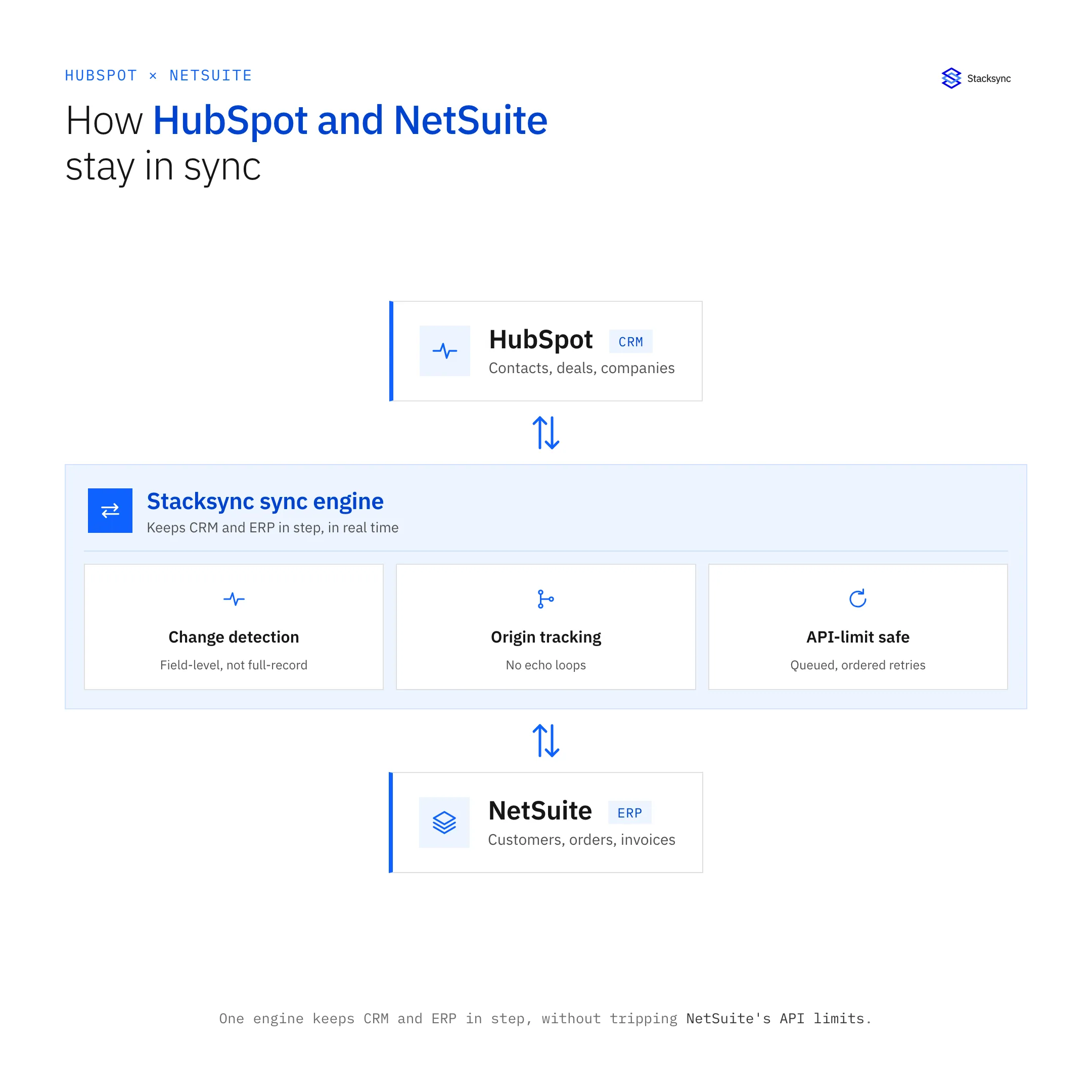
The native integration covers standard mappings and sales-order creation. Celigo and Workato orchestrate flows and recipes across many apps. Stacksync keeps records in both systems matched and current through one two-way configuration.
| HubSpot native integration | Celigo | Workato | Stacksync | |
|---|---|---|---|---|
| How data moves | Native object mappings, one-way or two-way | Flows on a schedule (5 to 55 minutes, or cron); webhook listeners for supported apps and events | Recipes with polling triggers (5-minute default on Professional and above, 10 minutes on lower tiers) | Continuous two-way sync; measure latency for your objects in a pilot |
| Two-way setup | Choose one-way or two-way per object mapping | A separate flow per direction | Both directions, loop prevention and reconciliation built into recipe logic | One configuration covers both directions, with write direction set per field |
| Won deal to NetSuite | A deal-based workflow action creates NetSuite sales orders | Prebuilt integration app templates, strong on NetSuite | A recipe you build and maintain | A Stacksync workflow filters closed-won deals; the sync creates the NetSuite customer or project |
| Custom fields | Custom field mappings require a Data Hub subscription | Mapped inside each flow | Mapped inside each recipe | No billing cap on objects or fields |
| Pricing | Depends on your HubSpot subscription; custom field mappings need Data Hub | Quote-only editions, priced by endpoints and flows | Quote-only: platform fee plus task or usage fees | Published: active syncs plus records in sync |
HubSpot and NetSuite integration options, from public documentation (checked September 2026)
Sources: HubSpot's NetSuite integration guide, and our Celigo alternative and Workato alternative comparisons. Vendors change plans and features, so confirm the current terms with each one.
HubSpot's native NetSuite integration
Start here if your needs fit its standard object mappings and you want sales orders created from deals. Object mappings, subsidiary handling and workflow prerequisites decide what you can build. One buyer who left an earlier version of the native integration reported customers that never reached NetSuite and invoice numbers missing in HubSpot, and said the integration has improved since, so test its current behavior. If customers are missing or deals land with the wrong revenue recognition or liability codes, audit the object mappings and subsidiary settings first. Replace the connector when you need per-field ownership, vendor or project records, or custom fields without adding Data Hub.
Celigo and Workato
Both fit teams that automate processes across many apps. A HubSpot to NetSuite sync on either one means building and maintaining a flow or recipe for each direction, plus the logic that stops an update from echoing back. Buyers we spoke with described a Workato bill that rose after a task upgrade. For a side-by-side, read Stacksync vs Celigo for CRM and ERP integration.
Custom API build
Your developers get full control, and they also own token-based authentication, NetSuite concurrency and governance limits, retries, loop prevention and schema changes on both sides for as long as the integration runs.
How to set up HubSpot NetSuite two-way sync
Plan the setup around three decisions: which records sync, which system owns each field, and how a record in one system finds its twin in the other.
- 01Connect NetSuiteA NetSuite administrator enables REST web services and token-based authentication, creates an integration record and an access token, and enters the account ID and credentials in the Stacksync connection form. Give the integration role access to the objects you plan to write.
- 02Connect HubSpotA HubSpot Super Admin authorizes Stacksync through OAuth. Tick the sensitive-fields option only if you need those properties.
- 03Pick the object pairsTypical pairs: HubSpot Company to NetSuite Customer, Contact to Contact, and a Deal to a NetSuite Customer or Project once it closes. Add HubSpot association tables if you need contact-to-company links to follow.
- 04Set write direction per fieldDecide field ownership one field at a time. A common split: HubSpot owns contact details and lifecycle fields; NetSuite owns the legal name, subsidiary, terms and credit fields. Make finance-owned fields read-only in HubSpot.
- 05Choose the match keyStore the NetSuite internal ID in a HubSpot property and match on it. Email or a company ID works for the first pass. Stacksync does not merge duplicates that already exist, so clean those up before you turn the sync on.
- 06Fill NetSuite's required fieldsNetSuite rejects a new customer without required values such as payment terms. Set a default, or pull the value from a reference field, and map mismatched picklist values (departments, terms, regions) to NetSuite's list values.
- 07Backfill, test, then go liveStacksync backfills existing records when the sync starts. When you add a field later, you choose whether to backfill it for existing records. Test with non-production records first, including an edit made in both systems at once, then switch the sync on for production.
Field ownership and conflict resolution
If a rep edits a phone number in HubSpot while finance edits the same customer in NetSuite, the sync needs a rule for which value wins. Set that rule in three steps.
- Prevent the conflict with field ownership. If NetSuite owns the billing address and HubSpot owns the lifecycle stage, each of those fields has one writer and cannot conflict.
- Resolve the rest with a policy. Stacksync lets you configure conflict handling per object and per field. Most-recent-change-wins is the usual choice for shared fields; system precedence suits fields where one team has the final word.
- Test the policy. Edit the same test record in both systems within a few seconds and check which value survives in each. Do this before go-live rather than trusting a default.
Map picklist values
Expect HubSpot dropdowns and NetSuite lists to hold different values. A department can carry one name in HubSpot and another in NetSuite, and a lifecycle stage has no NetSuite equivalent at all. Build a value map for each picklist you sync, and decide what should happen to a value that has no match: skip the field, fall back to a default, or raise an issue for someone to fix.
Send exceptions to the person who owns them
A write that NetSuite rejects lands in the Stacksync issues dashboard. To get it in front of the record owner, Enterprise plans send alerts to Slack. On other plans, scope a workflow that posts new issues to Slack during the proof of concept.
Closed-won deals to NetSuite customers and projects
Most teams want the same handoff: when a deal closes in HubSpot, finance should find a ready NetSuite customer, or a project for services work, without re-typing anything. One engineering consultancy we spoke with re-created dozens of won deals a month in NetSuite by hand, about a dozen fields each. Deal and job numbers did not match, and NetSuite demanded payment terms that sales did not know yet.
- 01Filter in a Stacksync workflowUse a Stacksync workflow, not the sync mapping, to decide which deals qualify. Closed-won is the common filter; add pipeline or deal type if only some deals need a NetSuite record. Some teams route qualifying deals through a Postgres table first, which also leaves an audit log of what went to NetSuite.
- 02Create the NetSuite customer or projectThe sync writes the qualifying company as a NetSuite Customer and, for project-based work, a Project (job). Both have documented read and write support.
- 03Write the NetSuite ID backMap the new internal ID and the project or customer number to HubSpot properties so the deal and the NetSuite record carry the same reference from day one.
- 04Bring invoice numbers backMap the NetSuite invoice number to a deal or company property so reps can answer billing questions without a NetSuite login. Invoice is a supported NetSuite object; confirm the read direction for your account during the proof of concept.
If your process creates sales orders rather than customers, compare this with the native integration's deal-based sales-order action, and read how to automate HubSpot to NetSuite quote-to-cash for quotes, orders and approvals.
NetSuite vendors as HubSpot contacts
Buyers told us their previous connector mapped NetSuite customers only. NetSuite Vendor has documented read and write support in Stacksync, so you can sync vendor records to HubSpot contacts, or to a custom object if you want to keep them apart from buyers. A services company we spoke with needed tens of thousands of NetSuite vendor records available as HubSpot contacts.
Payment status for sales, reconciliation for finance
Finance keeps applying and reconciling payments, ACH included, in NetSuite. Sales only needs to see the result. Stacksync lists NetSuite Invoice and Customer Payment as supported objects, and HubSpot Invoices and Commerce Payments on the HubSpot side. Confirm the read direction for your account, then map payment status to a read-only HubSpot property so reps see it without touching the ledger.
Monitoring, retries and NetSuite API limits
One buyer we spoke with found that two of three mappings in their existing NetSuite to HubSpot tool had stopped after a software change, and an earlier unnoticed break had already cost them data. Set up monitoring before go-live.
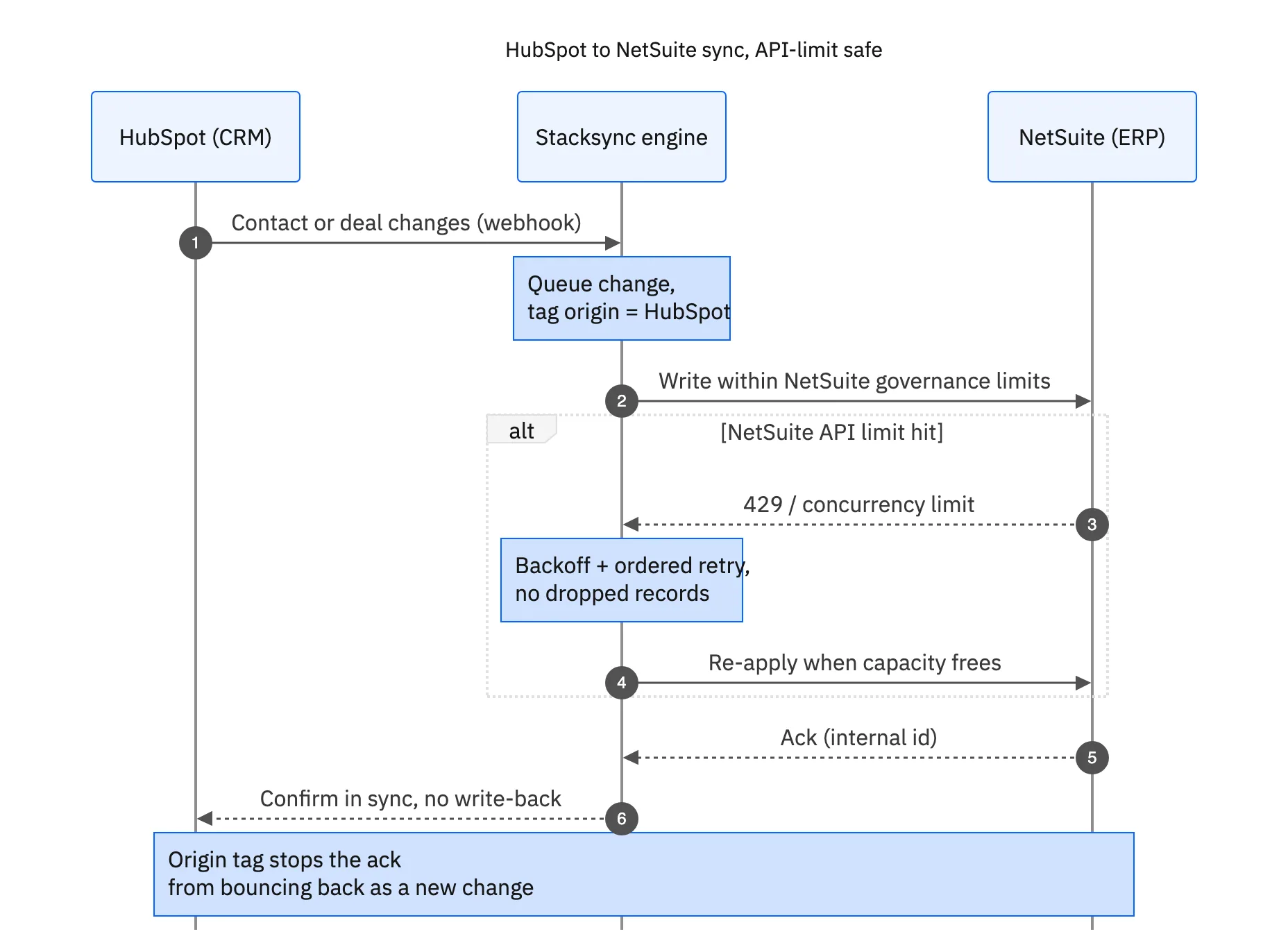
- Issues dashboard. A rejected write lands in the Stacksync issues dashboard with the record and the error. You fix the cause, then retry or revert. A retry reads the current source values again; it does not replay an old payload.
- API limits. Smart API rate limits come on every plan. If NetSuite concurrency or governance limits push back, the sync slows and resumes instead of hammering the API.
- Alerts. Email notifications come on every plan. Enterprise adds Slack, WhatsApp, PagerDuty, webhooks, Sentry, Datadog and New Relic.
- Freshness. Stacksync does not publish a staleness alert such as "nothing synced in 24 hours". If you need one, scope it during the proof of concept.
Security and compliance
Stacksync's compliance program covers SOC 2 Type II, ISO 27001, GDPR and CCPA. Read the security overview for encryption, access controls and data residency, and see the pricing page for which plan includes each framework.
What a HubSpot NetSuite integration costs, and how to switch
Stacksync prices on two things: active syncs and records in sync. The pricing FAQ defines a sync as a combination of two apps, so HubSpot plus NetSuite is one sync, whether it runs in one direction or both. A sync counts as active when it is turned on, and it carries no billing cap on objects or fields. Updates to a record already in sync are unlimited.
| Plan | Price | Active syncs | Records in sync included |
|---|---|---|---|
| Starter | $1,000/mo billed annually, $1,400 month-to-month | 1 | 50K |
| Pro | $3,000/mo billed annually, $3,700 month-to-month | 3 | 1M |
| Managed Pro | $4,200/mo billed annually, $4,900 month-to-month | 3 | 1M |
| Enterprise | Custom | Unlimited | Custom |
Published plan allowances (see /pricing for current prices and the full comparison)
A sandbox sync counts as an active sync while it is on, so budget for it if you test against a NetSuite sandbox on a plan with a single sync. Records above the allowance are billed per thousand at rates that fall as volume grows; the pricing page shows the rates and how a record in sync is counted. Onboarding starts with a guided proof of concept led by Stacksync's integration engineers.
Retire a brittle connector without a sync gap
- 01Inventory the old flowsList the objects, directions and fields the current connector, flow or recipe touches, including any that have stopped running.
- 02Rebuild on a sandboxConfigure the same objects in Stacksync against NetSuite and HubSpot test accounts, with field ownership decided up front.
- 03Match, don't duplicateMatch existing records on the NetSuite internal ID so the first run links records instead of creating copies.
- 04Cut over one object at a timeTurn off the old flow for an object, turn on the Stacksync sync for it, and check the issues dashboard before moving to the next.
Still under contract with Celigo or Workato? Stacksync offers a contract buyout for teams switching from an iPaaS; ask for the terms on a demo call.
Building HubSpot and NetSuite integrations into your own product
Software companies that offer HubSpot and NetSuite integrations to their own customers weigh an embedded iPaaS against building on each API. A third option is to run the sync on Stacksync and manage it from your code: the Management API and configuration as code come on the Pro plan and above, and a white-label platform is available on Enterprise. For the architecture, see embedded two-way sync, which runs one sync per customer into a database your product owns.

Other ERPs with HubSpot
Field ownership, match keys and the closed-won handoff carry over to any ERP you connect to HubSpot. NetSuite has documented read and write support by object in Stacksync; for Acumatica, Odoo, QuickBooks, Sage 300 and Cin7, which the catalog lists, review compatibility for the objects and directions you plan to sync before you commit to a design.
- HubSpot and Acumatica, with worked examples in Acumatica, Salesforce and HubSpot integration and HubSpot and Acumatica for construction services
- HubSpot and Odoo
- HubSpot and QuickBooks
- HubSpot and Sage 300
- HubSpot and Cin7
Bring the object list for any of these to a demo and the team will confirm what the connector can read and write before you plan the rollout.
Apply this in consumer packaged goods: HubSpot company and contact
In CPG, sales manages distributor relationships in HubSpot while finance owns the legal payer and accepted terms in NetSuite. Extend the mapping into onboarding only after the buyer, billing account and delivery locations are resolved.
| Record to reconcile | Responsible owner | Rule to preserve |
|---|---|---|
| HubSpot company | Revenue operations | Map the company to a stable NetSuite customer reference with documented parent and branch relationships. |
| Contact | Sales operations | Keep buyer role and company association separate from the legal bill-to identity. |
| NetSuite customer | Finance | Own legal name, subsidiary assignment, terms, and account approval. |
An exception to plan for: Two CRM companies map to one payer. Keep the relationship explicit and reconcile reporting; do not create duplicate ERP customers. Acceptance check for the pilot: each distributor company has an approved legal-customer mapping.
The consumer packaged goods hub connects the broader operating context. These guides develop the specific record mappings and decisions for this application:
Next steps and related guides
Bring your object list, the fields each team owns and a rough record count to a demo. A Stacksync integration engineer will map them against the NetSuite and HubSpot connector documentation and scope a proof of concept.
- HubSpot and NetSuite integration: objects, direction and setup
- Automate HubSpot to NetSuite quote-to-cash
- Real-time vs batch HubSpot NetSuite sync
- Sync NetSuite custom fields to HubSpot
- HubSpot vs NetSuite CRM
- HubSpot two-way sync: the complete guide
- The complete guide to Salesforce and NetSuite integration

FAQ
Frequently asked questions










Explore these integrations and topics
- integrationHubSpot and NetSuite integration
- connectorHubSpot integrations
- connectorNetSuite integrations
- platformTwo-way sync
- platformCRM synchronization
- platformCRM and ERP integration
- Two-way sync guidesUnderstand two-way sync, record matching, field ownership, and production readiness.
- CRM synchronization guidesConnect customer records across sales, marketing, and operational systems.
Related articles