How to Switch EDI Providers Without Disrupting Trading Partners
Run the new EDI provider in parallel, pilot one or two partners, move the rest as old contracts end, and retire the old network once every partner is live.
- Author
- Ruben Burdin · Founder & CEO
- Published
- Read time
- 16 min read

You switch EDI providers without dropping orders by running the new platform in parallel with the old one, rebuilding each trading partner connection there, and retiring the old provider only after every partner has sent and received live documents on the new connection. Move partners in waves: pilot one or two, send every new partner to the new platform from a set date, and migrate the rest as each old contract comes up for renewal.
This guide is written for the operations, finance and EDI leads who asked us the same questions on sales and customer calls: will we drop orders, can someone buy out our current contract, what happens when a retailer's vendor guide names SPS Commerce, and do small dropship accounts even need EDI. It covers the method step by step and says where you need an answer from your retailers or your new vendor instead of a blog post. If your goal is to modernize the EDI layer without changing providers or replacing your ERP, read how to modernize legacy EDI without replacing your ERP instead.
At a glance
| Question | Short answer |
|---|---|
| Will we drop orders during the switch? | Not if the old provider keeps carrying each partner's traffic until that partner passes live testing on the new connection. |
| What order should partners move in? | A one- or two-partner pilot first, then every new partner on the new platform, then existing partners as each old contract ends. |
| What slows a migration down? | Partner testing. Your retailer or distributor has to schedule and approve test documents, and that pace varies by partner. |
| A vendor guide names SPS Commerce. Are we stuck? | Not always. Confirm with each retailer, and expect some to charge a one-time setup fee or keep a testing role for their network. |
| Do small dropship accounts need EDI? | Some do not. Low-volume dropship programs sometimes run through a marketplace or store app instead, if the retailer allows it. |
| Can the new vendor buy out our current contract? | Stacksync can buy out your current contract with SPS Commerce, Cleo, TrueCommerce, or OpenText. Eligibility and terms are confirmed on a call. |
What breaks when you change EDI providers
EDI itself does not change when you change providers. An X12 850 purchase order from a retailer looks the same whichever network carries it. What changes is everything around the document: the interchange IDs and qualifiers your partner has on file for you, the mailbox or AS2 endpoint the partner sends to, the maps that turn each partner's implementation guide into ERP records, and the test approvals the partner signed off on years ago.
Orders go missing when a team flips all of those at once. A partner keeps sending to the old mailbox after it closes, a new map drops a segment the old one handled, or a ship notice fails the retailer's compliance check and turns into a chargeback. Each failure traces back to one decision: cutting over before the partner proved the new connection with live documents. For the most common failure points, see our list of common EDI errors in supply chains.
The second fear buyers raise is cost. Nobody wants to pay two providers for months while partners move. Plan for a short overlap per partner and ask your new vendor how it handles the old contract before you sign; the buyout section below covers what Stacksync publishes on that.
Step 1: Inventory every partner, network and contract
Few buyers we spoke with run a single EDI provider. A typical consolidation case looks like this: one network because a big retailer's vendor guide named it, a second for a dropship program, a web portal for a partner that never automated, and a flat file over SFTP for a distributor. Before you pick a migration order, put all of it in one sheet.
| Column | What to record | Why it matters |
|---|---|---|
| Partner and program | Retailer or distributor, and whether the flow is warehouse replenishment or dropship | Dropship programs often run on a retailer-chosen network such as Rithum DSCO or CommerceHub |
| Current provider and channel | SPS Commerce, TrueCommerce, a VAN, AS2, SFTP, a web form or portal | Tells you what has to be rebuilt and who else must be involved |
| Documents traded | 850, 855, 856, 810, 846, 860 and any others | Each document type needs its own map and its own live test |
| Mandate | Does the partner's vendor guide name a network or testing provider? | Mandated partners need a conversation with the retailer before they move |
| Contract end date | Renewal or notice date for the provider carrying this partner | Sets the latest date this partner should move |
| Revenue and volume | Annual revenue and document count through the partner | Low-revenue dropship accounts may not justify EDI at all |
One row per trading partner. The last two columns decide your migration order.
Many teams also find partners in this exercise that nobody on the current team set up. Flag them early. Those are the connections most likely to carry undocumented custom mapping.
Step 2: Run the new platform in parallel with the old one
A parallel run means both providers are live at the same time, each carrying a different set of partners. The old provider keeps every partner it has today. The new platform gets a partner only after you rebuild that partner's connection, maps and ERP writes there and the partner approves test documents. You retire the old provider when its last partner has moved.
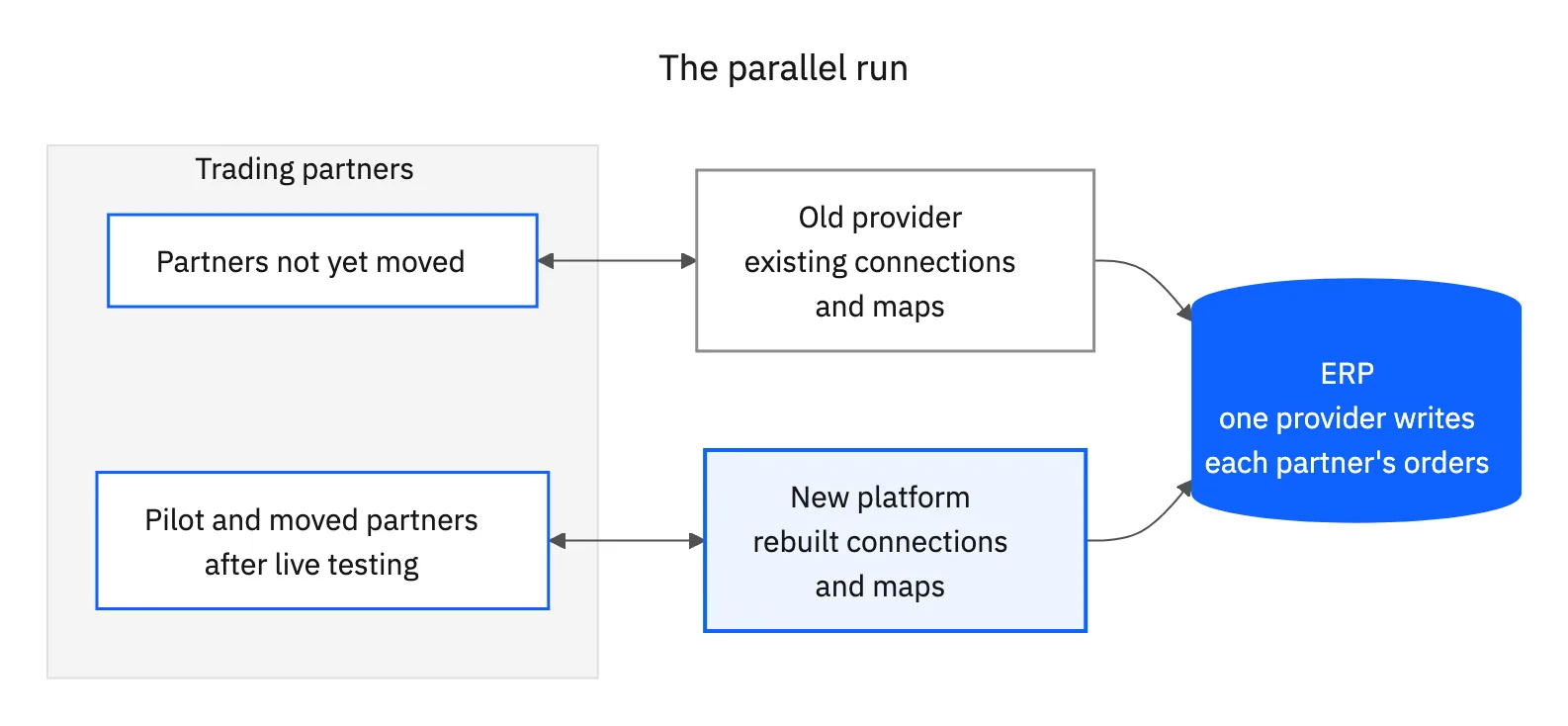
One buyer we spoke with asked exactly that on a call: will we drop orders or disrupt trading partners when we switch? Its plan kept the incumbent live, recreated the same partner relationships on the new platform and only then wound the incumbent down. Another asked for the same thing in different words: run the new setup next to the current one for a while and cut over after it proves itself.
- Keep ERP writes single-sourced per partner. A partner's orders should land in your ERP from one provider at a time, or you risk duplicate sales orders.
- Rebuild each map against the current guide. Export the old maps as a reference, then validate each one against the partner's current implementation guide. Guides change, and old maps often carry workarounds for problems that no longer exist.
- Watch both sides. During the overlap, somebody has to check acknowledgments and rejections on the old provider and the new platform every day.
Step 3: Pilot one or two partners with live transactions
Pick one or two partners for the pilot. Choose partners that respond fast and trade the full order cycle, not your largest account and not the partner with the strangest guide. A pilot that finishes teaches you more than a hard pilot that stalls in partner testing.
Write the success criteria down before you start, so the go or no-go call is not a debate:
- At least one live production transaction per pilot partner, with each document type the partner trades (for example an 850 in and an 855, 856 and 810 out).
- Every inbound order lands in the ERP once, with the right customer, items, quantities and ship-to.
- Outbound documents pass the partner's validation with no compliance rejections.
- Your team can see every pilot transaction and its status without asking the vendor.
- Failed documents show a readable cause and can be corrected and resent by your team.
If you face a seasonal peak, run the pilot early enough that one failed attempt still leaves time to fix and retest before your freeze. Brands we spoke with that needed to be live before Black Friday planned the pilot first, then a small second wave, then a steady rollout.
Step 4: Sequence the rest by contract end date
After the pilot, split the remaining work in two. From a set date, every new trading partner goes straight onto the new platform, so the old providers stop growing. Existing partners then move on a rolling schedule tied to the renewal or notice date of the provider that carries them.
One brand we spoke with, with its retail partners spread across several EDI providers, planned it this way: a small pilot wave before its peak, every new partner on the new platform from a set date, and each existing group moving ahead of its provider's renewal. That order lets you drop one provider contract at a time instead of paying for all of them until the last partner moves.
- 01Wave 1: pilotOne or two responsive partners, full order cycle, live transactions.
- 02From a set date: new partnersEvery new retailer or distributor onboards on the new platform only.
- 03Rolling waves: existing partnersGroup partners by the provider that carries them and move each group before that provider's renewal.
- 04Last: mandated and complex partnersPartners that need retailer approval, network testing or custom formats move once their terms are clear.
Avoid moving partners during your own peak or a retailer's code freeze. If a provider's renewal lands in the middle of peak, negotiate a short extension with that provider or move that group earlier.
Step 5: Cut over each partner and retire the old provider
Cut over one partner at a time. Agree the switch date with the partner, confirm they have updated your interchange IDs or connection details on their side, and stop outbound documents on the old provider for that partner on the same day. Keep the old mailbox readable for a few days so late or resent documents do not vanish.
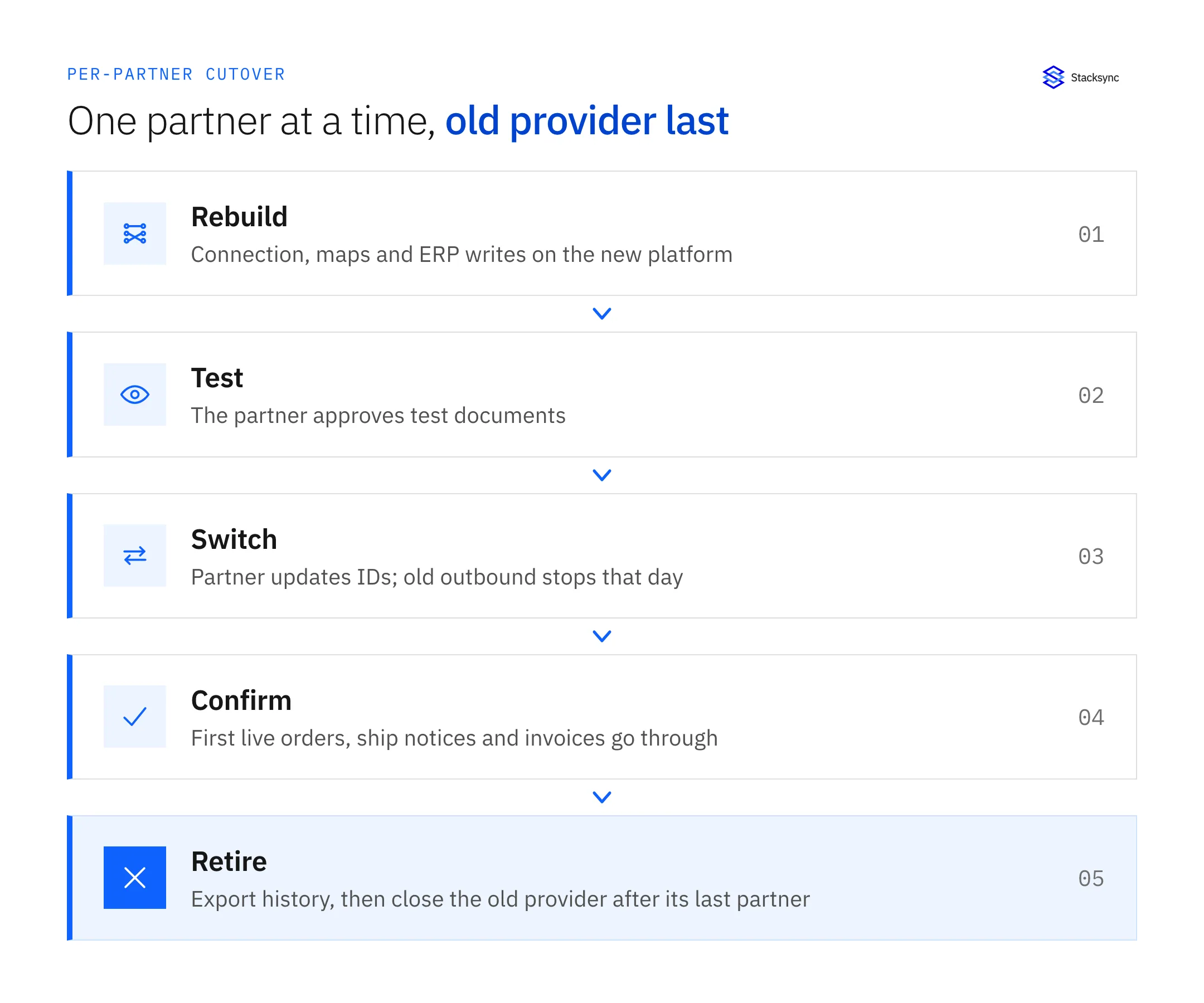
Before you give notice to an old provider, export what you may need later: transaction history for open orders, invoices still in dispute, chargeback evidence and the maps themselves. Then close it. Keeping a provider alive for one stray partner costs a full contract.
How long a switch takes, and what slows it down
Building a connection is the fast part. Partner testing sets the pace: the retailer or distributor has to receive your test documents, check them against its guide and approve the connection, and each partner runs that process on its own schedule. Buyers we spoke with named partner responsiveness as the main variable.
Ask any vendor for a per-partner estimate that includes partner testing, not only setup. Then plan your waves against the slowest partner in each group, and start the partners with the longest approval cycles first. Our EDI hub lists retailer and distributor profiles with each partner's preferred channel, supported documents and implementation notes, which helps you spot the slow ones early. A catalog listing does not mean a partner is pre-certified on a new connection; every partner still tests.
When a retailer's vendor guide names SPS Commerce or TrueCommerce
Many suppliers first joined a network because a retailer's onboarding letter or vendor guide named it. SPS Commerce, for example, runs compliance programs for retailers: it tests and certifies each supplier connection on the retailer's behalf. A name in the vendor guide can mean three different things, and only the retailer can tell you which one applies to you.
| What the vendor guide means | What it means for your switch |
|---|---|
| The network is a recommendation | You can connect through another provider. Update the retailer's supplier record with your new connection details. |
| The network runs the retailer's testing and certification | You may connect through another provider, but your connection still passes the retailer's testing process on that network. A one-time setup or testing fee may apply. |
| The network is a hard requirement | That partner stays on the named network, or you connect to it as a channel from your new platform. Move your other partners around it. |
Ask each mandated retailer two questions in writing: do you accept a supplier connection through another provider, and is there a one-time fee to set up the new connection? Then weigh any fee against what you pay to keep that partner on the old network each year. One buyer we spoke with found that some of its partners would charge a setup fee to reconnect.
Stacksync connects to retailer-mandated networks as channels rather than replacing them. You can see how this looks for specific retailers on channel pages such as Orgill via SPS Commerce and Academy Sports + Outdoors via SPS Commerce. Some partners with a mandated provider, such as a marketplace vendor program, can stay where they are while everything else moves.
Dropship networks and small dropship accounts
Rithum DSCO and CommerceHub are Rithum dropship networks that retailers use to run their dropship programs. Suppliers do not pick them the way they pick an EDI provider; the retailer's dropship program does. Switching EDI providers does not take you off those networks. What you can replace is the work on your side: the supplier portal logins, the manual order keying and the separate integration that feeds your ERP. Stacksync connects to these programs as channels, for example Bass Pro on DSCO and Nordstrom Rack via Rithum DSCO.
The harder question is whether a small dropship account belongs on EDI at all. Buyers we spoke with had dropship accounts that each brought in little revenue, and questioned paying per-partner EDI fees for them. Two options came up on those calls:
- Keep the account on EDI when the retailer requires it for dropship, or when you plan to grow the account.
- Move it to a direct marketplace or store connection when the retailer offers one. Some retailers and third-party apps connect dropship orders straight to a Shopify store. Confirm the retailer accepts it and that orders, tracking and invoices still reach your ERP.
Stacksync does not sell that store-app route; treat it as a third-party option worth pricing next to EDI for accounts at the low end. For how EDI fits alongside a Shopify or marketplace stack, see our guide to EDI integration for ecommerce brands.

Consolidating X12, EDIFACT and flat-file partners on one platform
Consolidation only pays off if the new platform can take every partner type you have today. Most North American retail partners trade X12. Some European and global logistics partners trade EDIFACT. A few distributors and smaller retailers still send flat files or their own formats over SFTP, and some suppliers still key orders into a retailer's web form. Check each type against the vendor before you plan waves.
Stacksync's EDI platform supports X12 and EDIFACT over AS2, VAN, FTP/SFTP and API channels, and handles custom transaction sets and proprietary partner formats. Confirm your specific flat-file layouts during scoping; expect each layout to need its own map.
| Where partners sit today | What moves | What to check first |
|---|---|---|
| SPS Commerce or TrueCommerce | Partner connections, maps and ERP integration | Retailer mandates and testing, contract notice dates |
| Cleo, OpenText or another VAN or self-hosted suite | Connections, maps, AS2 certificates, partner IDs | Custom maps nobody documented; who owns the certificates |
| EasyCom or an ERP-embedded EDI module | Maps and the ERP posting logic | Posting rules that live inside the ERP add-on |
| IBM web forms or retailer portals | Manual keying replaced by an automated connection | Whether the retailer accepts an automated connection for your account |
| Rithum DSCO or CommerceHub dropship programs | Your side of the integration, not the network | The retailer's program rules and your connection method |
| Seeburger or a large integration suite | EDI flows, often alongside an ERP migration | Which non-EDI flows share the same suite |
Contract buyouts, overlap billing and volume commitments
The question buyers ask most often after the drop-orders question: can the new vendor buy out the rest of my SPS Commerce contract? Stacksync runs a Legacy EDI Migration Fund, stated on each EDI partner page such as Orgill: Stacksync can buy out your current contract with SPS Commerce, Cleo, TrueCommerce, or OpenText. Eligibility and terms are confirmed on a call, so bring your contract end dates and partner counts to that conversation.
Stacksync does not publish an EDI price list. Platform plans on the pricing page are priced on records in sync, and EDI scope is set in the contract. If you plan to move partners in waves, ask whether you have to commit to your full partner count up front or can start smaller and add partners as they move. Get the answer in the contract, not in an email.
How Stacksync handles an EDI provider switch
Stacksync combines EDI connectivity with two-way sync into your ERP, so the partner connection and the ERP records move together instead of as two projects. For each partner that moves, the Stacksync team handles partner outreach, channel certification over AS2, VAN or FTP, mapping to the partner's implementation guide and end-to-end testing.
- One view across partners. The EDI dashboard shows every inbound and outbound transaction with its partner, channel, document type and validation result, which replaces checking several provider portals.
- Validation before send. Outbound documents are checked against each partner's channel guideline before they leave, which catches compliance problems during the parallel run.
- Failures you can fix. Failed transactions show a root cause, and a dead-letter queue keeps them for replay once the data is corrected.
- ERP writes through the same sync engine. Inbound 850, 855, 856 and 810 documents map into NetSuite, SAP, Microsoft Dynamics 365 or your data warehouse with the same connectors Stacksync uses for non-EDI sync.
Security and compliance details for the platform are on the security page. For NetSuite-specific setups, see EDI integration for NetSuite wholesale distributors.

FAQ
Frequently asked questions










Related articles