The AI Agent Data Layer: Per-App MCP Servers vs a Synced Postgres Database
AI agents work best on one synced Postgres copy of NetSuite, Salesforce and HubSpot, not per-app MCP calls: fewer tokens, SQL joins, two-way write-back.
- Author
- Ruben Burdin · Founder & CEO
- Published
- Read time
- 15 min read

Give agents one synced database, not one API per app
An AI agent that answers questions about NetSuite, Salesforce or HubSpot data works best against one synced Postgres copy of those systems, reached through a small SQL toolset, rather than through raw API calls or a separate MCP server per app. The agent makes zero calls to the source APIs, loads a handful of tools instead of hundreds, joins records across systems in one query, and writes changes back through two-way sync.
Per-app MCP servers and direct API calls still have a place for narrow, single-system actions. They get expensive when an agent has to read across systems. Many MCP clients load every tool definition up front; clients with deferred tool loading cut that cost, but payload size, pagination and source-API quotas remain: every question turns into paginated API requests, and every request counts against the source's rate limits. A synced database moves that load to a sync engine that batches and budgets API use once, for every agent and person who queries the copy.
At a glance: three ways to give an agent business data
Most teams start with one of three patterns. The table compares them on what an agent has to carry and what each question costs.
| Direct API calls | One MCP server per app | Synced Postgres + small SQL toolset | |
|---|---|---|---|
| What sits in the agent's context | Custom tool code and API docs per system | Tool definitions from every connected server, unless the client defers tool loading | A few tools: list tables, describe a table, run a query, propose a write |
| Source API calls per question | One or more, often paginated | One or more per tool call | None from the agent; the sync engine reads changes on its own schedule |
| Questions that span systems | The agent stitches JSON from several APIs | The agent chains tools across servers | One SQL join across synced tables |
| Rate-limit exposure | Every agent run spends source quota | Every agent run spends source quota | Agent traffic hits your database, not the source |
| Freshness | Live at call time | Live at call time | As fresh as the sync; changes propagate continuously |
| Writing back | Custom code per API | Per-server write tools | Insert or update rows; two-way sync applies them to the source |
| Best fit | One narrow, single-system action | Occasional actions inside one app | Agents that read and act across ERP, CRM and app data |
Per-app MCP and direct APIs suit single-system actions. A synced database suits agents that read across systems.
Why agents burn tokens and API calls on HubSpot and NetSuite
Ask an agent "which customers with open invoices over 60 days also have an open renewal opportunity?" and watch what it has to do through APIs. It lists invoices from the ERP page by page, lists opportunities from the CRM page by page, keeps both result sets in context, and matches them itself. Each page is a request against the source, and each response is verbose JSON the model reads as tokens.
Three costs stack up:
- Tool definitions. Many MCP clients load the name, description and input schema of every tool a connected server exposes. Connect servers for an ERP, a CRM, a helpdesk and a billing system, and the agent carries all of their tool definitions before it reads a single record. Clients with deferred tool loading or tool search fetch definitions on demand and cut this cost; the next two remain.
- Payload size. APIs return whole records with nested metadata. An agent that needs three fields still reads every field on every page it fetches.
- Source quotas. Salesforce enforces daily API request limits per org (Enterprise Edition starts at 100,000 requests per 24 hours, plus 1,000 per user license), NetSuite governs concurrent requests per account, and HubSpot applies burst and daily API limits. Agent loops that retry or re-fetch spend the same quota your integrations and users depend on.
The teams we talk to describe the same symptoms in different words: agents that can only see shared drives and spreadsheets, agents that can't make sense of a CRM's data model, agent pipelines that stall on Salesforce API limits, and Claude token bills that climb every time someone asks a question about HubSpot or NetSuite data.
Worked example: counting the requests
Take the question above against a hypothetical company with 50,000 open invoices in NetSuite and 20,000 open opportunities in Salesforce. NetSuite's REST web services return up to 1,000 results per page, and a Salesforce REST query returns up to 2,000 records per batch. Reading both sets through the APIs takes at least 50 + 10 = 60 paginated requests, and unless the agent filters in code, all 70,000 rows pass through its context before it can match one invoice to one opportunity.
| Through the source APIs | Against a synced Postgres copy | |
|---|---|---|
| Requests to answer the question | At least 60 (50 NetSuite pages + 10 Salesforce batches) | One SQL query to your database; none to NetSuite or Salesforce |
| Rows the agent reads | Up to 70,000 before matching | Only the rows that match the join and filter |
| Source quota spent | 60 requests against daily and concurrency limits | None per question; the sync engine reads changes on its own schedule |
Request counts use the page sizes NetSuite and Salesforce document as of September 2026. Real counts depend on filters, fields and batch settings.
A synced database changes the shape of the work. The question above becomes one SQL query with a join and a filter, and the agent reads back a few rows. The source systems see no agent traffic at all.
The reference architecture: sources, sync engine, one Postgres, agents
The pattern has four layers. Each one has a single job, which keeps agent access simple and keeps source systems safe.
- 01Source systemsNetSuite, Salesforce, HubSpot, Shopify, a billing system or an older ERP. They stay the system of record.
- 02Sync engineDetects changes in each source with the method that source supports, batches reads and writes, and budgets API use. For NetSuite that means polling on last-modified dates through SuiteQL or saved searches, since NetSuite has no native webhooks. Other sources use events or triggers where they exist.
- 03One Postgres databaseHolds a schema per source (for example netsuite, salesforce and hubspot) with tables that mirror the objects you choose. It can be your own Postgres or Supabase project, or a database Stacksync hosts for you.
- 04Agents and peopleClaude, Cursor, ChatGPT, internal copilots, BI tools and SQL clients all connect to the same database with a connection string and the permissions you grant.
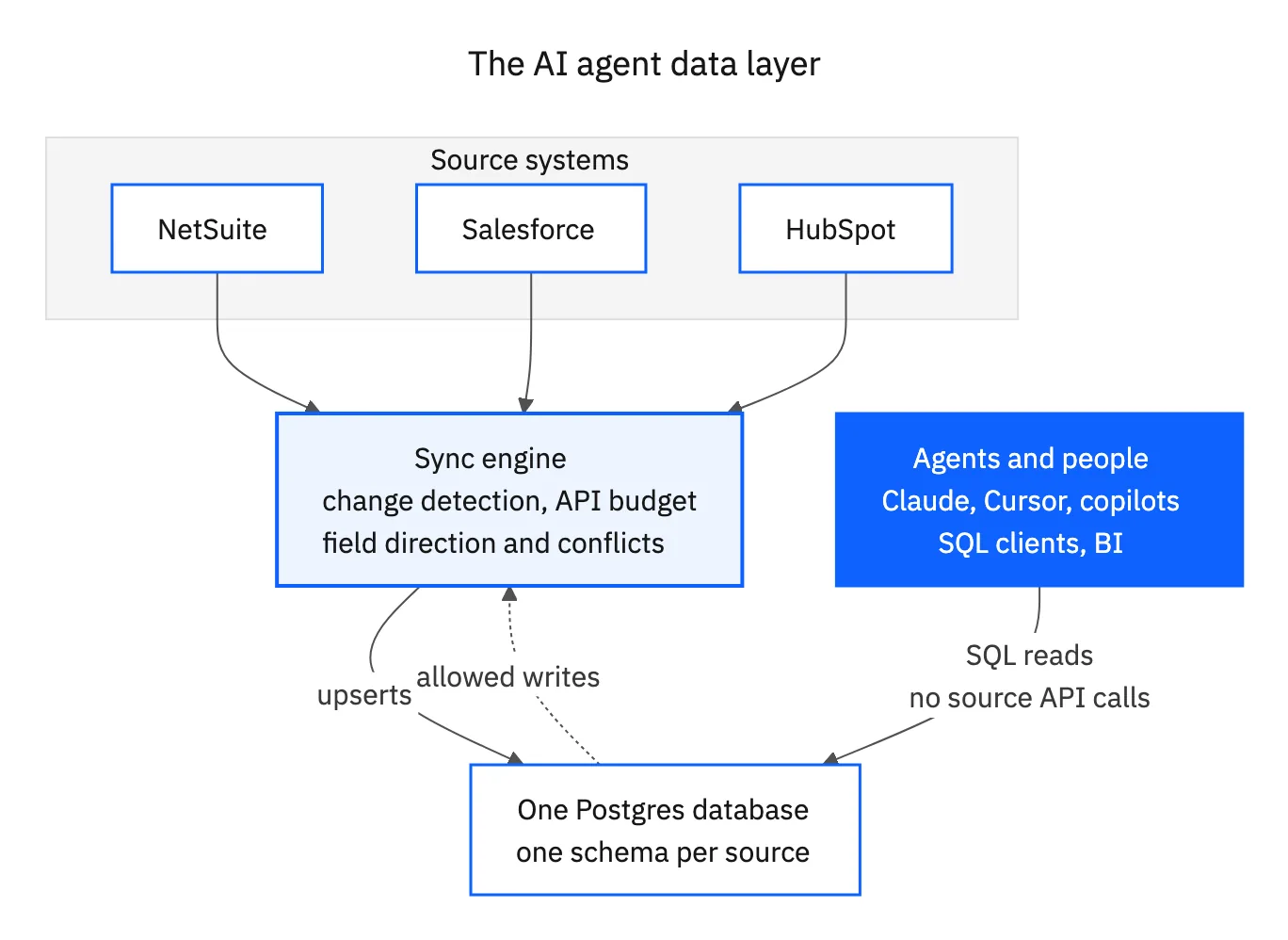
To be precise, the agent makes zero source-API calls. The sync engine still uses the source's API, once per change, on a schedule it controls, and every agent and person shares that single stream of reads. Adding a tenth agent adds load to your database, not to NetSuite or Salesforce.
Freshness depends on the source. Event-driven sources propagate changes quickly; polled sources such as NetSuite are as fresh as the polling interval. If a use case needs a value at the exact moment of a decision, such as a payment status during reconciliation, have the agent confirm that one record against the source before acting, and use the synced copy for everything else.
Where MCP fits: one small toolset, not one server per app
MCP works well for handing an agent tools. Trouble starts with the number and shape of those tools. One MCP server per SaaS app exposes dozens of narrow actions each. In clients that load tools up front, the agent pays for all of them on every turn; deferred loading helps there, but not with the paginated reads behind each tool. One data layer needs only a few general tools:
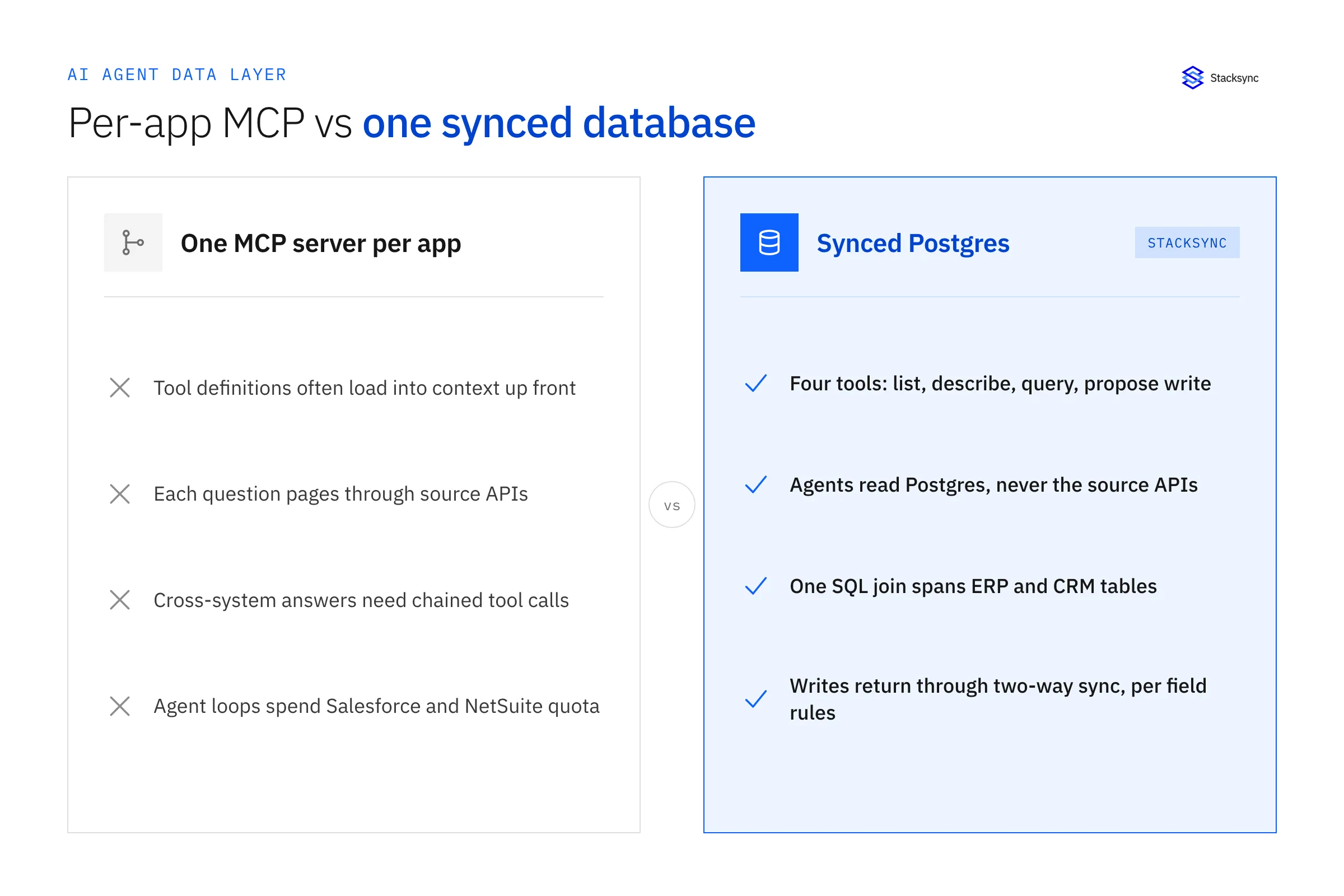
list_tablesanddescribe_table, so the agent can find the right schema and read column commentsrun_query, bound to a read-only database rolepropose_write, which inserts into a staging table that a person or a rule approves before two-way sync applies it
Any Postgres MCP server, or a SQL tool you define yourself, can provide those. Claude Desktop, Claude Code and Cursor all accept a Postgres connection this way. The agent learns one schema instead of five API surfaces, and you can describe tables and columns in plain language with Postgres comments so the model reads the business meaning of each field.
Stacksync's Supabase page puts it as "no SDK or MCP tool per system": synced tables sit next to your app's own tables under the same auth and row-level security. Stacksync also offers agent tooling of its own, described on the AI agents page. For a data layer, the standard route today is a Postgres connection and SQL, which every agent framework already supports.
Write-back: agents change the source through two-way sync
Reading is half the job. Agents also update a deal stage, correct a customer address, set a custom field on a NetSuite record or create a follow-up task. With two-way sync the agent does that with a normal SQL write. Insert a row into a synced table and the sync creates the matching record in the source; update a row and the change propagates to the source record.
Control comes from the sync configuration, not from the agent's good behavior:
- Field ownership and write permissions. Set direction per field. Keep financial fields, such as amounts, tax codes or commissions, read-only in the mirror, and allow writes only on fields an agent should change.
- Conflict rules. Decide which side wins when a person and an agent change the same field between syncs.
- Database grants. Give the agent's role write access only to the tables and columns it needs. Postgres enforces this before anything reaches the sync.
- Human approval. Route high-impact changes through a staging table and an approval step. See when to escalate to a human for a practical rule set.
SaaS vendors that need an agent to write into each customer's NetSuite use the same pattern once per customer: one connection per tenant, one schema per tenant, and grants that keep each agent inside its tenant. NetSuite-specific write-back and approval questions are covered in the NetSuite AI agents FAQ and in making NetSuite AI-ready.
Postgres or a warehouse for the agent layer?
Agents send many small, selective queries: one customer, one order, the last five tickets. That is operational work, and a transactional database such as Postgres is built for it. Warehouses such as Snowflake, BigQuery and Databricks are built for large scans and heavy aggregation. Both can sit behind an agent; they cost and behave differently.
| Postgres or Supabase | Cloud data warehouse | |
|---|---|---|
| Query shape it handles best | Point lookups and filtered joins on indexed columns | Large scans, aggregates and history |
| Write-back from agents | Row inserts and updates, applied to the source by two-way sync | Usually a separate reverse ETL step |
| Idle cost | A running instance at a fixed size | Compute bills while a warehouse runs; auto-suspend lowers it, but agent traffic keeps waking it |
| App and auth features | Row-level security, roles, extensions such as pgvector | Role-based access; app features vary by vendor |
| Keep it for | Agents, internal apps and live operational queries | BI, finance reporting and long-range analysis |
Cost is where the difference shows. An extra-small Snowflake warehouse consumes one credit per hour while it runs. Snowflake's Service Consumption Table (effective September 28, 2026) lists on-demand credit prices of $2.00 for Standard, $3.00 for Enterprise and $4.00 for Business Critical in AWS US East, and more in several other regions. At those US East prices, an extra-small warehouse left running 24/7 for a 730-hour month costs roughly $1,460 to $2,920 in compute alone. Auto-suspend cuts that, but an agent that queries every few minutes keeps the warehouse awake. Check your own contract rate before you compare.
Plenty of teams run both, and some prefer to build agents directly on the warehouse they already have. That is a sound choice when agents mostly analyze history. For agents that look up and change live records, a synced Postgres is the better fit, and the warehouse stays in charge of BI. Stacksync mirrors CRM, ERP and payment data into Postgres or Snowflake, so you can pick per workload.
Security and ownership: two deployment modes
Who holds the data depends on where the database runs. Pick the mode first, then design agent access.
| Bring your own Postgres or Supabase | Stacksync-hosted database | |
|---|---|---|
| Where the data lives | In your cloud account or Supabase project | In a managed database Stacksync runs for you |
| Network controls | Yours: VPC, firewall rules, allowlists | Isolated virtual network, VPC peering or PrivateLink options, IP allowlists, encrypted transit |
| Backups | Your backup policy | Continuous snapshots and replication |
| Best for | Teams that already run Postgres or build on Supabase | Teams that want a SQL layer without running a database |
In either mode, treat the agent like any other database client:
- Create a dedicated role per agent or per use case, with read access to the schemas it needs and write access only where write-back is allowed.
- Use row-level security to scope multi-tenant data, so an agent working for one customer or region can't read another's rows.
- Log queries and writes at the database, so you can review what each agent read and changed.
- Keep source credentials in the sync platform only. Agents never hold NetSuite, Salesforce or HubSpot credentials.
Stacksync lists SOC 2 Type II, ISO 27001 and HIPAA under a BAA for its platform on the Pro plan and up. Controls, data handling and plan details are on the security page and the SOC 2 Type II page. If Stacksync's own AI features are in scope, the AI agent governance page lists the questions to settle in your security review.

Legacy ERPs: the pattern works, connector availability varies
Teams staying on SAP ECC or another on-premise ERP ask whether they have to migrate before agents can use that data. The architecture does not require a migration: if a sync engine can read the ERP and write to Postgres, agents query the copy like any other schema, and the ERP keeps running as it does today.
Whether that works for your system depends on the connector, the edition, the customizations and the network path to an on-premise server. Stacksync reviews compatibility for older ERPs before committing to a timeline, and on-premise deployment options are listed by plan on the pricing page. Start with one module, such as customers and open orders, prove the sync, then widen the scope.
What we hear from teams building agents
The same situations come up across sales, customer and partner conversations. A few, described without identifying anyone:
- A SaaS company rolling out internal agents found the agents could read only shared drives and spreadsheets, while customer data sat in a product database and a CRM. The plan it settled on was one data layer over CRM and ERP data.
- A software company whose teams work in HubSpot and NetSuite saw how many API calls and tokens an assistant needed to answer simple questions about that data, and asked whether agents could run SQL against a mirrored copy instead.
- A NetSuite services partner hears the same request from nearly every client: agents for data entry, reconciliation and reporting. The pattern it recommends is a real-time NetSuite mirror in Postgres or Supabase, with agents working from there.
Not everyone lands on a new database. Some teams already run a warehouse and would rather build agents on it, and that works when the agents mostly analyze history. The synced-database pattern earns its place when agents look up and change live records across several systems.
Set it up: NetSuite or HubSpot to Postgres, then point Claude or Cursor at it
A first agent on synced data takes a handful of steps. The walkthroughs linked below cover the sync configuration screen by screen; this is the order of work.
- 01Choose the database. Use an existing Postgres or Supabase project, or a Stacksync-hosted database.
- 02Connect the source and pick objects. Start small: customers, open sales orders, invoices, or deals and contacts. Each object lands as a table in its own schema.
- 03Set direction per field. Mark which fields agents may change and keep the rest read-only.
- 04Run the initial backfill, then let the sync keep the tables current.
- 05Create an agent role. Grant read access on the synced schemas, and write access only on the tables and columns you allowed. Add column comments that explain business meaning.
- 06Connect the agent. Add a Postgres MCP server or a SQL tool in Claude Desktop, Claude Code or Cursor with the agent role's connection string.
- 07Test a round trip. Have the agent update one allowed field, then confirm the change in NetSuite or HubSpot.
Plan for schema change too: when someone adds a custom field in the source, decide how it gets added to the sync and to the agent's column comments. Step-by-step guides: connect NetSuite and Supabase in real time and use Supabase as your HubSpot API layer.
Where Stacksync fits
Stacksync runs the sync layer in this architecture. It keeps NetSuite, Salesforce, HubSpot and other systems in two-way sync with Postgres, Supabase or Snowflake, handles change detection and API budgets per source, and applies agent writes back to the source under the field rules you set. You can bring your own database or use Stacksync database hosting; Supabase teams can start from the Supabase integration, and the AI agents page covers agents that act on synced data.
Plans are priced on records in sync and active syncs, not on connectors or agent queries; see pricing. To map your own systems and agents onto this pattern, book a demo with an engineer.
Related reading
- Making NetSuite AI-ready: the three NetSuite access patterns and safe write-back
- NetSuite AI agents FAQ: NetSuite-specific agent questions
- NetSuite AI agents and small language models: finance use cases on NetSuite data
- Real-time data integration for SaaS platforms: how updates reach agents that read several apps

FAQ
Frequently asked questions










Explore these integrations and topics
- connectorNetSuite integrations
- connectorSalesforce integrations
- connectorHubSpot integrations
- connectorPostgreSQL integrations
- connectorSupabase integrations
- platformDatabase synchronization
- platformIntegration architecture
- Database synchronization guidesWork through database change capture, application writes, and reliable record reconciliation.
Related articles