Modernize Legacy EDI Without Replacing Your ERP
Learn how to modernize legacy EDI systems without replacing your ERP. Covers strategies for real-time data flows, API layers, and faster partner onboarding.
- Author
- Ruben Burdin · Founder & CEO
- Published
- Updated
- Read time
- 16 min read
EDI systems handle more than 75 percent of B2B digital commerce worldwide, yet many organizations run EDI infrastructure built decades ago. Modernizing legacy EDI systems without replacing ERP is possible by decoupling EDI translation, adopting real-time data flows, and layering API capabilities on top of existing protocols and workflows.
The challenge most teams face is not whether EDI still matters. It clearly does. The challenge is that legacy EDI setups were designed for a slower pace of business, and they now create friction in areas ranging from partner onboarding to order fulfillment accuracy. Replacing your ERP to fix these issues is expensive, risky, and usually unnecessary. The EDI layer itself is where the problems originate, and that is where modernization should focus.
Key Takeaways
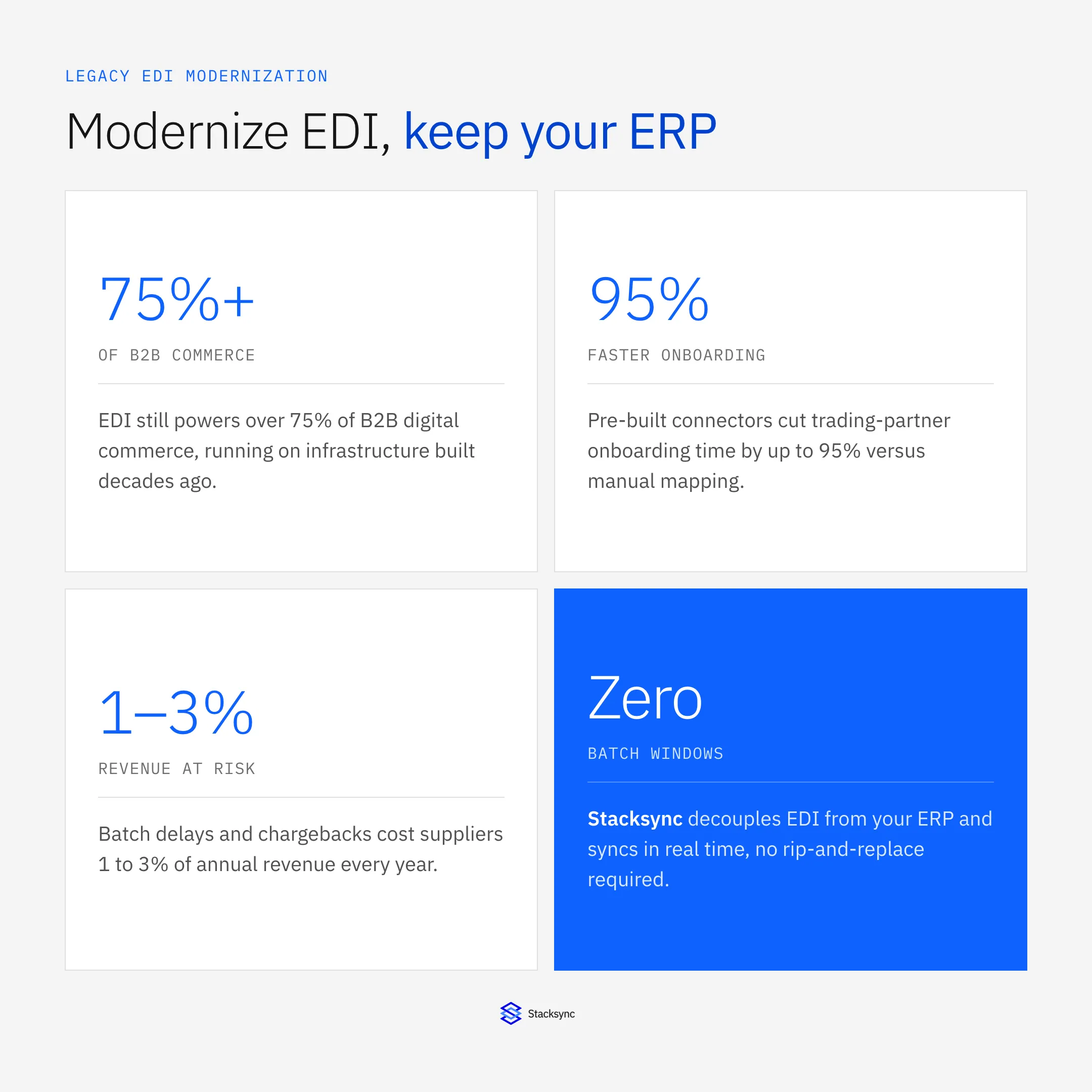
- Market reality: EDI systems power over 75 percent of B2B digital commerce, yet legacy batch-based infrastructure creates friction in partner onboarding, order fulfillment, and real-time inventory visibility.
- Modernization path: Organizations can decouple EDI translation from ERP logic, replace batch windows with real-time data flows, and introduce APIs alongside existing EDI protocols without replacing their ERP systems.
- Onboarding speed: Traditional EDI partner onboarding takes weeks to months due to manual configuration, while modern platforms with pre-built connectors can reduce onboarding time by up to 95 percent.
- Cost of delay: Batch processing lags of 15 to 60 minutes lead to overselling, fulfillment errors, and chargebacks that cost suppliers 1 to 3 percent of annual revenue.
- Data accessibility: Parsing EDI documents directly into database tables converts specialist-only formats into SQL-queryable records usable by operations, finance, and business teams.
Why Legacy EDI Still Runs Most Supply Chains
EDI has survived every wave of technology predictions about its demise. The reason is straightforward: it works. Retailers, distributors, manufacturers, and healthcare providers depend on EDI for purchase orders, advance ship notices, invoices, and functional acknowledgements. The protocol is standardized, widely adopted, and deeply embedded in supply chain operations across industries worldwide.
The Disconnect Between EDI and Modern IT Stacks
The problem is not EDI itself but the infrastructure surrounding it. Most legacy EDI systems were built for on-premises deployments with batch processing schedules. They assume that a 15-minute or hourly data refresh is fast enough. That assumption no longer holds in environments where customers expect real-time order tracking, inventory accuracy, and immediate fulfillment confirmation.
Modern IT stacks have moved to cloud-native architectures, API-driven integrations, and event-based data processing. Legacy EDI sits outside this stack, operating as a silo that only a handful of specialists can maintain. This disconnect creates bottlenecks that ripple across the entire organization.
Common Symptoms of an Outdated EDI Setup
Teams dealing with legacy EDI infrastructure typically recognize several patterns. Onboarding a new trading partner takes weeks or months because of manual IP address configuration, mailbox setup, and document mapping. Transaction errors require an EDI specialist to decode raw X12 or EDIFACT formats. Business users cannot access EDI data without going through IT. And the entire system runs on batch schedules that introduce blind spots into inventory and order management.
These symptoms point to an infrastructure problem, not a protocol problem. EDI as a communication standard is fine. The tooling around it needs to catch up with how businesses operate today.
Where the Batch Delay Actually Comes From
The batch pattern traces back to Value-Added Networks (VANs), which run on a store-and-forward model: a sender deposits a document in a VAN mailbox, the VAN stores it, and the receiver retrieves it on a schedule. Every layer built on top inherited that same batch assumption, including the translation software that polls a mailbox at fixed intervals and the ERP import job that runs on its own separate cycle.
The delays stack. A purchase order that arrives at your AS2 endpoint at 2:05 PM sits until the 2:30 batch run picks it up, gets translated to a staging table, and does not land in your ERP until the 3:00 import cycle, nearly an hour after it was actually sent. Because each downstream document depends on the one before it, the acknowledgement (855) cannot generate until the ERP has the order, and the ship notice (856) cannot generate until the warehouse processes it, so the delay compounds across the entire 850, 855, and 856 document chain.
What Happens When Legacy EDI Limits Your Operations
Slow Partner Onboarding Stalls Growth
One of the most visible costs of legacy EDI is the onboarding timeline. Adding a new retailer, distributor, or supplier to your EDI network often requires coordinating IP addresses, testing document maps, resolving formatting errors, and verifying acknowledgements. This process depends on back-and-forth communication over email and phone calls.
Healthcare and pharmacy supply chains face this friction acutely. Retailers like CVS and Walgreens require suppliers to meet strict EDI compliance standards across multiple document types, from purchase orders and invoices to ship notices and remittance advice. Onboarding with each of these partners means configuring specific document flows and passing compliance validation before a single transaction can go through.
For companies onboarding 10, 50, or more partners per year, this process becomes a constraint on deal flow. Every week of delay is a week of lost transactions and revenue. Modern EDI platforms have reduced onboarding times by up to 95 percent through self-service portals and pre-built trading partner profiles.
Batch Processing Creates Data Blind Spots
Legacy EDI systems typically process documents in scheduled intervals. A purchase order arrives, sits in a queue, gets translated, and lands in the ERP system 15 to 60 minutes later. During that interval, the data in your ERP does not reflect reality.
For industries like retail, this gap has measurable consequences. A 15-minute inventory sync delay during a flash sale creates a 900-second window where customers can order products that are already sold out. The result is overselling, cancellations, and chargebacks. Suppliers lose 1 to 3 percent of revenue annually to EDI-related penalties, and batch processing is a primary contributor.
Siloed EDI Data Cuts Off ERP Visibility
When EDI operates as a standalone system, the data it processes stays locked behind proprietary formats and specialist-only interfaces. Business analysts, operations managers, and finance teams cannot query EDI transaction data the way they query a database or a dashboard.
This lack of visibility means that problems go undetected until they become customer-facing issues. A missing advance ship notice triggers a chargeback. A mismatched invoice creates a payment dispute. These issues are preventable with real-time access to EDI data, but legacy systems make that access difficult.
Why You Should Modernize EDI Without Replacing Your ERP
Protecting Multi-Year ERP Investments
ERP systems like NetSuite, SAP, Oracle, and Microsoft Dynamics represent multi-year implementations with deep customization. Ripping out an ERP to fix EDI problems is like rebuilding a house because the mailbox is broken. The ERP is not the issue. The translation, connectivity, and monitoring layers between EDI and ERP are the issue.
Most organizations have invested significant capital and training into their ERP systems. The goal of EDI modernization should be to make EDI data flow more smoothly into and out of the ERP without requiring ERP changes, upgrades, or reconfigurations.
Reducing Risk While Gaining Agility
Full ERP replacements carry substantial risk. They typically take 12 to 24 months, require organizational change management, and frequently run over budget. EDI modernization, by contrast, can be completed in weeks to a few months by targeting the middleware and translation layers between EDI and ERP.
This approach lets organizations gain agility in how they handle trading partner communications while preserving the stability of their core business systems. It is a targeted intervention rather than a wholesale infrastructure overhaul.
Seven Strategies to Modernize EDI While Keeping Your ERP
Decouple EDI Translation From ERP Logic
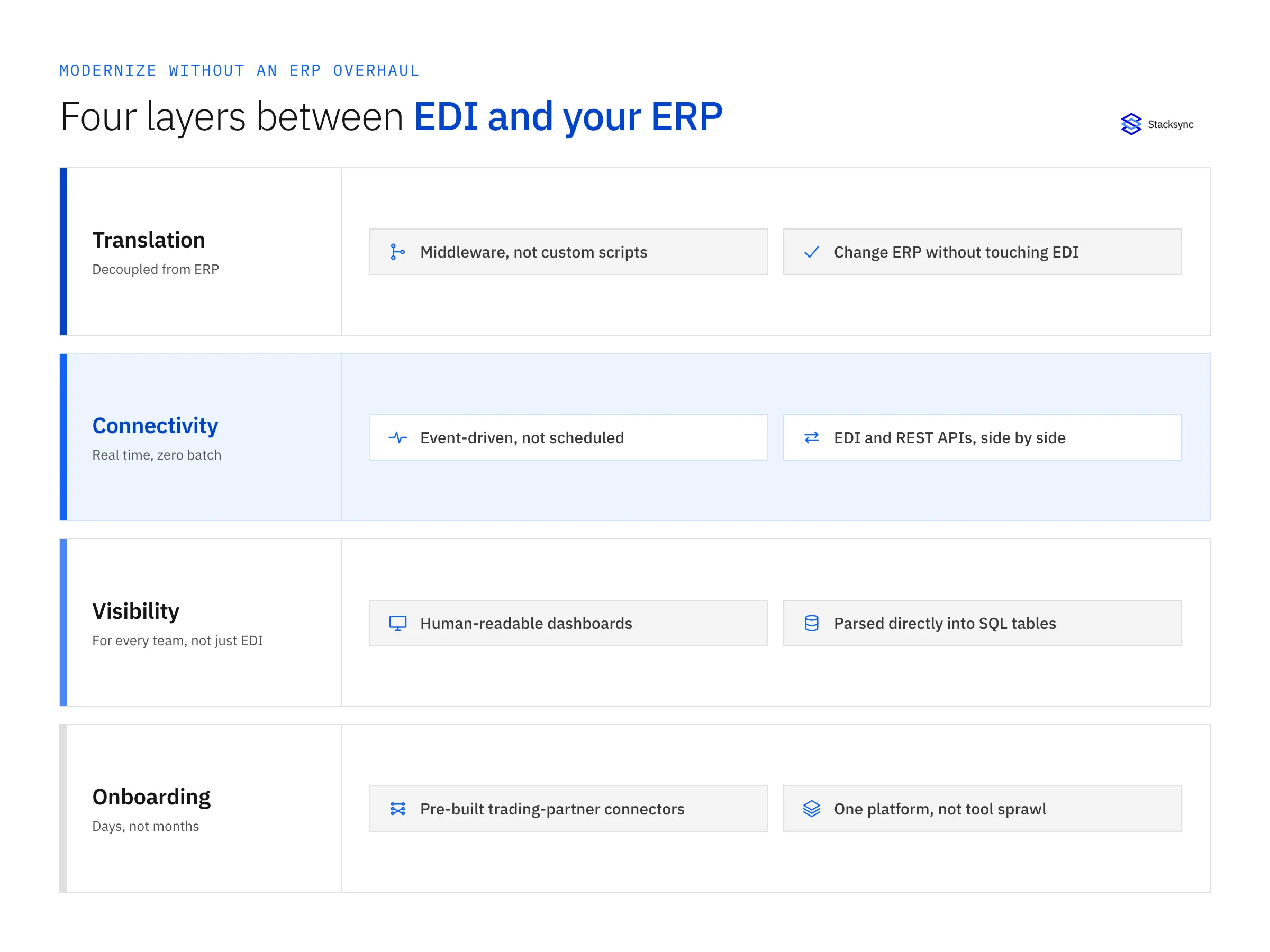
The first step in EDI modernization is separating EDI document parsing and translation from your ERP system. Legacy setups often have custom scripts that translate EDI documents directly into ERP-specific formats, creating tight coupling between the two systems.
How Middleware Layers Create Separation
Adding a middleware layer between EDI and ERP creates a clean boundary. EDI documents are parsed, validated, and transformed in the middleware before being passed to the ERP in a format it expects. This means you can change how you handle EDI without modifying your ERP, and you can upgrade or switch ERP systems without rewriting your EDI logic.
Replace Batch Windows With Real-Time Data Flows
Batch processing was acceptable when trading partners expected daily or weekly updates. It is no longer acceptable when retailers like Walmart and Amazon require near-real-time inventory visibility and order confirmation.
The Revenue Risk of 15-Minute EDI Delays
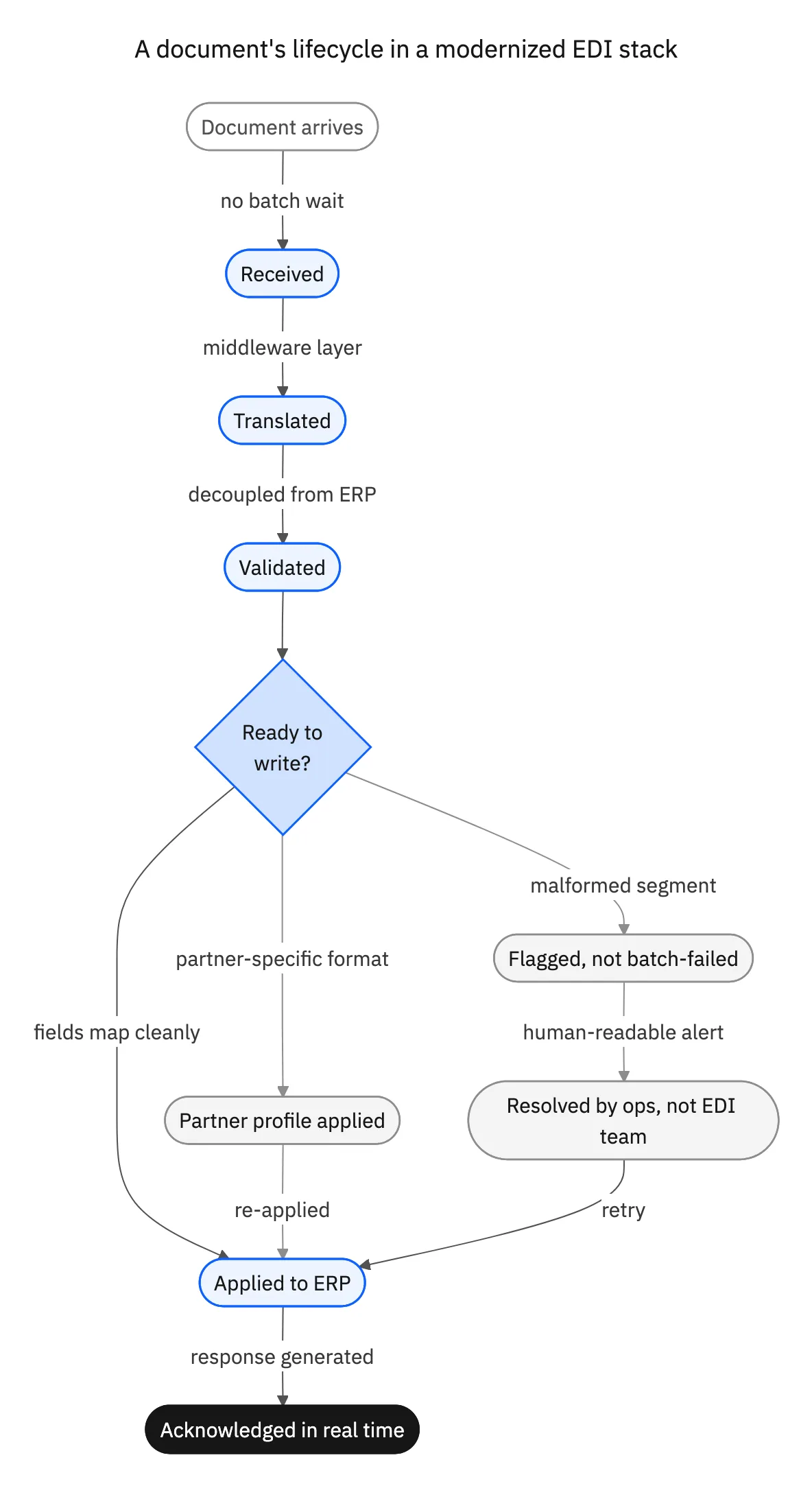
Research shows that every 100 milliseconds of latency can reduce e-commerce conversions by 1 percent. While EDI latency operates on a different scale than web page load times, the principle holds: delayed data means delayed decisions. Real-time EDI processing replaces fixed-interval batch jobs with event-driven data flows that propagate changes as they occur.
Add API Capabilities Alongside EDI Protocols
EDI is not going away, but APIs are becoming an increasingly important channel for B2B communication. Many trading partners now support both EDI and API-based integrations, and the most resilient supply chains accommodate both.
Bridging EDI and REST-Based Integrations
Rather than choosing between EDI and APIs, modern EDI platforms support both protocols simultaneously. This means you can continue exchanging EDI 850s and 856s with partners who require it while also using REST APIs for partners who prefer them. Your ERP receives the same data regardless of which channel delivered it.
Automate Partner Onboarding With Pre-Built Connectors
Manual partner onboarding is one of the biggest time sinks in legacy EDI. Each new trading partner requires custom mapping, protocol configuration, and extensive testing. Pre-built connectors eliminate most of this work by providing ready-made configurations for common trading partners.
Platforms like Stacksync offer EDI integrations for every trading partner, including retailers, distributors, and suppliers. With pre-built EDI connectors, organizations can go live with new partners in days instead of months. This acceleration directly impacts deal flow and time to revenue for companies scaling their supply chain network.
For healthcare and logistics operations that involve third-party transportation networks, pre-built connectors also cover specialized document flows. Integrations for CVS Health via Mercury Gate and Walgreens via Mercury Gate handle transportation-specific documents like load tenders, freight invoices, and shipment status messages without requiring custom mapping for each carrier relationship.
Deploy Human-Readable EDI Dashboards
Legacy EDI systems present transaction data in raw X12 or EDIFACT formats that only trained specialists can interpret. When a transaction fails, a business user has to involve the EDI team to determine whether the problem is a missing segment, a formatting error, or a communication failure.
Moving Beyond Specialist-Only Error Resolution
Modern EDI platforms translate EDI data into human-readable formats that operations and business teams can understand. A purchase order that spans multiple EDI documents, including ship notices, invoices, and functional acknowledgements, appears as a single unified view. Business users can diagnose issues independently, reducing resolution times and freeing EDI specialists to focus on higher-value work.
Parse EDI Documents Directly Into Your Database
One of the most effective approaches to EDI modernization is converting EDI documents into structured database records. Instead of processing EDI through proprietary translation software, incoming documents are parsed and stored in standard database tables that any developer or analyst can query using SQL.
Turning EDI Complexity Into Simple SQL Queries
This approach transforms EDI from a specialist-only domain into something any team with database access can work with. Stacksync takes this approach by automatically parsing incoming EDI documents directly into your database tables and converting outgoing data back into compliant EDI formats. Supply chain teams manage their EDI data with the familiarity of SQL instead of working with legacy file parsers and proprietary translation engines. This removes the dependency on specialized EDI knowledge and makes transaction data accessible to every team that needs it.
Consolidate EDI, Sync, and Workflow on a Single Platform
Many organizations maintain separate tools for EDI translation, data synchronization, workflow automation, and monitoring. This tool sprawl increases maintenance costs, creates integration gaps between the tools themselves, and requires teams to manage multiple vendor relationships. If the sprawl sits across several EDI providers, our guide to switching EDI providers without disrupting trading partners covers the parallel run and how to sequence partners by contract end date.
Reducing Tool Sprawl Across Your Integration Stack
A unified platform that handles EDI alongside real-time sync, workflow automation, event queues, databases, and monitoring eliminates the need to stitch together separate products. Stacksync provides six products on one platform with zero batch windows, covering real-time sync, workflow automation, event queues, databases, EDI, and monitoring. This consolidation reduces both the operational complexity and the total cost of maintaining your integration infrastructure compared to assembling separate tools from vendors like MuleSoft, Fivetran, Kafka, and Zapier.
Legacy EDI vs. Modernized EDI
Understanding the differences between legacy and modern EDI architectures helps clarify where modernization delivers the most impact. The following comparison highlights the key areas where modern approaches outperform legacy systems.
| Capability | Legacy EDI | Modernized EDI |
|---|---|---|
| Data Movement | Scheduled batch windows, 15 to 60 min intervals | Real-time, event-driven sync as changes occur |
| Partner Onboarding | Manual configuration, weeks to months per partner | Pre-built connectors, days to go live |
| ERP Connectivity | Custom scripts tightly coupled to ERP internals | Database middleware decoupled from ERP logic |
| Transaction Visibility | Raw EDI formats requiring specialist interpretation | Human-readable dashboards for business users |
| API Support | No native API layer for external integrations | Hybrid EDI and API with REST endpoints |
| Scalability | On-premises hardware with fixed capacity limits | Cloud-native architecture with elastic scaling |
| Error Resolution | EDI team manually parses transaction logs | Automated alerts with guided error handling |
Key Takeaways
Modernized EDI removes batch delays and manual onboarding without requiring changes to your existing ERP system or data model.
Keeping tightly coupled EDI scripts creates fragile integrations that break during ERP upgrades or when trading partners change requirements.
Evaluate platforms that offer pre-built EDI connectors, real-time sync, and database-native document parsing to reduce implementation time.
When Batch Processing Still Makes Sense
Modernization does not mean every document type needs real-time processing on day one. Batch windows are still a reasonable choice for low-volume trading partner relationships where a handful of purchase orders move per week and a 15-minute delay has no operational impact. Non-critical data transfers, such as historical reporting feeds or archival document exports, also tolerate batch schedules without any downside.
Mapping Document Types to Latency Sensitivity
The practical approach is to rank document types by how much a delay actually costs. Advance ship notices (856), purchase orders (850), and inventory updates are high sensitivity: these should move to real-time first because a delay directly causes overselling, missed ship windows, or chargebacks. Order acknowledgements (855) and invoices (810) are medium sensitivity: real-time helps but they can tolerate a short delay without customer-facing consequences. A platform that supports both batch and real-time modes lets you migrate document types incrementally instead of forcing an all-or-nothing cutover.

How to Evaluate an EDI Modernization Platform
Choosing the right platform for EDI modernization requires evaluating several capabilities that directly impact how quickly you can move away from legacy constraints without disrupting ERP operations.
Pre-Built Trading Partner Connectors
The most immediate accelerator for EDI modernization is the availability of pre-built connectors for your trading partners. Look for platforms that offer ready-made configurations for common retailers, distributors, and suppliers. This eliminates the custom mapping and testing work that makes legacy onboarding so slow.
A platform should support the specific EDI document types your partners require, including 850 purchase orders, 855 acknowledgements, 856 advance ship notices, and 810 invoices, without requiring you to build custom translators for each one.
Real-Time Sync and Zero Batch Windows
The platform should process EDI documents in real time as they arrive, not on a batch schedule. Real-time processing ensures that your ERP, warehouse management system, and order management system all reflect the current state of transactions without artificial delays.
Zero batch windows mean that a purchase order received at 2:47 PM is processed at 2:47 PM, not during the next batch run at 3:00 PM. This eliminates the data gaps that cause overselling, fulfillment errors, and chargeback penalties.
Security and Compliance Requirements
EDI transactions carry sensitive business data including pricing, quantities, and partner agreements. The modernization platform should meet enterprise security standards, including encrypted data transit, access controls, and compliance certifications relevant to your industry.
Key compliance certifications to look for include:
- SOC 2 Type II for operational security controls
- GDPR for organizations handling European partner data
- HIPAA for healthcare supply chain transactions
- ISO 27001 for information security management
- CCPA for California consumer data requirements
The platform should also support secure connection methods like VPN, VPC peering, and SSH tunneling for partners with strict network requirements.
Apply this in modular and prefab building supply and installation: component purchase line and supplier response
Prefab component procurement is a practical case for modernizing EDI around an existing ERP. Preserve the difference between factory receipts and direct-to-site deliveries so document modernization does not collapse two different receiving responsibilities into one completed status.
| Record to reconcile | Responsible owner | Rule to preserve |
|---|---|---|
| Component purchase line | Procurement | Keep item, unit, approved project allocation and intended destination. |
| Supplier response | Supplier and buyer | Record accepted quantities, changed dates and proposed substitutions. |
| Factory receipt | Warehouse | Confirm material entering factory custody and usable inventory. |
An exception to plan for: Supplier combines factory and site lines in one shipment message. Use line and destination references to route each quantity to the correct receiving process. Acceptance check for the pilot: factory and direct-site receipts remain separate.
The modular and prefab building supply and installation hub connects the broader operating context. These guides develop the specific record mappings and decisions for this application:
Modernize Your EDI Without the Infrastructure Overhaul
Legacy EDI infrastructure does not have to hold your supply chain operations back, and replacing your ERP is not the answer. By focusing modernization on the translation, connectivity, and visibility layers between EDI and ERP, organizations can eliminate batch delays, accelerate partner onboarding, and give business teams direct access to transaction data.
The strategies covered here, from decoupling EDI from ERP logic to parsing EDI documents into database tables to consolidating tools on a single platform, provide a clear path forward. Each one targets a specific limitation of legacy EDI without requiring changes to your core ERP system.
Ready to see how database-native EDI processing can simplify your supply chain integrations? Explore how Stacksync handles EDI by parsing documents directly into your database tables and converting outgoing data into compliant EDI formats, all with real-time sync and zero batch windows.

FAQ
Frequently asked questions










Related articles