SendGrid Accepted the Write. That Does Not Mean It Landed.
The platform-level guide to choosing an integration layer for SendGrid. It explains what an enterprise iPaaS is in this context, why the SendGrid API is harder to hold in sync than it looks (asynchronous contact import jobs, an at-least-once Event Webhook, suppression records that cannot drift, per-endpoint 429s, custom fields referenced by ID), how in-house code, automation tools, ETL, and a real-time two-way iPaaS actually compare, and what to hold a vendor to on coverage, security, observability, and replay.
- Author
- Ruben Burdin · Founder & CEO
- Published
- Read time
- 11 min read

An enterprise-grade iPaaS for SendGrid is a hosted integration platform that keeps SendGrid's contacts, engagement events, and suppression records in step with the rest of your stack, in real time and in both directions, without you writing and operating that plumbing yourself. For SendGrid in particular it has to handle four things a generic connector does not: contact writes that complete asynchronously as background jobs, an Event Webhook that delivers at least once and out of order, suppression records that are legal artifacts rather than ordinary fields, and per-endpoint rate limits that answer with a 429 sooner than you expect.
None of that is a complaint about the API. Twilio SendGrid's Web API v3 is well documented and behaves predictably once you know its shape. The problem is that the shape is not what most integration tools assume. PUT /v3/marketing/contacts does not write a contact, it queues one and hands back a job_id. A 202 from /v3/mail/send means queued, not delivered. And there is no endpoint that will give you every contact modified since a timestamp, so nothing on the SendGrid side can tell your CRM what changed.
This is the platform-level guide: what an iPaaS is in this context, why SendGrid is harder to hold in sync than it looks, how the four common approaches actually compare, and what to hold a vendor to before you sign anything. For the two implementations people ask about most, see how to sync SendGrid with Salesforce and two-way sync between SendGrid and HubSpot.
What an enterprise iPaaS for SendGrid actually is
An integration platform as a service is a hosted layer that sits between your systems, watches for changes, and applies them where they belong. You configure it instead of building it: authenticate SendGrid and the system on the other side, map the objects and the fields, pick a direction and a conflict policy, and the platform runs the parts nobody enjoys writing twice, including retries, rate limiting, ordering, and monitoring.
The word enterprise is carrying weight in that sentence. Plenty of tools will copy an email address from a CRM into a SendGrid list. What separates a platform you can run a marketing program on is how it behaves in the cases that actually happen: the same contact edited on both sides in the same minute, an import job that fails halfway through 30,000 rows, a webhook endpoint that was down for forty minutes, a compliance officer asking which system last set someone to unsubscribed and when.
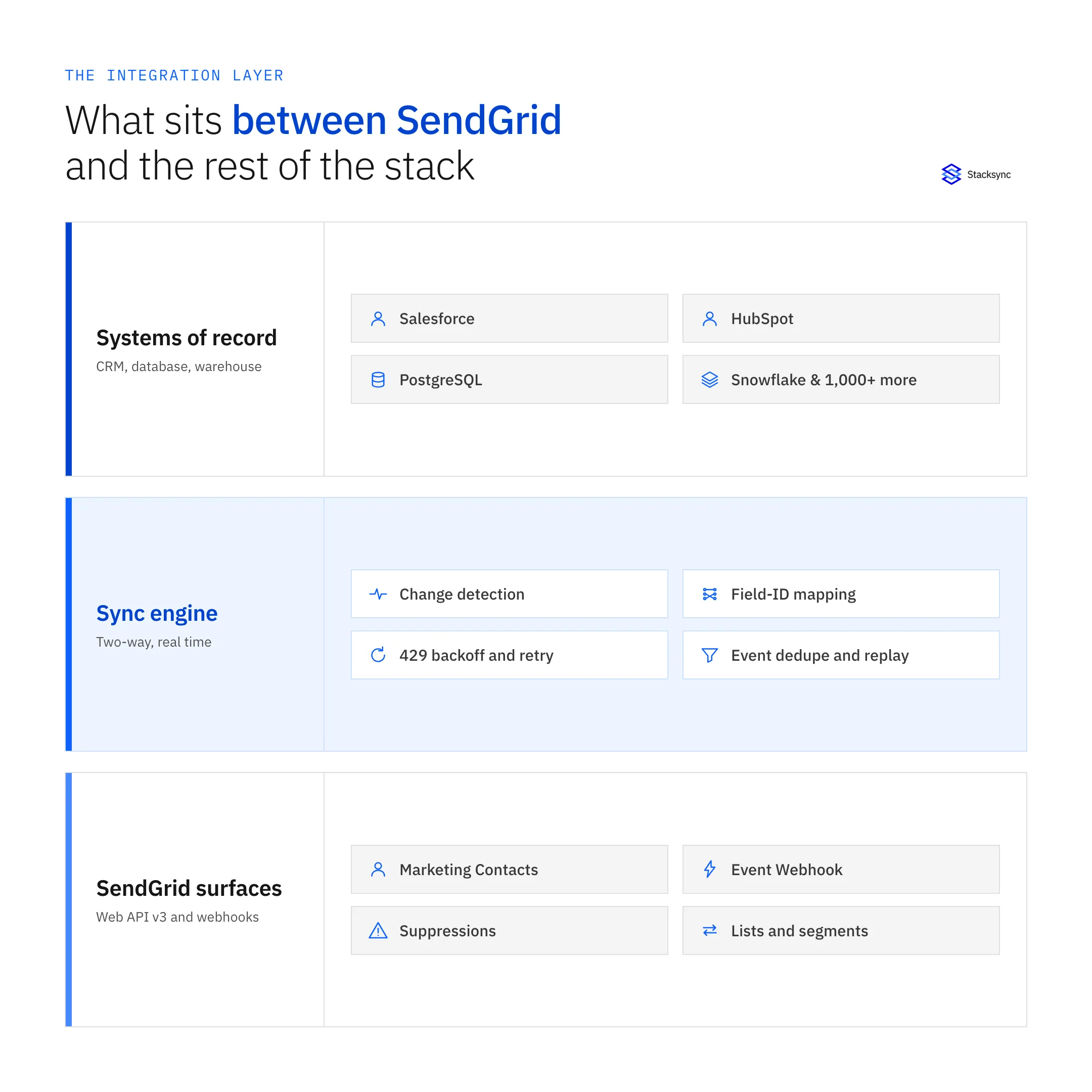
Drawn as a stack it looks obvious, and it is still worth stating: the sync engine is its own tier. When it is instead a function somebody wrote in a sprint, the failure modes stop being monitored, retried, logged events. They become an afternoon spent working out why 4,000 people received an email they had already opted out of.
Why SendGrid is harder to keep in sync than it looks
Four properties of the API decide the architecture. Get them wrong and the integration drifts quietly, which is the worst way for a marketing system to fail, because nothing alerts and the first symptom is a person receiving mail they should not have.
Contact writes are jobs, not writes
PUT /v3/marketing/contacts accepts up to 30,000 contacts or 6 MB per request and returns a job_id. The contact does not exist yet. You poll /v3/marketing/contacts/imports/{id} until the job reports its status, and only then is the record real. An integration that treats the initial response as success will report a clean sync while the contact is still missing, or while 12 rows out of 5,000 failed validation and nobody looked. Job tracking is not a refinement here. It is the difference between a sync you can trust and one that reports green while it is wrong.
The Event Webhook is a firehose with no ordering guarantee
Engagement truth only ever arrives on the Event Webhook: processed, delivered, open, click, bounce, dropped, spamreport, unsubscribe, group_unsubscribe. SendGrid POSTs them as batched JSON arrays, at least once, out of order, with retries when your endpoint fails. A consumer that inserts blindly will double-count opens and will occasionally record a delivery after a bounce. The fix is dull and mandatory: dedupe on sg_event_id and order on timestamp before anything downstream sees the event.
Suppressions are compliance records that live only in SendGrid
Global unsubscribes (/v3/asm/suppressions/global), unsubscribe groups (/v3/asm/groups), bounces (/v3/suppression/bounces), blocks, spam reports, and invalid emails are the records you cannot let drift. When someone unsubscribes through a footer link, the CRM has no idea. If the CRM is where campaign lists get built, the next send includes them, SendGrid suppresses the message, and the person stays on a list they asked to leave. That is a CAN-SPAM and GDPR problem wearing a data-integration costume.
There is no change feed for contacts
This is the honest technical reason a sync layer exists at all. Marketing Contacts has no modified-since endpoint. Your options are a full export through /v3/marketing/contacts/exports, which is another asynchronous job, or driving every change from the system that does have a change feed. A platform that watches the CRM or the database, pushes into SendGrid, and folds the Event Webhook back in is not one design among several. It is the only shape the API supports.
Build, automate, batch, or sync
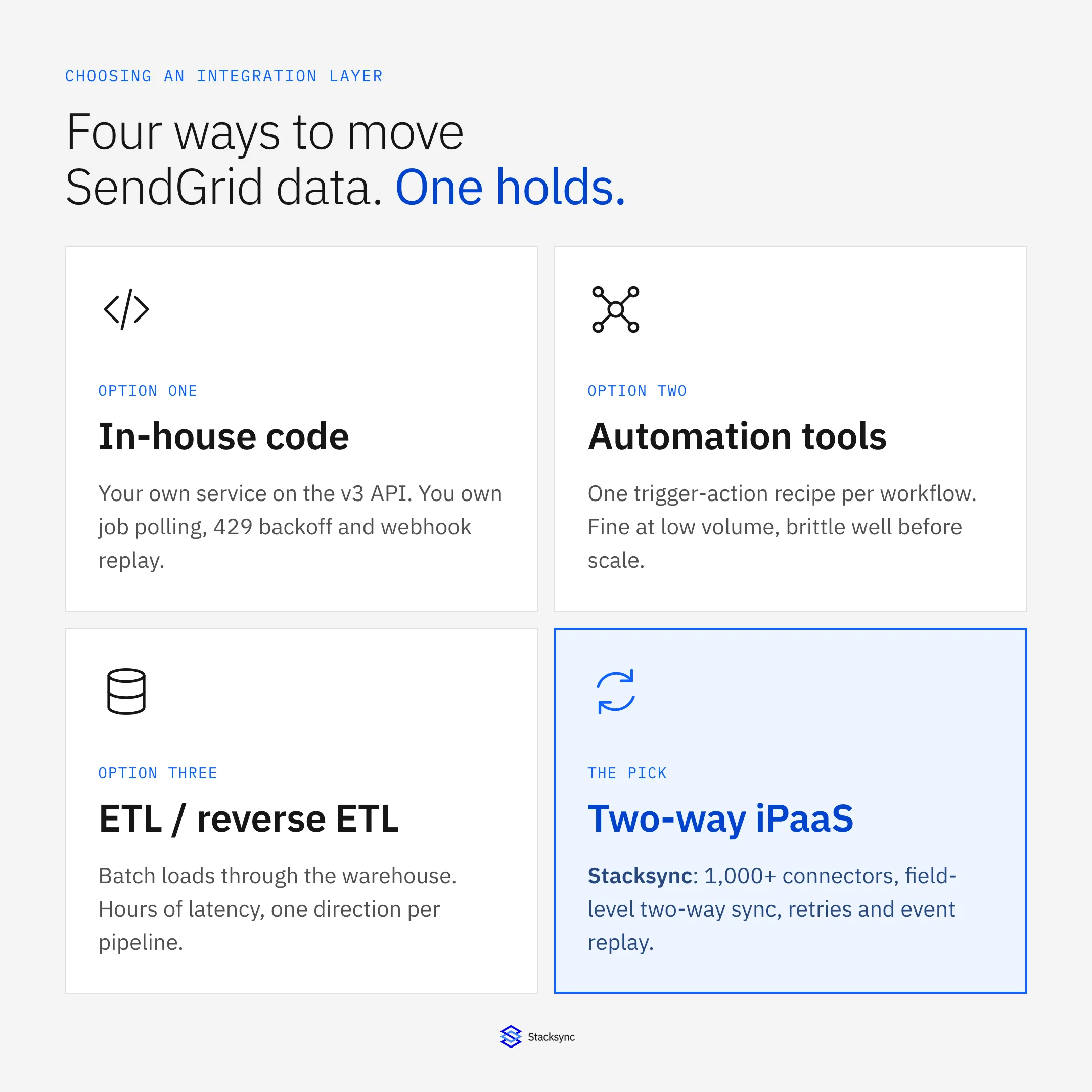
Four approaches turn up in every evaluation, and each one is genuinely correct somewhere. The comparison is only useful if you make it honestly rather than knocking down three strawmen.
- Write it yourself. Right when SendGrid is your only integration and the volume is modest. You will end up writing job polling, 429 handling against
X-RateLimit-Reset, webhook signature verification, dedupe, and a replay path. Call it two to four weeks, then permanent ownership. - Zapier-class automation. Right for a handful of low-volume triggers or an internal alert. Recipes fire per event, so cost and fragility scale with volume, and there is no concept of a record being in sync, only of an event having fired.
- ETL or reverse ETL. Right when the warehouse is genuinely the destination and analysts are the consumer. Events land in Snowflake on a schedule and reverse ETL pushes segments back out. Latency is measured in hours and every pipeline runs one way.
- A real-time two-way iPaaS. Right when SendGrid has to stay consistent with a CRM or a database that people edit all day. Change detection on both sides, a field-level conflict policy, and one connection instead of two pipelines aimed at each other.
| In-house code | Automation tool | ETL / reverse ETL | Two-way iPaaS (Stacksync) | |
|---|---|---|---|---|
| Latency to SendGrid | Whatever you build | Seconds to minutes, per event | Scheduled, hours | Seconds, on change |
| Direction | Both, if you build it | One way per recipe | One way per pipeline | Two way on one connection |
| Async import jobs | You poll and reconcile | Usually ignored | Not modeled | Tracked to completion |
| Event Webhook at volume | You dedupe and order | Not designed for it | Batched into the warehouse | Deduped on sg_event_id |
| Rate limits and 429s | You implement backoff | Drops or errors | Bulk windows | Per-endpoint backoff and retry |
| Suppression sync | A custom job you maintain | Rarely covered | Read only, delayed | Two way, within seconds |
| What drives the cost | Engineering time | Task volume | Rows and compute | Connections and volume |
The question is not which column wins everything. It is how many times you want to own SendGrid's behavior yourself.
The pattern in that table is that three of the four leave the SendGrid-specific behavior in your hands. If SendGrid is one of two systems you integrate, that is a reasonable trade. If it sits in a stack with a CRM, a product database, and a warehouse, owning that behavior four separate times is how integration budgets disappear without anyone deciding to spend them.
What to hold a platform to
Vendor pages converge on the same adjectives, so evaluate against things you can actually test in a trial. These seven are the ones that decide whether the integration survives a real sending program.
- Connector coverage across the whole stack. SendGrid rarely sits alone. Ask for the CRM, the production database, and the warehouse on one engine. Stacksync covers more than 1,000 systems, so the second and third connection is another configuration rather than another project. Start at the SendGrid connector or browse the full connector list.
- Real-time two-way sync at field level. Not two one-way pipelines pointed at each other. One connection, both directions, with a policy for the same field changing on both sides and origin tracking so a value written into SendGrid is not read back as a fresh change and bounced around.
- Async job awareness. Ask directly: when you write contacts, do you wait for the import job, and what happens to rows that fail validation. A vague answer means the platform is treating a queued job as a completed write, and you will find out during a launch.
- Event Webhook ingestion at volume. Batched arrays, at-least-once delivery, dedupe on
sg_event_id, ordering ontimestamp, and a buffer that absorbs the spike after a large send instead of shedding it. - Rate-limit behavior. SendGrid's limits are per endpoint, and the Marketing Contacts endpoints are far tighter than Mail Send. The platform should read
X-RateLimit-Reseton a 429, wait, and preserve queue order, rather than retrying straight away and making the throttle worse. - Custom field mapping by ID. SendGrid custom fields are created through
/v3/marketing/field_definitionsand referenced by field ID, not by name. A platform that maps by label breaks the first time somebody renames a field in the UI, and it breaks silently. - Observability and replay. When a webhook endpoint was down for an hour, you need to know which events you missed and be able to reprocess them. Per-record logs and a replay path are what turn an outage into a backlog instead of a permanent gap in your engagement history.
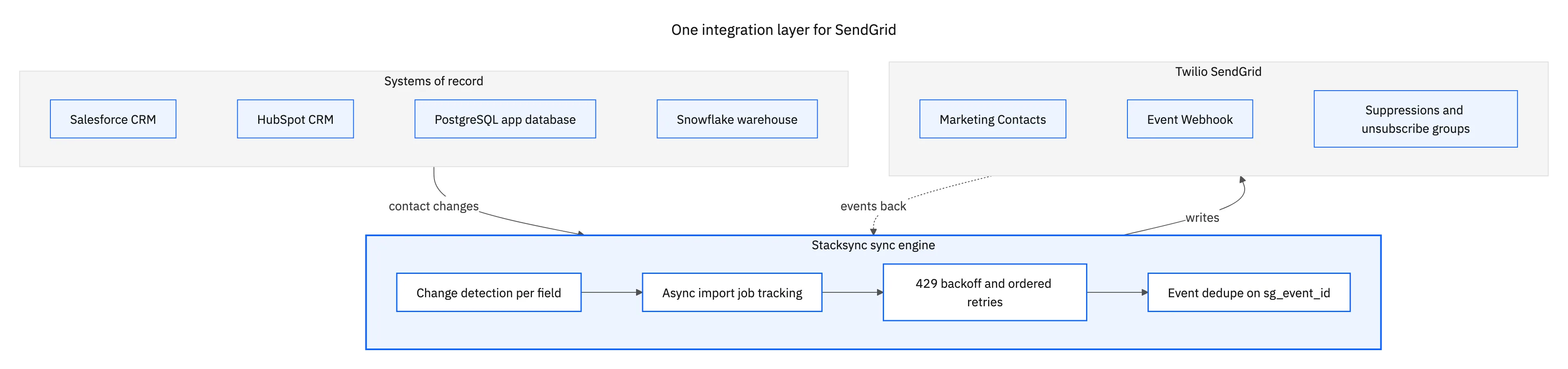
The shape above is the one to aim for. Every system connects to the same engine, the engine holds SendGrid, and events come back along the path they went out on. The alternative, one integration per system with its own credentials, schedule, and failure behavior, is how teams end up reconciling their integrations instead of running campaigns.
What the security review will ask
Email data attracts scrutiny because it is personal data with a regulatory edge on it. Three questions come up in every review, and it is cheaper to have answers before the meeting.
First, key scope. SendGrid API keys can be restricted per permission, so the integration should hold a key with Marketing, Suppressions, and Event Webhook access and nothing more. A platform that asks for a full-access key is asking you to accept its blast radius, and there is no reason to when the API supports scoping.
Second, webhook authenticity. With Signed Event Webhook turned on, SendGrid signs each POST with an ECDSA key and sends X-Twilio-Email-Event-Webhook-Signature. Verifying it is what stops anyone who learns your endpoint URL from writing invented engagement data into your CRM. Ask whether the platform verifies the signature by default or whether that is left to you.
Third, where the data rests. A platform that copies contacts and event history into its own store has just become another system in scope for your DPA and your next audit. Stacksync moves data between systems without parking a copy in the middle, and holds SOC 2 with encryption in transit, which is usually the shortest version of that conversation.

Where SendGrid sits in the stack
In practice SendGrid ends up connected to three or four systems, and each pairing has a different center of gravity. Getting them right individually is most of the work, so each has its own guide.
- The CRM. Salesforce is the most common partner by a distance. Contacts and consent flow out, engagement flows back onto the lead or contact record. See Salesforce and SendGrid, and the step-by-step build.
- The marketing platform. HubSpot is where lists and lifecycle stages live for most mid-market teams, and the interesting question is which side owns the contact record. See HubSpot and SendGrid, and why the answer is two-way.
- The product database. Entitlements, trial state, and account status live in Postgres, and they decide who belongs in which SendGrid list this week. See PostgreSQL and SendGrid.
- The warehouse. Deliverability and engagement reporting gets built where the rest of the company's data already is. See SendGrid and Snowflake.
None of those is a one-way problem, which is the recurring point. The CRM sends contacts and wants opens back. The database sends entitlement changes and wants bounce status back. The warehouse reads events and often writes a computed segment out again. Treat two-way sync as the default and one-way as the deliberate exception, not the other way round.
Match the integration layer to the API you actually have
SendGrid will tell you it accepted the write. It will not tell you the contact exists yet, it will not tell you who unsubscribed unless something is listening on the webhook, and it will not hand you a list of what changed. Those are not defects to complain about. They are the constraints an integration has to be built around, and the reason a generic connector quietly stops matching reality after a few weeks.
An enterprise iPaaS earns its place by absorbing exactly that work: import job tracking, event dedupe, rate-limit backoff, field-ID mapping, signature verification, and replay after an outage. Stacksync connects SendGrid to more than 1,000 systems on one engine, in real time and in both directions, without keeping a copy of your data. To see it running against your own stack, book a demo.

FAQ
Frequently asked questions










Explore these integrations and topics
Related articles