Every Open Lands in SendGrid. Your Reps Live in Salesforce.
A practical setup guide for the SendGrid and Salesforce pairing. It covers the object and field map, why the asynchronous Marketing Contacts write model means a 202 is not a saved record, how to consume the Event Webhook safely with sg_event_id dedupe and signature verification, where engagement events should land in Salesforce, the API limits on both sides, the suppression loop that keeps you compliant, and the three ways teams actually build it.
- Author
- Ruben Burdin · Founder & CEO
- Published
- Read time
- 10 min read

To sync SendGrid with Salesforce you wire three links, not one: Salesforce Contacts and Leads out to SendGrid Marketing Contacts, SendGrid engagement events back onto the Salesforce record, and a suppression loop so an unsubscribe on either side is honoured on the other. Skip the third and you will eventually email somebody who asked you to stop.
The awkward part is that the two systems disagree about what a write is. Salesforce gives you a synchronous save and a record Id you can trust the moment the call returns. SendGrid's Marketing Contacts endpoint takes the payload, returns a job id, and processes it later. Almost everything below follows from that.
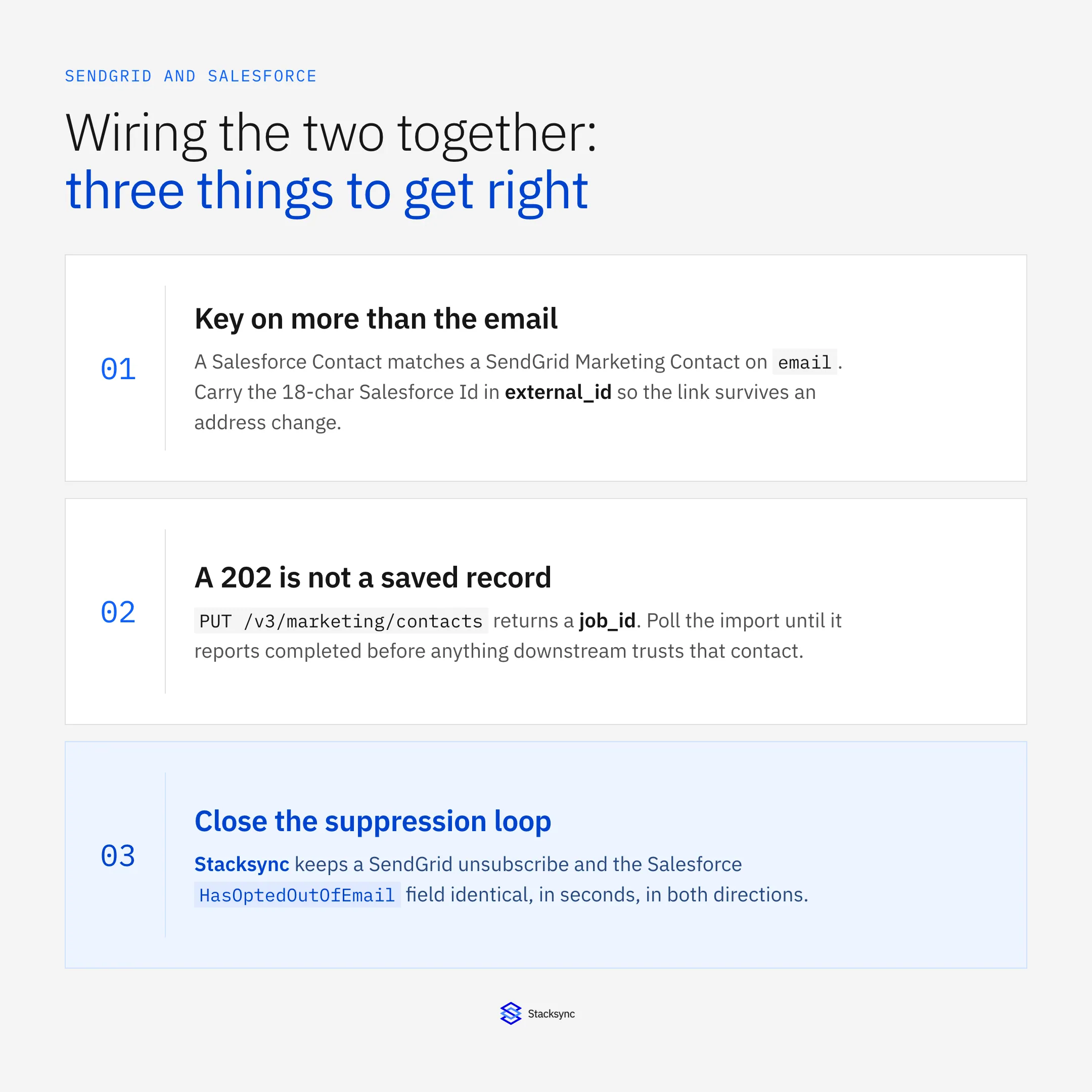
SendGrid is a live connector on Stacksync, so the pairing is configuration rather than a codebase: see the SendGrid connector and the Salesforce and SendGrid integration. If you are still choosing the platform underneath, start with the companion piece on an enterprise-grade iPaaS for SendGrid.
What actually maps to what
SendGrid's marketing model is thin: Marketing Contacts, Lists, Segments, and that is close to all of it. Salesforce has Leads, Contacts, Person Accounts, Campaigns and Campaign Members. The mapping is many-to-few, so decide the collapse rules before you move a record.
| Salesforce | SendGrid | What to watch |
|---|---|---|
| Contact, Lead, or Person Account | Marketing Contact | One contact per address. Decide which object wins when a Lead and a Contact share one. |
| 18-character record Id | external_id custom field | The stable key. Email addresses get corrected, Ids do not. |
| Campaign | List (/v3/marketing/lists) | One list per campaign you actually mail. |
| Campaign Member | List membership | Add and remove as member status changes, or you mail last quarter's audience. |
| Custom fields | /v3/marketing/field_definitions | Created once, then referenced by field ID rather than by name. |
HasOptedOutOfEmail | Global unsubscribe or unsubscribe group | The compliance link. Both directions, always. |
The core object map. Segments are absent on purpose: they refresh on SendGrid's own schedule, so treat them as a read surface.
Why email alone is not a good enough key
SendGrid keys Marketing Contacts on email. That works until somebody corrects a typo in a Salesforce address: the next upsert creates a second SendGrid contact while the original keeps the engagement history and the list memberships. Put the Salesforce 18-character Id in a custom field called external_id, match on that first, and fall back to email only for contacts that predate the sync.
Custom fields are referenced by ID, not by name
Any Salesforce field you want available for segmentation has to exist first as a SendGrid custom field definition. Create it once through /v3/marketing/field_definitions, store the returned field ID in your mapping config, and use that ID in every contact payload. Renaming the field in the SendGrid UI later breaks nothing, because the ID is what the API reads. Hard-coding the display name does break, usually mid-send.
The outbound leg: Salesforce to SendGrid contacts
Pushing contacts out is where integrations quietly go wrong, because the SendGrid write model is asynchronous. PUT /v3/marketing/contacts accepts up to 30,000 contacts or 6 MB per request and returns a job_id. The 202 means the payload was accepted, not that a contact exists. Poll /v3/marketing/contacts/imports/{id} until the job reports completed, then read the error count it returns.
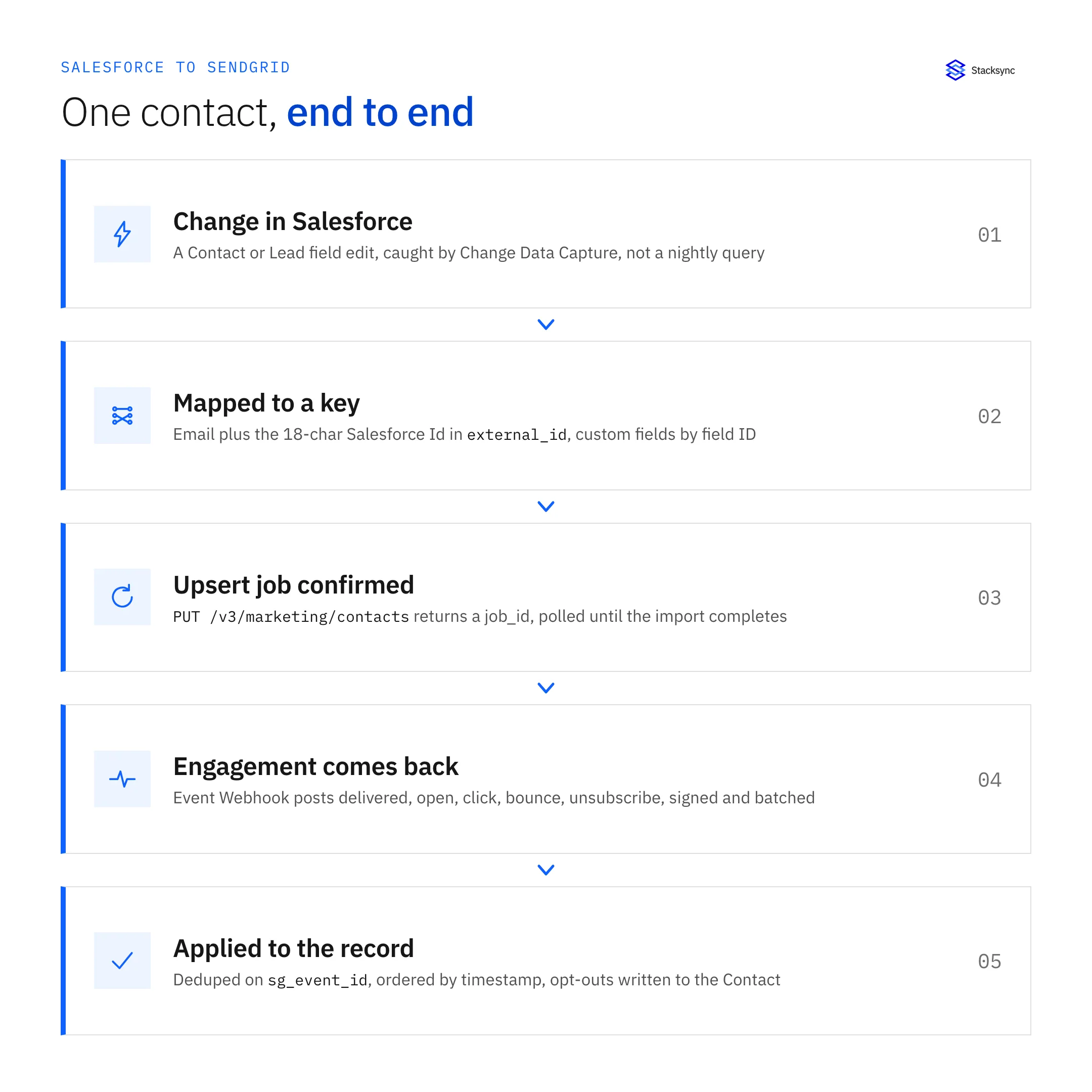
That gap produces the classic bug: a workflow marks the Salesforce record as synced the instant the API returns, the import later fails on a malformed address or a reserved field name, and nothing reconciles it. Treat the job as the unit of work. Store the job_id, mark records confirmed only when the import completes, and requeue whatever the job reports as failed.
The other half of the outbound design is the trigger. Polling for LastModifiedDate > T works, and spends API calls whether anything changed or not: a five-minute poll costs 288 queries per object on a quiet Sunday. Change Data Capture and Platform Events push the change to you instead, so the SendGrid contact updates seconds after the rep hits save and request volume tracks real edits rather than table size.
The inbound leg: SendGrid events into Salesforce
Delivery truth only ever arrives on the Event Webhook. A 202 from /v3/mail/send means queued. Whether the message was delivered, opened, clicked, bounced, dropped or reported as spam turns up later as a POST to your endpoint carrying a JSON array of events.
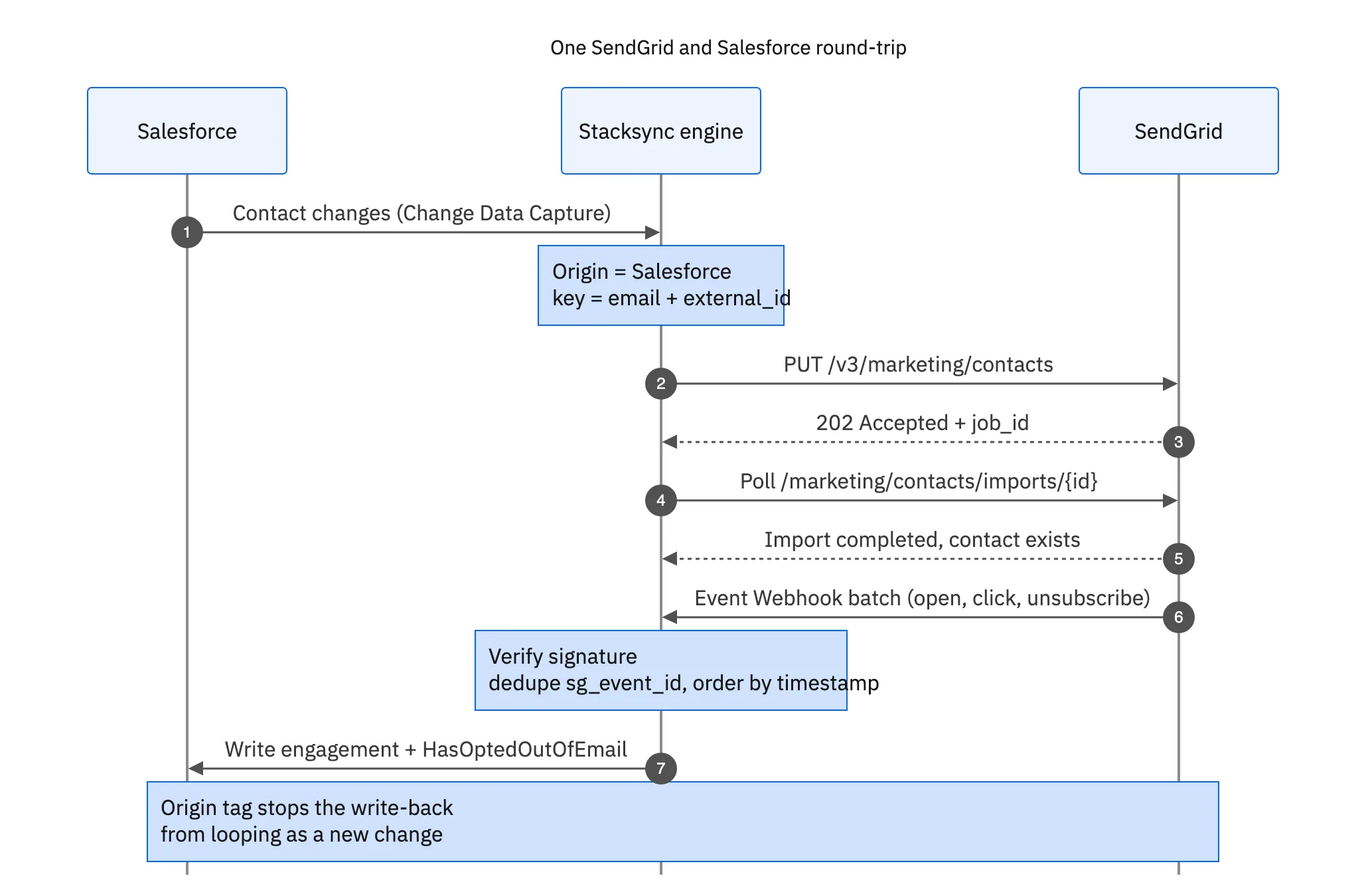
Four properties of that feed decide how the consumer is built. Events are at-least-once, out of order, batched and retried: the same event can arrive twice, a click can land before the delivered event for the same message, one request can carry hundreds of events, and an endpoint that returns a 500 gets the whole batch again.
- Dedupe on
sg_event_id. Every event carries a unique id. Store it and drop anything already applied, or one retried batch double-counts every open in your reporting. - Order on
timestamp. Never trust arrival order. Compare against the last timestamp stored for that message before overwriting a status, or a lateprocessedevent clobbers a delivered one. - Verify the signature. With Signed Event Webhook enabled, each request carries
X-Twilio-Email-Event-Webhook-Signatureand a timestamp header, signed with an ECDSA key. Verify against the public key from your SendGrid account before writing anything, and reject requests whose timestamp is older than a few minutes. - Return 2xx fast, process later. Acknowledge the batch, queue it, then write to Salesforce. Doing the Salesforce writes inline is how you end up with SendGrid retrying because your endpoint timed out, which multiplies the load you were already behind on.
Where the events should land in Salesforce
This is the decision teams regret most often: cheap to change on a whiteboard, expensive after six months of data. Three usual destinations.
| Destination | What you get | What it costs |
|---|---|---|
| Custom Email Engagement object, one record per event | Full history, reportable, filterable by event type | Storage and API consumption. A million-email month is millions of rows. |
| Rollup fields on Contact or Lead | What a rep reads: last opened, last clicked, hard bounced, opted out | No history. You cannot answer which email they clicked. |
| Campaign Member status | Fits the campaign reporting marketing already uses | Only meaningful for events tied to a campaign send. |
Most teams run a hybrid: raw events on a custom object with a retention window, plus rollups on the Contact.
Storage in Salesforce is not free and neither is the API allocation, so set the retention policy before you open the firehose. If the raw volume does not belong in the CRM, land it somewhere built for it and keep only the rollups in Salesforce. Both SendGrid with Snowflake and SendGrid with PostgreSQL are live pairings.
The Salesforce limits that bite
Salesforce enforces a daily API request allocation per org, sized from your edition and licence count, and an engagement feed will eat it. Send a hundred thousand emails, get a processed, a delivered and an open event for most of them, and a one-call-per-event consumer is a quarter of a million API calls against a budget that also has to run the rest of the business.
Three habits keep it inside budget. Batch before writing, so one composite or Bulk API 2.0 request carries hundreds of records instead of one. Split the paths: Bulk API for engagement volume, REST for the low-latency contact updates a rep is waiting on. And filter at the source, because SendGrid lets you choose which event types the webhook posts. If nobody reports on processed, do not receive it.
Outbound, the same arithmetic favours field-level two-way sync over scheduled batch jobs: moving only what changed costs a fraction of what a nightly full export burns re-reading records nobody touched.
The suppression loop is compliance, not tidiness
An unsubscribe recorded in SendGrid has to reach the Salesforce HasOptedOutOfEmail field, and an opt-out a rep sets in Salesforce has to reach SendGrid's suppression list. Miss either direction and you will send to somebody who opted out, which is a CAN-SPAM and GDPR problem, not a data-quality one.
SendGrid keeps suppressions on several surfaces and they are not interchangeable. Global unsubscribes live at /v3/asm/suppressions/global. Unsubscribe groups (/v3/asm/groups) are per topic, so a contact can leave the newsletter and keep billing notices. Bounces (/v3/suppression/bounces), blocks, spam reports and invalid addresses are separate lists again. Decide which set the Salesforce opt-out flag: a spam report should, a soft bounce should not, an invalid address belongs on a data-quality field.
The direction that gets skipped is Salesforce to SendGrid. A rep ticks Email Opt Out after a phone call, nothing propagates, and the contact stays in a SendGrid list until the next campaign goes out. Two-way sync on that one field is the cheapest control in the whole integration, and the first thing to test.
Error handling that survives a bad afternoon
SendGrid rate limits per endpoint, and the Marketing Contacts endpoints are much tighter than Mail Send. A 429 comes back with X-RateLimit-Reset, the epoch second at which the window resets. Read it, wait, retry, with exponential backoff and jitter on top so several workers that hit the wall together do not all resume at the same instant.
Assume the webhook endpoint will be unreachable at some point. SendGrid retries failed deliveries on its own schedule, which covers a short outage but is not an unlimited buffer. That is the real reason to acknowledge fast and process from a queue you own: your queue can be replayed and inspected, somebody else's retry policy can only be waited on. After a long outage, backfill contact state and accept that dropped engagement events are gone.
One more thing to know before designing any of this: SendGrid has no change feed for Marketing Contacts. No endpoint returns every contact modified since a timestamp. Your options are an asynchronous export (/v3/marketing/contacts/exports, another job to poll) or driving every contact change from Salesforce. Most teams pick the second and let SendGrid own only engagement and suppression state.

Three ways to build it, compared
Everything above is true regardless of how you implement it. What changes is who writes the polling loop, the dedupe table, the backoff and the suppression mapping, and who maintains them when SendGrid ships a change.
| AppExchange package | DIY code | Stacksync | |
|---|---|---|---|
| Time to first sync | Days, if it covers your objects | Weeks to months | An afternoon |
| Object and field coverage | Whatever the package ships | Anything you write | Any object and field, mapped in the UI |
| Async import jobs | Hidden, and hard to debug when one stalls | You build the polling and the requeue | Confirmed on job completion, failures surfaced |
| Webhook dedupe and ordering | Varies by package | You build sg_event_id dedupe and timestamp ordering | Handled by the engine |
| Salesforce API budget | Often a call per record | Entirely down to your batching | Field-level changes, batched, backoff on limits |
| Suppression both ways | Usually one direction only | You build both | Two-way on HasOptedOutOfEmail |
| Who maintains it | The vendor's release cycle | Your team, indefinitely | The platform |
DIY is right when the mapping is genuinely unusual. For a standard contact and engagement sync it is a lot of plumbing nobody will thank you for.
The same shape applies if your CRM is HubSpot: see HubSpot and SendGrid and the walkthrough of two-way sync between SendGrid and HubSpot, which meets the same async job and webhook problems against a different object model.
Standing it up on Stacksync
In order, here is what standing it up looks like. None of these steps is a code change.
- 01Connect both systems. Salesforce over OAuth, SendGrid with an API key scoped to Marketing and Suppressions. Nothing pasted into a script, no credentials in a repo.
- 02Create the
external_idfield in SendGrid. One call to/v3/marketing/field_definitions, then map the Salesforce 18-character Id into it so the match key survives an email change. - 03Map objects and fields. Contact and Lead to Marketing Contact, Campaign to List, Campaign Member to list membership, plus the custom fields your segments actually use.
- 04Point the Event Webhook at the sync. Enable Signed Event Webhook, choose the event types you will act on, and pick where they land: a custom engagement object, rollup fields on the Contact, or both.
- 05Turn on the suppression loop.
HasOptedOutOfEmailin both directions, plus an explicit rule for which SendGrid suppression types set it. - 06Backfill, then go live. Run the initial load, read the import job errors instead of assuming there are none, then switch to real time and watch the first day of engagement land.
Adding a third system later is another short configuration on the same engine rather than a second integration to maintain, which is the point of a platform with 1,000+ connectors rather than a point-to-point script.
Get both sides telling the same story
A SendGrid and Salesforce sync is not hard, it is detailed. Key on something stable, respect the asynchronous import job, treat the Event Webhook as the at-least-once out-of-order feed it is, keep suppressions honest both ways, and stay inside the API budget. Get those five right and a rep finally sees what the contact did with the last email.
To see it running both ways on real data, book a demo, look at the Salesforce and SendGrid integration, or read the broader guide to an enterprise-grade iPaaS for SendGrid.

FAQ
Frequently asked questions










Related articles