






















Keeping Dynamics 365 Finance & Operations and PostgreSQL in Step
A guide to keeping a PostgreSQL application database and Microsoft Dynamics 365 Finance & Operations consistent. It explains why a product keeps a local copy of F&O data, why two one-way exports drift and echo, and how a real two-way sync uses field-level change detection, origin tracking, and conflict resolution to keep both databases in step. Follows one record through its sync lifecycle, including the throttling and conflict branches.
- Author
- Ruben Burdin · Founder & CEO
- Published
- Updated
- Read time
- 7 min read

Plenty of products need what lives in Dynamics 365 F&O, order status, credit limits, invoice balances, without making users log into the ERP. The usual answer is to pull that data into the app's own PostgreSQL database. The moment you do, you have two copies of the same records, and they start to drift. Keeping them in step is a two-way sync problem.
This guide is about doing that properly: what two-way sync means when one side is an ERP and the other is a Postgres app database, how a record moves through its sync lifecycle, and why field-level sync beats a pair of one-way exports.
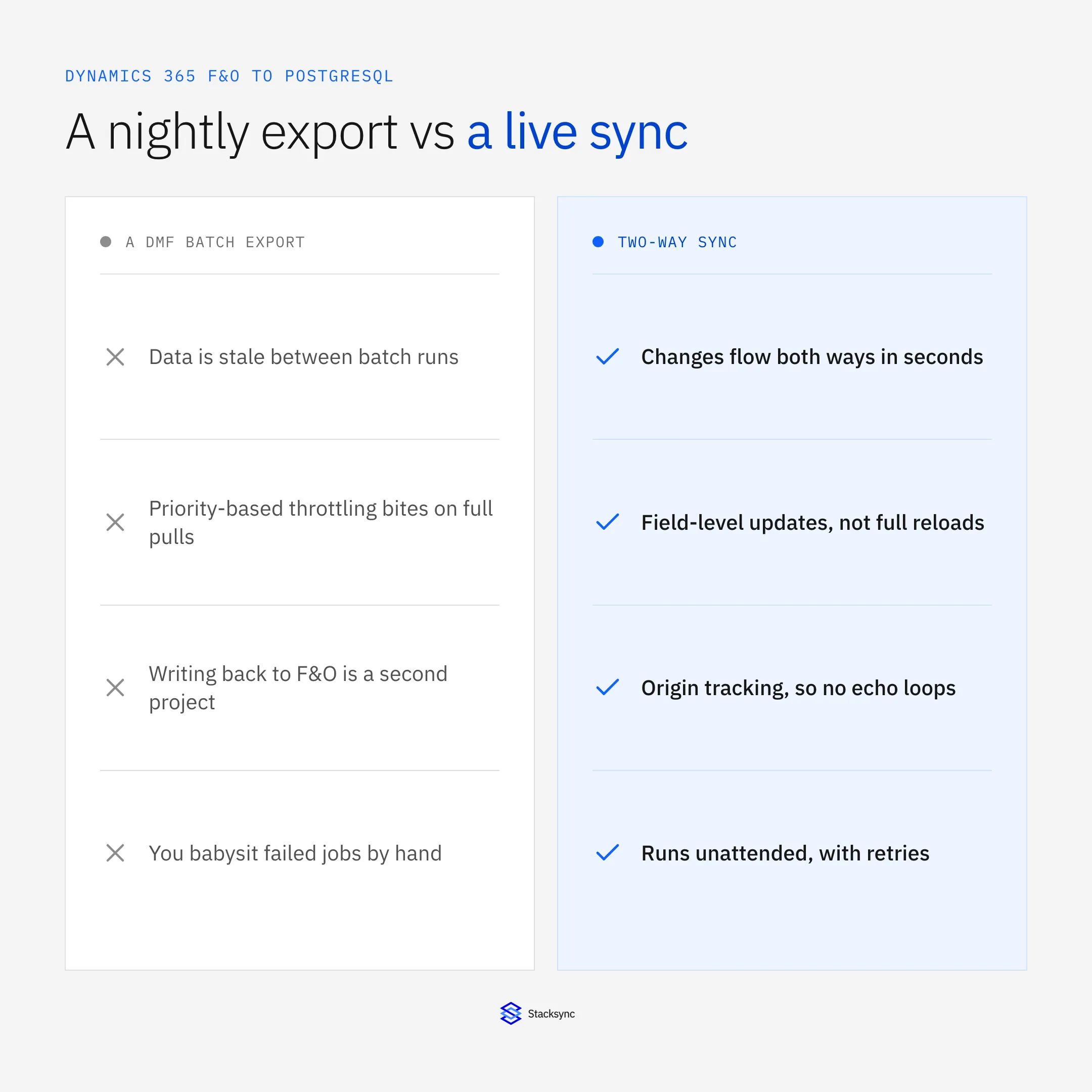
The setup assumes a two-way sync platform such as Stacksync between F&O and Postgres. The Dynamics 365 connector and PostgreSQL connector pages cover the surface; here we focus on keeping the two consistent.
Why an app keeps a local copy of F&O data
Your product cannot make thousands of users hit the F&O OData endpoints directly. It is too slow for an app UI, and it would trip priority-based throttling in minutes. So the app keeps the data it needs, customers, orders, balances, in its own Postgres database, where reads are fast and under your control.
That local copy is only useful if it is accurate. If a payment posts in F&O and the app still shows an open balance, or a customer updates an address in the app and F&O never hears about it, the copy is worse than no copy, because people trust it. Two-way sync is what keeps the copy honest.
What two-way sync actually means here
Two one-way exports are not a two-way sync. A pair of scripts, one F&O-to-Postgres and one Postgres-to-F&O, will fight each other: each treats the other's write as a fresh change and echoes it back, and when both sides edit the same record, one blindly overwrites the other. A real two-way sync puts an engine in the middle.
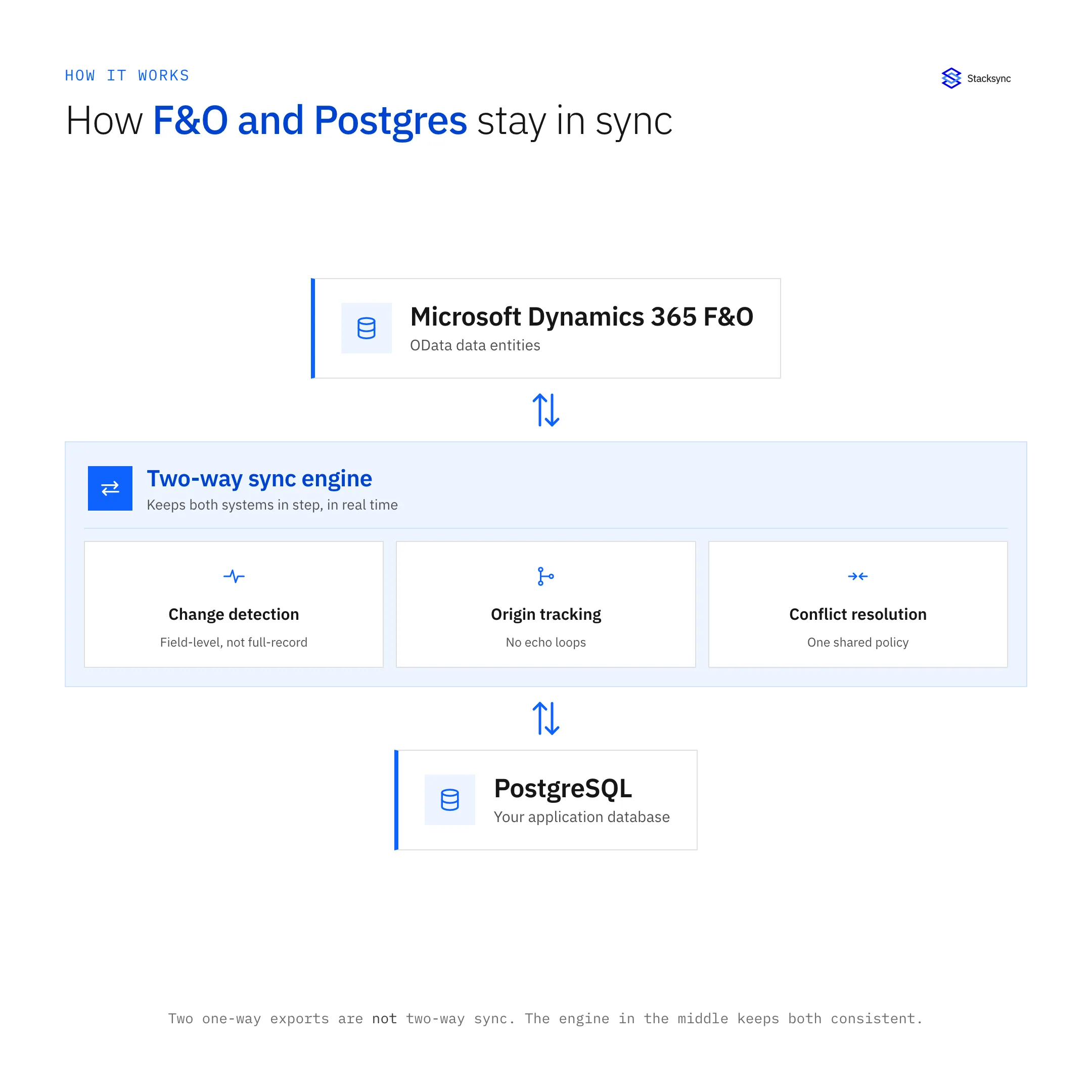
The engine does three things a pair of scripts cannot: it detects changes at the field level so only what moved is synced, it tracks the origin of every change so a write does not loop back, and it resolves conflicts under one shared policy when both sides touch the same field. That is the difference between two databases that agree and two databases that argue.
The life of a synced record
It helps to follow one change through the system. An edit in either F&O or Postgres enters a lifecycle: detected, mapped, applied, and confirmed, with branches for conflicts and for throttling.
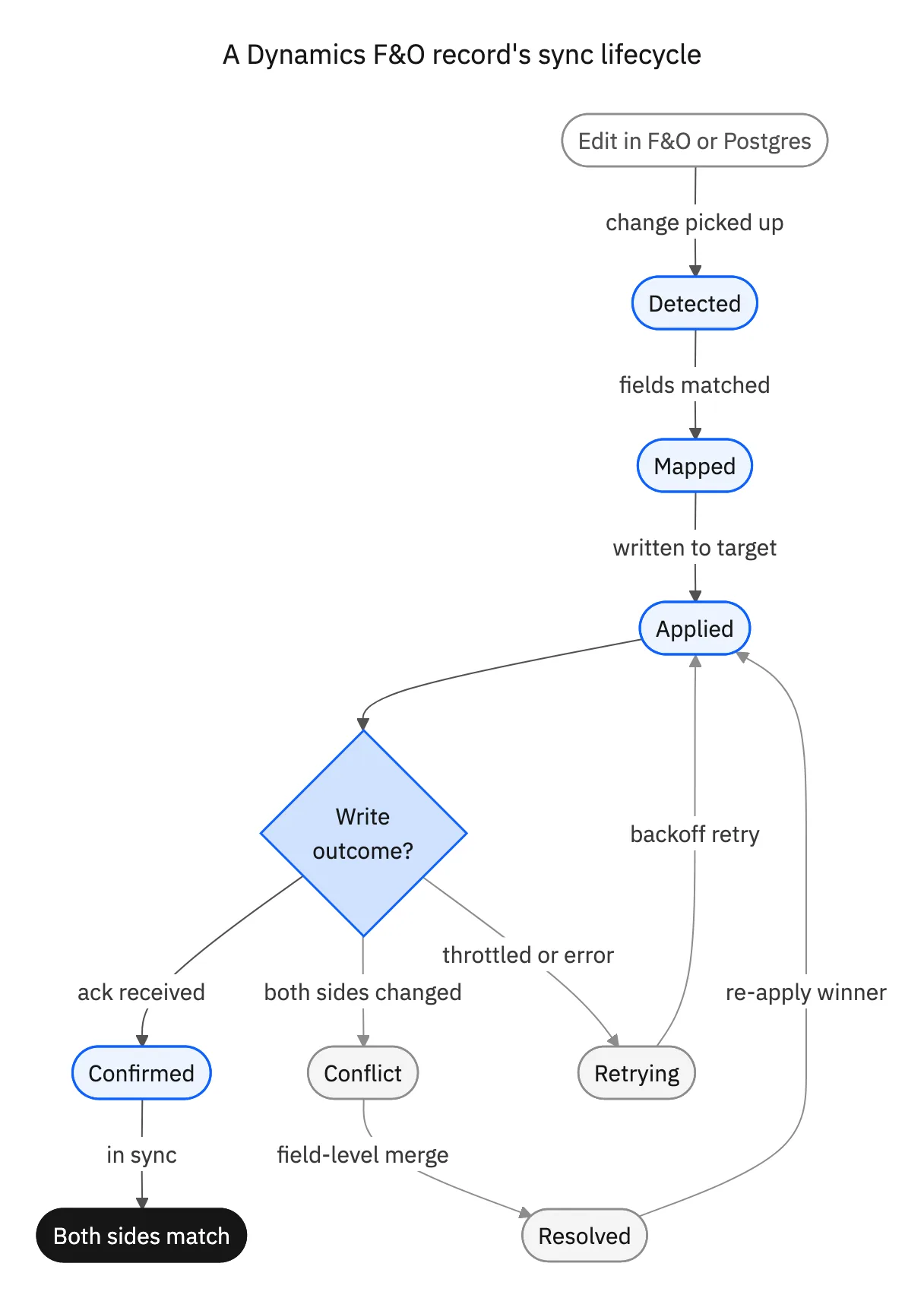
When a write is throttled, F&O returns a 429 and the engine backs off and retries rather than dropping the change. When both sides changed the same record, the engine merges at the field level and re-applies the winner. Only when the target acknowledges the write is the record marked confirmed and both sides declared in sync. Nothing is silently lost, and nothing loops.
One-way export vs two-way sync
The pair-of-scripts approach looks cheaper on day one. The table lays out what it actually costs every day after.
| Two one-way exports | Field-level two-way sync | |
|---|---|---|
| Consistency | Drifts between runs | Both sides match in seconds |
| Echo loops | Each write re-triggers the other | Origin tracking stops the loop |
| Conflicts | Last write wins, blindly | Merged per field, one policy |
| Load on F&O | Full pulls trip throttling | Only changed fields |
| Operations | Two scripts to babysit | One engine, monitored, retried |
Two exports look cheaper on day one and cost more every day after, in drift and reconciliation.
That daily cost shows up as reconciliation, as support tickets about wrong balances, and as the engineer who owns the cron jobs. A real two-way sync moves that cost off your plate, and it is the same engine that keeps F&O and Snowflake in step, so a second pairing is configuration, not a second project.

Apply this in automotive components: incoming release evidence and accepted comparison state
Once Dynamics records are available in an operational database, automotive teams still need to review which customer release is current and firm. The linked agent guides explain that business review and its exceptions while this page retains the PostgreSQL connection setup.
| Record to reconcile | Responsible owner | Rule to preserve |
|---|---|---|
| Incoming release evidence | Customer operations | Retain source category, customer plant, part references and received version without normalizing away uncertainty. |
| Accepted comparison state | Planning | Use the current approved release and its recorded quantity, timing and applicable revision. |
| Shipment context | Shipping | Show confirmed relevant shipments with their actual release relationships rather than matching by item alone. |
An exception to plan for: The customer plant reference is unknown. Hold the affected lines for mapping review and show candidate context without choosing a default plant. Acceptance check for the pilot: the packet preserves raw line differences beside its summary.
The automotive components hub connects the broader operating context. These guides develop the specific record mappings and decisions for this application:
Two databases, one truth
Keeping Dynamics 365 F&O and PostgreSQL in step is not about copying data faster. It is about an engine that detects field-level changes, tracks their origin, and resolves conflicts, so the app's local copy is always something users can trust. Set that up once and the drift, the echo loops, and the reconciliation go away.
Stacksync is built for exactly this: real-time, field-level, origin-aware two-way sync between F&O and Postgres, with backoff that respects F&O throttling. To keep your own app database and F&O consistent, book a demo.

FAQ
Frequently asked questions










Explore these integrations and topics
- connectorDynamics 365 F&O integrations
- connectorPostgreSQL integrations
- connectorMicrosoft Dynamics 365 integrations
- platformTwo-way sync
- platformDatabase synchronization
- Two-way sync guidesUnderstand two-way sync, record matching, field ownership, and production readiness.
- Database synchronization guidesWork through database change capture, application writes, and reliable record reconciliation.
Related articles






