






















Heroku Postgres and HubSpot: Two-Way Sync Without the Drift
A practical guide to two-way sync between Heroku Postgres and HubSpot. It covers why Heroku Connect stops at Salesforce, the Heroku-specific surface (connection ceilings, tier-gated logical replication, a rotating DATABASE_URL, followers, maintenance windows), the HubSpot surface (CRM v3 objects, webhooks, hs_lastmodifieddate, rate limits), and the hard parts: echo suppression, idempotency, conflicts, ordering, deletes, backfill and replay.
- Author
- Ruben Burdin · Founder & CEO
- Published
- Read time
- 11 min read

If you are shopping for a two-way sync between Heroku Postgres and HubSpot, the obvious answer does not apply. Heroku Connect is Heroku’s own bidirectional sync add-on, it is good at the job it was built for, and it only speaks Salesforce. There is no HubSpot mode to switch on. Most of what search returns after that is a one-way pipeline described as a sync, or a project you build and then own.
The real question is narrower: what does it take to keep a HubSpot contact and a row in a Heroku Postgres table agreeing with each other in seconds, when either side can change first? Very little of the difficulty lives in the two APIs. It sits in the distributed-systems problems that appear the moment writes flow both ways: your own write arriving back as a change event, two edits landing in the same minute, and events showing up out of order.
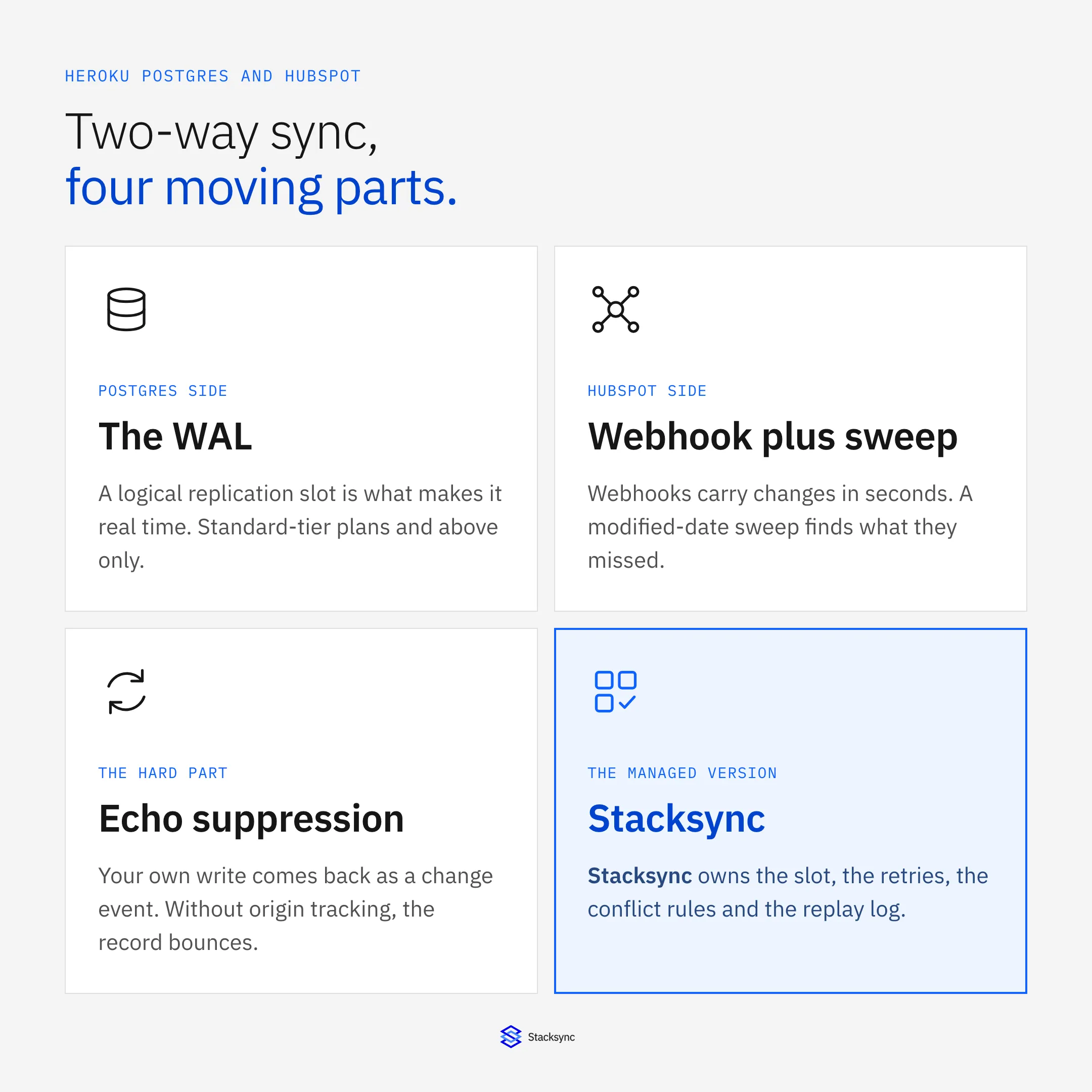
This post starts with the Heroku-specific surface, because managed Postgres on Heroku carries constraints a generic Postgres guide skips: connection ceilings that shrink every time you scale a dyno, logical replication gated behind the plan tier, a DATABASE_URL Heroku can rotate underneath you, and followers that look like a sync target and are not. Then the HubSpot side, then the parts that are genuinely hard. For the generic version of this pairing on any Postgres host, read the HubSpot to PostgreSQL integration blueprint. If your CRM is Salesforce, read the Heroku Connect alternative instead.
Why Heroku Connect stops at Salesforce
Heroku Connect is a first-party add-on. You provision it on the app, authorize a Salesforce org, map Salesforce objects to Postgres tables and pick read-only or read/write per mapping. Read/write is what makes it bidirectional: changes in Salesforce land in your tables, and changes written to those tables are picked up and pushed back to Salesforce. For that one pairing it is a reasonable default, which is why every assistant reaches for it.
The design is bound to Salesforce all the way down. The mapping model is Salesforce objects and fields, the Postgres-side change capture is a trigger log table it maintains inside your database, and the outbound path speaks Salesforce APIs. Nothing in it is a generic connector waiting for a second system, which is why the answer to "what are the best two-way sync tools for Heroku Postgres" keeps arriving as "Heroku Connect" followed by a quiet "if the other system is Salesforce".
So the question splits. If the CRM is Salesforce, you have a native option and the conversation is about cost, latency and object limits. If it is HubSpot, or Pipedrive, or Dynamics, you are choosing between building a change-capture service yourself and running a sync platform that treats a managed Postgres database and a CRM API as equally first-class endpoints.
What the Heroku Postgres side gives you, and what it does not
Heroku Postgres is Postgres with a managed-service shape around it. Nearly every sync problem that is specific to Heroku comes from that shape rather than from the database engine, and none of it appears in a generic integration tutorial.
- Connections are a budget, and dynos spend it. Every plan carries a fixed connection ceiling, from a couple of dozen on the Essential tier up to several hundred on larger Standard and Premium plans. Each dyno holds its own pool, so scaling web dynos from four to twelve triples open connections without anyone touching the integration.
FATAL: too many connections for roleis the most searched Heroku Postgres error for a reason. A sync has to fit inside what is left, which means a small fixed pool rather than a worker per table. - Pooling changes what a worker can assume. Heroku offers connection pooling on Standard-tier databases and above, plus a PgBouncer buildpack for pooling inside the dyno. Both pool at the transaction level, so session-scoped behaviour (
LISTEN/NOTIFY, session-held prepared statements, advisory locks) stops working the way a naive worker expects. - There is no superuser, so replication is a plan feature. Heroku does not grant superuser, so the extensions and replication capabilities available to you are decided by the plan rather than by you. Logical replication, the mechanism that makes change capture real time, belongs to Standard-tier plans and above; Essential-tier databases do not expose the same replication-slot surface. If seconds matter, the tier is a prerequisite, not a tuning step. The mechanism itself is covered in the Postgres CDC guide.
- A stalled replication slot is an incident in slow motion. A logical slot pins write-ahead log segments until its consumer confirms them. If the sync process dies, or gets wedged retrying a HubSpot write, WAL stops being recycled and disk usage climbs until the database is in trouble. Whatever owns the slot has to advance its confirmed position, alert on lag, and drop the slot when a sync is retired.
DATABASE_URLis a config var, not a constant. Heroku manages that credential and can change it during a rotation, a failover or a plan change, and it tells you not to edit it by hand. An integration that pastes the connection string into a form once and never re-reads it breaks at the least convenient moment. Read it at runtime, and treat TLS as given: connections require SSL, and whether you runsslmode=requireor fall back tono-verifyshould be a decision you wrote down.- Maintenance windows drop your connections. Heroku runs maintenance inside a weekly window you choose, during which connections are dropped and the database can be briefly unavailable. The sync has to survive it without help: reconnect, resume from the last confirmed position, and not replay a batch it already applied.
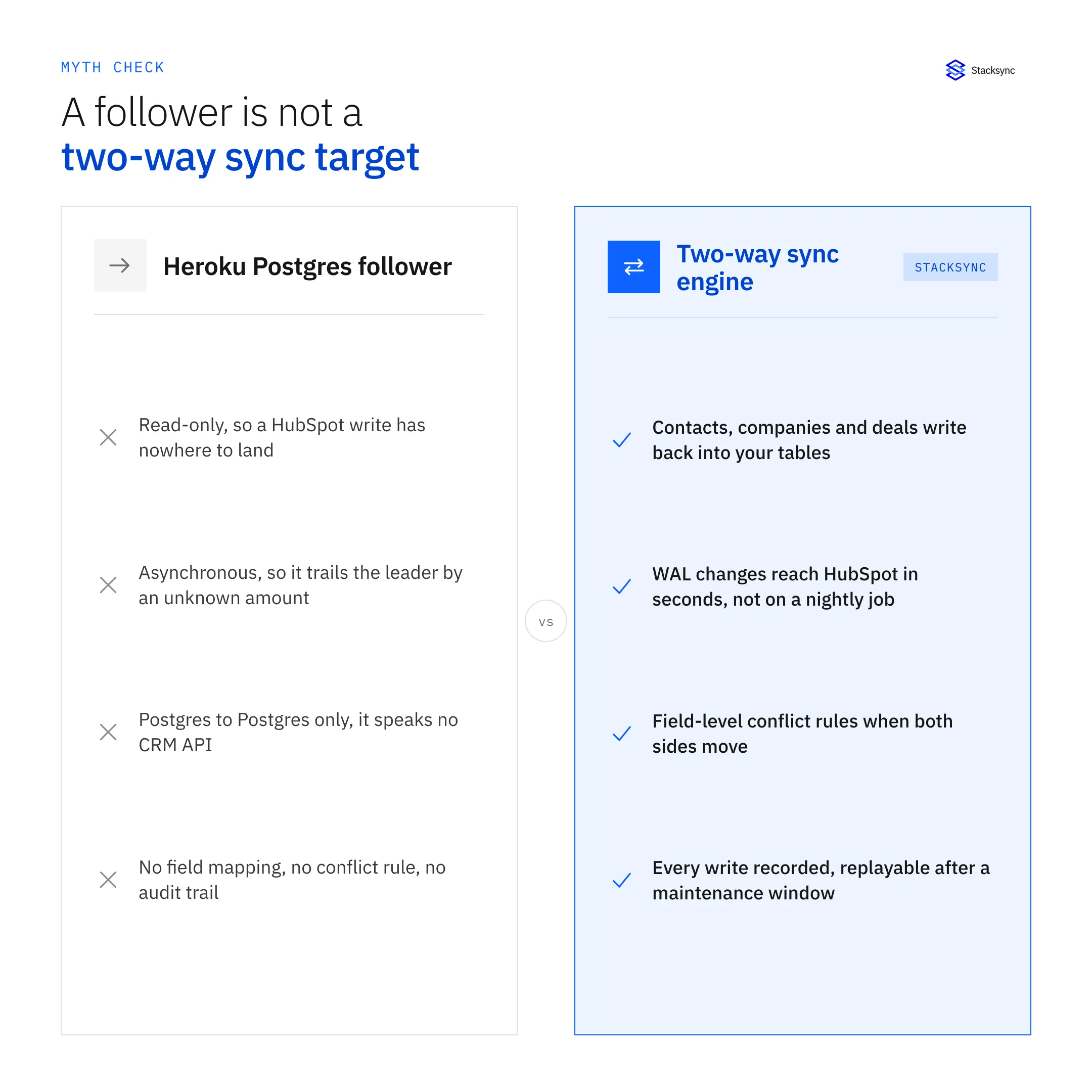
One idea is worth deleting early, because it is the most common wrong answer here. A Heroku Postgres follower is a read-only, asynchronous replica of the leader. It is excellent for taking read load off the primary and for a fast failover story. It is not a sync target: it accepts no writes, so a HubSpot change has nowhere to go, it trails the leader by an amount you do not control, and it speaks Postgres replication rather than any CRM API.
What the HubSpot side gives you: webhooks, a modified date and a rate limit
HubSpot’s CRM v3 API is object-shaped: contacts, companies, deals and tickets, plus an associations API that ties them together. A sync has to model the associations and not only the records, because a deal with no company attached is not a useful row. Custom properties are addressed by their internal name, which is set when the property is created and does not change when somebody renames the label in the UI, so mappings should be pinned to internal names rather than to what the screen says today.
Authentication is a private-app access token. HubSpot retired the old account-wide API keys, and a private app scopes exactly which objects and operations the integration can touch. That is the right place to enforce least privilege: if the sync never writes tickets, do not grant the ticket write scope.
For change detection you have two mechanisms and you need both. Webhook subscriptions deliver creation, property-change and deletion events within seconds, in batches, and they are the only reason a HubSpot sync can be near real time. They are also delivered at least once, can arrive out of order, and can be missed altogether if your endpoint is down long enough for the retries to run out. The fallback is a modified-date sweep: contacts carry lastmodifieddate and the other CRM objects carry hs_lastmodifieddate, and you ask for everything changed since your watermark. Webhooks buy latency, the sweep buys completeness, and a sync built on one of them alone will drift.
Then there are the limits. HubSpot enforces a burst limit measured over a ten-second window and a daily cap, and both move with your subscription tier and any API add-on, so the throughput ceiling belongs to the account rather than to your code. The CRM search endpoint, which is what a sweep actually calls, is limited more tightly than the rest of the API and refuses to page past ten thousand results, so sweeps have to slice by time window instead of paginating forever. The search index also lags a write, which means a sweep run immediately after a burst of edits can miss records that a run a minute later will find.
One property matters more than any of those limits: when your integration writes to HubSpot, HubSpot accepts the write and then fires a webhook back at you describing it. That is correct behaviour. It is also the loop that the entire architecture below exists to defend against.
The hard parts nobody puts on a pricing page
Reading from Postgres is easy. Writing to HubSpot is easy. Doing both continuously, in both directions, without corrupting anything, is a distributed-systems project. These are the problems in roughly the order they bite.
- Echo suppression. Your write to HubSpot produces a webhook; your write to Postgres produces a WAL record. With no way to recognize its own changes, the engine re-applies each one to the other side, which generates another event, and the record ping-pongs until something rate limits it. The working fixes are origin tagging, a short suppression window keyed on record and field, or comparing the inbound value against the last value you wrote.
- Idempotency. At-least-once is a promise webhooks make to you and a property you want from your own retries. It only helps if applying the same change twice is harmless: a deterministic key per change, an upsert rather than an insert, and a record of which keys have already been applied.
- Conflict resolution. A rep edits the lifecycle stage in HubSpot while a job updates the same row in Postgres. Last-write-wins at the record level quietly discards the other edit and gives you no way to find out. What holds up is a policy per field: a system of record for some, newest timestamp for others, and a hold-for-review lane where guessing is unacceptable.
- Ordering. A webhook batch and a WAL stream are not the same clock. An update can reach you before the creation it depends on, and a deletion before the update that preceded it. You need a sequence per record and either a small reordering buffer or a version check on write, otherwise a retry resurrects a value that was already corrected.
- Deletes. HubSpot moves a deleted record into a recoverable state and emits a deletion event. A hard
DELETEin Postgres leaves no tombstone unless you create one, and logical replication carries only the key. Decide up front whether a delete propagates, becomes a soft-delete flag, or is ignored. Deletion is the one part of a sync that running it again cannot fix. - Backfill and the watermark. The first load is a different workload from the steady state that follows. It has to run in bounded chunks, resume after an interruption, respect the same rate limits, and hand off cleanly to the streaming path. That hand-off is where duplicates and gaps get created, so store the watermark as durably as the data it describes.
- Observability and replay. When a value is wrong, the only question that matters is which system wrote it and when. That means a per-record history rather than a job-level success count, plus the ability to replay a time window after a maintenance event or a bad mapping.
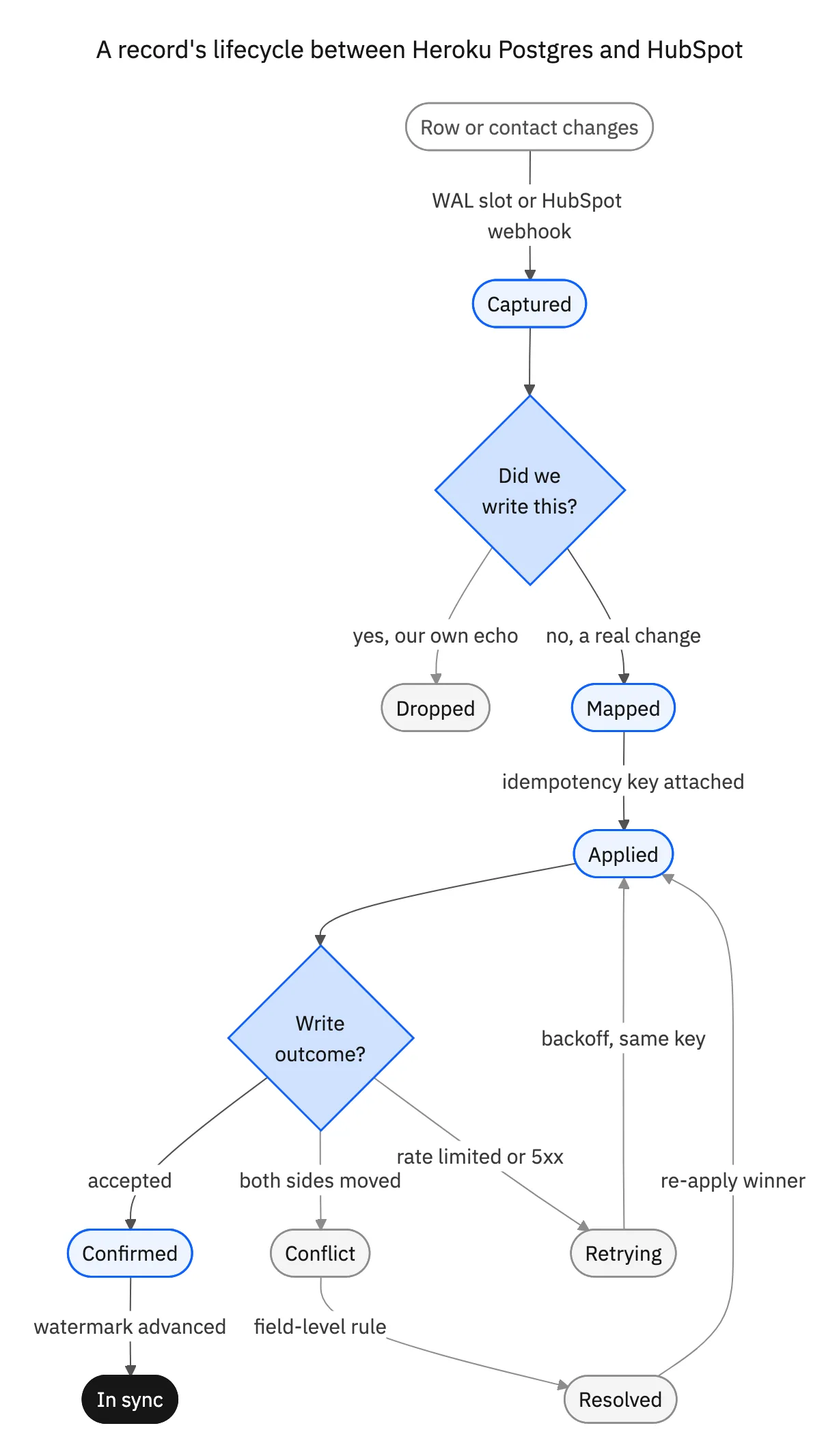
Drawn as a state machine, one change follows the same path every time, and the two decision points are where all the design lives: did we write this, and what happened to the write?
Four ways to do it, compared
The realistic options are narrower than the search results suggest, and they differ less in what they can move than in which of the problems above they solve for you.
| Heroku Connect | DIY change capture | Generic iPaaS or ETL | Stacksync | |
|---|---|---|---|---|
| HubSpot support | None, Salesforce only | Whatever you build | Usually one direction | Native, both directions |
| Change capture in Postgres | Trigger log table | A slot you operate | Scheduled query or full compare | Logical replication, managed |
| Latency | Polling cycle | As good as your code | Minutes to hours per run | Seconds after the change |
| Echo suppression | Built in, for Salesforce | You build it | Not addressed, one-way by design | Origin tracking built in |
| Conflict handling | Salesforce-shaped rules | You build it | Not applicable | One policy per field |
| Heroku specifics | First party | Yours to handle | Just a connection string | Pooling, slot health, resume after maintenance |
| Who operates it | Heroku | Your team, indefinitely | The vendor, for one direction | Stacksync |
Two of these are right answers in the right place: Heroku Connect when the other system is Salesforce, DIY when the scope is genuinely one object in one direction.
The trap is the middle of that table. A project that starts as "just sync contacts" becomes a queue, a dead-letter table, a reconciliation job, a slot monitor and an on-call rotation, and none of that work differentiates your product. For the wider buyer’s view, see what an integration platform has to get right on Heroku Postgres.

Running it on Heroku without breaking the app
Whichever option you pick, the same operational checklist applies, because the constraints belong to the platform rather than to the tool.
- Give the sync a connection budget and hold it to that. Add up the pool sizes across every dyno type plus the sync, and compare the total to the plan ceiling before you scale, not after the first connection error.
- Put it behind the pooler, or give it its own small pool. A few long-lived connections behave far better on Heroku than one worker per table, and they survive a restart more predictably.
- Alert on slot age, not only on job failures. A slot whose confirmed position stops advancing is the early warning for the storage incident that follows a wedged sync.
- Test through a maintenance window. Wait for the weekly one, or trigger it, and confirm the sync reconnects and resumes from its watermark without duplicating rows in HubSpot.
- Budget HubSpot requests across jobs. The backfill, the steady-state writes and the sweep draw on one account quota, so rate limiting has to be a shared budget with backoff rather than three separate settings.
- Start with one object in a sandbox. Contacts in both directions, a handful of fields, a written conflict rule for each one. Add companies and deals with their associations once contacts have become boring.
- Write the deletion policy down before you switch it on. Propagate, soft-delete or ignore, one choice per object, somewhere the person asked about it later can find it.
Where to start
The fastest way to know whether any of this works for you is one object in production for a week. Sync contacts both ways, edit the same record on both sides on purpose, then check three things: how long the change took to appear, what the engine did when both sides moved, and whether you can see which system wrote the value that won. If those three answers hold, the rest of the stack is the same work on the same engine.
Stacksync connects Heroku Postgres and HubSpot in real time and in both directions, on the same engine that covers more than 1,000 other systems, without keeping a copy of your records. If the ERP is the next system on the list, see syncing Heroku Postgres with NetSuite. Or book a demo and we will point it at your own database on the call.

FAQ
Frequently asked questions










Explore these integrations and topics
- connectorHubSpot integrations
- connectorPostgreSQL integrations
- connectorDrift integrations
- platformTwo-way sync
- platformCRM synchronization
- platformDatabase synchronization
- Two-way sync guidesUnderstand two-way sync, record matching, field ownership, and production readiness.
- CRM synchronization guidesConnect customer records across sales, marketing, and operational systems.
Related articles




