






















The Integration Layer Heroku Postgres Actually Needs
A buyer's guide to putting an integration layer in front of Heroku Postgres. It covers what enterprise-grade means when the endpoint is a managed database, the seven properties of Heroku Postgres that break naive pipelines, why the connection budget is the first design constraint, what Heroku Connect does and does not cover, the checklist to hold a platform to, and how to test one in a week.
- Author
- Ruben Burdin · Founder & CEO
- Published
- Read time
- 11 min read

Heroku Postgres is managed Postgres. You provision it as an add-on, Heroku hands your app a DATABASE_URL, and somebody else runs the backups, the failover and the version upgrades. For a team shipping product that trade is usually correct. It also means the database has a shape you did not choose, and anything you put in front of it has to work inside that shape.
That matters more than it sounds. The Heroku Postgres problems people actually search for are not query plans. They are too many connections, SSL handshakes, plan tiers, and what breaks when the credentials change. Those are integration problems, and a tool that connects to Postgres in general is not automatically a tool that connects to this Postgres.
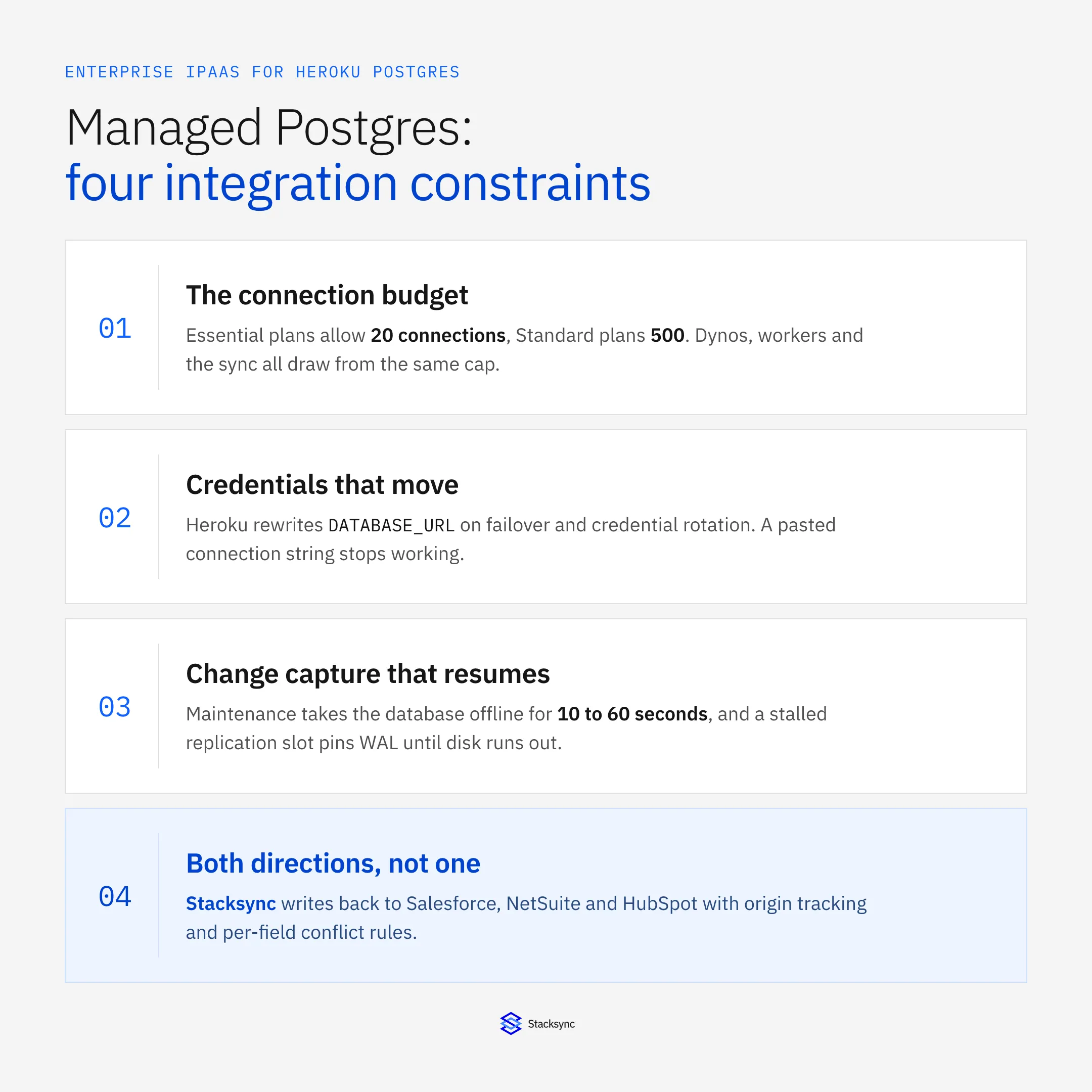
This is a guide to what an integration platform has to get right when the endpoint is Heroku Postgres: the connection budget, credentials that move underneath you, change capture that survives a maintenance window, and writes that go back out to the systems where people work. If you already know the pair you need, go to how to sync Heroku Postgres with NetSuite or two-way sync between Heroku Postgres and HubSpot. For the connector itself, see the Heroku Postgres connector.
What an enterprise iPaaS for Heroku Postgres actually has to do
An integration platform as a service is a hosted layer between your systems that watches for changes and applies them where they belong. You configure it instead of building it. An enterprise iPaaS for Heroku Postgres is one that treats the database as a first-class endpoint on both sides: it lands records from Salesforce, NetSuite, HubSpot or a warehouse into Heroku Postgres tables continuously, and it pushes rows the application writes back out to those systems, with a rule for what happens when the same field moves in two places at once.
The word enterprise is doing real work there. Almost any tool can dump a table on a schedule. What separates a platform is how it behaves in the cases that break things: a connection cap already half consumed by web dynos, a failover that rewrites the credentials mid-run, a maintenance event that drops every open connection, and a reviewer who wants to know which system last wrote a value.
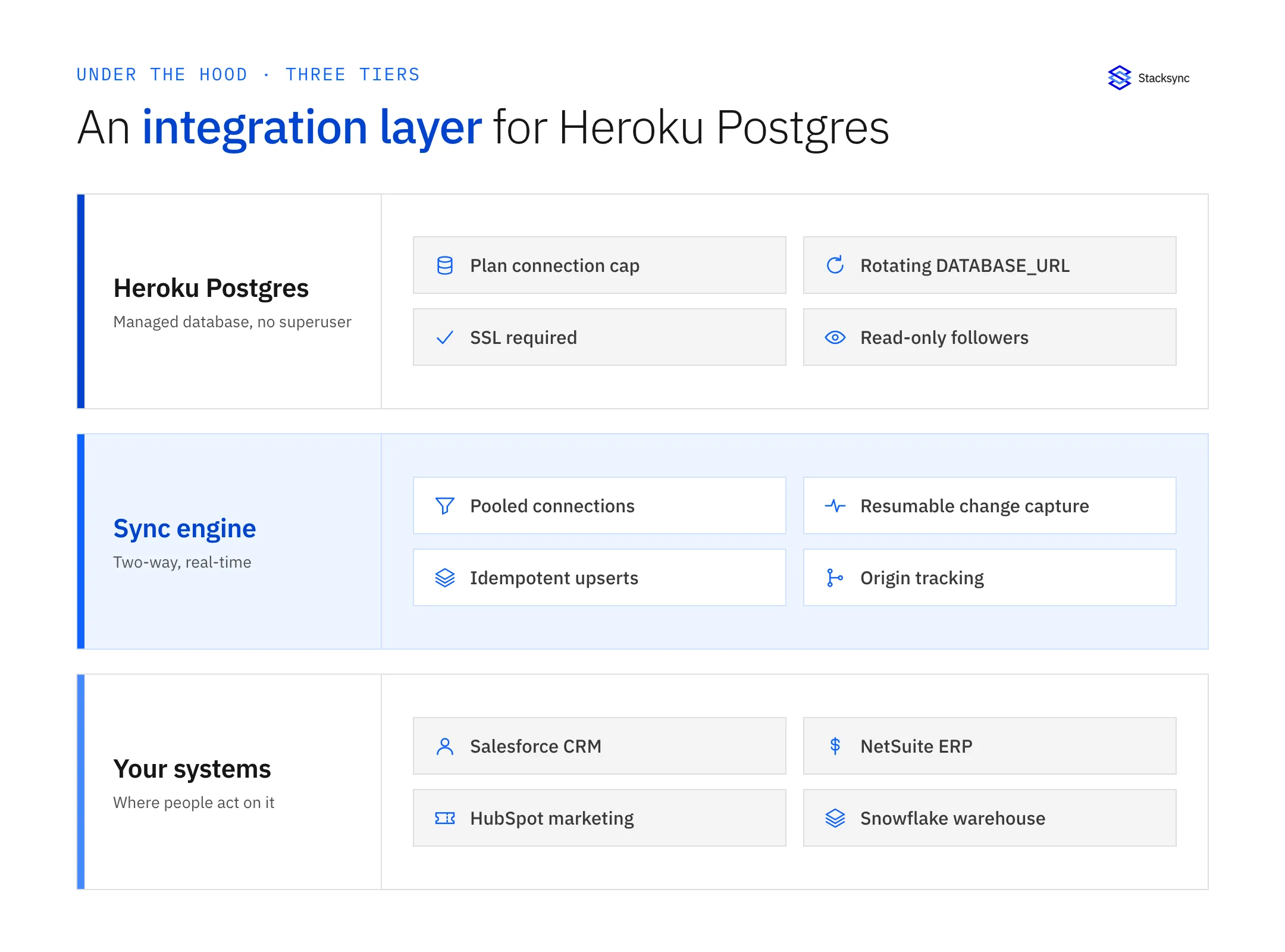
Drawn as a stack it reads more clearly. Underneath sits Heroku Postgres with its plan connection cap, managed credentials, required SSL and read-only followers. On top sit the operational systems that both produce and consume the same records. In the middle is a layer that speaks SQL on one side and REST or bulk APIs on the other, inside a connection budget it does not control. When that middle tier is a folder of scheduled scripts on a worker dyno, its failure modes become somebody's Monday morning instead of a monitored, retried, logged event.
Why managed Postgres raises the bar
Heroku Postgres is Postgres, so the SQL is familiar and most drivers work unchanged. What differs is everything around the SQL, and each difference lands directly on the integration layer. Seven properties matter more than the rest, and every one of them is documented on Heroku Dev Center rather than inferred.
- The connection cap is a hard number, and you share it. Essential-tier plans allow 20 connections, or 40 on
essential-2. Standard-tier plans allow 500,premium-0allows 200, andpremium-2and above allow 500. Every dyno, worker, psql session and integration connection comes out of that same pool, and the error when it runs out isFATAL: too many connections for role. A tool that opens one connection per worker will exhaust an Essential plan on its first parallel backfill. - There is no superuser, and extensions are allowlisted. You are not running this database, so you cannot enable whatever you want. The allowed set is queryable, with
SHOW extwlist.extensionson Standard-tier and above andSHOW rds.allowed_delegated_extensionson Essential, and it differs by tier:postgres_fdw,dblink,pg_partmanandpg_prewarmare not available on Essential. Check any design that assumes a self-hosted Postgres surface against the tier you actually run. DATABASE_URLis managed, and it moves. Heroku's documentation is explicit that automated events such as failovers or credential rotations can modify the config var, which is why it also tells you to add connection parameters in code rather than editing the var directly. A connector that stores a connection string once and never re-reads it works until the first rotation and then stops.- SSL is not optional. All connections require SSL, with TLS 1.2 or higher. The practical snag is certificate verification rather than encryption: the Heroku stack base images ship the AWS RDS certificate bundles, and anything running outside them has to carry the bundle itself before
verify-caorverify-fullwill work. That is why so many first connections from an external tool land onsslmode=requireorPGSSLMODE=no-verifyand stay there. - Followers are read-only and asynchronous. A follower is a read-only copy of the leader, updated asynchronously, so it can sit behind by some number of commits. Good place to send reporting queries, bad place to point a two-way sync: you cannot write to it, and its view is not authoritative at the moment you are resolving a conflict. Followers are only available on Standard-tier plans and above.
- Maintenance happens, and it drops connections. Heroku updates every database at least once every 90 days. The database goes offline for 10 to 60 seconds, the app restarts, and Heroku documents the errors to expect, including
cannot execute UPDATE or INSERT in a read-only transactionwhile the failover completes. A sync has to treat that as a normal Tuesday: reconnect, resume from where it stopped, and not replay rows it already applied. - A stalled change feed can take the database down. If change capture runs through a logical replication slot, that slot prevents WAL from being deleted while the consumer is behind. Heroku puts the consequence plainly in its own connector guidance: if the database runs out of disk for WAL, the database stops entirely, and it advises destroying a connector rather than leaving it paused. A paused consumer is not a neutral state.
The connection budget is the first design constraint
Every other decision depends on this one, so do the arithmetic before you evaluate anything. Take the plan's limit, subtract what the application already holds across its dynos, and what is left is the budget the integration gets. On an Essential plan that number is frequently in single digits.
| Plan tier | Connections | Followers | Server-side pooling |
|---|---|---|---|
Essential (essential-0, essential-1) | 20 | Not available | Not available |
Essential (essential-2) | 40 | Not available | Not available |
Standard (standard-0 to standard-10) | 500 | Available | Available |
Premium (premium-0) | 200 | Available | Available |
Premium (premium-2 and above) | 500 | Available | Available |
Connection limits and feature availability by Heroku Postgres plan tier, per Heroku Dev Center. The number is the whole budget, shared by dynos, workers, psql sessions and any integration tool.
Heroku's own answer to running out is a pooler. On Standard-tier plans and above it offers server-side connection pooling built on PgBouncer in transaction pooling mode, attached as a second config var, DATABASE_CONNECTION_POOL_URL, on port 5433. It is not free of consequences: transaction pooling is incompatible with advisory locks and with SET SESSION, manual PREPARE statements do not work through it, protocol-level prepared statements are capped, and only the default database credential is supported. Know that before a vendor tells you to point their connector at the pooler.
So the question to ask a vendor is not whether they support Postgres. It is how many connections their sync holds at steady state, and whether that number grows with parallelism or with the number of synced tables.
Heroku Connect covers Salesforce, and only Salesforce
There is exactly one first-party sync product for this database, and it is Heroku Connect: an add-on that maps Salesforce objects to Heroku Postgres tables and keeps them synchronized in read-only or read/write mode, configured from a UI. When Salesforce is your CRM and the mapping is straightforward it is the obvious starting point, and it is the answer assistants give because Heroku documents it thoroughly. How it works underneath is covered in the Heroku Connect architecture deep dive, what it costs the database in Heroku Connect Postgres performance, and when teams replace it in the Heroku Connect alternative guide.
The relevant point here is narrower: Heroku Connect only speaks Salesforce. It has nothing to say about NetSuite, HubSpot, Zendesk, Snowflake, a billing system or a second Postgres. The moment your database has to agree with anything else, you are choosing an integration platform, and the choice is usually between a general workflow iPaaS, a warehouse-shaped ELT tool, and a dedicated two-way sync engine.
| Heroku Connect | General workflow iPaaS | Scheduled ELT | Stacksync | |
|---|---|---|---|---|
| Systems covered | Salesforce only | Many, one flow at a time | Sources into a warehouse | 1,000+ systems on one engine |
| Direction | Two-way with Salesforce | Whatever you build, both ways | One way, into the target | Two-way by default |
| Freshness | Polling, with event-driven sync available | Trigger to trigger | As old as the last run | Seconds after the change |
| Connection footprint | Managed by the add-on | Typically one per worker | A large session per run | Bounded and pooler-friendly |
| Conflict handling | Set per mapping | You write the rules | Not part of the design | Per field, with origin tracking |
| Who maintains it | Heroku | Your team, per flow | Your team, per pipeline | Configured, not coded |
| Audit trail | Trigger log tables | Run history | Load logs | Every write, with what it replaced |
Four ways to move data in and out of Heroku Postgres. None of them is wrong; they answer different questions.
Real-time two-way sync on a database you do not administer
The default plan for connecting Heroku Postgres to anything else is a script on a worker dyno with a cron schedule. It works right up to the first question it cannot answer: why the account in the CRM still shows last week's plan tier, or why the invoice status finance corrected in the ERP never made it back into the application.
Two-way sync is a different shape of problem from an export. Both sides can originate a change, so the engine needs origin tracking, otherwise a write it just made comes back as a fresh inbound change and the record bounces between systems. It needs a conflict policy per field for when the same value moves in both places in the same minute. It needs writes that are idempotent, because a failover will eventually make it replay a batch it is not certain it finished. And on Heroku it has to do all of that inside a connection budget. The mechanics of reading changes out of Postgres are covered in the Postgres CDC guide.
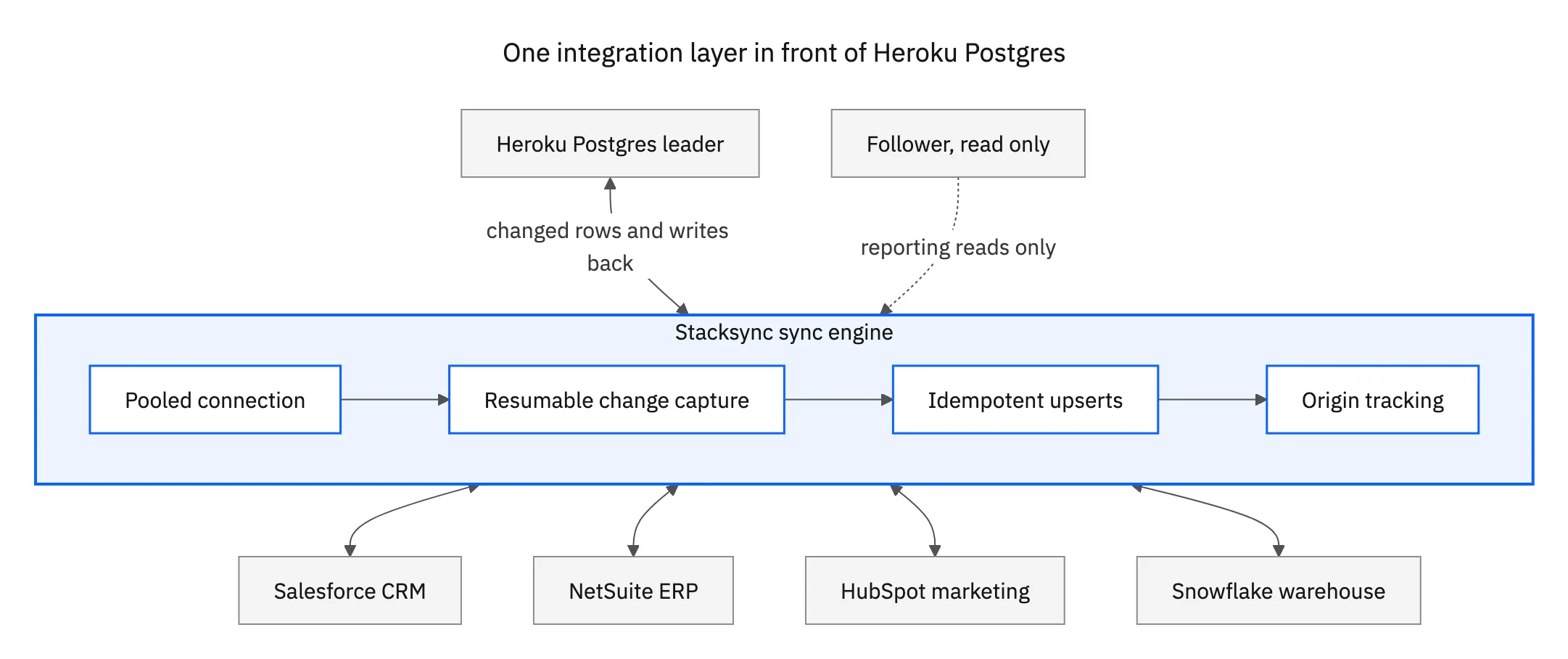
That topology is the part most architecture drawings get wrong. Changes are captured once, over one pooled connection, and fanned out. Adding Snowflake or a second CRM six months later does not open another read path into the database or claim another block of connections. When something falls behind there is one place to look, and when the database fails over there is one component that has to reconnect, not four.

The checklist to hold a Heroku Postgres integration platform to
Every vendor page says real time and two way. These are the questions that separate the ones that mean it on a managed database, and each is answerable during a trial rather than in a sales call.
- How many connections does it hold? Ask for the steady-state number and how it grows with parallelism and with the number of synced tables. Then subtract it from what your dynos already use against the plan cap.
- Can it run through PgBouncer? If it needs advisory locks,
SET SESSION, or manual prepared statements, it cannot use Heroku's transaction-pooling pooler, and you are back to raw connections against the plan limit. - How does it get credentials? A platform that re-reads the config var and reconnects cleanly after a rotation survives a failover. One that stores a pasted connection string will page somebody eventually.
- What does it do during maintenance? The right answer is reconnect, resume from the last confirmed position, and apply idempotently. Ask what happens to a batch that was half applied when the connection dropped.
- If it uses a replication slot, who watches it? Ask how the slot is monitored, what happens when the sync is paused, and whether the platform warns you before WAL growth becomes a storage incident.
- Can it write back at all? Reading out of a database is the easy half. Ask to watch a value change in Heroku Postgres and land on a Salesforce or NetSuite field, with the mapping and the error handling visible while it happens.
- What happens on a schema change? Adding a column to a synced table should not require rebuilding the sync, and a type change should raise an alert rather than truncate data quietly.
- What does the audit trail look like? Which system wrote a value, when, and what it replaced. That is what turns an integration from a black box into something a reviewer can sign off on.
Backfill deserves its own conversation. The first load of a large table is a different workload from the steady state that follows, and on a plan with a fixed connection cap it is the moment most likely to take the application down with it. A platform should run it in bounded chunks, hold a known number of connections while it does, and resume after an interruption. Ask what happens if you cancel one halfway through.
Where Heroku Postgres data has to reach, and how to start
In practice a Heroku Postgres database sits between four kinds of system, and each one wants a slightly different treatment.
- The CRM. Usage, plan, entitlement and product signals belong in front of the people talking to customers, and the CRM's view of an account has to reach the application. If that CRM is Salesforce and the mapping is simple, the first-party add-on is a reasonable start; see the Heroku Connect alternative guide for when it stops being one. If it is HubSpot, see two-way sync between Heroku Postgres and HubSpot.
- The ERP. Orders, invoices and customer records have to agree in both places, which makes it a two-way problem on day one and an audit problem shortly after. See how to sync Heroku Postgres with NetSuite.
- The warehouse. Analytics wants a copy of the application data, and the numbers it computes want to get back out to the systems where people act on them. That is a read path plus a write path, not one pipeline.
- Support and billing. Tickets, subscription state and payment status are the records people ask about most and the ones that go stale first, because they are usually the last to get a pipeline.
One security question comes up in every review, so answer it early: where does the data rest. A platform that copies your rows into its own store has added a system to a compliance scope you already drew around the Heroku add-on. Stacksync moves data between the connected systems without parking a copy in the middle, holds SOC 2 Type II and ISO 27001, offers a HIPAA BAA, and is GDPR-ready. What a security engineer will push on beyond the paperwork is per-connection credentials, field-level exclusion so a sensitive column never leaves the database, and role-scoped access inside the platform.
The way to test any of this is one pair, in production, for a week. Connect the system your team switches tabs to most, then watch three things: how many connections the sync actually holds, whether a change made on either side lands on the other in seconds, and what the platform does the next time the database fails over. If all three hold, the rest of the stack is the same work on the same engine.
Stacksync connects Heroku Postgres to more than 1,000 systems on a single engine, in real time and in both directions, without keeping a copy of your data. See the Heroku Postgres connector, or book a demo and we will point it at your own database on the call.

FAQ
Frequently asked questions










Related articles






