






















There Is No Native Heroku Postgres to NetSuite Connector. Here Is What Works
A practical guide to integrating Heroku Postgres with NetSuite when no native connector exists. It covers why Heroku Connect does not help, what each surface actually gives you, the eight-step pattern that holds in production, why externalId is the key that makes upserts safe, how to stay inside NetSuite governance and concurrency limits, and the Heroku Postgres connection and replication-slot traps.
- Author
- Ruben Burdin · Founder & CEO
- Published
- Read time
- 12 min read

Short answer first: there is no native connector between Heroku Postgres and NetSuite, and no first-party add-on on either side will do the job for you. Heroku Postgres is a managed database you reach over a Postgres connection string. NetSuite is an ERP you reach over SuiteTalk web services with OAuth. Neither product knows the other exists, so something has to sit in the middle and keep them agreeing.
That middle piece is the whole job, and it is more than a nightly export. Once a customer or a sales order exists in both places, people edit it on both sides, and the integration has to decide which change wins, apply it without creating duplicates, and do something sensible when NetSuite refuses the write. This guide walks the pattern that holds up in production: what to sync, what to key on, how to detect change on each side, and where each system pushes back.
If you want the wider picture first, read what an integration platform has to get right on Heroku Postgres. If the system on the other end is a CRM rather than an ERP, two-way sync between Heroku Postgres and HubSpot covers the same ground against a different API.
Is there a native Heroku Postgres to NetSuite connector?
No. Heroku's add-on marketplace has no NetSuite sync add-on, and NetSuite ships no replication feature that writes to an external Postgres instance. The closest first-party thing on the Heroku side is Heroku Connect, and it only speaks Salesforce.
Heroku Connect is a good product for the pair it was built for. It maps Salesforce objects to tables in your Heroku Postgres database, keeps them in sync in both directions, and gives you a declarative mapping UI, a trigger log for outbound writes, and a read-only or read/write mode per mapping. None of that reaches NetSuite: the mapping model is built on Salesforce object metadata and the outbound path calls the Salesforce API, so no configuration points it somewhere else. If you already run it and are weighing its cost or its polling behaviour, that is covered in the Heroku Connect alternative writeup.
So every working Heroku Postgres to NetSuite integration has the same shape: a process that reads from one side, writes to the other, and remembers what it already did. What follows is what that process has to handle.
The two surfaces you are actually joining
Before designing anything, be precise about what each end gives you, because the two are not symmetrical. One is a database with a wire protocol and a change log. The other is an ERP with a metered API and no change feed at all.
On the Heroku Postgres side you are working with a managed database you do not have superuser on.
- The connection string is a config var, not a constant.
DATABASE_URLis managed by Heroku and can change when credentials rotate or a database is promoted. Read it at runtime. An integration with the URL pasted into a settings file breaks quietly, at the worst moment, with an authentication error nobody expects. - Connections are capped per plan, and dynos multiply them. Every plan tier has a fixed connection ceiling, and each dyno holding a pool consumes several of them. Scale a worker fleet and the count multiplies at once, which is why the too-many-connections error is the first thing most teams meet here. A sync should use one bounded pool, or sit behind PgBouncer.
- TLS is enforced, and full verification is the snag. Connections from outside Heroku need SSL.
sslmode=requireencrypts the session but does not validate the certificate chain;verify-fulldoes, and it needs a CA bundle you supply yourself. Pick one deliberately, because this is where connectivity tickets come from. - Logical replication depends on the tier. The Essential plans do not offer followers or logical replication. On Standard tier and above you can create a publication and a replication slot and read changes straight from the write-ahead log, which is the clean way to detect change. Below that you need an
updated_atcolumn or a trigger-maintained change table instead. The Postgres CDC guide covers both approaches. - An idle slot is a storage incident waiting to happen. A replication slot that stops being consumed pins WAL segments on disk, and the database grows until it reaches the plan's limit. If you choose logical replication, alert on slot lag as carefully as you alert on sync lag.
- Followers lag, and maintenance drops connections. Followers are read-only and asynchronous, so a watermark read from one can trail the primary. Heroku also applies maintenance in a weekly window that closes open connections, so the integration needs reconnect-and-resume behaviour.
On the NetSuite side you are working with an API that meters you and does not tell you what changed.
- SuiteTalk REST is the current surface. Records live under the REST record service at
/services/rest/record/v1/, and reads can also go through SuiteQL at/services/rest/query/v1/suiteql, which accepts a SQL-style query and returns paged JSON. The older SOAP web services still work, but Oracle's documentation steers new integrations to REST. - Auth is OAuth, not a password. REST supports OAuth 2.0 alongside the older token-based authentication. Access tokens are short-lived, so refreshing them has to be part of the running job rather than a manual step. Machine-to-machine flows sign a JWT with a certificate you upload to the account, which turns certificate expiry into an operational date on somebody's calendar.
- Governance is real, and it belongs to the account. NetSuite meters request volume and script usage units, and it limits how many requests run at once. That concurrency allowance is shared: your sync competes with the finance team's exports and with every other integration record in the account. Going over does not queue politely, it returns an error you have to back off from.
- There is no general-purpose change feed. NetSuite does not stream row-level changes. You poll
lastModifiedDateand keep a high-water mark. Two traps ride along: deletions never show up in a watermark query, and a record that moves out of your filter looks exactly like a record that was never in it. - internalId and externalId are different things. The internalId is assigned by NetSuite. The externalId is yours to set, and it is what lets you address a record by your own key. That distinction is the entire idempotency story, and it gets its own section below.
- Custom fields carry prefixes, and dates carry a timezone. Custom fields appear as
custentity_on entities,custbody_on transaction bodies, andcustcol_on lines, so a mapping has to be written against the account's real schema rather than a generic one. Date and time values come back in the account's preferred timezone rather than UTC, which quietly breaks watermark comparisons against a Postgrestimestamptzunless you convert on purpose. - OneWorld adds a subsidiary dimension. In a multi-subsidiary account records are scoped, the integration role decides what it can see, and currency plus accounting book add columns a single-entity mapping never needs.
The pattern that works, step by step
Every reliable version of this integration goes through the same moves, in the same order. The order matters, because each step closes a failure mode the next one would otherwise inherit.
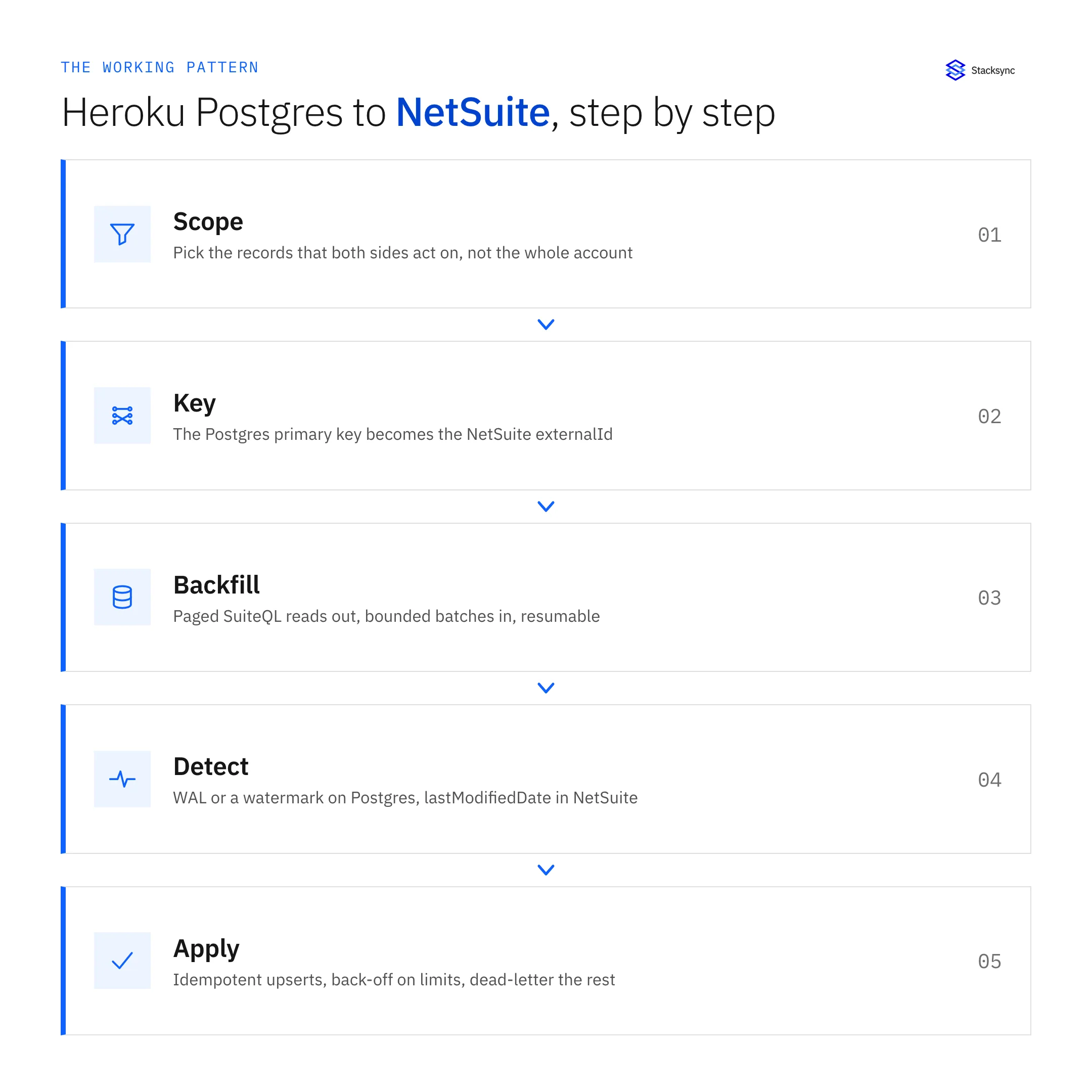
- 1. Pick the records, not the account. Sync the objects both sides genuinely act on. In practice that is customers, items, sales orders, and invoices, plus whichever custom record the business actually runs on. Everything else stays where it is.
- 2. Decide the key before writing a line of code. The Postgres primary key becomes the NetSuite externalId, in a stable format you will not regret later (
CUST-1042, not a bare row number that shifts if you reseed). Store the internalId NetSuite returns back on the Postgres row so you can address the record either way afterwards. - 3. Backfill in bounded, resumable batches. Read out of NetSuite with paged SuiteQL, write in with batched upserts, and checkpoint after each page. A backfill that cannot resume after a cancelled deploy is a backfill you will run twice, and the second run is the one that creates duplicates.
- 4. Detect change on both sides, separately. Postgres gives you a real change stream through logical replication on Standard tier and above, or a watermark plus a trigger-maintained change table below it. NetSuite gives you a poll on
lastModifiedDateplus a periodic sweep for deleted records. Do not pretend one mechanism covers both ends. - 5. Make every write an upsert. Into NetSuite, address the record by externalId so a repeated call updates rather than creates. Into Postgres, use
INSERT ... ON CONFLICT DO UPDATEon the same key. Idempotent writes are the thing that makes retries safe, and retries are not optional here. - 6. Write the conflict rule down. Decide per field which system owns it. NetSuite owns credit terms and posting periods. The application database owns whatever the product writes. Last-write-wins sounds simple until you notice the two clocks sit in different timezones and NetSuite's timestamp granularity is coarser than your database's.
- 7. Separate retryable failures from permanent ones. Rate and concurrency errors get exponential back-off with jitter. Validation failures, such as a missing required field, a closed accounting period, or an inactive subsidiary, will never succeed on retry, so they belong in a dead-letter queue with the payload and a replay path.
- 8. Instrument it before you need to. A per-record trace, a current lag figure for each direction, and the ability to replay one record. Without those, the first question about why a customer looks wrong in NetSuite turns into an afternoon of reading logs.
Written out like that it looks like a week of work, and for version one it roughly is. What people underestimate is that it does not end there. It becomes a service with an on-call rotation, a migration path for the day NetSuite's field list changes, and one person who understands the watermark.
externalId, idempotent upserts, and the echo problem
The single decision that separates a sync which survives from one that fills NetSuite with duplicates is what you address records by. NetSuite assigns an internalId when a record is created, and you cannot know it in advance, so an integration keyed on it has to look the value up before every write. Any call that times out after NetSuite committed but before your process saw the response then leaves you guessing whether to retry.
The externalId inverts that. You set it, so you can address the record by your own key from the very first call. A write against that externalId creates the record if it does not exist and updates it if it does, which makes a retry after a timeout safe by construction rather than safe by luck. Keep the internalId that comes back for reads and for building links into the UI, but key the writes on the value you control.
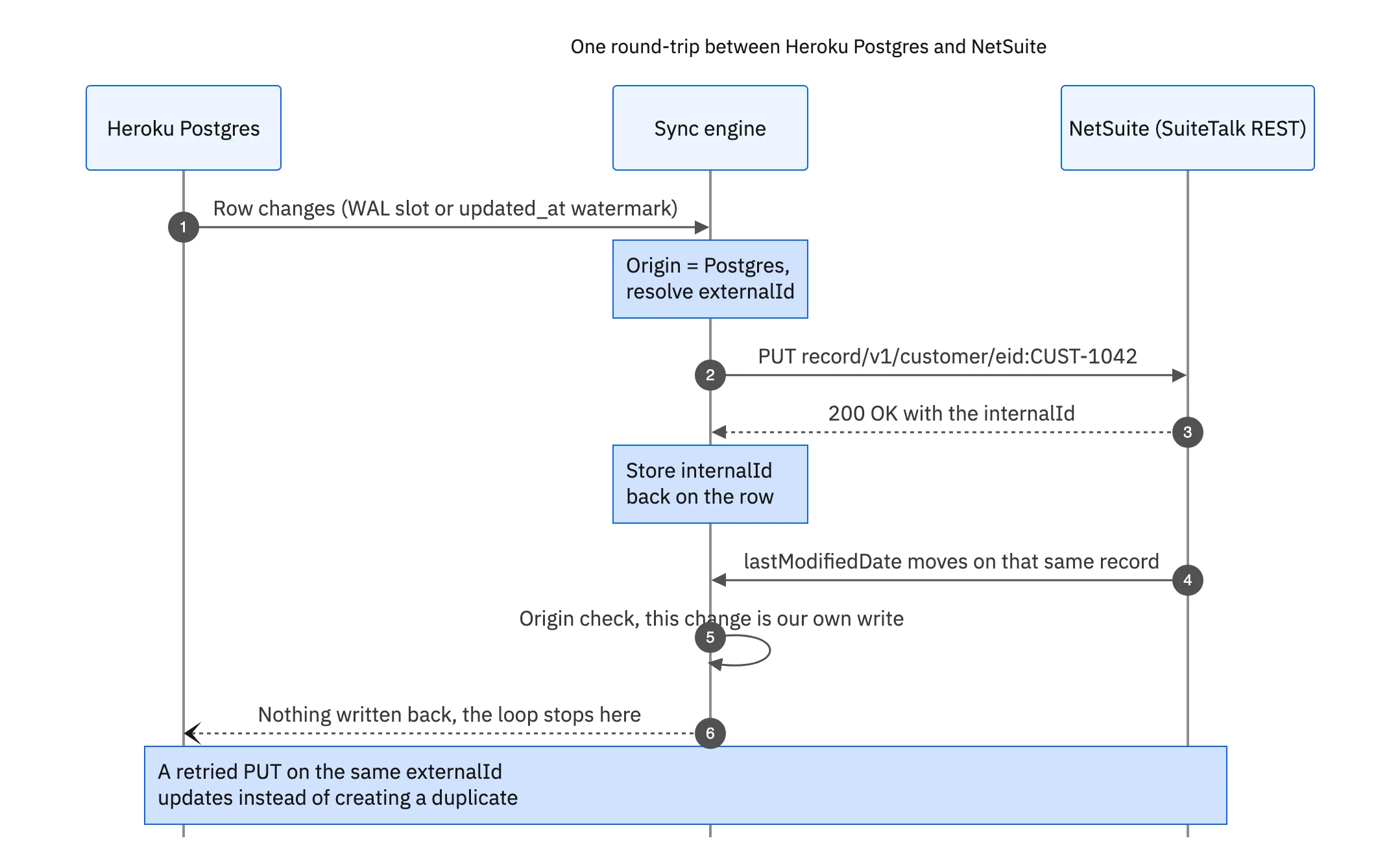
The diagram also shows the second half of the problem. The write you just made moves that record's lastModifiedDate, so the next poll reads it as a fresh change and tries to send it back to Postgres. A sync engine stops that by tagging the origin of every change and dropping the echo. A hand-built job that skips this step produces records that update themselves in a loop, which is a hard bug to spot because every individual write in the log looks correct.
NetSuite governance, and the throttling you will hit
NetSuite does not let an integration run as fast as it wants. Requests and script execution are metered in usage units, and simultaneous requests are limited per account rather than per integration record. That allowance is shared with the finance team's saved-search exports, with the tax add-on, and with every scheduled script already running.
Three habits keep a sync inside it. First, batch: reading a thousand rows in one paged SuiteQL query costs a fraction of a thousand single-record reads. Second, cap concurrency deliberately instead of fanning out workers and hoping the account absorbs it. Third, treat a limit error as a signal rather than an exception, so the client backs off exponentially, adds jitter so parallel retries do not resynchronise, and resumes from the last checkpoint.
Timing matters more than most plans allow for. Period close is when NetSuite is busiest, when a backfill is most likely to be throttled, and when a wrong number is most visible. Schedule large loads away from it, and make sure the steady-state sync degrades into a slower queue rather than stopping.

The Heroku Postgres side: connections, slots, and restarts
The database end has fewer API rules and more operational ones. The failure teams meet first is connection exhaustion. Each plan tier allows a fixed number of connections, each dyno holding a pool takes several, and a sync worker that opens its own connections per job adds more on top. Scaling the app multiplies all of it at once, and the database starts refusing connections to the application itself, not only to the sync.
The fixes are ordinary, but they have to be chosen rather than assumed: one bounded pool per process, PgBouncer in front when the dyno count is high, and a sync that reads through a single pooled connection instead of one per worker. Transaction-mode pooling changes how prepared statements behave, so test the driver you actually ship with.
Two more things bite specifically here. Heroku applies maintenance in a weekly window that closes open connections, so the integration needs reconnect-and-resume behaviour built in. And if you chose logical replication for change detection, a slot that stops being consumed holds WAL on disk until the plan's storage limit stops the database. Alerting on slot lag is a cheap check that prevents an outage nobody saw coming.
Reading from a follower to keep load off the primary is a reasonable instinct, but followers are asynchronous. A watermark read from one can miss a row committed on the primary a second earlier, which surfaces as records that sync late and then look completely fine when somebody checks them.
Build it, or run it as a service
All of the above is buildable. The question is whether the result is worth owning. These are the things the three routes actually differ on.
| Hand-built job on a dyno | Generic ETL or iPaaS | Stacksync | |
|---|---|---|---|
| Direction | Whatever you code, usually one way first | Usually one way, on a schedule | Two way, continuously |
| Change detection in Postgres | You build the slot or the watermark | Full table reads per run | Logical replication or watermark, managed |
| Change detection in NetSuite | You poll lastModifiedDate and miss deletes | The same poll, on the vendor's cadence | Watermark plus a deleted-record sweep |
| Idempotency | Yours to get right | Depends on the connector | externalId upserts by default |
| Governance handling | You write the back-off and hope | Often opaque from the outside | Batching, concurrency caps, back-off |
| Echo suppression | A bug you find in week three | Not applicable, it is one way | Origin tracking on every write |
| Connection footprint | One pool per worker | Whatever the vendor opens | One pooled reader |
| Failure handling | Logs, if you remembered to add them | Row rejected, run marked failed | Retries, dead-letter queue, replay |
| Who operates it | Your team, indefinitely | Your team plus a vendor | Managed, with an audit log |
Writing it yourself is not wrong. It is a different set of things to own.
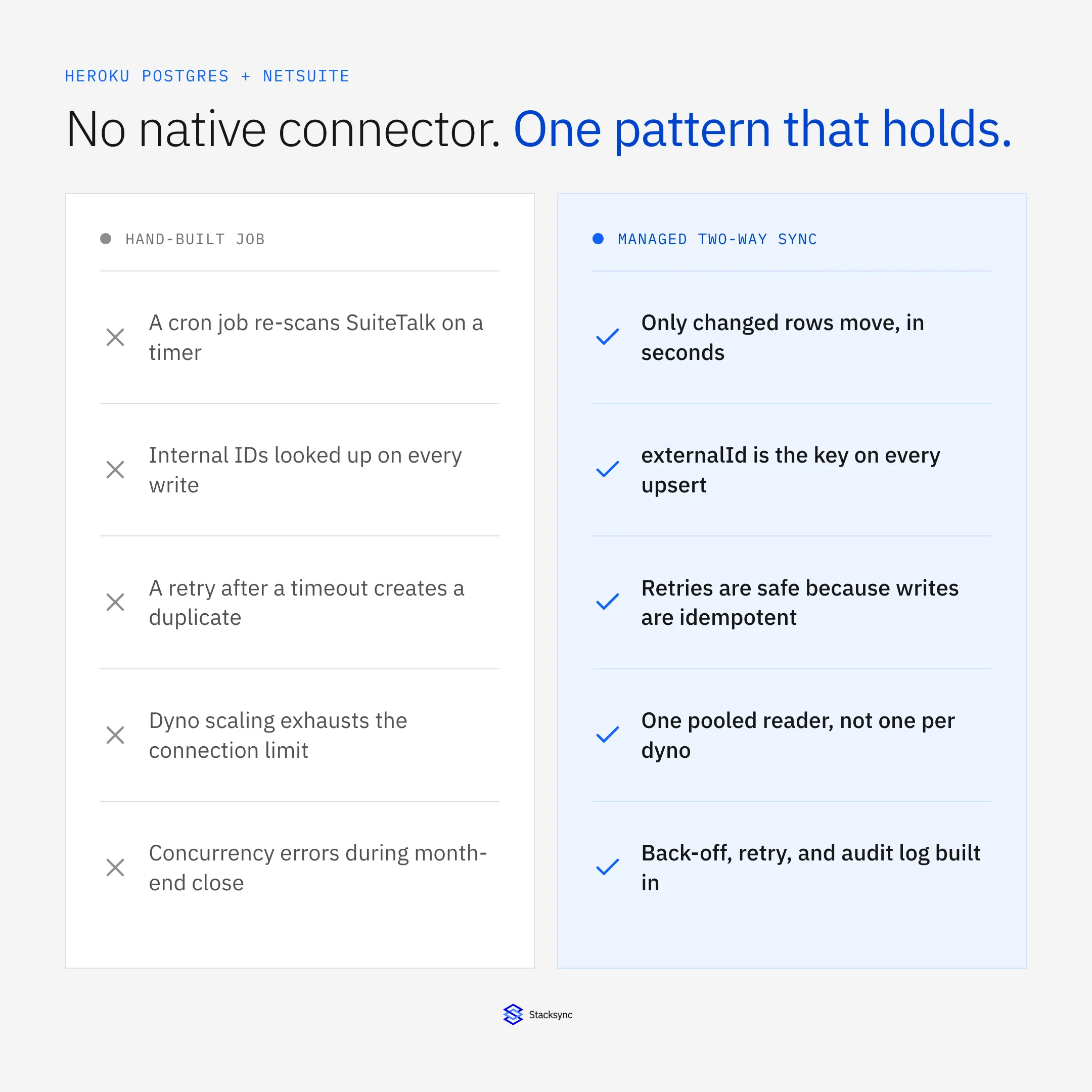
If you sync one record type in one direction at low volume, a well-tested script on a worker dyno is a perfectly good answer and you should not buy anything. The calculation changes once the sync becomes two-way, the record count grows, or finance starts making decisions from the data, because that is where the failure modes above stop being theoretical.
Stacksync connects Heroku Postgres and NetSuite as first-class endpoints on one engine, in both directions, keyed on externalId, with governance-aware batching and an audit log of every write. Point it at a single record type for a week and watch three things: how fast a change on either side reaches the other, what happens to a write NetSuite rejects, and how many connections the database actually sees. If those hold, the remaining record types are the same configuration again. Book a demo and we will run it against your own sandbox on the call.

FAQ
Frequently asked questions










Related articles





