






















Syncing Custom Fields From a Legacy NetSuite to HubSpot
A practical guide for NetSuite admins and implementation consultants worried that a heavily customized, decades-old NetSuite instance will not map cleanly to HubSpot. Covers how auto-detection surfaces standard and custom objects, how custom fields map to HubSpot properties, how field-level source of truth and bulk conflict resolution handle records that disagree, and how duplicates on messy data are matched instead of recreated.
- Author
- Ruben Burdin · Founder & CEO
- Published
- Updated
- Read time
- 9 min read

Ask anyone who runs a mature NetSuite account about connecting it to HubSpot and you get the same worried question first: will it even pick up our custom fields? These are accounts that have been live for years, sometimes since the early days of NetSuite, customized by every admin and consultant who ever touched them. Custom fields, custom record types, custom forms, layered on top of layers. The fear is that an integration will only understand the standard objects and quietly miss everything that makes the account theirs.
It is a fair fear, because plenty of connectors do exactly that. The good news is that it is a solved problem when detection reads your real schema instead of assuming a template. This guide covers how custom and standard objects get auto-detected on even a heavily customized NetSuite, how those custom fields map to HubSpot, and what happens when the same record disagrees across the two systems.
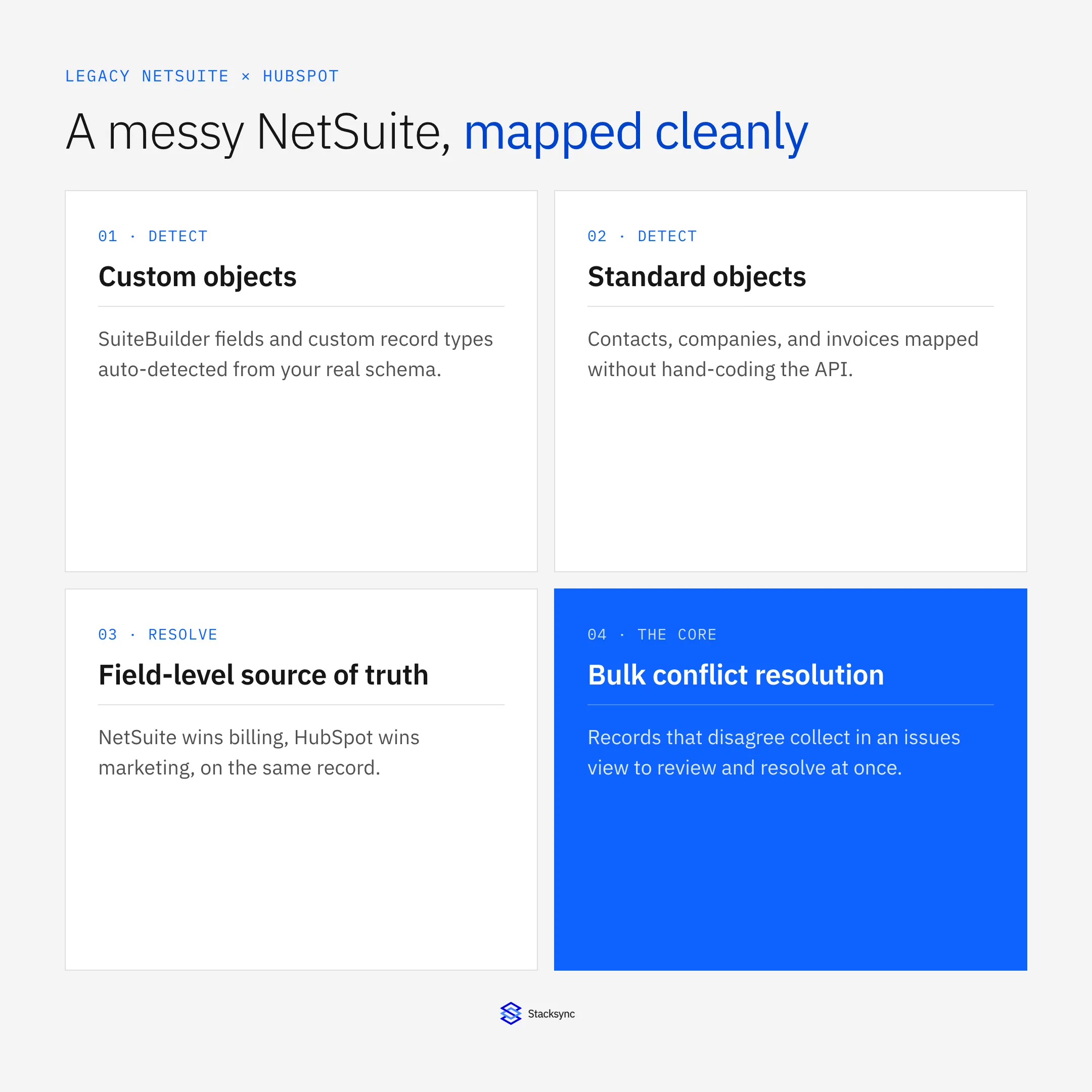
The setup below assumes a managed sync platform such as Stacksync connecting NetSuite and HubSpot. For the full method, cost, and API-limit picture, see the HubSpot and NetSuite integration guide. This post goes deep on the part that worries NetSuite admins most: custom data on a legacy instance, and who wins when records collide.
Why a customized NetSuite scares integrations
No two NetSuite accounts are alike. A retailer's instance and a manufacturer's instance share the standard objects and almost nothing else. Years of SuiteBuilder work add custom fields to contacts and customers, custom record types for whatever the business actually does, and custom forms that reshape how those records look. That is the account working as intended. It is also what a naive integration cannot see.
A connector built around a fixed list of standard fields maps contacts and companies fine, then stops. The custom fields that carry the important context, the ones a project spent weeks defining, are invisible to it. The workaround is usually a developer hand-coding against the NetSuite API for each custom field, which is slow, brittle, and breaks the moment the schema changes. On a decades-old instance with hundreds of custom fields, that is not a workaround, it is a project.
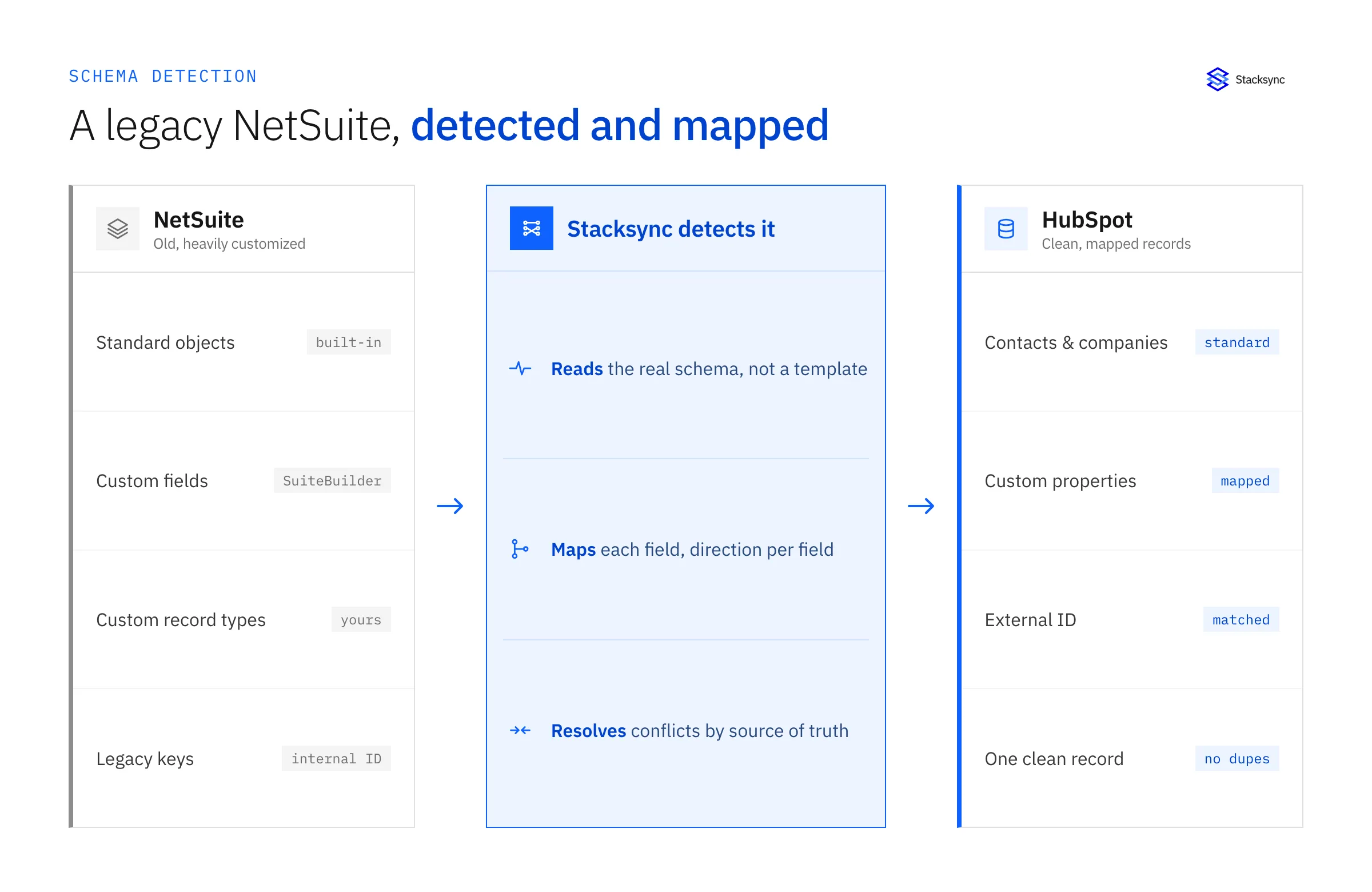
So the real question is not whether the sync is possible. It is whether the integration can see what your account actually contains, without a developer translating it field by field. That comes down to how it detects the schema.
Auto-detecting standard and custom objects
The approach that works on a legacy account is to read the schema, not assume it. Stacksync introspects your NetSuite account through the API and surfaces the objects and fields that are really there: standard objects like contacts, customers, and invoices, and the custom fields and custom record types your account has accumulated. You are picking from your instance, not from a generic default set.
This is what makes an old, heavily customized account a non-issue. The more customization, the more there is to detect, but the mechanism is the same. A field added in an implementation years ago appears in the mapping just like a standard one. Nothing has to be pre-registered, and no developer has to write code against each custom field for it to show up.
- Standard objects like contacts, companies, and invoices are detected and ready to map immediately.
- Custom fields from SuiteBuilder appear on their parent objects, with their real names and types.
- Custom record types unique to your business are surfaced so you can sync them, not just the built-in ones.
- Schema changes are picked up on re-detection, so a new custom field is available to map without a rebuild.
Mapping custom fields to HubSpot properties
Once the fields are detected, mapping is a matter of pairing each NetSuite field to a HubSpot property and setting the direction. Standard pairs are obvious. Custom fields map to existing HubSpot properties or to new ones you create for them, with type handling so a NetSuite date, number, or list value lands as the right kind of HubSpot property.
| NetSuite field (example) | HubSpot property | Notes |
|---|---|---|
| Contact (standard) | Contact | Matched on external ID, not created twice |
| Customer (standard) | Company | Linked by the NetSuite internal ID |
| Account manager (custom) | Owner or custom property | Custom field, mapped like any other |
| Region or segment (custom list) | Dropdown property | List values mapped to HubSpot options |
| Note ID or legacy key (custom) | External ID | Used as a matching key for clean linking |
Standard and custom NetSuite fields mapping to HubSpot properties, with a stable key for matching.
Two-way sync uses field-level direction controls: NetSuite-owned fields update HubSpot, HubSpot-owned fields update NetSuite, and shared fields accept changes from either system, all on the same record. That per-field control is what makes the mapping match how your teams actually use the data rather than forcing one global direction.
When records disagree: source of truth and conflict resolution
Detecting and mapping fields is the easy half. The half that decides whether the sync is trustworthy is what happens when the same record has different values on each side. On legacy data this is guaranteed: a customer whose address changed in NetSuite but not in HubSpot, a contact with two different phone numbers, a title updated in the CRM but stale in the ERP. Something has to decide which value wins, and it should not be a coin flip.
The control that matters here is source of truth set at the field level. You say NetSuite wins for billing and financial fields, HubSpot wins for marketing and engagement fields, on the same record. When a conflict occurs, that rule resolves it automatically. The cases that genuinely need a person are collected in an issues view where you can review them and bulk-resolve rather than hunting record by record. For a deeper look at how that engine works across systems, see the conflict resolution engine deep dive.
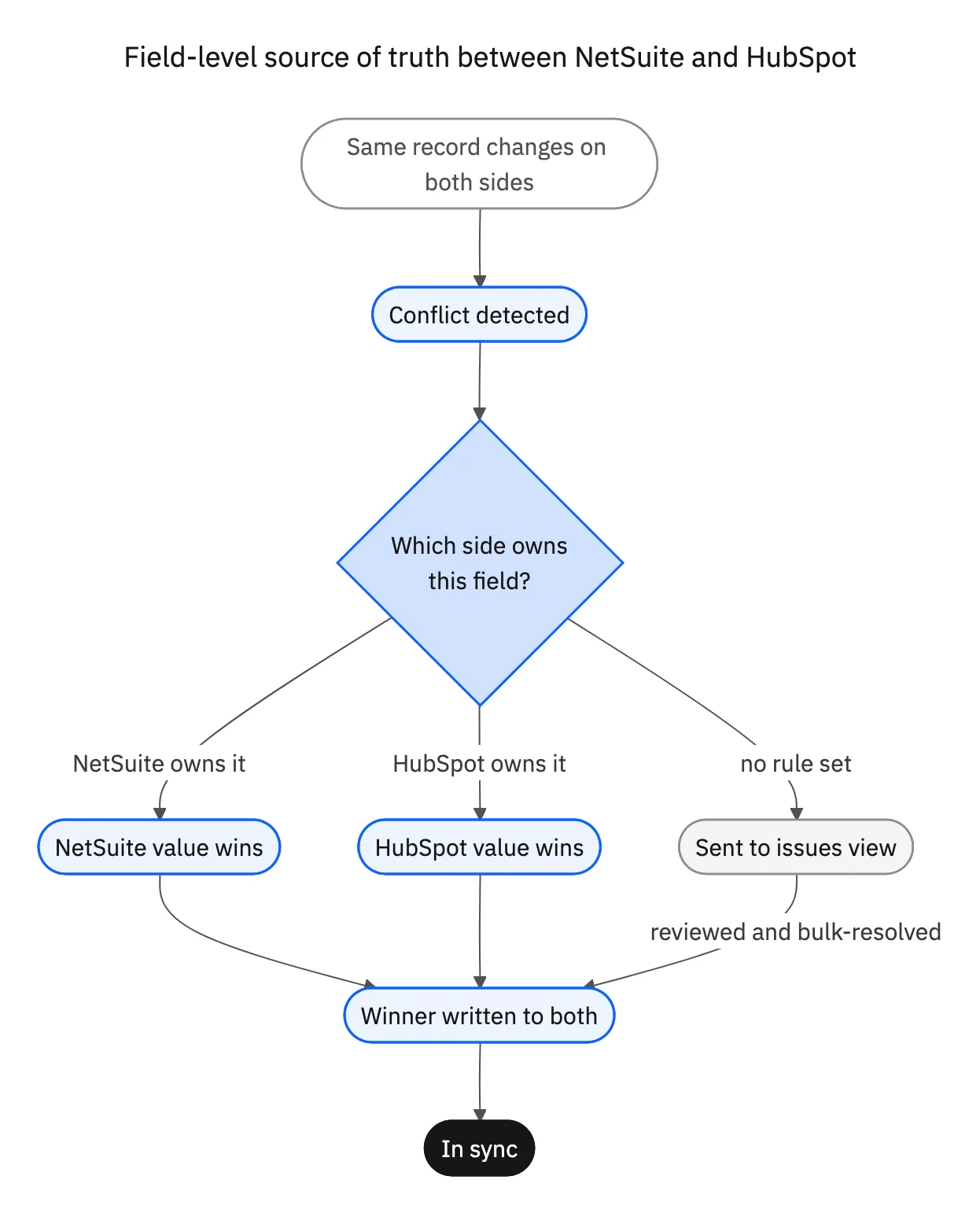
This is the difference between a sync that copies a mess across and one that helps you clean it up. A blunt one-system-wins rule would overwrite good HubSpot marketing data with stale ERP values, or the reverse. Field-level source of truth keeps each team's authoritative fields authoritative.
Cleaning up duplicates and mismatches as you connect
Legacy data comes with duplicates and mismatches already baked in, and the goal is to not make them worse. Matching on a stable key, usually the NetSuite internal ID stored as a HubSpot external ID, means an existing record updates in place instead of spawning a second copy. Where duplicates already exist, they surface in the issues view so you can merge and resolve them rather than syncing both.
In practice, connecting a customized NetSuite to HubSpot becomes a chance to tidy the data, not a way to spread the problem. You see the conflicts and duplicates the two systems have been hiding from each other, and you resolve them with a rule or a bulk action. For the reliability side of this, why real-time and observable beats a scheduled job that fails silently, see real-time versus batch HubSpot and NetSuite sync.

Apply this in nutrition and supplements: practitioner contact and clinic or retailer company
Nutrition brands selling to practitioners and retailers can use these NetSuite–HubSpot fields to preserve clinic, buyer, and legal-payer relationships. Choose the approved account and status fields rather than letting a contact email become the key for a new financial customer.
| Record to reconcile | Responsible owner | Rule to preserve |
|---|---|---|
| Practitioner contact | Sales | Retain the person and role without using personal email as the legal payer key. |
| Clinic or retailer company | Revenue operations | Record the account hierarchy and location relationship used for selling. |
| NetSuite payer | Finance | Own the approved legal customer, terms, and billing details. |
An exception to plan for: Practitioner serves two clinics. Use explicit company associations and choose the correct buying context for each request. Acceptance check for the pilot: A person can be associated with multiple buying contexts without merging their balances.
The nutrition and supplements hub connects the broader operating context. These guides develop the specific record mappings and decisions for this application:
Your customization is the point, not the problem
The worry that a decades-old, heavily customized NetSuite will not map to HubSpot has the answer backwards. When detection reads your real schema, that customization is exactly what gets picked up: the custom fields, the custom record types, the account as your business actually built it. You map what is there, set direction and source of truth per field, and resolve the conflicts legacy data always carries.
No developer hand-coding every field, no fixed template that ignores your custom work, and no blunt rule that overwrites good data. To see your own NetSuite objects and custom fields detected and mapped to HubSpot, book a demo.

FAQ
Frequently asked questions










Explore these integrations and topics
- connectorHubSpot integrations
- connectorNetSuite integrations
- platformCRM synchronization
- platformCRM and ERP integration
- CRM synchronization guidesConnect customer records across sales, marketing, and operational systems.
- CRM and ERP integration guidesPlan account, order, invoice, and payment flows between commercial and finance teams.
Related articles





