






















Real-Time vs Batch HubSpot and NetSuite Sync: What Actually Changes
A buyer's guide to the first question every team asks about connecting HubSpot and NetSuite: is the sync real-time and two-way, or a scheduled batch job like the connector they have now? Covers what batch polling actually does, how webhook and CDC-driven real-time sync differs, why teams migrate off a flaky setup, how step-metered tools price it, the license tier gotcha, and starting with a POC.
- Author
- Ruben Burdin · Founder & CEO
- Published
- Read time
- 9 min read

When a team sets out to connect HubSpot and NetSuite, the first question is almost never whether it is possible. It is whether the sync is real-time and two-way, or a scheduled batch job like the connector they already have. Teams ask it point blank, because they have usually been burned by a setup that runs on a timer and drifts out of date between cycles.
That one distinction, real-time versus batch, decides whether a rep can trust what they see in HubSpot, whether finance can rely on what lands in NetSuite, and whether the integration quietly falls behind during a busy hour. This guide breaks down what batch sync actually does, what real-time two-way sync means, why teams migrate off a connector that feels flaky, and the pricing and licensing details that catch people out.
The setup below assumes a managed sync platform such as Stacksync connecting HubSpot and NetSuite. For the full picture of methods, field mapping, and cost, see the HubSpot and NetSuite integration guide. This post goes deep on the one decision that shapes all of it: how fast, and how reliably, data moves.
What "batch sync" actually does (and why it feels flaky)
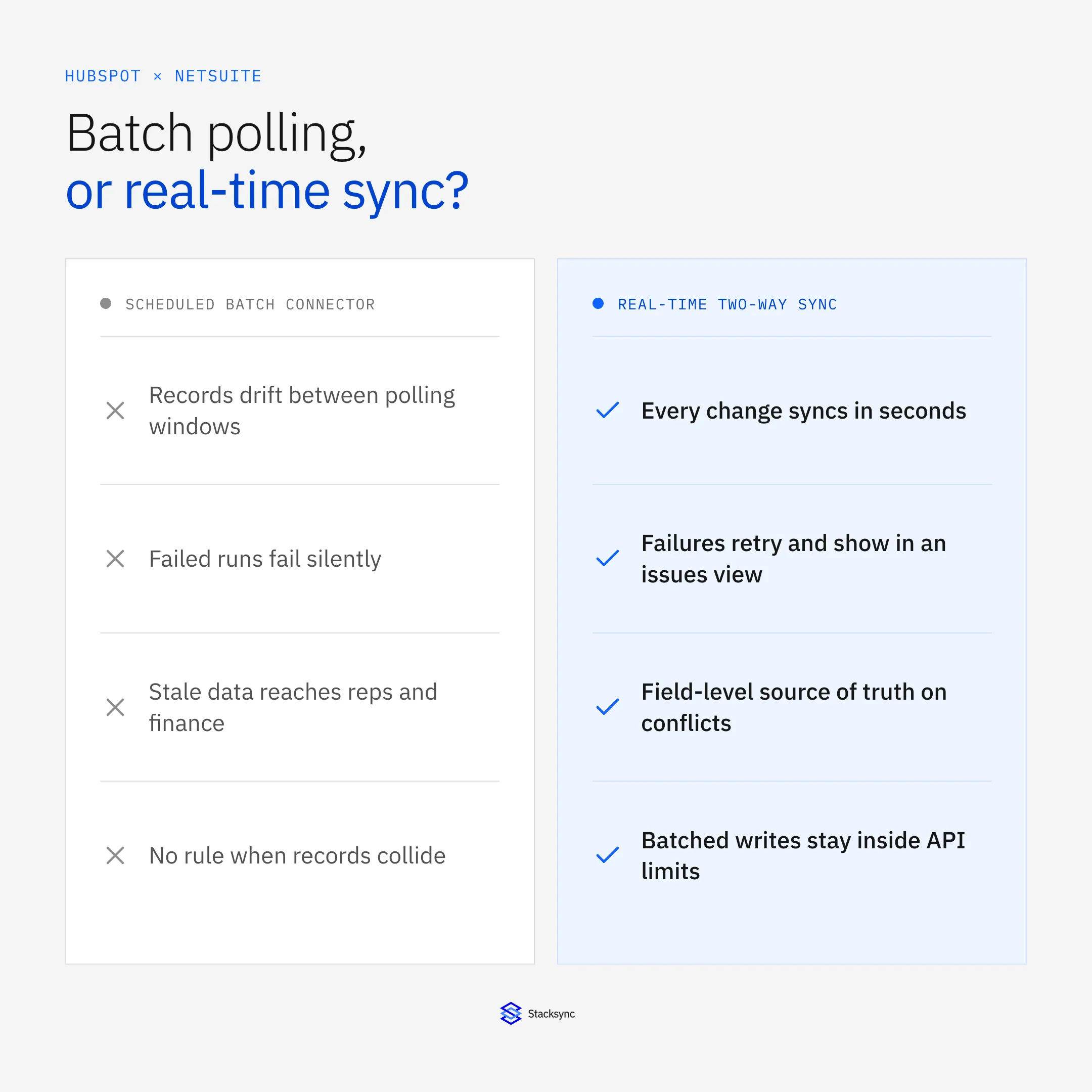
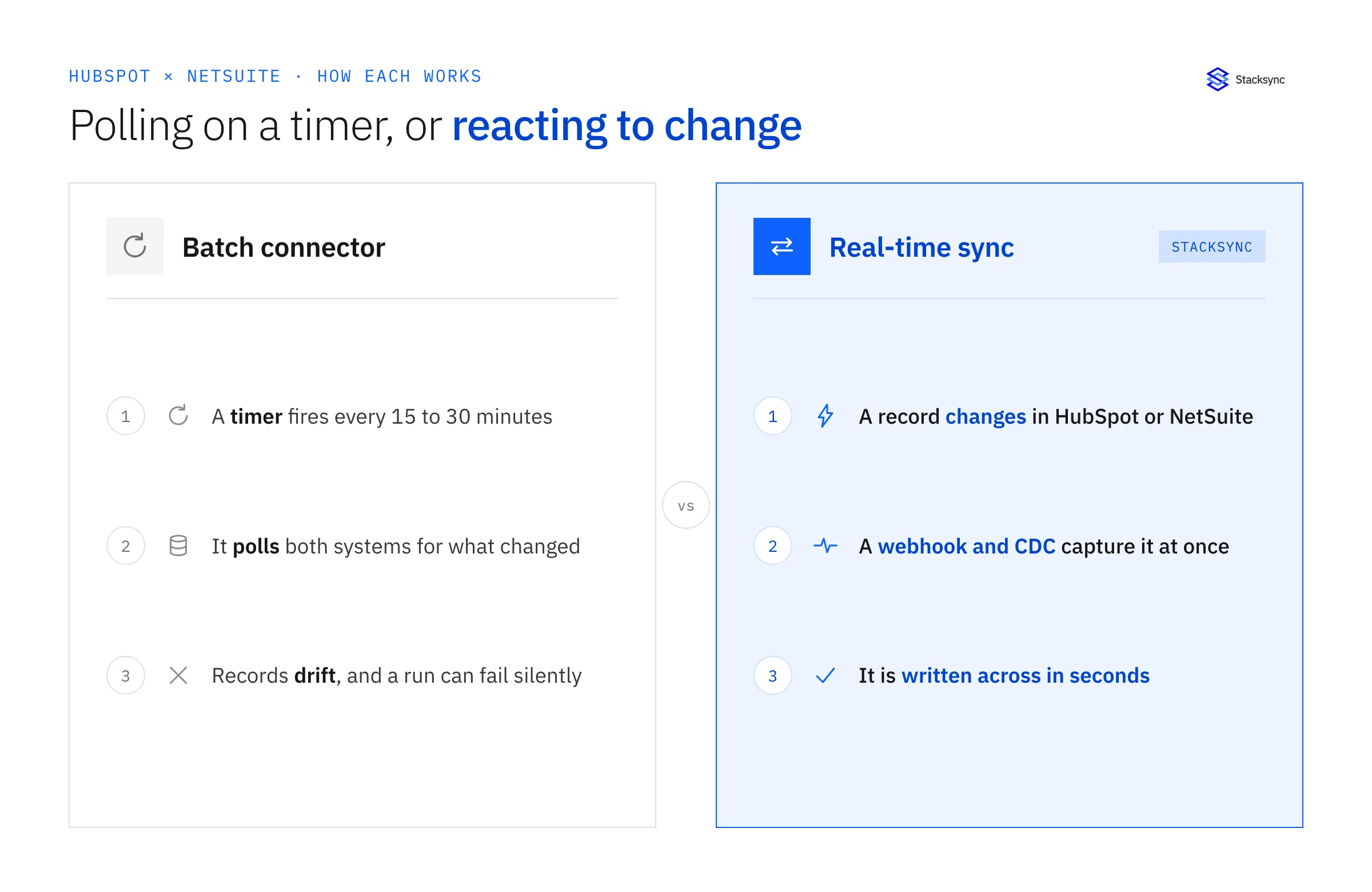
Most legacy connectors are batch, even when the marketing says otherwise. They wake up on a schedule, ask each system what changed since the last run, and copy the differences across. The interval might be 5 minutes, 15 minutes, or half an hour. Between runs, the two systems are simply out of sync, and nobody watching HubSpot can tell whether a record is current or stale.
The gap is the smaller problem. The bigger one is that a scheduled job has to detect what changed, and that detection is where batch connectors get fragile. A missed change, a timeout on a large NetSuite pull, a run that overlaps the previous one, an API limit hit mid-cycle, and the record silently sits wrong until someone notices. Teams that ran HubSpot and NetSuite through a scheduled connector for a few years tend to describe it the same way: it mostly works, until it does not, and when it breaks you find out from a confused customer, not an alert.
None of this means batch is broken by design. For a nightly warehouse load it is the right tool. But for the operational link between the CRM your reps live in and the ERP your finance team runs on, a polling window is exactly where trust leaks out.
What real-time two-way sync actually means
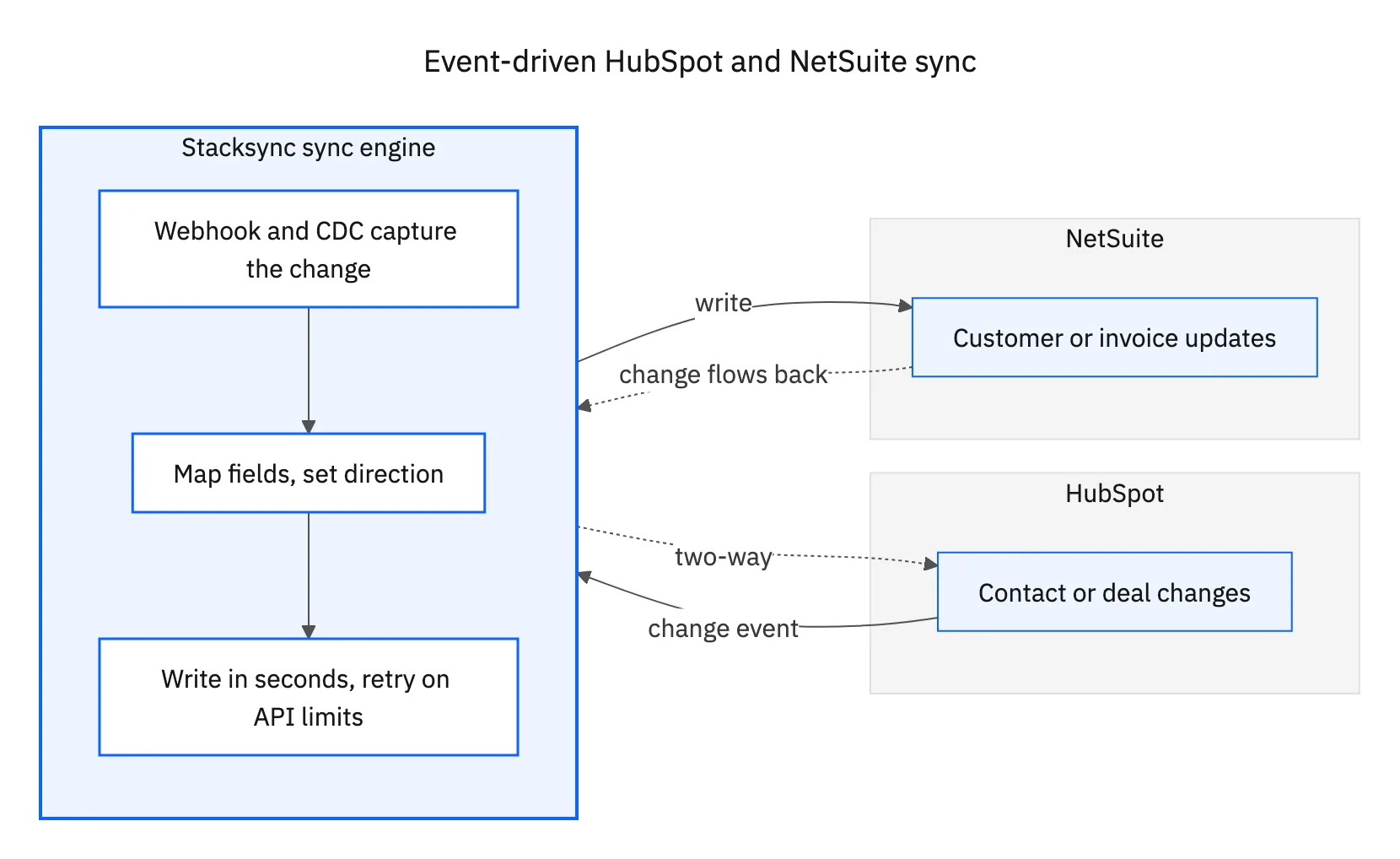
Real-time sync is event-driven, not scheduled. Instead of asking every few minutes what changed, it reacts to each change as it happens. A contact edited in HubSpot or an invoice posted in NetSuite triggers the sync through webhooks and change data capture, and the matching record updates on the other side in seconds. There is no window to wait for, because there is no window.
Two-way means direction is a choice you make per object, not a fixed pipe. Contacts, companies, and deals usually run both ways so an edit on either side reconciles. Financial records like invoices often remain NetSuite-owned and read-only in the CRM, so the CRM can display them but never overwrite them. You set that per object and per field rather than accepting a single global direction.
The practical test is simple. Change a record in one system and watch the other. With real-time sync it updates while you are still looking at the screen. With batch, you refresh, wait, and refresh again until the next run catches up. That difference is what teams mean when they ask for the fastest sync on the market: not a benchmark number, but the confidence that what they see is what is true right now.
Why teams migrate off a flaky connector
The teams looking hardest at real-time sync are rarely starting from zero. They are usually running HubSpot and NetSuite through a scheduled connector or a general automation tool, and they have decided it is not stable enough to keep. The reasons cluster into a short list.
- Stale records. A sales rep quoting from data that is 20 minutes behind, or finance reconciling against a contact that changed hours ago.
- Silent failures. A run that dropped a batch and never raised an alert, so the mismatch is found by a customer instead of the team.
- No conflict handling. The same contact edited in both systems, and no clear rule for which value wins, so one edit quietly clobbers the other.
- No visibility. When something is wrong there is nowhere to look, no list of failed records to fix, just a support ticket and a guess.
A real-time platform answers each of those directly. Records stay current because the sync fires on change. Failures retry with backoff and surface in an issues view instead of disappearing. Conflicts resolve by a source-of-truth rule you set at the field level, with a place to review and bulk-resolve the ones that need a human. For how that conflict logic works in detail, see syncing custom fields from a legacy NetSuite to HubSpot, which covers source of truth on messy data. The point is not that real-time is faster. It is that it is observable and recoverable, which is what enterprise-ready actually means.
How this differs from HubSpot's native sync, Zapier, and step-metered iPaaS
The other recurring question is how a dedicated platform differs from HubSpot's own automations or a general connector. The honest answer has two parts: capability and pricing model.
On capability, native CRM automations and Zapier-style tools are built to move a field or trigger an action, not to keep two systems of record fully in sync both ways with custom fields and conflict rules. They tend to be shallow on custom objects, thin on conflict handling, and one-directional in practice. On pricing, they are metered per step or per task. Every field change is another billable step, so a two-way sync across contacts, companies, deals, and invoices multiplies fast, and costs that looked small in a demo climb into real money as volume grows.
| Native / Zapier-style | Scheduled iPaaS connector | Stacksync | |
|---|---|---|---|
| Timing | Trigger-based, per action | Scheduled polling (minutes to 30+) | Event-driven, real time |
| Direction | Mostly one-way | One or two-way, per run | Two-way, set per object and field |
| Custom fields and objects | Limited | Varies, often manual | Auto-detected, standard and custom |
| Conflict handling | Minimal | Basic | Field-level source of truth plus review |
| Pricing model | Per step or task | Per connector or volume tier | Not step-metered |
How real-time two-way sync compares to native automations and scheduled connectors.
Stacksync is not step-metered. It syncs full objects, including custom fields, both ways, and it includes the conflict resolution and monitoring that the lighter tools leave out. That is the line between a workflow shortcut and an integration you can run your business on.
The license gotcha: does your plan even allow API sync?
One detail catches teams late in the process, so it is worth raising early. NetSuite and several CRMs gate third-party API access behind higher plan tiers. A sync platform connects through those APIs, so if your NetSuite or HubSpot plan does not include the API access the integration needs, that is a licensing conversation with the vendor, not something the sync tool can grant.
This is not a reason to hesitate, just a box to check before you commit a timeline. Confirm that your HubSpot and NetSuite plans allow the API access, and that any SuiteTalk or token-based authentication you need is enabled. It is a five-minute check that saves a surprise two weeks in. A good sync platform will tell you exactly what access it needs so you can verify it up front.

Start small: a POC before the full rollout
Teams that eventually sync a wide surface between HubSpot and NetSuite, and often analytics and other systems after that, almost never start there. They start with a small proof of concept, prove it on real data, then expand. It is the sensible way to de-risk a system-of-record integration.
- 01Pick one objectStart with something concrete, such as contacts syncing from NetSuite to HubSpot, so you can judge the sync on data you know.
- 02Confirm mapping and directionCheck that fields map correctly, that direction is set the way you want, and that custom fields are picked up.
- 03Watch conflict handling on real editsEdit the same record in both systems and confirm the source-of-truth rule resolves it the way you expect.
- 04Expand object by objectAdd companies, deals, and invoices once the pattern is proven. Because scope is per object, growing the sync is additive, not a rebuild.
The reason this works with a real-time platform is that it scales without changing shape. The POC and the full rollout use the same sync, the same conflict rules, and the same monitoring. You are not throwing away a prototype, you are turning up the volume on something already proven.
Real-time is the default now
The question that opens every HubSpot and NetSuite project, real-time or batch, has a clear answer for operational data: real-time, two-way, and observable. Batch still has its place for warehouse loads, but the link between the CRM and the ERP is exactly where a polling window and a silent failure cost the most trust.
If you are coming off a connector that feels flaky, the upgrade is not just speed. It is conflict handling, visibility into failures, and a pricing model that does not punish volume. Start with one object, prove it, and expand. To see a real-time two-way HubSpot and NetSuite sync on your own data, book a demo.

FAQ
Frequently asked questions










Explore these integrations and topics
- connectorHubSpot integrations
- connectorNetSuite integrations
- platformCRM synchronization
- platformCRM and ERP integration
- CRM synchronization guidesConnect customer records across sales, marketing, and operational systems.
- CRM and ERP integration guidesPlan account, order, invoice, and payment flows between commercial and finance teams.
Related articles






