How to Move AI Agent Reads Off the Salesforce API Before HPI Metering
A six-step plan to move AI agent reads from Salesforce MCP and APIs to a synced Postgres or warehouse copy, so read traffic stops counting as HPIs.
- Author
- Ignacio Malpartida · GTM Engineer
- Published
- Read time
- 7 min read

How do you move agent reads off the Salesforce API?
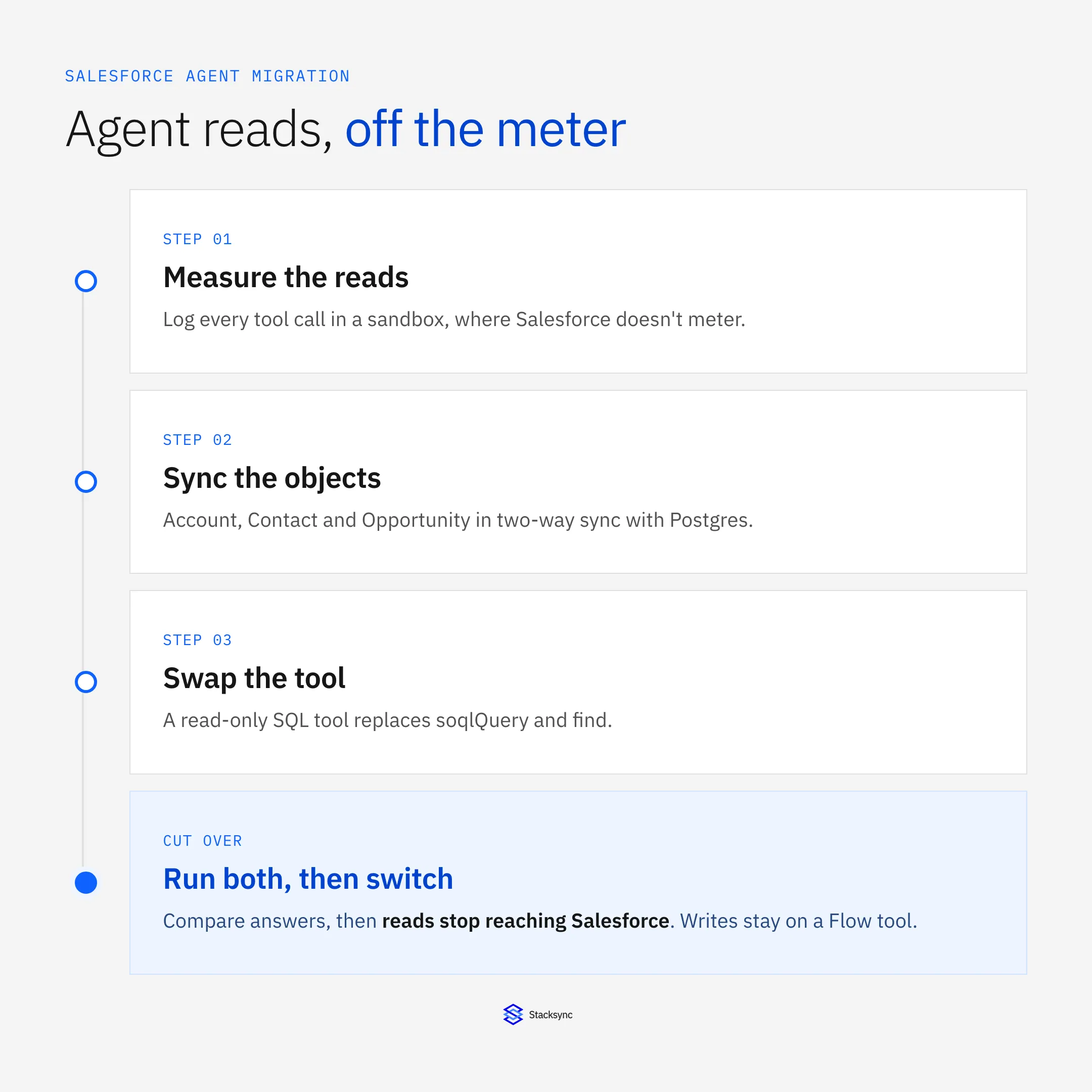
Short answer: Measure which records your agents read, sync those objects into Postgres or a warehouse, and give the agent a read-only SQL tool in place of its Salesforce read tools. Keep writes on Salesforce. Run both paths side by side until the answers match, then switch. Reads against your own database never reach Salesforce, so they never become Headless Platform Interactions (HPIs), the per-call unit Salesforce plans to bill in Flex Credits.
Written for the rules Salesforce has announced as of October 24, 2026. Metering hasn't started, and Salesforce promises 30 days' notice.
Why should reads move first?
Agents read far more than they write. A pipeline review, an account brief, or a churn scan can run five or ten queries and change nothing. Once metering starts, Salesforce charges each successful call from a registered agent the same flat rate, whether it reads one field or creates a record.
- Reads drive most of the bill. In the example from our cost-cutting guide, 8 of 10 calls in a typical request are reads.
- Reads hit hard limits. The hosted MCP
soqlQuerytool caps at 50,000 records per transaction andfindat 2,000. A database has no such cap. - Reads are easy to move. A read has no side effects, so a wrong answer from the new path costs you a retry, not bad data.
Switching the agent from MCP to the REST API saves nothing. Salesforce meters registered agent calls on both. The only read that costs no HPI is one that doesn't reach Salesforce.
Step 1: Which records do your agents read?
Run each agent workflow 20 times in a sandbox, where Salesforce doesn't meter calls, and log every tool call. For each call, record the tool, the object, the fields, and whether it read or wrote.
| Workflow | Read calls | Write calls | Objects read |
|---|---|---|---|
| Account brief | 6 | 0 | Account, Contact, Opportunity, Task |
| Pipeline review | 4 | 0 | Opportunity, OpportunityLineItem, User |
| Renewal follow-up | 5 | 2 | Account, Opportunity, Contract |
Example inventory. Replace with your own sandbox logs.
The objects that show up in most read calls are your first sync scope. In most CRM agents, that is Account, Contact, Opportunity, and activity history.
Step 2: What should you sync?
Sync the objects from step 1 with every field the agent reads, plus the IDs that join them: AccountId, OwnerId, ContactId. Add LastModifiedDate so the agent can tell how recent a record is.
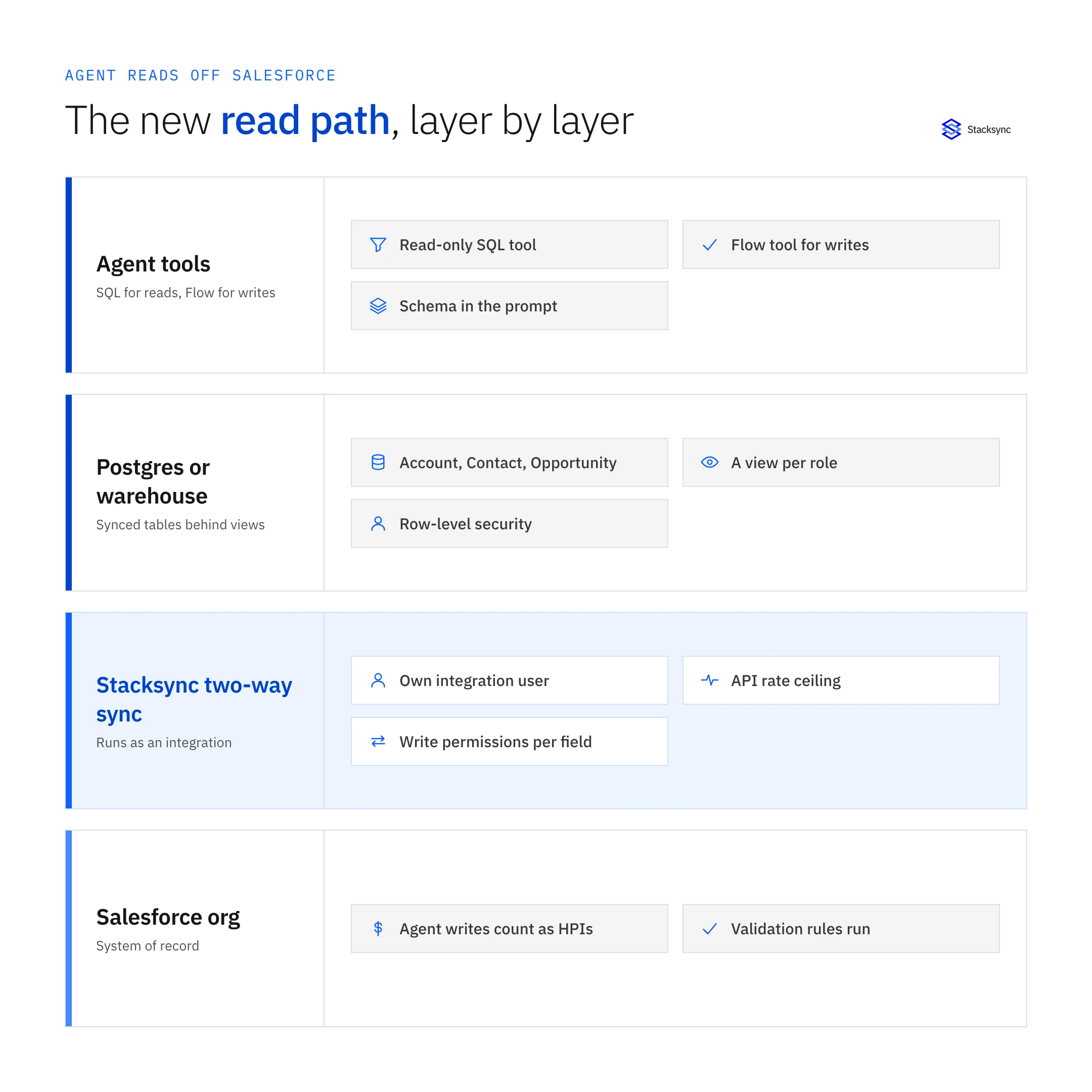
Then decide who can see what. Salesforce enforces field-level security and sharing rules on every MCP call. A database copy holds whatever the sync's integration user can see. If one agent serves many reps, rebuild access in the database: a view per role, or Postgres row-level security keyed on OwnerId or territory. Skip this and a rep can ask the agent about accounts they can't open in Salesforce.
Step 3: How do you set up the sync?
Connect Salesforce and the database in Stacksync, pick the objects and fields, and run the backfill. After that, Stacksync keeps both systems in two-way sync: a change in Salesforce lands in Postgres, and a change in Postgres lands in Salesforce, with write permissions you set per field. See Salesforce to Postgres two-way sync.
- Run it as an integration. Give the sync its own integration user and connected app, separate from every agent. That keeps it on the traditional-integration side of Salesforce's line. The Agentic Identity checklist explains why the split matters.
- Budget its API calls. The sync counts against your org's daily API request limit. Stacksync batches record changes and lets you set a rate ceiling per app, so the sync stays inside the budget you give it.
- Keep the database read-only to agents at this stage. Grant the agent's database role
SELECTonly.
Step 4: How does the agent query the database?
Replace the agent's Salesforce read tools with one SQL tool. You can expose it through a Postgres MCP server or as a function in your agent harness. Either way:
- Connect with the read-only role from step 3, pointed at the access-controlled views, not the raw tables.
- Put the table and column list in the system prompt, so the agent doesn't spend turns discovering schema.
- Set a statement timeout and a row limit, so a bad query fails fast instead of scanning millions of rows.
- Remove
soqlQuery,find, andgetRelatedRecordsfrom the agent, or move it fromsobject-alltosobject-mutationsfor writes only. The endpoint guide lists what each server exposes.
A join that took four MCP calls becomes one query. You can also join CRM data with billing, product usage, or ERP tables that Salesforce never held.
Step 5: Where do writes go?
Leave writes on Salesforce for now. The cleanest pattern is one Flow published as a custom MCP tool per business action, such as "Log renewal follow-up." Each one costs one HPI and runs your validation rules.
Writing to Postgres and letting the sync carry the change back also works, since the sync is two-way. Salesforce hasn't published how it classifies agent activity that reaches Salesforce through a sync. Get a written answer from your account executive before you move writes. Until then, treat the database as the read path.

Step 6: How do you cut over safely?
Run the old and new read paths in parallel on the same requests for one to two weeks.
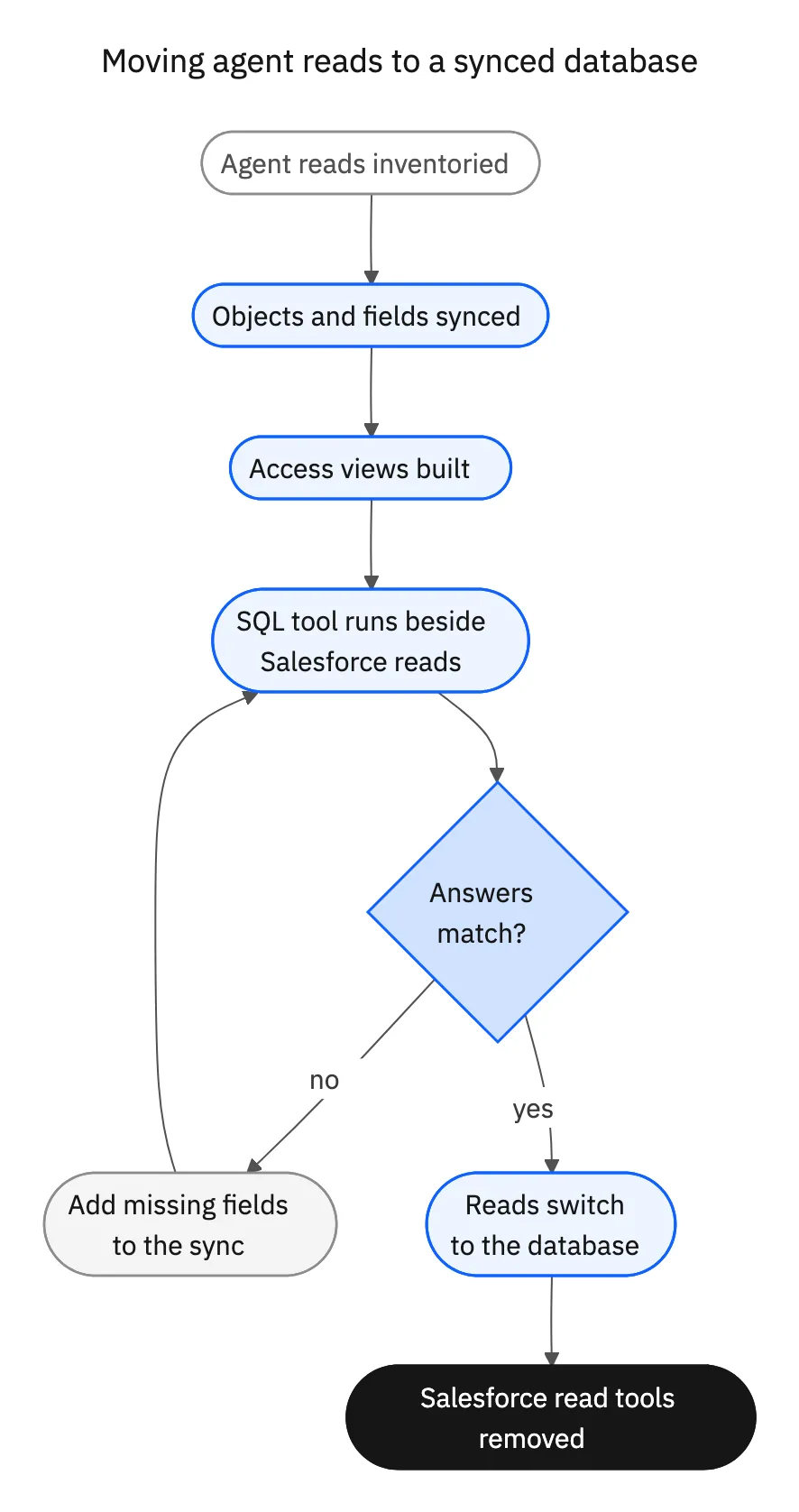
- 01Compare final answers. Spot-check the agent's output from both paths on 50 real requests. Matching row counts prove little.
- 02Track the gaps. A missing field or an unsynced object shows up as "I couldn't find that." Add it to the sync scope.
- 03Count HPIs before and after in the sandbox. You should see read calls drop to zero and writes stay flat.
- 04Switch, then remove the Salesforce read tools so a prompt change can't bring them back.
What can go wrong?
| Risk | What to do |
|---|---|
| Stale reads on fast-moving fields | Check sync latency for the fields that matter, such as stage and amount. For a field that must be live, keep one MCP read for that field only. |
| Over-broad access | Rebuild sharing with views or row-level security before more than one person uses the agent. |
| Sync API usage spikes | Set a rate ceiling and watch the org's API usage during backfill. |
| Unclear classification | Keep agent and sync credentials separate, and get Salesforce's answer on synced writes in writing. |
For a full cost picture before and after the move, run your numbers through our Salesforce MCP cost estimates, and see what stays off the HPI meter.
Sources
- Salesforce Ben, Salesforce Will Charge Flex Credits for Agentic MCP and API Calls (September 24, 2026)
- Vantage Point, Salesforce Will Meter Agentic MCP and API Calls: What to Do Now (updated October 10, 2026)
- Salesforce Developers, SObject All MCP Server
- Salesforce Developers, Standard MCP Servers Reference

FAQ
Frequently asked questions










Explore these integrations and topics
- connectorSalesforce integrations
- platformDatabase synchronization
- platformAI agent operations
- Database synchronization guidesWork through database change capture, application writes, and reliable record reconciliation.
- AI agent operations guidesExplore practical Genies workflows across industries, with source evidence, human approvals, and confirmed outcomes.
Related articles