Acumatica to Salesforce & HubSpot Integration
A bottom-funnel guide to connecting Acumatica ERP with Salesforce and HubSpot through real-time, two-way sync: what records move, in which direction, and the exact steps to set it up.
- Author
- Ignacio Malpartida · GTM Engineer
- Published
- Updated
- Read time
- 10 min read

To integrate Acumatica with Salesforce and HubSpot, you connect your Acumatica ERP to each CRM through a real-time, two-way sync so that customers, contacts, sales orders, invoices, products, and inventory stay identical in every system. The most direct path is a managed sync platform such as Stacksync: it authenticates to Acumatica and to your CRM, maps the records once, and then keeps both sides current in both directions with no custom code to build or babysit.
Acumatica is where finance and operations run. It holds the customer master, sales orders, AR invoices, stock items, and on-hand inventory. Salesforce and HubSpot are where sales and marketing run: accounts, contacts, opportunities, and deals. When these systems do not share data, reps re-key order details, finance rebuilds pipeline numbers by hand, and both teams argue over which record is right.
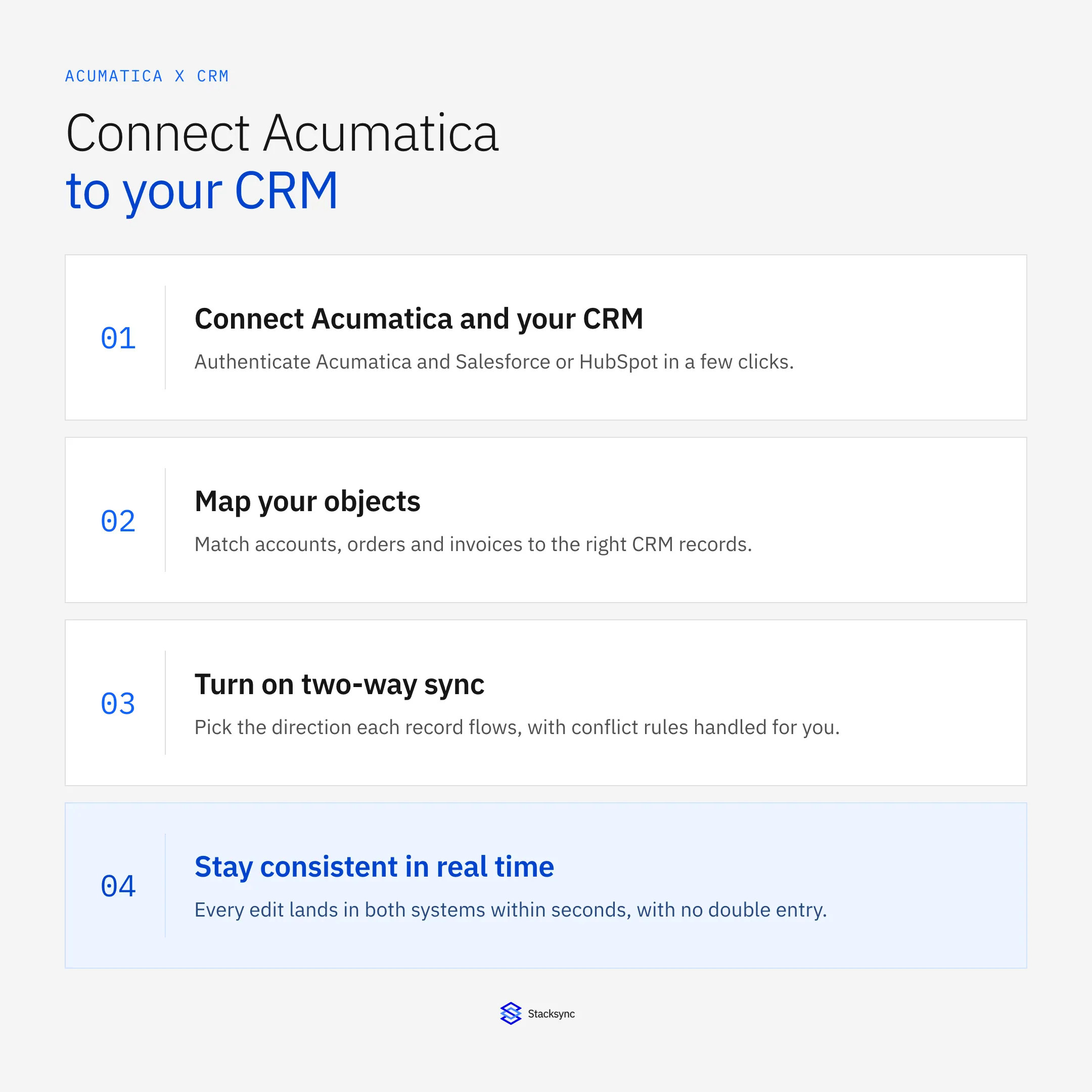
This guide covers what actually syncs between Acumatica and a CRM, why the sync has to run in both directions, how the main integration options compare, and the concrete steps to connect Acumatica to Salesforce and to HubSpot.
What Actually Syncs Between Acumatica and Your CRM
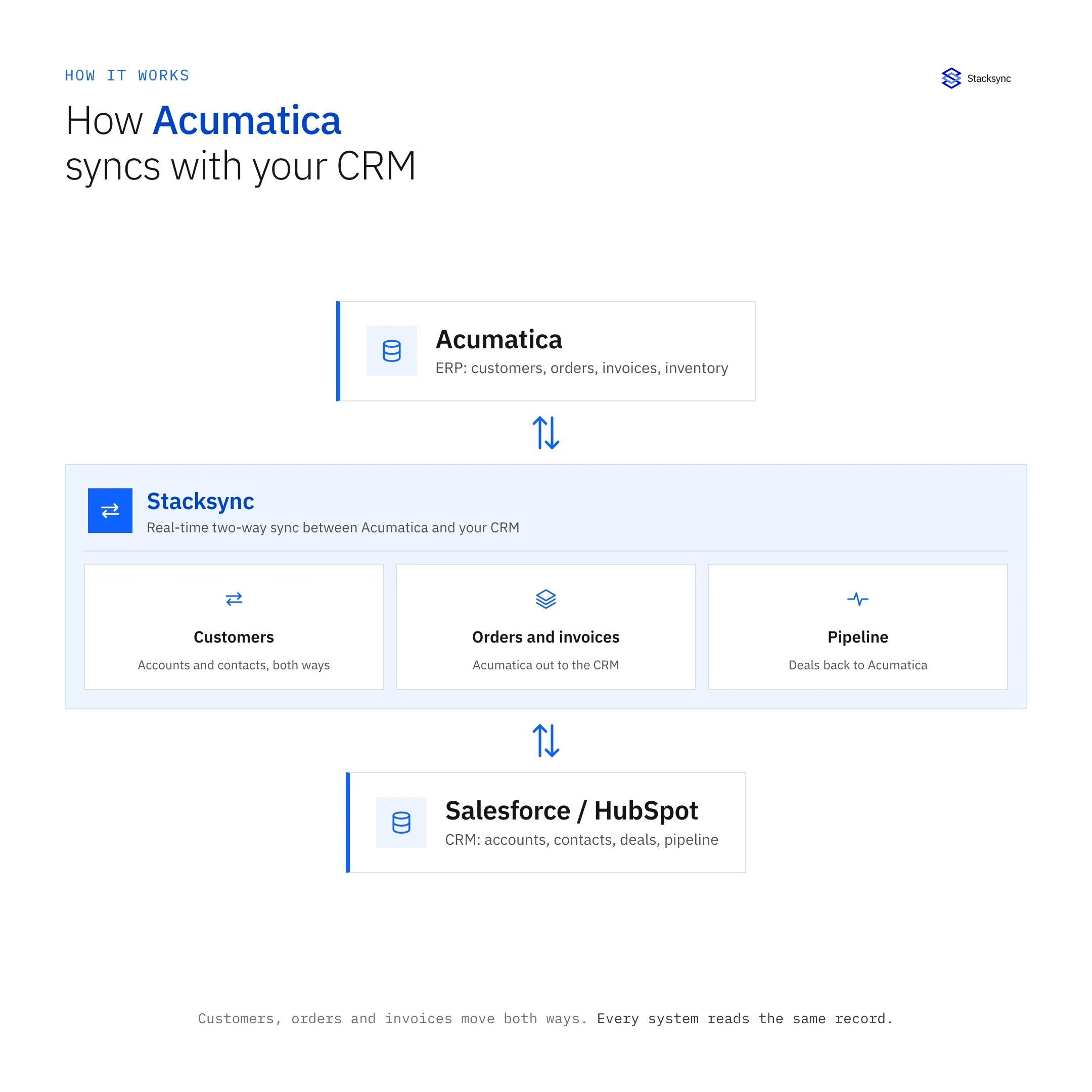
An Acumatica to CRM integration is only useful if the right records move. In practice, a customer in Acumatica should match the account in your CRM, a contact should match a contact, and financial documents like orders and invoices should appear on the related opportunity or deal. The table below shows the records most teams sync and the direction each one usually flows.
| Record | Acumatica field group | CRM object | Direction |
|---|---|---|---|
| Customer / account | Customer (AR) master | Account / Company | Two-way |
| Contact | Contact records | Contact / Lead | Two-way |
| Sales order | Sales Orders (SO) | Opportunity / Deal | Acumatica to CRM |
| Invoice | AR invoices and balance | Invoice or custom object | Acumatica to CRM |
| Product / item | Stock Items (Inventory) | Product | Acumatica to CRM |
| Inventory availability | Available quantity | Product field | Acumatica to CRM |
| Payment status | AR payment and open balance | Opportunity / custom field | Acumatica to CRM |
Directions are a starting point, not a rule. Accounts and contacts are usually two-way because either team can create or edit them. Orders, invoices, and inventory typically originate in Acumatica, so they flow out to the CRM, though new orders keyed by sales can be pushed back into Acumatica when you want reps to raise orders straight from an opportunity.
Two details decide whether the sync stays clean. First, every synced record needs a stable matching key, usually the Acumatica customer ID stored as an external ID on the CRM side, so the same customer is never created twice. Second, decide up front which fields are read-only in the CRM. Inventory counts and invoice totals should be owned by Acumatica, since letting a rep edit them in Salesforce or HubSpot invites the two systems to disagree.
Why Acumatica to CRM Sync Has to Be Two-Way
A one-way export from Acumatica leaves half your teams blind. Two-way sync means a change made in either system shows up in the other within seconds, so nobody works from a stale copy. Two roles feel the difference right away:
Sales sees live fulfillment and credit status. When an order ships or a customer hits their credit limit in Acumatica, the rep sees it on the account without opening the ERP. No more promising a delivery date that finance already put on hold.
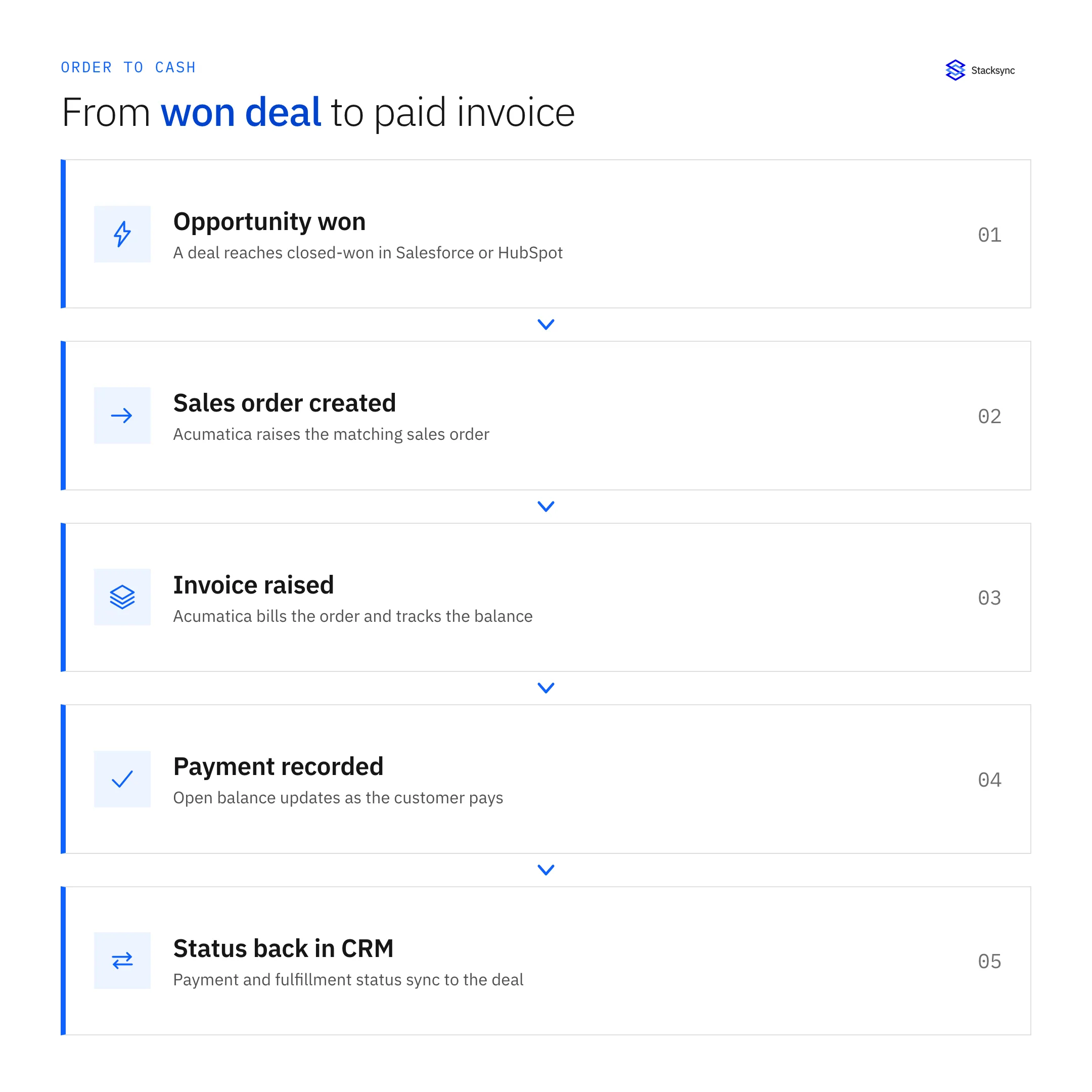
Finance sees live pipeline. When a deal moves to closed-won in the CRM, finance can act on the order and invoice instead of waiting for a weekly export or a chat message.
Both sides trust one number. Address changes, new contacts, and updated payment terms move in both directions, so the customer record reads the same whether you open it in Acumatica, Salesforce, or HubSpot.
A concrete example: a customer calls sales to update their billing address and add a new contact. In a two-way setup, that edit lands in Acumatica within seconds, so the next invoice goes to the right place and finance never re-enters it. Run the same scenario one-way and the address sits in the CRM while Acumatica keeps billing the old one.
The technical requirement behind this is conflict handling. When the same field changes in two places at once, the sync needs a defined source of truth or a timestamp rule so one edit does not silently overwrite the other. That is the part brittle scripts usually get wrong.
Acumatica CRM Integration Approaches Compared
There are three common ways to connect Acumatica to a CRM. They differ in whether they sync both directions, whether updates are real-time or batched, and how much you have to build and maintain.
| Approach | Two-way? | Real-time? | Setup effort |
|---|---|---|---|
| Native or point connector | Often one-way only | Usually scheduled batch | Low, but rigid and hard to extend |
| Generic iPaaS | Possible, but you build every flow | Depends on polling interval | High, you own the mapping and error logic |
| Stacksync | Yes, native two-way | Yes, changes sync in seconds | Low, guided mapping with managed conflict handling |
Native connectors are quick to switch on but usually push data one way on a schedule, which is why sales still sees yesterday’s inventory. Generic iPaaS tools can do more, but you become the integration team: you build each flow, handle retries, and debug drift. A purpose-built real-time sync keeps both directions current and handles conflicts for you, which is the model Stacksync uses.
How to Integrate Acumatica with Salesforce
To connect Salesforce with Acumatica, you authenticate both systems, choose the objects to sync, map the fields once, and turn on two-way sync. The Acumatica and Salesforce integration follows four steps:
- 01Connect Acumatica and SalesforceAuthenticate Acumatica through its contract-based API and Salesforce through OAuth. Confirm the API user has read and write access to the objects you plan to sync.
- 02Pick objects and map fieldsMatch the Acumatica customer to the Salesforce Account, contact to Contact, and sales order to Opportunity. Map each field and set type conversions, for example the Acumatica customer ID to a Salesforce external ID.
- 03Set direction and conflict rulesMake accounts and contacts two-way, keep invoices and inventory flowing from Acumatica outward, and choose a source of truth per field so simultaneous edits resolve cleanly.
- 04Test, then go liveValidate the mapping on a handful of records, confirm that updates round-trip in both directions, then enable the sync for the full data set.
For teams with heavy order volume, the same setup handles line-item detail and status changes. As an order moves from open to shipped to invoiced in Acumatica, the linked Salesforce opportunity reflects each step, so the rep never has to ask operations where an order stands.
Because an Acumatica external ID sits on the Salesforce account, records stay matched over time instead of creating duplicates every time a company name changes.
How to Connect Acumatica to HubSpot
Connecting HubSpot to Acumatica works the same way, mapped to HubSpot’s object model. The Acumatica and HubSpot integration lines up like this:
Companies and contacts: Sync the Acumatica customer to the HubSpot Company and Acumatica contacts to HubSpot Contacts, two-way, so marketing and finance share one customer record.
Deals: Push Acumatica sales orders onto the related HubSpot Deal, and optionally create an Acumatica order when a deal reaches a chosen stage.
Invoices and payment status: Surface AR invoice and open-balance data on the HubSpot company or a custom object so customer success sees who is past due before a renewal call.
Products and inventory: Bring Acumatica stock items and available quantity into HubSpot so quotes reflect what you can actually ship.
The result is that a HubSpot user sees order history, invoice status, and stock availability on the company record, and any contact or company edit they make flows back to Acumatica.
For marketing, this also means campaign and lifecycle logic can key off real order and payment data instead of guesses. A customer who just fell behind on payment does not sit in an upsell sequence, and a first-time buyer can trigger an onboarding track the moment the order posts in Acumatica.

Common Pitfalls and How Stacksync Handles Them
This is the difference between an integration you set up once and one you re-fix every quarter. Real-time, two-way sync with managed conflict handling keeps Acumatica, Salesforce, and HubSpot aligned without a standing maintenance burden on your team.
Apply this in construction services and installation: hubSpot company and acumatica customer
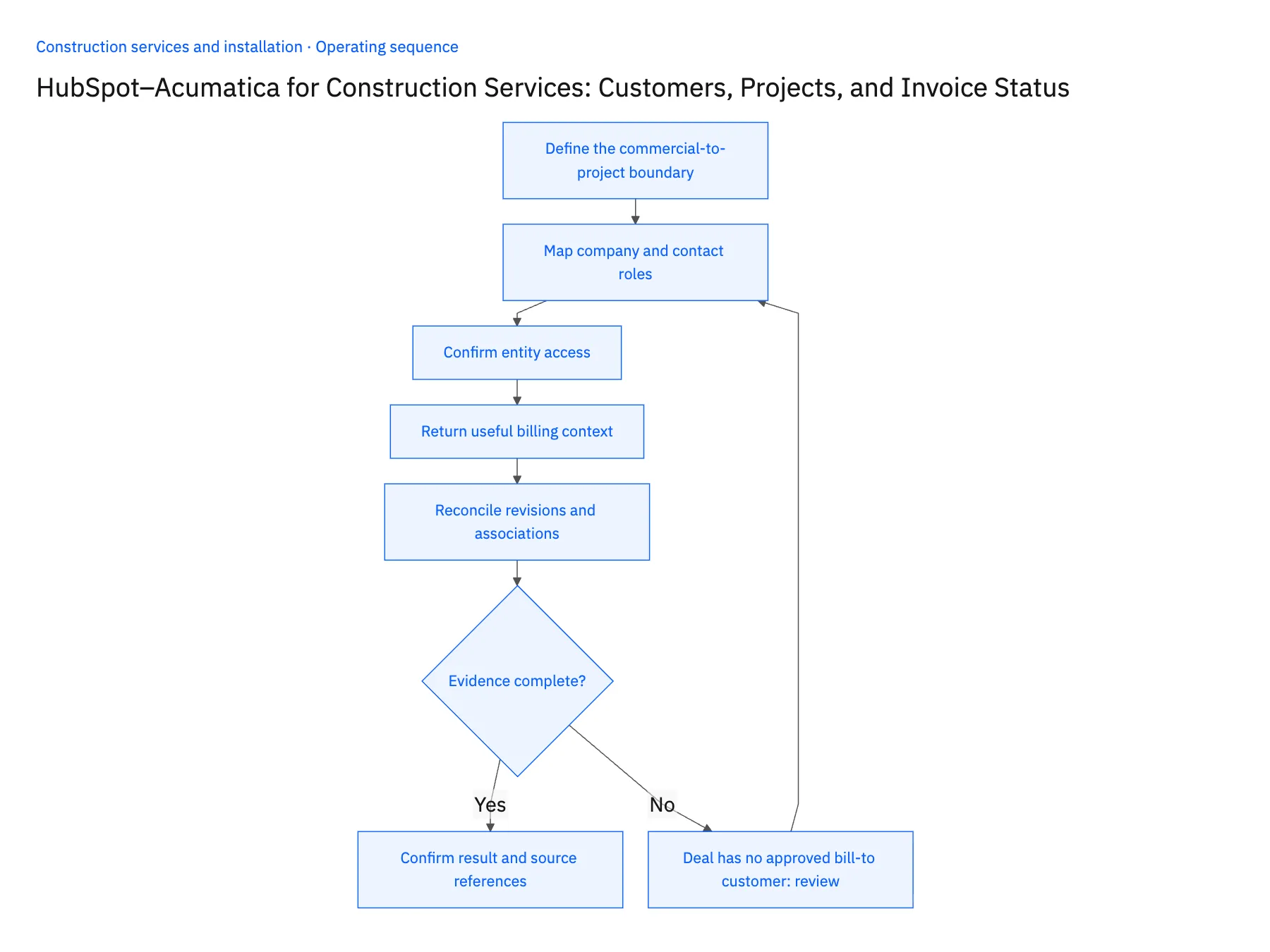
The customer and project mapping in this integration guide has a direct construction-service application: align HubSpot customer context with the approved Acumatica account and project. Keep invoice visibility separate from permission to change finance-owned records.
| Record to reconcile | Responsible owner | Rule to preserve |
|---|---|---|
| HubSpot company | Sales operations | Store the Acumatica customer reference without replacing HubSpot's native record ID. |
| Acumatica customer | Finance | Own legal name, billing address and approved payment terms. |
| Project association | Project administration | Connect the deal to the approved project key, including branch or company context. |
An exception to plan for: Deal has no approved bill-to customer. Route to finance with the missing legal entity; do not create a customer from an email domain. Acceptance check for the pilot: hubSpot shows the correct Acumatica customer for a multisite account.
The construction services and installation hub connects the broader operating context. These guides develop the specific record mappings and decisions for this application:
Get Your Acumatica and CRM Data in Sync
Integrating Acumatica with Salesforce and HubSpot comes down to one decision: keep exporting data one way on a schedule, or run a real-time, two-way sync where every customer, order, invoice, and inventory count matches across finance, sales, and marketing. The second option is what lets reps quote accurately, lets finance act on pipeline the moment it closes, and gives everyone a single customer record they can trust. To see it running on your own Acumatica, Salesforce, and HubSpot data, book a demo with Stacksync.

FAQ
Frequently asked questions










Explore these integrations and topics
- connectorSalesforce integrations
- connectorHubSpot integrations
- connectorAcumatica integrations
- platformCRM synchronization
- platformCRM and ERP integration
- CRM synchronization guidesConnect customer records across sales, marketing, and operational systems.
- CRM and ERP integration guidesPlan account, order, invoice, and payment flows between commercial and finance teams.
Related articles