






















Verify Warranty Coverage and Customer Acceptance Before Closing Repairs
Before proposing customer charges for an equipment repair, verify the applicable warranty and service agreement for the identified asset and confirmed fault.
- Author
- Ignacio Malpartida · GTM Engineer
- Published
- Updated
- Read time
- 7 min read

Warranty evidence comes before a charge proposal
Before proposing customer charges for an equipment repair, verify the applicable warranty and service agreement for the identified asset and confirmed fault. A warranty status, agreement scope, and customer acceptance each answer different questions. Keeping them separate prevents the coordination process from treating one positive status as permission to invoice or close the case.
Read the evidence available in NetSuite and Salesforce, preserving references and unresolved terms for the service manager. Do not infer coverage from product age alone, and do not infer noncoverage because a field is empty. Where interpretation is required, obtain the authorized service decision before presenting costs to the customer.
Evidence needed to resolve the exception
Use this exception guide when reviewing a proposed Genie workflow or investigating a case that cannot proceed confidently. The tables describe operational decisions to configure in your environment. They are not claims that a connected application automatically supplies your organization’s policies, identity mappings, or approval process.
| System or owner | Evidence and responsibility |
|---|---|
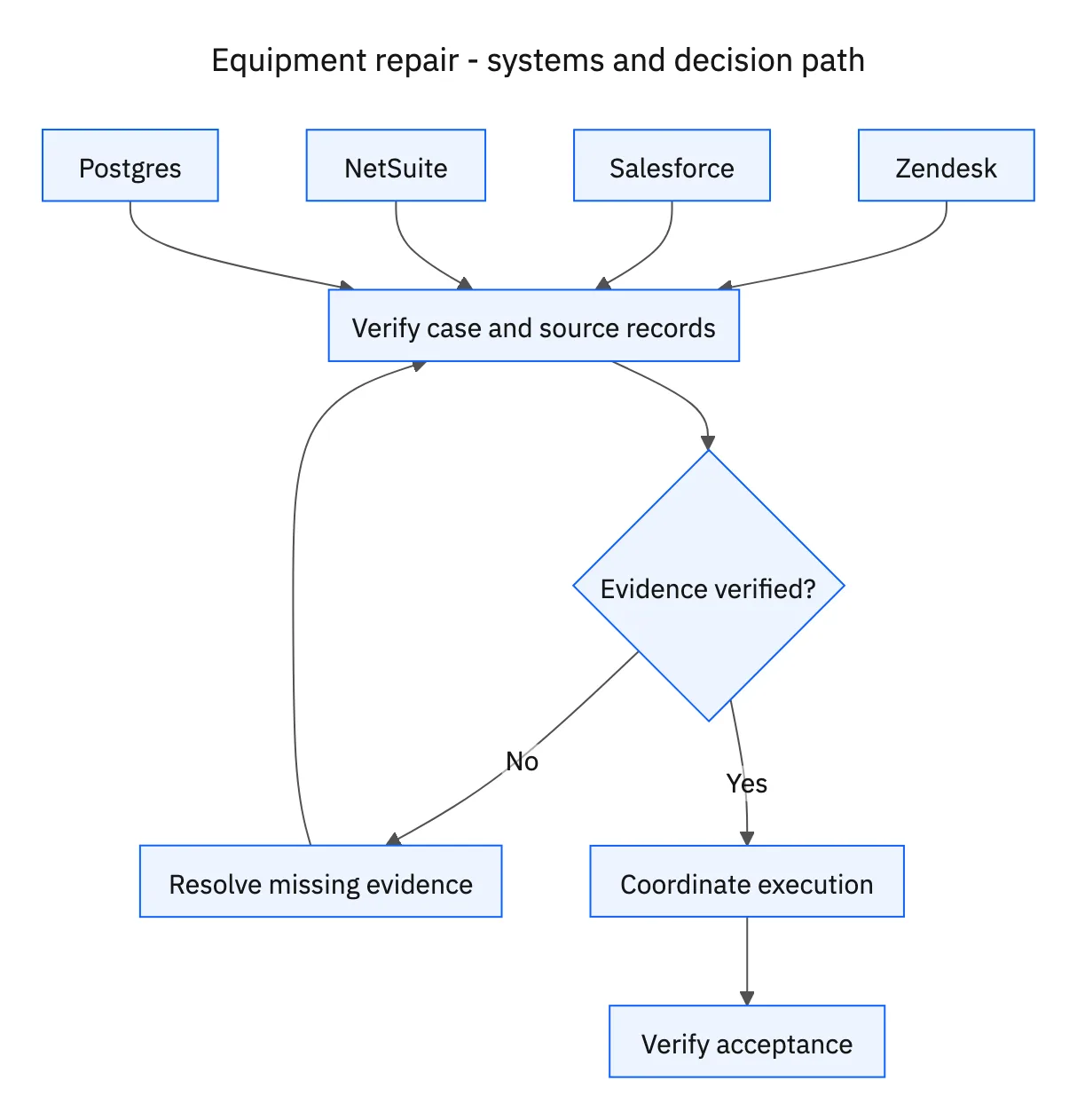
| Zendesk | Technician-confirmed fault, service case, approval context, and customer communication. |
| Salesforce | Asset identity and service agreement. |
| NetSuite | Warranty evidence, replacement stock, and approved parts orders. |
| Postgres | Available service appointments and the configured work-request process. |
| Service manager | Approval of the repair plan before parts orders or work requests. |
Required context for this workflow design.
Match approval to the actual parts and work
A repair proposal should name the required parts, quantities, stock location, work scope, appointment, and any cost supported by the warranty review. Service-manager approval must precede parts orders and work requests. Existing records should be checked first so a repeated ticket update does not create another set of parts.
If approved stock becomes unavailable, ask the service team to validate the alternative. Similar product names do not establish compatibility. Likewise, an appointment proposal is not a confirmed visit until the scheduling process confirms it. Customer updates should state what is confirmed and which action remains outstanding.
Close only after technician completion and customer acceptance
The technician’s completion record establishes that the service work was reported complete. Customer acceptance establishes the second required outcome in this workflow. Record both, tied to the correct case and asset, before closing. A customer who has not responded has not implicitly accepted the repair.
Track follow-up for missing acceptance and route a reported unresolved issue back to the service team. Do not reopen the entire ordering sequence without checking existing parts and work records. The aim is continuity: keep the confirmed work, preserve any new issue, and let the service manager decide the next repair action with the original evidence available.
Decision table for common exceptions
Use the condition in the first column to choose the next action. The final column describes the boundary that must remain true while the case is unresolved. Apply the organization’s actual policy and source records to the live case; do not treat an illustrative condition as proof that the condition exists.
| Observed condition | Next action | Required boundary |
|---|---|---|
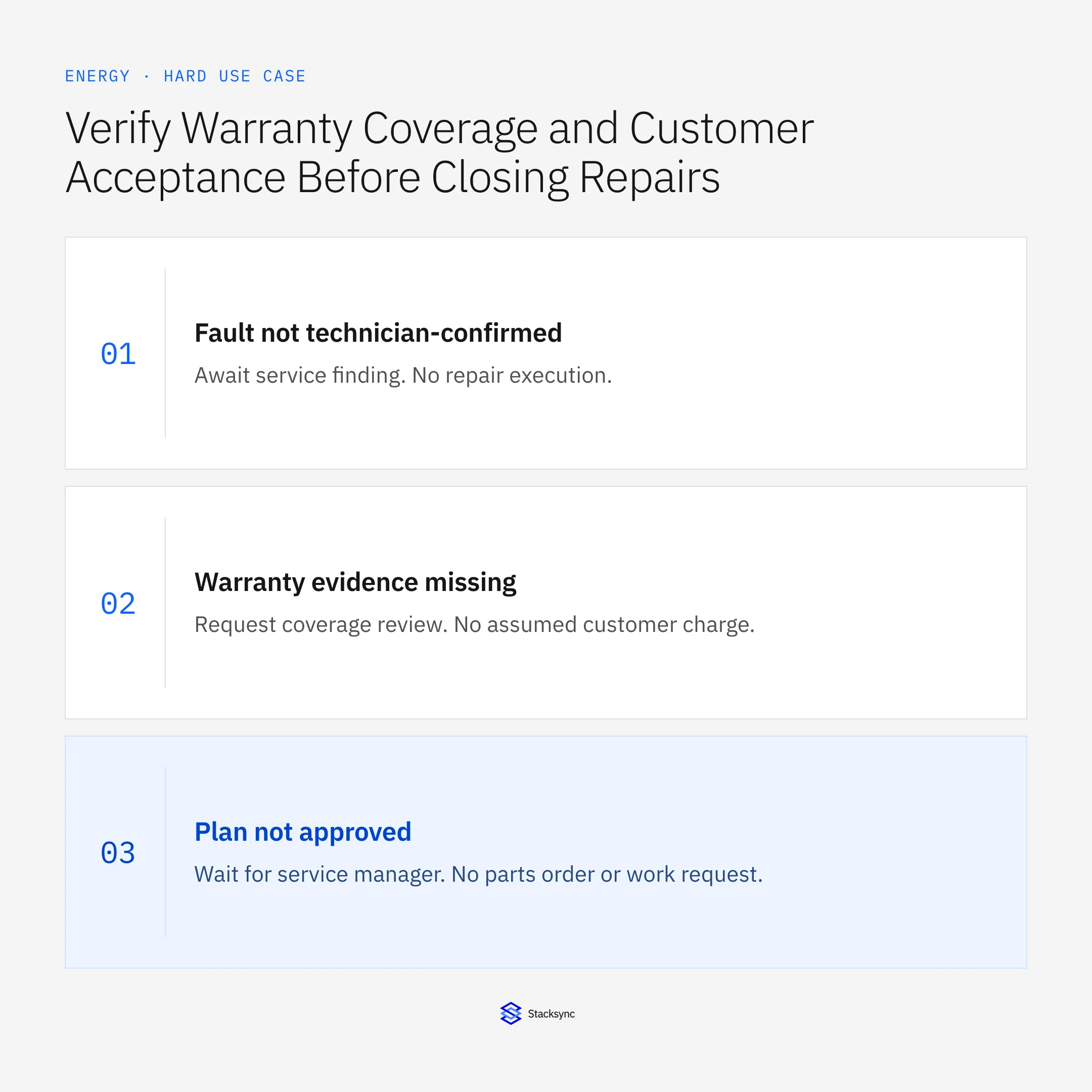
| Fault not technician-confirmed | Await service finding | No repair execution |
| Warranty evidence missing | Request coverage review | No assumed customer charge |
| Plan not approved | Wait for service manager | No parts order or work request |
| Technician complete; acceptance missing | Follow up with customer | Case remains open |
Exception decisions for equipment repair.
Illustrative exception and recovery
The warranty field is empty for the registered asset. The workflow requests coverage review and does not propose a customer charge. Missing evidence remains a decision item in the service-manager plan.
This example uses fictional records to show the decision logic. It is not a customer case study or a claim of measured results. In a live case, retain the actual record IDs and evidence behind each statement, and replace all illustrative quantities or timing assumptions with the approved operational inputs.
What to record before resuming
A service-manager-approved repair plan, linked parts and work records, confirmed appointment, and Zendesk evidence of technician completion and customer acceptance.
Preserve the original finding and the evidence that resolves it. Record which person or system supplied the clarification, which proposal it applies to, and the action now permitted. Do not erase the uncertainty from the history: a later reviewer needs to understand why the case paused and why it resumed.
Boundaries that remain in force
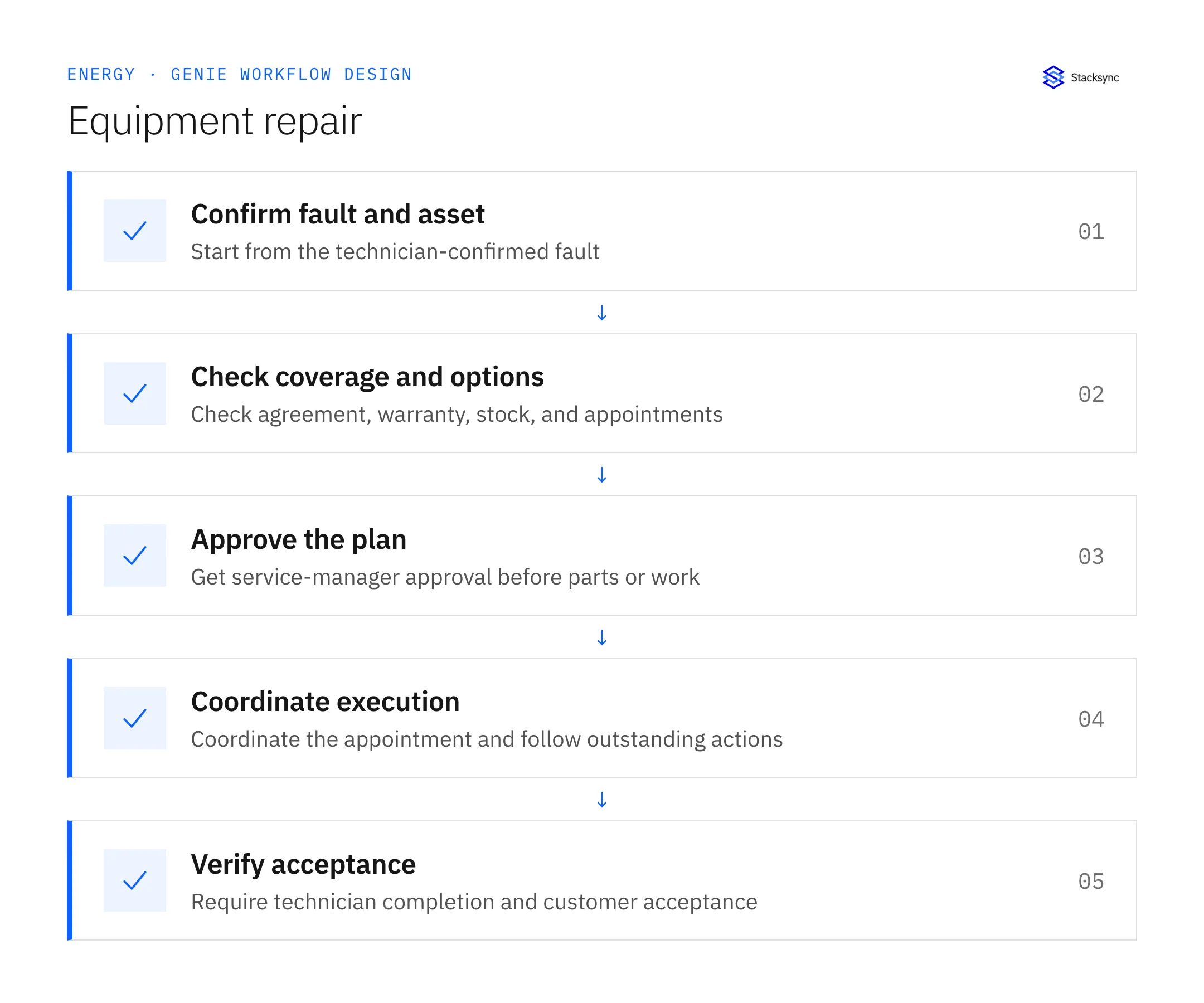
- Begin only after technician confirmation of the fault in Zendesk.
- Check asset, agreement, warranty, replacement stock, and appointment availability.
- Require service-manager approval before parts orders or work requests.
- Check warranty before proposing charges; close only with technician completion and customer acceptance.
Review the case before restarting
First verify that the new evidence resolves the original blocker rather than a different issue. Then check whether the case, source records, or proposed action changed during the wait. A response attached to the right ticket can still be insufficient if it refers to an earlier proposal or leaves a required quantity, identity, or approval unresolved.
Run the relevant row from the decision table as a review scenario. Confirm that the job stops at the required boundary, asks for the specified information or decision, and resumes from the confirmed state. If a write or message may already have succeeded, inspect its destination before repeating it; if this job only prepares a draft or report, verify that it stays within that output scope.
- Repair commitments linked to an approved plan
- Charge proposals preceded by coverage review
- Closed cases containing technician completion and customer acceptance
Track unresolved cases by their actual blocker and owner. A case waiting for clarification needs a different next action from one waiting for a confirmed result. Review the evidence when the state changes, and keep any still-unresolved completion condition visible instead of treating a successful intermediate step as the end of the work.

Give your Genie a job description
Copy the job description below. It preserves the scope and decision boundaries of this use case. Configure the referenced systems, record relationships, policies, and approval owners in your workspace before enabling the job.
Paste this into “Give your Genie a job description.” Explore Stacksync Genies.
Apply this in commercial HVAC, plumbing and electrical contractors: related visits and coverage decision
MEP contractors face the same distinction between a finished repair and an approved billable outcome. Extend the warranty and acceptance checks to callbacks, unresolved parts, and customer sign-off before a service-closeout job prepares the finance packet.
| Record to reconcile | Responsible owner | Rule to preserve |
|---|---|---|
| Related visits | Service administration | Link the original work and return visit without combining their evidence. |
| Coverage decision | Service manager | Record why work is warranty, callback, included service or separately chargeable. |
| Part-identification exception | Inventory owner | Resolve the item and quantity from technician and stock evidence. |
An exception to plan for: Customer calls every return a callback. Collect the related visit evidence and ask the service manager to determine the actual classification. Acceptance check for the pilot: A return visit is linked without automatically becoming nonbillable.
The commercial HVAC, plumbing and electrical contractors hub connects the broader operating context. These guides develop the specific record mappings and decisions for this application:
Implementation references
These first-party references document the underlying records and interfaces. The cross-system sequence, approvals, and completion rules in this article are a proposed operational configuration; validate them against your connected workspace before enabling it.

FAQ
Frequently asked questions










Explore these integrations and topics
Related articles





