Aurora PostgreSQL and Salesforce in Both Directions, Step by Step
Aurora PostgreSQL holds the product data and Salesforce holds the commercial record, and both get edited. This is the implementation in the order the work has to happen: the custom DB cluster parameter group, the reboot, the publication and the slot on the writer endpoint, External ID upserts through Bulk API 2.0, Change Data Capture for the return direction, and what a cluster failover does to all of it.
- Author
- Ruben Burdin · Founder & CEO
- Published
- Read time
- 12 min read

Aurora PostgreSQL holds the product data. Salesforce holds the commercial record. Both get edited, and by the second month nobody can say which seat count the renewal quote was built from. Keeping the two in agreement in both directions is less a connector problem than a set of decisions: which endpoint owns the replication slot, which field carries identity across the boundary, and what happens the first time the cluster fails over.
This is the implementation in the order the work has to happen: the custom DB cluster parameter group and the reboot that turn logical decoding on, the publication and slot that can only live on the writer, the External ID that makes a Salesforce write idempotent, Change Data Capture for the return trip, and the metrics that keep a paused sync from filling the cluster volume.
If you have not picked a platform yet, the pillar on an enterprise iPaaS for Aurora PostgreSQL covers that decision, and two-way sync between Aurora PostgreSQL and NetSuite covers the ERP side of the same cluster. If you are on classic RDS rather than Aurora, the instance surface is different enough that syncing Amazon RDS with Salesforce is the better starting point.
Why Aurora and Salesforce end up disagreeing
They disagree because both are systems of record, for different halves of the same customer. Aurora owns the product: entitlements, usage counters, provisioning state, the rows an application writes on every request. Salesforce owns the commercial record: the account, the opportunity, the renewal date, the field a rep edits on a call. The trouble starts with the handful of values that are editable on both sides, which is almost always seat count, plan tier and status.
A one-way pipe hides the problem rather than solving it. A nightly load from Aurora into Salesforce works until a rep changes the seat count there and the application never hears about it. Someone then writes a second job going the other way, and now there are two jobs with no shared idea of which write happened last. That is where a job becomes a sync engine.
Aurora adds a wrinkle a single-instance PostgreSQL server does not have: the cluster is not one machine. Compute and storage are separate, and the volume is a distributed service shared by every instance, which is the design the Aurora origin story unpacks. For an integration that means several endpoints doing different jobs, and only one of them may hold your replication slot.
Setting up the Aurora side, in order
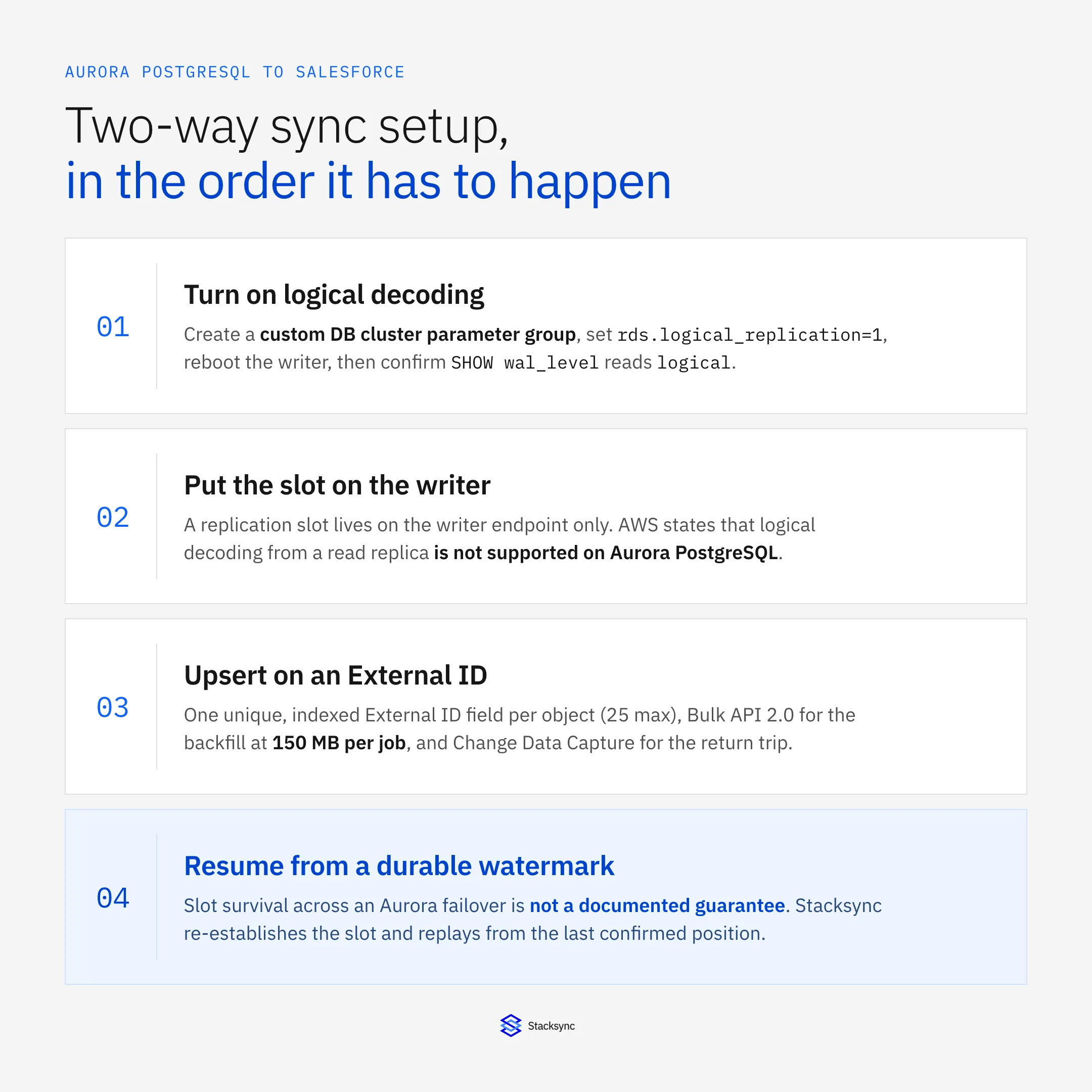
Five things, and the sequence matters because one of them needs a reboot of the writer. Create a custom DB cluster parameter group, set rds.logical_replication to 1, reboot the writer, create the role and publication, then create the slot. Everything after that is Salesforce work.
Here is where those steps sit in the path a committed row takes on its way to becoming a Salesforce record.
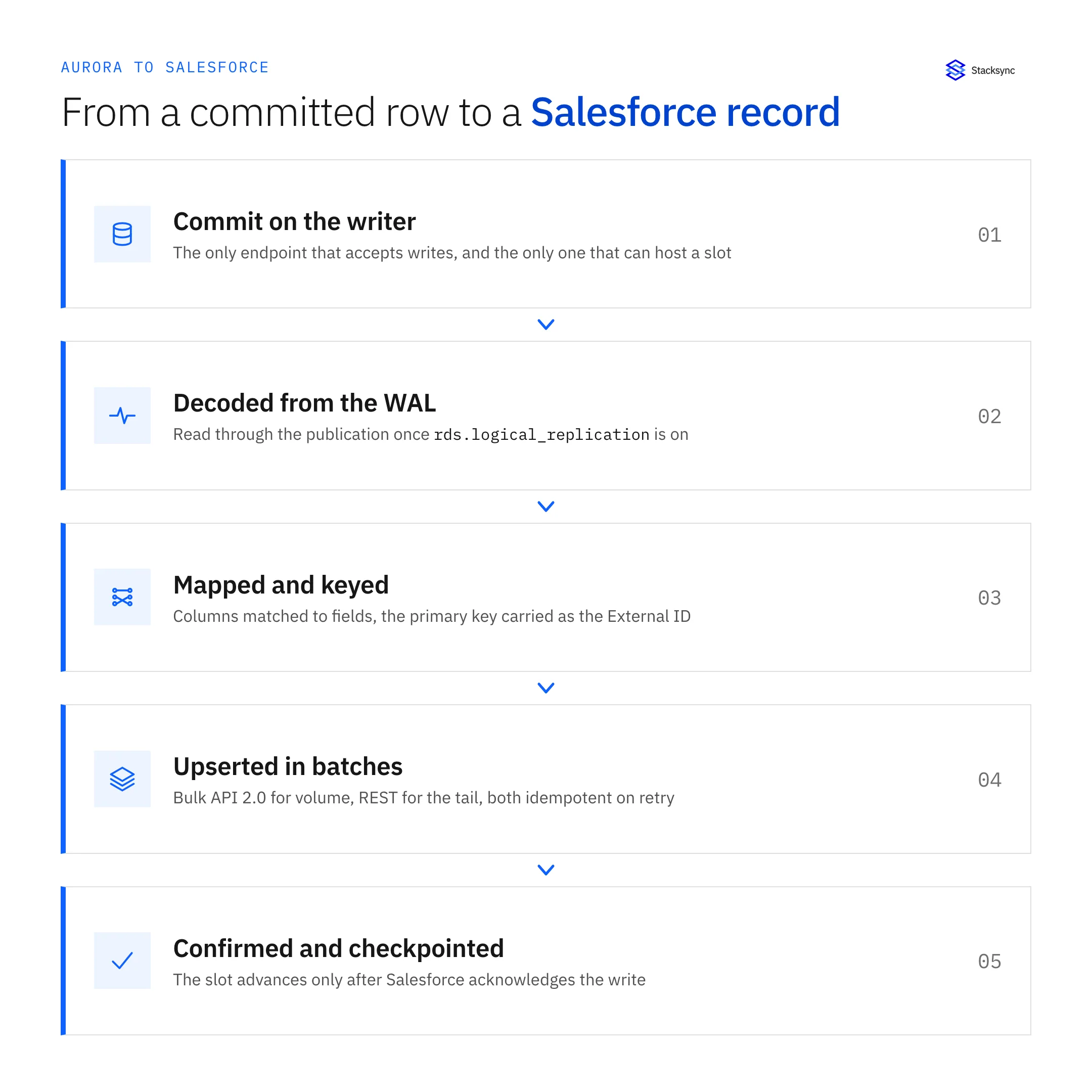
Turn on logical decoding
rds.logical_replication is a DB cluster parameter, not an instance parameter, and it defaults to 0. Default parameter groups cannot be edited, so the first real step is creating a custom DB cluster parameter group and associating it with the cluster. Set the value to 1, reboot the writer instance, then confirm the result rather than assuming it. You never set wal_level yourself on Aurora, you set the flag and let the engine derive it.
Two things to budget for. Enabling the flag increases WAL generation even if you never create a slot, which shows up on the billed VolumeWriteIOPS metric. And since Aurora PostgreSQL 14.5, 13.8, 12.12 and 11.17, a write-through WAL cache reduces disk reads during logical decoding, on by default whenever logical replication is in use.
Put the slot on the writer, and only the writer
The replication slot lives on the publisher, and on an Aurora cluster the publisher is the writer instance. Readers cannot host one. AWS states it directly: PostgreSQL 16 added support for logical decoding from read replicas, and that feature is not supported on Aurora PostgreSQL. So the change-capture connection uses the cluster writer endpoint. The reader endpoint is wrong for a second reason too, since it balances connections rather than queries, randomly through DNS.
-- run on the CLUSTER WRITER endpoint, after the reboot
SHOW wal_level;                     -- must return: logical

CREATE ROLE stacksync WITH LOGIN REPLICATION PASSWORD '...';
GRANT SELECT ON ALL TABLES IN SCHEMA public TO stacksync;

CREATE PUBLICATION stacksync_pub
  FOR TABLE public.accounts, public.subscriptions, public.usage_daily;

-- the query that belongs on a dashboard from day one
SELECT slot_name, active, restart_lsn,
       pg_size_pretty(pg_wal_lsn_diff(pg_current_wal_lsn(), restart_lsn)) AS retained
FROM pg_replication_slots;
Size the connections before you need to
Aurora derives the default connection ceiling from instance memory with LEAST({DBInstanceClassMemory/9531392}, 5000), capped at 5,000. AWS gives db.r4.large at 15.25 GiB as roughly 1,717 connections. Size the sync pool against that number rather than a guess. On Aurora Serverless v2 the value comes from the maximum ACU, so connections are not dropped when the cluster scales down.
RDS Proxy is worth considering, because it can cut failover time by up to 66% by routing to the new instance instead of waiting on DNS. It has one behaviour that catches integrations out: creating a temporary table pins a connection to its session and removes it from the pool, so a staging temp table in a batch job is the usual culprit. Prepared statements no longer force pinning on PostgreSQL targets.
Setting up the Salesforce side: External IDs, Bulk API 2.0 and CDC
Three pieces, in this order: an External ID field so writes are idempotent, Bulk API 2.0 for the backfill, and Change Data Capture for the return direction. The External ID is the one people skip and then regret, because without it every retry is a potential duplicate record.
An External ID is a custom field flagged as External ID, marked unique and indexed. Put the Aurora primary key in it, one per object you sync. Salesforce allows up to 25 per object, so the count is not the constraint, uniqueness is: an upsert that matches more than one record raises a DMLException rather than picking a winner. Populate the field before you upsert on it, and reconcile duplicates during that load.
For the initial load, Bulk API 2.0 batches for you rather than making you cut 10,000-record batches by hand the way v1 did. The ceilings that matter are 150 MB per job, 15,000 batches per rolling 24 hours shared across Bulk API and Bulk API 2.0, and 150,000,000 records per rolling 24 hours. A few million rows fits comfortably. A few hundred million needs planning across days.
Steady-state traffic comes out of a different bucket. The 24-hour API request allocation is shared across REST, SOAP, Bulk, Bulk 2.0 and Connect REST: 100,000 plus 1,000 per licence on Enterprise and Professional, 100,000 plus 5,000 per licence on Unlimited and Performance, a flat 15,000 on Developer, and 5,000,000 on a Full Sandbox. Sizing a sync against that number is worked through in the guide to Salesforce API limits in a Postgres sync.
Change Data Capture is where the return direction lives
For Salesforce to Aurora you want events, not polling. Change Data Capture publishes create, update, delete and undelete events for selected objects, and a consumer reads them with a stored replay ID. Two limits shape the design more than anything else here: events are retained on the event bus for 72 hours, and without the Change Data Capture add-on licence an org can enable CDC on a maximum of five objects.
The five-object cap is what decides your scope. Account, Contact, Opportunity and two custom objects, and you are done. Beyond that you either buy the add-on, which also adds 100,000 events per day, or fall back to a query-based sweep for the rest. The 72-hour window matters separately: an integration offline for longer than three days cannot resume from its replay ID and has to reconcile by querying instead. Delivery allocations before add-ons run from 10,000 events per rolling 24 hours on Developer to 50,000 on Unlimited, with a 1 MB maximum message size.
One round trip, and how the echo gets dropped
The mechanism that makes a two-way sync stable is origin tagging. Every write the engine makes carries the system it came from, so when that write reappears a moment later in the Aurora WAL or on the Salesforce event bus it is recognised as an echo and dropped rather than replayed.
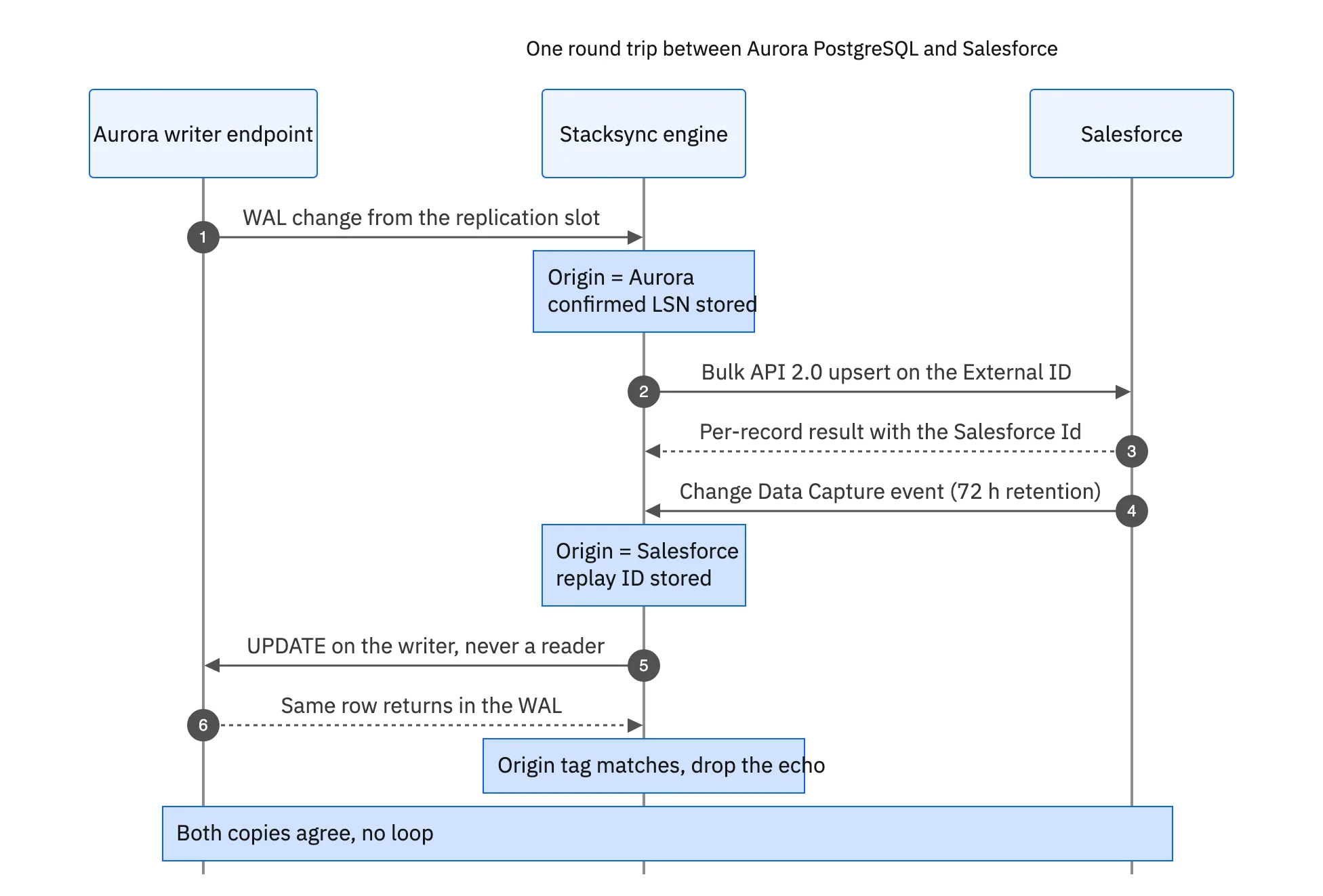
Two checkpoints carry the whole thing. On the Aurora side it is the confirmed LSN, and the slot advances past a change only once Salesforce has acknowledged the write. On the Salesforce side it is the replay ID. Both have to be durable, because both are what a restart resumes from, and on Aurora a restart is not a rare event.
When the same field moves on both sides inside the same window, something has to decide. Last writer wins is the common default and a poor one, because the outcome then depends on which job ran last. Field-level precedence is better, and it is mostly a conversation rather than an engineering problem: Aurora owns usage and provisioning state, Salesforce owns the commercial fields, and once every synced field has one named owner most collisions stop happening.

Three ways to build it, and what each one costs you
There are three honest options: assemble it from AWS-native services, write it yourself, or run it on a managed two-way platform. The AWS-native route is the one most teams try first, and it is worth being precise about where it stops.
AWS DMS reads change data out of Aurora PostgreSQL well. It uses one of two logical decoding plugins, test_decoding or pglogical, preferring pglogical when it is installed on the source. The difference is where filtering happens: pglogical filters unwanted tables at the slot level, so less WAL, CPU and network, while test_decoding filters inside DMS and adds latency on long transactions. Enabling it means adding pglogical to shared_preload_libraries, restarting, then running CREATE EXTENSION pglogical.
What DMS does not do is write to Salesforce, and its bidirectional mode is not what the name suggests. DMS bidirectional replication is two independent one-way tasks with loopback prevention, and AWS states plainly that it "isn't intended as a full multi-master solution including a primary node, conflict resolution, and so on". Two more constraints apply to a PostgreSQL source: CDC requires primary keys, and there is no custom start time because PostgreSQL has no timestamp to LSN mapping. The AWS-native path is therefore DMS plus Amazon AppFlow or Lambda plus your own reconciliation, and the conflict policy is still yours.
| AWS-native (DMS + AppFlow or Lambda) | Custom code | Stacksync | |
|---|---|---|---|
| Aurora change capture | DMS task on a slot | Your own slot consumer | Managed slot on the writer |
| Writes into Salesforce | Not a DMS target, needs AppFlow or Lambda | Your Bulk and REST client | Bulk API 2.0 upsert on the External ID |
| Return direction | A second, independent task | A second service to run | The same engine, both ways |
| Loop prevention | Loopback filtering you configure | You build and test it | Origin tagging built in |
| Conflict policy | None, AWS says not multi-master | You define and maintain it | Field-level precedence |
| Failover behaviour | Task restart, resume from the slot | Your checkpoint code | Slot re-established, replay from watermark |
| Salesforce quota control | You meter it yourself | You meter it yourself | Batched and metered by the engine |
| Schema changes | Edit the task and reload | A code change and a deploy | Remapped in configuration |
| Realistic time to first sync | Weeks | Weeks to months | Hours |
The same job, priced in engineering time rather than licence fees.
The custom-code column is not a strawman, and plenty of teams build it. The cost is that you then own a slot consumer with backpressure, durable checkpointing on both sides, Bulk job polling and error-file parsing, replay ID storage, echo suppression, idempotent retries and schema drift handling, forever. The Heroku Connect post-mortem is a good read on how that ages, and the platform comparison for PostgreSQL and Salesforce covers the vendor landscape.
Operating it: monitoring, failover, Blue/Green and upgrades
Four CloudWatch metrics and three cluster events. Watch OldestReplicationSlotLag, ReplicationSlotDiskUsage, FreeStorageSpace and TransactionLogsDiskUsage, and treat a stalled consumer as a database incident rather than an integration one.
The reason is that an inactive slot retains WAL. It blocks removal of old logs, which AWS notes can eventually lead to insufficient storage, and it blocks autovacuum from cleaning the catalog tables. A sync paused over a weekend is therefore not a backlog to clear on Monday, it is a cluster running low on volume. Alert on retained WAL size, not only on whether the process is up.
What a failover actually does
On failover the cluster endpoint keeps its DNS name and repoints to the promoted instance. Aurora DNS zones use a 5-second TTL, failover is typically restored in under 60 seconds and often under 30, and AWS names DNS propagation as the largest contributor, recommending client DNS TTL caching below 30 seconds. Your client library DNS cache settings are part of your recovery time whether you tuned them or not.
What is not documented is slot survival. AWS documents failover slots for classic RDS primary and read-replica topologies, not for Aurora clusters, so do not assume the slot comes through. Design for re-establishing it on the new writer and resuming from a durable watermark, which is only safe if every Salesforce write is idempotent. That is exactly what the External ID upsert buys you.
Blue/Green switchovers and major version upgrades
Two planned events will also take your slot away. A Blue/Green deployment needs a replication slot of its own for the green environment, and the documented AWS guidance is to drop your self-managed slots and subscriptions before the switchover and recreate them afterwards. A major version upgrade goes further: Aurora requires that all logical replication slots be dropped, including inactive ones, before it will proceed.
Neither is a problem if the sync resumes from a watermark and writes idempotently. Both are an outage if the design assumed a slot that lives forever.
To see this running without building the slot consumer yourself, look at the AWS Aurora PostgreSQL connector, the Aurora PostgreSQL and Salesforce integration, or book a demo. The same engine writes into Salesforce on the External ID and reads Change Data Capture back, so most of this guide becomes mapping and a precedence rule.

FAQ
Frequently asked questions










Explore these integrations and topics
- connectorSalesforce integrations
- connectorPostgreSQL integrations
- platformCRM synchronization
- platformDatabase synchronization
- CRM synchronization guidesConnect customer records across sales, marketing, and operational systems.
- Database synchronization guidesWork through database change capture, application writes, and reliable record reconciliation.
Related articles