






















Making SQL Server and NetSuite Agree on the Same Record
Exporting NetSuite into SQL Server is routine. Writing back is where most projects stall. This guide covers what a genuine two-way sync between SQL Server and NetSuite has to solve, what change capture looks like on the SQL side, what NetSuite does to the write path, and how saved-search exports, SuiteAnalytics Connect, custom RESTlet middleware and a real-time sync platform actually compare.
- Author
- Ruben Burdin · Founder & CEO
- Published
- Updated
- Read time
- 16 min read

NetSuite holds the ledger. SQL Server holds everything around it: the order entry app, the warehouse tables, the reporting marts, the stored procedures operations has relied on for a decade. Getting NetSuite data into SQL Server is routine. A saved search, an SSIS package on a nightly schedule, and by morning customers and sales orders sit in tables T-SQL can reach.
The other direction is the one that stalls. An order entry app writes a ship date into SQL Server and it has to land on the sales order in NetSuite. A pricing procedure recalculates a customer's terms in a SQL table and accounts receivable needs the change in the ERP. That is not a bigger export job. It is a different problem: two systems that both accept writes to the same record, and rules deciding which one is right when they disagree.
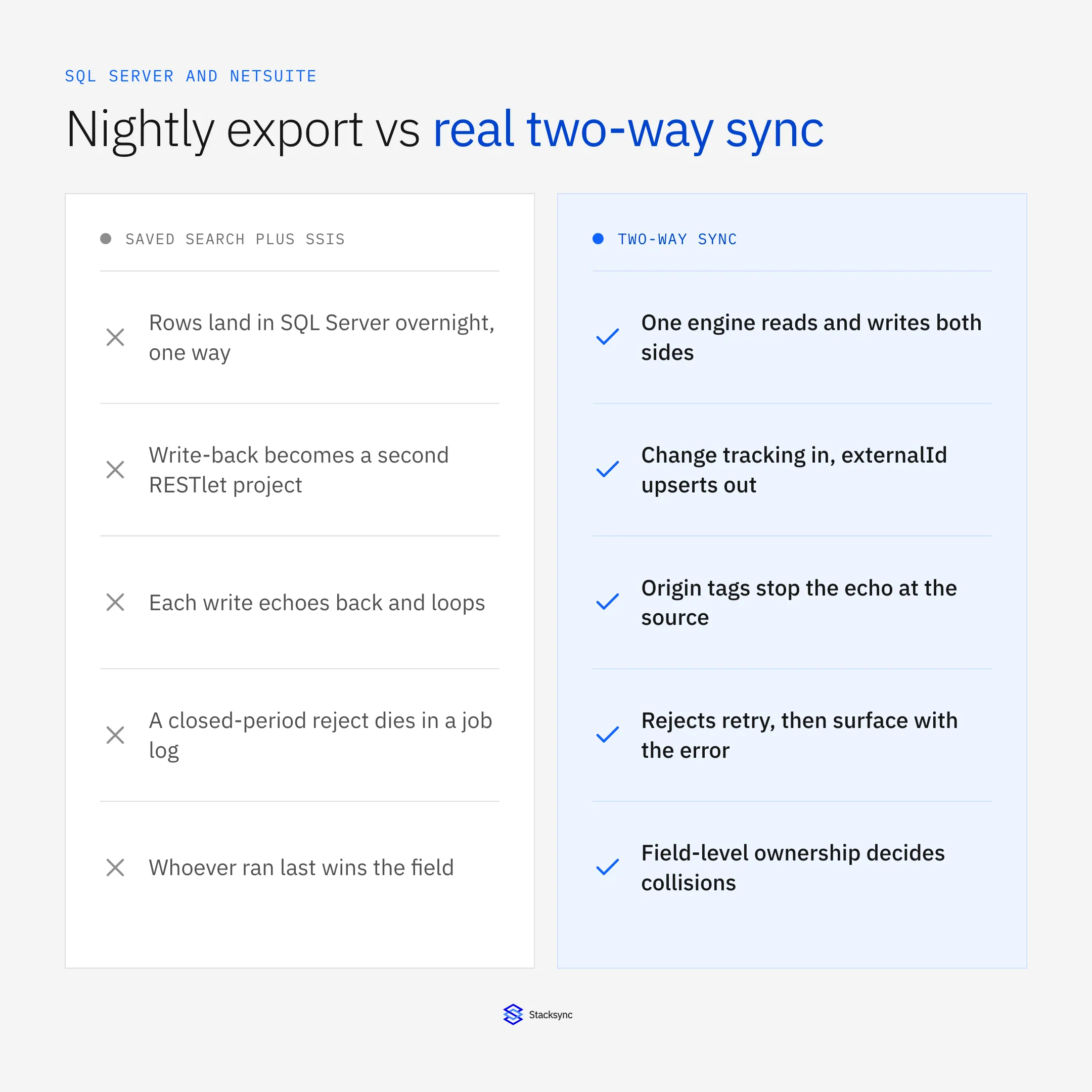
This guide covers what a real two-way sync between SQL Server and NetSuite has to solve, what each side constrains, and how the four available approaches compare. If you are choosing a platform for the whole stack rather than this one pair, start with the guide to an enterprise iPaaS for SQL Server.
Why NetSuite and SQL Server end up side by side
The pairing is rarely a design decision. NetSuite arrives as the finance system, and SQL Server is already in the building: an internal ordering app built on it, a warehouse system a vendor wrote against it, years of stored procedures nobody is going to rewrite against SuiteTalk. So the ERP becomes the system of record for anything that posts to the ledger, and SQL Server stays the operational database applications read and write at application speed.
Most teams try the read path first, usually SuiteAnalytics Connect, the ODBC driver NetSuite ships. It works, it is read-only, and its performance envelope is a longer argument covered in going beyond the NetSuite ODBC driver. The point here is narrower: ODBC gives you reads. A linked server on top of it (sp_addlinkedserver plus OPENQUERY) inherits that limit and adds one of its own: a distributed query holding a session open against a SaaS API is fragile in a way a local join is not.
What two-way sync between SQL Server and NetSuite has to solve
A one-way export has a single job: read from the source, write to the target, keep up. Almost everything it can get wrong is a throughput problem. Bidirectional sync adds problems that have nothing to do with throughput, and they are why write-back projects run long.
- Field ownership. Decide which system owns which field before anything else. NetSuite owns posted amounts, tax codes, terms and periods. SQL Server owns the operational fields an application maintains, such as ship dates and pick statuses. Ownership written down per field is the conflict policy.
- Echo suppression. Every write the engine makes into SQL Server lands in the change tables a moment later and looks exactly like a user edit. Unless the engine recognises its own writes, it pushes them back to NetSuite, which emits another change, and the record bounces.
- Conflict resolution. When the same field moves on both sides inside one window, something has to pick a winner. Last writer wins makes that a function of which job ran last. Field ownership with a version tiebreak makes it a rule you can explain to finance.
- Idempotent writes. ERP writes fail for ordinary reasons: a throttle, a timeout, a record another process has locked. The retry has to update the same record rather than create a second one, which means a stable key on both sides.
- Deletes. A row removed from a SQL table leaves no updated timestamp to poll. NetSuite rarely deletes financial records at all; it inactivates or closes them. Decide per record type whether a delete propagates, becomes an inactivation, or is ignored.
- Referential order and rejections. A sales order cannot reference a customer that does not exist yet, so the engine has to hold the child until the parent lands. And when NetSuite refuses a write, that refusal has to reach a person with the ERP's own error attached.
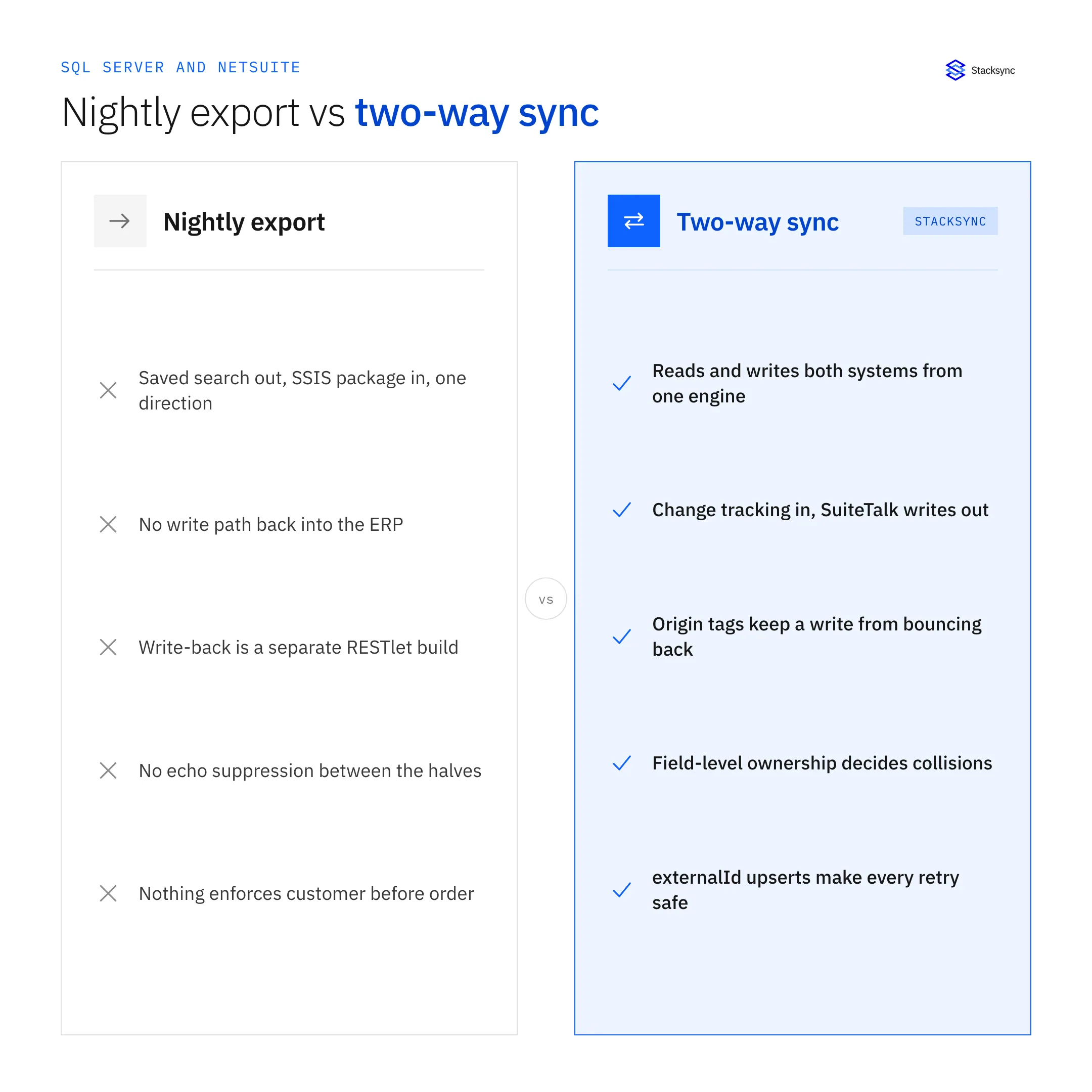
None of those six are exotic. They are the standard content of any bidirectional integration. The worked examples in bi-directional sync explained cover the same mechanics on other pairs.
How you capture changes on the SQL Server side
SQL Server gives you three mechanisms, and the choice shapes everything downstream. Change Data Capture is the richest. Enable it with sys.sp_cdc_enable_db then sys.sp_cdc_enable_table, and SQL Server mirrors every insert, update and delete into cdc.<schema>_<table>_CT with before and after images. Two SQL Server Agent jobs do the work: a capture job reading the transaction log and a cleanup job trimming history.
That cleanup job is the trap. Default retention is 4,320 minutes, three days. A consumer that stops over a long weekend comes back to find changes it never read already removed, and nothing raises an alarm. Azure SQL Database has no SQL Server Agent and runs the same jobs through an internal scheduler, so the on-prem runbook does not transfer directly.
Change Tracking is the lighter option. Turn it on at the database and table level, then read with CHANGETABLE(CHANGES ...) against a version you keep from CHANGE_TRACKING_CURRENT_VERSION(). It tells you which rows changed and how, but not what the old values were, which is usually enough for a sync that reads the current row anyway.
-- Change Data Capture: per database, then per table
EXEC sys.sp_cdc_enable_db;
EXEC sys.sp_cdc_enable_table
     @source_schema = N'dbo', @source_name = N'SalesOrder',
     @role_name = NULL, @supports_net_changes = 1;

-- retention defaults to 3 days; a stalled reader loses changes quietly
SELECT job_type, retention FROM msdb.dbo.cdc_jobs;

-- Change Tracking: cheaper, row level, no before-images
ALTER DATABASE Operations
  SET CHANGE_TRACKING = ON (CHANGE_RETENTION = 2 DAYS, AUTO_CLEANUP = ON);
ALTER TABLE dbo.SalesOrder ENABLE CHANGE_TRACKING;
A rowversion column is the fallback when neither is available. It is a database-wide counter that bumps on every update, so a high-water mark over it is monotonic. It beats WHERE modified_at > @last, the pattern most hand-built jobs start with, which silently misses rows: a transaction that began before your watermark but committed after it writes a timestamp below the value you already recorded, so the next poll skips it. The same capture decision shows up on any SQL Server integration, including syncing SQL Server with Salesforce.
What NetSuite does to the write path
NetSuite offers several ways in. SuiteTalk exposes a SOAP web services API and a REST record service. RESTlets are custom SuiteScript endpoints you deploy yourself, for records the standard APIs cover poorly. SuiteQL runs SQL-style queries against NetSuite records: efficient for reads, irrelevant for writes. Authentication is token-based authentication, which is OAuth 1.0a, or OAuth 2.0, against an account-specific service URL rather than a shared hostname.
The constraint that shapes the design is concurrency. NetSuite caps how many requests an account or integration may have in flight, and that budget is shared with every other integration, scheduled script and user. A writer that opens as many parallel requests as it likes gets throttled, and while it is throttled it starves everyone sharing that budget. Retries alone do not fix it. A bounded concurrency budget does, with batching and backoff on a throttle.
Then there is the record model. Line-level data lives on sublists, so a sales order is not a flat row and updating one line is not the call that updates the header. Custom fields carry custbody, custentity and custitem prefixes and must be mapped explicitly. OneWorld accounts add subsidiaries, so one customer name can exist as several records.
Two refusals are worth designing for specifically. Once a posting period closes, records inside it are effectively read-only, and a write that would change a posted amount is rejected. That is terminal, not retryable, and it belongs in front of a person. The other is optimistic locking: the error saying the record has been changed by another user means your write raced someone else's and has to be re-read and re-applied rather than forced. For the read side of the same system, see second-level NetSuite change detection.
Making the writes idempotent on both sides
Idempotency decides whether a retry is safe, and it works differently on each side. On the NetSuite side the mechanism is externalId. You do not control internal IDs, so mapping the SQL Server key into externalId makes an upsert address the record by a value you own: the same call run twice updates one record instead of creating two. Keep the NetSuite internal ID in a mapping column on the SQL side, with a unique index on it.
On the SQL Server side the mechanism is a MERGE that cannot race itself. MERGE without WITH (HOLDLOCK) on the target is not safe under concurrent writers, because two sessions can both find no matching row and both insert. Add the hint, and expect deadlocks on hot tables during bulk upserts, which is one reason to turn on READ_COMMITTED_SNAPSHOT before a second system starts writing steadily: readers move onto row versions in the tempdb version store instead of blocking on writer locks.
-- Applying an ERP write back into the operational table
MERGE dbo.SalesOrder WITH (HOLDLOCK) AS t
USING (SELECT @ExternalId AS ExternalId, @NsInternalId AS NsInternalId,
              @Status AS Status, @InvoiceNo AS InvoiceNo) AS s
   ON t.ExternalId = s.ExternalId        -- the unique index lives here
 WHEN MATCHED THEN UPDATE
      SET t.NsInternalId = s.NsInternalId,
          t.Status       = s.Status,
          t.InvoiceNo    = s.InvoiceNo,
          t.SyncOrigin   = 'netsuite'    -- origin tag: do not echo this back
 WHEN NOT MATCHED THEN
      INSERT (ExternalId, NsInternalId, Status, InvoiceNo, SyncOrigin)
      VALUES (s.ExternalId, s.NsInternalId, s.Status, s.InvoiceNo, 'netsuite');
One more thing to check before you trust the key: collation. The default SQL_Latin1_General_CP1_CI_AS is case-insensitive, so ORD-1001a and ORD-1001A are one value to SQL Server and two to a case-sensitive external system. If your external identifiers are case-sensitive, give that column a binary or case-sensitive collation rather than assuming the database will keep them apart.
What happens to a single sales order
The pieces hold together better as the states one record passes through than as a set of jobs and schedules: an order created in SQL Server, upserted into NetSuite by externalId, billed and posted there, then written back into the SQL table with its status and invoice number.
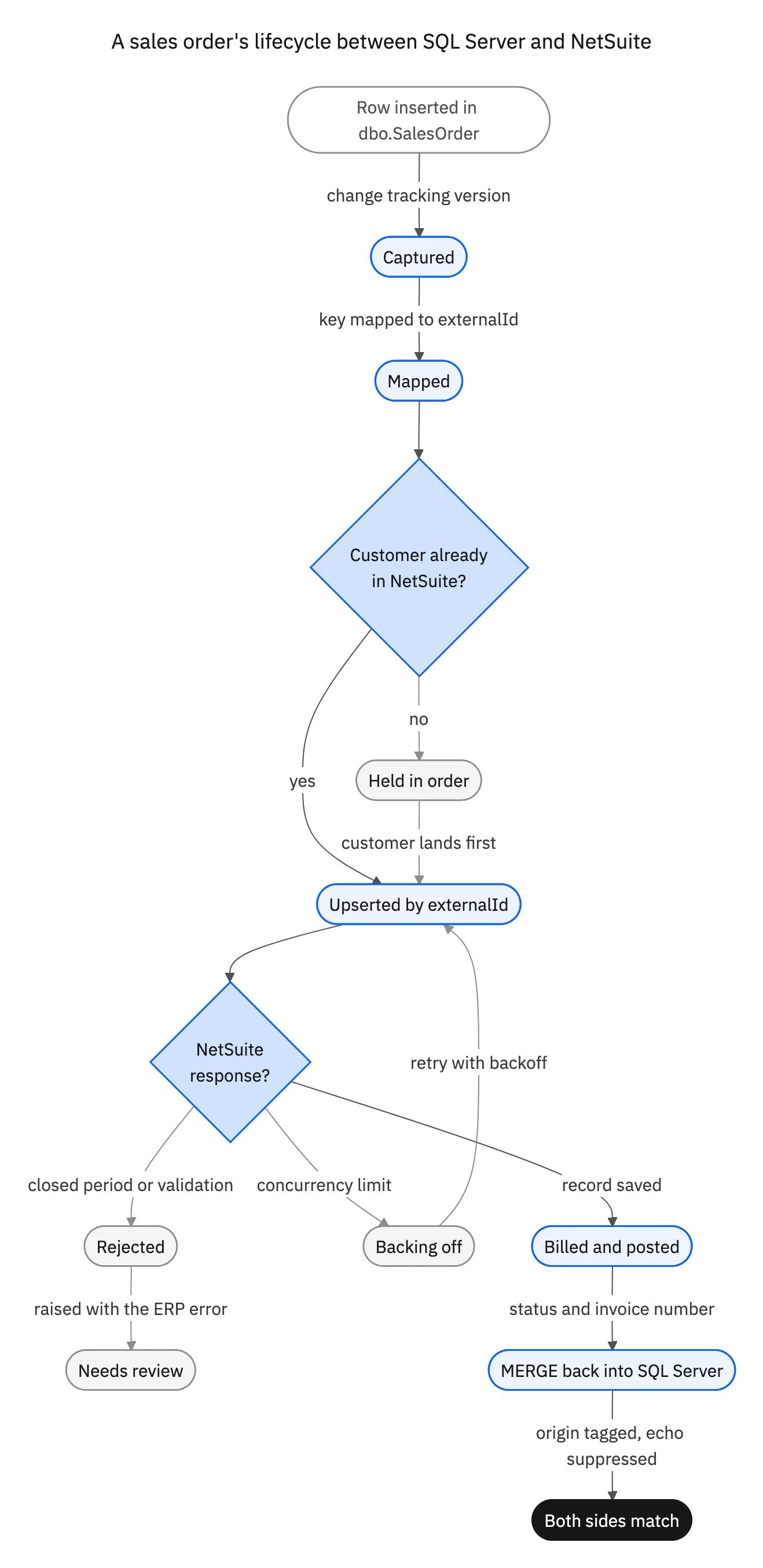
Three of those states carry the argument. Held in order is dependency handling. Backing off is concurrency handling. Rejected is the case a one-way export never had to think about, because it never wrote to a system with an opinion. A design that draws only the happy path meets all three in week one.

The four options, compared
Four approaches show up in practice. They differ less on whether data can move and more on who ends up owning the six problems above.
Saved search export plus SSIS. A saved search or SuiteQL query feeds a .dtsx package in the SSISDB catalog, run on a schedule by SQL Server Agent. It is batch, it is one way, and it has no concept of a conflict. Good for feeding a reporting mart, not usable as half of a sync.
SuiteAnalytics Connect over ODBC. A read-only replica you can query with T-SQL, optionally through a linked server. Useful for reporting, and it has no write path, so anything bidirectional gets built somewhere else anyway.
Custom RESTlet middleware. A service you own that reads change tracking on one side and calls SuiteTalk or a RESTlet on the other. Full control, no per-record cost, and reasonable for one or two record types with simple rules. The cost is that echo suppression, conflict precedence, concurrency budgeting, dependency ordering, idempotency keys and a retry queue are all yours to build and keep working through NetSuite release cycles and schema changes.
A real-time two-way sync platform. Bidirectional behaviour, field-level conflict policy, echo suppression, dependency ordering and retry are product features rather than code you maintain. The trade is configuring within a model instead of writing arbitrary logic, which is right for keeping records consistent and wrong for multi-step business processes.
| Saved search plus SSIS | SuiteAnalytics Connect | Custom RESTlet middleware | Stacksync | |
|---|---|---|---|---|
| Direction | One way, NetSuite to SQL | Read only | Both, if you build both | Two-way by default |
| Latency | Nightly or hourly batch | Query time against a replica | Whatever you schedule | Real time |
| SQL Server change capture | None | Not applicable | You build it | CDC or change tracking |
| Conflict handling | None | Not applicable | You build it | Field-level ownership |
| Handles deletes | No | Not applicable | You build it | Policy per record type |
| Echo and loop suppression | Not applicable | Not applicable | You build it | Origin tagging built in |
| NetSuite concurrency | Whatever the package does | Not applicable | You handle backoff | Bounded budget and backoff |
| Rejected ERP writes | Not applicable | Not applicable | Custom error handling | Retried, then surfaced with the error |
| Who maintains it | Your team | NetSuite plus your team | Your team | The platform |
The four realistic approaches to a two-way sync between SQL Server and NetSuite.
The row that decides most evaluations is the last one. Middleware looks cheap until you price the engineering time to keep six behaviours correct across two systems that release on their own schedules.
How to choose, and what to check before production
Start from latency, because it rules options out fast. If the SQL Server copy only feeds dashboards and nothing writes back, a nightly export is fine. The moment an application writes to SQL Server and that value has to reach NetSuite, batch stops working, because a value that arrives tomorrow morning is not one anyone can act on.
Then count record types and name an owner for every field on each one. Two record types with a clean owner split is a middleware project. Eight record types where finance owns the terms and an application owns the fulfilment fields is a platform decision, and the ownership map is the conflict policy you will configure. The same reasoning applies to any operational database next to the ERP, including the walkthrough for Amazon RDS and NetSuite.
Whatever you pick, four checks are worth running first. Confirm the change capture retention window outlives your worst realistic outage. Confirm every write into NetSuite carries an externalId, so a retry updates rather than duplicates. Confirm writes the engine makes into SQL Server are recognised as its own and not re-emitted. And confirm a rejected NetSuite write reaches a person with the ERP error text attached.
Then decide how you will know the two sides agree. A daily count and checksum per record type, compared across both systems and alerted on drift, is what turns a quiet divergence into a ticket. After an outage the sequence is the same every time: check whether the capture window still holds the missed changes, replay from the last confirmed version rather than the beginning, and reconcile the range you replayed.
To see SQL Server and NetSuite kept in step in both directions, book a demo or look at the NetSuite and SQL Server integration.
Apply this in manufacturing: customer request and accepted commitment
A SQL Server and NetSuite connection needs an explicit answer to who may change each shared order field. The manufacturing ownership guide develops that business contract without changing this page’s connector pair or assuming every operational database value may write back to the ERP.
| Record to reconcile | Responsible owner | Rule to preserve |
|---|---|---|
| Customer request | Commercial operations | Record what the customer asked for, when it was received and which order revision it applies to. |
| Accepted commitment | Production planning | Publish the approved date and quantity with the approving owner and applicable revision. |
| Quality release | Quality management | Keep held, conditionally accepted and released states distinct from production completion. |
An exception to plan for: A field is required by both systems but has different meanings. Create separate requested and accepted representations, or transform through an explicit rule. Do not solve a semantic disagreement by choosing whichever system updated last. Acceptance check for the pilot: each production-triggering field has one named owner and an allowed update path.
The manufacturing hub connects the broader operating context. These guides develop the specific record mappings and decisions for this application:

FAQ
Frequently asked questions










Explore these integrations and topics
- connectorNetSuite integrations
- connectorSQL Server integrations
- platformTwo-way sync
- platformDatabase synchronization
- Two-way sync guidesUnderstand two-way sync, record matching, field ownership, and production readiness.
- Database synchronization guidesWork through database change capture, application writes, and reliable record reconciliation.
Related articles






