






















One Row, One Record: Sync SQL Server With Salesforce
A practical guide to syncing SQL Server with Salesforce in both directions and in real time. It covers the three approaches teams try today and what each one costs, how to choose between CDC and change tracking on the database side and events versus SystemModstamp polling on the Salesforce side, the External ID mapping that makes writes idempotent, the case-sensitivity trap that lets two Salesforce record IDs collide in a default SQL Server collation, what to do about deletes, and how to validate that the sync is actually correct.
- Author
- Ruben Burdin · Founder & CEO
- Published
- Read time
- 11 min read

A SQL Server database and a Salesforce org usually describe the same customers in two incompatible shapes. The database has tables, foreign keys, IDENTITY columns, and whatever the line-of-business application writes. Salesforce has accounts, contacts, and opportunities, plus the custom fields an admin added last quarter. Getting the two to agree is the part nobody scopes properly.
This guide covers how to sync SQL Server with Salesforce in both directions and in real time: CRM objects landing in tables you can query with T-SQL, and application data going back into Salesforce without a nightly job. It walks through the approaches teams try today, how to pick a change feed on each side, the key mapping that quietly corrupts data, and what to do about deletes.
If you are still comparing platforms rather than wiring one up, start with the wider guide to an enterprise iPaaS for SQL Server. This post assumes the decision is made and you want the mechanics.
Why Salesforce and SQL Server drift apart
SQL Server is usually where the operational record lives: orders, entitlements, billing state, whatever the internal application writes. Salesforce is where the commercial relationship lives. Both describe the same customer, and neither knows what the other did five minutes ago.
The usual patch is an export. Someone runs Data Loader against Salesforce on a schedule and bulk-inserts the CSV into a staging table. That holds until a field is renamed or the job fails quietly on a Sunday, and by then support is quoting an entitlement that expired.
What makes this specific to SQL Server is that its own tooling assumes it is talking to another database. SSIS, linked servers, transactional replication, and MERGE all expect a system that speaks TDS or ODBC and holds locks while you work. Salesforce is an HTTP API with a daily request allocation, validation rules, read-only fields, and its own idea of a primary key. Every design that treats it as one more data source hits that gap.
Three DIY routes between SQL Server and Salesforce
The do-it-yourself route takes one of three shapes, and they are not equivalent.
| SSIS plus a third-party component | Custom job or linked server | Data Loader on a schedule | Managed two-way sync | |
|---|---|---|---|---|
| Direction | One way per package | Both, if you write both jobs | One way per run | Both, one configuration |
| Latency | The Agent schedule, usually nightly | The poll interval, 15 minutes at best | Whenever someone runs it | Seconds |
| Handles deletes | Only if you code the tombstone logic | Only via getDeleted() calls you write | No, deleted rows linger | Yes, mapped both ways |
| Idempotent writes | Depends on the component | Only if you upsert on an External ID | On upsert, not on insert | Upsert on External ID by default |
| API-limit safety | Batch reads re-read unchanged records | Every poll spends requests on unchanged rows | Full extracts spend the allocation | Only changed fields move |
| Who maintains it | Your BI team, plus a licence per server | Your engineers, indefinitely | Whoever remembers to run it | Configuration, not code |
The common routes between a SQL Server database and a Salesforce org.
SSIS is the incumbent. If you run SQL Server you already have it, packages deploy to the SSISDB catalog as .dtsx, and SQL Server Agent schedules them. The catch is that SSIS has no native Salesforce source or destination: connectivity comes from a commercial third-party component licensed per server, and what you get is a batch job in one direction. Going the other way means a second package that knows nothing about the first. The name causes real confusion: SQL Server Integration Services is an ETL engine for SQL Server, and adding a connector does not make it a Salesforce integration.
The second shape is a job you write yourself: a stored procedure or a small service that queries Salesforce over SOQL, upserts into a table, and pushes changes back. Some teams skip the service and define a linked server with sp_addlinkedserver so they can run OPENQUERY against Salesforce from T-SQL. It demos well. It also puts a SaaS API behind a query optimiser built for a database: predicates are not reliably pushed down, so a join can pull a whole object across the wire.
The third shape is Salesforce Data Loader on a schedule, which plenty of teams run without anyone having designed it. It is a full extract with no change detection: it spends API requests re-reading records that have not changed, and it has no idea a row was deleted.
The fourth option is a platform that treats both sides as live systems: it reads SQL Server changes off CDC or change tracking, reads Salesforce changes off Change Data Capture, and applies each to the other under one conflict policy. That is the setup the rest of this guide describes.
Picking the change feed on each side
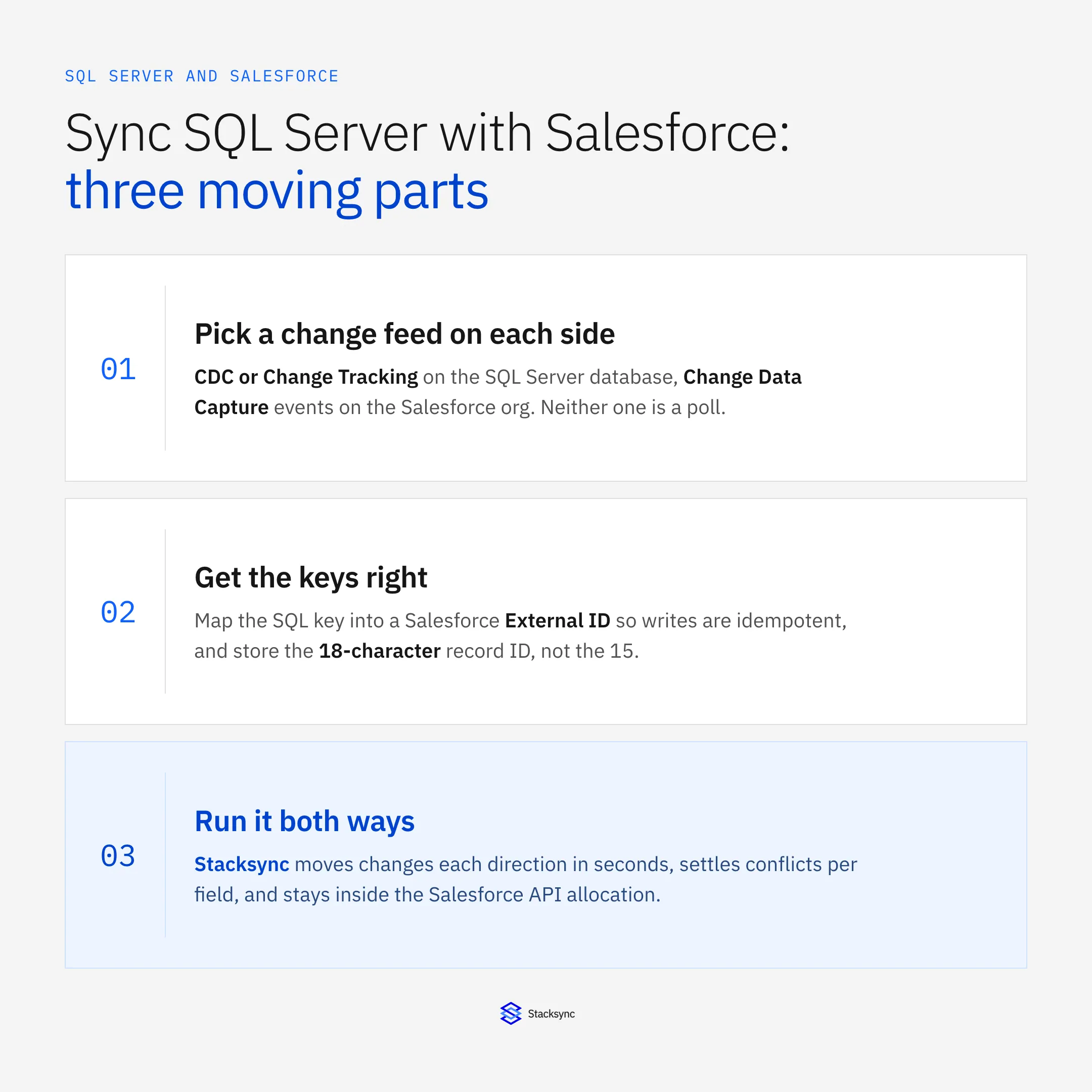
Make this choice before you map a single field. Both systems can tell you what changed, and neither does it the same way.
On SQL Server, change data capture is the richer option. Enable it per database with sys.sp_cdc_enable_db and per table with sys.sp_cdc_enable_table, and the engine writes every insert, update, and delete into a change table named cdc.<schema>_<table>_CT, with old and new values. Two SQL Server Agent jobs do the work: a capture job reading the transaction log and a cleanup job trimming history. Default retention is 4,320 minutes, three days, so a consumer down over a long weekend loses changes. Azure SQL Database supports CDC but has no SQL Server Agent, so capture and cleanup run on an internal scheduler.
Change tracking is lighter. ALTER DATABASE … SET CHANGE_TRACKING = ON (CHANGE_RETENTION = 2 DAYS, AUTO_CLEANUP = ON) turns it on, and you read deltas with CHANGETABLE(CHANGES …) against a version from CHANGE_TRACKING_CURRENT_VERSION(). It records that a row changed and which columns, not the old values. For a sync that pushes the current row anyway that is usually enough, and it costs the database far less than CDC.
What people reach for first, and should not, is WHERE modified_at > @last_run. It misses rows: a transaction that starts before your high-water mark and commits after it writes a timestamp already behind the mark, so the next run skips it and never comes back to it. A rowversion column is a better watermark, because its value comes from a database-wide counter at write time rather than from a clock.
On the Salesforce side the choice is between events and polling. Salesforce Change Data Capture publishes record changes as Platform Events on the Streaming API, and a subscriber resumes from a replayId after a disconnect. Event retention is 72 hours, so a consumer down longer than that has to fall back to a full re-read. If you poll instead, filter on SystemModstamp rather than LastModifiedDate, and use getUpdated() and getDeleted() for windowed reads. getDeleted() is the only practical way to learn that a record was removed.
External IDs and the 15 versus 18 character trap
This is where most builds quietly corrupt data. Salesforce record IDs come in two forms. The 15-character form is case-sensitive: a0B and a0b are two different records. The 18-character form appends a three-character checksum and is safe to compare case-insensitively. SQL Server ships with SQL_Latin1_General_CP1_CI_AS as its default collation on most installations, and CI means case-insensitive. Store 15-character IDs in such a column and two different Salesforce records can collide on what your unique index thinks is one key. The upsert overwrites one with the other, and nothing errors.
Two fixes, and apply both. Store the 18-character ID, which is what a modern API response gives you anyway. And put a case-sensitive or binary collation on the ID column, COLLATE Latin1_General_BIN2, so the database enforces what you meant even if a 15-character value arrives later through a CSV import.
The mapping runs the other way too. Your SQL Server key is usually an IDENTITY int or a uniqueidentifier, and Salesforce has no concept of either. Create a custom field on the object, mark it External ID and Unique, and write your key into it. Every write is then an upsert against that field rather than an insert, which is what makes retries safe: if the connection drops after Salesforce committed but before you saw the response, the retry matches the existing record instead of creating a duplicate. The Salesforce connector and SQL Server connector pages list what each side expects.
How to sync SQL Server with Salesforce, step by step
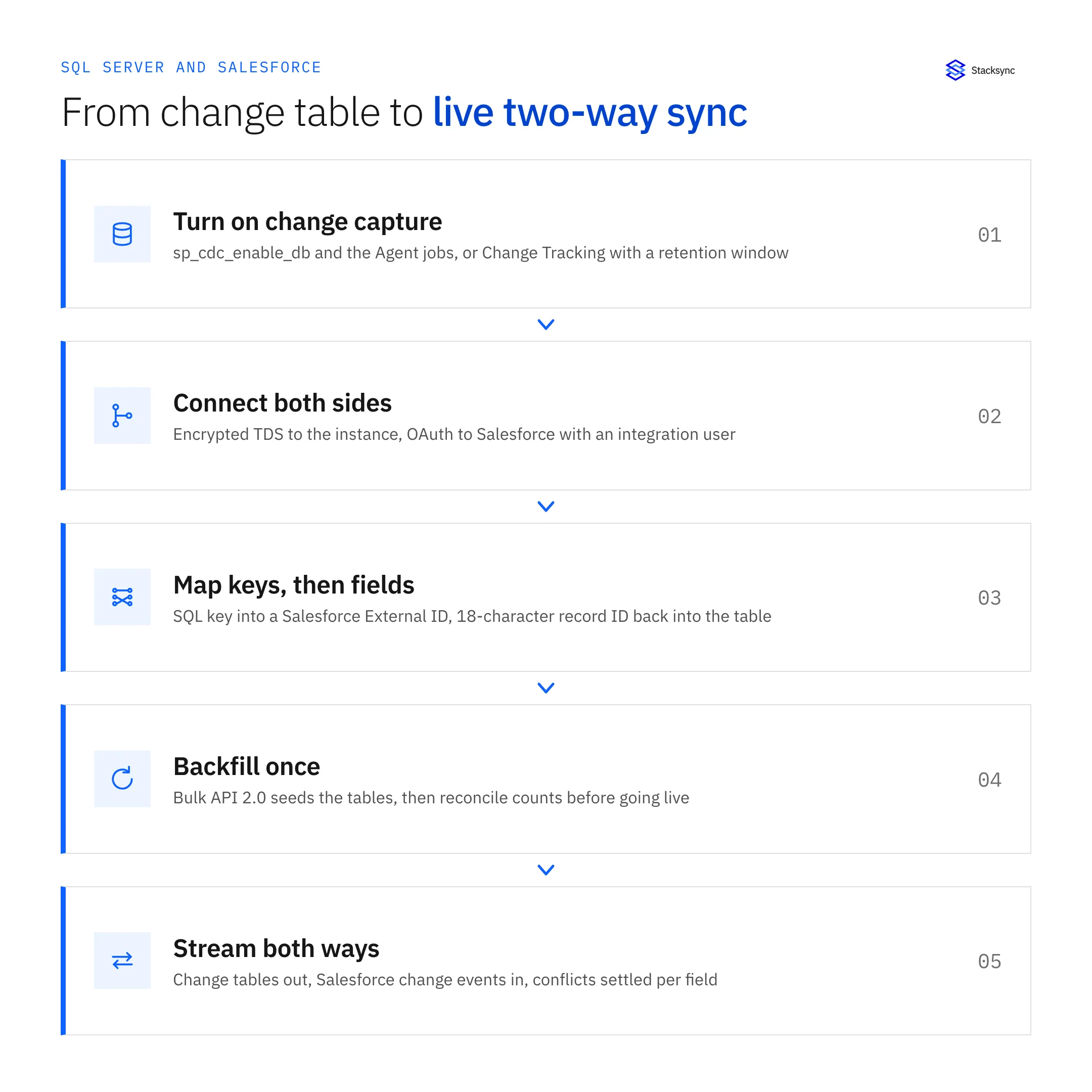
With the change feed chosen and the keys settled, the rest is configuration, and the order matters: a backfill started before the mapping is settled has to be run again.
- Connect Salesforce. Authenticate over OAuth with a dedicated integration user, scoped to exactly the objects and fields in play so the sync cannot write somewhere nobody expected.
- Connect the SQL Server instance. Host, port, database, and a dedicated login rather than
sa. ODBC Driver 18 for SQL Server defaults toEncrypt=yesand refuses a self-signed certificate, which is the usual reason a connection that worked under Driver 17 stops working. Fix the certificate, or setTrustServerCertificate=yesknowing what you are accepting. - Choose objects and tables. Start narrow. Account, Contact, and Opportunity cover most first projects.
- Map keys first, then fields. The SQL key goes into the Salesforce External ID field; the 18-character record ID comes back into a
char(18)column with a binary collation, unique and indexed. Only then map the rest, where picklists, currencies, and datetimes each need a decision on the database side. - Set the direction per object. Not everything should be two-way. Product usage can run to Salesforce only, case status the other way, shared account fields both ways.
- Run the initial backfill. Bulk API 2.0 seeds the tables and chunks large extracts for you. Reconcile row counts before enabling live sync.
- Turn on change capture both ways. Salesforce changes arrive as change events, SQL Server changes from the change table, each applied to the other within seconds with its origin recorded.
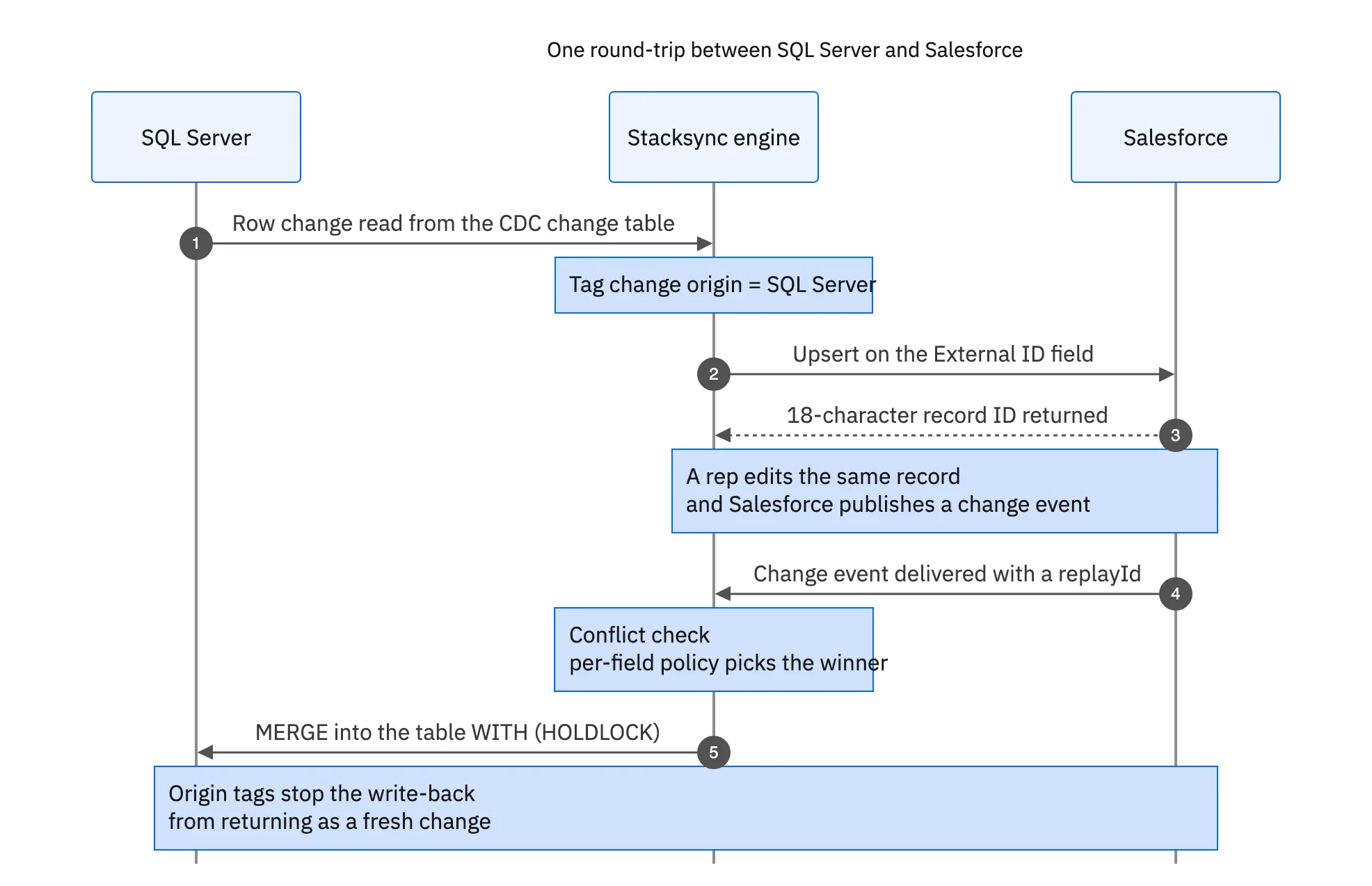
That round trip is what separates a sync from two scheduled jobs pointed at each other. The origin tag on every write stops a write-back being read a second later as a fresh change and pushed straight back, which is how naive two-way links turn into loops inside an hour. The guide to bidirectional sync versus CDC covers the difference.

Idempotent writes, deletes, and checking the sync is right
Applying a change on the SQL Server side is usually a MERGE, and it has a sharp edge: without a WITH (HOLDLOCK) hint on the target, two concurrent merges against the same key can both take the not-matched branch and both insert, which a unique index turns into a failed transaction and a stuck retry. Add the hint; on a keyed lookup it costs almost nothing.
Writing into Salesforce fails for a different set of reasons, all mundane. Formula fields and roll-up summaries are read-only. Field-level security on the integration user's profile drops fields that user cannot see, quietly. Required fields and validation rules reject the whole record, so a rule added last month can turn a healthy sync into a wall of partial failures overnight. And if your writes fire Apex triggers, governor limits apply to the batch, which is why write-back through custom Apex is a common source of latency. Read the per-record error detail, not the job status.
Deletes need an explicit decision, because the two systems disagree about what a delete is. Salesforce moves a deleted record to the Recycle Bin for 15 days and reports it through getDeleted() over a time window. SQL Server simply removes the row, and on change tracking you get the fact of the deletion but not the row that was there. Most teams do not hard-delete on the other side: they map the delete to a soft-delete flag and clean up separately. Pick something, because ignoring deletes leaves stale rows nobody trusts.
Validation is worth an afternoon. Reconcile row counts per object against Salesforce, then take twenty records at random, edit them on one side, and confirm they arrive on the other with the right values. Edit the same field on both sides within a few seconds and confirm the conflict policy did what you said it would. Alarm on capture-job lag, on Salesforce API usage as a percentage of the daily allocation, and on sync error counts. Bidirectional sync explained walks through per-field conflict resolution on real records.
Getting it running
Syncing SQL Server with Salesforce is mostly a sequencing problem. Pick the change feed on each side, get the keys right before you map a single business field, backfill once, then let change capture carry the rest both ways. The hard parts, conflict policy and delete semantics, are decisions rather than code, provided the layer underneath handles the change tables and the change events.
To see it running against a real instance, book a demo, look at the Salesforce and SQL Server integration, or read the companion guides on an enterprise iPaaS for SQL Server and two-way sync between SQL Server and NetSuite. If the database is managed on AWS rather than an instance you run, the same shape applies in the guide to syncing Amazon RDS with Salesforce.

FAQ
Frequently asked questions










Explore these integrations and topics
- connectorSalesforce integrations
- connectorSQL Server integrations
- platformCRM synchronization
- platformDatabase synchronization
- CRM synchronization guidesConnect customer records across sales, marketing, and operational systems.
- Database synchronization guidesWork through database change capture, application writes, and reliable record reconciliation.
Related articles






