






















What an Enterprise iPaaS Must Get Right on SQL Server
A buyer's guide to putting an integration layer in front of SQL Server. It covers why SSIS is an ETL engine and not an iPaaS, how to read changes without losing them across CDC, Change Tracking and rowversion, what a safe write path into a live database looks like, how Azure SQL Database and Managed Instance change the answer, and the security questions a reviewer will ask.
- Author
- Ruben Burdin · Founder & CEO
- Published
- Read time
- 11 min read

SQL Server holds the ledger for a large share of mid-market and enterprise operations: order lines, contracts, inventory, entitlements, claims. The systems that grew up around it, the CRM the sales team works in, the ERP finance closes in, the warehouse the analysts query, all need those rows while they are still current.
Teams get stuck here, and not for lack of options. SQL Server ships with more built-in ways to move data than any other database: SSIS packages, replication, linked servers, change data capture, Change Tracking, the ODBC and OLE DB drivers. Every one was designed to move data around a Microsoft estate. None was designed to keep a table and a Salesforce object holding the same value in both directions.
This is what an enterprise iPaaS has to do when SQL Server is the system in the middle. Not integration platforms in general: SQL Server specifically, its change-capture surface, its write path, its collation, and the gap between a box in your rack and an Azure SQL Database. If you already know the pair you need, go straight to SQL Server and Salesforce or two-way sync between SQL Server and NetSuite.
What does an enterprise iPaaS have to do on SQL Server?
It has to read committed changes out of the database within seconds and write changes from Salesforce, NetSuite, HubSpot, or Snowflake back into the same tables, with a stated policy for what happens when a value moves on both sides at once. You configure it rather than build it: the alternative is a folder of packages, Agent jobs, and stored procedures one person on your team owns forever.
The word enterprise is not decoration. Plenty of tools copy a table into a warehouse overnight. What separates a platform is the awkward cases: a column added to a hot table on a Tuesday, a SaaS API returning 429 on the last day of the month, a bulk update touching 300,000 rows, an availability group failover that moves the listener, and an auditor asking which system last wrote a value.
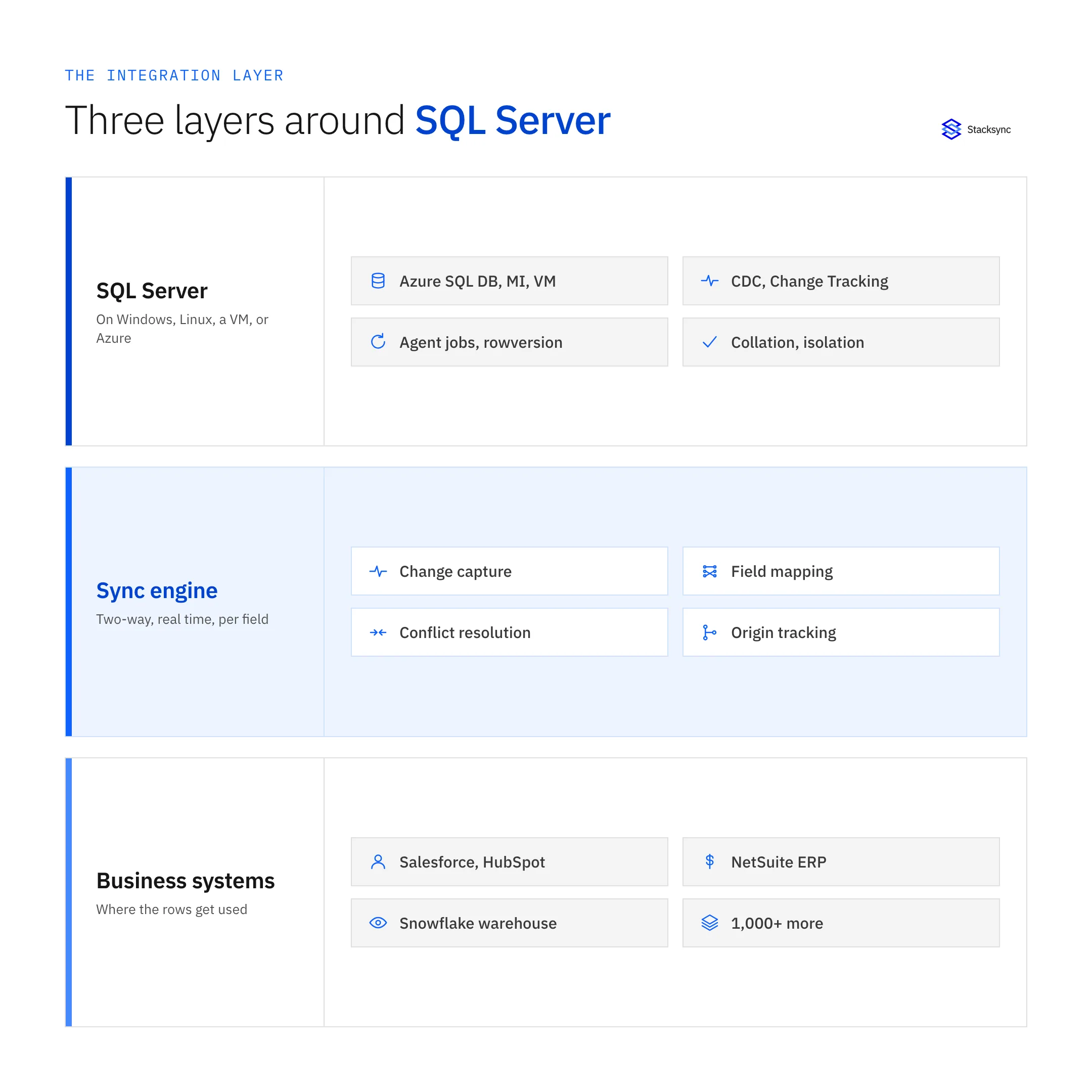
Drawn as a stack it is easier to argue about. At the bottom sits SQL Server with its deployment surface, its collation, and its change-capture features. At the top sit the business systems that consume and produce the same records. In the middle is a tier that speaks two languages: T-SQL and change tables on one side, REST and bulk APIs on the other. When that tier is a set of scripts, its failure modes become somebody's afternoon instead of a logged, retried event.
Is SSIS an iPaaS?
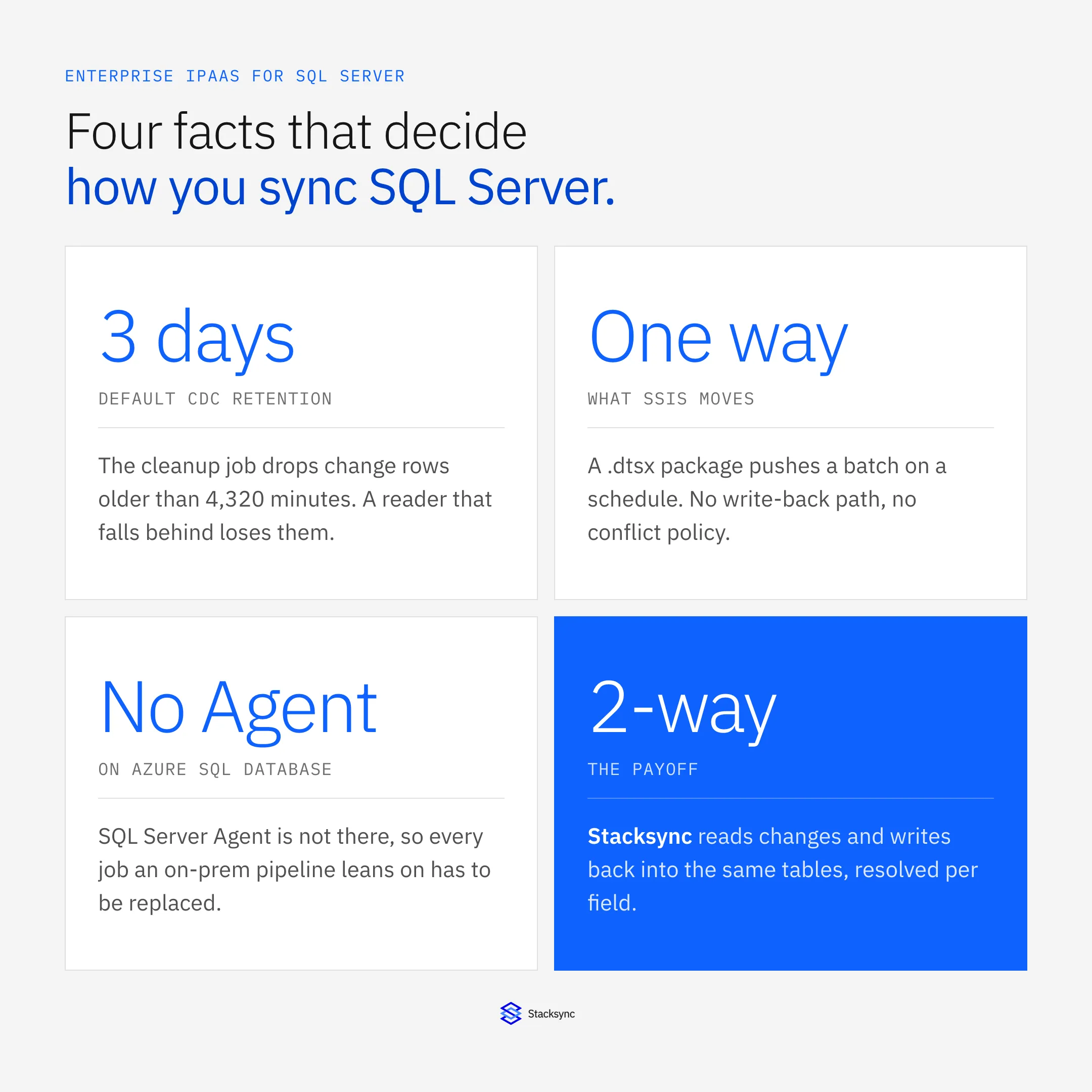
No, and it is worth saying plainly, because search results for SQL Server integration are almost entirely SSIS documentation. SQL Server Integration Services is an ETL engine, and a capable one. You build a .dtsx package, deploy it to the SSISDB catalog, and a SQL Server Agent job runs it on a schedule. It is batch shaped by design: extract a set, transform it, load it somewhere. No change stream, no write-back contract, no conflict resolution, because none of those was ever in scope.
That gap shows up the moment the data leaves the Microsoft estate. Reaching Salesforce or NetSuite from SSIS means a Script Task, a paid adapter, or a staging table plus something else, and then you own the pagination, the token refresh, the rate-limit backoff, and the retries. On Azure SQL Database there is no SQL Server Agent at all, so the scheduling model the design rests on is gone: the packages move into the Azure-SSIS integration runtime inside Data Factory.
The other in-house options have the same shape. Transactional replication is fast and dependable, and it moves rows between SQL Server endpoints, not into a SaaS object model. Merge replication resolves conflicts through article-level resolvers, not per field against a CRM. Linked servers with sp_addlinkedserver, OPENQUERY, and an MSDTC distributed transaction reach another database well enough, and turn brittle the moment the other side is an HTTP API with an expiring token.
| SSIS packages | Replication and linked servers | Generic ETL or reverse ETL | Stacksync | |
|---|---|---|---|---|
| Direction | One way, source to destination | One way, SQL Server to SQL Server | One way per pipeline | Both ways on one connection |
| Latency | Whatever the Agent schedule says | Seconds, inside the Microsoft estate | Minutes to hours per run | Seconds, on commit |
| Conflict handling | None, the last package wins | Merge replication resolves per article | None, the target is overwritten | Per field, by policy |
| Reaches SaaS APIs | Script Tasks or paid adapters | Not what it was built for | Yes, read-only in most cases | Yes, read and write |
| Runs on Azure SQL Database | Needs Azure-SSIS IR in Data Factory | Can subscribe, cannot publish | Yes | Yes |
| Who maintains it | Your team, in .dtsx and Agent jobs | Your DBA | Your data team plus the vendor | Hosted and monitored for you |
SSIS is not a worse iPaaS. It is a different tool that was never asked to do this job.
The last row decides most evaluations: every option except the platform leaves running software with your team's name on it.
How do you read changes out of SQL Server without losing them?
SQL Server gives you three real read paths, and they are not interchangeable. Change data capture reads the transaction log and stores the full before-and-after row. Change Tracking records that a row changed and which columns changed, but not the old values. A rowversion column gives you a monotonic high-water mark you can poll. Which one a platform uses decides how much you can trust the result.
CDC is the richest of the three. sys.sp_cdc_enable_db and then sys.sp_cdc_enable_table create cdc.<schema>_<table>_CT change tables plus a capture job and a cleanup job that SQL Server Agent runs. The trap is retention. The default is 4,320 minutes, three days, and the cleanup job deletes anything older without asking whether a consumer read it. A sync that pauses over a long weekend does not resume, it gaps. Anything reading CDC has to advance its position continuously and alarm when it cannot.
Change Tracking is the lighter alternative: ALTER DATABASE … SET CHANGE_TRACKING = ON (CHANGE_RETENTION = 2 DAYS, AUTO_CLEANUP = ON), then read with CHANGETABLE(CHANGES …) against a version from CHANGE_TRACKING_CURRENT_VERSION(). It costs far less on the instance and has the same retention cliff. Because it does not keep old values, an engine using it re-reads the current row: usually fine, occasionally not, since a value that changed twice between reads collapses into one.
Polling a modified timestamp is the fallback everybody writes first, and the one that quietly loses rows. WHERE modified_at > @last assumes commit order matches timestamp order. It does not: a transaction that stamped its row before your last read and committed after it carries an older value, so it never appears again. A rowversion column fixes the ordering, because the value comes from a database-wide counter assigned at write time, but it says nothing about deletes. The line between capturing changes and reconciling state is drawn in bi-directional sync versus CDC.
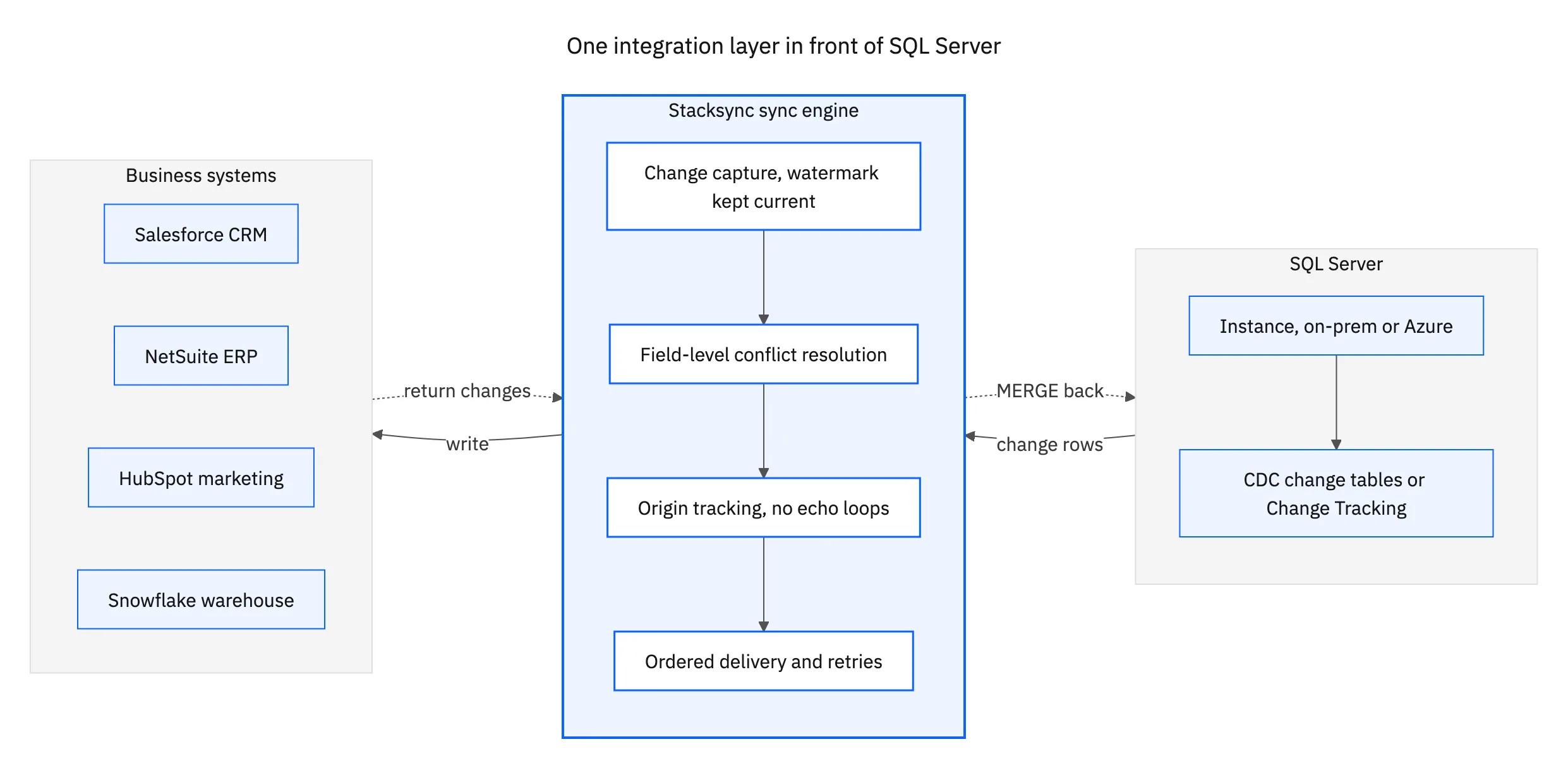
The topology matters as much as the mechanism. SQL Server should emit its changes once. The engine fans them out and accepts changes coming back on the same connection. Adding Snowflake six months later should not disturb the Salesforce sync you already trust.
How do you write back into SQL Server safely?
Reading is the easy half. Writing into a live operational database is where an integration either behaves or starts an incident, and four specifics decide which.
MERGEneeds a lock hint. The upsert everyone reaches for is aMERGEon a business key, and under concurrent writers it is not safe withoutWITH (HOLDLOCK)on the target. Without it you get primary key violations and duplicate rows under load, intermittently.- Identity columns are not external IDs. An
IDENTITYvalue is local to the table; a Salesforce record ID or a NetSuite internal ID is the key the other system knows. A sync needs a dedicated mapping column with its own unique index, not an assumption that row 4213 is the same customer on both sides. - Collation can merge two records into one. The common default,
SQL_Latin1_General_CP1_CI_AS, is case insensitive. SaaS external IDs are frequently case sensitive, soa1B2candA1b2Cmatch as the same key on lookup and two upstream records become one row. Store that key in a case-sensitive collation or normalise it on the way in, but decide it deliberately. - Isolation and deadlocks. A bulk upsert that holds locks on a hot table will deadlock against the application.
READ_COMMITTED_SNAPSHOTmoves readers onto the tempdb version store, which keeps queries off the writers' locks and adds pressure on tempdb. Whatever writes into the database should batch, keep transactions short, and retry the deadlock victim rather than fail the run.
A fifth item is organisational more than technical: constraints mean something. A production table has check constraints, foreign keys, NOT NULL columns, and triggers that encode rules nobody wrote down elsewhere. A platform writing into it has to surface a violation as a per-record error you can see and fix, not swallow it and not abort the batch. Ask to watch that on real data before you sign anything.
Does it work on Azure SQL Database, Managed Instance, and VMs?
This question changes the answer to every other question, and most evaluations skip it. SQL Server is four deployment surfaces wearing one name, and each removes something an integration tool may have relied on.
- SQL Server on Windows or Linux, on your own hardware. Everything is available: Agent, CDC, Change Tracking, replication, CLR, linked servers. The constraint is the network, not the feature set.
- SQL Server on a cloud VM. The same engine and features, with the same administration you thought you were escaping. Worth naming, because vendors sometimes count it as "we support Azure" when Azure SQL Database is a different story.
- Azure SQL Managed Instance. Close to the full engine, with SQL Server Agent, CDC, and cross-database queries. Some surface is still trimmed, and it lives inside a VNet subnet, which shapes how anything external connects.
- Azure SQL Database. A single database, no SQL Server Agent, no
msdb, no cross-database queries. CDC does work here, on S3 or higher in the DTU model and on any tier in the vCore model, but a built-in scheduler runs the capture and cleanup rather than Agent. Anything you scheduled through Agent has to be rebuilt.
The practical test is short. Ask which of those four a vendor runs in production today, and what changes in the setup between them. "SQL Server is supported" without that breakdown means it was tested on one of them, and you find out which during the migration.

How does an iPaaS reach a SQL Server instance securely?
Most production SQL Server instances are not on the public internet, so the onboarding instructions are the security answer. If setup amounts to opening port 1433 and allowlisting an IP range, that is the answer and it is the wrong one. You want a private endpoint or VNet integration into the subnet where Managed Instance lives, or an outbound agent that dials out rather than accepting inbound connections.
Authentication is the second half. Microsoft Entra ID authentication replaces a long-lived SQL login with a token-based identity you can govern centrally, and it is what a reviewer will ask for on any Azure deployment. On transport, ODBC Driver 18 for SQL Server changed the default to Encrypt=yes and refuses a self-signed certificate unless you set TrustServerCertificate=yes. That default broke a lot of upgrades from Driver 17.
The third question does most of the work in a review: where does the data rest. A platform that copies your rows into its own store has added a system to the compliance scope you drew around the database and its network. Stacksync moves data between the connected systems without parking a copy in the middle, encrypted in transit, with every write in an audit log. On paperwork, Stacksync holds SOC 2 Type II and ISO 27001, offers a HIPAA BAA, and is GDPR-ready.
What to evaluate in a vendor, and where to start
Every vendor page claims real time and two way. These questions separate the ones that mean it, and each is answerable inside a trial rather than a sales call.
- How does it read changes? CDC, Change Tracking, a polled
rowversion, or a full table reload. Only the first three are incremental, and the reload stops being viable somewhere past a few million rows. - What happens when a sync pauses past retention? The honest answer includes an alert and a reseed path, not silence. Ask specifically about a destination system being down for a weekend.
- Can it write back? Ask to watch an edit made in the CRM land in a SQL Server table, with the type mapping, the collation handling, and a rejected record visible while it happens.
- What happens when a column is added? Adding a column to a synced table should not require rebuilding the sync, and dropping one should not stop it quietly.
- Which deployment surfaces? On-prem, cloud VM, Managed Instance, Azure SQL Database, and exactly what changes between them.
- How does it reach a private instance? Private endpoint, VNet integration, or an outbound agent. Not an allowlist on a public port.
- What does the audit trail show? Which system wrote a value, when, and what it replaced. That is what a reviewer signs off on.
The way to test any of it is one pair, in production, for a week. Connect the system your team switches tabs to most, either Salesforce and SQL Server or NetSuite and SQL Server, and watch three things: whether a change on either side lands on the other in seconds, whether the change tables stay current instead of growing, and what the write path does with a record your constraints reject. If all three hold, the rest of the stack is the same work on the same engine. Three worked examples of two-way sync show what that looks like.
Stacksync connects SQL Server to more than 1,000 systems on a single engine, in real time and in both directions, without keeping a copy of your data. See the SQL Server connector, read the same argument applied to a managed AWS database in what an enterprise iPaaS has to get right on Amazon RDS, or book a demo and we will point it at your own instance on the call.

FAQ
Frequently asked questions










Related articles





