






















GitHub Into Snowflake Is Solved. The Trip Back Is Not.
Loading GitHub into Snowflake is the boring half: every ELT vendor ships that connector. The half people are actually searching for is the writeback, where the priority, owner or SLA flag the warehouse computed has to land back on the GitHub issue without bouncing. This guide covers both directions, the traps that belong to this pair specifically, and how the tool options compare.
- Author
- Ruben Burdin · Founder & CEO
- Published
- Read time
- 13 min read

Getting GitHub data into Snowflake has been a solved problem for years. Fivetran has a GitHub source, Airbyte has a GitHub source, and a dozen smaller vendors do too. Point one at a Snowflake destination, pick a schedule, and issues, pull requests, reviews and commits land in the warehouse. The vendors compete on price and schema handling, not on whether it works.
That is the boring half. The reason people search for two-way sync rather than a GitHub connector is the other direction. The warehouse computes something useful, a triage score, an owner, an SLA breach flag, a customer tier joined in from the CRM, and that answer has to land back on the GitHub issue where an engineer will actually see it. Almost nothing in the ELT category does that, and the tools that claim to usually mean a scheduled push with no memory of what it wrote.
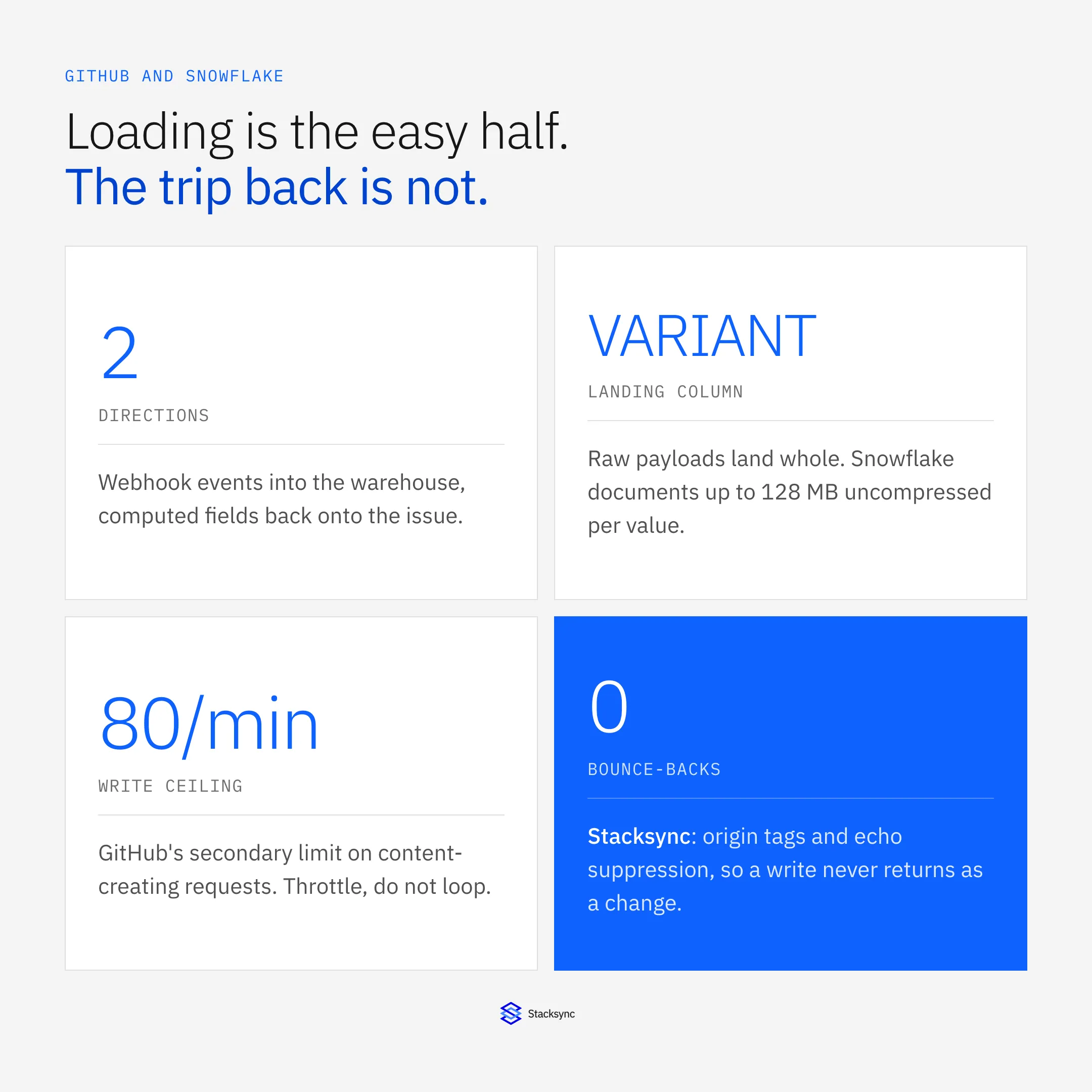
This guide covers both directions between GitHub and Snowflake: what the inbound path actually needs, what the writeback path has to solve, the failure modes that belong to this pair specifically, and how the four ways of doing it compare. If you are earlier than this and still choosing a platform, start with the guide to an enterprise-grade iPaaS for GitHub. If the other side of your sync is a tracker rather than a warehouse, syncing GitHub with Jira covers that case instead.
Direction one: GitHub into Snowflake
There are two ways in, and a serious pipeline uses both. Webhooks push events as they happen and cover the steady state. The REST API pulls, and covers the backfill and any gap a webhook outage leaves behind.
Take the webhook literally. Every delivery carries an X-GitHub-Event header naming the event, an X-GitHub-Delivery header that GitHub documents as a globally unique identifier for the event, and, when the webhook has a secret, an X-Hub-Signature-256 header holding the HMAC hex digest of the body generated with SHA-256. Verify that signature before you parse anything. GitHub also expects a 2XX response within ten seconds, which means the receiver acknowledges and queues rather than modelling inline.
Land the payload whole. Put the raw JSON in a VARIANT column and model on top of it. Snowflake documents a VARIANT value at up to 128 MB of uncompressed data, and GitHub caps webhook payloads at 25 MB and will not deliver an event that generates a larger one, so the landing column is never your constraint. Storing the raw body also turns a modelling mistake into a re-run, which matters because you cannot ask GitHub to resend last month.
-- raw landing: one row per delivery, nothing parsed yet
create table if not exists raw.github_events (
  delivery_id   string      not null,   -- X-GitHub-Delivery
  event_type    string      not null,   -- X-GitHub-Event
  received_at   timestamp_ntz default current_timestamp(),
  payload       variant     not null
);

-- the issue model, keyed on the immutable id, addressed by owner/repo/number
create table if not exists model.github_issues (
  issue_id      number      not null primary key,  -- payload:issue.id
  node_id       string,
  repo_owner    string      not null,
  repo_name     string      not null,
  issue_number  number      not null,
  login_key     string,                            -- normalized, for joins
  login_display string,                            -- as GitHub sent it
  state         string,
  updated_at    timestamp_ntz
);
Deliveries are neither unique nor automatically retried. GitHub states plainly that it does not automatically redeliver failed deliveries, so an endpoint that is down loses the event until somebody redelivers it by hand or through the API, and only within the window GitHub keeps recent deliveries available for. A redelivery is then a duplicate arriving at a handler that already processed the original. Dedupe on the delivery GUID, keep that table well past that window, and make every downstream step idempotent anyway.
Change detection on the pull side fans out per repository. The list-issues endpoint takes a since parameter that shows only results last updated after a given timestamp, and it is scoped to one repository. There is no cross-repository modified-since feed, so two hundred repositories means two hundred cursors and two hundred chances to drift. That is why webhooks carry the steady state and the API is kept for backfill and repair.
Two data-model traps bite before the pipeline is a week old. GitHub documents the first in plain language: the REST API considers every pull request an issue, but not every issue is a pull request, so the Issues endpoints return both and you identify pull requests by the pull_request key. Skip that filter and every PR duplicates as an issue, and the counts are quietly wrong forever. The second is the key. An issue's number is unique within its repository, not across GitHub, so the moment a second repository joins, issue 1 collides with issue 1. Model on the global id and carry owner, repo and number alongside it, because those three are the address you need to write anything back.
Direction two: Snowflake back onto the issue
This is the direction that makes it a two-way sync, and it is a different engineering problem. Inbound, GitHub tells you what changed. Outbound, nobody tells you anything: you detect the change inside the warehouse, decide it is worth writing, find the right issue, make the call, survive the rate limit, and then recognise your own write when it comes back through the webhook a second later.
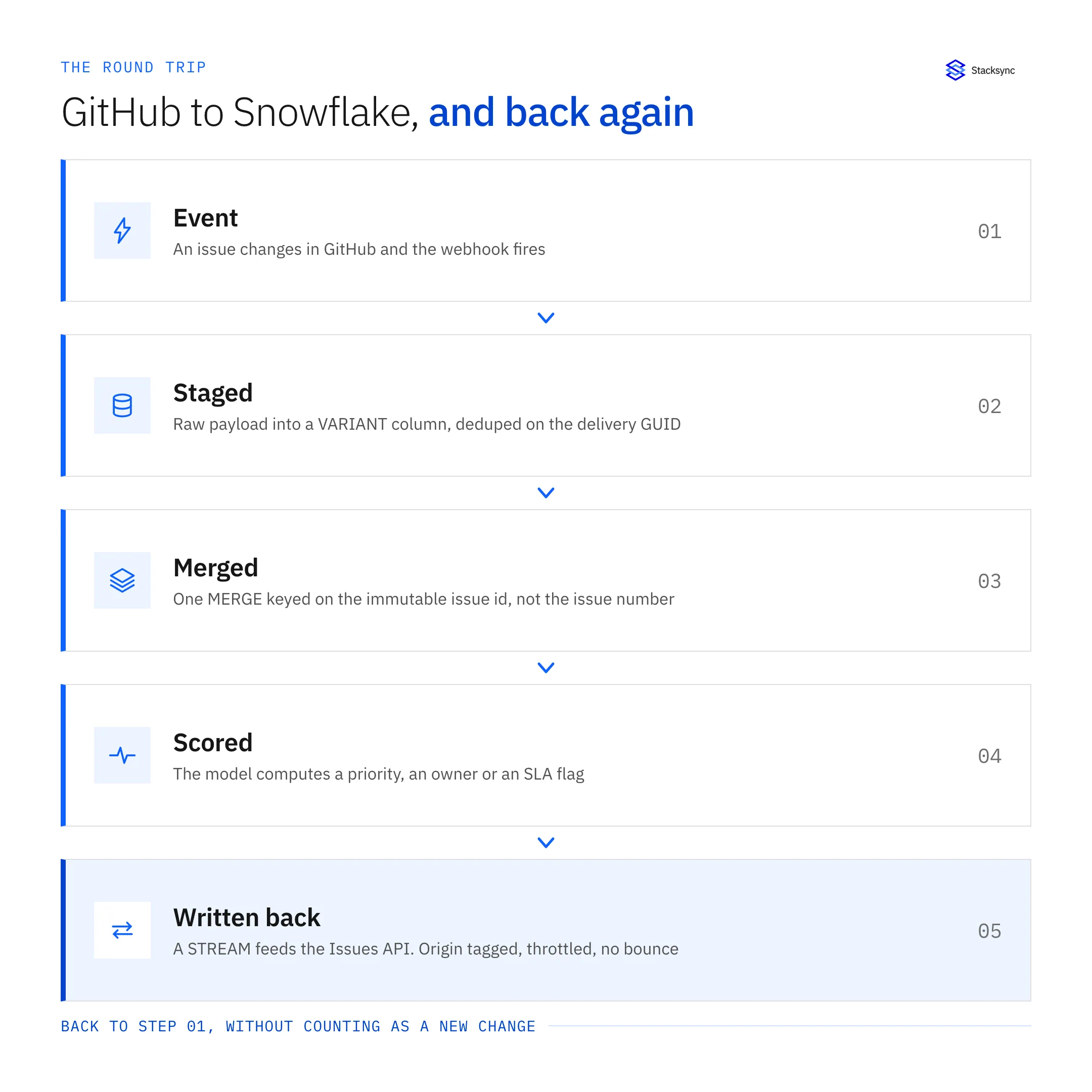
Change detection is a stream, and it lives in your account. Snowflake's stream object records DML changes made to a table, including inserts, updates and deletes, plus metadata about each change. It is not a table holding data: the docs are explicit that it stores an offset for the source object and returns change records from the object's versioning history. Querying it exposes METADATA$ACTION, METADATA$ISUPDATE and METADATA$ROW_ID, and an update appears as a paired delete and insert with the update flag set.
The detail that catches people is the offset. Consuming a stream inside a DML transaction advances it. Merely selecting from the stream does not. A job that reads the stream with a plain SELECT, calls GitHub and finishes will find the same rows on every run, forever, because nothing consumed them. Wrap the read and the bookkeeping in one DML statement or you are building a replay loop by accident.
-- the change feed for the writeback
create stream if not exists sync.issue_scores_stream
  on table model.issue_scores;

-- consuming the stream inside DML advances its offset; a bare SELECT does not
insert into sync.writeback_queue
  (issue_id, repo_owner, repo_name, issue_number, field_name, new_value, queued_at)
select s.issue_id, i.repo_owner, i.repo_name, i.issue_number,
       'labels', s.priority_label, current_timestamp()
from sync.issue_scores_stream s
join model.github_issues i on i.issue_id = s.issue_id
where METADATA$ACTION = 'INSERT';   -- new rows and the new half of an update
The write itself is the Issues API, addressed by repository and number. Labels go to POST /repos/{owner}/{repo}/issues/{issue_number}/labels to add, or PUT on the same path to set the full list. Assignees have their own POST .../assignees endpoint. No endpoint takes the global issue id, which is exactly why the model carries both keys: the id for identity, the owner, repo and number triple for the address. Prefer the set-shaped verb where one exists. Idempotency comes from the shape of the write rather than from a header, and replaying a request that sets the full label list is harmless in a way that replaying an append is not.
Project fields are a separate surface. Updating a field value on a Projects item is the GraphQL mutation updateProjectV2ItemFieldValue, and GraphQL is budgeted in points rather than requests: 5,000 points per hour for a user or a non-Enterprise app installation, with a secondary cap of 2,000 points per minute where a request carrying a mutation counts as 5 points against a plain query's 1. A writeback that touches labels and project fields spends from two separate budgets and has to be throttled against both.
Then the write comes back. Adding a label fires an issues event within seconds, and that event is indistinguishable from a human edit unless you made it distinguishable. Without origin tracking the engine reads its own write, concludes the warehouse is stale, writes again, and the record starts bouncing. Three defences work together: origin metadata recorded at write time, a short suppression window keyed on the record and the field, and a value comparison so a write that changed nothing never emits an event. The sender object on the payload is a cheap first filter, since the account you write with is visible on the echo, but it is not sufficient: a person can make the same edit in the UI a second later, and that one is real.
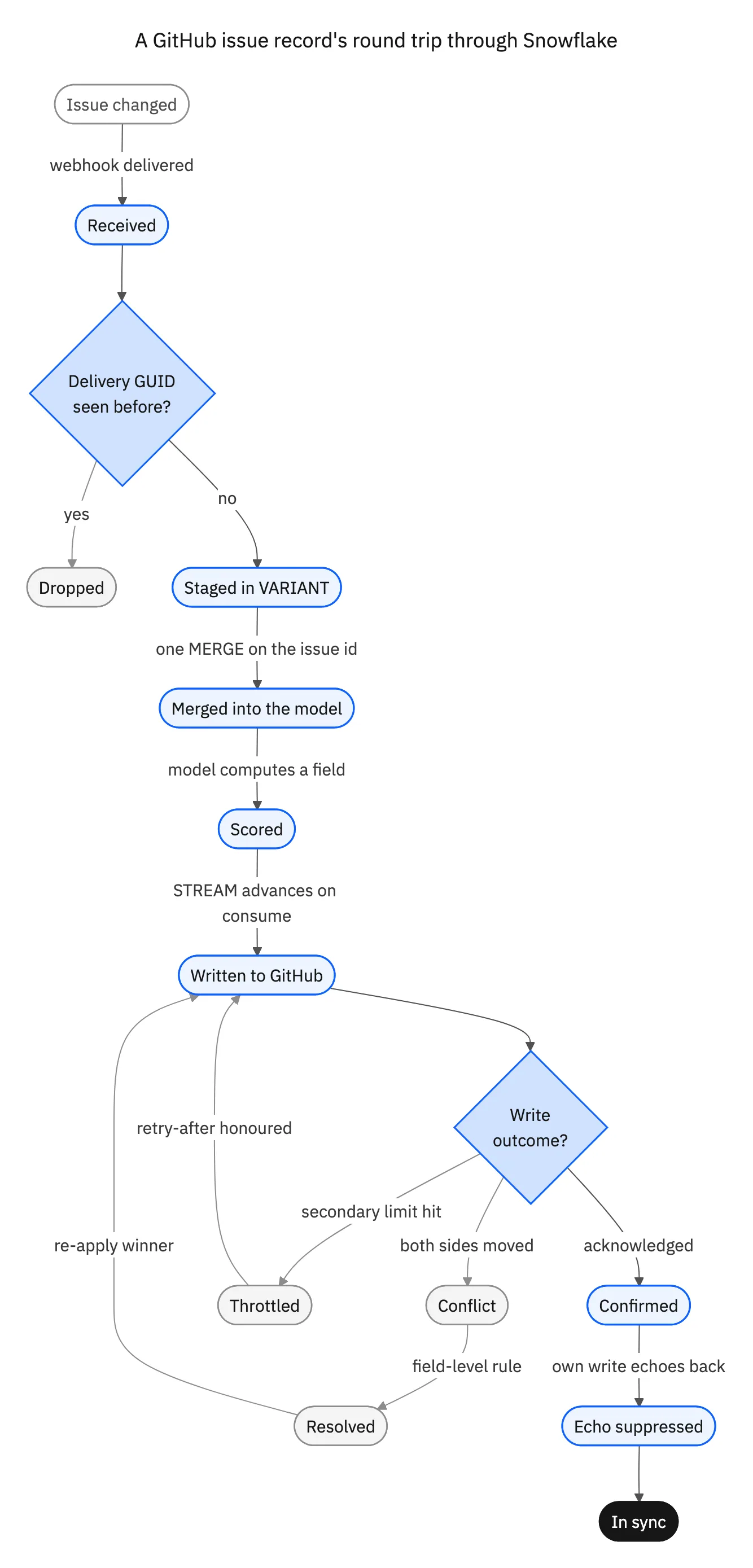
Four states on that diagram carry the argument. Dropped is delivery dedupe. Throttled is the secondary rate limit, which arrives sooner than people expect. Conflict is the policy question, answered per field rather than per record. Echo suppressed is what separates a sync engine from a scheduled push, and it is the state homegrown integrations usually find as a label that flickers on and off every few seconds.
The traps that belong to this pair specifically
Generic sync advice will not save you from these four. Each comes from a documented behaviour of GitHub or Snowflake, and each shows up as a data bug rather than an outage, which is why they survive so long in production.
Uppercase identifiers, case-sensitive values
Snowflake folds unquoted identifiers to uppercase: id is stored and resolved as ID, while a double-quoted identifier keeps its case. That trains everyone on the team to assume the warehouse does not care about case. String values are the opposite. Snowflake's default collation is case-sensitive, so Abc = abc returns false. GitHub logins, repository names and label names arrive in whatever case they were typed, so an unnormalized join splits one account into two rows, an unnormalized label comparison decides a label is missing when it is already there, and the writeback adds it again. Decide the rule in the load, not in each query: keep the display value as GitHub sent it and add a normalized key column next to it.
Stage and MERGE, and dedupe the source first
Snowflake stores data in micro-partitions holding between 50 MB and 500 MB of uncompressed data, with columns stored independently inside them. That layout is built for scanning, not for ten thousand single-row UPDATE statements in a loop. Stage the batch and apply it in one MERGE keyed on the issue id, which is also what makes the load idempotent.
There is a sharp edge on that MERGE. The ERROR_ON_NONDETERMINISTIC_MERGE session parameter defaults to TRUE, so the statement returns an error when a single target row would be updated by more than one source row. With a duplicate webhook delivery or a retried queue message in the batch, that is not rare. Snowflake's own guidance is a GROUP BY in the source clause so each target row joins at most one source row; a QUALIFY ROW_NUMBER() OVER (PARTITION BY issue_id ORDER BY received_at DESC) = 1 does the same job and keeps the latest version. Turning the parameter off is the wrong fix, because then one duplicate wins at random and you never find out which.
merge into model.github_issues t
using (
  select issue_id, repo_owner, repo_name, issue_number, state, updated_at
  from staging.issue_batch
  qualify row_number() over (partition by issue_id order by received_at desc) = 1
) s
on t.issue_id = s.issue_id
when matched and s.updated_at > t.updated_at then update set
  t.state = s.state, t.updated_at = s.updated_at, t.issue_number = s.issue_number
when not matched then insert
  (issue_id, repo_owner, repo_name, issue_number, state, updated_at)
  values (s.issue_id, s.repo_owner, s.repo_name, s.issue_number, s.state, s.updated_at);
Auto-suspend is a sync SLA decision
Snowflake automatically resumes a warehouse when a statement that needs one is submitted, and it bills per second with a 60-second minimum each time the warehouse starts. Both facts point the same way for a sync workload. A job that wakes a suspended warehouse every thirty seconds pays a fresh 60-second minimum on every wake, and the first statement after idle waits for the resume. If you promised that a triage label appears within a minute of the issue being opened, that promise is a warehouse sizing and scheduling decision as much as a connector setting, and it is worth writing the two numbers down next to each other before anyone commits to an SLA.
Secondary rate limits kill the writeback, not the read
The primary REST limit is generous: 5,000 requests per hour for an authenticated user, the same for a GitHub App installation outside Enterprise Cloud, 15,000 for an Enterprise Cloud organisation, and a documented ceiling of 12,500 for a non-Enterprise installation that scales with repository and user count. The writeback rarely gets near it, because the secondary limits arrive first. GitHub allows no more than 80 content-generating requests per minute and no more than 500 per hour, no more than 100 concurrent requests, and no more than 900 points per minute against REST endpoints. Do the arithmetic before you promise a backfill: relabelling 3,000 issues cannot take less than six hours at 500 content-generating requests per hour, no matter how fast your code is. A bulk writeback is a queue with a token bucket that honours retry-after and watches the x-ratelimit-* headers, not a loop.
What you should not write back
Snowflake is not the transactional system of record for a GitHub issue, and a sync design that forgets this produces the worst kind of incident: one where nothing errors and everyone stops trusting the tool. Three things should stay out of the writeback.
- Issue bodies and comments. GitHub renders Markdown, keeps edit history and fans notifications out to every watcher and every subscribed team. A warehouse-authored rewrite of a body loses the original author, notifies everyone, and cannot be undone cleanly. If the model has something to say, it says it as a field, not as prose in somebody else's issue.
- Open and closed state. Closing an issue has consequences beyond the row: it fires events other automations listen for, resolves linked references and ends a conversation. Compute a should-close flag and let a person or an explicit, named automation act on it. That way the decision has an owner.
- Anything from a stale model run. If the warehouse copy is six hours old and a human triaged the issue ten minutes ago, the writeback has to lose. That is a precedence rule, it needs to be written down, and it needs to be enforced by the engine rather than by whichever job happened to run last.
What is left is deliberately short and boring: labels, assignees, milestones and Projects field values. They are additive, set-shaped, visible in the GitHub UI where the work happens, and cheap to reverse when the model is wrong. That is the whole point of picking them.
The four ways teams actually do this
Four shapes cover almost every real setup, and most teams evaluate one while describing another. The honest read is that three of the four handle only part of the round trip, and that is fine as long as you know which part you are buying.
| ELT connector | Reverse ETL | Custom code | Stacksync two-way sync | |
|---|---|---|---|---|
| GitHub into Snowflake | Yes, on a schedule | Not its job | You build it | Yes, event driven |
| Snowflake back onto the issue | No | Yes, one direction | You build it | Yes, same engine |
| Change detection in Snowflake | Not applicable | Watermark or query | Your choice | Stream offsets |
| Duplicate webhook deliveries | Handled on the load | Not applicable | Your dedupe table | Deduped on the delivery GUID |
| Echo suppression | Not applicable | Not applicable | You build it | Built in |
| Conflict policy | Not applicable | One writer, none needed | You build it | Field-level precedence |
| Secondary rate limits | Read side only | Basic retries | You build it | Throttled to the documented caps |
| Replay after an outage | Re-run the sync | Re-run the job | Whatever your queue does | Replay from the log |
| What you maintain | Schemas and schedules | Mappings and a job | A service, on call | Configuration |
| Good for | Dashboards and reporting | A field the app only reads | One flow you truly own | Fields both sides can change |
Three of the four cover part of the round trip. Know which part before you sign.
Reverse ETL deserves a fairer hearing than it usually gets. If the warehouse computes a value and GitHub only displays it, one direction is genuinely enough, because one writer means nothing to reconcile and nothing to keep from looping. It stops being enough the moment an engineer can change that same field in the UI, which for labels and assignees is roughly immediately. The cost comparison between the two shapes is worked through in reverse ETL pricing versus two-way sync cost, and it is worth reading before the tooling decision hardens.
Custom code is the honest option when there is exactly one flow, it is high value, and someone owns it by name. It stops being honest at flow number three, when the dedupe table, the token bucket, the suppression window and the replay log have all been rebuilt slightly differently in each one. On the Snowflake side, the connection details are their own project: connecting Snowflake for two-way sync without managing certificates covers what that setup involves.

What good looks like before you go live
Whether you build it or buy it, these are the checks that separate a sync that survives its first bad week from one that quietly corrupts the model. None of them is exotic, and each maps to something documented above.
- Signature verification on every delivery, with a counter on rejections you can alert on.
- A dedupe table keyed on
X-GitHub-Delivery, retained well past the window GitHub keeps recent deliveries available for redelivery. - Models keyed on the issue
id, withowner,repoandnumbercarried alongside as the write address. - A
pull_requestfilter on anything that reads the Issues endpoints, so pull requests stop counting twice. - One
MERGEper batch with the source deduped, soERROR_ON_NONDETERMINISTIC_MERGEnever fires and no duplicate silently wins. - A token bucket in front of the writeback sized under 80 content-generating requests per minute, honouring
retry-after. - Origin tagging on every write, plus a value comparison so a no-op write never emits a change event.
- One named owner per synced field, recorded somewhere other than the sync tool's configuration screen.
- A warehouse schedule that matches the latency you promised, with the 60-second billing minimum on each start accounted for.
The list that usually gets cut is the last two, and they are the ones that decide whether people trust the integration six months in. Everything above them is engineering. Those two are agreements, and an engine can only enforce an agreement somebody made.
Where to start
Start by writing down the fields that will travel back, because that list is shorter than anyone expects and it decides the rest of the design. If nothing travels back, you want a one-way load and this whole guide is optional reading. If two or three fields travel back and engineers can also edit them, you want an engine that holds both directions rather than two jobs pointed at each other.
To see it working on this pair, look at the GitHub and Snowflake integration or book a demo. The same engine covers the trackers next door, so GitHub and Jira runs on the same rules, and the platform view is in the enterprise iPaaS for GitHub guide. And if you want the backstory rather than the schema, the origin story of GitHub is a better read than any changelog.

FAQ
Frequently asked questions










Explore these integrations and topics
- connectorSnowflake integrations
- connectorGitHub integrations
- platformTwo-way sync
- platformWarehouse data flows
- Two-way sync guidesUnderstand two-way sync, record matching, field ownership, and production readiness.
- Warehouse data flows guidesChoose between ingestion, reverse ETL, and operational write-back for warehouse data.
Related articles





