






















Every Merge Is an Event. Almost Nothing Downstream Is Listening.
The platform-level guide to choosing an integration layer for GitHub. It explains what an enterprise iPaaS is in this context, why GitHub is harder to hold in sync than it looks (pull requests returned as issues, per-repository issue numbers, change detection that fans out per repo, failed webhook deliveries that GitHub never retries, two separate rate limit systems), how in-house code, automation platforms, ETL and a real-time two-way iPaaS actually compare, and what to hold a vendor to on coverage, security, observability and replay.
- Author
- Ruben Burdin · Founder & CEO
- Published
- Read time
- 15 min read

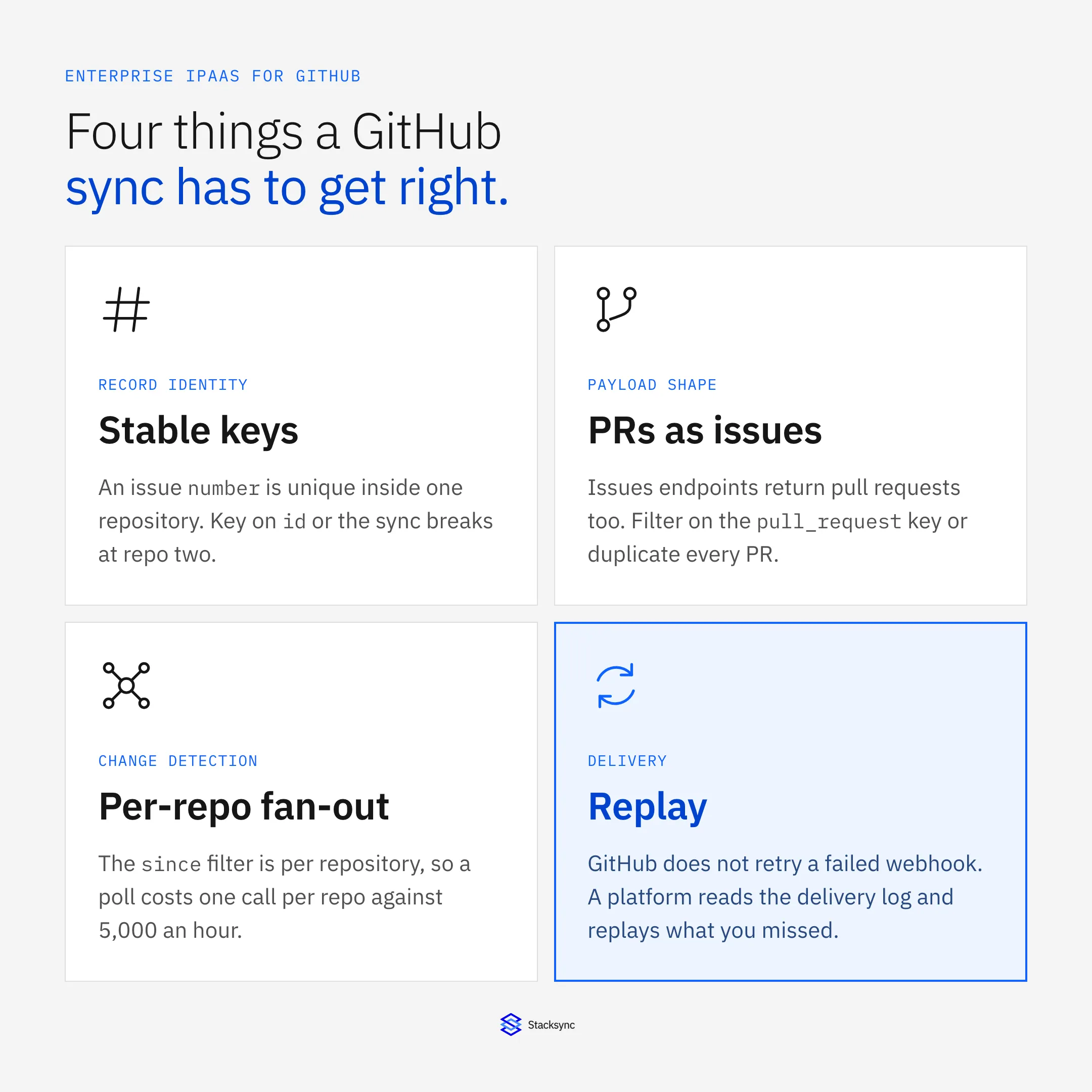
An enterprise-grade iPaaS for GitHub is a hosted integration platform that keeps GitHub issues, pull requests, reviews and releases in step with the rest of your stack, in real time and in both directions, without you writing and operating that plumbing yourself. For GitHub in particular it has to handle four things a generic connector does not: an Issues API that hands back pull requests as issues, record numbers that are only unique inside a single repository, change detection that fans out once per repository, and webhook deliveries that GitHub marks as failed and never retries on its own.
GitHub is the system of record for what engineering is doing. Every bug, every branch, every review, every release is written down there first, with a timestamp and an author. Almost none of it reaches the systems that need it. Support does not know the customer's bug already has a fix on main. The account team does not know the feature they sold went out on Tuesday. The planning board still shows a ticket that closed a week ago. Someone pastes a link into a channel, and that is the integration.
The first instinct is usually GitHub Actions. GitHub describes Actions as a continuous integration and continuous delivery platform that automates your build, test and deployment pipeline, which is what it is good at. A workflow that fires on an issue event and posts to an external API is still a script with YAML around it: no state, no mapping between records, no policy for both sides changing at once, nothing to replay when the far end was down. For the two implementations people ask about most, see how to sync GitHub with Jira and two-way sync between GitHub and Snowflake.
What an enterprise iPaaS for GitHub actually is
An integration platform as a service is a hosted layer that sits between your systems, watches for changes, and applies them where they belong. You configure it instead of building it: authenticate GitHub and the system on the other side, map the objects and the fields, pick a direction and a conflict policy, and the platform runs the parts nobody enjoys writing twice, including retries, rate limiting, ordering, signature verification and monitoring.
The word enterprise is doing real work there. Plenty of tools will post to Slack when a pull request opens. What separates a platform you can run a company's reporting on is how it behaves in the cases that actually happen: the same issue edited in GitHub and in the planning tool in the same minute, a webhook endpoint unreachable for forty minutes, an auditor asking which system last changed a field and when.
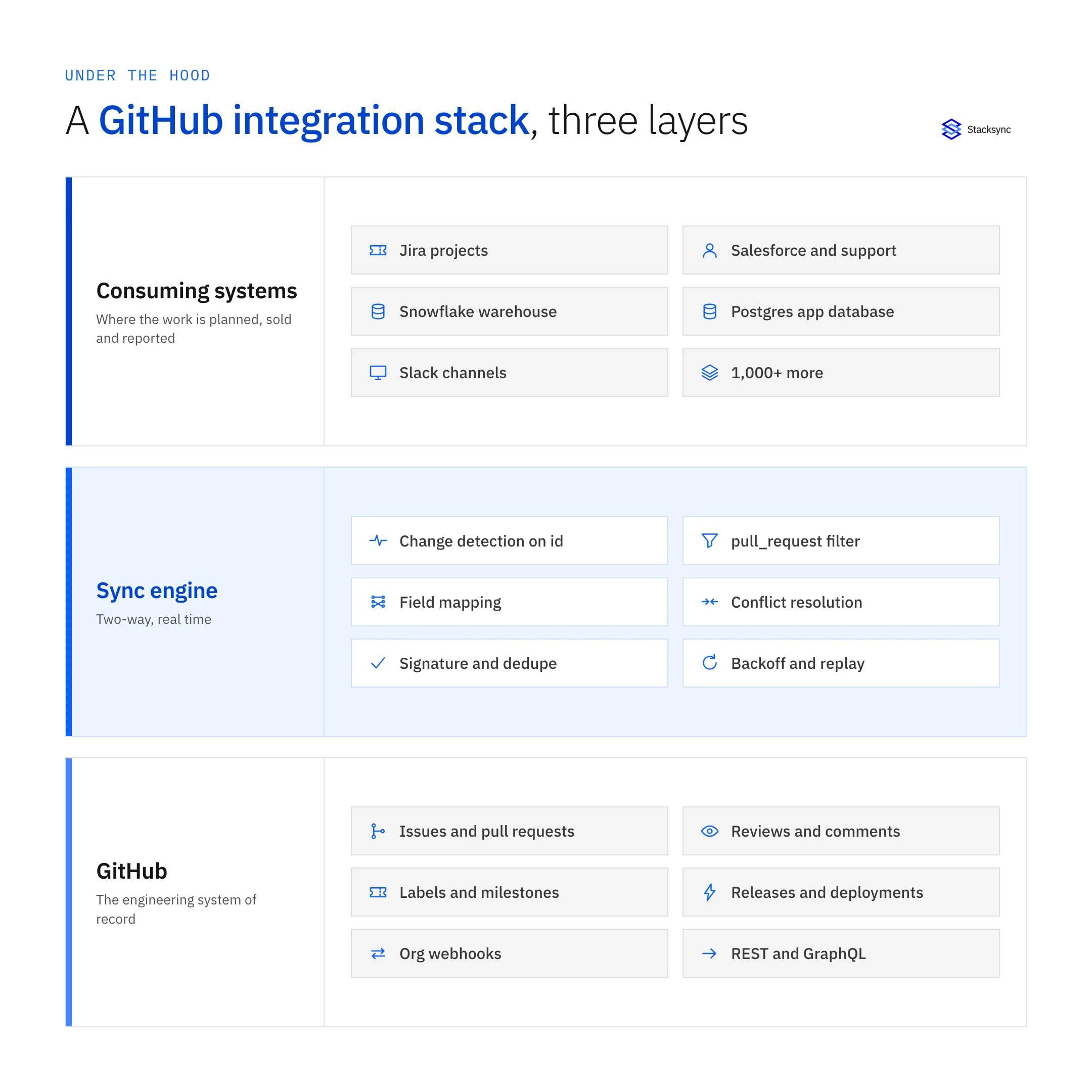
Drawn as a stack it looks obvious, and it is still worth stating: the sync engine is its own tier. When it is instead a function somebody wrote in a sprint, the failure modes stop being monitored, retried, logged events. They become an afternoon spent working out why support has been telling customers a bug is open for two weeks after it shipped.
Why GitHub is harder to keep in sync than it looks
GitHub has been the default home for source code long enough that its API carries a few decisions from an earlier era (the origin story is worth a read). Five of them decide the architecture of anything that syncs it. Get them wrong and the integration drifts quietly, which is the worst way for this data to fail, because nothing alerts and the first symptom is a person being told the wrong thing.
Every pull request is also an issue
The docs are explicit about it: GitHub's REST API considers every pull request an issue, but not every issue is a pull request, so Issues endpoints may return both, and you identify pull requests by the pull_request key on the payload. A connector that reads GET /repos/{owner}/{repo}/issues and does not check for that key will create a ticket, a row or a record for every pull request the team opens. Nothing errors. The number of open bugs in your reporting is simply wrong, in the direction of roughly however many pull requests you merge.
The number in the URL is not a key
The endpoint is /repos/{owner}/{repo}/issues/{issue_number}, which tells you what you need to know: an issue number only means something inside its repository. Issue 42 exists in every repo you own. The immutable id (and the GraphQL node ID) is what stays unique across the account and survives a rename. Plenty of first attempts key the mapping on the number, because that is the value people quote in conversation, and they work perfectly until the second repository joins and starts overwriting the first one's records.
Change detection fans out per repository
The since parameter on the list-issues endpoint filters to issues last updated after a given time, which is exactly what a poller wants. It is also scoped to one repository. There is a cross-repository endpoint, GET /issues, but it answers from the authenticated user's own visibility and participation filters, not from an organization. In practice a poll over an org is one request per repository per cycle, and that number runs directly into the rate limit below. An organization with 400 repositories polled every five minutes is asking for 4,800 requests an hour before it has read anything else.
GitHub does not retry a failed webhook
This is the fact most integrations are quietly wrong about. GitHub expects a 2XX response within 10 seconds and records anything slower or unreachable as a failed delivery, and the documentation states plainly that GitHub does not automatically redeliver failed webhook deliveries. A deploy window, a cold start or one slow database write is a permanently missing event unless something goes and gets it. The recovery path is to list deliveries with GET /repos/{owner}/{repo}/hooks/{hook_id}/deliveries, look for a status that is not OK, and request a redelivery through POST /repos/{owner}/{repo}/hooks/{hook_id}/deliveries/{delivery_id}/attempts. That reconciliation loop is a feature, not an implementation detail. Ask any vendor whether they run one.
There are two rate limit systems, not one
The primary limit is 5,000 REST requests per hour for an authenticated user. A GitHub App installation starts at the same 5,000, gains 50 more per hour for each repository past 20 and each organization member past 20 up to a 12,500 ceiling, and gets 15,000 per hour on GitHub Enterprise Cloud. GraphQL is metered in points rather than requests: 5,000 points per hour for a user, 10,000 for an Enterprise Cloud installation. Sitting underneath both are secondary limits that will stop you long before the hourly one does, including no more than 100 concurrent requests, no more than 80 content-generating requests per minute and 500 per hour, and no more than 900 points per minute on REST. Search is tighter still, at 30 requests per minute for most search endpoints. Everything you need to behave correctly is in the response: x-ratelimit-remaining, x-ratelimit-reset, x-ratelimit-resource and retry-after. Backing off without those headers, and without preserving queue order while you wait, is how a write lands out of sequence and looks like a mapping bug.
Build, automate, batch, or sync
Four approaches turn up in every evaluation, and each is genuinely right somewhere. The comparison is only useful if you make it honestly rather than knocking down three strawmen.
- Write it yourself. Right when GitHub is your only integration and one repository matters. You will end up writing signature verification, delivery-log reconciliation, the
pull_requestfilter, an ID mapping table, primary and secondary backoff, and a replay path. Three to five weeks, then permanent ownership. - An automation platform. Right for a handful of notifications and low-volume triggers. Recipes fire per event, so cost and fragility scale with volume, and there is no concept of a record being in sync, only of an event having fired once.
- ETL or reverse ETL. Right when the warehouse is the destination and analysts are the consumers. Events land in Snowflake on a schedule and reverse ETL pushes computed values back out. Latency is hours and each pipeline runs one way, which is the gap reverse ETL leaves open for operational data.
- A real-time two-way iPaaS. Right when GitHub has to stay consistent with a system people edit all day. Change detection on both sides, a field-level conflict policy, origin tracking so a write does not echo back, and one connection instead of two pipelines aimed at each other.
| In-house code | Automation platform | ETL / reverse ETL | Two-way iPaaS (Stacksync) | |
|---|---|---|---|---|
| Latency | Whatever you build | Seconds, per recipe run | Scheduled, hours | Seconds, on change |
| Direction | Both, if you build it | One way per recipe | One way per pipeline | Two way on one connection |
| Pull requests in the Issues API | You filter on pull_request | Usually unfiltered | Loaded raw, filtered later | Filtered at the source |
| Identity across repositories | You design the key | Recipes hold no state | Keyed by the load job | Mapped on the immutable id |
| Missed webhook deliveries | You poll the delivery log | Lost | Caught on the next run | Detected and replayed |
| Rate limits | You implement backoff | Errors or drops the run | Bulk windows | Backoff on x-ratelimit-reset |
| Both sides edited at once | You write the policy | Last writer wins by accident | Not modeled | Field-level conflict policy |
| What drives the cost | Engineering time | Task volume | Rows and compute | Connections and volume |
The question is not which column wins everything. It is how many times you want to own GitHub's behavior yourself.
The platforms you will be compared against
Any shortlist will include the large integration vendors, and each earns its place. MuleSoft is the strongest choice when integration is itself the programme: API-led design, a gateway, governance across hundreds of interfaces, and a team funded to run it. Boomi has the widest coverage of established enterprise applications and the longest track record in large IT estates. Workato is the best of the automation-first tools, with a genuinely good builder and a large recipe library. Jitterbit is strong on the legacy and on-premise systems newer platforms skip.
All four will move GitHub data. What none is built around is durable two-way record sync: a persistent mapping between a GitHub issue and its counterpart, field-level change detection on both sides, a stated conflict policy, and origin tracking. Test that in a trial rather than reading connector counts. Point two systems at the same record, edit both within a minute, and watch what happens.
What to hold a platform to
Vendor pages converge on the same adjectives, so evaluate against things you can test in a trial. These seven decide whether the integration survives contact with a real engineering organization.
- Coverage across the whole stack. GitHub never sits alone. Ask for the planning tool, the CRM, the support desk and the warehouse on one engine, so the second connection is a configuration rather than another project. Start at the GitHub connector.
- Real-time two-way sync at field level. One connection, both directions, with a stated policy for the same field changing on both sides and origin tracking, so a value written into GitHub is not read straight back as a new change.
- It respects GitHub's data model. The
pull_requestfilter, mapping keyed onidand node IDs rather than the per-repo number, and correct handling of an issue transferred between repositories. Listen for whether the answer is specific. - Webhook hygiene. Verification of
X-Hub-Signature-256, dedupe on theX-GitHub-DeliveryGUID, and an endpoint that acknowledges inside the 10-second window and processes asynchronously. - Reconciliation, not just streaming. Because failed deliveries are not retried, the platform needs a scheduled pass over the delivery log and a bounded backfill, so an outage becomes a queue rather than a hole in your history.
- Rate-limit behavior on both systems. Primary and secondary limits, GraphQL points, header-driven backoff, and preserved ordering while it waits. Retrying immediately makes the throttle worse and reorders your writes.
- Observability and replay. Per-record logs that say which side wrote last and when, and the ability to reprocess a window. Without them, every disagreement between two systems is an investigation instead of a lookup.
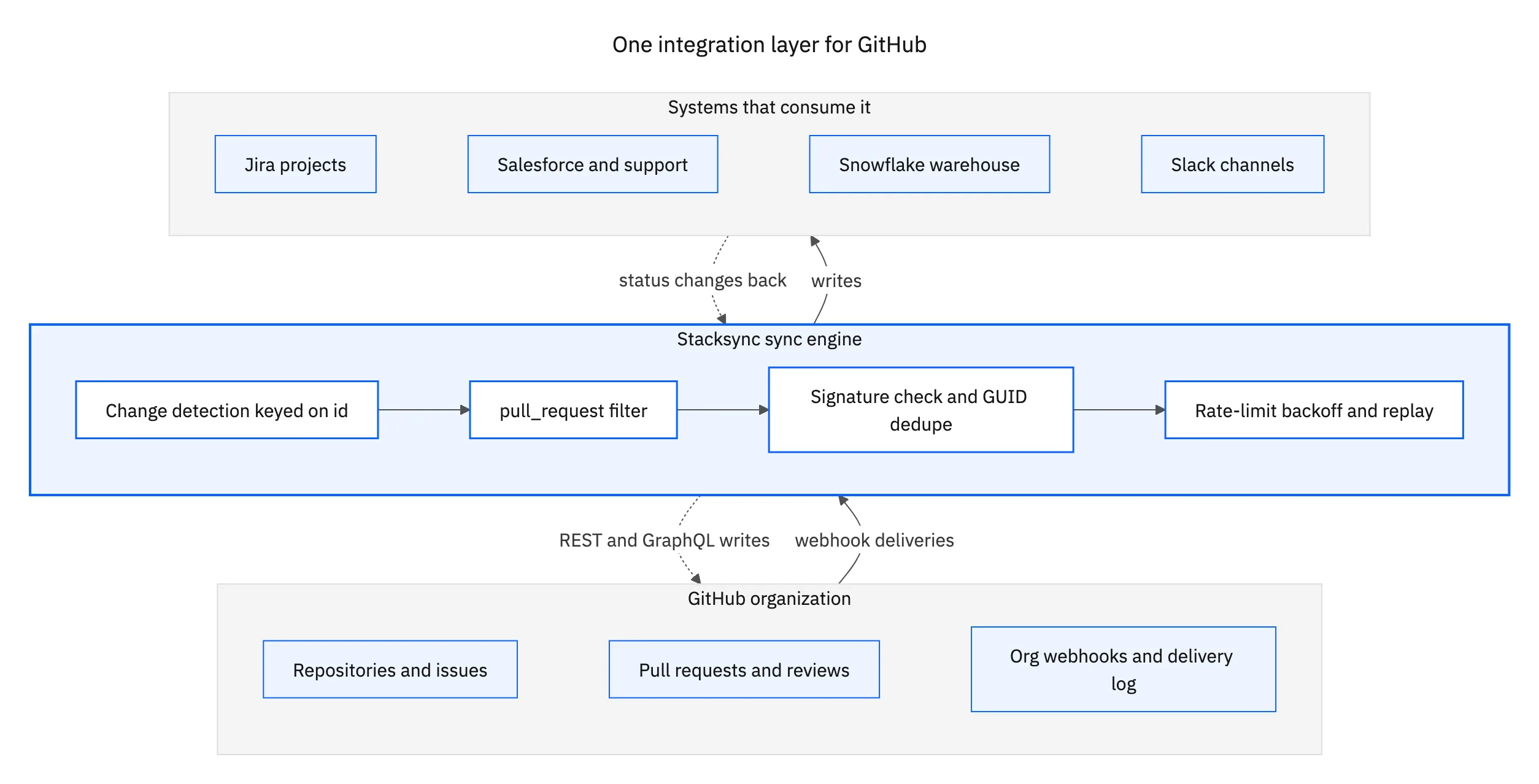
That is the shape to aim for. Every system connects to the same engine, and changes come back along the path they went out on. The alternative, one integration per system with its own credentials, schedule and failure behavior, is how teams end up reconciling their integrations instead of shipping.
What the security review will ask
Source control attracts scrutiny, and rightly. Three questions come up in every review, and it is cheaper to have answers before the meeting than during it.
First, how it authenticates. GitHub Apps install directly on organizations, are granted access to specific repositories, come with built-in webhooks and narrow permissions, and act independently of a user. A personal access token carries one person's access, appears in the audit log as that person, and stops working when they rotate it or leave. Ask whether the vendor ships a GitHub App and whether it installs on a selected list of repositories.
Second, what it can reach. A sync of issues, labels, assignees and pull request metadata does not need code contents, and it does not need write access to anything it only reads. Compare the permission list against the objects on your field map. Anything left over is blast radius accepted for no benefit, and it is the part a reviewer will circle.
Third, where the data rests. A platform that copies your issue and pull request history into its own store becomes another system in scope for your DPA and your next audit. Stacksync moves data between systems without parking a copy in the middle, and holds SOC 2 with encryption in transit, which is usually the shortest version of that conversation.

Where GitHub sits in the rest of the stack
GitHub ends up connected to three or four systems, and each pairing has a different centre of gravity. Getting them right individually is most of the work.
- The planning tool. Jira is the most common partner by a distance, and the native app links branches and pull requests to a work item rather than syncing issues to issues. See GitHub and Jira, the Jira connector, and the step-by-step build.
- The warehouse. Throughput, cycle time and release reporting get built where the rest of the company's data lives. See GitHub and Snowflake, the Snowflake connector, and why that one runs both ways.
- The customer-facing systems. Support and sales need to know when a reported bug has a fix, and it has to arrive on the case or the account, not in a channel. See GitHub and Salesforce.
- Where people actually look. Slack is where a release becomes common knowledge, and the one place a one-way notification is the right answer. See GitHub and Slack.
Only the last of those is a one-way problem, which is the recurring point. Planning sends priority and status into GitHub and wants state back. The warehouse reads events and writes computed values out again. Treat real-time two-way flow as the default and one-way as the deliberate exception, not the other way round.
Match the integration layer to the API you actually have
GitHub will tell you an issue changed. It will also hand you pull requests when you asked for issues, number them in a way that only works inside one repository, make you ask each repository separately what changed, and forget a delivery you were not awake for. That is not a defect to complain about. It is the set of constraints an integration has to be built around, and the reason a generic connector quietly stops matching reality after a few weeks of real traffic.
An enterprise iPaaS earns its place by absorbing exactly that work: the pull_request filter, ID-keyed mapping, per-repository change detection, signature verification, GUID dedupe, header-driven backoff, delivery-log reconciliation and replay. Stacksync connects GitHub to more than 1,000 systems on one engine, in real time and in both directions, without keeping a copy of your data. To see it running against your own organization, book a demo.

FAQ
Frequently asked questions










Explore these integrations and topics
Related articles






