






















Your Commits Reach Jira. Your Issues Stay Behind.
The practical guide to the GitHub and Jira integration. It explains exactly what Atlassian's GitHub for Jira app does (branches, commits, pull requests and deployments on the Jira work item, linked by issue key), where it stops (no issue-to-issue pairing, no status round-trip, no comment mirroring, nothing for teams working in GitHub Issues), how the native app, a point-to-point sync tool and a two-way iPaaS compare, and how a real bidirectional sync is engineered: immutable IDs instead of keys, filtering pull requests out of the Issues API, converting Atlassian Document Format to Markdown, refreshing Jira webhooks before they expire, echo suppression, field-level conflict rules and backoff on both APIs.
- Author
- Ruben Burdin · Founder & CEO
- Published
- Read time
- 13 min read

Ask anything how to sync GitHub with Jira and you get the same answer: install the GitHub for Jira app from the Atlassian Marketplace. That answer is correct, and it is also where most of the disappointment starts, because the app and the question are usually about two different things. The app attaches development activity to a Jira work item. It does not keep two issue trackers holding the same records.
The word sync is doing the damage. One meaning is traceability: I am looking at a Jira work item and I want to see the branch, the commits and the pull request behind it. The other meaning is record parity: a team files bugs in GitHub Issues, product plans in Jira, and both sides need the same title, status, assignee and comment thread without anyone retyping. The native app does the first very well. Nothing in it does the second.
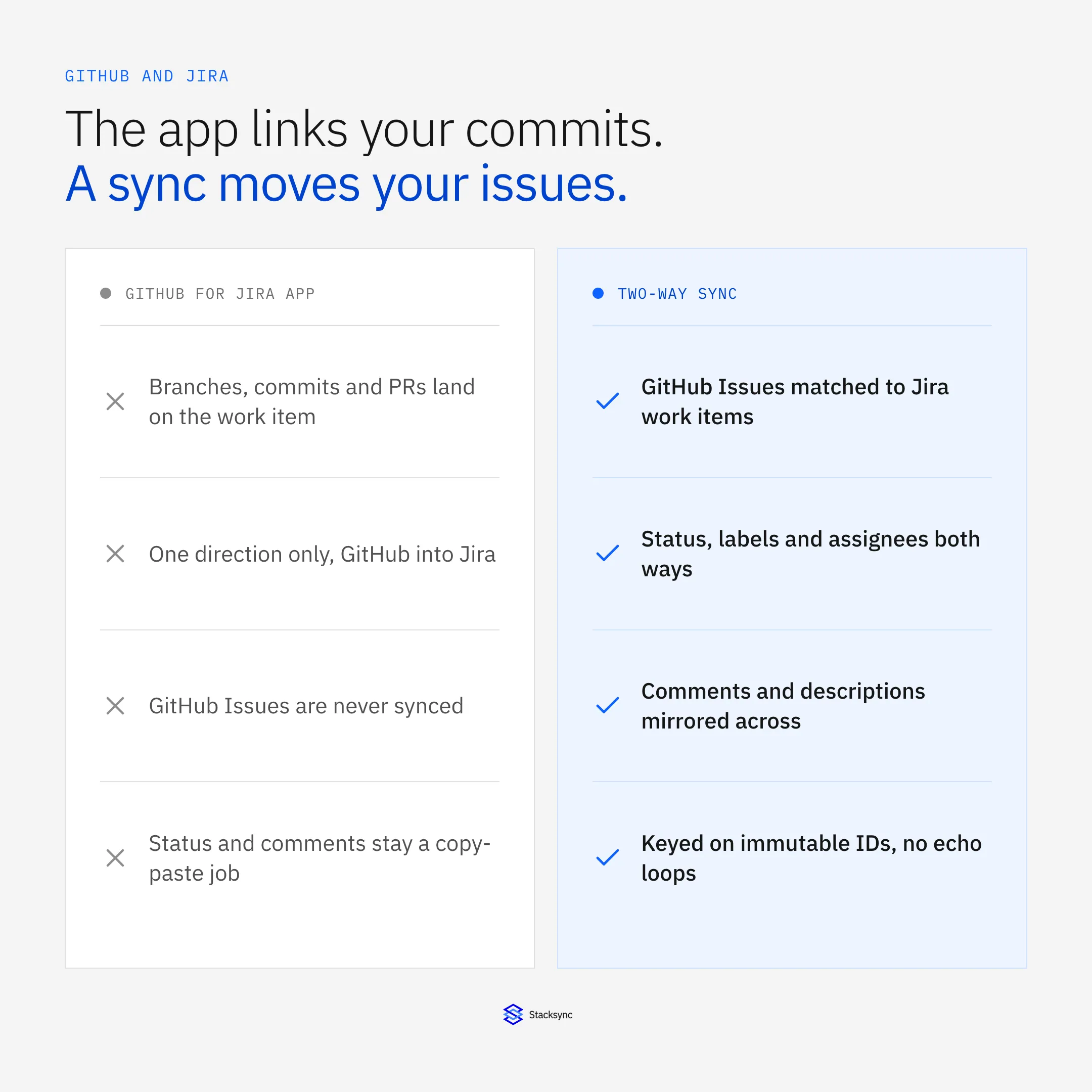
This guide covers what the GitHub for Jira app does, where it stops, and how a real two-way sync is built. That last part is where the interesting failures live: identifiers that change under you, pull requests arriving disguised as issues, Atlassian Document Format on one side and Markdown on the other, webhooks that expire quietly, and the echo loop that turns one edit into an endless argument between two systems. For the platform view of GitHub integration in general, start with the enterprise iPaaS guide for GitHub.
What the GitHub for Jira app actually does
Credit where it is due. Atlassian's GitHub for Jira app is free, it installs in minutes, and for traceability it works. Atlassian's documentation describes it as a way to track branches, commits and pull requests in the context of your Jira work items, on your Jira board and in the releases feature. There is a companion guide for linking GitHub workflows and deployments to work items, so deployment state can appear next to the code. One vocabulary note for anyone reading those pages: Jira Cloud now calls issues work items, so the docs talk about work items where your team probably still says tickets.
Linking runs entirely on the issue key
The mechanism is text matching. You put the Jira issue key in the branch name, the commit message or the pull request title, and the app attaches that activity to the matching work item. Atlassian's examples are literal: git checkout -b JRA-123-<branch-name> for a branch, git commit -m "JRA-123 <summary of commit>" for a commit, and the key in the title for a pull request. Smart commits extend the same idea, letting a commit message add a comment, log time or transition the work item.
So there is a narrow sense in which the native integration writes back into Jira: a smart commit can move a work item along its workflow. That is a command a developer typed, not a synchronized field. Nothing is watching Jira and pushing the result to GitHub.
When is that enough? When Jira is the only tracker. If your engineers plan, estimate and close work in Jira and use GitHub purely for code, the development panel is the whole integration you need.
Where the native GitHub and Jira integration stops
The moment GitHub holds work of its own, the picture changes. Open source projects take bug reports in GitHub Issues, the default place to file a bug for most of GitHub's history. Platform teams triage in GitHub Projects. A customer opens an issue on a public repository and support needs it on a Jira board with a priority and an SLA. None of that is what the development panel is for.
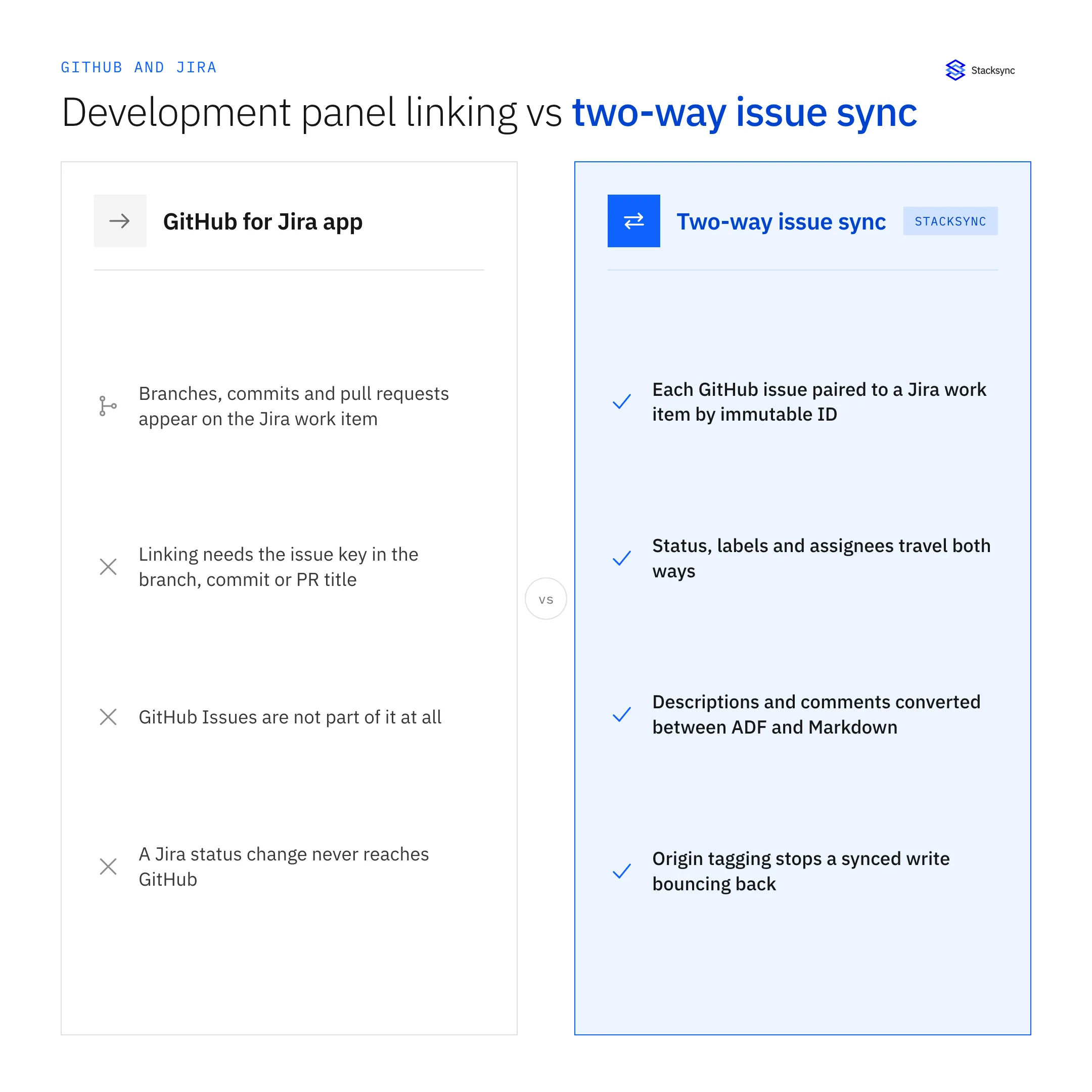
- No issue-to-issue pairing. The app relates commits, branches and pull requests to a Jira work item. A GitHub issue is not one of the objects it links, so no GitHub issue corresponds to a Jira work item and stays that way.
- No status round-trip. Move a Jira work item to Done and nothing happens in GitHub. Close a GitHub issue and nothing happens in Jira. Both sides carry a state and neither knows about the other's.
- No comment mirroring. A contributor answers a question in a GitHub issue thread. A product manager asks the same question in Jira. The two conversations never meet, and somebody ends up pasting one into the other.
- Nothing for the team living in GitHub. If engineering never opens Jira, the development panel adds Jira-side visibility and gives engineering nothing. That asymmetry is usually why adoption dies.
This is why every tool roundup for this question is a list of sync vendors rather than an Atlassian page. Unito, Exalate, getint and similar products exist because the native app is deliberately scoped to development traceability. That is not a criticism of the app. It is the reason anyone adds a second thing.
Three ways to connect GitHub and Jira
There are three real options, and the right one depends entirely on whether GitHub holds records or only code.
- The native GitHub for Jira app. Free, official, five minutes to install. Branches, commits, pull requests and deployment context land on the Jira work item. Right whenever Jira is the single tracker.
- A point-to-point sync tool. Products built specifically to mirror issues between two trackers. They solve the issue-to-issue problem and they are scoped to it, so when the same records also have to reach a warehouse or a support desk you buy another tool for each.
- A general two-way iPaaS. One engine that treats GitHub and Jira as two connected systems among many, with field-level mapping, conflict rules, retries and replay. Right when GitHub and Jira are two of six systems that have to agree, not two of two.
| GitHub for Jira app | Point-to-point sync tool | Two-way iPaaS (Stacksync) | |
|---|---|---|---|
| What it links | Branches, commits, PRs, deployments | Issues to work items | Issues, work items, and the rest of the stack |
| Direction | GitHub into Jira | Both ways, between two trackers | Both ways, on one connection |
| GitHub Issues | Not covered | Covered | Covered |
| Status round-trip | Smart commit transitions only | Yes | Yes, with field-level rules |
| Comments and descriptions | Commit messages only | Mirrored, fidelity varies | ADF and Markdown converted both ways |
| Reaching other systems | None | Another tool per pair | 1,000+ connectors on the same engine |
| What drives the cost | Free | Per synced item | Connections and volume |
Choose by how much of the work actually lives in GitHub, not by which product is cheapest.
The middle column is a genuinely good answer for plenty of teams, and it is worth saying so plainly. The reason to look past it is coverage: GitHub issue data rarely stops at Jira. It gets pulled into a warehouse for engineering metrics, into a support desk so agents can see whether a customer bug has been picked up, into Slack for triage. The analytics half of that is two-way sync between GitHub and Snowflake, and the pairing itself lives at GitHub and Jira.
How a real two-way GitHub and Jira sync is built
Whether you are evaluating a vendor or writing this yourself, the decisions below decide whether the integration survives six months. Every one of them has caught somebody out.
Key on identifiers that do not move
The Jira issue key is the identifier everyone recognizes, and it is the wrong join key. A key changes when the work item is moved to another project, and it changes again if an administrator renames the project key. The numeric issue id never changes. Store the id, display the key.
GitHub has the mirror-image trap. An issue's number is unique per repository, so #42 exists in every repo you own. Only id, and the GraphQL node_id, is globally unique. A mapping table keyed on issue numbers works until the second repository joins the sync, then starts overwriting records without complaining.
Filter out pull requests, or duplicate every one of them
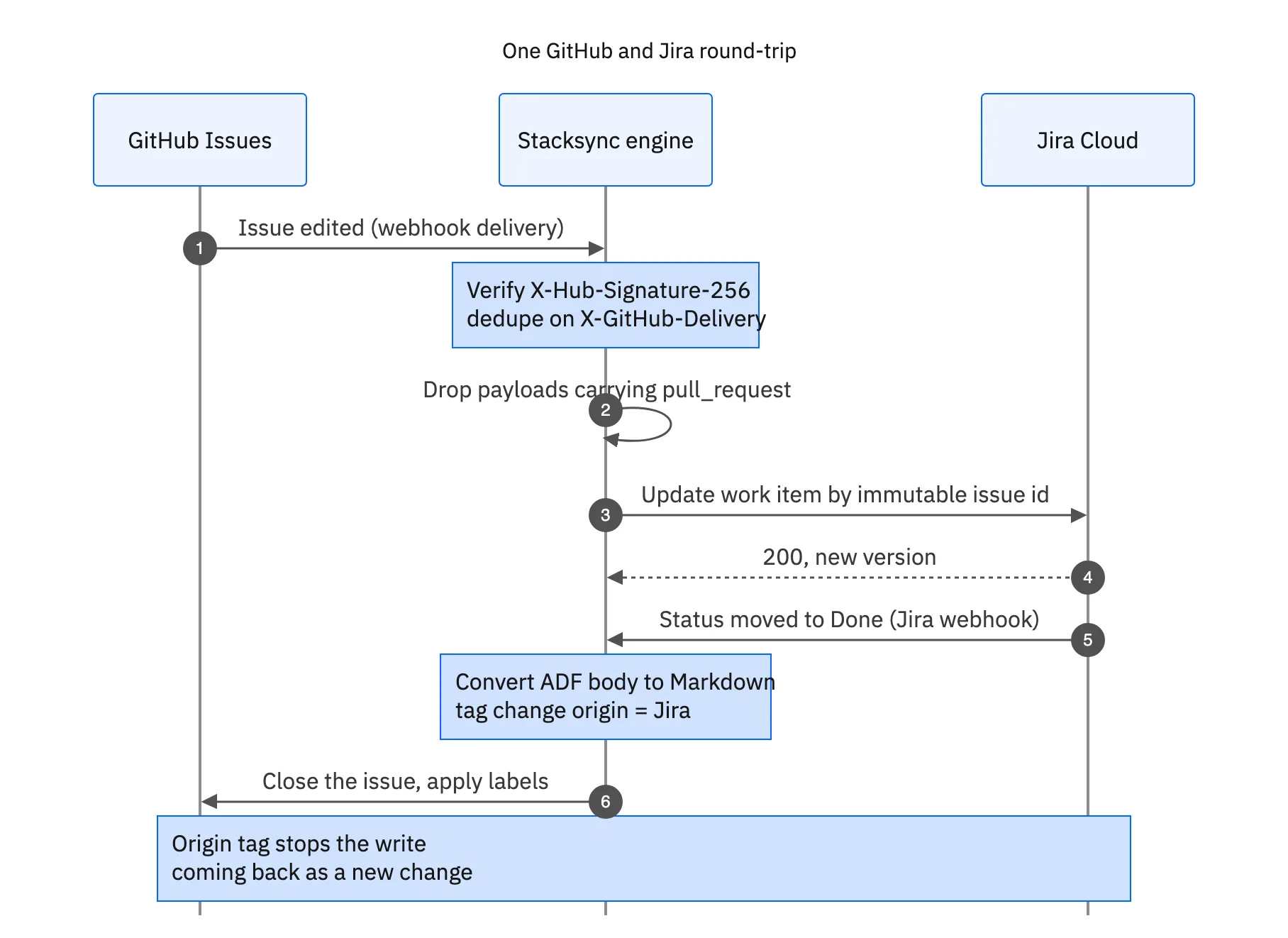
This is the most common bug in a homegrown GitHub sync, and GitHub's REST documentation warns about it in as many words: its API considers every pull request an issue, but not every issue is a pull request, and you identify pull requests by the pull_request key. List the issues in an active repository and every open pull request comes back in the same array. Without that filter, your Jira project fills with work items that are really pull requests.
Rich text: ADF on one side, Markdown on the other
Jira Cloud REST API v3 represents a description or a comment body as an Atlassian Document Format document, which the specification defines as a JSON object: a hierarchy of block and inline nodes, with marks carrying the formatting. GitHub stores the same content as Markdown. Moving text between them is a real conversion, not a string copy, and it loses information both ways. Code blocks, tables, panels, mentions and attachments each need a rule about what converts and what degrades to plain text.
Map the fields that have no counterpart
Jira has a workflow with named statuses and restricted transitions. GitHub has an issue state of open or closed, plus labels, assignees, milestones and project fields. There is no natural mapping, so you write one: which Jira statuses close the GitHub issue, which GitHub label triggers a transition, what happens to a Jira priority GitHub has nowhere to put. Assignees need their own table, because a Jira Cloud account ID and a GitHub login are two identities for the same person.
Detect change without missing any
GitHub webhooks carry X-GitHub-Event, a signature and a delivery identifier. GitHub's guidance is to verify X-Hub-Signature-256, the HMAC hex digest of the request body generated with SHA-256 and your webhook secret, and to use X-GitHub-Delivery, the globally unique GUID for the event, so each delivery is acted on once. Deliveries can be re-sent, so store that GUID and keep the handler idempotent. GitHub also expects a 2XX within 10 seconds, which means acknowledge first and process on a queue.
Jira Cloud webhooks registered through the REST API expire. Atlassian puts the expiry at 30 days from creation or last refresh, extended by another 30 days each time you call the Extend webhook life resource at /rest/api/3/webhook/refresh, and an expired webhook stays available for up to three months so it can be revived rather than rebuilt. A sync that never calls refresh works for a month, then goes silent with no error anywhere.
Polling as a backstop has an edge of its own. A JQL filter like updated >= "-5m" is the usual approach, and JQL date values go down to the minute rather than the second. Anything changed inside the current minute can fall on either side of that boundary, so overlap the window and make every write an idempotent upsert.
Suppress the echo, then resolve the conflict
The first version of every two-way sync loops. GitHub fires a webhook, the engine writes to Jira, Jira fires a webhook about that write, the engine writes back to GitHub, and the two systems keep each other busy forever. The fix is to tag the origin of every write and ignore inbound events the engine caused itself. Stacksync tracks the origin of each change, so a synced write is recognized on the way back and does not restart the cycle.
Echo suppression is not conflict resolution. When someone edits the title in GitHub and someone else edits it in Jira within the same minute, you need a rule: last write wins, one system owns that field, or the clash goes to a human. Deciding at field level is what keeps this workable, because status usually belongs to Jira while labels usually belong to GitHub, and a whole-record rule forces one owner for everything.
Back off before either API makes you
GitHub's primary REST limit is 5,000 requests per hour for an authenticated user, rising to 15,000 for accounts in a GitHub Enterprise Cloud organization, with GitHub App installations starting from the same 5,000 and scaling with repositories and users. The secondary limits are separate and easier to hit: no more than 100 concurrent requests, and no more than 80 content-generating requests per minute or 500 per hour. Creating issues and posting comments counts as content generation, so a bulk backfill meets that ceiling long before the hourly one.
Jira Cloud limits by cost rather than by request count and answers with HTTP 429 plus a Retry-After header telling you how long to wait, and Atlassian's guidance is exponential backoff with jitter rather than an immediate retry. Both platforms tell you what to do in a response header. An integration that ignores both is the one that stalls during a migration and drops writes without saying so.

A setup checklist for the GitHub to Jira integration
Whether you configure a platform or build it, the order matters. Settling identity and filtering before the first backfill is what saves you from cleaning up a Jira project by hand afterwards.
- Install the native app anyway. Traceability and issue sync are complementary, not alternatives. Commits and pull requests belong on the work item regardless of what else you run.
- Decide what a synced record is. One GitHub repository to one Jira project is the clean starting shape. Decide whether every issue syncs or only issues carrying a specific label, and set that filter before the backfill.
- Authenticate with scoped credentials. A GitHub App installation limited to the repositories in play, not a personal access token belonging to whoever set it up. On Jira, an account whose permissions cover exactly the target project.
- Map identities first. Build the GitHub login to Jira account ID table before anything else, and decide what happens when an assignee has no counterpart. Falling back to unassigned is a legitimate choice; discovering it mid-backfill is not.
- Map statuses in both directions. Say explicitly which Jira transitions close the GitHub issue and which GitHub label triggers a transition, then set conflict rules per field: status owned by Jira, labels owned by GitHub, description on last write wins.
- Backfill, then reconcile. Compare counts on both sides and check that no pull request became a work item. That one check catches the
pull_requestbug on day one instead of month three. - Watch the failure path. Confirm you can see per-record errors, that a 429 shows up as a retry rather than a loss, and that you can replay a time window after an outage.
Match the tool to whichever system holds the work
Every honest answer to how to sync GitHub with Jira starts by splitting the question. If Jira is the only tracker and you want to see the code behind a work item, install the GitHub for Jira app, put the issue key in your branch names, and you are done for free. If GitHub Issues holds work that Jira also has to hold, the native app was never going to cover it, and no amount of configuration changes that.
The second case is an integration problem with well-understood failure modes: immutable IDs instead of keys, filtering pull requests out of the issues feed, converting ADF to Markdown and back, refreshing webhooks before they lapse, tagging origins to break the echo, and backing off when a header tells you to. Stacksync runs that pattern between GitHub, Jira and more than 1,000 other systems on one engine, in real time and in both directions. To see it against your own repositories and projects, book a demo.

FAQ
Frequently asked questions










Explore these integrations and topics
Related articles






