






















Bring Patient Records Into Zoho Without Moving What Should Stay
A guide to syncing eClinicalWorks with Zoho CRM for practices that run clinical work in the EHR and outreach, intake, and campaigns in Zoho. It covers mapping patients, appointments, and encounters to Zoho modules, using field-level exclusion so protected health information you do not need never leaves the EHR, writing custom transformations with a Python step, driving Zoho workflows from live clinical data, and what a HIPAA-aligned setup requires from the integration platform.
- Author
- Ruben Burdin · Founder & CEO
- Published
- Read time
- 10 min read

A practice that runs clinical work in eClinicalWorks and everything else in Zoho ends up with the same split every time. The EHR holds the truth about patients, appointments, and encounters. The CRM is where intake coordinators, outreach staff, and campaign owners actually work. Neither team wants to live in the other's system, and re-keying patients into Zoho by hand is both slow and the least accurate option available.
Syncing the two solves it, but the requirements are stricter than a normal CRM integration. Protected health information is involved, so the question is not only how to move data but how to move as little of it as possible, prove what moved, and keep the clinical record authoritative in the system that is supposed to hold it.
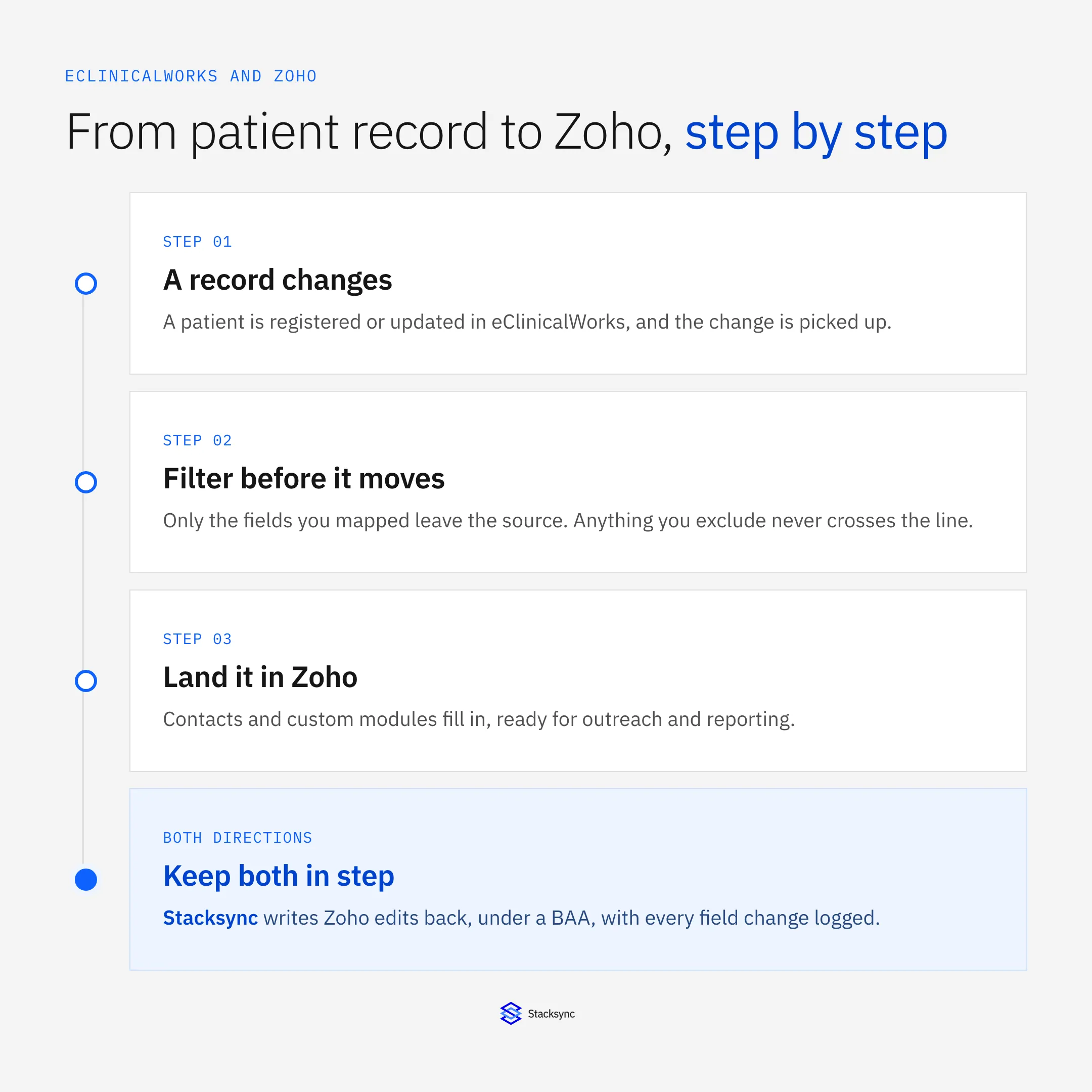
Step two is the one that makes the rest defensible. This guide covers all four: what to map, how field-level exclusion works, how to transform values in flight, and what a compliant setup expects from the platform in the middle. If you are still choosing that platform, the guide to Zoho integration platforms covers the general criteria, and the eClinicalWorks integrations guide covers the EHR side.
Deciding what actually belongs in the CRM
Start from what the CRM is for rather than from what the EHR contains. Outreach and intake teams need to know who someone is, how to reach them, whether they are due for something, and where they are in a process. They do not need the clinical detail behind any of it. That distinction is the whole design.
In practice that means patients map to Contacts, with name, contact details, and the identifiers you need to match records reliably. Appointments and encounters map to a custom module, carrying dates, types, and status but not the clinical content. Anything that drives a campaign, a recall date, a consent flag, a coverage status, is mapped deliberately because a workflow depends on it. Everything else stays where it is, and the fact that it stays is not an oversight to fix later, it is the design decision that keeps your CRM out of scope for things it has no business holding.
The field boundary, and why exclusion beats hiding
There are two ways to keep sensitive data out of a CRM, and they are not equivalent. The common one is to sync everything and then restrict who can see the sensitive fields in Zoho. That leaves the data in two systems, doubles the surface you have to defend, and turns every access review into a conversation about permissions that could have been avoided.
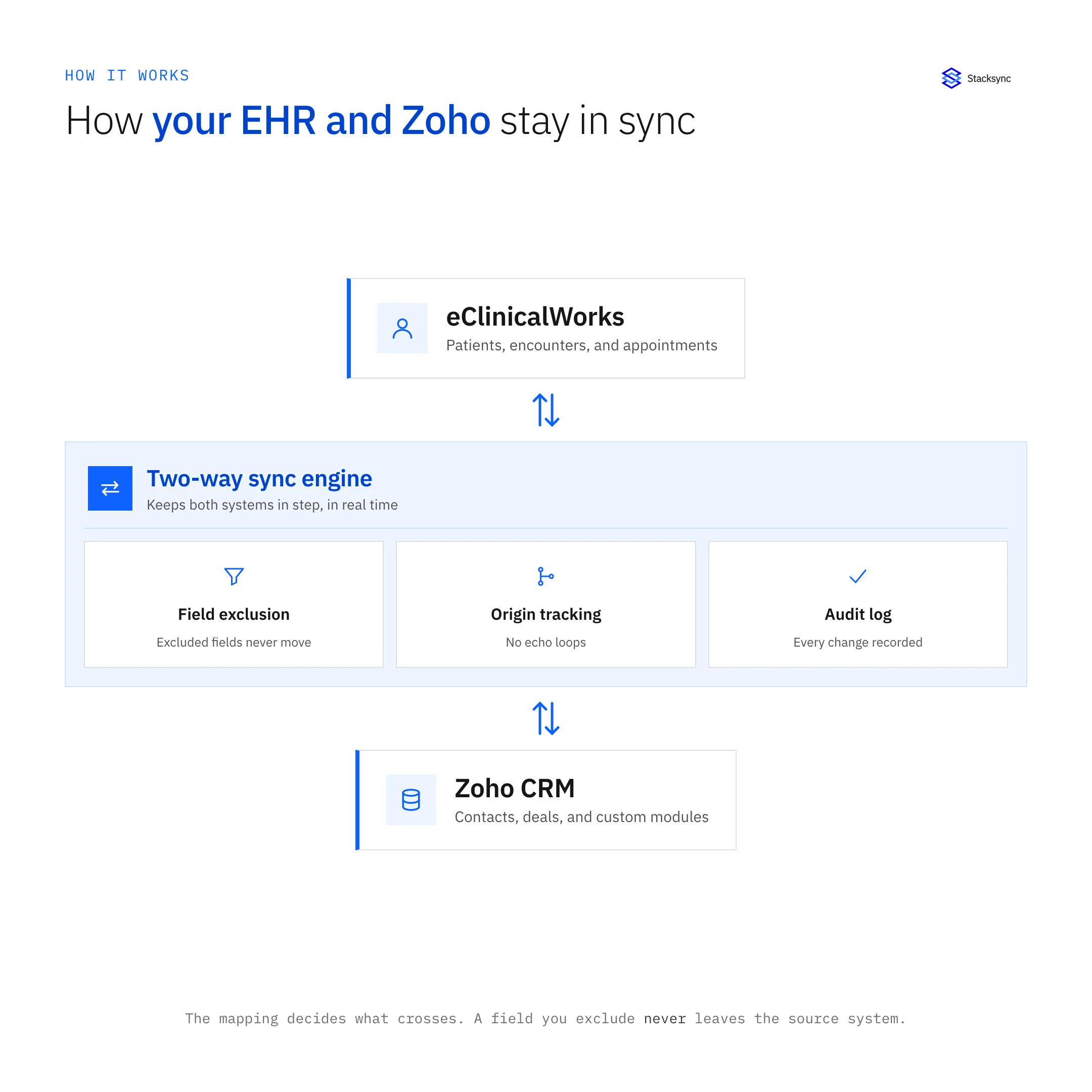
Field-level exclusion is the better answer. The mapping acts as an allow list: only mapped fields are read and forwarded, so an excluded element is never transmitted to Zoho in the first place. The data stays in the EHR, the CRM holds a deliberately narrow slice, and the answer to an auditor is simple to give and easy to evidence from the log.
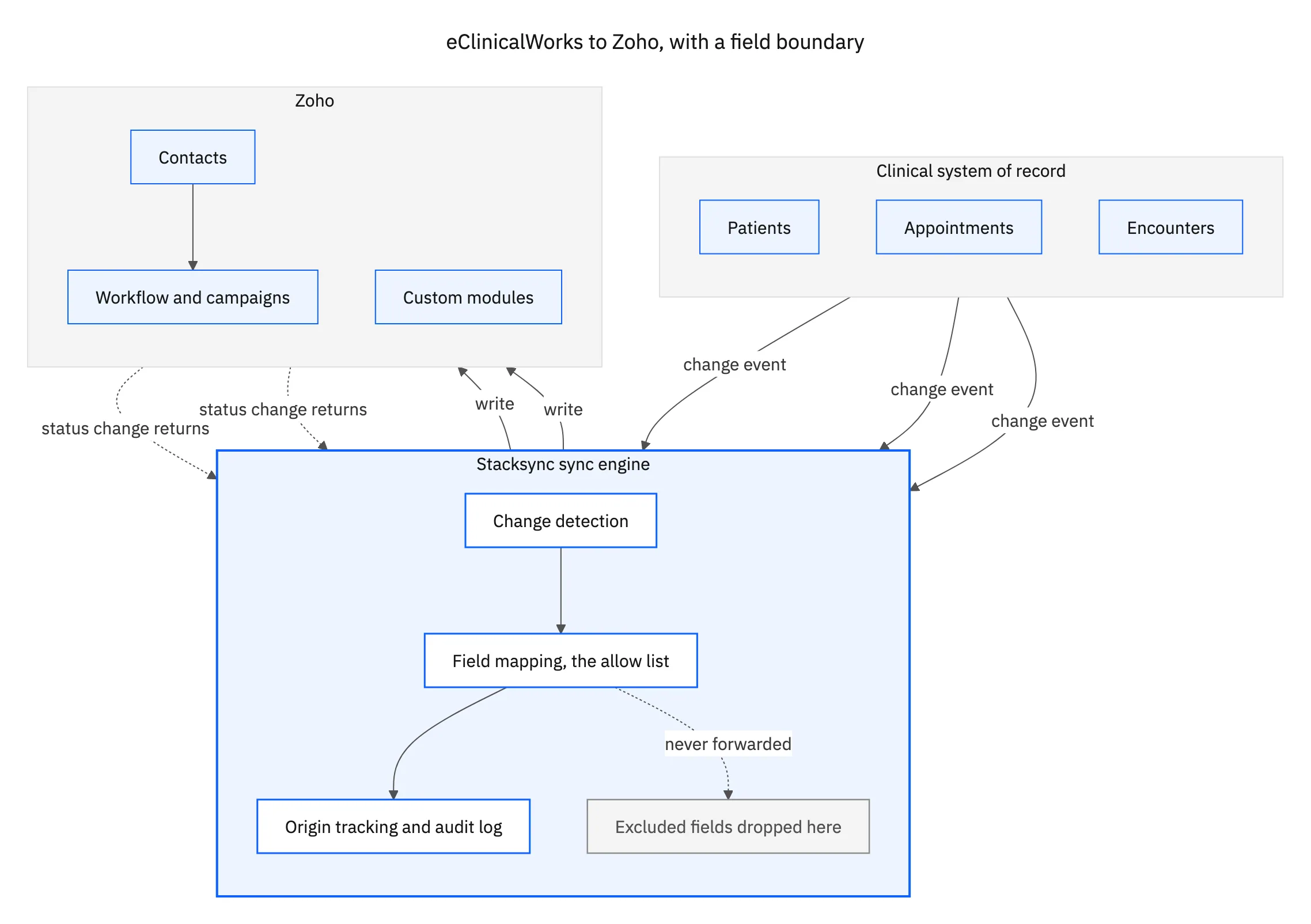
Notice where the drop happens. It is at the mapping, inside the engine, before any write is attempted, which is what lets you say the excluded field never reached the CRM rather than that it reached it and was restricted afterwards.
Reshaping values on the way across
Clinical data rarely arrives in the shape a CRM wants, and the gap is usually an opportunity to move less. A date of birth is a good example: outreach segmentation normally needs an age band, not an exact date, so deriving the band during the sync means the precise value never has to leave the EHR at all. The same logic applies to clinical codes that only need to become a plain-language segment name.
A Python step in the flow handles this. You write a small script that receives the record in flight and returns the shape Zoho should store, which covers the ordinary cases too, normalising phone numbers, splitting or combining name fields, converting units, or setting a flag from a combination of source values. Doing it in the flow avoids the usual alternative of a staging database that exists purely to reshape data, and that database would itself become another copy of patient information to secure.
| Manual entry or CSV | Real-time two-way sync | |
|---|---|---|
| Freshness | Stale from the moment it is exported | Seconds behind the EHR |
| What crosses | Whole rows, including extra fields | Only the fields you mapped |
| Sensitive data | Sent, then hidden in the CRM | Never read from the source |
| Reshaping values | Done by hand or in a staging table | A Python step in the flow |
| Evidence for an audit | Reconstructed after the fact | A log of every field change |
| Updates from the CRM | Re-keyed by someone | Written back automatically |
Why the export-and-import routine does not hold up for clinical data.
Once records are in Zoho as real module records, the native automation works on them normally. Intake sequences for new patients, recall and follow-up campaigns, task assignment, and reporting all behave as they would on any other data, with the difference that the data is current rather than a snapshot from the last export.

What a compliant setup expects from the platform
HIPAA does not have a checkbox that a product can tick on your behalf, but the controls a review will look for are consistent. You need a business associate agreement with the platform handling the data. The data needs to be encrypted in transit and not parked in a middleman, so the platform moves records between your systems rather than accumulating its own copy. Access needs to be per person and revocable, which OAuth gives you without anyone sharing a login.
Then there is the audit log, which is what turns every other claim into something you can evidence. A log of which field changed, in which direction, at what time, and what the resulting value was, is what lets you answer a question about a specific record months later. Combined with field-level exclusion keeping the scope narrow in the first place, that is a setup you can put in front of a reviewer without apologising for it.
Clinical truth in the EHR, working data in Zoho
The goal is not to copy the EHR into a CRM. It is to give the teams working in Zoho exactly the current information they need, and nothing beyond it, while the clinical record stays authoritative where it belongs. Field-level mapping is what makes that split real, real-time sync is what keeps it useful, and the audit log is what makes it defensible.
Stacksync runs the sync in both directions with field-level mapping and exclusion, a Python step for custom transformations, encryption in transit, OAuth access per person, and a full change log. The same engine also connects Zoho to your own database and to Snowflake for reporting. To map it against your own modules, book a demo.

FAQ
Frequently asked questions










Related articles





