






















Binlog In, Bulk API Out: Syncing Aurora MySQL With Salesforce
A step-by-step guide to syncing AWS Aurora MySQL with Salesforce in both directions. It covers why the documented Data Cloud and AppFlow paths do not close the loop, how to turn binary logging on in the DB cluster parameter group and keep it readable after a failover, how to write into Salesforce with a Bulk API 2.0 upsert on an External Id, how to read changes back over the Pub/Sub API, the collation trap that makes two Salesforce record IDs collide in one Aurora row, and the Aurora behaviours that break a sync: Backtrack, the max_connections formula, and Serverless v2 scaling.
- Author
- Ruben Burdin · Founder & CEO
- Published
- Read time
- 12 min read

The obvious answer to this one is not the answer. Salesforce Data Cloud does document an Amazon Aurora MySQL connection, in a batch form and a zero-copy form, and it works. What it does is bring Aurora data into Data Cloud. It does not write anything back into your cluster and it is not a sync between database rows and CRM records. AWS AppFlow, the other name that surfaces immediately, has a good Salesforce connector and a destination list that does not include Aurora.
So the round trip has to be assembled from parts on both sides: the Aurora MySQL binary log going out, the Salesforce API going in, Change Data Capture coming back, and something in the middle stopping the two from echoing at each other. This guide walks each of those in order, with the Aurora-specific settings that decide whether the result survives its first failover.
If you are still choosing a platform rather than wiring one up, the companion post on an enterprise iPaaS for AWS Aurora MySQL covers that decision. This one assumes it is made.
Why the documented AWS and Salesforce paths stop short
Four routes exist between an Aurora MySQL cluster and a Salesforce org. Three are real products doing real work, aimed at a slightly different problem.
| Two AWS DMS tasks | AppFlow and EventBridge | Custom binlog reader | Managed two-way sync | |
|---|---|---|---|---|
| Directions | One per task, so two tasks | Salesforce out only; Aurora is not a target | Both, if you build both | Both, one configuration |
| Write path into Salesforce | Not a supported DMS target | Writes to S3, Redshift and similar | Whatever you code | Bulk API 2.0 upsert on an External Id |
| Loop prevention | None | Not applicable, one way | You build it | Origin tagged on every write |
| Conflict rule | None | Not applicable | You build it | One policy, resolved per field |
| After an Aurora failover | The task restarts; the position is yours to fix | Not applicable | Safe only if you implemented GTID | GTID checkpoint, resumes in place |
| Who maintains it | Two tasks and four endpoints | A flow plus glue code | Your engineers, indefinitely | Configuration, not code |
The four routes between an Aurora MySQL cluster and a Salesforce org.
AWS DMS is the one people reach for, because docs.aws.amazon.com covers Aurora MySQL change capture through DMS in detail and the setup genuinely works. What a DMS task gives you is one direction. A round trip is two tasks, and pointing them at each other needs three things DMS does not have: an idempotency key so a replayed batch does not duplicate, a rule for which side wins when both edit the same record, and a way for each task to skip the other's writes.
Two more get ruled out quickly. Aurora zero-ETL to Amazon Redshift is one-way analytics replication, with no write-back and no SaaS target. Bidirectional MySQL replication tooling such as SymmetricDS does have loop and conflict machinery, but it assumes MySQL at both ends, and Salesforce is an API with validation rules and a request allocation rather than a database you replicate into. Building on a binlog reader such as Debezium is reasonable if you have the team: reading the log is the solved part.
Step 1. Turn the binary log on in the right parameter group
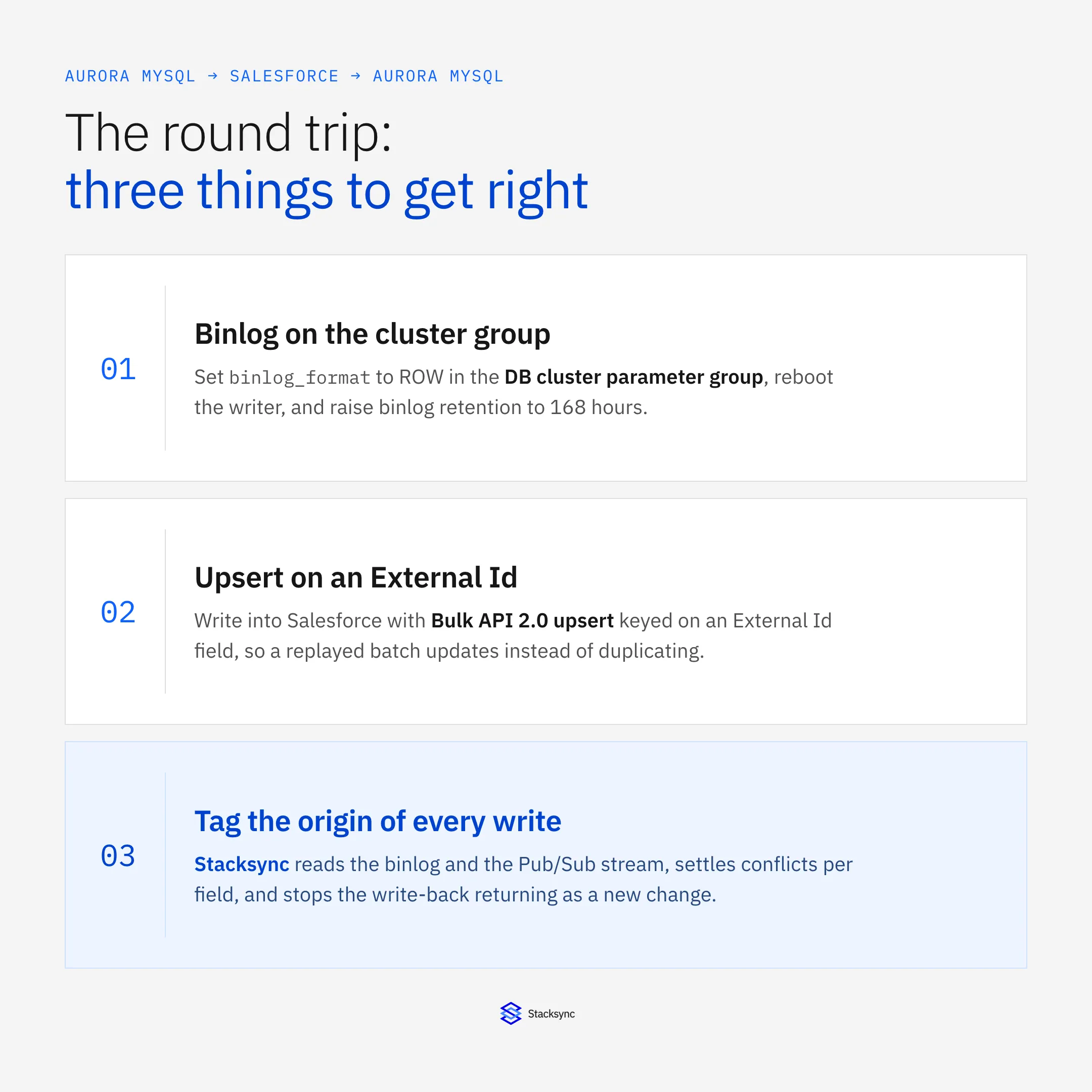
Binary logging is off by default on Aurora MySQL, and the setting is not where most people look for it. binlog_format belongs to the DB cluster parameter group, not the DB instance parameter group. Editing the instance group and rebooting produces exactly nothing, which is the most common reason a first attempt at Aurora MySQL change capture reads an empty stream for an afternoon. Set it to ROW, because statement and mixed formats do not give a consumer the before and after values it needs, then reboot the writer.
Then set retention, which quietly decides whether an outage is recoverable: CALL mysql.rds_set_configuration('binlog retention hours', 168); One hundred and sixty-eight hours, seven days, is the maximum Aurora MySQL accepts. Left alone, Aurora purges binary logs aggressively, and a consumer down over a long weekend comes back to a gap it cannot resume from. The only recovery then is a full re-snapshot.
Read the log from the writer endpoint. Aurora separates compute from a shared, distributed storage volume, so replicas serve reads from that volume rather than replaying a log of their own, which is why Aurora replica lag behaves differently from stock MySQL. The binary log is still produced only by the writer. Pointing a capture connection at the reader endpoint is a quiet failure: the credentials are accepted and no events ever arrive. Why the storage layer works that way is the subject of the origin story of Amazon Aurora.
Last, turn on GTID. A failover promotes a reader to writer, and the new writer's binary log file name and offset are not the old one's, so a consumer that checkpointed on file plus position resumes somewhere that means something different and either re-reads or skips a window of changes with no error anywhere. gtid_mode and enforce_gtid_consistency, both in the cluster parameter group, give it a position that means the same thing on either instance. AWS documents both parameters and the retention procedure in the Aurora MySQL section of docs.aws.amazon.com.
Our guide to syncing Amazon RDS with Salesforce covers this round trip for Amazon RDS for PostgreSQL. Aurora MySQL differs where it matters most: no logical replication slot and no write-ahead log to pin, so the failure mode is not a slot filling the disk, it is a retention window expiring. The AWS Aurora MySQL connector page lists what a platform expects on the cluster.
Step 2. Write into Salesforce with a Bulk API 2.0 upsert
The outbound leg is where the Salesforce API allocation gets spent. Salesforce meters API requests per org over a rolling 24 hours, with the allocation set by edition and licence count, and separately caps concurrent long-running requests. A writer that issues one REST call per changed row finds both ceilings faster than anyone expects.
Bulk API 2.0 with the upsert operation is the idempotent path. Create an ingest job against an object, name an External Id field as the matching key, upload the records as CSV, and close the job so Salesforce processes it. Because the match is on a key you control rather than a Salesforce record Id you do not have yet, replaying a batch after a crash updates the same records instead of creating a second set. developer.salesforce.com documents the job lifecycle and the external id field name parameter.
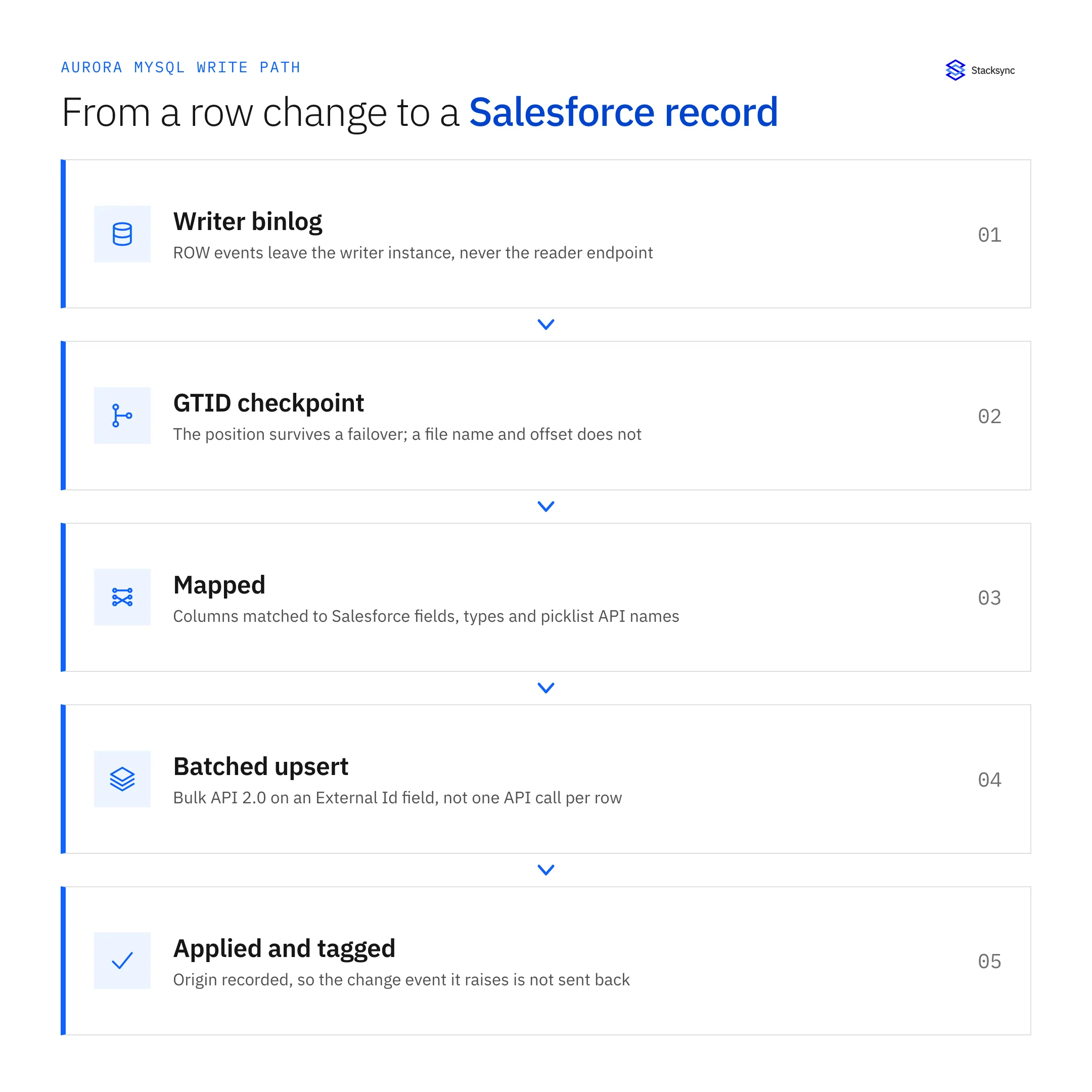
The External Id field is not optional and it is not the record Id. Create a custom field on each Salesforce object you write into, mark it External Id and Unique, and populate it with the key you already have in Aurora, normally the primary key of the source table. That one field is what makes every later write safe to repeat. For the steady state, sObject Collections and the composite endpoints accept up to 200 records in a single call at lower latency than a bulk job; keep Bulk API 2.0 for the backfill and for catch-up runs after an outage.
Then the type mapping, cheap to decide now and expensive to change after six months of history.
| Salesforce field type | Aurora MySQL column | The part that bites |
|---|---|---|
| Record Id, lookups, master-detail | CHAR(18), case-sensitive collation | The default Aurora collation is case-insensitive and 15-character IDs are not. See the next section. |
| Text, Text Area | VARCHAR(n) | Salesforce enforces its own length limits, so a wider MySQL column produces a write error rather than a silent truncation. |
| Picklist | VARCHAR plus a lookup table | Store the API name, not the label. Admins rename labels and history rewrites itself. |
| Multi-select picklist | VARCHAR or a child table | Salesforce ships them semicolon delimited in one string. Split on load or every filter becomes a LIKE. |
| Checkbox | TINYINT(1) | MySQL has no native boolean. Be consistent about 0 and 1, and decide what NULL means before the first load. |
| Currency | DECIMAL(18,2) | Multi-currency orgs also carry CurrencyIsoCode and a dated rate. Store both or the totals will not tie out. |
| Date, Date/Time | DATE, DATETIME | Salesforce sends UTC. Keep DATETIME in UTC and convert on read; TIMESTAMP shifts with the session time zone. |
| Formula, roll-up summary | Read-only column | Salesforce computes them on read and rejects writes to them, so never map them as a write target. |
Type decisions on the Aurora side, and what each one costs when it is wrong.
Step 3. Read Salesforce changes back over the Pub/Sub API
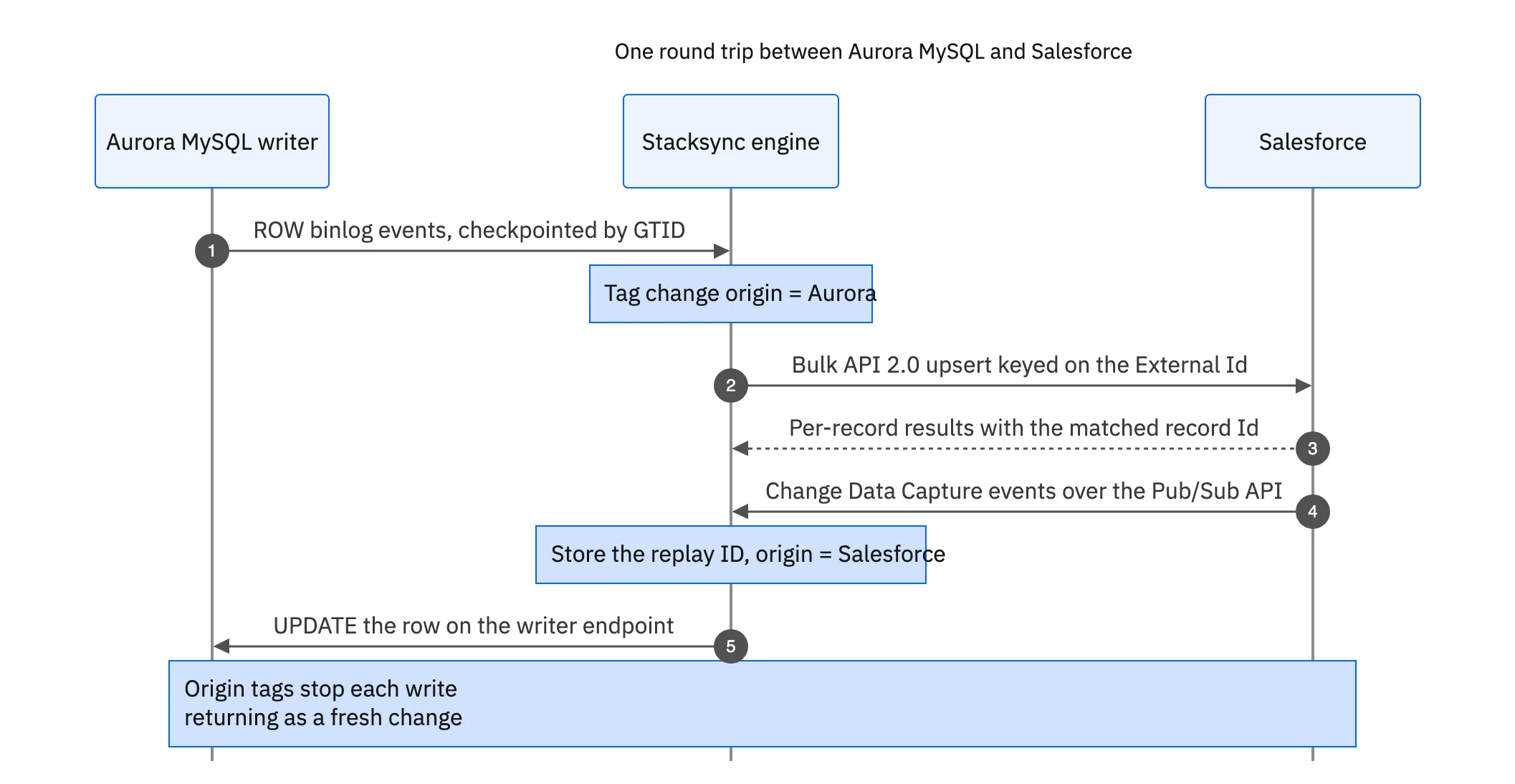
The return leg is Change Data Capture. Enable the channel for the objects in scope in Setup, then subscribe over the Pub/Sub API, a gRPC service that streams change events with a replay ID attached to each one. Store that replay ID after the event has been applied in Aurora, not when it is received, so a restart resumes where it stopped rather than a few events past it.
The constraint to design around is retention. Change events stay on the event bus for up to 72 hours, so a subscriber offline longer than that cannot replay and needs a fallback. The fallback is a query window on SystemModstamp, not LastModifiedDate: the latter only moves when a user edits a record, so system-level changes such as a lead conversion or a rollup recalculation slip past it, while SystemModstamp moves on both. Build that path before the incident, not during it.
Platform Events and the older Outbound Messages still exist. Outbound Messages need no long-running subscriber, but they fire from workflow rules with their own retry behaviour, which suits a narrow notification rather than a full record stream. developer.salesforce.com is explicit about which of the three fits which integration.
Whichever mechanism you use, keep a watermark per object and re-read a small overlap window on every cycle, a minute or two, instead of trusting two clocks to agree. Reading the same record twice is harmless when the write is an upsert on a stable key. Missing one is not.
The collation trap: two Salesforce IDs, one Aurora row
This one gets its own section because it corrupts data quietly, and the error, when it finally shows up, points somewhere else.
Aurora MySQL 3 is compatible with MySQL 8.0 and defaults to the utf8mb4 character set with the utf8mb4_0900_ai_ci collation. The ai means accent-insensitive and the ci means case-insensitive, so Café and cafe compare as equal. That is a sensible default for names and email addresses. It is the wrong default for Salesforce record IDs.
Salesforce record IDs come in two forms. The 15-character form is case-sensitive by design; the 18-character form appends a three-character checksum encoding the capitalisation of the first 15, so it compares safely without case. That means 0015000000ABCDE and 0015000000abcde are two different records in Salesforce and the same value in a default Aurora MySQL column. A UNIQUE index rejects the second as a duplicate key. An upsert keyed on that column overwrites the first record with the second one's field values, and nothing logs an error.
There are two fixes and it is worth doing both. Store the 18-character form everywhere, which the Salesforce REST and Bulk APIs return by default, and put the column in a case-sensitive collation: ALTER TABLE account MODIFY sf_id CHAR(18) COLLATE utf8mb4_0900_as_cs NOT NULL; Use utf8mb4_bin if you would rather have a plain byte comparison. Set it on the column rather than on a table or schema default, because a column-level collation travels with the column through later migrations.
The related trap is mixing the two forms in one join. A 15-character ID does not equal its own 18-character version under any collation, so normalise at the boundary and convert anything legacy once. Old CSV exports and hand-built integrations are where the 15-character values usually come from.
Stopping the echo, and deciding which side wins
A two-way sync with nothing else in it will loop. Aurora emits a binlog event, the engine writes it into Salesforce, Salesforce raises a change event for that write, the engine writes it back into Aurora, and Aurora emits another binlog event. That runs at machine speed and spends the org's API allocation on nothing until somebody notices.
The fix is to tag the origin of every write and ignore your own. The sync has to be identifiable on both sides: a dedicated Salesforce integration user, and a dedicated Aurora database user. Salesforce change event headers identify the user that committed the change, and Aurora binlog events carry the server and session that produced them, so the filter is cheap on each side. The generic MySQL two-way sync guide works through the same mechanism without the Aurora specifics.
Then the conflict rule, because both sides can edit the same record inside the same second and no amount of process prevents it. Resolve per field rather than per record: last write wins as a default, and pin the direction for fields where one system is authoritative. Subscription state comes from Aurora, account owner comes from Salesforce, and nobody declares a single winner for a whole object. Bidirectional sync explained walks through what that looks like on real records.
One Aurora detail rides along: the sync's own writes go to the writer endpoint. That sounds too obvious to state until a pooler or an application config has been pointed at a custom endpoint for read scaling and the sync inherits it.

Three Aurora behaviours that will surprise the sync
Backtrack rewinds a cluster in place, up to 72 hours, without restoring a snapshot. It is useful, and it is the most dangerous button in the console for anything reading downstream, because it produces no compensating change events. Rows that existed before the rewind and not after it were never deleted as far as the binary log is concerned, so Salesforce keeps records Aurora no longer has. Treat a backtrack as a re-snapshot event: pause the sync, backtrack, re-baseline from Aurora, then resume.
max_connections is not a round number you can guess. The Aurora MySQL default is a formula derived from instance memory, LEAST({DBInstanceClassMemory/12582880}, 16000), so a small instance class allows far fewer sessions than people assume and an integration opening one connection per worker competes with the application for them. RDS Proxy is the documented answer: it pools connections in front of the cluster and survives a failover more gracefully than a raw client.
Aurora Serverless v2 scales capacity in 0.5 ACU increments between a floor and a ceiling you set, with two consequences here. A cluster sitting at its minimum takes a moment to scale up under a sudden batch, which surfaces as sync lag rather than a database error, so size the floor for the batch you actually send. And a polling integration that queries every 30 seconds keeps the cluster awake all night, which is the opposite of what Serverless v2 is for. Capture off the binary log costs almost nothing while nothing is happening.
The order to do it in
Sequencing matters more than it looks, mostly because a backfill started before the mapping is settled has to be run a second time. The last step is the one teams skip, and the only one that proves the previous seven were done correctly.
- Prepare the cluster. In the DB cluster parameter group:
binlog_format= ROW,gtid_mode,enforce_gtid_consistency. Reboot the writer, then runCALL mysql.rds_set_configuration('binlog retention hours', 168); - Create the database user. A dedicated account with REPLICATION SLAVE and REPLICATION CLIENT plus SELECT on the tables in scope, and INSERT and UPDATE only where the sync writes back. Put RDS Proxy in front if the cluster is near its connection ceiling.
- Open the network path. The cluster lives in a VPC, so either a security group rule scoped to the platform's published address ranges, or a private connection where a public endpoint is not allowed.
- Connect Salesforce. OAuth with a dedicated integration user and a permission set granting API access to exactly the objects and fields in scope, so a mapping mistake cannot write somewhere nobody expected.
- Add the External Id fields. One per object you upsert into, marked External Id and Unique, with the matching case-sensitive
CHAR(18)column on the Aurora side. - Map fields for two-way sync with direction controls. Product usage updates Salesforce, case status returns to Aurora, and shared fields accept changes from either system. Keep each owned field writable only from its authoritative system.
- Backfill once, in the quiet hours. Bulk API 2.0 out of Salesforce, a plain read out of Aurora, one object at a time. Record the GTID position and the replay ID at the moment it starts, so the incremental job picks up exactly there.
- Turn on capture both ways, then break it on purpose. Fail the cluster over in a test environment and confirm the consumer resumes from its GTID, and pause the Salesforce subscriber long enough to confirm it replays rather than skips.
Getting it running
Most of the difficulty here is not inside either system. It sits in four decisions between them: where the binlog position lives so a failover does not lose it, what the idempotency key is so a replay does not duplicate, which side wins a conflict, and how a write is stopped from coming back. The Aurora settings are half an hour of parameter group work. Those four decisions are the design.
To see it running against a real cluster, book a demo, look at the AWS Aurora MySQL and Salesforce integration, or take the companion guides on an enterprise iPaaS for AWS Aurora MySQL and two-way sync between AWS Aurora MySQL and NetSuite.

FAQ
Frequently asked questions










Explore these integrations and topics
- connectorSalesforce integrations
- connectorMySQL integrations
- platformCRM synchronization
- platformDatabase synchronization
- CRM synchronization guidesConnect customer records across sales, marketing, and operational systems.
- Database synchronization guidesWork through database change capture, application writes, and reliable record reconciliation.
Related articles






