






















Stage, Then MERGE: How to Sync Salesforce With MotherDuck
A practical guide to syncing Salesforce with MotherDuck. It covers the connected app and OAuth flow on the Salesforce side, service token auth on the MotherDuck side, how to choose between a bulk export, SystemModstamp polling and Change Data Capture, mapping objects and picklists onto columnar tables, why a staging table plus a MERGE beats per-row updates, how to handle deletes and merged records, and how to prove the load is correct.
- Author
- Ruben Burdin · Founder & CEO
- Published
- Read time
- 10 min read

MotherDuck is a good place to put Salesforce data. It is DuckDB in the cloud, and a single query can run locally, in the cloud, or split across both. What it is not is a row-oriented database, which is exactly what most Salesforce pipelines were written against.
This guide walks through how to sync Salesforce with MotherDuck properly: authenticating both sides, choosing a change capture mechanism and living with its limits, mapping objects and picklists onto columnar tables, and applying each batch with a staging table and a MERGE instead of a stream of single-row updates. It also covers the two things hand-rolled scripts almost always get wrong, which are deletes and merged records.
If you are still choosing a platform rather than wiring one up, the companion post on an enterprise iPaaS for MotherDuck covers that decision. This one assumes it is made and you want the mechanics.
Why the CSV export stops working
Almost every MotherDuck and Salesforce project starts the same way. Somebody exports Accounts and Opportunities from a report, points read_csv_auto at the file, and has a queryable table in about four minutes. That is genuinely the fastest path to a first chart, and it is why so many teams stop there.
The trouble arrives in week two. An export is a snapshot, so last week's numbers are gone unless somebody kept the file. A rep renames a picklist value and the column quietly gains a new category. Two accounts get merged and the losing record Id stays in your table forever, double counting revenue. Nothing was ever deleted in MotherDuck, because a CSV cannot tell you what was deleted.
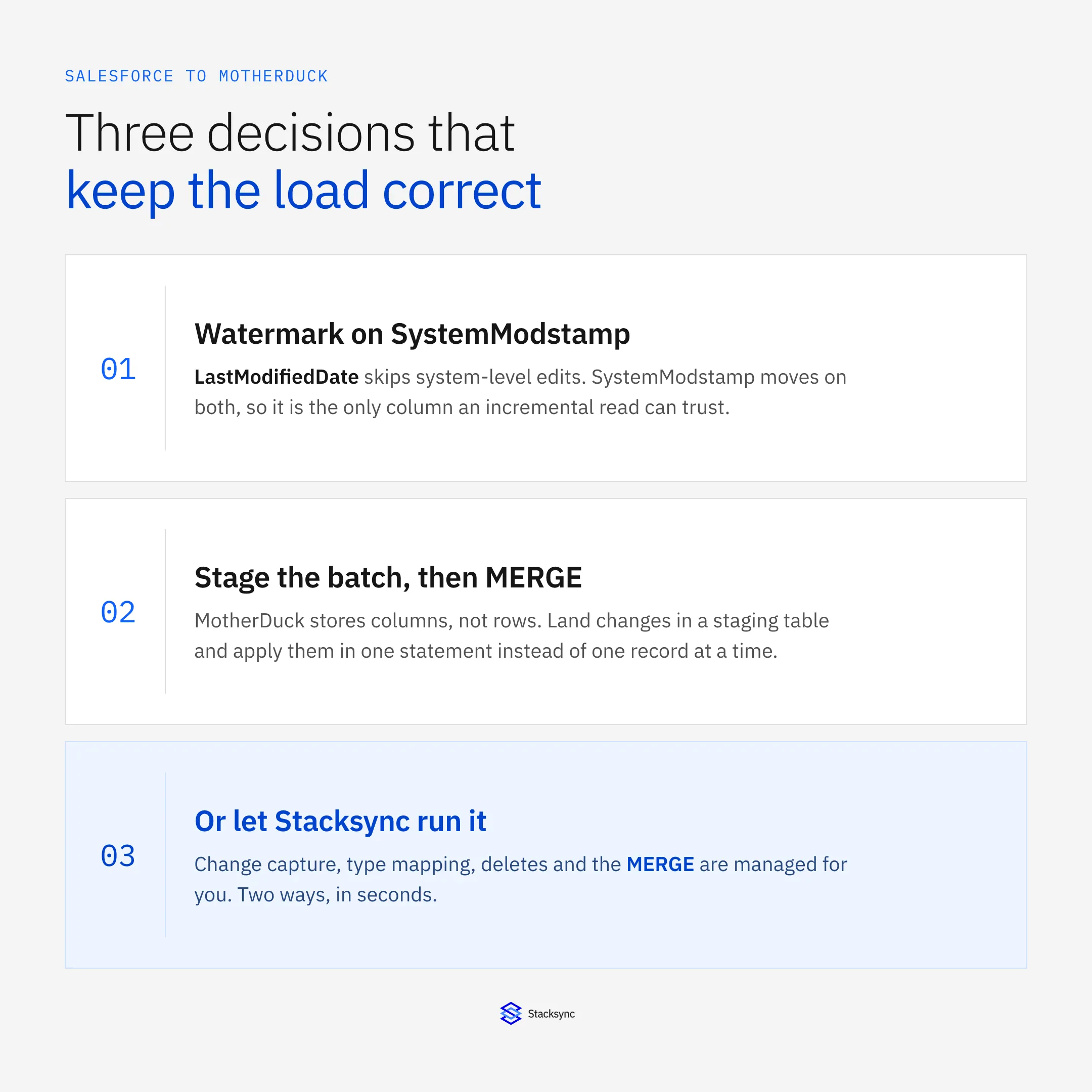
The second attempt is usually a Python script on a schedule: ask the Salesforce REST API for rows where LastModifiedDate is greater than the last run, then write them into MotherDuck. Closer, and it fails in more interesting ways. LastModifiedDate only moves when a user edits the record, so a lead conversion, a rollup recalculation or a cascading owner change modifies a row without touching it. SystemModstamp moves on both, which is why an incremental read should watermark on that column instead.
Then there is the write pattern. A script that loops over the batch and issues one UPDATE per record is fine against Postgres and falls over on a columnar store. The gap between those two shapes is wide enough that it gets its own post on two-way sync between MotherDuck and PostgreSQL, and the more general version of the argument lives in real-time sync versus batch ETL.
Authenticating both sides
Salesforce first. Server-to-server access goes through a connected app: create one in Setup, enable OAuth settings, add the api and refresh_token offline_access scopes, and keep the consumer key and secret somewhere the job can read them. For an unattended sync the JWT bearer flow with a certificate is the usual pick, because there is no browser in the loop and no password to rotate. Client credentials is simpler where your org allows it and you can nominate a run-as user.
Whichever flow you use, create a dedicated integration user rather than borrowing an admin login. Give it a permission set with API Enabled, read access to exactly the objects in scope, and write access only to the fields you intend to push back. It is boring work and it is the single control that stops a sync bug from becoming a data incident. The Salesforce connector page lists the permissions a managed platform asks for.
The MotherDuck side is shorter. Authentication is a service token: generate one, keep it out of the repository, and pass it as motherduck_token when the client opens md:my_database. There is no cluster to size and no VPC to open, which removes most of the network work a warehouse project carries. The tradeoff is that you connect through a DuckDB client rather than a generic JDBC or ODBC endpoint, so older ETL tooling often cannot point at MotherDuck at all. Check that before you plan around one.
Give the sync its own token and its own schema. Compute in MotherDuck is allocated per user, so a heavy load does not queue behind an analyst's dashboard query, and revoking a token later locks nobody else out. The MotherDuck connector page covers what the platform expects on that side.
Choosing how you read changes out of Salesforce
Salesforce gives you three realistic ways to learn what changed, and the choice sets the latency, the API cost and the failure modes of everything downstream.
| Nightly bulk export | SystemModstamp polling | Managed sync (Stacksync) | |
|---|---|---|---|
| Latency | A day | The poll interval, 5 to 60 minutes | Seconds |
| What it misses | Deletes, merges, and every intra-day edit | Deletes, unless you query them separately | Nothing, deletes and merges included |
| Salesforce API cost | Cheap per record, expensive in freshness | Every poll re-reads records that did not change | Only changed records move |
| Write pattern in MotherDuck | Full table replace | Whatever the script does, often row by row | Staged batch, one MERGE |
| Recovery after an outage | Rerun the export | Rewind the watermark and hope the window covers it | Replay from the stored position |
| Who maintains it | A cron job and a runbook | Your engineers, indefinitely | Configuration, not code |
Three ways to learn what changed in Salesforce, and what each one costs.
The bulk export is the honest answer for a table that moves slowly and is read once a day. An Account object with 20,000 rows and no history requirement is fine as a full replace. Opportunity and Task are not, because the row count and the edit rate both keep growing.
Change Data Capture is what you want when freshness matters. Salesforce publishes record changes to an event channel, your subscriber holds a replay position, and it resumes from there after a disconnect. The limit worth writing on a whiteboard is retention: events stay on the bus for up to 72 hours, so a subscriber that has been down over a long weekend has to fall back to a SystemModstamp window or a fresh backfill. Design that fallback before the incident, not during it.
Either way, one cycle looks the same from the outside.
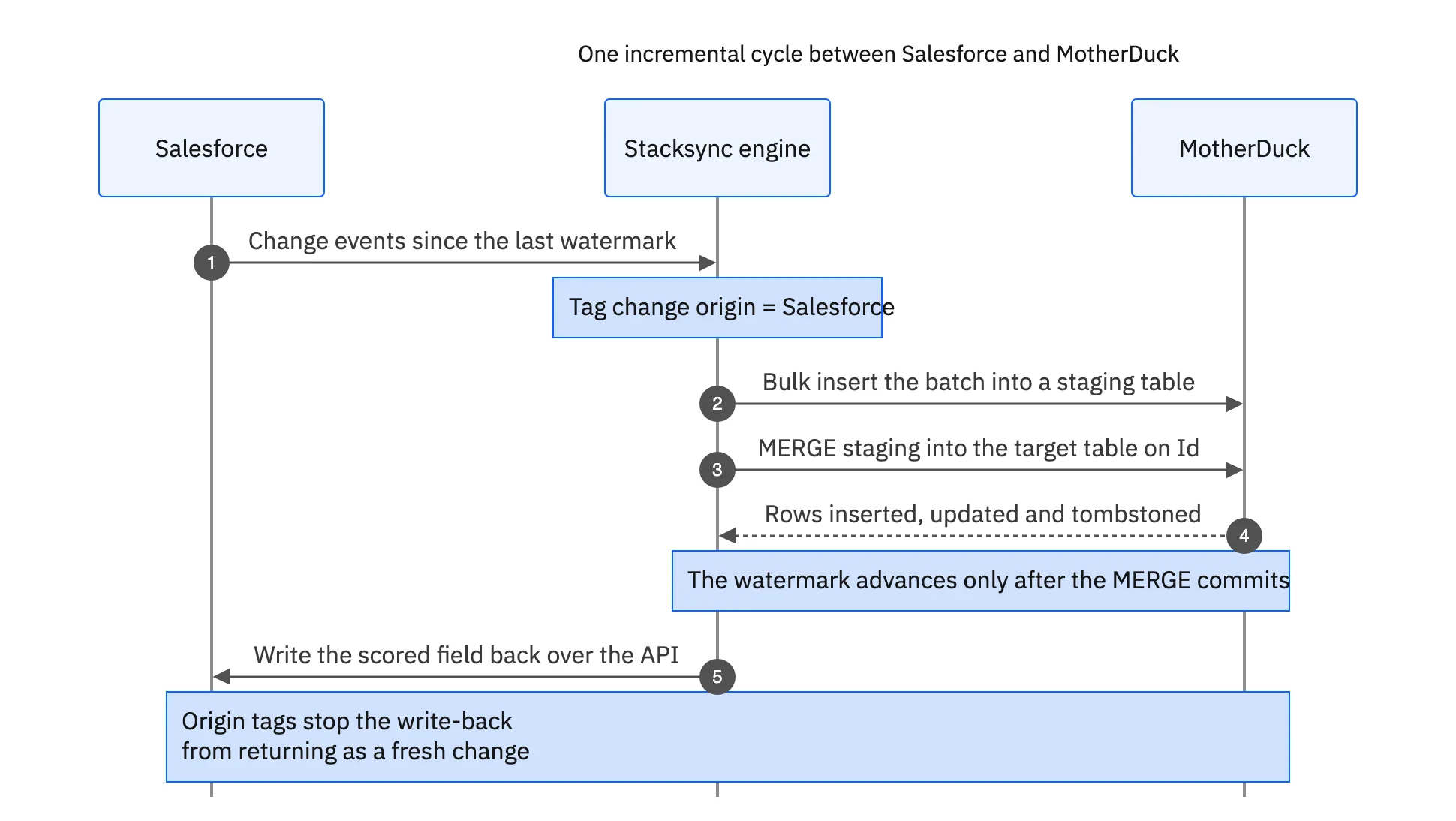
The write-back leg at the end is optional but common: a churn score or a usage total computed in MotherDuck and pushed onto the Account record. The moment you add it you are running a round trip, and every write needs an origin tag so the value you just wrote is not read back a second later as a fresh change. Bidirectional sync explained shows what that looks like on real records.
Mapping Salesforce objects onto columnar tables
One object becomes one table. Keep the 18 character record Id as the key column and use it as the join key everywhere, because it is what every later MERGE matches on. Resist the urge to invent a surrogate key, because you will only have to map it back later.
Types need decisions rather than defaults. These are the ones that are cheap now and expensive after the first six months of history.
| Salesforce field | MotherDuck column | The part that bites |
|---|---|---|
| Id, lookups, master-detail | VARCHAR | Two forms exist, 15 and 18 characters. Pick 18 everywhere or joins miss silently. |
| Picklist | VARCHAR plus a lookup table | Values get renamed and deactivated. Store the API name, not the label, or history rewrites itself. |
| Multi-select picklist | VARCHAR[] | Salesforce ships them semicolon delimited. Split on load or every filter becomes a LIKE. |
| Currency | DECIMAL(18,2) | Multi-currency orgs also carry CurrencyIsoCode and a dated rate. Store both or the totals will not tie out. |
| Date, Datetime | DATE, TIMESTAMP | They arrive in UTC. Convert at query time, never on load. |
| Formula, rollup | Materialized column | Computed on read, so a change event does not always announce that they moved. |
Custom __c fields | Snake case column | Admins rename things. Map by API name and keep a rename map. |
Type decisions that are cheap to make now and painful to change later.
Formula and rollup fields deserve a second look. A change event on the child record that feeds a rollup does not reliably announce that the parent's value moved. If a formula field matters for reporting, either recompute it in MotherDuck from the underlying columns or refresh the parent on a schedule. Treating it as a stored column is a slow, quiet source of drift.
Start narrow. Account, Contact and Opportunity cover most first projects, and adding an object later costs an afternoon. Selecting every object in the org costs you a backfill nobody asked for and a schema nobody understands. The MotherDuck and Salesforce integration page shows which objects the connector exposes.
Stage the batch, then MERGE
This is the part that separates a load which stays fast from one that gets slower every week. DuckDB, and therefore MotherDuck, stores data column by column in compressed row groups of roughly 120,000 rows. An update is not an in-place edit of one value, it rewrites the parts it touches. Issue 5,000 single-row UPDATE statements and you pay that cost 5,000 times, plus 5,000 round trips.
The pattern that works is the one warehouses have used for years, and it is three steps.
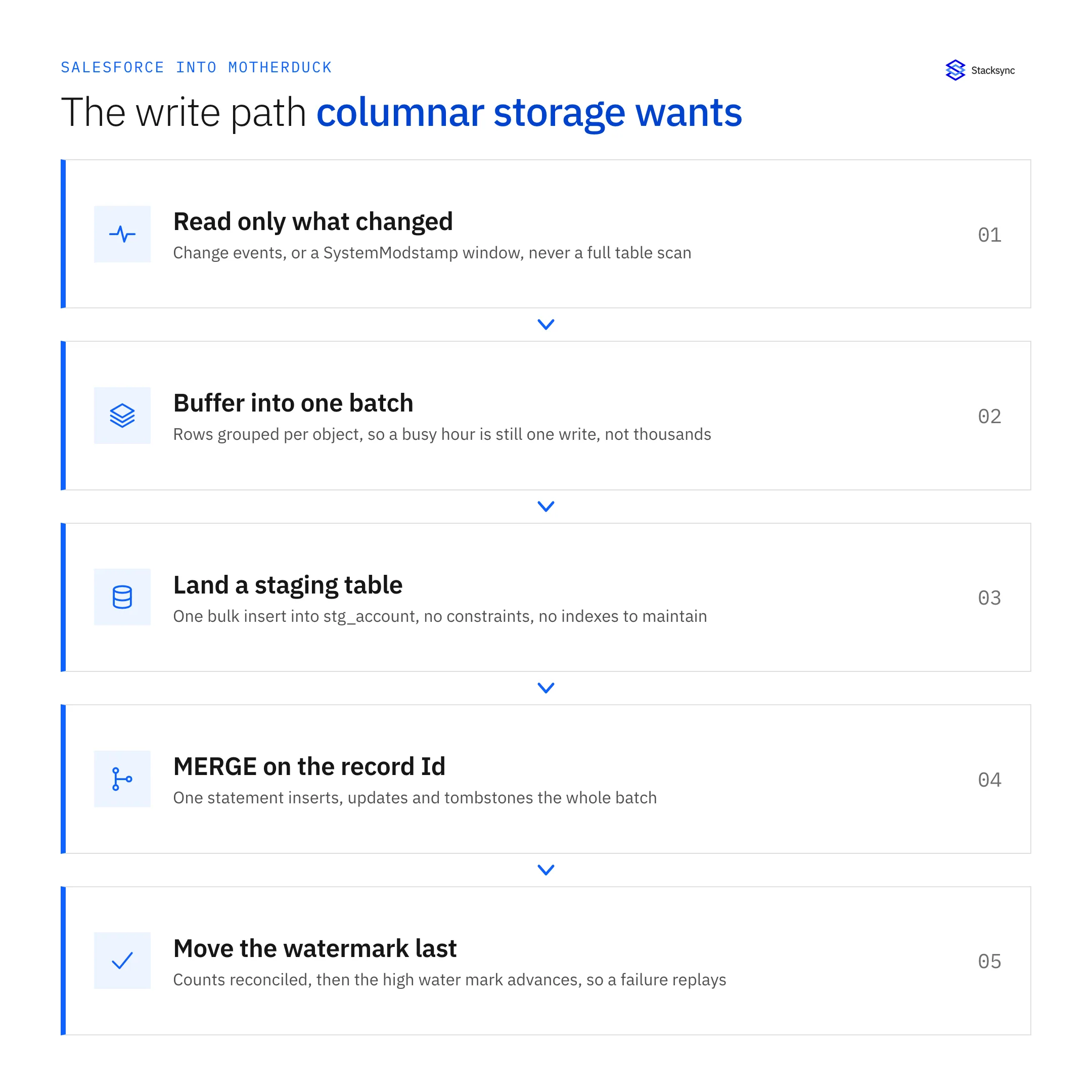
- Load a staging table. One bulk insert of the batch into
stg_account, with no constraints and no indexes to maintain. Rebuild it every cycle rather than appending to it. - Apply it in one statement.
MERGE INTO account USING stg_account ON account.id = stg_account.idwhere your DuckDB version supports it, orINSERT INTO account SELECT * FROM stg_account ON CONFLICT (id) DO UPDATE SET ...when the target carries a primary key on the Id. Either way the whole batch lands as one operation. - Move the watermark last. Record the new high water mark only after that statement commits. If the job dies halfway you replay the window instead of losing it.
Batch size is a tuning knob, not a constant. A few thousand rows per statement is a sensible start: much smaller and you pay per-statement overhead again, much larger and a failure costs a bigger replay.
If you are also pushing values back into Salesforce, batch that side too. Salesforce meters API requests per org over a rolling 24 hours, and the allocation depends on edition and licence count, so a write-back that fires one call per record is the fastest way to find the ceiling. The arithmetic is worked through in the guide to syncing Salesforce without hitting API limits.

Deletes, merges, backfill, and proving it worked
Deletes are where hand-rolled pipelines quietly diverge. A SystemModstamp window returns rows that changed; it does not return rows that stopped existing. queryAll() with IsDeleted = true finds them while they are still in the Recycle Bin, which holds records for 15 days. Miss that window and the only way to find the gap is a full key comparison against the object.
Prefer a soft delete: an is_deleted flag and a deleted_at timestamp rather than removing the row, because analysts usually want to know that an opportunity existed and then went away. Hard deletes also fragment a columnar table for no benefit.
Record merges are the same problem wearing a different hat. When two accounts are merged, the losing record is deleted and its MasterRecordId points at the survivor. If nothing follows that pointer, your table keeps both rows, every count is off by the number of merges, and nothing in the data looks wrong. Capture MasterRecordId and repoint the child rows in the same batch.
The backfill is a separate job from the incremental one. Use Bulk API 2.0, which chunks large extracts for you, run it one object at a time, and note the SystemModstamp value at the moment it starts so the incremental job picks up exactly where it stopped. Let it finish and reconcile before you enable live sync, otherwise you will run it twice.
Validation is an afternoon well spent. Compare row counts per object against a SELECT COUNT() in Salesforce, edit twenty random records in the CRM and confirm the new values arrive, then sum a currency field on both sides and check that it ties. Then break something on purpose: pause the sync, make a few edits, restart it, and confirm the window replayed rather than skipped. Alarm on API usage as a share of the allocation, on error counts, and on watermark lag.
Getting it running
Syncing Salesforce with MotherDuck means respecting two constraints at once. Salesforce decides what you can learn about a change and how often you may ask; MotherDuck decides how you write it down. Watermark on SystemModstamp, stage every batch and apply it with one statement, handle deletes and merges explicitly, and the rest is maintenance.
The alternative to building it is not building it. Stacksync reads Salesforce change events, maps the objects and picklists, applies each batch as a staged MERGE, and handles the return leg under one conflict policy. To see it against a real org, book a demo, read the MotherDuck connector announcement, or take the companion guides on an enterprise iPaaS for MotherDuck and two-way sync between MotherDuck and PostgreSQL. If the warehouse choice is still open, MotherDuck and Snowflake and MotherDuck and PostgreSQL are the two comparisons that come up most often.

FAQ
Frequently asked questions










Explore these integrations and topics
- connectorSalesforce integrations
- connectorMotherDuck integrations
- platformCRM synchronization
- platformWarehouse data flows
- CRM synchronization guidesConnect customer records across sales, marketing, and operational systems.
- Warehouse data flows guidesChoose between ingestion, reverse ETL, and operational write-back for warehouse data.
Related articles






