






















What an Integration Platform Has to Get Right on MotherDuck
A buyer's guide to putting an integration layer in front of MotherDuck. It covers what enterprise-grade means when the endpoint is an analytical database, the six MotherDuck properties that break naive pipelines, why ATTACH and the database scanners are query federation rather than sync, the checklist to hold a platform to, and how security works around a token-scoped warehouse.
- Author
- Ruben Burdin · Founder & CEO
- Published
- Read time
- 10 min read

MotherDuck is DuckDB with a cloud account attached. You point the same client at it, run the same SQL, and the data sits in a managed service instead of a file on a laptop. That is why it shows up in a stack quickly: an analyst can go from a local prototype to a shared cloud database without switching engines, and nobody has to size a cluster first.
The integration question arrives right behind it. Numbers in the warehouse only matter if the CRM, the ERP, and the support desk can act on them, and the warehouse is only as good as the operational data landing in it. That is a two-way problem from the start, and it is where most teams write an export script on a schedule and then spend the next year maintaining it.
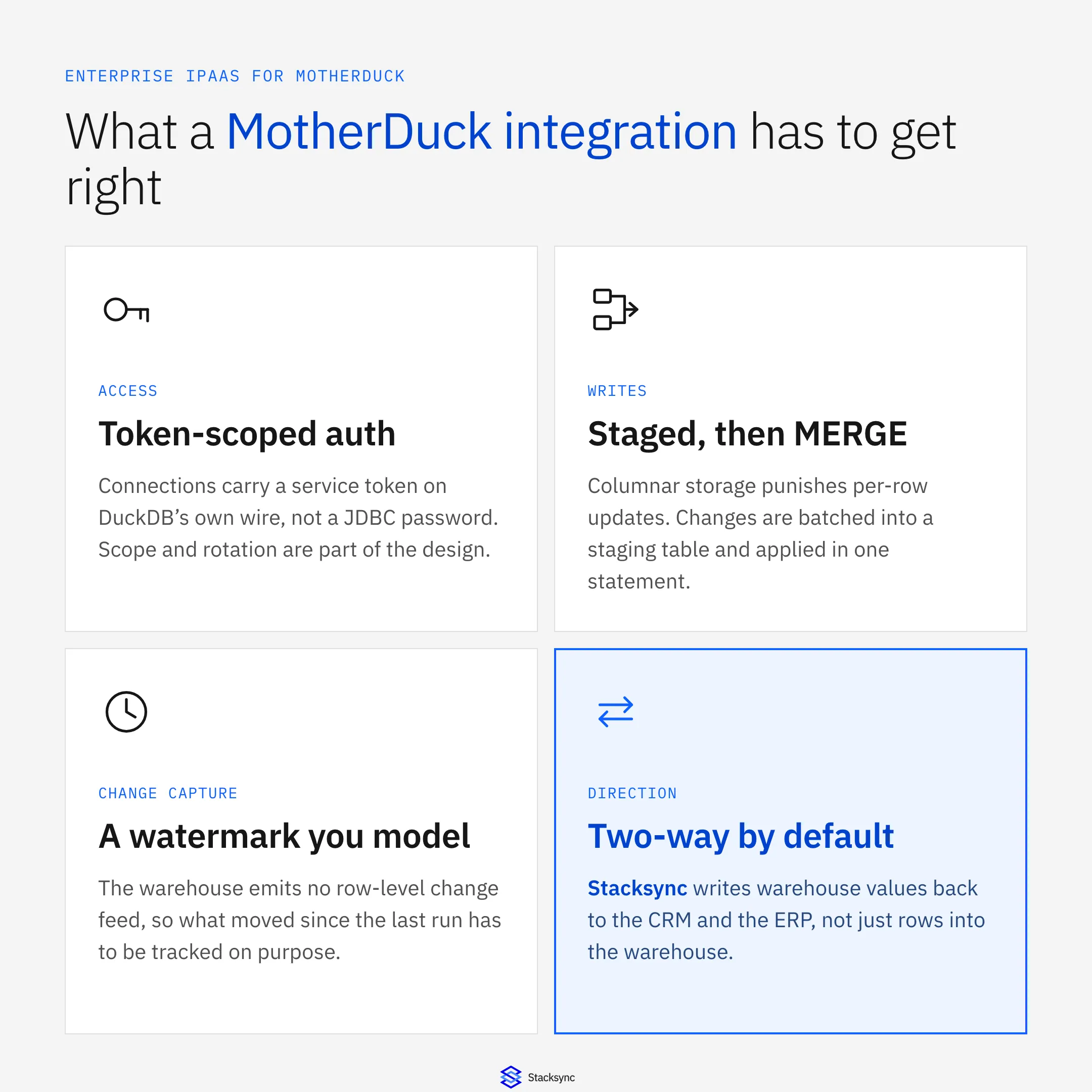
This is a guide to what an enterprise integration platform has to handle when MotherDuck is the system in the middle: token auth, columnar write patterns, the change feed that does not exist, and compute shared with the people running dashboards. If you already know the pair you need, go to how to sync Salesforce with MotherDuck or two-way sync between MotherDuck and PostgreSQL. For the connector itself, see the MotherDuck connector announcement.
What an enterprise iPaaS for MotherDuck actually has to do
An integration platform as a service is a hosted layer between your systems that watches for changes and applies them where they belong. You configure it instead of building it. An enterprise iPaaS for MotherDuck is one that treats the warehouse as a first-class endpoint on both sides: it lands operational records from Salesforce, NetSuite, HubSpot, or PostgreSQL into MotherDuck tables continuously, and it pushes warehouse-derived values back out to the systems where people work, with a rule for what happens when the same field moves in two places at once.
The word enterprise is doing real work in that sentence. Almost any tool can copy a table into a warehouse overnight. What separates a platform is how it behaves in the cases that break things: a source API that rate limits you halfway through a load, a schema change on a wide table, a backfill of two hundred million rows, and a reviewer who wants to know which system last wrote a value.
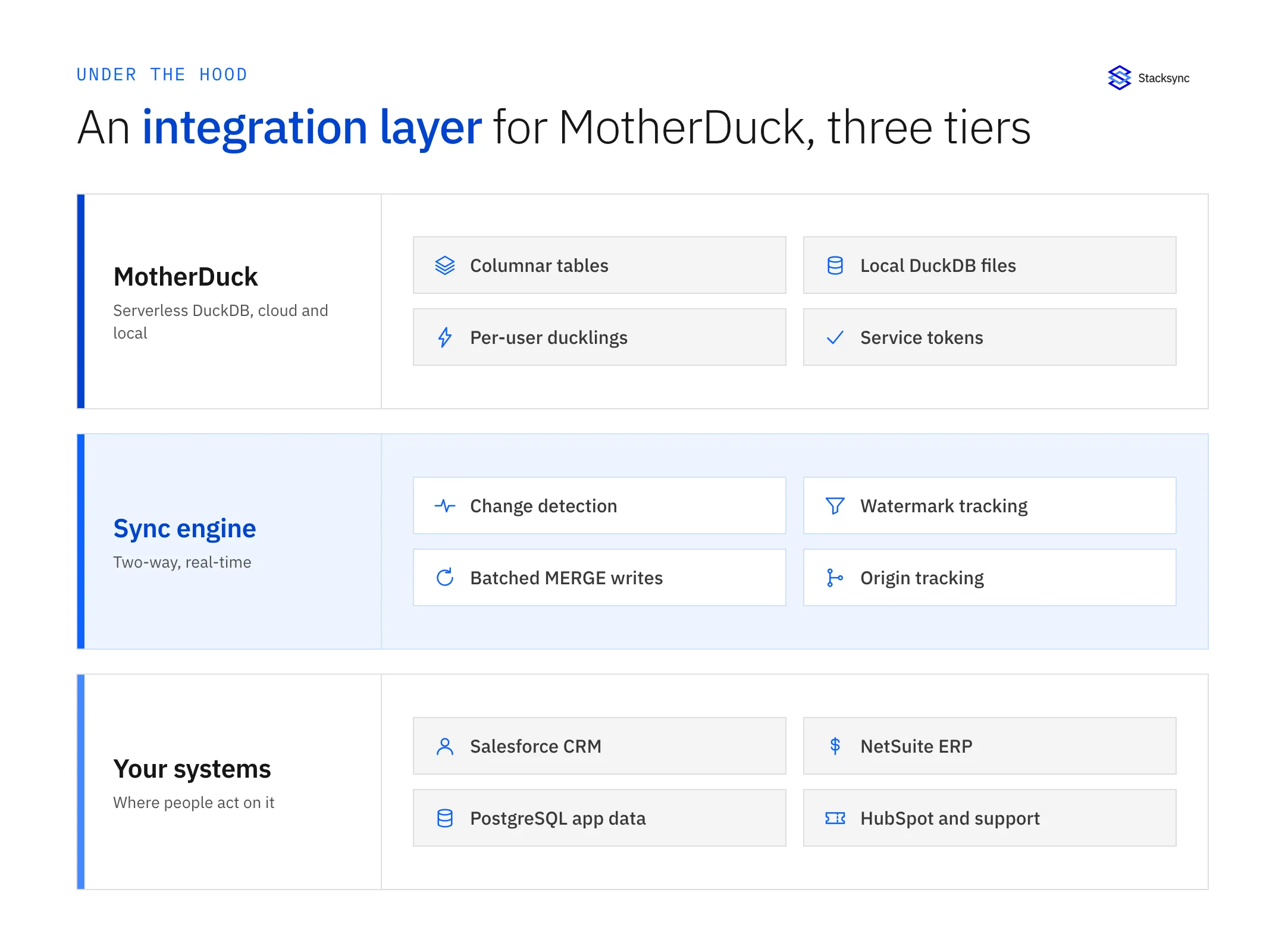
Drawn as a stack it reads more clearly. Underneath sits MotherDuck with its columnar storage, its service tokens, and its per-user compute. On top sit the operational systems that both produce and consume the same records. In the middle is a sync engine speaking two languages at once: SQL and batched writes on the warehouse side, REST and bulk APIs on the other. When that middle tier is a folder of scheduled scripts, its failure modes become somebody's Monday morning rather than a monitored, retried, logged event.
Why an analytical database raises the bar
DuckDB is an analytical engine: it stores data in columns, executes over them in vectorized batches, and is built to scan a lot of rows fast rather than touch one row at a time. MotherDuck keeps that engine and wraps it in a managed cloud service, which is what makes it pleasant to use and awkward to integrate naively. Six properties matter more than the rest, and the origin story of DuckDB explains where most of them come from.
- Auth is a token, and the wire is DuckDB's. Connections authenticate with a service token, commonly passed as
motherduck_token, on a DuckDB connection string such asmd:my_database, not a JDBC URL with a password field. Token scope and rotation become part of the integration design rather than an afterthought. - Writes want to be batched, not chatty. Columnar storage makes a single-row
UPDATEexpensive, because the engine rewrites more than the row you touched. The pattern that holds up is to stage changed records and apply them in oneMERGE(orINSERT ... ON CONFLICT). A sync that issues a statement per changed record looks fine on a demo table and falls over on a real load. - There is no change feed on the warehouse side. MotherDuck does not hand you a row-level change stream the way Postgres logical replication or a MySQL binary log does. If you need to know what moved in the warehouse since the last run, you model it: an
updated_atcolumn maintained on write, a monotonic sequence, or a change table the sync keeps itself. That watermark is a design decision, and it is what homegrown pipelines most often get wrong, usually by reading a column nothing maintains. - Compute is isolated per user, so a sync shares the room. Queries run in ducklings, compute instances scoped to a user or a session. The isolation is a feature: one heavy query cannot take out the account. It also means a sync job either burns its own compute or contends with an analyst's, depending on how its token is scoped, and batched writes on a steady cadence behave far better than a fan of parallel workers.
- Dual execution means the database is in two places. MotherDuck can plan a query in the client's local DuckDB, in the cloud, or split across both, and it can join a local file against a cloud table in one statement. A sync target is therefore not simply a remote endpoint, and a platform that assumes everything lives server-side moves more data than it needs to.
ATTACHand the scanners look like sync and are not. DuckDB can attach a Postgres, MySQL, or BigQuery database and query it live. It is useful and it is a read path: no incremental copy, no history, no writes back to the source, and nothing at all for a SaaS API that is not a database to begin with. That distinction deserves its own section, because it is where most MotherDuck integration plans go wrong.
Query federation is not sync
ATTACH 'dbname=app host=db.internal' AS app (TYPE postgres) is one line, and after it you can select from Postgres tables inside a DuckDB query, joined against warehouse tables. For a one-off join or an exploratory read that is the right tool and there is nothing to operate. The trouble starts when it quietly becomes the plan of record.
A federated read runs at query time, so every dashboard refresh reaches into the operational database and puts analytical load on it. There is no materialized copy to fall back on when the source is unavailable, no record of what a value used to be, and no path for something computed in the warehouse to reach the source. The scanners also cover databases only, so the CRM, the ERP, and the billing platform sit outside the model entirely.
| ATTACH and the scanners | Scheduled export or ETL | Stacksync two-way sync | |
|---|---|---|---|
| What it is | A live read path into another database | A copy moved on a schedule | A continuous sync in both directions |
| Freshness | Live, at query time | As old as the last run | Seconds after the change |
| Load on the source | Every query reaches it | One large scan per run | Only the rows that changed |
| Writes back | Not supported | Not part of the design | Mapped, validated, and audited |
| SaaS systems | Databases only | A separate job for each | 1,000+ systems on one engine |
| History | None, it is a view | Whatever the target keeps | Every write in an audit log |
| Where it fits | Ad hoc joins and exploration | Reporting that can be a day behind | Data both sides act on |
None of this makes federation a mistake. It makes it a different tool: use ATTACH when a human is exploring, use a sync when a process depends on the answer.
Real-time two-way sync, not a nightly reload
The default plan for getting operational data into MotherDuck is an extract job on a timer. It works right up to the first question it cannot answer: why the account record in Salesforce still shows last week's usage tier, or why the health score an analyst computed this morning never reached the person who would have acted on it.
Two-way sync is a different shape of problem. Both sides can originate a change, so the engine needs origin tracking, otherwise a write it just made comes back as a fresh inbound change and the record bounces. It needs a conflict policy per field for when the same value moves in both places in the same minute. And on MotherDuck it has to turn a stream of individual changes into batched statements without letting latency drift back into hours. The general tradeoff is laid out in real-time sync versus batch ETL.
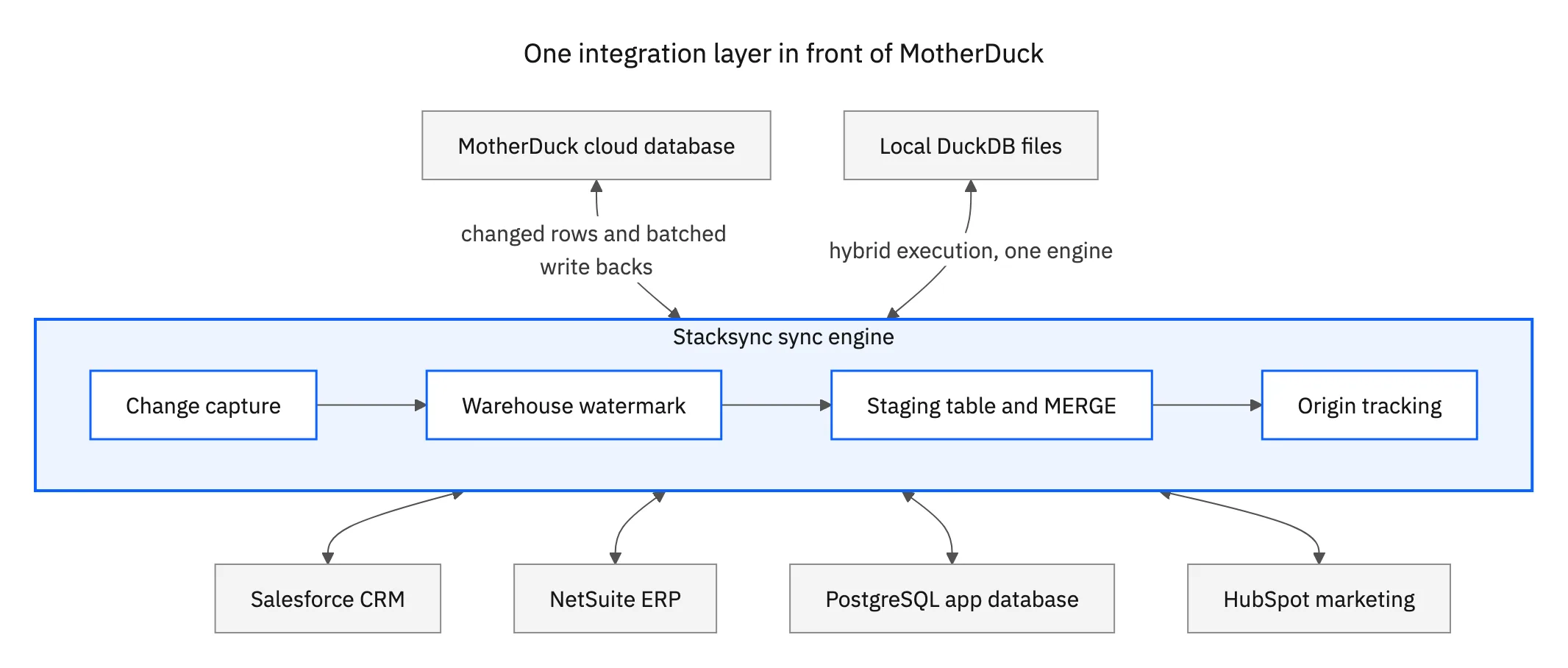
That topology is the part most architecture drawings get wrong. Changes are captured once and fanned out. Adding Snowflake or a second CRM six months later does not disturb the sync you already trust, and when something falls behind there is one place to look instead of four. It is also what makes the warehouse safe to write from: a value computed in MotherDuck reaches the CRM through the same audited path, not a spreadsheet somebody pastes in on Fridays.
The checklist to hold a MotherDuck integration platform to
Every vendor page says real time and two way. These are the questions that separate the ones that mean it, and each is answerable during a trial rather than in a sales call.
- How does it write to MotherDuck? Staged into a table and applied with one
MERGE, or a statement per record. Ask to see the SQL it actually issues. - How does it know what changed in the warehouse? A watermark column, a change table it maintains, or a full compare on every run. A full compare is fine at ten thousand rows and useless at five hundred million.
- Can it write back at all? Reading out of a warehouse is the easy half. Ask to watch a value computed in MotherDuck land on a Salesforce field, with the mapping and the failure handling visible while it happens.
- What happens on a schema change? Adding a column to a synced table should not require rebuilding the sync, and a type change should raise an alert rather than silently truncate data.
- How is the token handled? Scope, storage, and rotation. A platform that wants a broadly privileged token pasted into a form and never rotated has answered a different question than the one you asked.
- What does it do to compute? Ask about write cadence and concurrency. You want to know whether the sync is one steady writer or twenty parallel ones before it is sharing ducklings with the analytics team.
- What does the audit trail look like? Which system wrote a value, when, and what it replaced. That is what turns an integration from a black box into something a reviewer can sign off on.
Backfill deserves its own conversation. The first load of a large table is a different workload from the steady state that follows, and a platform should run it in bounded chunks, resume after an interruption, and not hold the target table busy while it goes. Ask what happens if one is cancelled halfway through.

Security and compliance around a token-scoped warehouse
MotherDuck gives you encrypted storage, TLS in transit, and service tokens you can scope and revoke. An integration platform should extend that story rather than work around it. If the setup instructions amount to one long-lived token with account-wide privileges, that is the answer to the security question, and it is the wrong one.
Two questions do most of the work in a review. The first is where the data rests. A platform that copies your rows into its own store has added a system to a compliance scope you already drew. Stacksync moves data between the connected systems without parking a copy in the middle, so the answer stays what it was before you added it. The second is who can see what: per-connection credentials, field-level exclusion so a sensitive column never leaves the source, and role-scoped access inside the platform itself.
On the paperwork side, Stacksync holds SOC 2 Type II and ISO 27001, offers a HIPAA BAA, and is GDPR-ready. That covers what procurement asks for; the technical answers above are what a security engineer will push on, so get both in writing before the pilot turns into production.
Where MotherDuck data has to reach, and how to start
In practice a MotherDuck database sits between four kinds of system, and each one wants a slightly different treatment.
- The CRM. Usage, plan, health scores, and product signals belong in front of the people talking to customers. See how to sync Salesforce with MotherDuck, the MotherDuck and Salesforce integration, or HubSpot and MotherDuck if marketing is the system of record.
- The operational database. Postgres holds the state the application runs on, and the warehouse both consumes it and produces values it wants back. See two-way sync between MotherDuck and PostgreSQL and the MotherDuck and PostgreSQL integration.
- The ERP. Orders, invoices, and customer records have to agree in both places, which makes it a two-way problem on day one. See the MotherDuck and NetSuite integration.
- The other analytical stores. Few teams run one warehouse forever: MotherDuck and Snowflake, BigQuery and MotherDuck, Databricks and MotherDuck, and DuckDB and MotherDuck for the local files that started the project.
The way to test any of this is one pair, in production, for a week. Connect the system your team switches tabs to most, then watch three things: the SQL the platform issues, whether a change made on either side lands on the other in seconds, and what compute looks like while an analyst is working. If all three hold, the rest of the stack is the same work on the same engine.
Stacksync connects MotherDuck to more than 1,000 systems on a single engine, in real time and in both directions, without keeping a copy of your data. See the MotherDuck connector or the DuckDB connector, or book a demo and we will point it at your own database on the call.

FAQ
Frequently asked questions










Related articles





