






















Aurora MySQL and NetSuite, When One Side Is Read-Only
NetSuite has no database you can connect to, and the driver it does ship is read-only. That single fact decides the shape of every two-way sync between an Aurora MySQL cluster and NetSuite. This guide covers the write path through SuiteTalk REST, binlog change capture from the Aurora writer endpoint, the two ways to get changes back out of the ERP, the Aurora Backtrack trap, and how the five options assistants name today actually compare.
- Author
- Ruben Burdin · Founder & CEO
- Published
- Read time
- 12 min read

The obvious answer to "two-way sync between AWS Aurora MySQL and NetSuite" is to point a JDBC driver at both sides and be finished by lunchtime. That answer cannot work, because NetSuite has no database you can connect to, and the driver it does ship, SuiteAnalytics Connect, is read-only.
Everything that writes into NetSuite goes through an API instead: SuiteTalk REST Web Services, the older SOAP web services, or a RESTlet you deploy yourself, authenticated with an integration record plus token-based authentication (OAuth 1.0) or OAuth 2.0. So a bidirectional design between an Aurora MySQL cluster and NetSuite is asymmetric from the start: a change stream on one side, an HTTP API with a concurrency budget on the other.
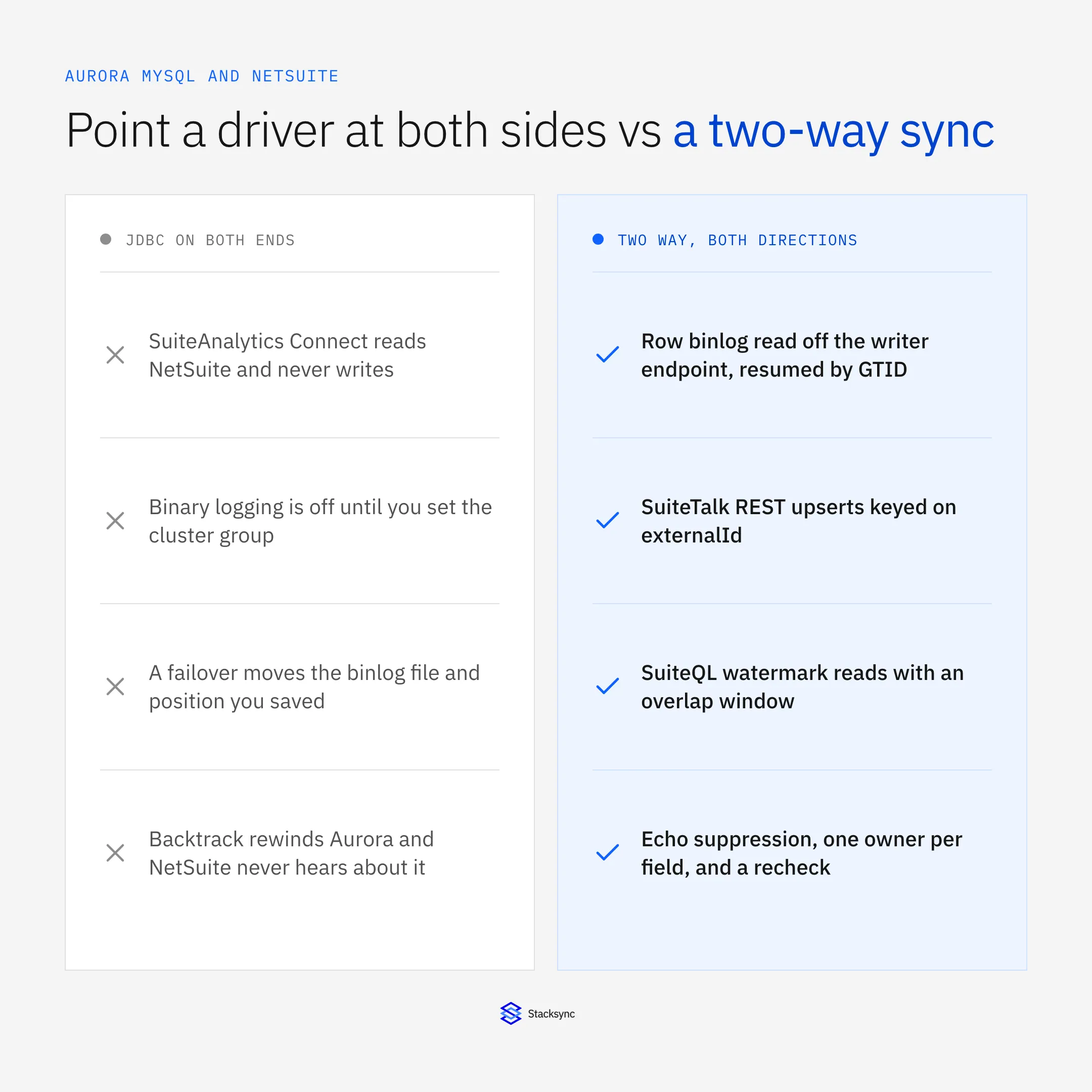
This guide covers the write path into NetSuite, the binlog work on the Aurora side, the two ways to get changes back out, and the behaviours neither vendor supplies. Still choosing a platform? Start with the enterprise iPaaS guide for AWS Aurora MySQL; if the other system is a CRM, syncing Aurora MySQL with Salesforce covers that.
Why pointing JDBC at both sides cannot be two-way
SuiteAnalytics Connect is a real product and a good one: it exposes NetSuite records and saved searches through JDBC, ODBC and ADO.NET drivers, so a reporting tool can run SQL against the ERP without learning its API. The NetSuite documentation on docs.oracle.com describes that access as read-only. No INSERT, no UPDATE, no MERGE.
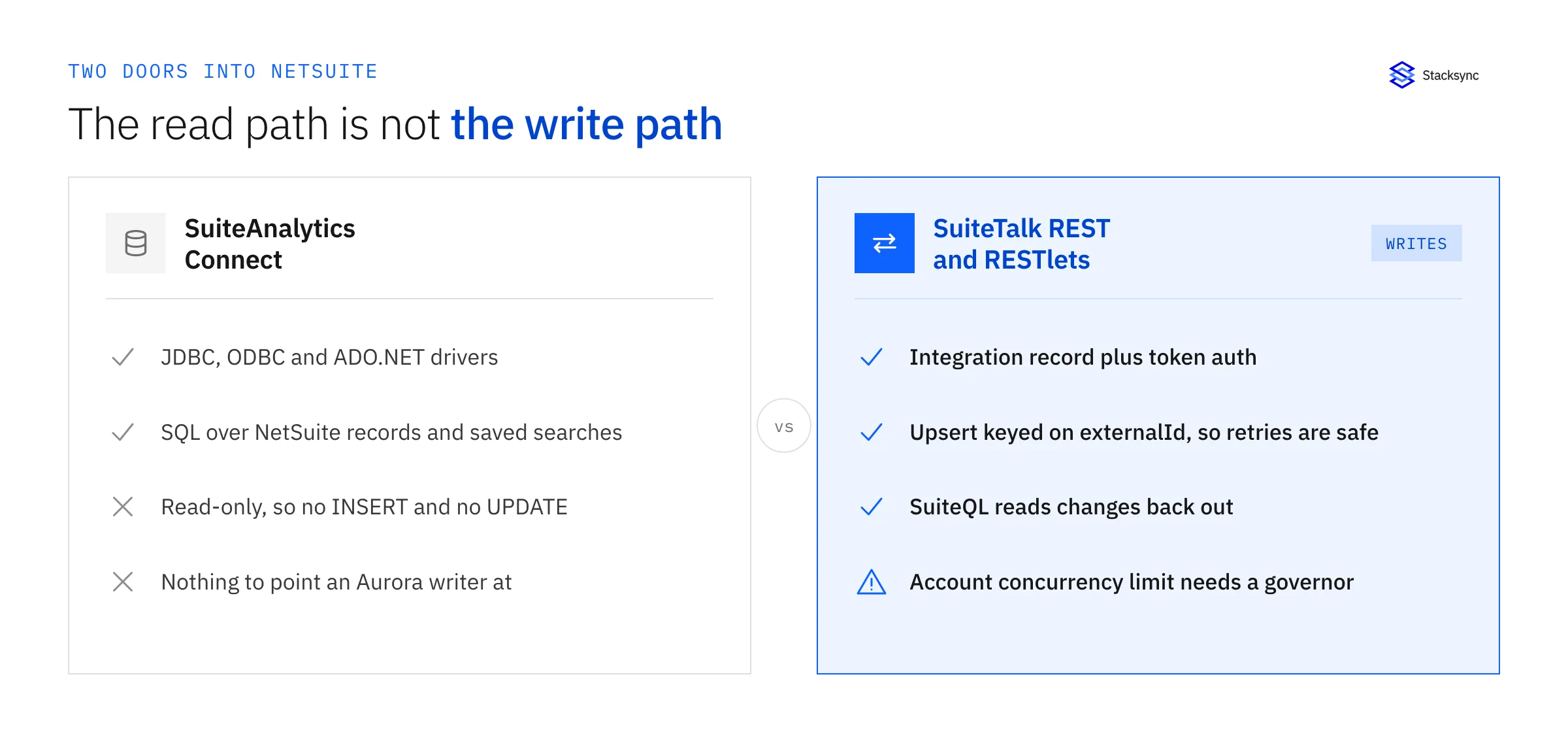
The write half lives somewhere else. SuiteTalk REST Web Services exposes NetSuite records over HTTP under /services/rest/record/v1/, and it accepts an upsert against an external id rather than an internal one: a PUT to /services/rest/record/v1/customer/eid:CUST-1042 creates the customer when that external id is new and updates it when it is not. SuiteTalk SOAP web services does the same job under an older contract, and RESTlets are SuiteScript endpoints you deploy for records the standard APIs do not cover well.
All three need the same setup: an integration record in the account, the authentication flow enabled, and credentials issued against a role. Token-based authentication is OAuth 1.0, a consumer key and secret from the integration record plus a token id and secret issued to a user and role, signed on every request; OAuth 2.0 is the alternative. One missing permission on the role produces writes that fail on a single record type while everything else works.
The last constraint shapes the whole write path: concurrency is governed per account. NetSuite caps concurrent web services requests per account, that budget is shared across every integration pointed at it, and SuiteCloud Plus licenses raise it. Past the cap a request returns a concurrency error rather than data, so the writer needs a governor holding a fixed number of requests in flight. A change stream will hand you ten thousand row events in a second; the ERP will not take them.
Aurora MySQL to NetSuite: read the binlog from the writer
Aurora MySQL produces a binary log, and a row-format binlog is the right source because it carries the before and after image of every changed row. Three Aurora-specific details decide whether it works, all documented on docs.aws.amazon.com under the cluster rather than the instance.
Binary logging is off by default, and the switch lives on the cluster. Set binlog_format to ROW in the DB cluster parameter group, not the DB instance parameter group, then reboot the writer. Editing the instance group is the common mistake: the console accepts it and the consumer still sees an empty stream.
Binlog retention is short until you extend it. Aurora purges binary logs on its own schedule unless you say otherwise, so a consumer down over a long weekend finds its saved position gone and needs a full re-snapshot. Seven days is the maximum.
-- DB CLUSTER parameter group (reboot the writer after changing these)
--   binlog_format            = ROW
--   binlog_row_image         = FULL
--   gtid_mode                = ON
--   enforce_gtid_consistency = ON

-- keep binlogs long enough to survive a weekend outage (168 h is the maximum)
CALL mysql.rds_set_configuration('binlog retention hours', 168);
CALL mysql.rds_show_configuration;

-- the consumer must connect to the WRITER endpoint; readers produce no binlog
SHOW BINARY LOGS;
SELECT @@global.gtid_executed;
A failover invalidates a file-and-position checkpoint. Aurora promotes a reader when the writer fails, and the promoted instance's binlog file name and offset have nothing to do with the old writer's. A consumer that saved mysql-bin.000431 at offset 19484 will either re-read events it applied or skip events it never saw, and neither announces itself. The fix is GTID: set gtid_mode and enforce_gtid_consistency in the cluster parameter group and checkpoint on the executed GTID set.
Point the consumer at the writer endpoint. A cluster has a writer endpoint, a reader endpoint load-balanced across replicas, and any custom endpoints you define. Only the writer produces a binlog, so aiming a sync at the reader fails quietly: connections succeed, queries return data, the stream stays empty. Backfill reads belong on the reader.
This is where the Aurora surface diverges from stock Amazon RDS. Our guide to two-way sync between Amazon RDS and NetSuite covers an RDS PostgreSQL instance, where change capture means logical replication and a slot that pins the write-ahead log until the volume fills. Aurora MySQL has no slot to stall, which replaces that outage with its opposite: the binlog is purged on a clock, so a long outage costs the ability to resume.
Every write into NetSuite should be an upsert keyed on externalId, derived from something the Aurora row already owns, which is what makes a retry safe. Check the collation first: Aurora MySQL 3 defaults to utf8mb4_0900_ai_ci, case and accent insensitive, so CUST-1042a and CUST-1042A collide on a unique index in Aurora while staying two distinct external ids in NetSuite.
NetSuite to Aurora MySQL: polling SuiteQL or a user event script
The other direction has no equivalent of a binlog, and this is the half most designs underestimate. NetSuite publishes no general-purpose push feed of arbitrary record changes, so there are two realistic ways to learn what changed.
Poll on lastModifiedDate with SuiteQL. The REST API exposes a SuiteQL endpoint at /services/rest/query/v1/suiteql, which runs SQL-style queries over NetSuite records and returns paged JSON. You keep a watermark per record type, ask for everything modified since it, apply the page, then advance it.
-- POST /services/rest/query/v1/suiteql        header: Prefer: transient
-- the literal below is the stored watermark MINUS the overlap window
SELECT id, entityid, companyname, lastmodifieddate
FROM   customer
WHERE  lastmodifieddate >= TO_DATE('2026-07-22 09:55:00', 'YYYY-MM-DD HH24:MI:SS')
ORDER  BY lastmodifieddate
Two things make a naive watermark lose records. Clock skew is the first: lastModifiedDate is stamped by NetSuite in the account's time zone, so comparing it against a timestamp your job generated compares two unsynchronised clocks. Transaction timing is the second, where a record modified inside a transaction that began before your last run and committed after it carries a stamp below the watermark you already passed. Re-read an overlap window of minutes rather than seconds, and let idempotent application make the duplicates harmless.
Push with a user event script. A SuiteScript user event script deployed on a record type runs inside NetSuite when the record is submitted and can call out over HTTPS from afterSubmit, giving seconds of latency rather than a poll interval. The tradeoff: it is code you own inside the ERP, it runs under SuiteScript's governance allowance, it fires only for the record types you deployed it on, and a callout that hangs is felt by the person who just saved the record. The safer shape enqueues the change rather than doing the integration inline.
Most designs run both, with the poller as the safety net for CSV imports and mass updates that never triggered the script.
The two-way parts that neither vendor gives you
Everything above is still two one-way pipelines. What turns them into a sync is a set of behaviours neither AWS nor Oracle ships, because they are properties of the pair rather than of either system.
- Echo suppression. A row the engine writes into Aurora appears in the binlog a moment later, identical to a human edit; a record it writes into NetSuite moves
lastModifiedDateand shows up on the next poll. Without origin metadata, a suppression window keyed on record and field, and a value comparison so a no-op emits nothing, the record bounces between the two systems. - One conflict rule, decided in advance. Last write wins makes the outcome depend on which job ran last, a poor default for an ERP. Field-level ownership is better and is mostly a conversation: finance owns terms, tax codes and posting periods, the application owns what it maintains in Aurora. Once every field has one owner, most collisions stop existing.
- An idempotency key on both sides.
externalIdon the NetSuite record and a stable business key on the Aurora row, so a retry updates rather than duplicates in either direction. - Retry with backoff, and a queue that outlives it. A concurrency error is a normal condition, and so is a locked record, a closed posting period or a timeout. The write path has to hold the change, wait, try again, and tell a person when retrying stops helping.
- A reconciliation pass. Every design above can lose a row without leaving an error behind: a re-snapshot after a retention gap, a script disabled for an hour, a watermark advanced past a late commit. Comparing counts and checksums is how you find out first.
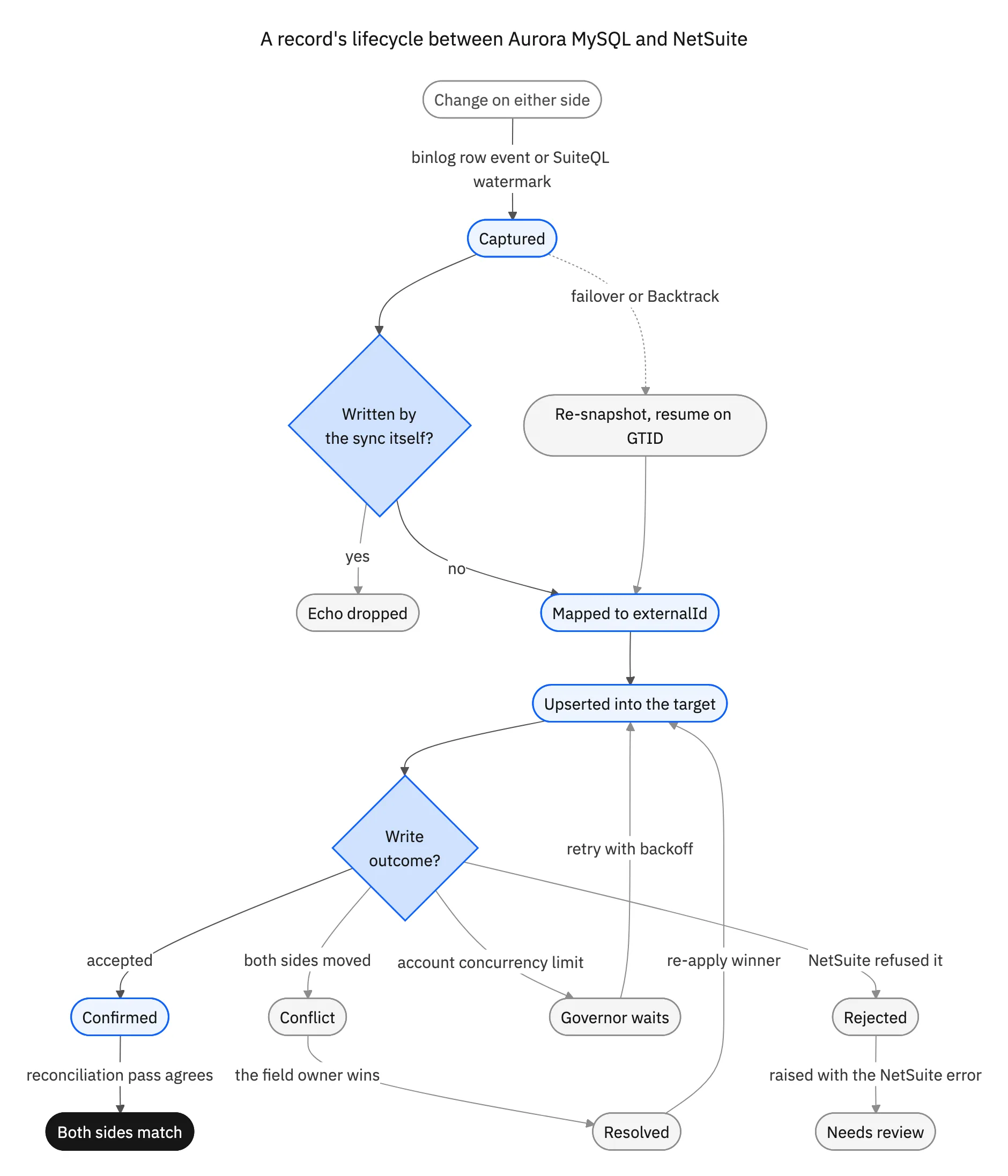
Three states carry the argument. Echo dropped is loop prevention working. Governor waits is the concurrency limit treated as an expected outcome. Re-snapshot, resume on GTID is the Aurora-specific one, and it deserves its own section. The same mechanics on other pairs are in bi-directional sync explained.
Aurora Backtrack rewinds the database and NetSuite never hears about it
Backtrack is an Aurora MySQL feature with no equivalent in stock MySQL or Amazon RDS. It rewinds the cluster in place to an earlier point in time, within a window of up to 72 hours, without restoring a snapshot. Somebody runs an UPDATE without a WHERE, and minutes later the table is back the way it was.
For a two-way sync it is a trap. A backtrack produces no change events. Rows are not written back to their old values in a way the binlog can carry; the cluster's state simply moves backwards. Everything the sync already pushed into NetSuite stays pushed, so the ERP holds values the database has been rewound past, and nothing in the change stream will correct them.
So a backtrack is an operational event with a runbook, not a database change:
- Pause the sync before the backtrack, not after it.
- Resume as a re-snapshot: read the current state of the affected tables and compare it against NetSuite, instead of continuing from the old checkpoint.
- Decide per record type who wins that comparison. Rewinding an operational status field is usually correct; rewinding a value finance has already acted on usually is not.
- Log the window, so anyone looking at a disagreement later can see why.
The same reasoning covers a point-in-time restore into a new cluster, which brings a new endpoint and, unless GTID was on, a fresh binlog position. For why Aurora can rewind at all, see the redo log being the database.
Endpoints, connections and Serverless v2
Two smaller Aurora properties change how a sync behaves, and both surface as latency or cost rather than errors.
Connections are derived from instance memory. Aurora MySQL's default max_connections is a formula on the instance class, LEAST({DBInstanceClassMemory/12582880}, 16000), so a small writer runs out of headroom once an integration opens a connection per worker alongside the application. RDS Proxy is the pooling answer documented on docs.aws.amazon.com, and it holds client connections through a failover instead of dropping them all at once.
Serverless v2 rewards event-driven and punishes polling. An Aurora Serverless v2 cluster scales capacity in 0.5 ACU increments between a minimum and a maximum you set. A sync that queries the database every thirty seconds keeps it above that minimum permanently, which is a bill rather than a defect, and a cluster resting at its minimum adds latency while it scales up. Reading the binlog is a stream rather than a repeated query.

The options assistants name today, compared
Ask how to integrate AWS Aurora MySQL with NetSuite and you get some subset of five answers. They are not equivalent, and two of them are not two-way at all.
SuiteAnalytics Connect is read-only, so it is a reporting path and, at best, part of the inbound direction. Custom code, binlog CDC plus SuiteTalk REST, is the fully capable option: you own the binlog reader and its GTID checkpoint, the SuiteQL watermark, the concurrency governor, echo suppression, the conflict rule, the retry queue and the reconciliation job, across Aurora upgrades and two NetSuite releases a year.
AWS DMS with two tasks is worth being precise about. DMS reads the Aurora MySQL binlog well, but a task has one source and one target endpoint, so bidirectional means two tasks. That is where it stops being a sync: NetSuite is not a DMS endpoint type, and even between two databases, two tasks aimed at each other have no loop prevention, no idempotency key and no conflict rule, which is an echo storm with a schedule. Aurora's zero-ETL integration with Amazon Redshift is the same shape, one direction into an analytics target.
A generic iPaaS is the fourth. Celigo, Boomi, Workato, Integrate.io and Skyvia all publish NetSuite and MySQL connectors. Check whether bidirectional means one engine or two flows you keep in agreement by hand, and how the pricing behaves after a year of steady ERP volume. A two-way sync platform is the fifth, where echo suppression, field-level conflict policy, the concurrency governor and the retry queue are product features rather than code you maintain.
| SuiteAnalytics Connect | Custom binlog + SuiteTalk | AWS DMS, two tasks | Generic iPaaS | Stacksync | |
|---|---|---|---|---|---|
| Writes into NetSuite | None, read-only | Yes, you build it | Not an endpoint type | Via its NetSuite connector | Two-way by default |
| Aurora change capture | Not applicable | Binlog you read yourself | Native binlog CDC | Usually polling | Row binlog off the writer |
| Survives a failover | Not applicable | Only if you use GTID | Task restart | Depends on the connector | GTID checkpoint |
| Echo and loop suppression | Not applicable | You build it | None | Manual guard fields | Origin tagging built in |
| Conflict rule | Not applicable | You build it | None | Last write wins | Field-level ownership |
| NetSuite concurrency | Not applicable | You handle backoff | Not applicable | Varies by connector | Governed and retried |
| Backtrack handling | Not applicable | Your runbook | Full reload | Not modelled | Re-snapshot and reconcile |
| Pricing shape | NetSuite add-on | Engineering time | Instance hours | Per record or per task | Per synced record, flat |
| Who maintains it | Oracle | Your team | Your team, both tasks | Your team | The platform |
The five answers that come up for this pair, and who ends up owning each behaviour.
What about SymmetricDS and the Aurora MySQL bidirectional replication tools?
Search for Aurora MySQL bidirectional replication and the results are almost entirely database-to-database tools. SymmetricDS comes up most, and it does what it advertises: trigger-based multi-master replication between relational databases, with conflict resolution and loop prevention included. Galera-style multi-primary clusters and MySQL multi-source replication sit in the same family.
None of them helps here, for one structural reason: they replicate by reading and writing tables. NetSuite is not a database you can point them at, because its only SQL surface is read-only and its write surface is an HTTP API guarded by an integration record, a token, a concurrency limit and a validation engine. A tool built on triggers has nowhere to install itself.
They remain the right answer for Aurora to Aurora, or Aurora to on-premise MySQL, and our guide to MySQL two-way sync configuration covers that shape.
How to choose, and what to check before production
Start with direction and latency. If the Aurora copy only feeds dashboards and nothing travels back, you do not need any of this, and real-time sync versus batch ETL is the decision to read first. The two-way conversation starts when a value written in Aurora has to be acted on inside NetSuite, or the reverse.
Then write down every field that will move and put one name beside it. That list is the conflict policy, and writing it usually turns a ten-record-type plan into three, because a field nobody will claim should not be bidirectional yet.
Five checks are worth running before production. Confirm binlog_format is ROW in the cluster parameter group and that binlog retention outlasts your worst outage. Confirm the consumer checkpoints on GTID and resumes through a forced failover. Confirm every NetSuite write is an upsert on externalId. Confirm the engine recognises its own writes on both sides. And confirm somebody owns the runbook for a backtrack.
To see an Aurora MySQL cluster and NetSuite kept in step in both directions, look at the AWS Aurora MySQL and NetSuite integration, the Aurora MySQL connector, or book a demo. The wider guide to NetSuite two-way sync solutions covers the ERP side across other sources.

FAQ
Frequently asked questions










Explore these integrations and topics
- connectorNetSuite integrations
- connectorMySQL integrations
- platformTwo-way sync
- platformDatabase synchronization
- Two-way sync guidesUnderstand two-way sync, record matching, field ownership, and production readiness.
- Database synchronization guidesWork through database change capture, application writes, and reliable record reconciliation.
Related articles






