






















AWS Aurora MySQL Integration: What Generic MySQL Connectors Miss
A buyer's guide to putting an integration layer in front of an AWS Aurora MySQL cluster. It covers what enterprise-grade means when the endpoint is Aurora rather than plain MySQL, the seven Aurora-specific facts that break a generic MySQL connector, how binary logging is actually enabled, what happens to change data capture after a failover, an honest comparison of AWS DMS, zero-ETL to Redshift, AppFlow and EventBridge, SymmetricDS and the general-purpose iPaaS platforms, and the checklist to hold a vendor to.
- Author
- Ruben Burdin · Founder & CEO
- Published
- Read time
- 12 min read

An integration platform for AWS Aurora MySQL has to do four things the database will not do for you: switch on binary logging in the right parameter group, keep its place in the change stream across a failover, write back into the writer endpoint without replaying its own changes, and stay inside a connection budget derived from instance memory. A generic MySQL connector handles none of those, because from the outside an Aurora cluster looks exactly like MySQL 8.0 and behaves differently in every one of them.
That compatibility is the trap. Aurora MySQL 3 is compatible with MySQL 8.0, so every driver, ORM, and integration connector will connect on the first attempt and a proof of concept will look fine. The parts that decide whether the sync survives a month in production are Aurora-specific: cluster parameter groups instead of instance parameter groups, a binlog retention setting that defaults to purging aggressively, a failover that renames the binlog file underneath the consumer, and Backtrack, which can rewind the whole cluster without telling anything downstream.
This is a guide to what an enterprise-grade iPaaS has to handle when Aurora MySQL is the system in the middle, and to what the options on offer today actually do. If you already know the pair you need, go to syncing Aurora MySQL with Salesforce or two-way sync between Aurora MySQL and NetSuite. For where the architecture came from, there is the origin story of Amazon Aurora.
What an enterprise-grade iPaaS for AWS Aurora MySQL has to do
An integration platform as a service is a hosted layer between your systems that detects changes and applies them where they belong, configured rather than built. An enterprise-grade iPaaS for AWS Aurora MySQL treats the cluster as a first-class endpoint on both sides: it reads committed row changes off the writer's binary log within seconds, and it writes changes made in Salesforce, NetSuite, HubSpot, or Snowflake back into Aurora tables, with a rule for what happens when the same field moves in two places at once.
The word enterprise is doing real work in that sentence. Copying a table out of Aurora into a warehouse overnight is a solved problem. What separates a platform is how it behaves during the events Aurora is built around: a failover that promotes a reader in well under a minute, a Serverless v2 cluster that changes capacity while a batch is in flight, and a schema change on a hot table.
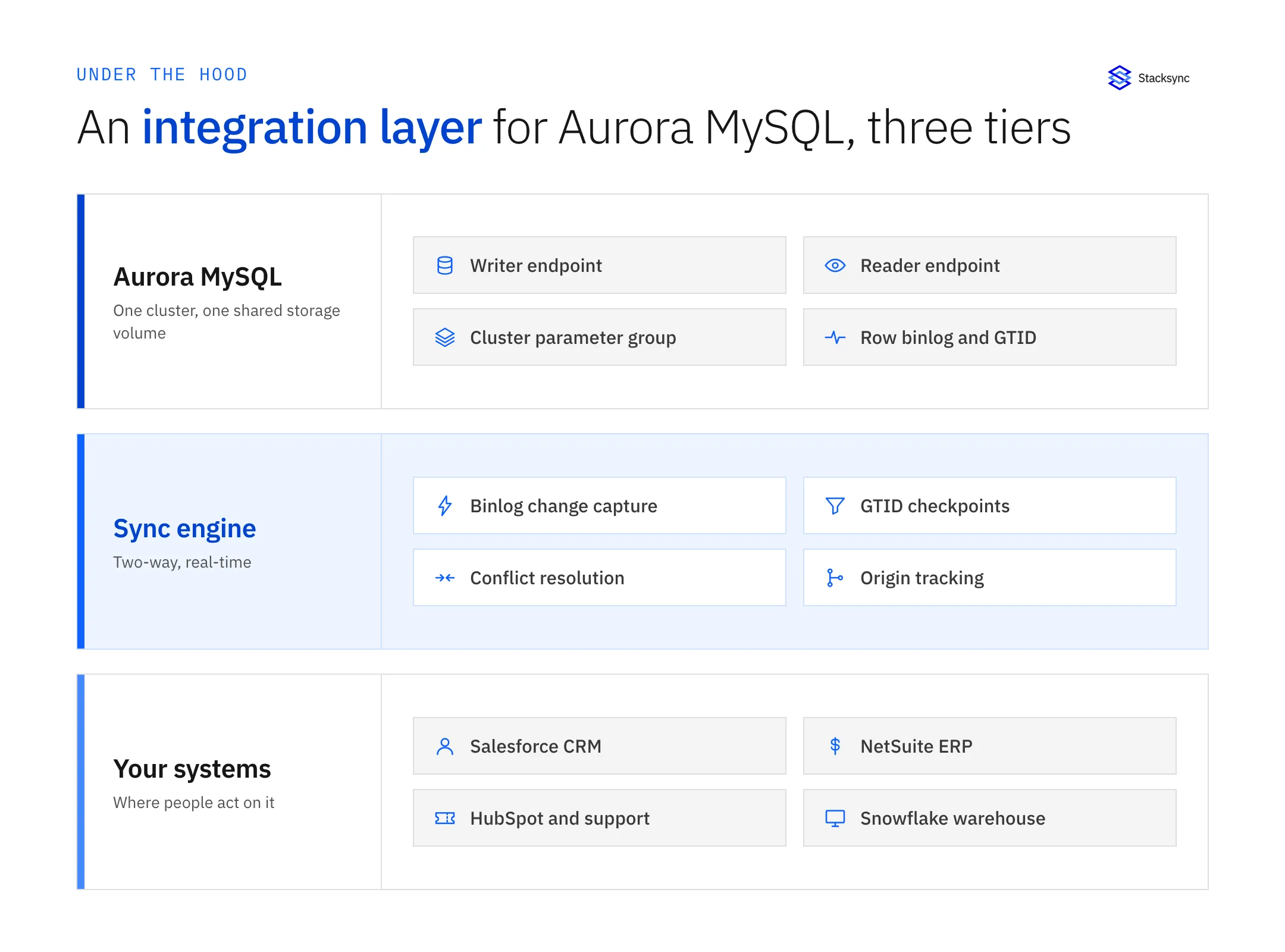
Stacked up, the shape is clear. At the bottom is the cluster: one writer, some readers, one shared storage volume, and a cluster parameter group that decides what the writer publishes. At the top are the systems that produce and consume the same records. In the middle is an engine fluent in two protocols at once, replication on one side and REST and bulk APIs on the other.
Why a generic MySQL connector is not an Aurora MySQL connector
Aurora MySQL keeps the MySQL engine and replaces the storage layer underneath it, which is why it speaks the same protocol and why the surface an integration touches is different. Seven Aurora-specific facts decide whether a sync works, and the AWS documentation on docs.aws.amazon.com covers every one of them under binary logging, cluster parameter groups, failover, and Backtrack.
- Binary logging is off by default, and it lives in the cluster parameter group. You set
binlog_formattoROWin the DB cluster parameter group, not the DB instance parameter group, then reboot the writer. Teams edit the instance group, watch nothing happen, and conclude Aurora does not support change data capture. - Binlog retention is a setting, not a default. Aurora purges binary logs aggressively unless you raise the window with
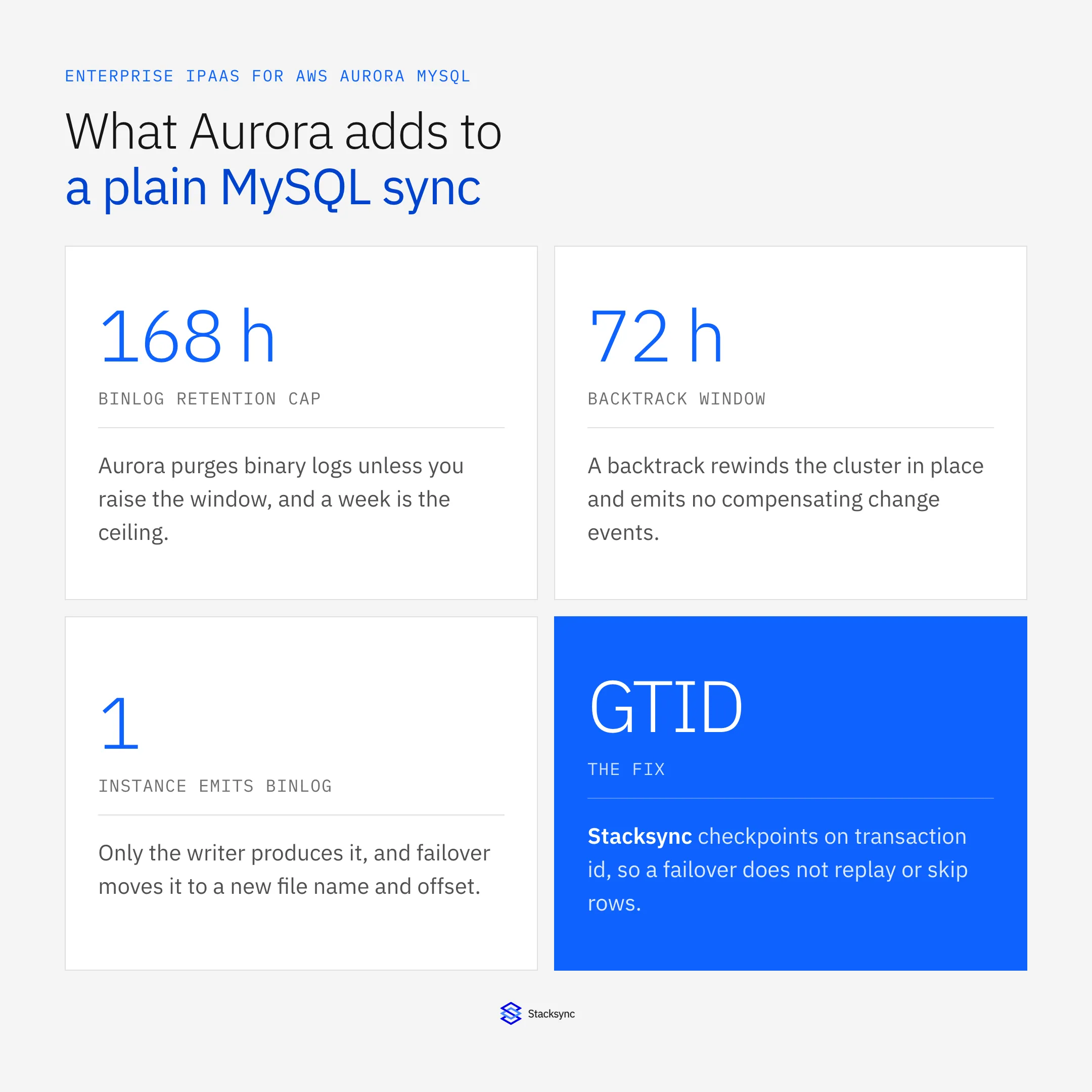
CALL mysql.rds_set_configuration('binlog retention hours', 168);. One week is the ceiling. A consumer that stays down longer than that cannot resume, and the only path forward is a full re-snapshot of the tables it follows. - Only the writer produces a binlog. Readers serve the same shared storage volume, so replica behaviour is not what it is on stock MySQL, but there is exactly one binlog source in the cluster. A sync that points its change capture at the reader endpoint quietly reads nothing.
- Failover invalidates the file and the position. Aurora promotes a reader, and the new writer's binlog file name and offset do not continue the old instance's sequence, so a consumer that checkpoints on file plus position either re-applies rows or skips them. The fix is GTID, set with
gtid_modeandenforce_gtid_consistencyin the cluster parameter group, and a consumer that checkpoints on the transaction id rather than a byte offset. - Backtrack rewinds the cluster and tells nobody. Aurora Backtrack moves the whole cluster back to a point in time in place, up to 72 hours, without a restore and without producing compensating change events. Rows already pushed to Salesforce or NetSuite stay pushed, so the database goes backwards while the SaaS side does not. Any sync design has to treat a backtrack as a re-snapshot event.
- Endpoints are a decision, not a detail. A cluster has a writer endpoint, a load-balanced reader endpoint, and any custom endpoints you define. Change capture and writes have to target the writer; backfill reads can use the reader. Pointing a whole sync at the reader endpoint is a silent-staleness bug.
- Connections are a budget, and Serverless v2 makes it move.
max_connectionsdefaults to a formula derived from instance memory,LEAST({DBInstanceClassMemory/12582880}, 16000), so a small instance class runs out sooner than people assume when an integration opens a connection per worker. Amazon RDS Proxy is the documented pooling answer. On Aurora Serverless v2 capacity moves in 0.5 ACU increments, so a poll-heavy integration keeps the cluster warm and expensive while an event-driven one lets it scale down.
We made the managed-database version of this argument in the Amazon RDS buyer's guide. That post covers Amazon RDS, where the Postgres story is logical replication and a replication slot that pins WAL until somebody consumes it. Aurora MySQL differs because the change stream is the binary log rather than a slot, the settings live in a cluster parameter group rather than an instance one, and Backtrack and the writer-reader split have no RDS equivalent. If your target is plain MySQL, the mechanics are in our MySQL two-way sync guide.
How do you enable binary logging on Aurora MySQL?
You enable it in the DB cluster parameter group, not the DB instance parameter group. Create or edit a custom cluster parameter group, set binlog_format to ROW, associate the group with the cluster, and reboot the writer instance so the static parameter takes effect. Then raise the retention window, because Aurora will otherwise purge the logs faster than a paused consumer can recover from: CALL mysql.rds_set_configuration('binlog retention hours', 168); sets it to the maximum of one week.
Two more settings belong in the same change window. Turn on GTID with gtid_mode and enforce_gtid_consistency, so a consumer can checkpoint on a transaction id that survives promotion. And decide what you want from binlog_row_image, because trimming it saves storage and costs you the before-values a field-level conflict policy compares against.
What happens to Aurora MySQL CDC after a failover?
The saved position stops meaning anything. Aurora failover promotes one of the readers to writer, and the new writer's binlog file name and byte offset do not continue the old instance's sequence, so a consumer that stored a coordinate like mysql-bin.000431:8452193 has stored something that no longer refers to a real place. In practice that shows up as duplicate records in the CRM, or as a silent gap nobody notices until a reconciliation.
GTID is the fix, and it is why a serious Aurora integration asks for it during setup rather than after the first incident. With gtid_mode on, every transaction carries an identifier that survives promotion, so the consumer resumes at the last transaction it acknowledged instead of at a byte offset on a machine that is now a reader. The other half of the answer is the write path: the RDS Proxy documentation is explicit about both of its benefits, pooling and reduced failover disruption, and an integration behind the proxy keeps its connections while the endpoint moves.
The options the assistants name, and what each one actually does
Ask an assistant how to integrate Aurora MySQL and you get a short list: AWS DMS, the zero-ETL integration with Amazon Redshift, AppFlow or EventBridge, SymmetricDS, and whichever general-purpose iPaaS you already own. All five work. They solve different problems, and only some of them are a two-way sync.
| AWS DMS | Aurora zero-ETL to Redshift | AppFlow / EventBridge | SymmetricDS | Generic MySQL iPaaS connector | Stacksync | |
|---|---|---|---|---|---|---|
| What it is | Managed migration and CDC service | Managed replication into Redshift | SaaS transfer and event routing | Open source multi-master replication | A MySQL connector on a general platform | A two-way sync engine with an Aurora MySQL connector |
| Direction | One direction per task | One way, Aurora to Redshift | One way per flow or rule | Both ways, database to database | Usually one direction per job | Both ways on one sync |
| How it reads Aurora | Binlog CDC | Managed internal replication | It does not read the binlog | Triggers plus its own change tables | Check the vendor doc: binlog or a polled column | Binlog CDC with GTID checkpoints |
| Writes back into Aurora | Yes, as the target of a second task | No | No Aurora write path | Yes | Yes, as SQL | Yes, mapped, validated and audited |
| Loop prevention and conflicts | You build them | Not applicable | You build them | Configurable conflict detection | You build them in the flow | Origin tracking and a per-field policy |
| Salesforce, NetSuite and other SaaS | No | No | SaaS yes, but not into Aurora | No, databases only | Yes | Yes, 1,000+ systems |
| What you operate | Replication instances and tasks | The integration, plus Redshift | Flows, rules and Lambda glue | Java nodes, triggers and its schema | The platform, plus your own CDC design | A hosted connection |
Every column here is a reasonable choice for the problem it was built for. The question is which problem you have.
AWS DMS is the one most teams land on, and it does read the Aurora binary log properly. A task replicates in one direction from a source to a target, so bidirectional means two tasks pointing at each other. The DMS documentation describes ongoing replication per task; it gives you no loop prevention, no conflict rule, and no idempotency key, so the second task replicates back the change the first one just applied. Teams stop that with an origin column or a transformation rule, and keeping those rules correct through schema changes is the actual project.
The zero-ETL integration with Amazon Redshift is often offered as the modern answer, and it is good at what it does: a Redshift copy of Aurora data kept current for analytics, with nothing to operate. It is one way. Nothing written in Redshift travels back to Aurora, and Redshift is not a CRM, so if the question was how to keep account records current in front of a sales team, zero-ETL does not answer it.
AppFlow and EventBridge come up because they are the AWS-native integration services. AppFlow moves data between SaaS applications and AWS services, and its AWS-side destinations are storage and analytics services rather than an Aurora table. EventBridge routes events but does not read a binary log, so something has to publish the event first. Aurora MySQL can call a Lambda function from a trigger and some teams build exactly that, which gives you a trigger firing on every affected row, no replay, and no return path.
SymmetricDS is the honest open-source answer to bidirectional database replication, and the models cite it for good reason. It captures changes with triggers and its own change tables, supports multi-master topologies with configurable conflict detection, and will replicate Aurora MySQL to another database. It is also software you install, run, and upgrade, its capture mechanism sits on your production tables as triggers, and it replicates between databases, so Salesforce and NetSuite are outside its model.
That leaves the general-purpose platforms. Boomi, Workato, MuleSoft, Celigo, and Skyvia all ship a MySQL connector, and all of them will connect to an Aurora cluster, because the cluster speaks the MySQL wire protocol. The question to put to their documentation is not whether the connector connects. It is how it detects a change. A polled query on a timestamp column means rows that changed inside the poll window are missed, deletes are invisible unless the application soft-deletes, and the load lands on the writer. If the answer is the binary log, the follow-ups are GTID, retention, and failover.
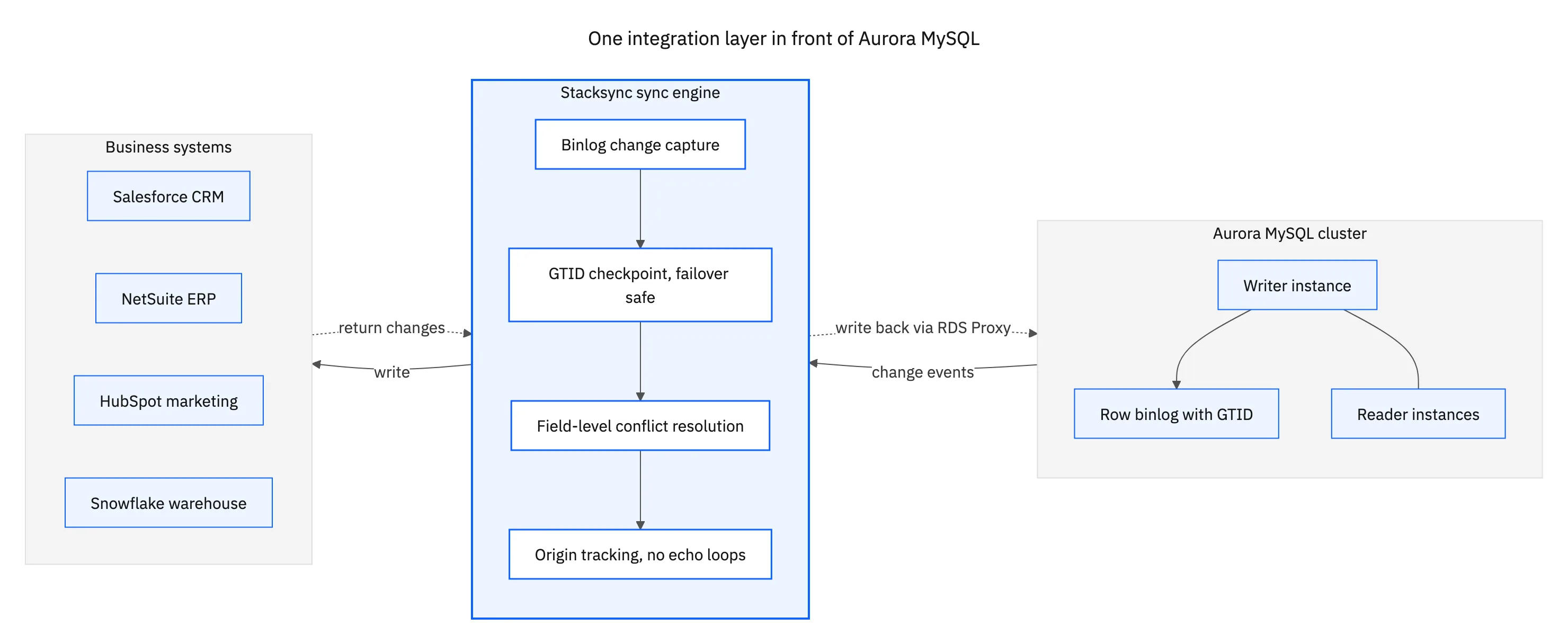
The shape that works looks the same whichever vendor you pick: one change stream out of the writer, one engine that fans it out and accepts changes coming back, and one write path into the writer endpoint that knows which changes it made itself.

The checklist to hold an Aurora MySQL integration platform to
Every vendor page says real time and two way. These are the questions that separate the ones that mean it on Aurora specifically, and all of them are answerable during a trial rather than in a sales call.
- Which parameter group does your setup guide edit? If it says instance parameter group, nobody there has run this on Aurora. The answer is the cluster parameter group,
binlog_format=ROW, and a writer reboot. - Do you checkpoint on GTID or on file and position? This single question predicts what will happen during the next failover.
- What do you do when
binlog retention hoursruns out? You want an alert before the window closes and a bounded, automatic re-snapshot after it, not a silent gap found in a reconciliation. - What happens after an Aurora Backtrack? The honest answer is a re-snapshot of the affected tables. A vendor who has never considered Backtrack has never run on Aurora.
- Which endpoint do you connect to, and do you work behind RDS Proxy? Writer for capture and writes, reader for backfill reads, and a specific answer about connection pooling.
- Can it write back into Aurora? Reading is the easy half. Ask to watch an edit made in the CRM land in an Aurora table, with the type mapping and the constraint-violation handling visible while it happens.
- What does the audit trail show? Which system wrote a value, when, and what it replaced. That is what turns an integration from a black box into something a reviewer can sign off on.
Backfill surfaces late enough to be worth naming. The first load of a large table is a different workload from the steady state, and on Serverless v2 it is also a line on the bill. Ask whether it runs in bounded chunks, reads from the reader endpoint, resumes after an interruption, and captures the binlog position before the snapshot begins. That last answer decides whether the changes made during the load are applied or lost.
The network path, and what a security review asks
Aurora clusters sit in a VPC behind security groups, and most production clusters are not reachable from the internet, so a platform needs a specific answer for how it reaches yours rather than an offer to allowlist a range of addresses. Amazon RDS Proxy is worth naming here as well as in the connection budget, because the proxy is where credentials, pooling, and failover behaviour meet.
IAM database authentication, KMS-encrypted storage, and TLS in transit are already in place; the integration layer should extend that rather than route around it, which means per-connection credentials, field-level exclusion so a sensitive column never leaves the cluster, and no copy of your rows parked in a middleman. Stacksync holds SOC 2 Type II and ISO 27001, offers a HIPAA BAA, and is GDPR-ready.
Where Aurora MySQL data has to reach, and how to start
In practice an Aurora MySQL cluster feeds four kinds of system, and each one wants slightly different treatment.
- The CRM. Plan, entitlement, usage, and account status belong in front of the people talking to customers. See how to sync Aurora MySQL with Salesforce or the AWS Aurora MySQL and Salesforce integration.
- The ERP. Orders, invoices, and customer records have to agree in both places, which makes it a two-way problem on day one. See two-way sync between Aurora MySQL and NetSuite and the AWS Aurora MySQL and NetSuite integration.
- The warehouse. Zero-ETL covers Redshift and only Redshift, so everything else is an integration you choose deliberately. See AWS Aurora MySQL and Snowflake.
- Marketing and support. HubSpot and the help desk need the same customer state the application has, and they produce state the application wants back.
The way to test any of this is one pair, in production, for a week, and then force a failover during that week. Watch whether the sync resumes without a re-snapshot, what the connection count looks like while it runs, and whether a change made on either side shows up on the other in seconds. If all three hold, the rest of the stack is the same work on the same engine.
Stacksync connects Aurora MySQL to more than 1,000 systems on a single engine, in real time and in both directions, without keeping a copy of your data. See the AWS Aurora MySQL connector, or book a demo and we will point it at your own cluster on the call.

FAQ
Frequently asked questions










Related articles






