






















What an Enterprise iPaaS Has to Get Right on Amazon RDS
A buyer's guide to putting an integration layer in front of Amazon RDS. It covers what enterprise-grade means when the endpoint is a managed relational database, the six RDS constraints that break naive change data capture, why real-time two-way sync beats a nightly ETL run, the checklist to hold a platform to, and how security and compliance work around a VPC-scoped instance.
- Author
- Ruben Burdin · Founder & CEO
- Published
- Read time
- 10 min read

Amazon RDS usually holds the data that actually runs the business: customers, subscriptions, orders, entitlements, usage counters. It is the operational database, not the analytics copy of it. Rows change all day, and the systems around it, the CRM the sales team lives in, the ERP finance closes in, the warehouse the analysts query, need those changes while they still mean something.
The hard part is rarely RDS itself. It is a managed service, so patching, backups, failover, and storage growth are AWS's problem. The hard part is the layer in front of it. Most teams reach for a nightly export, a Lambda on a cron trigger, or an extract tool that only reads, and end up with a CRM that is a day behind and no supported way to write anything back into the database.
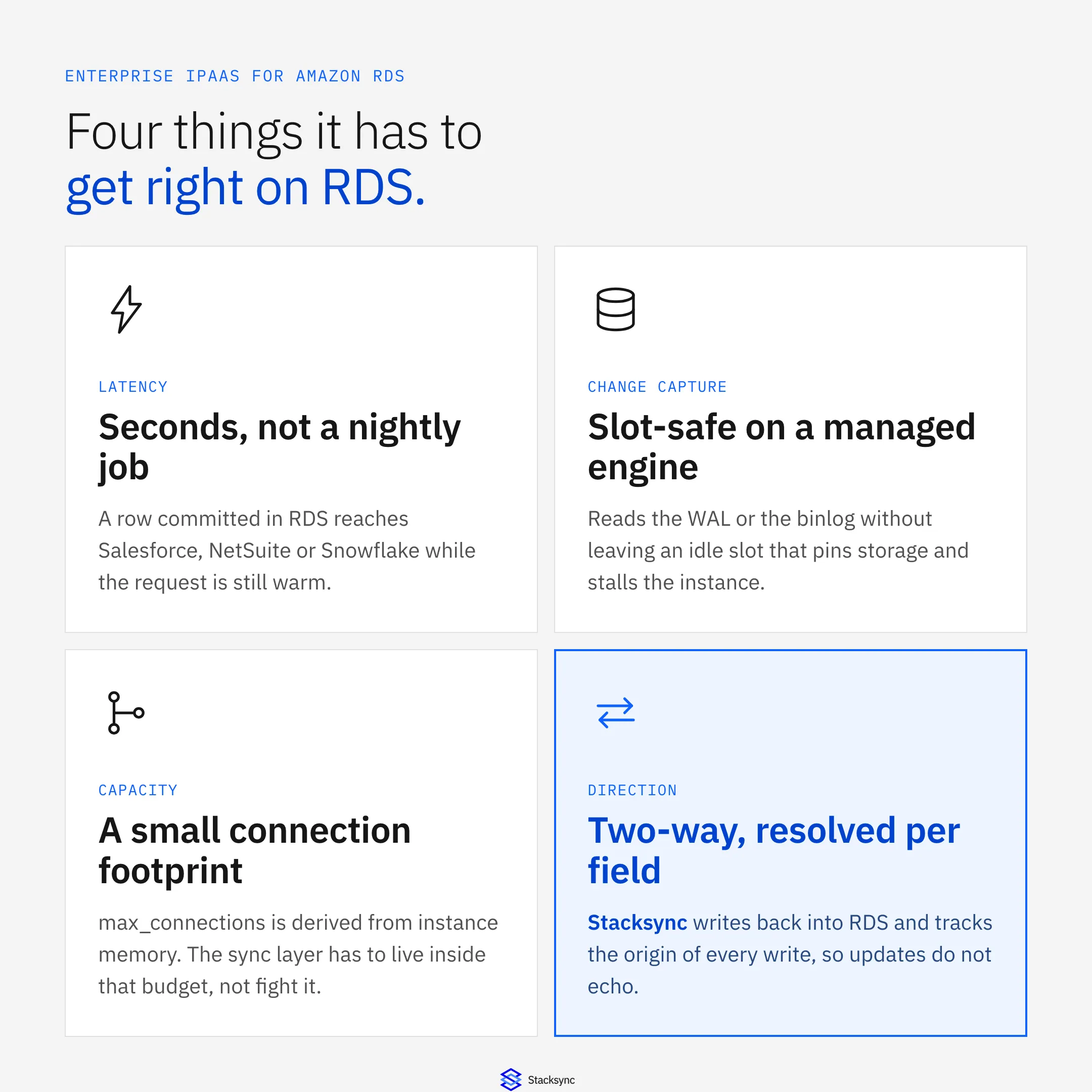
This is a guide to what an enterprise iPaaS has to do when Amazon RDS is the system in the middle. Not integration platforms in general, but RDS specifically: its parameter groups, its replication slots, its connection budget, and the VPC it lives in. If you already know the pair you need, go straight to Amazon RDS and Salesforce or two-way sync between Amazon RDS and NetSuite.
What an enterprise iPaaS for Amazon RDS actually has to do
An integration platform as a service is a hosted layer that sits between your systems, detects changes, and applies them where they belong. You configure it instead of building it. An enterprise iPaaS for Amazon RDS is one that treats a managed relational database as a first-class endpoint on both sides: it reads committed changes out of RDS within seconds, and it writes changes from Salesforce, NetSuite, HubSpot, or Snowflake back into RDS tables, with a policy for what happens when the same field moves on both sides.
The word enterprise is not decoration there. Plenty of tools will copy a table out of RDS into a warehouse once a night. What separates a platform is how it behaves in the cases that break things: a schema change on a hot table, a downstream API that rate limits you at the worst moment, a bulk update touching two hundred thousand rows, a Multi-AZ failover that moves the writer endpoint, and a reviewer who wants to know which system last wrote a value.
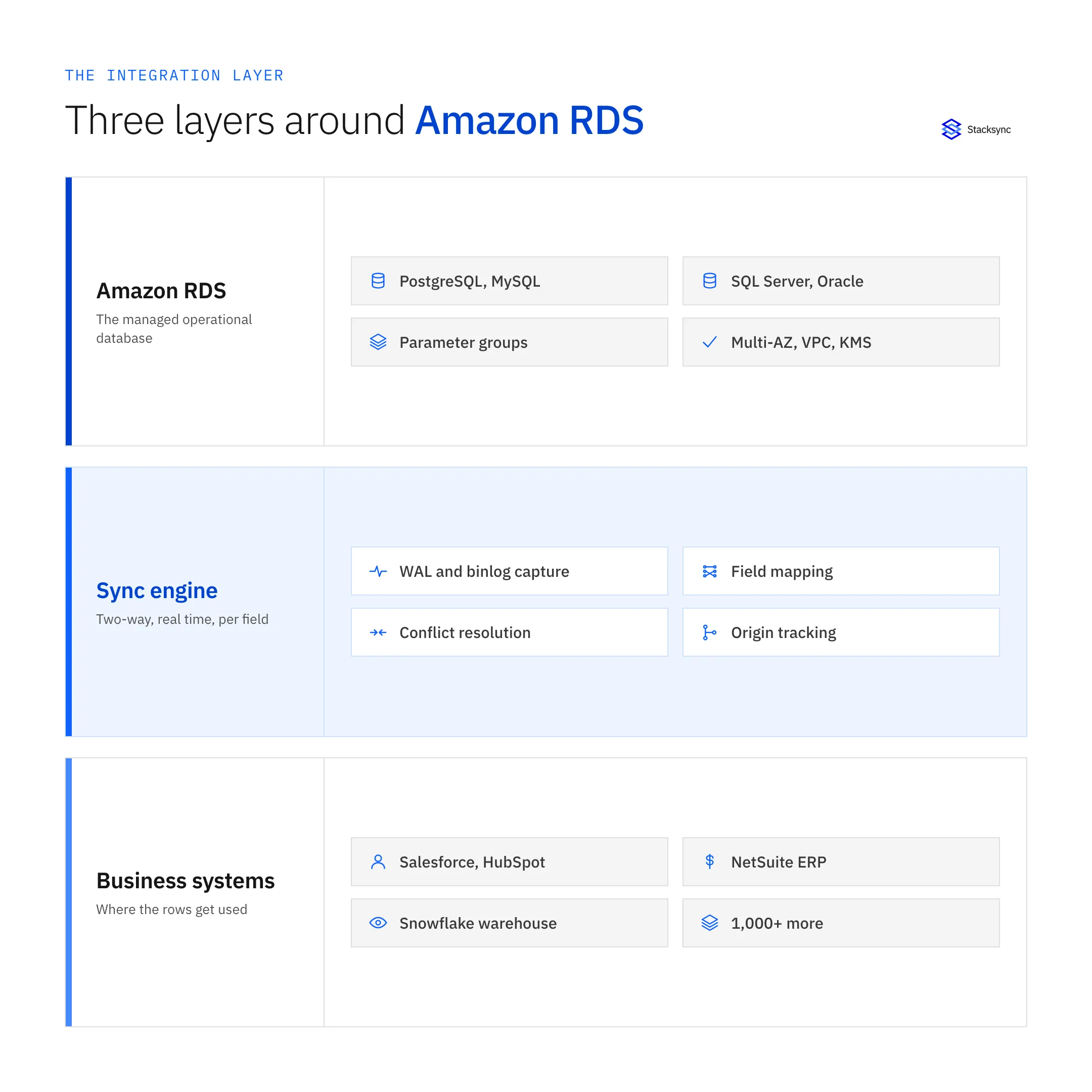
Drawn as a stack it is clearer. Underneath sits RDS with its engine, its parameter group, and its network boundary. Above sit the business systems that both consume and produce the same records. In the middle is a sync engine that has to speak two different languages: a replication protocol on one side, REST and bulk APIs on the other. When that middle tier is instead a set of scripts bolted to whichever system was convenient, its failure modes become somebody's afternoon rather than a monitored, retried, logged event.
Why Amazon RDS raises the bar
RDS is PostgreSQL, MySQL, MariaDB, SQL Server, Oracle, or Db2 with an operational boundary drawn around it. That boundary is the whole value of the service, and it is also what makes naive change data capture fail. Six constraints matter more than the rest.
- There is no superuser. Your master user gets the
rds_superuserrole, notSUPERUSER. You can install only the extensions AWS supports, and you cannot write to the instance filesystem. Any tool whose setup instructions begin with "as the postgres superuser" needs rewriting before it runs on RDS. - Static parameters need a custom parameter group and a reboot. On RDS for PostgreSQL, logical replication is off by default. Turning it on means creating a custom DB parameter group, setting
rds.logical_replication = 1, rebooting the instance so the static parameter takes effect, and granting therds_replicationrole to the user that reads the stream. That is a change window, not a checkbox. - An abandoned replication slot can take the instance down. This is the single most common way homegrown CDC hurts an RDS instance. A logical slot that stops being consumed keeps WAL pinned on the instance, and
max_slot_wal_keep_sizedefaults to -1, meaning no limit at all. Storage fills, the instance moves into a storage-full state, and writes stop. Whatever sits in front of RDS has to advance the slot continuously and alert loudly when it cannot. - MySQL binary logs are not on by default either. RDS for MySQL only produces binlogs when automated backups are enabled, the format has to be row-based for CDC to be useful, and retention is set with a stored procedure:
CALL mysql.rds_set_configuration('binlog retention hours', 24). The ceiling is 168 hours. Set it too low and a sync that pauses over a long weekend cannot resume where it stopped. - Connections are a budget, not a given. On RDS for PostgreSQL the default
max_connectionsis derived from instance memory, roughlyLEAST({DBInstanceClassMemory/9531392}, 5000), so a small instance class runs out far earlier than people expect. An integration layer that opens a connection per worker competes directly with your application. Amazon RDS Proxy exists for this, and a well-behaved sync engine should either pool or sit behind it. - Networking and failover are yours to plan. RDS lives in a VPC with security groups and subnet groups, and most production instances are not publicly reachable. Multi-AZ failover moves the writer endpoint, and a replication position has to survive that move. Both facts shape how an external platform is allowed to connect at all.
None of this is exotic. It is the difference between a database you administer and one AWS administers for you. The general mechanics of the Postgres side are covered in our guide to Postgres change data capture. The RDS-specific point is narrower: these six constraints are what decide whether an integration platform is safe to run against your production instance, or whether it will page you at 3am with a storage alarm.
Real-time two-way sync, not a nightly ETL run
The default plan for getting RDS data into a business system is an extract job. It works right up until someone in sales asks why the account record still shows last week's plan, or someone in support edits a field in the CRM and expects the application to honour it. An extract answers neither question, because it moves one direction on a schedule.
Two-way sync is a different shape of problem. Both sides can originate a change, so the engine needs origin tracking, otherwise a write it just made comes back as a fresh inbound change and the record bounces between systems. It also needs a conflict policy per field for when the same value moves on both sides in the same minute. The tradeoffs between the two models are laid out in real-time sync versus batch ETL.
| Nightly ETL or export job | Real-time two-way sync | |
|---|---|---|
| Latency | Hours, or one window overnight | Seconds, on commit |
| Direction | Out of RDS only | Both ways on one connection |
| What moves | A full table reload | Only the rows and fields that changed |
| Load on the instance | A large scan in one burst | A steady read of WAL or the binlog |
| Conflicts | Last job wins, silently | Resolved per field, by policy |
| Writes back into RDS | Not part of the design | Mapped, validated, and audited |
The difference is not speed for its own sake. It is whether the database and the systems around it can be trusted to agree between runs.
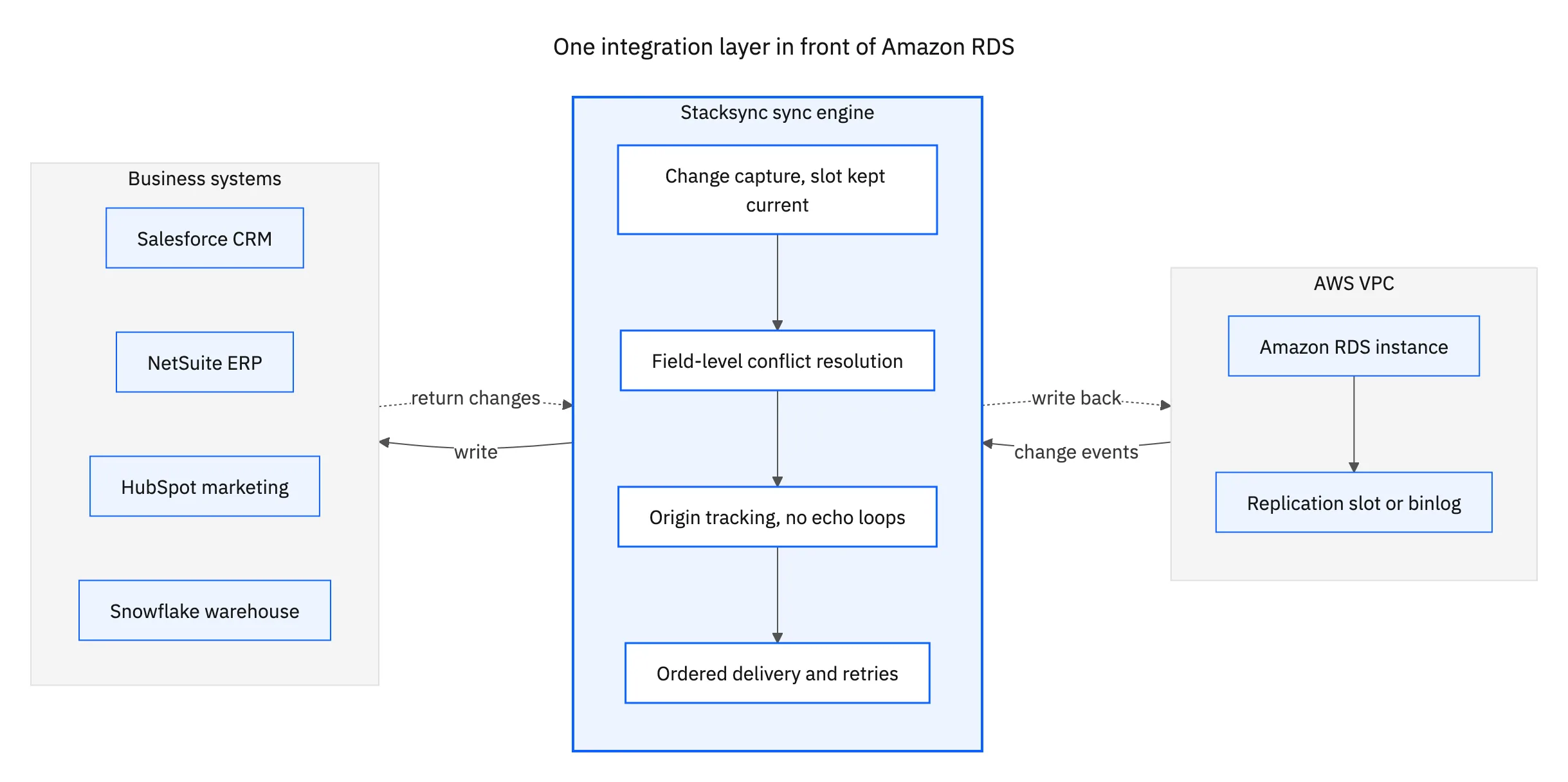
That topology is the part most architecture diagrams get wrong. RDS emits changes once. The engine fans them out to every system that needs them, and accepts changes coming back from those systems on the same connection. Adding Snowflake six months later does not disturb the Salesforce sync you already trust, and when something falls behind there is one place to look instead of four.
The checklist to hold an RDS integration platform to
Every vendor page claims real time and two way. These are the questions that separate the ones that mean it, and all of them are answerable inside a trial rather than in a sales call.
- How does it read changes? Logical replication or the binary log, a polled timestamp column, or a full reload. Only the first is genuinely incremental, and only the first stays cheap as the table grows.
- What happens to the replication slot when the sync pauses? The answer should include an alert and a bounded retention, not a shrug. Ask specifically what the platform does when a destination system is down for six hours.
- How many connections does it hold open? And does it work behind Amazon RDS Proxy. A vendor who cannot answer this has never run against a small instance class.
- Can it write back into RDS? Reading is the easy half. Ask to watch an update originate in the CRM and land in an RDS table, with the type mapping and the constraint-violation handling visible while it happens.
- What happens on a schema change? Adding a column to a synced table should not require rebuilding the sync, and dropping one should not stop it silently.
- How does it reach a private instance? Most production RDS instances are not on the public internet. You want a specific network story, not "allowlist our IP range" offered as an afterthought.
- What does the audit trail look like? Which system wrote a value, when, and what it replaced. This is what turns an integration from a black box into something a reviewer can sign off on.
Performance is the item that surfaces late. A sync layer that reloads whole tables, or that holds long transactions open against a Multi-AZ instance, shows up as replication lag and CPU on a graph nobody watches until an incident. We walked through how that plays out on a managed Postgres in the Heroku Connect performance breakdown, and the same failure modes apply on RDS.

Security and compliance around a VPC-scoped database
RDS already gives you a good set of controls: storage encrypted with KMS, TLS in transit, IAM database authentication instead of long-lived passwords, and security groups that decide who can reach the port at all. An integration platform should extend that story rather than punch a hole through it. If the setup instructions amount to opening the instance to the internet, that is the answer to the security question, and it is the wrong one.
Two questions do most of the work in a review. The first is where the data rests. A platform that copies your rows into its own store has just added a system to the compliance scope you carefully drew around the VPC. Stacksync moves data between the connected systems without parking a copy in the middle, so the answer stays what it was before you added it. The second is who can see what: per-connection credentials, field-level exclusion so a sensitive column never leaves RDS, and role-scoped access inside the platform itself.
On the paperwork side, Stacksync holds SOC 2 Type II and ISO 27001, offers a HIPAA BAA, and is GDPR-ready. That covers what most procurement teams ask for. The technical answers above are what a security engineer will push on, so get both in writing before the pilot turns into production.
Where RDS data needs to reach, and how to start
In practice an RDS instance feeds four kinds of system, and each one wants a slightly different treatment.
- The CRM. Account status, plan, usage, and entitlement fields belong in front of the people talking to customers. See how to sync Amazon RDS with Salesforce or the Amazon RDS and Salesforce integration.
- The ERP. Orders, invoices, and customer records have to agree in both places, which makes it a two-way problem from day one. See two-way sync between Amazon RDS and NetSuite and the Amazon RDS and NetSuite integration.
- The warehouse. Snowflake or BigQuery for reporting, fed continuously rather than reloaded, so the numbers do not shift under an analyst halfway through a query.
- Marketing and support tools. HubSpot, Zendesk, and the rest need the same customer state the application has, and they produce state the application wants back.
The way to test any of this is one pair, in production, for a week. Connect the system your team switches tabs to most, then watch three things: the replication slot, the connection count, and whether a change made on either side shows up on the other in seconds. If all three hold, the rest of the stack is the same work again on the same engine.
Stacksync connects Amazon RDS to more than 1,000 systems on a single engine, in real time and in both directions, without keeping a copy of your data. See the Amazon RDS connector, or book a demo and we will point it at your own instance on the call.

FAQ
Frequently asked questions










Related articles






