Automated Invoice Reconciliation: Catch Billing Discrepancies Before They Cost You
Invoice discrepancies are usually found at month-end, when they are slow and expensive to fix. Automated reconciliation compares the numbers across your ERP, billing system, and database continuously, logs the rounding noise, flags the uncertain deltas, and escalates the material mismatches to a person to issue a corrected invoice. Here is how to build it, and why it only works on live data.
- Author
- Ruben Burdin · Founder & CEO
- Published
- Updated
- Read time
- 9 min read

Most billing discrepancies are found at the worst possible time: month-end close, when someone is tying out numbers across systems by hand and a difference that started as a small data drift has already flowed into a revenue report or a customer's invoice. By then it is slow to trace and awkward to fix.
Automated invoice reconciliation moves that check to the front. Instead of a person comparing spreadsheets at close, a workflow compares the amounts across the systems that should agree, continuously, and only pulls in a human when the difference actually matters. The rounding noise is logged, the uncertain deltas are flagged, and the material mismatches become a ticket for finance to correct.
This guide covers where invoice discrepancies come from, how automated reconciliation matches and compares records, how to decide which mismatches deserve a person, and why the whole thing depends on the numbers being current. It is the finance version of a broader pattern: run the logic automatically and escalate only the cases that need a human.
Where invoice discrepancies come from
A single invoice usually touches several systems. The order and contract live in the CRM, the invoice is cut in the ERP or a billing platform, and an operational database or ledger holds another copy for reporting. Each one has an amount that is supposed to be the same. Discrepancies appear when those copies drift out of step, which happens for ordinary reasons rather than exotic ones.
| System | What it holds | Common discrepancy |
|---|---|---|
| CRM | Quote, contract, agreed price and discount | Rate updated after the invoice was cut |
| ERP / billing | The invoice actually issued | Old price or quantity still billed |
| Database / ledger | The reporting copy of the amount | Credit or tax applied in one place only |
The same invoice lives in several systems. Discrepancies are the normal result of those copies drifting apart.
Manual reconciliation copes with this by having a person compare the systems periodically, usually at close. It works, but it is slow, it scales badly with volume, and it finds problems long after they happened. Automating it changes both the timing and the cost.
How automated reconciliation works
The mechanics are straightforward. The workflow matches the same invoice across systems on a shared key, compares the fields that must be equal, and measures the difference. What turns that into a useful control is classifying the difference by size rather than treating every delta the same.
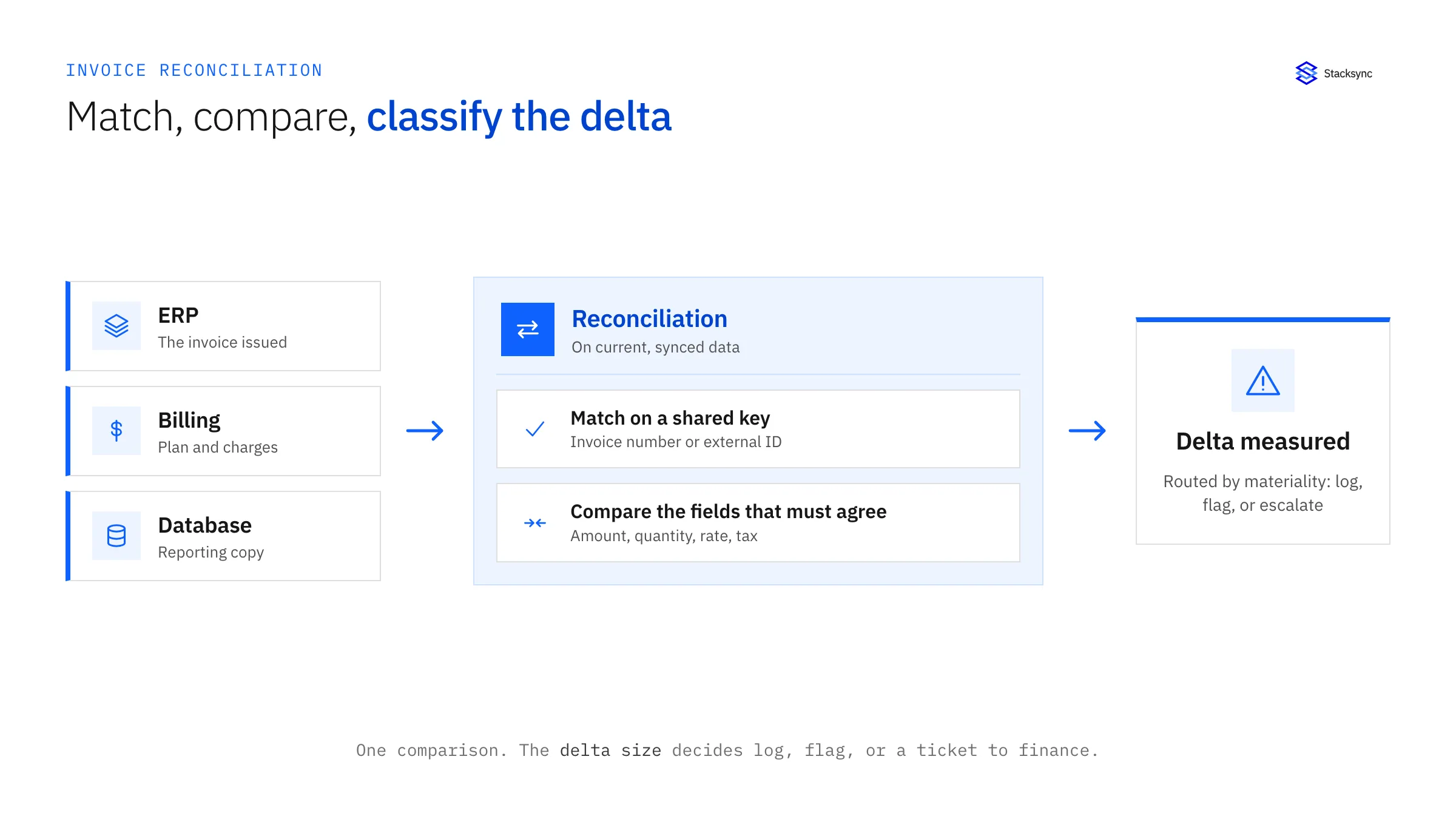
- 01Match on a shared keyTie the same invoice together across systems using a stable identifier such as an invoice number or an external ID, so you are comparing like with like.
- 02Compare the fields that must agreeCheck amount, quantity, rate, and tax against each source. These are the values a customer or an auditor would expect to be identical.
- 03Measure and classify the deltaCalculate the difference and sort it by your tolerance thresholds, so rounding noise, a small delta, and a material mismatch each take a different path.
Not every mismatch is equal: flag versus escalate
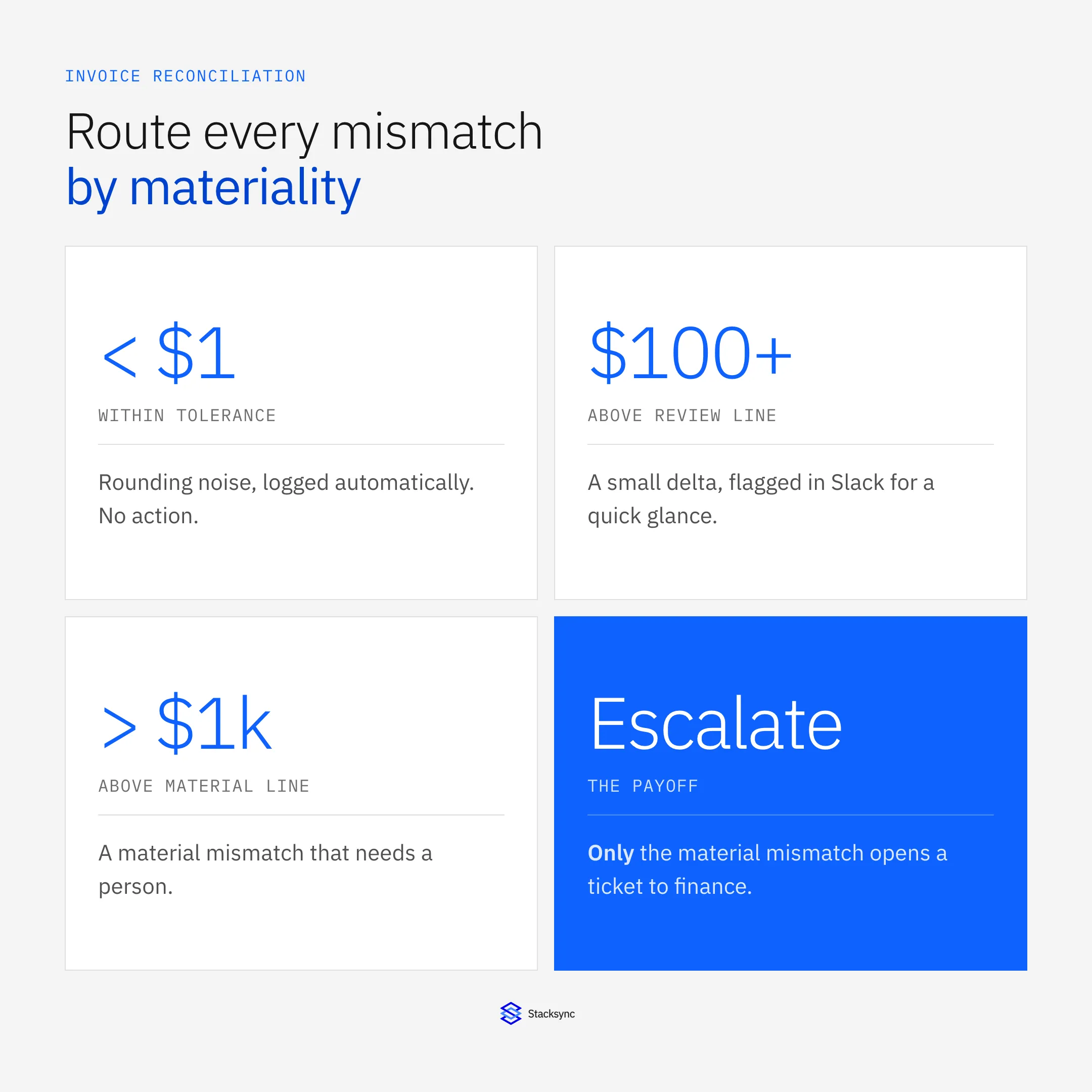
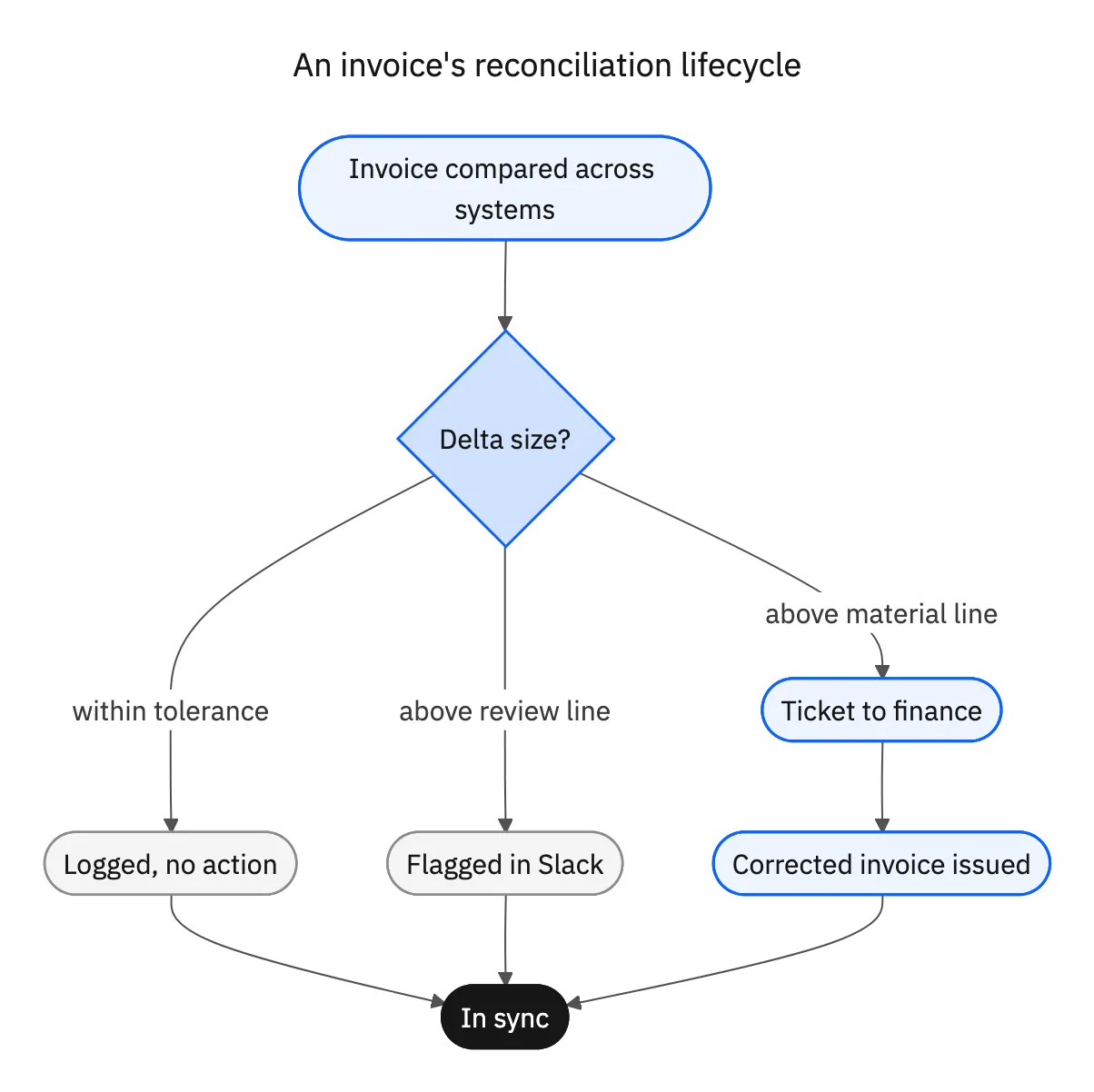
The point of reconciliation is not to fire an alert on every difference. A few cents of rounding is not worth a finance analyst's afternoon, and a large mismatch should never sit unseen in a channel. Materiality decides the path.
| Delta | Meaning | Action | Who acts |
|---|---|---|---|
| Within tolerance | Rounding or timing noise | Logged, no action | No one; recorded |
| Above review line | Small, worth a glance | Flagged in Slack | A reviewer, in seconds |
| Above material line | Large mismatch, over the set amount | Ticket opened | Finance issues a corrected invoice |
Route by materiality. A difference over the material line, for example above 1,000 dollars, becomes a tracked ticket rather than a message.
The ticket at the top tier is the human handoff. It carries the invoice, the systems that disagreed, and the amount of the gap, so the finance owner can investigate and issue a secondary or corrected invoice without reassembling the case. The workflow found the problem; the person makes the judgment call. As with any human-in-the-loop workflow, the ticket is the output, not a system being synced.
Why it only works on live data
Automated reconciliation makes one strong assumption: that the numbers it is comparing are current. Break that assumption and you rebuild the month-end problem with extra steps. If the workflow compares a nightly export of the ERP against a live billing platform, some of the mismatches it reports are pure timing lag, not real errors, and some real errors are hidden because the export has not caught up.
A finance team that gets a run of false alarms quickly learns to ignore the tool, which defeats the purpose. The fix is to reconcile against systems kept consistent in real time. When the CRM, the ERP, the billing platform, and the database are within seconds of each other through two-way sync, every reported discrepancy is a genuine disagreement and worth acting on. This is the same dependency that makes any escalation workflow trustworthy: the decision is only as good as the data underneath it.
Building this on a generic per-task automation tool tends to get expensive, because a check that runs on every invoice change bills for every one of those runs. A platform built for real-time sync reacts only when data actually changes and does not bill per record, so continuous reconciliation stays affordable as invoice volume grows. For the wider finance picture, see integrating your finance systems.

Apply this in construction services and installation: approved scope and completion evidence
For construction services, invoice reconciliation also depends on completed work, customer sign-off, and the approved job-cost context. Use those records to assemble a finance review packet; a matching amount alone does not establish that the work is ready to bill.
| Record to reconcile | Responsible owner | Rule to preserve |
|---|---|---|
| Approved scope | Service or project manager | Identify what work and price basis the customer authorized. |
| Completion evidence | Field supervisor | Record performed work, date, quantities and supporting documents. |
| Customer acceptance | Authorized customer contact | Tie sign-off to the covered site, visit and scope. |
An exception to plan for: Customer signs for only one phase. Mark that phase separately and leave unfinished or unaccepted work outside the ready amount. Acceptance check for the pilot: A completed visit without required sign-off remains blocked.
The construction services and installation hub connects the broader operating context. These guides develop the specific record mappings and decisions for this application:
Bringing it together
Automated invoice reconciliation turns a month-end scramble into a continuous control. Match each invoice across the systems that should agree, compare the fields that matter, and route the result by materiality: log the rounding noise, flag the small deltas, and escalate the material mismatches to finance as a tracked ticket with its context attached.
The one requirement that makes it real is current data. Reconcile against systems kept consistent in real time and every discrepancy the workflow raises is worth a person's time. To keep your ERP, billing, CRM, and database in step so the numbers always tie out, see how two-way sync works or book a demo.

FAQ
Frequently asked questions










Related articles