






















HubSpot to Supabase Field Mapping: Handling Data-Type Mismatches
A technical guide to the part of HubSpot-to-Supabase sync teams pressure-test most: reconciling a field that is a string in one system and an integer in the other, mapping types per field, keeping types correct across multi-hop chains, handling associations, and recovering when HubSpot rejects a write.
- Author
- Ruben Burdin · Founder & CEO
- Published
- Read time
- 6 min read

The sharpest question teams ask about syncing HubSpot with a database is not whether it works. It is what happens to a field that is a string in HubSpot but an integer in Supabase. CRMs and databases type their data differently, and a two-way sync that ignores that is how records quietly get corrupted: a phone number stored as a number and losing its leading zero, an amount written as text into a numeric column and failing, an enumeration that means nothing on the other side.
This guide is about that layer: how a HubSpot to Supabase sync reconciles data types, where you configure it, how types survive a multi-hop chain like HubSpot to Airtable to Supabase, how associations are handled, and what happens when HubSpot rejects a write. If field mapping is the part of the evaluation you care most about, this is the part that decides whether the sync is trustworthy.

Why data types don't line up between HubSpot and a database
HubSpot properties and Supabase columns come from two different worlds. HubSpot has a small set of property types, number, single-line text, enumeration, date, datetime, and boolean, and it is forgiving about what goes in them. Supabase, being Postgres, is strict: an integer column rejects text, a timestamptz column expects a real timestamp, a boolean will not accept the string "yes".
That strictness is a feature, not a problem, but it means the sync has to translate. A HubSpot number is often stored and returned as a string, so writing it into an integer column requires a cast. A HubSpot enumeration is a set of option values that has to map to whatever your Supabase column expects. Dates carry timezones that a naive copy will mangle. None of this is exotic; it is the everyday reality of moving a record between a CRM and a database, and it is exactly where a copy-paste integration breaks.
Per-field mapping is where reconciliation happens
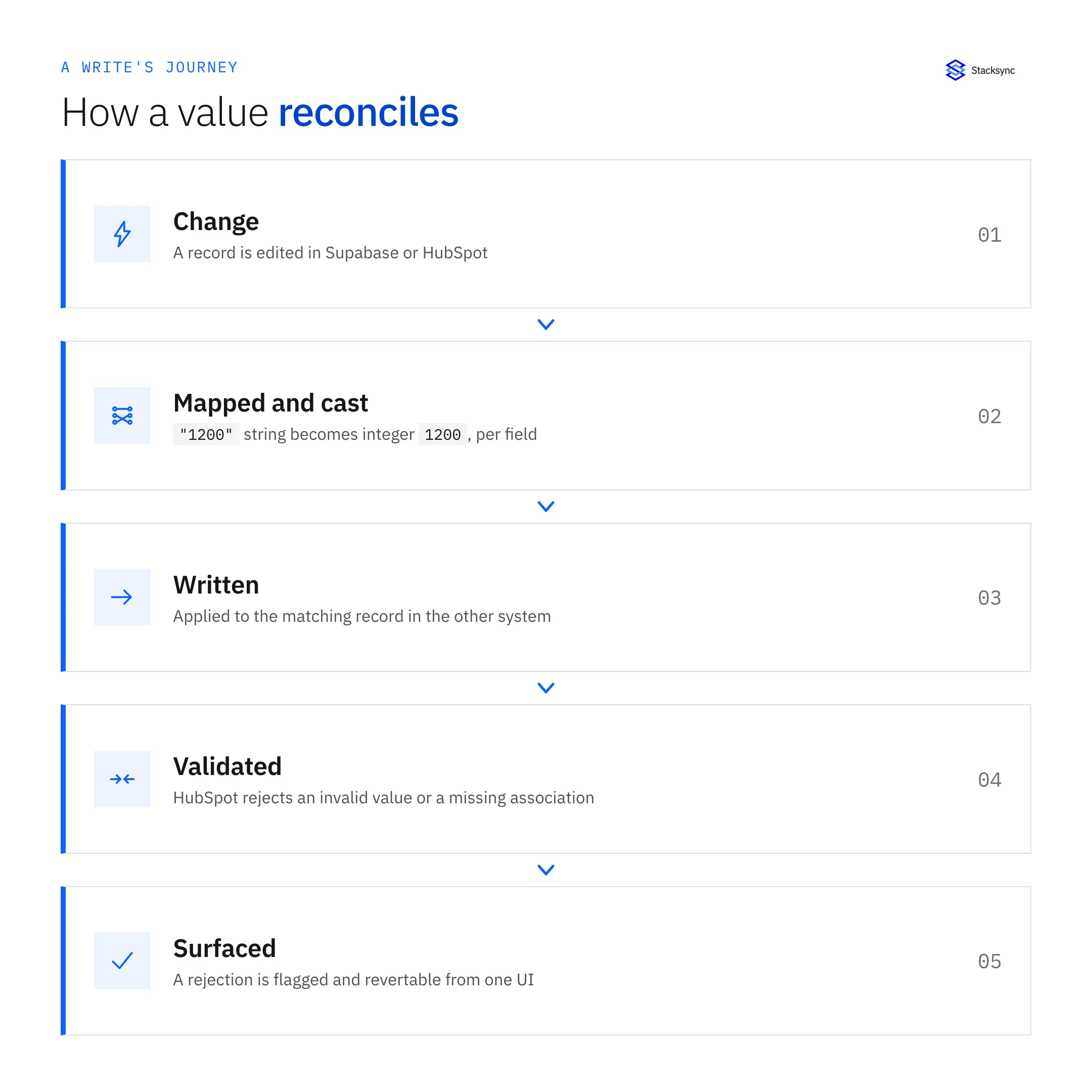
Reconciliation is not automatic magic; it is configuration you do once per field, in a mapping UI, and then the platform applies it on every sync in both directions. For each field you set three things: the source property and target column, the type conversion between them, and how nulls and defaults behave. You also set a match key so the same record stays linked over time instead of duplicating.
The value of doing this per field is that you can be precise. A numeric string like "1200" is cast to the integer 1200 on the way into Supabase and written back as the string HubSpot expects on the way out. A value that cannot be cast cleanly, free text aimed at an integer column, is flagged rather than written wrong. The table below shows the common HubSpot-to-Supabase conversions.
| HubSpot property | Supabase (Postgres) column | How it reconciles |
|---|---|---|
| Number (often a string) | integer / numeric | Cast on write, flagged if not numeric |
| Single-line text | text | Copied as-is |
| Enumeration | text / enum | Option value mapped to your column's value |
| Datetime | timestamptz | Parsed with timezone, not string-copied |
| Boolean | boolean | Normalized to true / false |
| Associated company ID | foreign key / reference | Treated as a validated link, not free text |
Common HubSpot property to Supabase column conversions handled in the field mapping.
Because the mapping is explicit, there is no guessing. You can look at any field and know precisely how a value moves and what happens when it does not fit.
Multi-hop chains: HubSpot to Airtable to Supabase
Real setups are rarely a single hop. A common pattern is HubSpot to Airtable to Supabase, where Airtable is a working layer in the middle and Supabase is the system of record for an app. Each hop is its own sync with its own field mapping, so a type is reshaped at every step rather than assumed to carry through.
That matters because the middle system is often loose about types. Airtable will happily hold a number as text. Left unmanaged, that looseness reaches your database and breaks the integer column. With mapping defined per hop, the value is cast correctly on the way into Supabase no matter how many systems it passed through, so the database always receives the type it expects. The chain is only as trustworthy as its weakest hop, which is why each one is configured, not inferred.
When HubSpot rejects a write
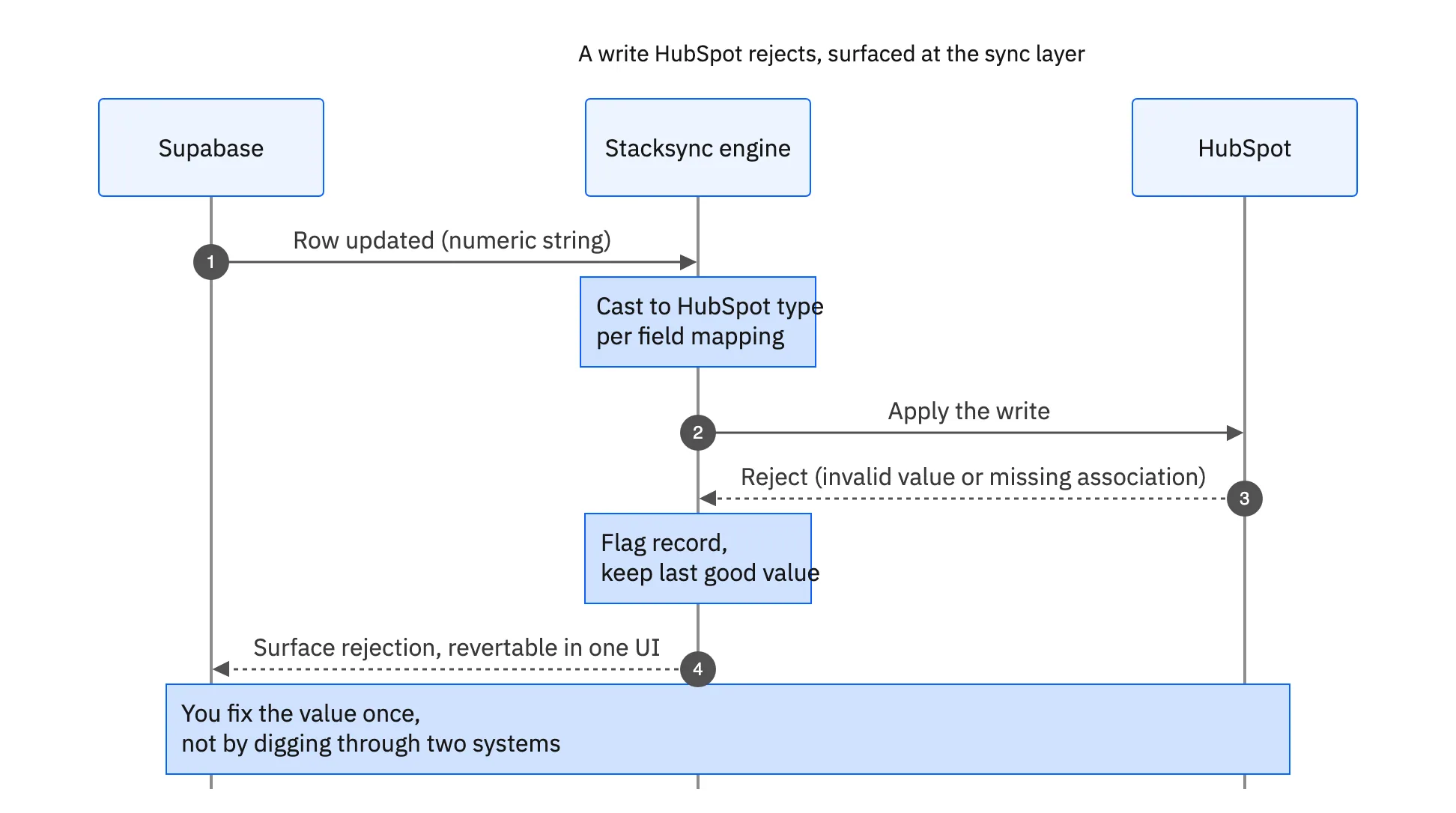
Two-way sync means writes go back into HubSpot, and HubSpot enforces its own rules. It will reject a write it considers invalid: a value out of range, a malformed field, or an association that does not exist. The question is not whether rejections happen, they will, but where you find out about them.
The pattern you want is for the rejection to surface at the sync layer. The affected record is flagged, you can see what HubSpot refused and why, and you fix or revert the value from one place. The alternative, learning about it hours later by noticing a record has drifted and then reading HubSpot logs against the database to reconstruct what happened, is the failure mode that makes teams distrust a sync. Treat the sync UI as the control plane for reconciliation: it is where a bad write shows up and where you resolve it, instead of digging into HubSpot and Supabase separately.
Associations and reference fields
Some fields are not values at all; they are references. The associated company ID on a HubSpot contact is a link to another record, and HubSpot validates it. You cannot write an arbitrary ID into it and expect it to hold. In a multi-system sync, this is a place people get surprised: changing an association value deep in the chain, two hops away from HubSpot, produces a write that HubSpot rejects because the target does not exist or is not permitted.
Handled well, the sync treats the association as the validated link it is. If a change points at a missing or disallowed company, the rejection is surfaced with the record flagged, so you correct the reference rather than silently storing a broken pointer. This is the difference between a sync that keeps your graph of records intact and one that lets a stray edit quietly detach a contact from its company.

A reliable field-mapping checklist
For a HubSpot to Supabase sync you can trust, work through each field once:
- 01Identify the type on both sidesNote the HubSpot property type and the Supabase column type for every field you sync, so mismatches are visible before they cause a failed write.
- 02Set the conversionMap the cast explicitly: numeric strings to integers, enumerations to your column values, datetimes parsed with timezone, booleans normalized.
- 03Decide null and default behaviorChoose what happens when a source value is empty, so a blank in HubSpot does not overwrite a real value in Supabase or violate a not-null column.
- 04Pin the match keyUse a stable identifier as the match key so updates land on the same record instead of duplicating, in both directions.
- 05Test a rejected write on purposePush a value HubSpot will refuse and confirm it surfaces at the sync layer, flagged and revertable, before you rely on the sync.
Do this and the sync stops being a black box. Every field has a defined behavior, and every failure has a place it shows up.
Bringing it together
Data-type reconciliation is the quiet make-or-break of a HubSpot to Supabase sync. Per-field mapping with explicit casts handles the string-versus-integer problem, per-hop mapping keeps types correct across chains like HubSpot to Airtable to Supabase, associations are treated as validated links, and rejected writes surface at the sync layer where you can revert them. That is what makes a two-way sync trustworthy instead of a slow way to corrupt data.
For the surrounding decisions, see how a real-time sync layer compares to HubSpot's native Data Sync, how teams use Supabase as their HubSpot data layer, and the quick setup steps. To map your own HubSpot properties onto Supabase columns on real data, see the HubSpot and Supabase integration or book a demo.

FAQ
Frequently asked questions










Explore these integrations and topics
- connectorHubSpot integrations
- connectorSupabase integrations
- platformCRM synchronization
- platformDatabase synchronization
- platformIntegration architecture
- CRM synchronization guidesConnect customer records across sales, marketing, and operational systems.
- Database synchronization guidesWork through database change capture, application writes, and reliable record reconciliation.
- Integration architecture guidesEvaluate integration methods and design for conflicts, retries, failures, and changing schemas.
Related articles





