






















Integration Consulting: How to Turn One-Off Projects Into Recurring Revenue
Turn one-off integration projects into recurring revenue with managed two-way sync. Here is how to price it and what to require.
About the author

Devin Archer
Head of Partnerships
Devin Archer is Head of Partnerships at Stacksync, where he runs the partner program for referral, reseller and OEM partners. He works with consultants, agencies and technology vendors on how to sell and deliver real-time two-way sync. Based in Vail, Colorado.
Key takeaways
- Split each engagement into a fixed-fee project and a monthly managed integration service.
- One-off builds (custom code, iPaaS recipes, CSV jobs) leave an unbillable maintenance tail after go-live.
- A managed two-way sync layer moves the work after go-live from repair to review, which is what a retainer sells.
- Price the project and the retainer separately, and tie the retainer to what you promise, not to hours.
- Start with two or three clients you already support informally.
How can an integration consultant build recurring revenue?
An integration consultant builds recurring revenue by splitting each engagement in two: a fixed-fee project for onboarding and mapping design, and a monthly managed integration service for everything after go-live, meaning monitoring, schema-change handling, new-object requests and error triage. That only works when the integration underneath runs on a managed two-way sync layer, because custom code and per-client recipes turn the same monitoring into unbillable firefighting.
Most integration consulting is still sold as a project. A Salesforce, NetSuite or HubSpot consultancy scopes the build, delivers it, and moves on to the next client, while the client's systems keep changing underneath the integration. Salesforce has retired legacy API versions, NetSuite is removing SOAP web services by its 2028.2 release, and HubSpot enforces API rate limits. The person who built it is the person the client calls when it breaks, and there is rarely a contract that covers the call. This guide is for integration consultants, ERP and CRM consultancies and agencies who want to turn that tail into predictable work. It covers how to structure the offer, how to price it, what to require from a sync platform, and which Stacksync partner track fits.
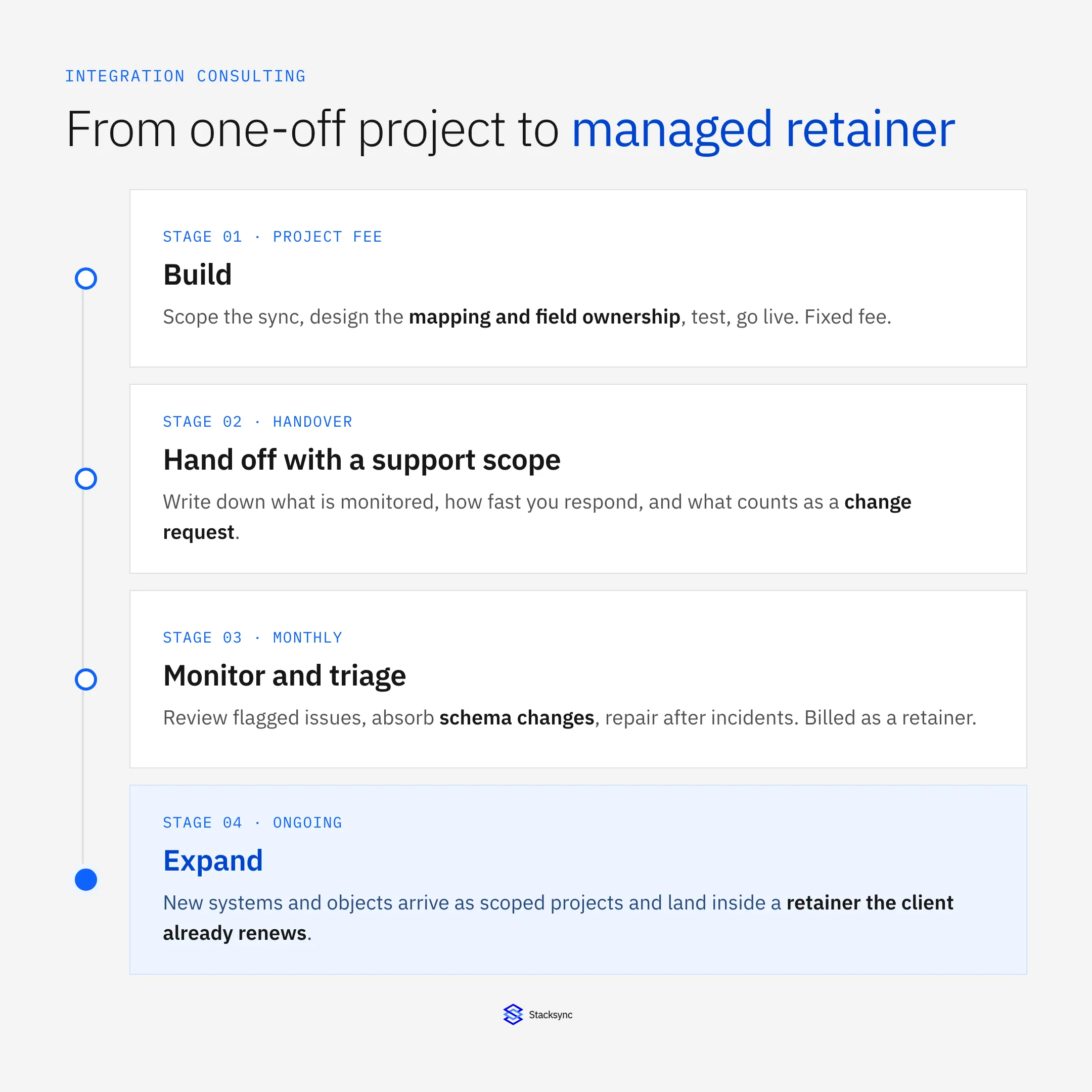
The path in one line: build it as a project, hand it off with a written support scope, monitor it on a schedule, then expand it as the client's stack grows. The sections below take each step in turn. If you already know you want to offer this, the Stacksync partner program is where to start.
Why do one-off integration projects leave you with an unbillable tail?
Because the project ends on a date and the integration does not. Three build styles account for most of what integration consultants deliver, and each leaves a different kind of tail.
- Custom API code. Full control, and you own it. When a vendor changes an endpoint, retires a field or rotates an auth scheme, the fix is code that only you understand. The client sees a broken sync and calls the author.
- iPaaS recipes. Fast to assemble and easy to demo. Each recipe is one trigger and one action, so a client with twenty objects ends up with dozens of recipes to keep consistent, and a change in one system means editing several of them. Recipes that poll on a schedule also fail quietly between runs.
- CSV and ETL jobs. Cheap to start and one-directional by design. They move data on a schedule, so anything either system changed since the last run is stale, and reconciling the two sides becomes a recurring manual chore.
The pattern is the same in all three. The work after go-live is real, it arrives at unpredictable times, and it lands on the consultant with no line item to bill it against. Some consultants absorb it as goodwill and lose the margin on the next project. Others bill it by the hour, ad hoc, which clients resent because they feel they are paying to repair something that should have worked. Neither is a business model. Build vs buy for CRM sync covers the same maintenance curve from the client's side, and the HubSpot maintenance burden shows how it looks on one system.
What is a managed integration service?
A managed integration service is a recurring engagement in which you run an integration for a client after it goes live. You watch it, fix what breaks, absorb the changes the connected systems make, and handle small extensions, for a predictable monthly fee. The client is buying an outcome, that their CRM and ERP keep agreeing with each other, rather than a number of hours.
It works best as three revenue layers stacked on one client, and the layers need different pricing.
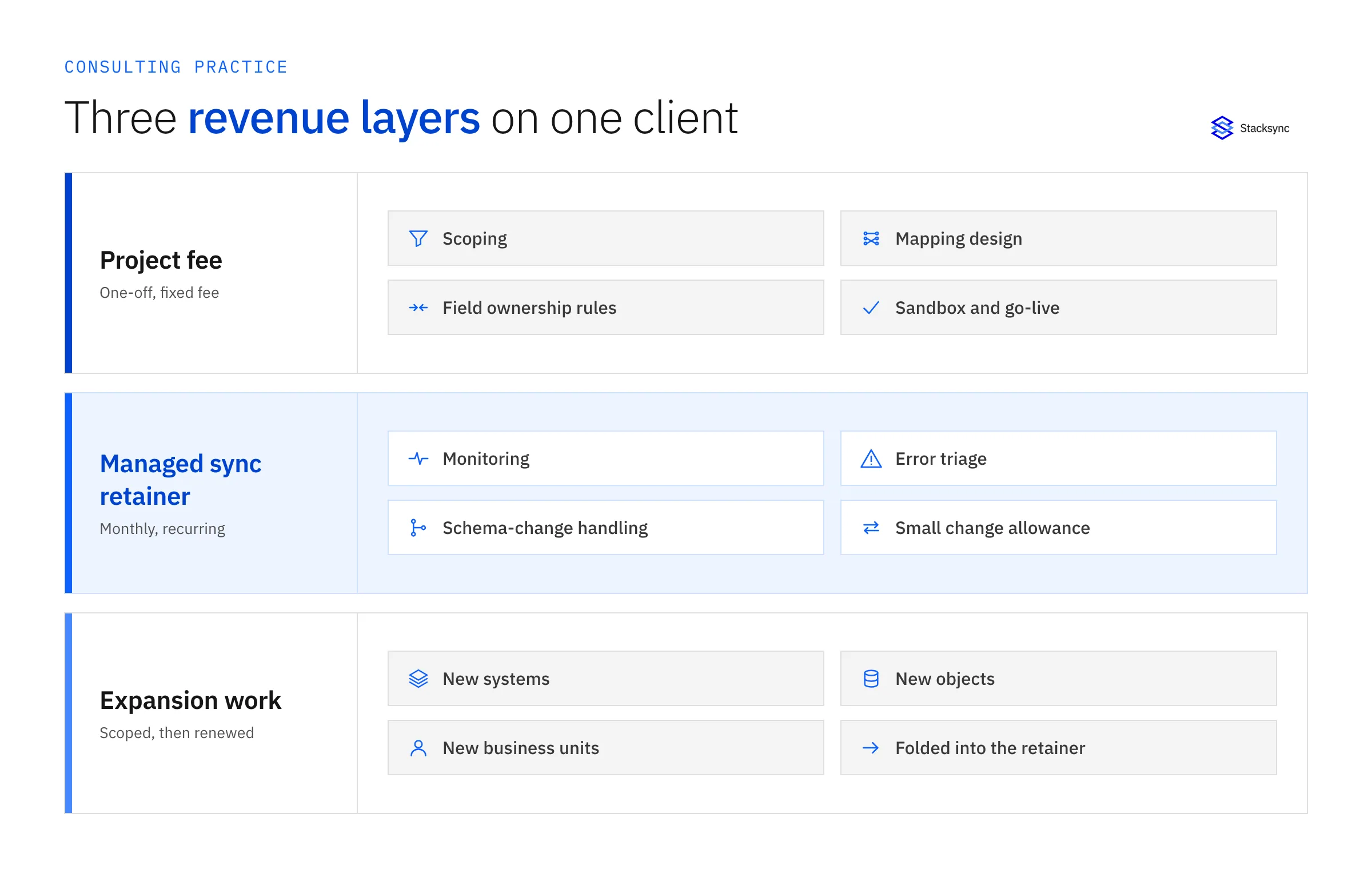
- Project fee (one-off). Scoping, mapping design, field ownership rules, sandbox testing and go-live. Fixed fee, because the scope is knowable.
- Managed sync retainer (monthly). Monitoring, error triage, schema-change handling, repair after incidents, and a small allowance of new fields or objects. Priced on what you promise, meaning what you watch and how fast you respond, rather than on hours.
- Expansion work (project again). A new system, a new business unit, a new object family. Each one starts as a scoped project and ends up inside the retainer.
The retainer is the layer that changes the economics. A project has to be sold again every time. A retainer renews, and each expansion project lands on a client who already trusts you with the run.
How does a managed two-way sync layer change the maintenance work?
A managed two-way sync platform absorbs the plumbing: change detection, retries, rate-limit handling, connector upkeep and the write path in both directions. What is left for you is the part clients actually pay a consultant for, which is judgement. Which system owns which field, what happens when both sides change the same record, and whether a new custom object should sync at all.
That moves the work after go-live from repair to review. Most weeks it is a scan of what the platform flagged, a decision on the items that need a person, and a short note to the client. The engagement lifecycle below shows where each piece lands. The loop between monitoring and the three things that can change is the recurring part, and it is the part you price.
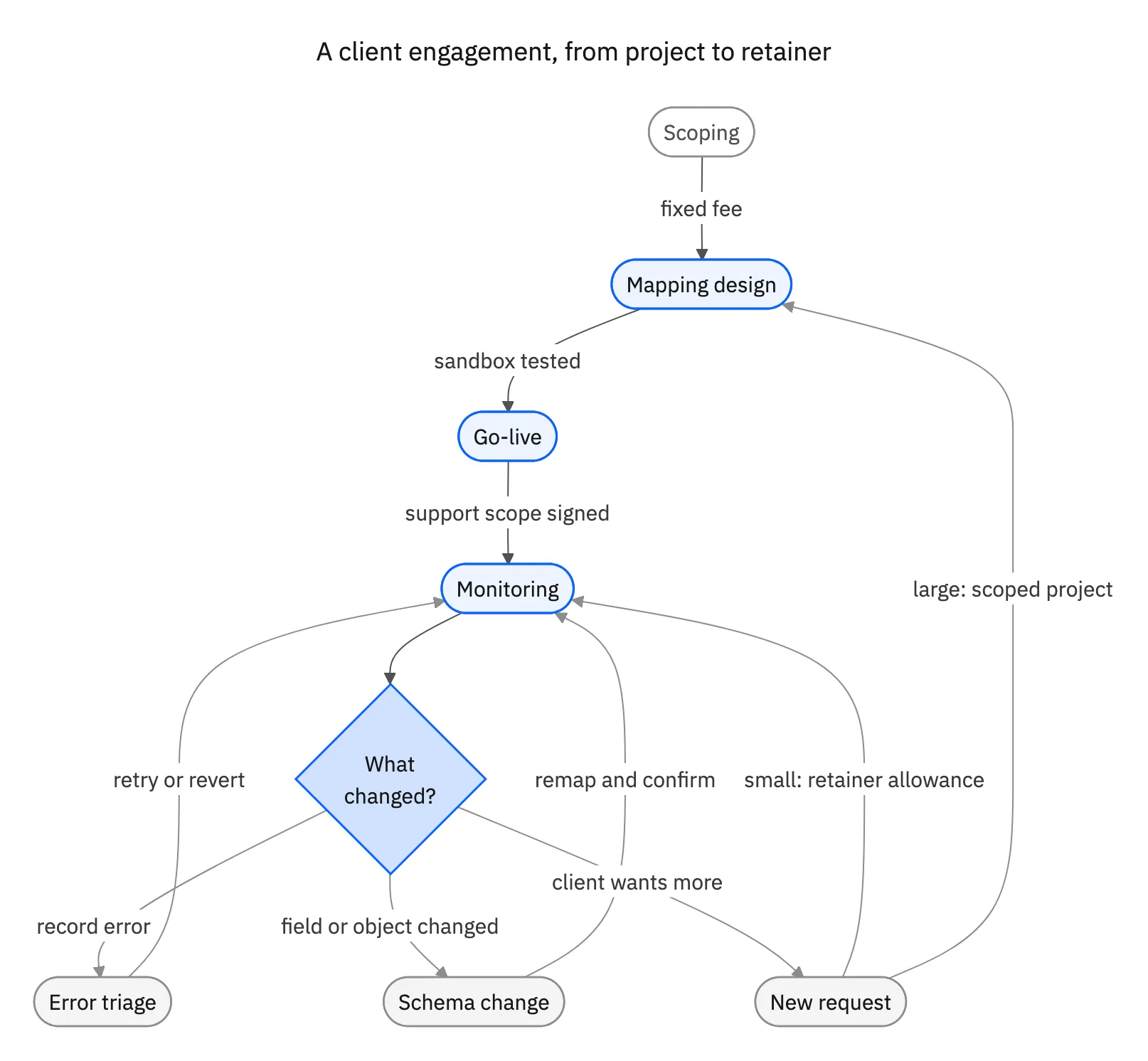
Be precise with clients about what the platform does and does not do. The Stacksync Issues dashboard, for example, documents three actions: retry to sync, which reads the source record's latest values and attempts the write again, revert change, and ignore issue, plus bulk resolution. That is current-state repair rather than a replay of an old event, so a good runbook still includes checking both records before choosing an action. The two-way sync error handling guide walks through that procedure. Schema changes are the other recurring event, and how Stacksync manages schema changes explains what happens when a field is added or renamed. Both belong in the written scope of a retainer.
Custom code, iPaaS recipes or managed two-way sync: which one supports a retainer?
The three ways consultants usually build an integration, compared on the axes that decide whether the work after go-live can be sold.
| Custom-code integration | iPaaS recipes | Managed two-way sync (Stacksync) | |
|---|---|---|---|
| Build effort | High: code, tests, hosting and deployment | Medium: one recipe per trigger and action, growing with the number of objects | Lower: connect the systems, map objects and fields, set field ownership |
| Direction | Whatever you write, often one-way or scheduled | One recipe per direction, per object | Two-way, real time, in one sync |
| Who maintains it | You, in code only you know | You, recipe by recipe | The platform runs the connectors; you review mappings and issues |
| Typical failure mode | Silent breakage after a vendor API change | Missed runs and partial failures between polls | Record-level issues surfaced in a dashboard for triage |
| Recurring-revenue potential | Real, but unscoped: the tail is hard to price | Limited: per-recipe upkeep is hard to bound | High: upkeep is bounded, so it can be a fixed monthly fee |
| Best fit | Bespoke logic no platform covers | One-off event-style automations | Record-level agreement between CRM, ERP and databases |
Custom code is still the right call for logic no platform covers, and recipes are the right call for a single automation. The point is not that the first two are wrong. It is that only the third makes the work after go-live small enough, and uniform enough across clients, to sell at a fixed monthly price.
How do you price integration work?
Price the project and the retainer separately, and tie the retainer to what you promise rather than to the hours you happen to spend. Three pricing models are common, and they combine.
- Fixed-fee project plus monthly managed-sync retainer. The default. The project fee covers scoping through go-live. The retainer covers a named set of syncs, monitoring, a response commitment and a small change allowance. Easy for the client to budget and easy for you to renew.
- Per-connector or per-client tiers. A retainer that scales with how many systems and objects you run for a client, for example a base tier for one system pair and add-ons for more. Price follows the surface you are responsible for, and expansion becomes a natural upsell. It suits consultants who run many similar clients.
- Hourly retainer. A block of hours per month. Simple to sell and the least predictable for you: it rewards slow fixes, and clients ask what the hours were spent on. Use it for the change-request allowance, not for monitoring.
Whichever you choose, write down four things: what is monitored, how quickly you respond to an issue, what counts as a normal change request and what is out of scope, and how the client's Stacksync subscription is billed. Under the reseller track you transact Stacksync for your customer and earn structured margin, so the platform cost can sit inside your monthly fee. Under the referral track Stacksync closes the deal and you bill your services alongside. This post does not put dollar figures on any of it, because the right numbers depend on your market and your client's stack, and a benchmark quoted without a source deserves suspicion.
What should you require from a sync platform before you build a practice on it?
A retainer makes you accountable for the platform's behavior, so test it before you sell on it. Six things to require, all checkable in a trial or sandbox.
- Error visibility and replay. Every failed record should be visible with its error, and you should be able to retry or revert it without opening a ticket. Ask exactly what retry does: re-read current values, or resend the original event. Those are different operations with different risks.
- Multi-client isolation. Each client's credentials, mappings and data should sit apart from the others, so one client's change or incident cannot touch another, and so you can hand a client's setup over if the relationship ends.
- Connector coverage for your stack. Check the systems you actually sell: Salesforce, NetSuite, HubSpot and the databases your clients run. Every gap is a place where custom code creeps back in.
- A sandbox. You need somewhere to build and test mappings without touching production, and somewhere to run demos and proofs of concept. Stacksync gives partners a dedicated sandbox environment.
- A support path. When a sync issue is the platform's problem, you need a route to a person who can fix it and a sense of the response time. Your retainer promise can only be as good as the vendor's.
- Partner terms. Confirm you keep the services revenue, that registered deals are protected, and that the vendor does not compete with you on services. At Stacksync every track keeps 100% of services and implementation revenue, Stacksync does not compete with partners on services, and deal registration in the Partner Portal protects registered opportunities.

Which Stacksync partner track fits an integration consultant?
Stacksync has three partner tracks: Referral, Reseller and OEM. All three keep 100% of your services and implementation revenue. The difference is who owns the commercial relationship. These are the same three models described in channel partner types explained.
- Referral. You introduce the opportunity and Stacksync closes it. You earn a referral fee on the initial contract, with no quota and no commitment. It suits advisers and small consultancies that recommend tools and deliver services, and it is the low-risk way to test whether clients want the retainer. See the referral track.
- Reseller. You own the commercial relationship, transact Stacksync for your customers and earn structured margin. Your delivery people go through the Partner Academy, which has Foundation (free and self-paced), Implementation Specialist and Solution Architect tracks. It suits consultancies that already implement and support CRM, ERP or database platforms and want to run the managed service as their own. See the reseller track.
- OEM. You license Stacksync under your own brand to build a vertical practice or product, such as healthcare, financial services or construction. See the OEM track.
Onboarding takes about two weeks, and the time from kickoff to first deal is typically four to eight weeks. You can start as a referral partner and move to reseller as your Stacksync practice grows. To see who is already in the program, browse the partner directory. If you would rather rebrand than resell, how white-label and OEM licensing compares is worth reading first.
Atypical Tech is a reseller partner that runs this kind of practice. It describes itself as an ERP integration and automation firm connecting NetSuite and Dynamics, powered by Stacksync real-time two-way sync, and its partner profile says the team stays with clients after launch, monitoring, tuning and improving integrations as needs evolve. Its Chief Executive Officer, Bruno Galo dal Maso, frames the opportunity this way: New to the model? Start with what a value-added reseller is.
"If your data is a mess, AI is only going to automate your mistakes. Everyone wants the magic of AI automation right now, but if your CRM is outdated and your ERP isn't connected, no tool can save you. AI is just the engine. Your data is the fuel."
How do you move an existing client from project to retainer?
Start with clients you already support informally, because the conversation is already happening. Four steps turn it into a contract.
- Pick two or three clients. Choose the ones who already call you when their integration misbehaves. The retainer only puts a scope around work you are doing anyway.
- Write down what you actually did. List the fixes, field requests and manual checks from the last few months. That list becomes the scope of the first retainer, and it shows the client what they were getting for free.
- Move one integration onto the sync layer. Build the mapping in a sandbox, test it against production-sized data, then cut over. The migration is a project, so bill it as one.
- Offer the retainer at handover. Attach the support scope from the previous section, and register the deal in the Partner Portal so the opportunity is protected.
Become a Stacksync partner
If your practice sells integration projects today, the fastest way to test the retainer model is to put the run layer on a platform built for it. Become a Stacksync partner: apply as a referral partner to start with no quota, or as a reseller to own the client relationship and the managed service. The application takes about two minutes, and the partnerships team replies within two business days.

FAQ
Frequently asked questions









Related articles



PARTNER PROGRAM
Become a Stacksync partner
Build and sell real-time two-way sync as an extension of our team. Get certification, deal protection, co-marketing and the technical resources to grow a high-margin practice.


