






















Why Zapier, Make, and n8n Fall Short for eClinicalWorks Integration
Healthcare buyers evaluating eClinicalWorks integration ask three things: is it HIPAA compliant, do I need a database in the middle, and why not just use Zapier, Make, or n8n. This guide answers all three.
- Author
- Ruben Burdin · Founder & CEO
- Published
- Read time
- 8 min read

When a healthcare team decides to connect eClinicalWorks to another system, reaching for a general automation tool like Zapier, Make, or n8n looks like the obvious first move. They are familiar, quick to start, and cheap to trial. But eClinicalWorks holds protected health information (PHI), and a regulated EHR changes the math. The same three questions come up in almost every evaluation.
Is the eClinicalWorks connector HIPAA compliant? Do you need a database in the middle, or can it go direct? And why not just use Zapier, Make, or n8n? This guide answers all three in order, because the answers are related: the reasons a generic automation tool falls short for eClinicalWorks are the same reasons compliance and architecture matter here in the first place.
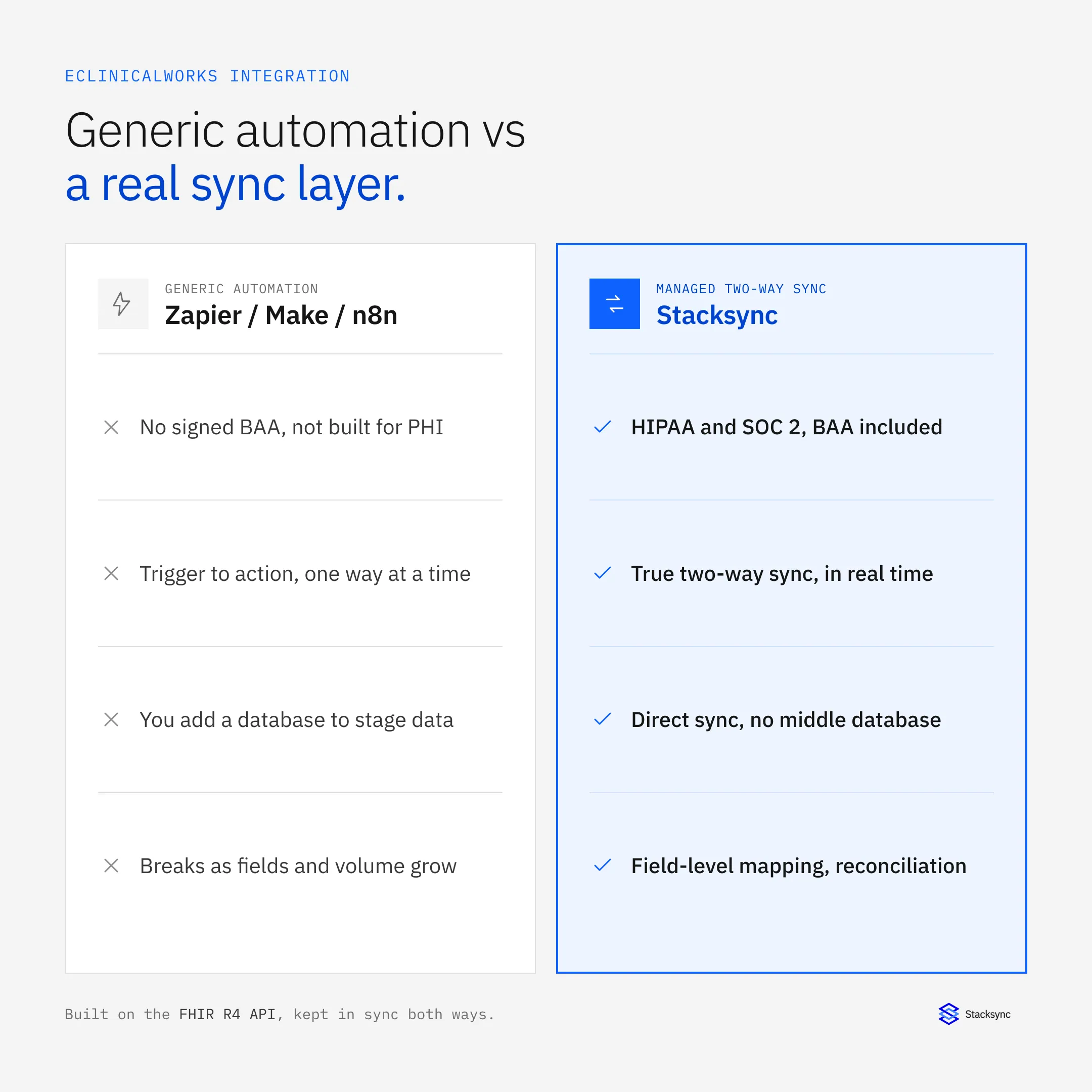
The short version: eClinicalWorks integration can absolutely be HIPAA compliant, it does not need a staging database when it is done right, and generic automation tools miss on both counts because they were never built to sync a regulated EHR both ways. Here is the detail behind each answer.
Is the eClinicalWorks connector HIPAA compliant?
Yes, an eClinicalWorks integration can be HIPAA compliant, but compliance is a property of the platform moving the data, not of eClinicalWorks alone. Any integration that touches patient records is handling PHI, so the platform in the middle has to be built for it.
Stacksync is SOC 2 certified and supports HIPAA, including signing a Business Associate Agreement (BAA). Data is encrypted in transit and at rest, access is scoped per user and per connection, and every sync is logged for audit. You can read more on the security page. The point that matters for the comparison ahead: a BAA is not a checkbox you can bolt onto a tool that was not designed for PHI.
The bigger lever you control is PHI minimization. Sync only the fields a destination genuinely needs. A marketing CRM rarely needs clinical notes, so you might send contact details and appointment status while keeping diagnoses and medications out of scope. Narrowing the data set reduces risk and shrinks the number of systems that ever hold sensitive records.
Do you need a database in the middle?
No. A common assumption is that connecting eClinicalWorks to a CRM or another app requires standing up a database in between to stage and join the data first. With a managed sync platform, you do not. Stacksync reads the eClinicalWorks FHIR API and writes clean, mapped records straight into the destination, then keeps both sides matched. The data flows directly, app to app.
The difference is easiest to see side by side. Generic automation tools have no memory of state, so teams end up adding a database to hold records, deduplicate, and reconcile between runs. That is a second system to run and a second place PHI lives. A purpose-built sync layer keeps that state itself, so there is no middle store to secure.
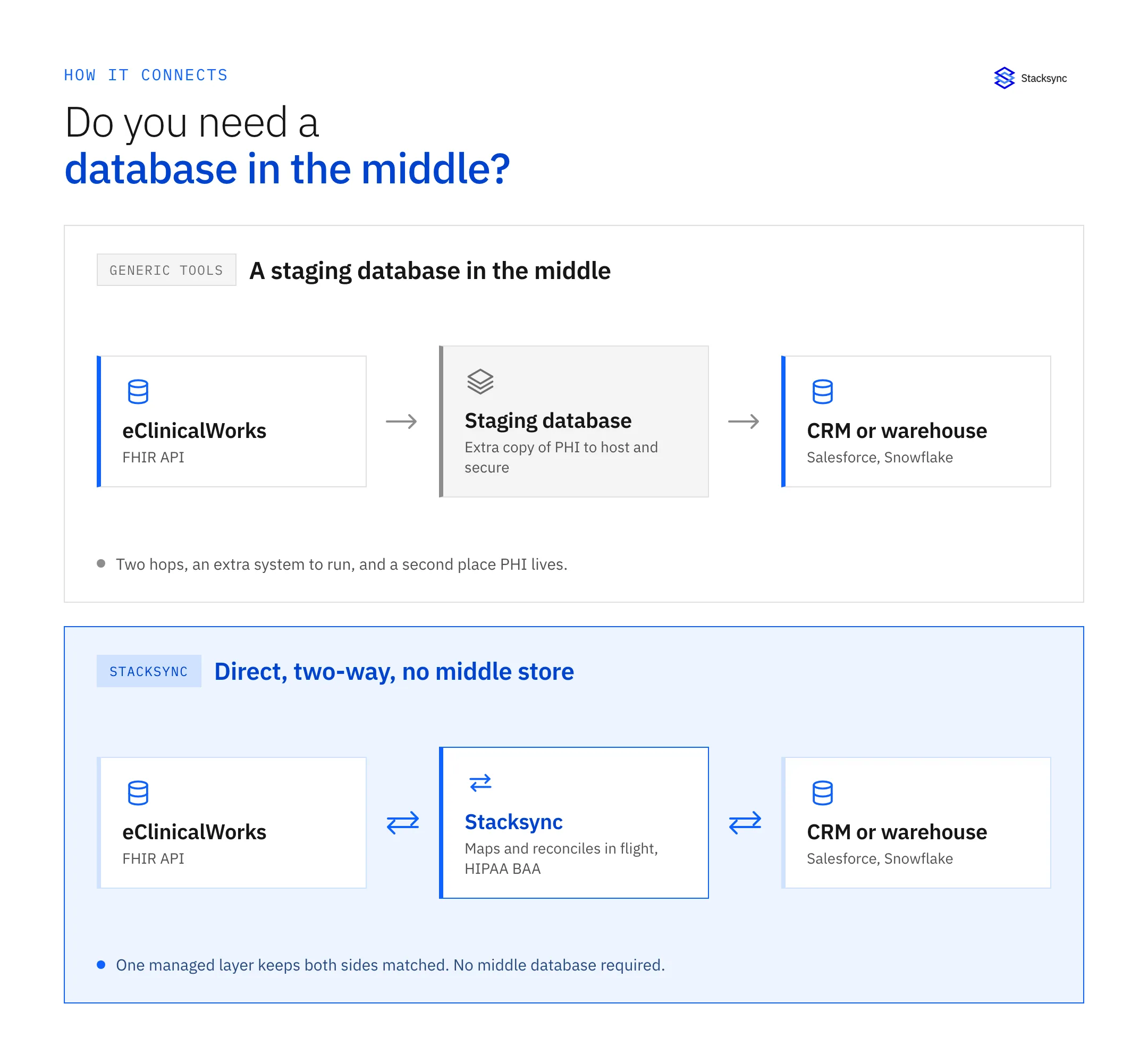
To be clear, there is one case where a database belongs in the picture: when the database itself is the destination. If you want eClinicalWorks data in PostgreSQL to back a custom patient app or internal reporting, Stacksync syncs it there and keeps it current. That is the database as a target you chose, not a staging layer you were forced to build to make the integration work at all.
Why Zapier, Make, and n8n fall short for eClinicalWorks
Zapier, Make, and n8n are genuinely good tools for what they were designed for: lightweight, event-driven automations between SaaS apps that do not carry PHI. Sending a Slack message when a form is submitted is a perfect fit. Keeping a regulated EHR in sync with your operational systems is not. Five gaps show up every time.
No maintained eClinicalWorks connector
None of these tools ship a native, maintained eClinicalWorks connector. To reach the data you hand-wire raw HTTP calls to the eClinicalWorks FHIR API with OAuth 2.0 (SMART on FHIR), then own the token refresh, pagination, and resource mapping yourself. That is integration code living inside a no-code tool, which is the worst of both worlds to maintain.
One direction at a time
Automations are trigger-to-action: one event fires one action, in one direction. Real two-way sync means a change on either side reaches the other, at the field level, without echoing back into a loop. Rebuilding that out of paired one-way zaps is where these setups quietly break, because there is no shared conflict policy when both sides change.
No reconciliation, so drift goes unnoticed
A managed sync layer continuously reconciles the two systems and surfaces mismatches. Trigger-based automations only act on the events they happen to catch. Miss an event, hit a rate limit, or change a field on one side, and the two systems drift apart with nothing watching for it. In healthcare, stale or mismatched records affect both care coordination and billing.
It gets brittle at scale
One or two automations are manageable. A dozen, each with its own filters, error handling, and staging database, is a maintenance problem with no single place to check whether patient data is actually consistent. The hidden cost is not the monthly bill, it is the drift and the debugging.
| Capability | Zapier / Make / n8n | Stacksync |
|---|---|---|
| HIPAA BAA for PHI | Limited or unavailable; PHI was never the design goal | Signed BAA, SOC 2, encryption, audit logs |
| eClinicalWorks support | Raw HTTP to the FHIR API, built and maintained by you | Managed FHIR connector, resources mapped for you |
| Sync direction | Trigger to action, one way per automation | Two-way, with per-field direction you set |
| Data in the middle | Add a database to stage, dedupe, and join records | Direct app to app, no middle database |
| Keeping records matched | No reconciliation; drift goes unnoticed | Built-in reconciliation and conflict rules |
| At scale | Automation count and edge cases balloon | One layer, repeatable mappings, monitoring |
Generic automation tools versus a managed sync layer for eClinicalWorks.

What Stacksync does instead
The Stacksync eClinicalWorks connector is one managed layer between eClinicalWorks and everything else. You connect eClinicalWorks once through its FHIR API, then keep records matched with your CRM, warehouse, or database in both directions in real time. When a record changes on either side, the change propagates within seconds, and conflicts resolve by rules you set rather than by whichever run happened last.
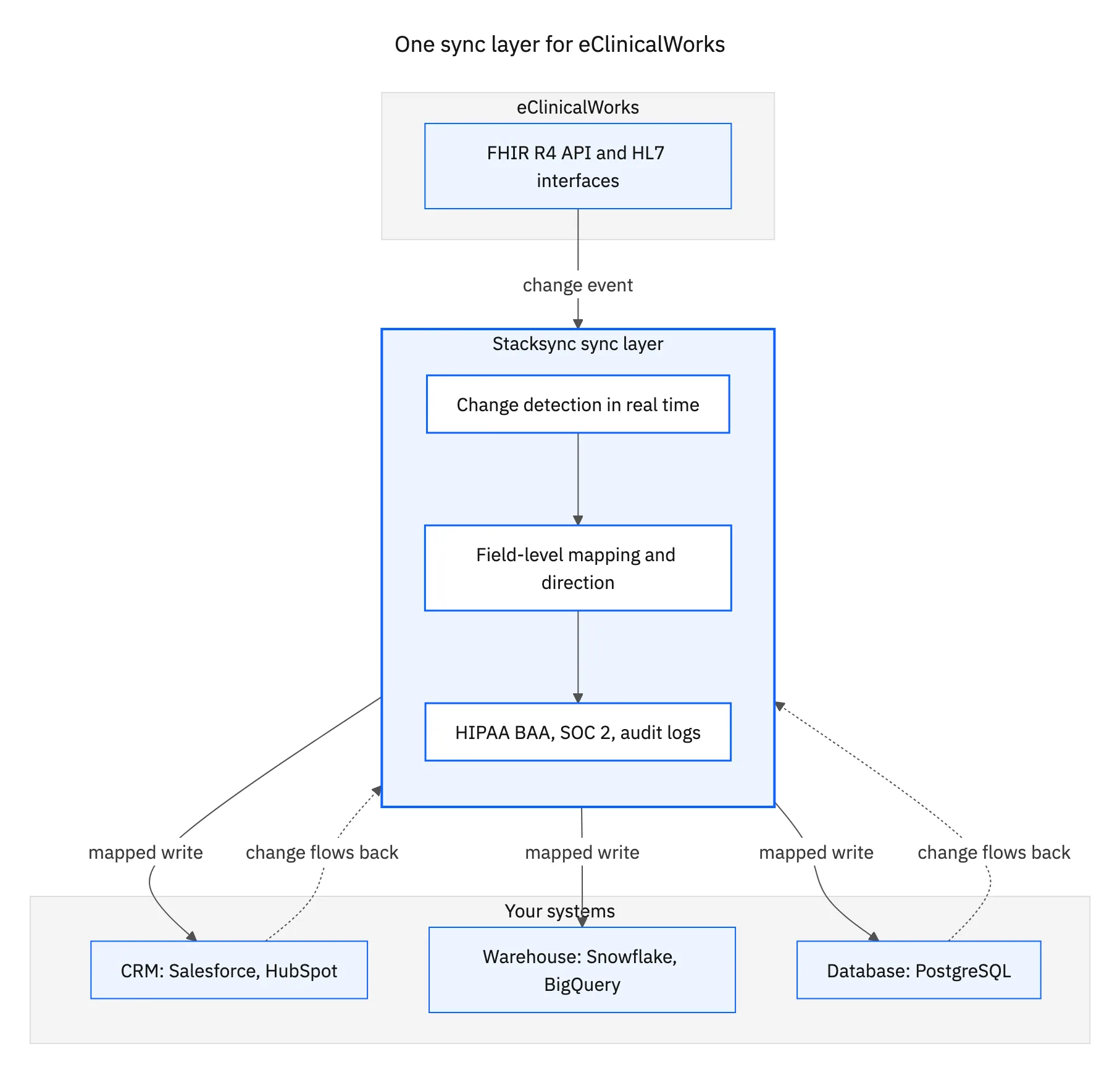
- A maintained FHIR connector, so you are not building and babysitting OAuth and resource mapping.
- Field-level mapping between eClinicalWorks FHIR resources and your target objects.
- Per-field sync direction, so you decide what stays read-only and what writes back where the API allows.
- Real-time change detection with built-in retries, reconciliation, and monitoring across every connected system.
- HIPAA support with a signed BAA, encryption, per-connection access, and audit logs.
Because one platform manages every connection, adding a second or third target does not mean building another integration from zero. For the highest-traffic pairs there are prebuilt connectors to start from: eClinicalWorks and Salesforce, eClinicalWorks and HubSpot, and eClinicalWorks and PostgreSQL. For the full picture of interfaces and targets, see the eClinicalWorks integrations guide.
Bringing it together
The three questions have clear answers. An eClinicalWorks integration is HIPAA compliant when the platform in the middle is built for PHI and signs a BAA. It does not need a database in the middle, because a managed sync layer keeps state itself and writes directly to the destination. And Zapier, Make, and n8n fall short not because they are bad tools, but because a regulated EHR needs compliance, two-way sync, and reconciliation that trigger-to-action automation was never meant to provide.
If you are weighing how to connect eClinicalWorks to your CRM, warehouse, or database, book a demo and we will map your first integration with you.

FAQ
Frequently asked questions










Explore these integrations and topics
Related articles





