






















Running Campfire and NetSuite Side by Side Without a Big-Bang Cutover
Most teams move to Campfire from NetSuite, and almost nobody can do it in one weekend. This guide compares the three ways to hold both ledgers in agreement while you migrate: a one-time export, a scheduled ETL job, and a real-time two-way sync. It covers what has to stay paired during coexistence, how conflicts get settled when both sides are still being edited, how the two APIs differ, and how to phase a cutover entity by entity so you keep a way back.
- Author
- Ruben Burdin · Founder & CEO
- Published
- Read time
- 10 min read

Almost every Campfire deployment starts the same way: a finance team has outgrown QuickBooks or has spent years fighting NetSuite, and they want a general ledger that closes continuously instead of monthly. The decision is usually easy. The move is not, because the ledger you are leaving is still the one recording revenue, and it will be for months.
So the real question is not how to migrate. It is how to keep two ledgers in agreement while both are being used. There are three answers in common use, and only one of them survives a multi-entity rollout. This guide compares them, then covers what to sync, how conflicts get settled, and how to phase the cutover so you always have a way back.
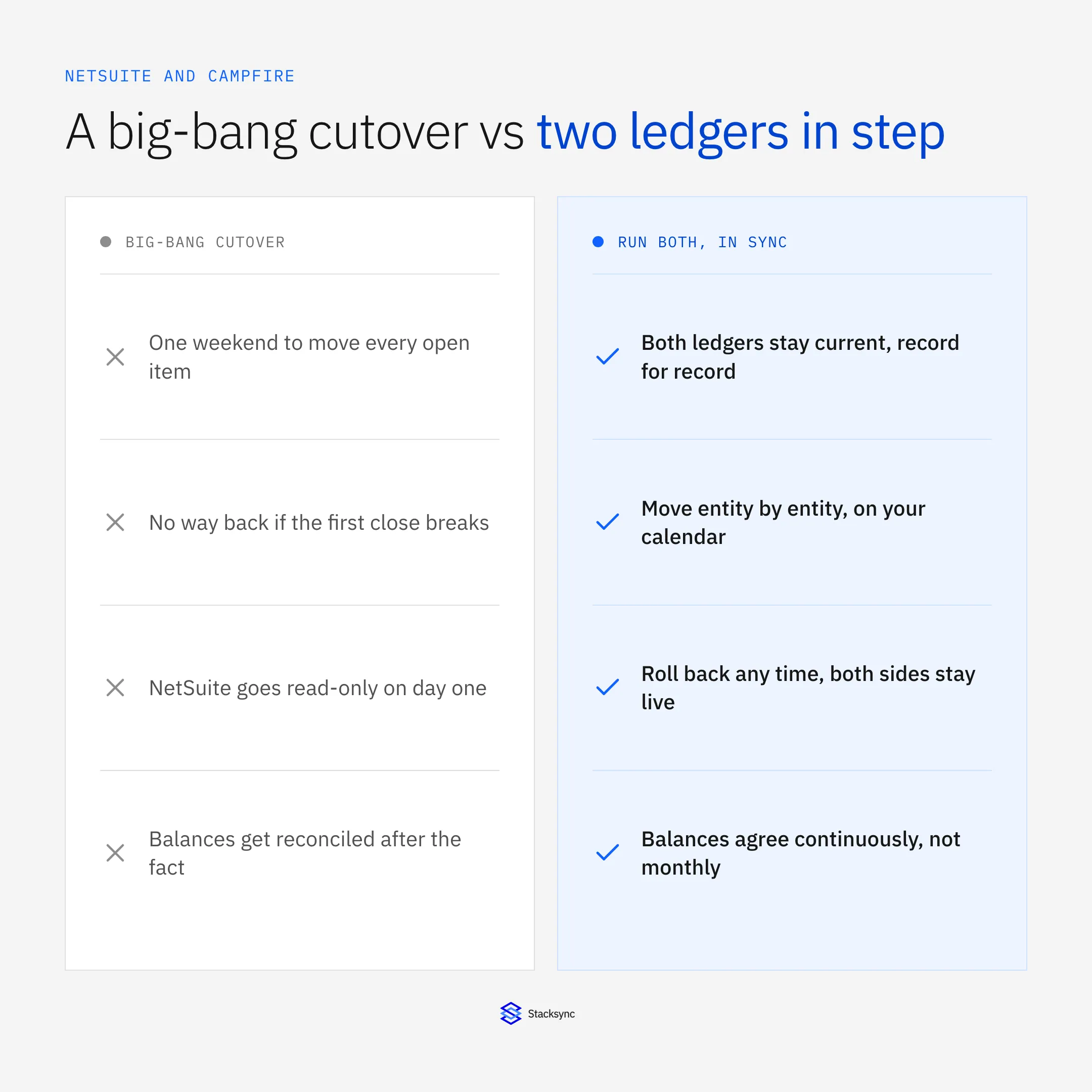
The pattern that works is coexistence: both systems stay live and in agreement, and you cut over one entity or one process at a time. That takes a sync, not an export.
Three ways to hold both ledgers together
Every team lands on one of these three, usually after trying the first one and discovering what it costs.
| One-time export | Scheduled ETL | Real-time two-way sync | |
|---|---|---|---|
| What it does | Copies data once at a point in time | Copies changed rows on a timer | Applies changes both ways as they happen |
| Direction | One way | Usually one way | Both ways |
| State between runs | Diverges immediately | Stale until the next run | Seconds behind |
| If both sides are edited | Not handled | Last run overwrites | Field-level conflict policy |
| Way back if the close breaks | None | Partial, and manual | Both ledgers stay live and current |
| Fits a phased cutover | No | Barely | Yes, entity by entity |
The three options, judged on what actually happens during a months-long overlap.
The one-time export is fine for closed historical periods that nobody edits. The scheduled job is fine for feeding a warehouse. Neither is a coexistence plan, because both assume one system is authoritative and the other is a copy, and during a migration that is exactly what is not true.
What a two-way sync actually keeps in agreement
A sync engine sits between the two ledgers and holds pairs of records together. It is not a queue of one-way copies in each direction, which is where most homegrown attempts fail. Each pair has an identity, a mapping, and a conflict policy, and every change is applied through that.
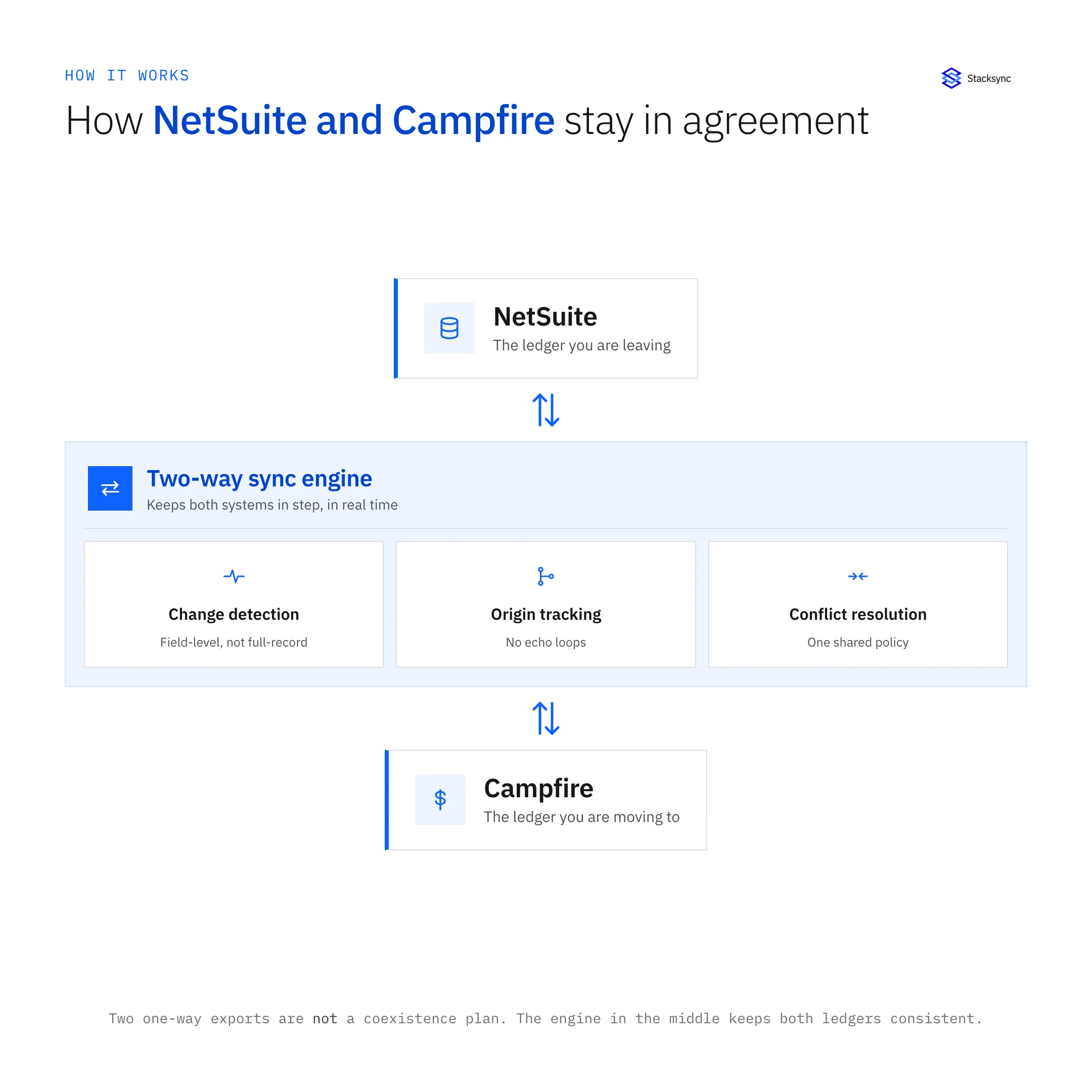
In practice the objects worth pairing are the ones both teams touch during the overlap: customers and vendors, open invoices and bills, payments and credit memos, and the entities, departments, and dimensions those hang off. Campfire exposes all of these through its REST API, including company objects and custom dimensions, so the mapping can follow your real chart of accounts rather than a lowest common denominator.
Closed periods are different. Nobody is editing a journal entry from two years ago, so a one-time backfill is the right tool. Syncing history continuously adds load with no benefit, and it is one of the main reasons migration syncs get a reputation for being slow.
Conflicts, ownership, and the switch date
During coexistence both ledgers are writable, so you need a rule for who wins. The rule that works is per field and per entity, anchored on a switch date: before the switch date for a given entity, NetSuite owns the posted numbers; after it, Campfire does. Reference data such as customers and vendors usually stays two-way the whole time, because both teams keep it current.
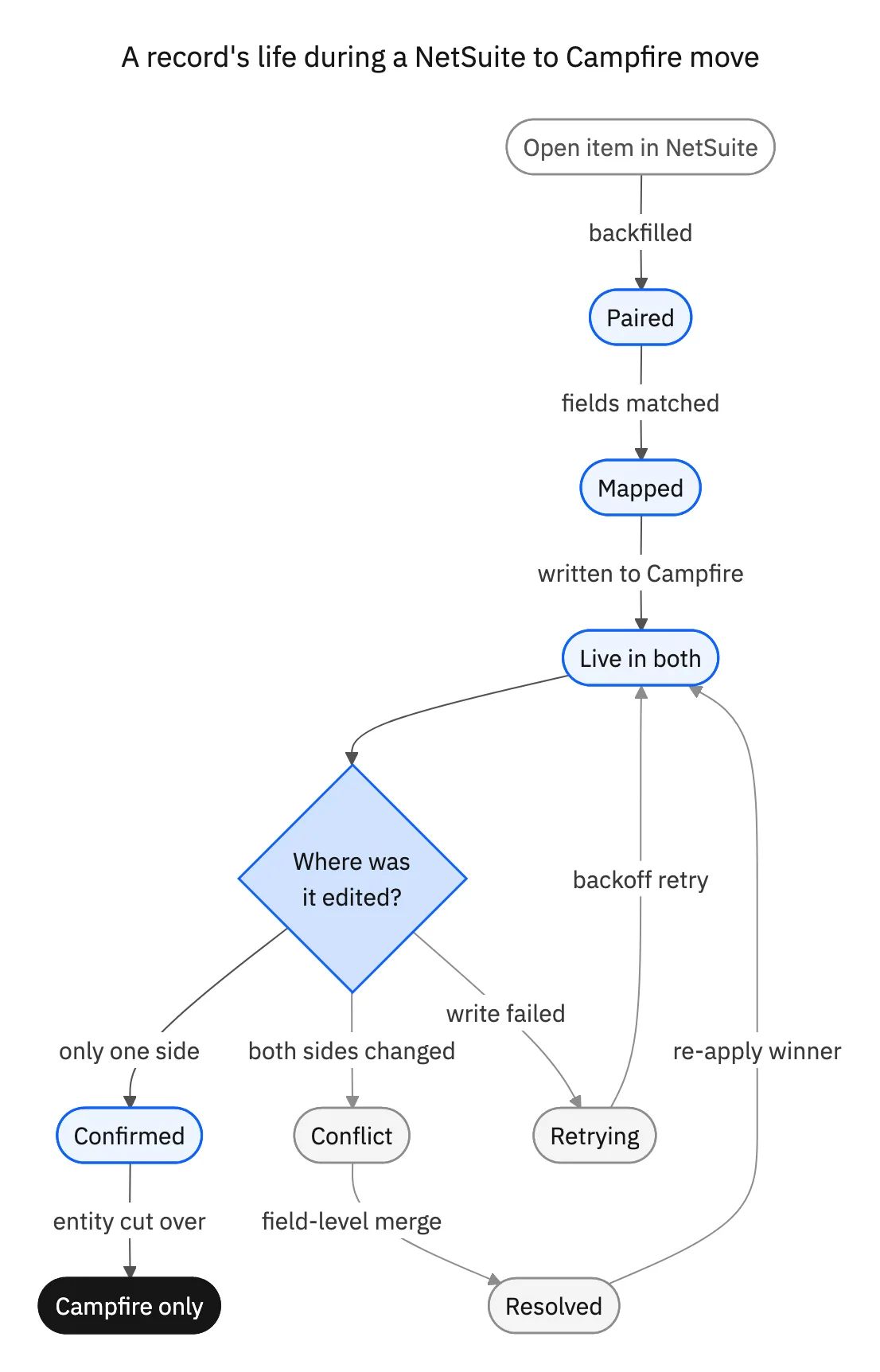
The engine also has to keep its own writes out of the change stream. When it pushes a customer update into Campfire, that write must not be read back as a fresh Campfire change and pushed into NetSuite again. Origin tracking is what prevents that, and it is the single feature most often missing from scripts built in-house.
The two APIs behave differently and the engine has to respect both. NetSuite is reached through SuiteTalk REST, SOAP, or SuiteQL under request governance, so the sync must move only changed fields and back off when it approaches a limit. Campfire supports webhooks plus last_modified_at filtering on its list endpoints, so changes there can be picked up the moment they are written. Our guide to NetSuite sync performance patterns goes deeper on the NetSuite side.

Phasing the cutover
With both ledgers in agreement, the cutover stops being an event and becomes a sequence. A workable order looks like this.
- Backfill history into Campfire as a one-time load, and reconcile the opening balances before anything else.
- Turn on the two-way sync for reference data and open transactions, and let it run for a couple of weeks while nothing changes operationally.
- Cut over one entity, ideally a small one. Post its transactions in Campfire, let the sync mirror them into NetSuite for reporting continuity, and run a full close in the new system.
- Repeat entity by entity, keeping the sync live so any entity can be rolled back without a restore.
- Switch NetSuite to read-only once the last entity is on Campfire and one audit has been completed, then retire the sync.
The point of the sequence is that at no stage is there a day where the only copy of a live number lives in a system nobody has closed in yet. If you are still weighing the platforms themselves, our ERP comparison covers how the incumbents differ.
Coexistence beats a cutover weekend
Moving from NetSuite to Campfire is not really a data transfer problem. It is a months-long period where two ledgers are both true, and the tool that fits that is a two-way sync, not an export. Get the pairing, the conflict policy, and the switch dates right, and the migration becomes a series of small reversible steps.
Stacksync keeps NetSuite and Campfire in agreement record for record, in real time and in both directions, with field-level conflict resolution and an audit log for every decision. To see it against your own entities, book a demo, or read how the same engine handles Campfire and Snowflake.

FAQ
Frequently asked questions










Related articles






