






















Top PostgreSQL-Salesforce Synchronization Platforms for Mid-Size Companies
Compare 6 PostgreSQL-to-Salesforce integration tools, real-time vs batch, bi-directional vs one-way, and how each avoids Salesforce API limits.
- Author
- Alexis Favre · Co-Founder & CTO
- Published
- Updated
- Read time
- 8 min read

For mid-sized companies juggling data between PostgreSQL databases and Salesforce CRM, finding the right synchronization solution can make the difference between consistent operations and constant data headaches. With numerous options on the market, it can be challenging to determine which platform best meets your specific needs while providing enterprise-grade reliability without enterprise-level complexity.
In this guide, we'll explore the best database synchronization platforms specifically for PostgreSQL-to-Salesforce integration, with a focus on solutions that work well for mid-market organizations.
Why PostgreSQL to Salesforce Integration Matters
Before diving into platform recommendations, let's understand why this specific integration is so crucial for many organizations:
- PostgreSQL is a powerful, open-source relational database that many companies use for their operational systems, applications, and data warehousing needs
- Salesforce remains the dominant CRM platform, housing critical customer data, sales pipelines, and marketing information
- Bi-directional synchronization ensures both systems contain up-to-date information, eliminating disconnected systems and manual updates
When these systems remain disconnected, organizations face significant challenges:
- Sales teams work with outdated customer information
- Engineers spend excessive time building and maintaining custom integrations
- Analytics and reporting become fragmented and unreliable
- Customer experience suffers from inconsistent data across touchpoints
Key Considerations for PostgreSQL-Salesforce Sync Platforms
When evaluating synchronization platforms for these specific systems, mid-sized companies should prioritize:
- 01Real-time capabilities: How quickly do changes propagate between systems?
- 02Bi-directional support: Does it sync both ways, or just one direction?
- 03Schema handling: How well does it handle PostgreSQL's relational structure and Salesforce's object model?
- 04Setup complexity: Can it be implemented without extensive engineering resources?
- 05Maintenance requirements: What ongoing overhead will it create for your team?
- 06Scalability: Will it handle your data volume as you grow?
- 07Security and compliance: Does it meet your regulatory requirements?
- 08Cost structure: Is pricing transparent and predictable as usage increases?
Avoiding Salesforce API Limits When Syncing to PostgreSQL
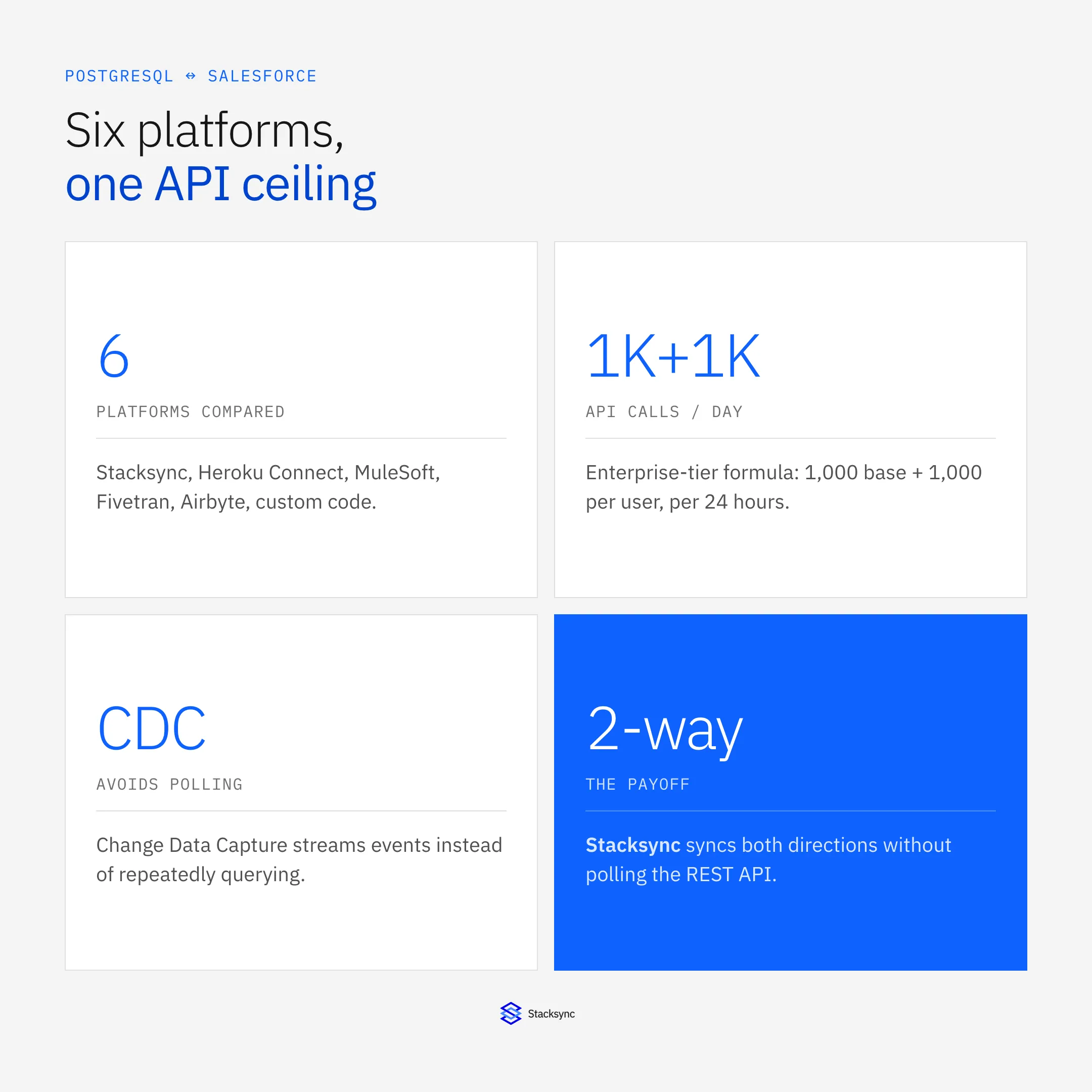
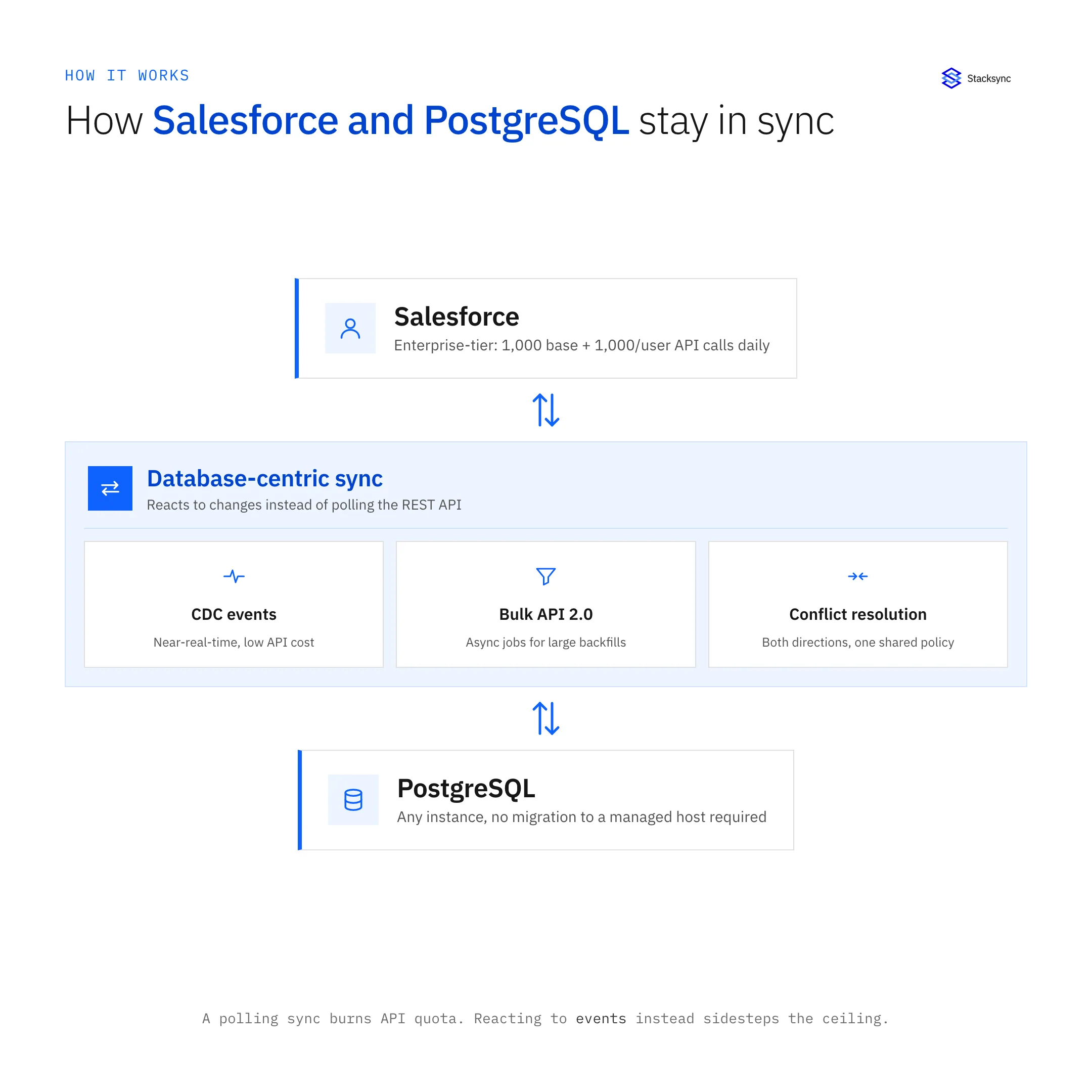
Whichever platform you pick, the ceiling you will eventually hit is Salesforce's API allocation. Enterprise, Unlimited, and Performance editions get 1,000 base calls plus 1,000 per user, per day, while a free Developer Edition gets 15,000. A naive polling sync that checks every object every few minutes burns through that quota fast on any org with real data volume. Three approaches handle this differently:
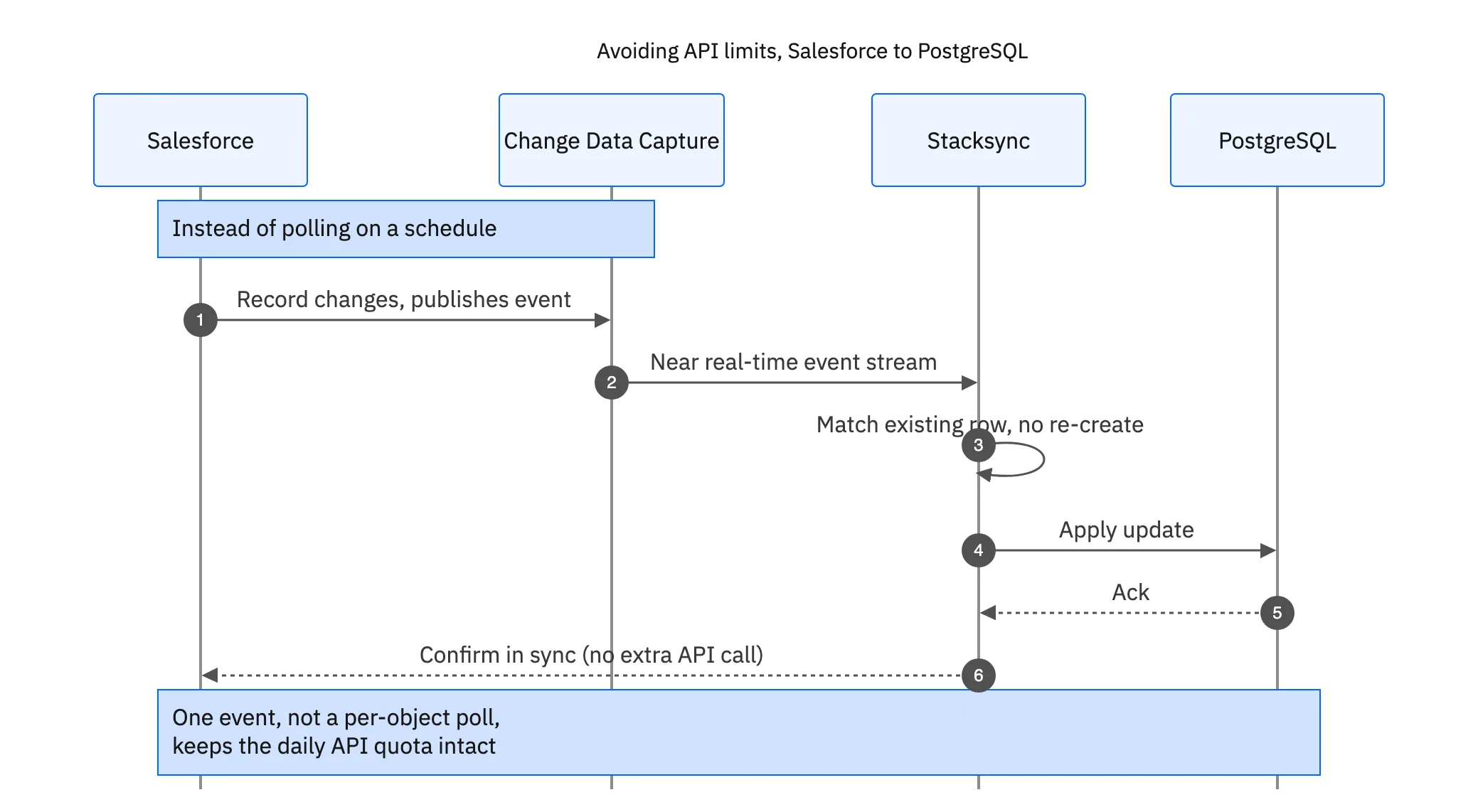
- Change Data Capture (CDC): Salesforce publishes an event stream of every record change as it happens, so a consumer gets near-real-time updates without repeatedly polling for what changed. This is far cheaper on API quota than scheduled REST queries.
- Bulk API 2.0: for large one-time loads or backfills, asynchronous bulk jobs move data outside the normal REST API limits, at the cost of being batch, not real-time, since you submit a job and poll for completion.
- Database-centric sync (Stacksync's approach): rather than polling the Salesforce REST API on a schedule, an event-driven, database-centric architecture reacts to changes as they occur, which sidesteps the calls-per-object-per-poll math entirely.
ACERTUS, a vehicle logistics company syncing shipment data to PostgreSQL, was hitting Salesforce API limits daily under a polling-based sync. Moving to a database-centric, event-driven sync removed the API-quota ceiling as a constraint on how often data could move.
Top 6 PostgreSQL-Salesforce Synchronization Platforms
1. Stacksync
Ideal for: Mid-size companies needing true real-time, bi-directional sync with minimal maintenance
Key strengths:
- built specifically for bi-directional synchronization between databases and CRMs
- Sub-second latency for real-time data consistency
- No-code setup with automatic field mapping
- Sophisticated conflict resolution for bi-directional updates
- Record-based pricing model for predictable costs as you scale
Limitations:
- Newer platform compared to some legacy options
- Focuses specifically on data synchronization rather than broader iPaaS capabilities
Pricing model: Record-based subscription with tiers starting around $1,000/month for up to 50k records
2. Heroku Connect
Ideal for: Organizations already committed to the Heroku ecosystem
Key strengths:
- Native integration with Salesforce (being a Salesforce product)
- Reliable synchronization with reasonable latency
- Well-established with extensive documentation
- Strong security and compliance features
Limitations:
- Requires hosting PostgreSQL on Heroku's platform
- Can become expensive as data volume grows due to pricing model
- Limited to Salesforce as the only CRM option
- Not truly bi-directional for all object types
Pricing model: Complex pricing structure tied to Heroku usage and Salesforce licenses
3. MuleSoft
Ideal for: Larger mid-market companies with more complex integration needs
Key strengths:
- Comprehensive enterprise integration platform
- Extensive connector library beyond just PostgreSQL and Salesforce
- Powerful workflow and transformation capabilities
- Strong governance and monitoring features
Limitations:
- Significant implementation complexity requiring specialized skills
- High cost of ownership (licenses, implementation, maintenance)
- Typically requires dedicated integration developers
- Potentially overkill for straightforward PostgreSQL-Salesforce sync
Pricing model: Enterprise licensing with implementation services; typical engagements start at $100k+
4. Fivetran
Ideal for: Companies primarily looking for one-way PostgreSQL to data warehouse flow with some Salesforce connectivity
Key strengths:
- Excellent for analytics use cases
- Well-established with reliable reliability
- Simple setup for standard objects
- Strong security and compliance
Limitations:
- Primarily one-way ETL rather than true bi-directional sync
- Batch-oriented rather than real-time
- Limited customization for complex transformations
- Not optimized for operational data synchronization
Pricing model: Monthly Active Rows (MAR) based pricing
5. Airbyte
Ideal for: Companies with engineering resources who prefer open-source solutions
Key strengths:
- Open-source core with commercial cloud option
- Growing connector ecosystem
- Community support and transparency
- Flexible deployment options (self-hosted or cloud)
Limitations:
- Requires more technical expertise to implement and maintain
- Primarily focused on ETL rather than bi-directional sync
- Less mature than some commercial alternatives
- Limited enterprise support options in open-source version
Pricing model: Open-source core is free; cloud version has usage-based pricing
6. Custom API Integration
Ideal for: Organizations with unique requirements and dedicated engineering resources
Key strengths:
- Complete customization control
- No licensing fees (direct cost)
- Can be optimized for specific use cases
- Integrates into existing development workflows
Limitations:
- Extremely high development and maintenance costs
- Requires specialized expertise in both PostgreSQL and Salesforce APIs
- Ongoing maintenance burden as both systems evolve
- Typically lacks sophisticated monitoring and error handling
Pricing model: No direct licensing costs but significant engineering investment
Real-World Implementation Scenarios
Scenario 1: E-commerce Platform with Custom PostgreSQL Backend
A mid-sized e-commerce company uses PostgreSQL for their product database and order management system, while Salesforce serves as their CRM for sales and customer service. They need real-time visibility of orders and customer data across both systems.
Best fit: Stacksync or Heroku Connect
Why: Both provide real-time synchronization with relatively simple setup. Stacksync offers better bi-directional capabilities and doesn't require migrating to Heroku PostgreSQL, while Heroku Connect provides a familiar environment for companies already on the Heroku platform.
Scenario 2: SaaS Company with Complex Integration Needs
A growing SaaS provider uses PostgreSQL for their application database and Salesforce for customer management. Beyond basic synchronization, they need complex workflows that integrate with multiple additional systems.
Best fit: MuleSoft or Custom Development
Why: The complexity of their requirements justifies either MuleSoft's comprehensive integration capabilities or a custom solution. This assumes they have the budget for MuleSoft or the engineering resources for custom development.
Scenario 3: Data-Driven Organization with Analytics Focus
A mid-market company primarily needs to pull Salesforce data into their PostgreSQL data warehouse for analytics, with some limited data pushing back to Salesforce.
Best fit: Fivetran or Airbyte
Why: These ETL-focused tools excel at data warehouse loading scenarios. Though their bi-directional capabilities are limited, they work well for analytics-centric use cases where real-time operational sync is less critical.

Implementation Best Practices
Regardless of which platform you choose, follow these best practices for successful PostgreSQL-Salesforce integration:
- 01
Start with a clear data mapping strategy
- Document which fields need to sync between systems
- Determine which system is the "source of truth" for each data type
- Establish clear rules for conflict resolution
- 02
Implement in phases
- Begin with the most critical objects (Accounts, Contacts, Opportunities)
- Test thoroughly before expanding to additional objects
- Add custom objects and complex relationships after basics are working
- 03
Plan for data validation and cleaning
- Assess data quality in both systems before synchronization
- Create validation rules to prevent problematic data from syncing
- Implement monitoring to catch data inconsistencies
- 04
Consider performance impacts
- Understand how synchronization will affect both PostgreSQL and Salesforce API limits
- Plan for appropriate indexing in PostgreSQL to support efficient synchronization
- Monitor performance metrics and optimize as needed
- 05
Establish governance processes
- Document field mappings and transformation rules
- Create clear procedures for handling schema changes
- Define roles and responsibilities for maintaining the integration
Total Cost of Ownership Considerations
When evaluating platforms, look beyond the subscription price to understand the true Total Cost of Ownership (TCO):
- Implementation costs: Professional services, internal engineering time, training
- Ongoing maintenance: Platform fees, support costs, internal resources needed
- Scaling costs: How expenses increase with data volume, user count, or custom objects
- Opportunity costs: Engineering resources diverted from core product development
- Risk costs: Potential downtime, data inconsistency, or security issues
For mid-sized companies, platforms that minimize implementation and maintenance costs often provide the best long-term value, even if initial subscription fees seem higher.
Conclusion: Making the Right Choice for Your Organization
For most mid-sized companies seeking PostgreSQL-Salesforce synchronization, the decision comes down to three key factors:
- 01Integration complexity: How sophisticated are your synchronization needs?
- 02Resource availability: Do you have specialized integration engineers available?
- 03Growth trajectory: How rapidly is your data volume expanding?
Based on our analysis, Stacksync offers the best balance for mid-market organizations needing true bi-directional PostgreSQL-Salesforce synchronization without extensive engineering resources. Its real-time capabilities, simplified setup, and low maintenance overhead make it particularly well-suited for operational data synchronization scenarios.
For companies already committed to the Heroku ecosystem, Heroku Connect remains a solid option despite its limitations. Meanwhile, organizations with broader integration needs beyond just PostgreSQL and Salesforce might justify the investment in a comprehensive iPaaS solution like MuleSoft.
The most important consideration is alignment with your specific business requirements. Take advantage of free trials and proof-of-concept implementations to ensure the platform you choose can handle your unique PostgreSQL and Salesforce environments before making a long-term commitment.
By selecting the right synchronization platform, mid-sized companies can keep every system in sync, improve operational efficiency, and create a more consistent customer experience, all while freeing engineering resources to focus on core business innovation.

FAQ
Frequently asked questions










Explore these integrations and topics
- connectorSalesforce integrations
- connectorPostgreSQL integrations
- platformCRM synchronization
- platformDatabase synchronization
- CRM synchronization guidesConnect customer records across sales, marketing, and operational systems.
- Database synchronization guidesWork through database change capture, application writes, and reliable record reconciliation.
Related articles



