How to Choose an iPaaS for Aurora PostgreSQL
Aurora PostgreSQL is a cluster over shared storage, not a Postgres server with a managed wrapper, and that changes what an integration platform has to do. This guide covers the endpoints, the failure modes specific to Aurora, what zero-ETL and DMS actually give you, and how the four categories of tooling compare.
- Author
- Ruben Burdin · Founder & CEO
- Published
- Read time
- 11 min read

The best iPaaS for Aurora PostgreSQL is the one that treats the cluster as a cluster. Aurora is not a Postgres server with a managed wrapper on it: it is a fleet of instances sitting in front of a shared distributed storage volume. Which endpoint can hold a replication slot, what a failover does to it, what a Blue/Green switchover drops, and what enabling CDC costs on a Serverless v2 bill are all Aurora questions, not PostgreSQL questions.
That gap is the whole evaluation. Any platform with a generic PostgreSQL connector will attach to Aurora on the first afternoon and still be attached on the second. What separates them is the day the writer moves, the day someone schedules a major version upgrade, or the day an idle replication slot fills the cluster volume. This guide covers what Aurora's architecture changes, the failure modes specific to it, and how the four categories of tooling compare. For background, the origin story of Amazon Aurora covers the design everything here follows from.
Two neighbours worth naming first. If you are on Amazon RDS for PostgreSQL rather than Aurora, read the enterprise iPaaS guide for Amazon RDS instead: the parameter names overlap but the cluster behaviour does not. If you already know the pairing you need, syncing Aurora PostgreSQL with Salesforce and two-way sync between Aurora PostgreSQL and NetSuite go deeper than this page does.
Why an Aurora PostgreSQL integration is not a Postgres integration
Aurora PostgreSQL runs the PostgreSQL engine on top of storage AWS wrote from scratch, and that one swap changes everything built on it. The engine still speaks the wire protocol you expect, so a JDBC driver attaches without complaint, but the cluster underneath behaves nothing like a single server.
The storage volume is shared by every instance. Aurora grows it in 10 GiB segments up to 128 TiB and keeps six copies across three Availability Zones, write quorum four and read quorum three, so a cluster survives losing a whole Availability Zone plus one more node. Because replicas read that same volume instead of replaying a log, Aurora replica lag is typically under 100 ms. Amazon RDS for PostgreSQL is a different machine: EBS-backed, Provisioned IOPS from 1,000 to 256,000, capped at 64 TiB, with read replicas that typically lag seconds and can reach minutes under heavy writes.
Then there are the endpoints, where integrations make their first mistake. The writer endpoint, also called the cluster endpoint, always resolves to the current primary and is the only one that accepts writes or DDL. The reader endpoint, carrying the -ro suffix, load balances connections rather than queries: it hands out a replica at connection time via DNS, so one long-lived connection sits on one replica forever and spreading query load means opening a new connection per query.
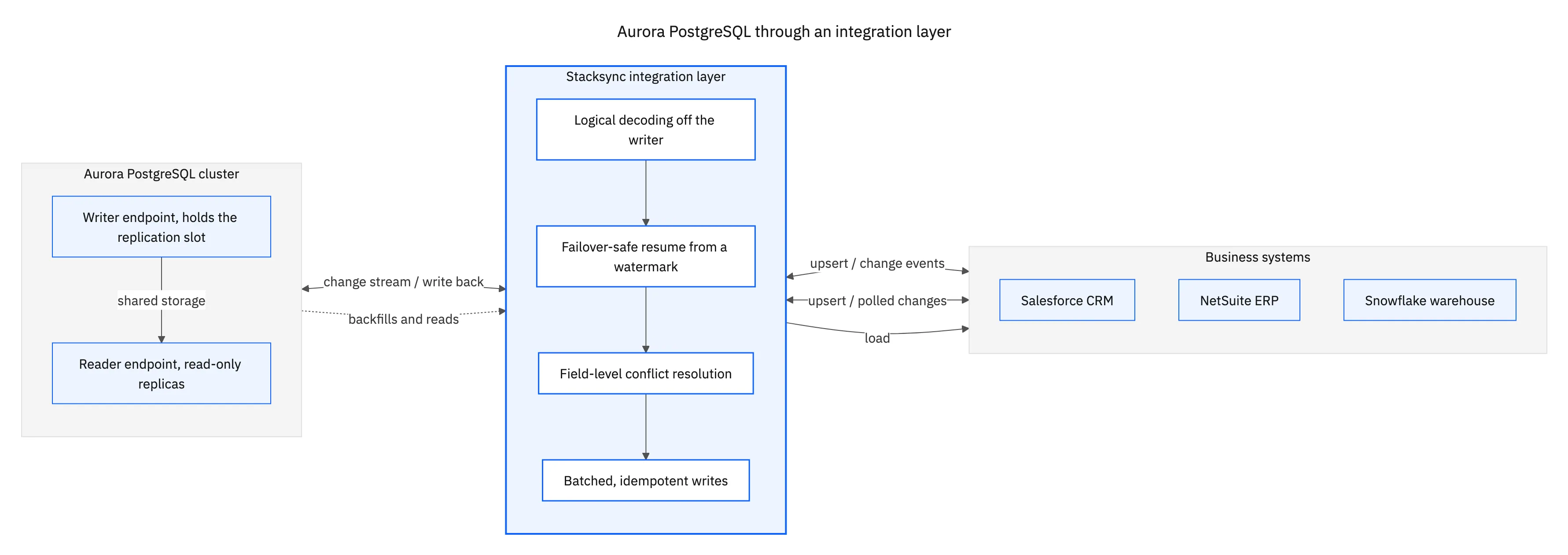
That is the architecture in one picture, and the asymmetry is the point. Change data can only be read from the writer. Backfills can go to the readers, the one place the cluster genuinely helps you. And anything travelling out returns through the same layer that decides who wins when both sides moved the same field.
The hardest parts of building an Aurora PostgreSQL integration
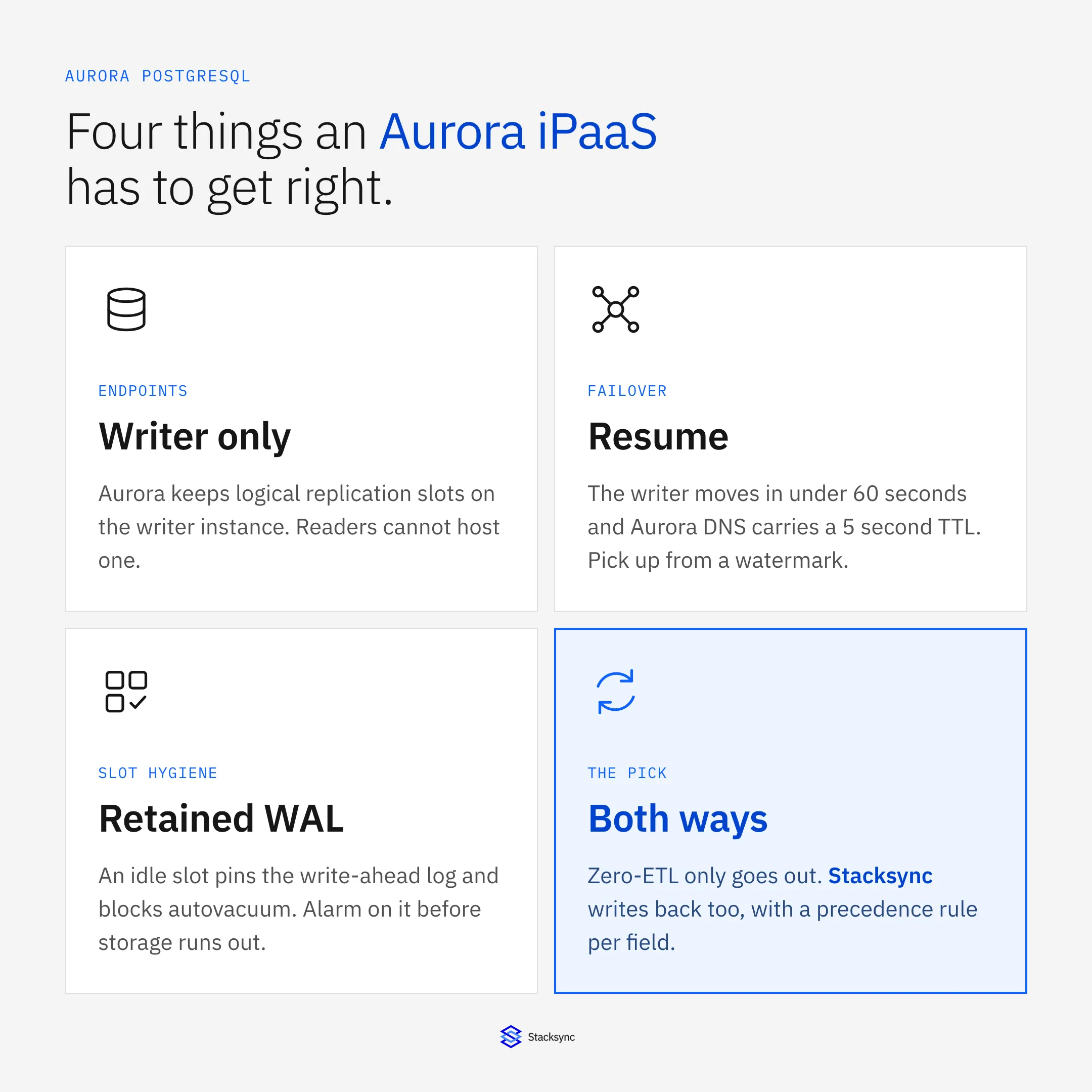
The hard parts are not the connection string. They are the places where Aurora's cluster machinery invalidates the assumption every Postgres CDC pipeline is built on: that a replication slot stays where you left it. On Aurora it does not, and four routine operational events prove it.
Turning change capture on is itself cluster-shaped. rds.logical_replication is a DB cluster parameter group parameter and defaults to 0. You cannot edit a default parameter group, so step one is creating a custom cluster parameter group. Set it to 1, reboot the writer, and wal_level then reads logical; you never set wal_level yourself. Logical replication works on all currently available Aurora PostgreSQL versions, and since 14.5, 13.8, 12.12 and 11.17 Aurora adds a write-through WAL cache that cuts disk I/O during decoding. The flag is not free: it raises WAL generation even with no slot created, which shows up on billed VolumeWriteIOPS.
-- 1. custom DB CLUSTER parameter group, then set the flag:
--    aws rds modify-db-cluster-parameter-group \
--      --db-cluster-parameter-group-name aurora-pg-sync \
--      --parameters "ParameterName=rds.logical_replication,\
--                    ParameterValue=1,ApplyMethod=pending-reboot"
-- 2. reboot the WRITER instance, then confirm:
SHOW wal_level;   -- logical

-- the query that belongs on a dashboard, not in a runbook
SELECT slot_name, active, restart_lsn,
       pg_size_pretty(pg_wal_lsn_diff(pg_current_wal_lsn(), restart_lsn)) AS retained_wal
FROM pg_replication_slots;

-- required before a Blue/Green switchover and before a major version upgrade
SELECT pg_drop_replication_slot('stacksync_slot');
Here is the list worth putting in front of any vendor. Every item is a real operational event.
- The slot only exists on the writer. Slots live on the publisher, and on Aurora the publisher is the writer instance. AWS states it plainly: PostgreSQL 16 added support for logical decoding from read replicas, and that feature is not supported on Aurora PostgreSQL. You cannot move CDC load onto a reader.
- Failover moves the writer out from under the slot. Aurora repoints the same DNS name at the new primary, typically in under 60 seconds and often under 30, but Aurora DNS zones carry a 5-second TTL and AWS names DNS propagation the largest contributor to failover time. Slot survival across an Aurora failover is not documented, so the safe design re-establishes the slot and resumes from a durable watermark.
- A Blue/Green switchover drops your slots deliberately. AWS's documented guidance is to drop your own self-managed replication slots and subscriptions before the switchover and recreate them afterwards. A pipeline that cannot be told to stop, drop and resume on command turns a routine upgrade into an outage window.
- Major version upgrades refuse to run while slots exist. Aurora requires every logical replication slot to be dropped first, including inactive ones. Whoever owns the upgrade calendar and whoever owns the sync need to be the same conversation.
- An inactive slot is a storage incident in slow motion. A slot with no consumer retains WAL, blocks removal of old logs and blocks autovacuum on catalog tables, which AWS notes can lead to insufficient storage. Alarm on
OldestReplicationSlotLag,ReplicationSlotDiskUsage,TransactionLogsDiskUsageandFreeStorageSpace. The outage starts in whatever stopped reading, not in Aurora. - The connection budget is a formula, not a number. Aurora defaults
max_connectionstoLEAST({DBInstanceClassMemory/9531392}, 5000), scaling with instance memory and capping at 5,000; AWS's own example puts a db.r4.large at 15.25 GiB and roughly 1,717. Sync workers draw from the same pool as the application. RDS Proxy helps, and cuts failover time by up to 66%, but a temporary table pins a session. - Turning on CDC removes Serverless v2 scale-to-zero. With logical replication enabled, the writer and any reader in failover tier 0 or 1 do not auto-pause, because Aurora keeps minimal activity to health-check the replication connection. So the accurate claim is not that auto-pause breaks your CDC reader; it is that enabling CDC pins the cluster out of scale-to-zero and the budgeted saving goes away. An attached RDS Proxy, a Global Database primary, a zero-ETL integration and active Babelfish connections do the same. For reference, 1 ACU is roughly 2 GiB, and scale-to-zero needs Aurora PostgreSQL 16.3, 15.7, 14.12 or 13.15 and later.
Four things an integration platform has to get right on Aurora
Reduced to a shortlist, a platform earns the word Aurora in its documentation by getting four things right. Everything else is table stakes any tool with a Postgres driver already has.
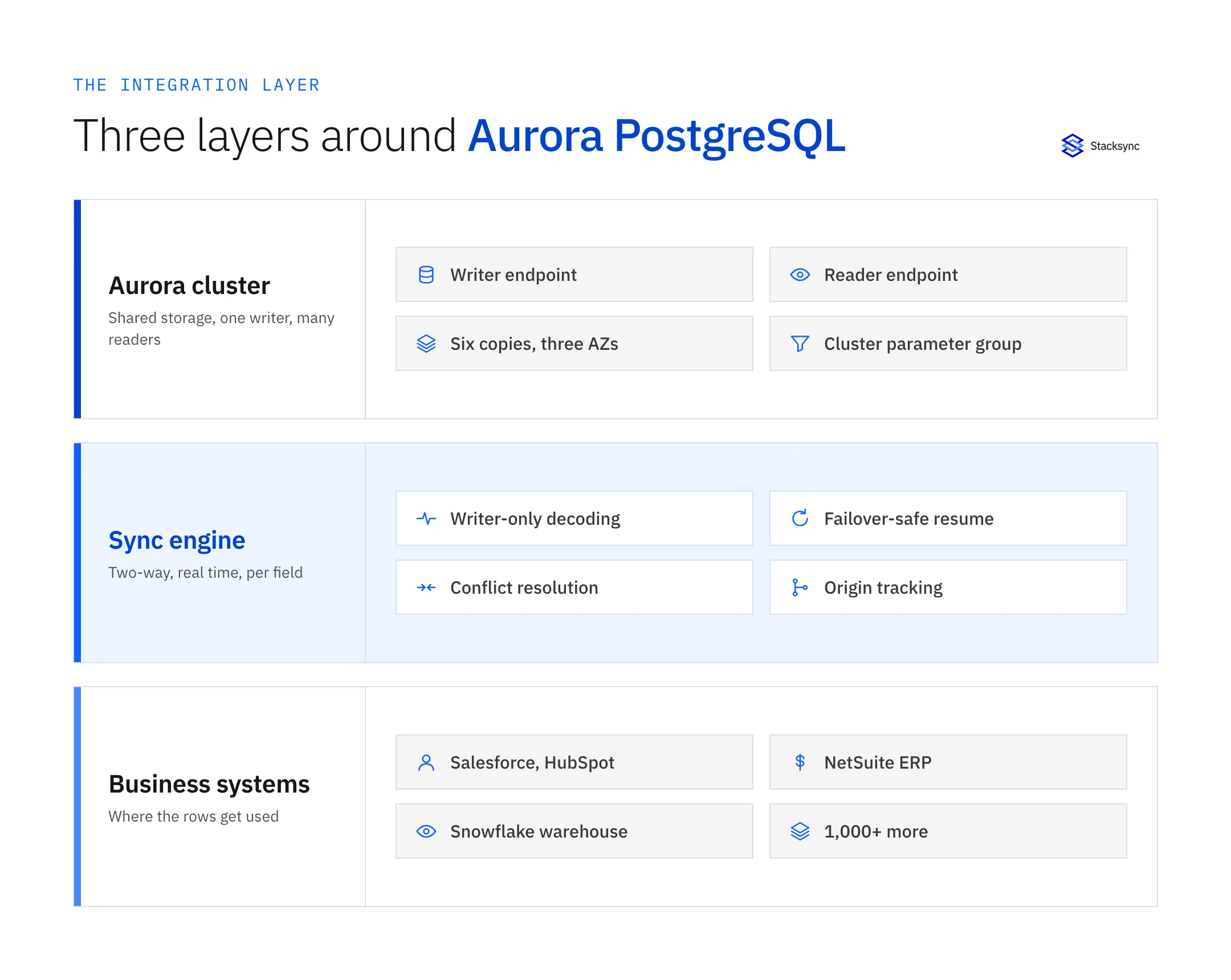
Cluster-aware connections. Writes, DDL and the replication slot go to the writer endpoint; backfills and bulk reads can go to the reader endpoint, and because that endpoint balances at connection time rather than per query, spreading load means opening more than one connection on purpose. The client also has to re-resolve DNS rather than cache an address, since Aurora repoints the same name on failover.
Change capture that survives being interrupted. Because the slot is not guaranteed across a failover, a Blue/Green switchover or an upgrade, the engine needs its own durable position: a committed watermark to resume from, an idempotent apply so replaying an overlap window does not duplicate rows, and the ability to drop and recreate its slot on command. That last capability is the one most often missing.
Slot hygiene as a product feature, not a runbook. The engine has to advance the confirmed LSN as it consumes, alarm when retained WAL grows, and fail loudly rather than stopping silently while the slot stays behind. An integration that dies quietly at 2am and leaves its slot behind is a database availability problem.
Correct writes on the far side. Aurora is only half of any integration. Salesforce Bulk API 2.0 caps a job at 150 MB, shares 15,000 batches per rolling 24 hours across Bulk API and Bulk API 2.0, and ceilings ingest at 150,000,000 records per rolling 24 hours; upsert needs a unique, indexed custom field flagged as an External ID, up to 25 per object, and a duplicate match raises a DMLException. NetSuite has no write-ahead log at all, so change detection is scheduled SuiteQL on lastmodifieddate, against one concurrency pool shared by SuiteTalk SOAP, SuiteTalk REST and RESTlets: 5 Standard, 15 Premium, 20 Enterprise and Ultimate, plus 10 per SuiteCloud Plus licence, returning HTTP 429 or SSS_REQUEST_LIMIT_EXCEEDED over the limit.
Does zero-ETL replace an integration platform?
No, because zero-ETL only goes one way. Aurora PostgreSQL zero-ETL integrations target Amazon Redshift, generally available since October 2024, and Amazon SageMaker Lakehouse since October 2025, and AWS describes data being available in the target within seconds of the write. There is no documented write-back path: it is a managed low-latency analytics replica, not a bidirectional integration.
That is not a criticism. If the requirement is analytics on operational data with as little operational surface as possible, zero-ETL is hard to beat and an integration platform is the wrong tool for it. It stops being enough at exactly two moments: when a value computed downstream has to change a record back in Aurora, and when the destination is something other than Redshift or SageMaker.
AWS DMS is the other native answer and it rewards a precise reading. DMS decodes Postgres changes with one of two plugins: test_decoding, or pglogical when that extension is set up on the source. The difference matters on a busy cluster, because pglogical filters unwanted tables at the slot level and cuts WAL, CPU and network, while test_decoding filters inside DMS and adds latency on long transactions. Using pglogical means setting shared_preload_libraries, restarting, and running CREATE EXTENSION pglogical, on top of rds.logical_replication = 1. On the two-way question, AWS is refreshingly direct.
"Bidirectional replication in AWS DMS is two independent one-way tasks with loopback prevention. It isn't intended as a full multi-master solution including a primary node, conflict resolution, and so on."
Two further DMS constraints decide architectures rather than configurations. CDC from a Postgres or Aurora source requires primary keys on the tables it replicates, and Postgres sources do not support a custom CDC start time, because there is no mapping from a timestamp to an LSN. Glue and AppFlow round out the AWS-native set: batch ELT and SaaS-to-AWS transfer, neither of them two-way operational sync.
The classic enterprise iPaaS category, the MuleSoft and Boomi and Workato and SnapLogic and Informatica shelf, comes at it from the other end: a generic PostgreSQL or JDBC connector plus a flow you build. That works, and an existing licence often makes it the default. The useful move is to stop comparing feature lists and put the list above to whichever you are considering, because a generic Postgres connector is exactly the thing with no opinion about writer endpoints, failover or Blue/Green.

Comparing the four ways to integrate Aurora PostgreSQL
There are really only four categories, whatever the logo on the page: a generic PostgreSQL or JDBC connector, AWS-native replication, code you write and operate yourself, and a sync engine built for two-way operational data. The table compares them on the Aurora-specific surface.
| Generic Postgres connector | AWS-native (DMS, zero-ETL, Glue) | Custom code | Stacksync two-way sync | |
|---|---|---|---|---|
| Writer vs reader awareness | Usually one connection string | Yes, it is AWS | Whatever you build | Writer for the slot, readers for backfills |
| Change capture | Often a polled timestamp column | Logical decoding, test_decoding or pglogical | Logical decoding you operate | Logical decoding off the writer |
| Behaviour on failover | Reconnect, often from scratch | Task restarts | Whatever you build | Resume from a durable watermark |
| Blue/Green switchover | Manual, if anyone remembers | Manual slot drop and recreate | Manual | Drop and recreate on command |
| Direction | Depends on the flow you build | One way, or two one-way DMS tasks | Both, if you build both | Two-way from one engine |
| Conflict handling | Not part of it | Loopback prevention only | Yours to write | Field-level precedence |
| Writes into Salesforce or NetSuite | Via a separate connector | Not a supported target | Your code, their rate limits | Batched upserts inside the API limits |
| Slot and WAL monitoring | Rarely | CloudWatch metrics, your alarms | Yours to build | Built in, alarms on retained WAL |
| Serverless v2 impact | Not considered | zero-ETL blocks writer auto-pause | Not considered | CDC pins the cluster, costed up front |
| Best for | Simple scheduled loads | Analytics replicas and migrations | One genuinely unusual requirement | Data both sides are allowed to edit |
Compared on the Aurora-specific surface rather than on connector counts.
Read it by direction first, because direction rules options out faster than anything else. If a value only travels out of Aurora into an analytics target, zero-ETL or a DMS task is the cheapest correct answer. If it travels out, gets changed by a person working in a CRM or an ERP, and has to come back, every one-way option is disqualified and the question becomes which engine holds the conflict policy.
The second filter is latency, and real-time sync versus batch ETL is worth settling before you shortlist anything. If your other database is plain PostgreSQL and the CRM is Salesforce, the API-limit arithmetic in syncing Salesforce and Postgres within API limits applies unchanged on Aurora.
What to ask a vendor before you sign
The same short list separates a platform that has actually run on Aurora from one that has run on PostgreSQL and assumed the rest. Ask for specifics, in a technical call rather than a form.
- Which endpoint does change capture connect to, and can backfills be pointed at the reader endpoint instead of competing with production on the writer?
- What happens to an in-flight sync during a failover, and what exactly is the resume mechanism? "It reconnects" is not an answer; ask what the durable position is.
- What is the documented procedure for a Blue/Green switchover and a major version upgrade, both of which require every replication slot to be dropped first?
- Does the platform alarm on retained WAL, and which CloudWatch metrics does it read?
OldestReplicationSlotLagandReplicationSlotDiskUsageare the two that matter. - How many connections does a running sync hold, and how does that sit against
LEAST({DBInstanceClassMemory/9531392}, 5000)on your instance class? - Does it batch into the target's bulk API, and back off on HTTP
429andSSS_REQUEST_LIMIT_EXCEEDEDrather than retrying into the limit? - When the same field changes in Aurora and in the CRM inside the same window, what decides the winner, and can that rule differ per field?
Two things are worth writing down before any demo. First, the list of fields that will sync, with one owner's name next to each; that list is your conflict policy, and writing it is usually where a ten-table plan becomes a three-table plan. Second, whether the value has to travel back at all, since a one-way requirement served by zero-ETL is a much smaller thing to run.
To see Aurora kept in step with the rest of the stack in both directions, look at the Aurora PostgreSQL connector, the Aurora PostgreSQL and Salesforce integration, or book a demo. The two-way sync page covers how the engine holds precedence per field, and the database page covers the rest of the operational data surface, including Aurora PostgreSQL and NetSuite.

FAQ
Frequently asked questions










Related articles