






















From Closed Won to Recognized Revenue: Salesforce Into Rillet
A step-by-step guide to connecting Salesforce and Rillet. It covers why the handoff from a closed-won opportunity to a revenue schedule is where most finance stacks break, how a two-way sync engine sits between the CRM and the general ledger, exactly which objects and fields to map, and how to keep invoice and payment status flowing back to the rep without anyone rekeying a contract.
- Author
- Ruben Burdin · Founder & CEO
- Published
- Read time
- 8 min read

There is a specific moment where most finance stacks quietly break: a rep flips an opportunity to closed won, and then somebody has to turn that into a contract, a revenue schedule, and eventually an invoice. In a lot of companies that somebody is a person with a spreadsheet and a Monday morning.
Syncing Salesforce with Rillet removes that handoff. The deal that closes in the CRM becomes a customer and a revenue schedule in the general ledger without anyone rekeying it, and the invoice and payment status that Rillet produces flows back onto the Salesforce account so the rep can see it. Here is how to set it up and what to map.
All of it rests on a sync engine that connects both systems, matches their records, and keeps them consistent. If you are still choosing an integration platform, start with the guide to an enterprise iPaaS for Rillet.
Why the CRM to ledger handoff matters
Rillet is built to run a continuous close, with revenue recognition handled as contracts change rather than reconstructed at month end. That only works if the contracts arrive when they are signed. A CRM that reports its closed deals once a night, or once a week through an export, turns a continuous close back into a periodic one.
The return path matters just as much and gets forgotten more often. Sales asks finance the same three questions constantly: has this customer been invoiced, have they paid, what is outstanding. Every one of those answers already exists in Rillet. Pushing them back onto the Salesforce account turns a recurring interruption into a field the rep can read before they pick up the phone.
The third reason is less about convenience. When the contract in the ledger is created by hand from the opportunity, the two records drift: an amendment gets applied in one place, a term is corrected in the other, and nobody notices until revenue looks wrong. A sync keeps them identical by construction.
How the sync works
Between Salesforce and Rillet sits a sync engine. It detects a change on either side at the field level, maps it to the matching record and fields in the other system, applies one conflict policy when both sides moved, and records the origin of every write so nothing bounces back around the loop.
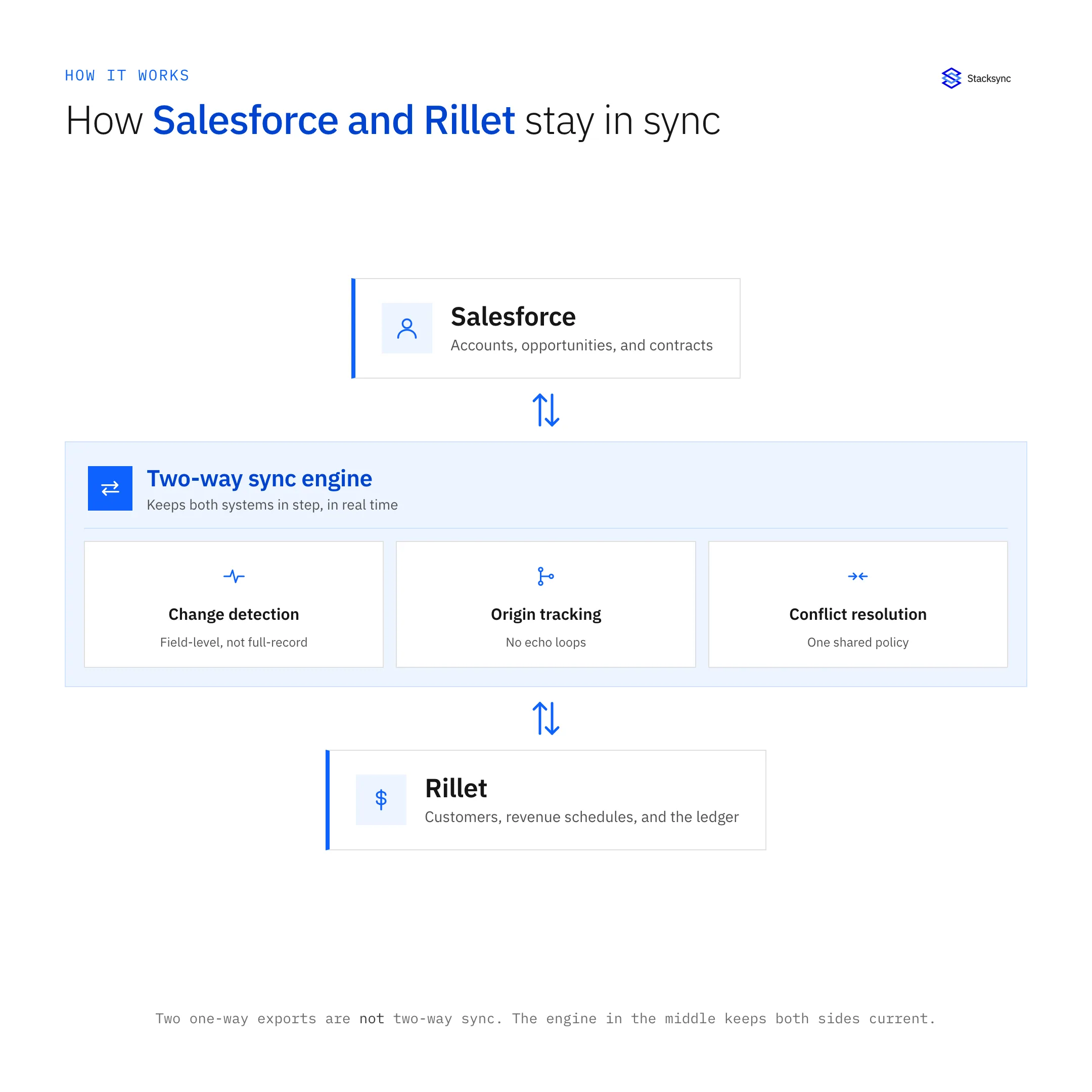
The word engine is the important one. Two one-way jobs, Salesforce to Rillet in the morning and Rillet to Salesforce at night, are not two-way sync. They overwrite each other, they cannot resolve a field that changed on both sides, and they drift in ways that are painful to unwind once revenue has been recognized against the wrong number.
Setting it up, step by step
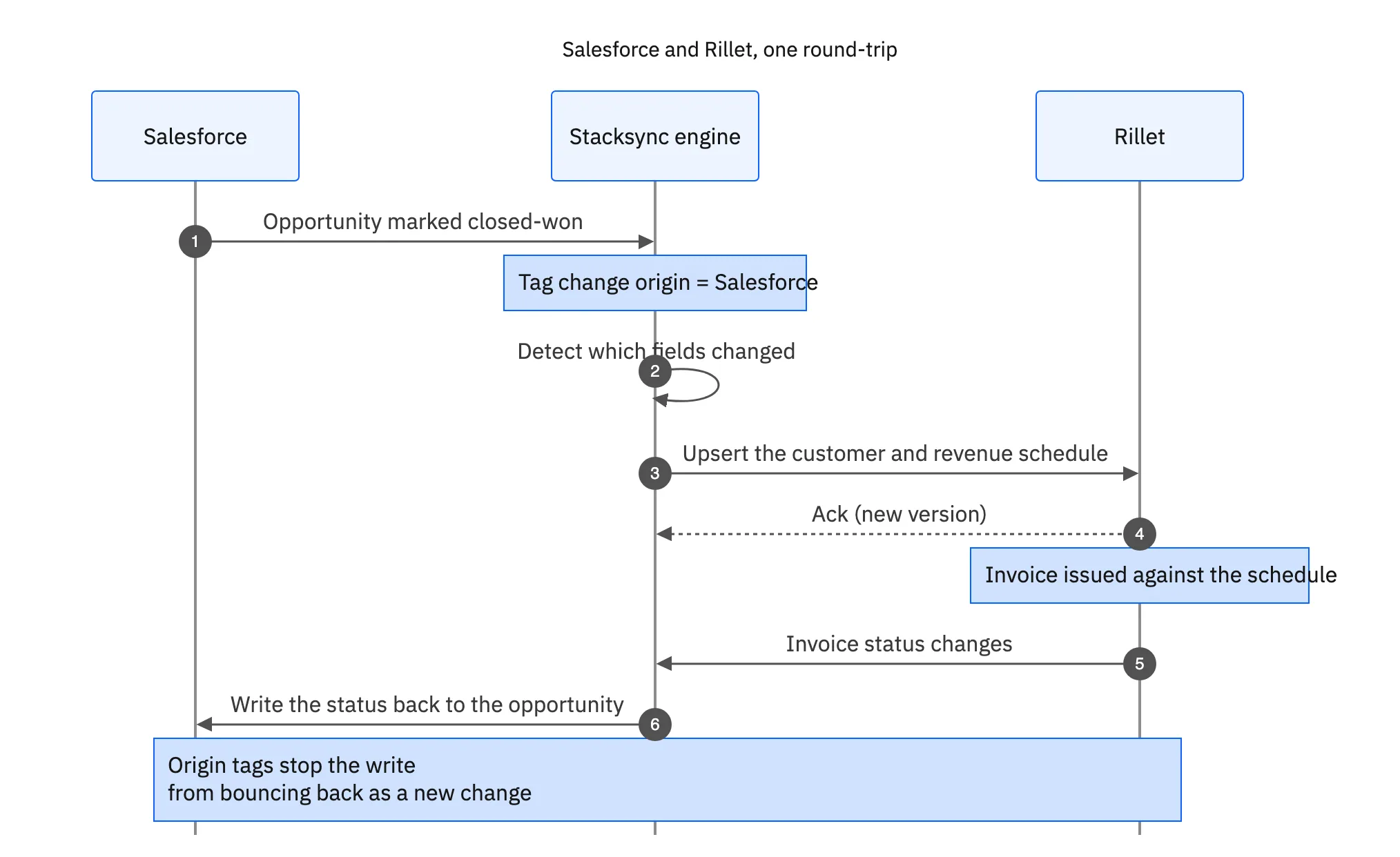
The flow below is one full round-trip: an opportunity closes in Salesforce and becomes a revenue schedule in Rillet, then the invoice status Rillet produces is written back onto the Salesforce record.
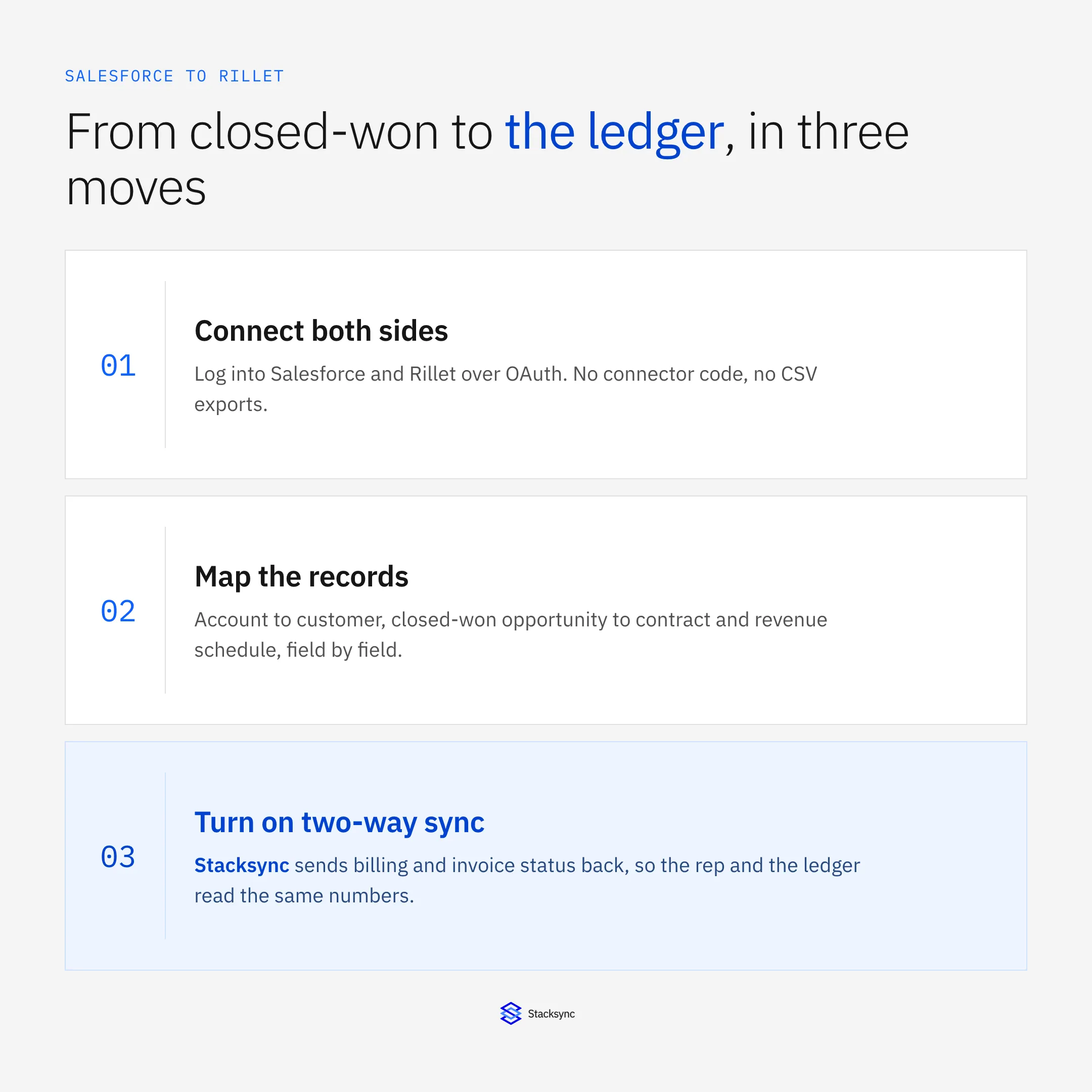
- Connect both sides. Authenticate Salesforce and Rillet to Stacksync over OAuth. No connector code, no credentials pasted into a script, no CSV drop folder.
- Map the records. Account to customer, Contact to billing contact, closed-won Opportunity to contract or sales order, and Opportunity Product lines to the revenue lines Rillet builds the schedule from.
- Pick the trigger. Usually the stage moving to closed won, optionally gated on a signature or approval field so a deal marked won early does not create a schedule.
- Turn on two-way sync. Changes then flow both directions in seconds, with field-level conflict resolution and origin tracking, and the write-back fields land on the Salesforce account.
That is a configuration measured in minutes, not a multi-week integration project. Adding another object later, or another system entirely, is another short configuration on the same engine rather than a second integration to maintain.
What to sync between Salesforce and Rillet
You choose the objects and the fields. There is no need to push the entire CRM into the ledger, and good reason not to. A common starting map looks like this.
| Salesforce | Rillet | Why finance needs it |
|---|---|---|
| Account | Customer | The billing entity of record, matched by ID |
| Contact | Billing contact | Where the invoice actually goes |
| Opportunity (closed won) | Contract or sales order | The signed terms revenue is recognized against |
| Opportunity Product lines | Revenue lines | Amount, term, and product drive the schedule |
| Close date and term fields | Recognition start and end | When recognition begins and over what period |
| Invoice and payment fields | Written back from Rillet | Sales sees account health without asking |
A common Salesforce to Rillet map. The last row is the return path most teams forget to configure.
Keeping the scope tight has a practical benefit beyond tidiness: because the sync is priced by the records you keep in step, syncing active customers and live contracts rather than a decade of closed-lost opportunities keeps both the volume and the cost aligned with what finance actually uses.

Keeping it real-time and two-way
Because the sync operates at the field level, only what changed moves. That keeps it comfortably inside the Salesforce daily API allocation, which a nightly full export tends to eat into for no benefit, and it means a contract amendment reaches the ledger as a small update rather than a full re-read of the opportunity.
Origin tracking is what makes the write-back safe. When Rillet's invoice status is written onto the Salesforce account, the engine knows it wrote that value, so it does not read it back a second later as a fresh CRM change and push it into Rillet again. Without that, any genuine two-way link becomes an echo chamber within hours.
The result is a Salesforce that shows real financial state and a Rillet that reflects the sales pipeline as it moves. Finance keeps the ledger as the system of record, sales keeps the CRM as their home, and neither team is copying numbers between tabs. If you also want that data in the warehouse, see real-time sync between Rillet and Snowflake.
Close the loop between sales and the ledger
Syncing Salesforce with Rillet removes the manual step between a signed deal and a revenue schedule, and it gives sales the invoice and payment answers they were asking finance for. The setup is short, the sync runs both ways in real time, and OAuth means neither system's data is parked in a middleman.
To see a Salesforce and Rillet sync set up and running both ways, book a demo, look at the Rillet and Salesforce integration, or read the broader guide to an enterprise iPaaS for Rillet.

FAQ
Frequently asked questions










Related articles






