






















How to Explain Split Shipments and Missing Tracking
Explain split shipments by listing what is in each parcel and what has not shipped.
- Author
- Ignacio Malpartida · GTM Engineer
- Published
- Updated
- Read time
- 7 min read

Split fulfillment changes the meaning of “shipped”
Explain split shipments by listing what is in each parcel and what has not shipped. Do not describe an entire Shopify order as delivered because one fulfillment has a delivery event. The most useful answer is a quantity reconciliation: ordered, shipped, delivered where confirmed, and outstanding. This is particularly important when two units of the same product travel separately.
Begin with the customer’s specific complaint. “Only one shirt arrived” calls for an item-and-quantity check, while “the link has no updates” calls for a tracking check. Those questions can relate to the same order but require different explanations. An order-level label hides the difference.
Evidence needed to resolve the exception
Use this exception guide when reviewing a proposed Genie workflow or investigating a case that cannot proceed confidently. The tables describe operational decisions to configure in your environment. They are not claims that a connected application automatically supplies your organization’s policies, identity mappings, or approval process.
| System or owner | Evidence and responsibility |
|---|---|
| Slack | Customer question and the draft response in the originating conversation. |
| Shopify | Order identity, ordered quantities, fulfillment records, and tracking for each shipment. |
Required context for this workflow design.
Resolve three common tracking ambiguities
A missing link means tracking is unavailable in the record you inspected. It does not prove that the warehouse has not shipped. A label-created status means a label exists; without a later event, do not claim a carrier has possession. A delivered parcel with missing contents requires a support investigation, rather than a statement that the remaining items will arrive in that same parcel.
Check whether a tracking number belongs to the fulfillment containing the disputed item. Copying the first link on an order is a common way to send a customer to the wrong parcel. Where a carrier has several package identifiers, retain the relationship between the package, item quantity, and delivery event in the evidence summary.
Use a reply pattern that exposes uncertainty
Write “The shoes are in shipment A, recorded as delivered. The jacket is in shipment B, which has tracking but no delivery confirmation. The belt remains unfulfilled.” This communicates three different states without requiring the customer to interpret internal status codes. Replace each label with the actual items and evidence from their verified order.
If no confident order match exists, stop before sharing any shipment information and ask for the order number. If the customer disputes a delivery scan, identify the scan as what the system records and route the discrepancy for investigation. Do not contradict the customer with a claim that receipt has been proven.
Decision table for common exceptions
Use the condition in the first column to choose the next action. The final column describes the boundary that must remain true while the case is unresolved. Apply the organization’s actual policy and source records to the live case; do not treat an illustrative condition as proof that the condition exists.
| Observed condition | Next action | Required boundary |
|---|---|---|
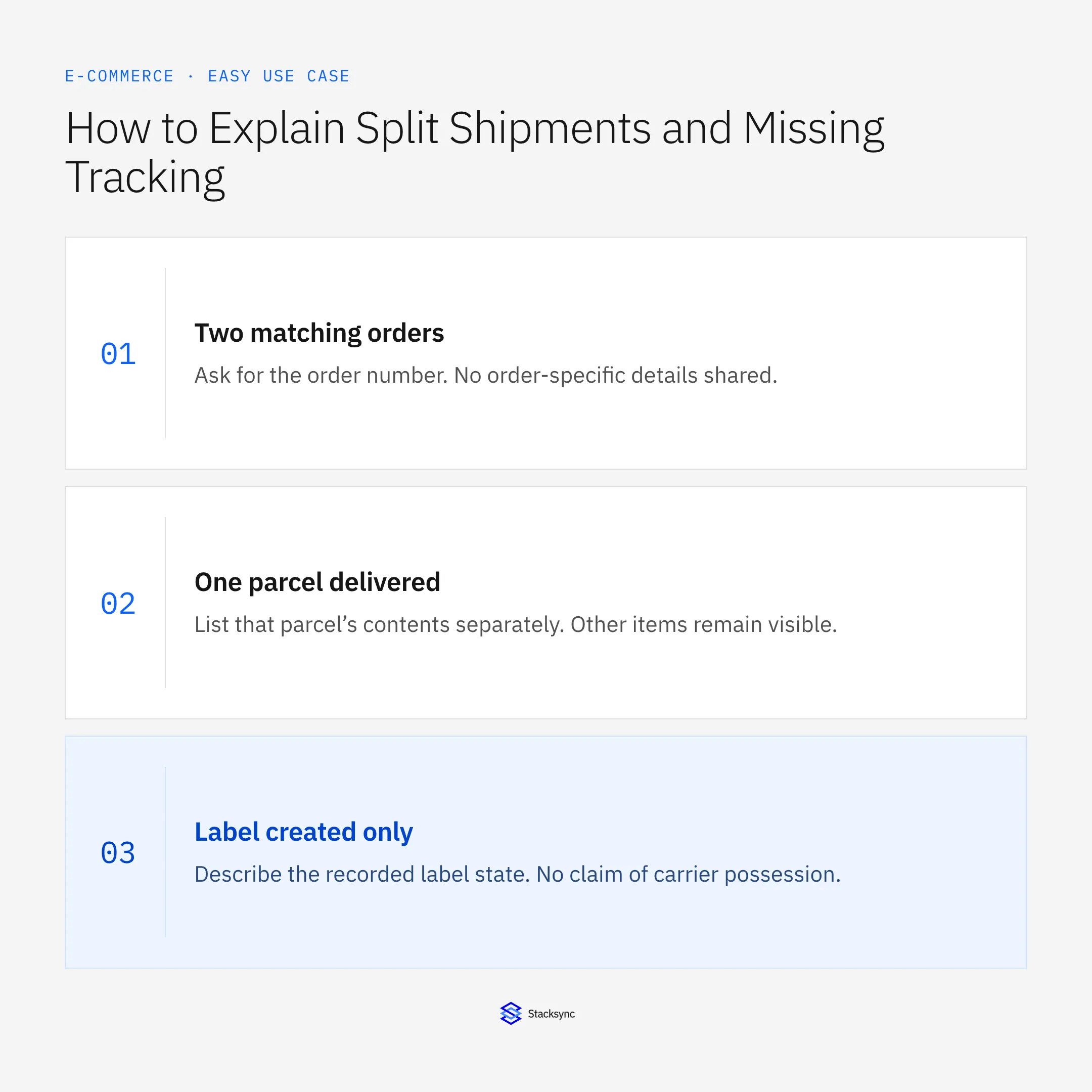
| Two matching orders | Ask for the order number | No order-specific details shared |
| One parcel delivered | List that parcel’s contents separately | Other items remain visible |
| Label created only | Describe the recorded label state | No claim of carrier possession |
| Tracking unavailable | Say the record lacks tracking | No invented delivery estimate |
Exception decisions for order updates.
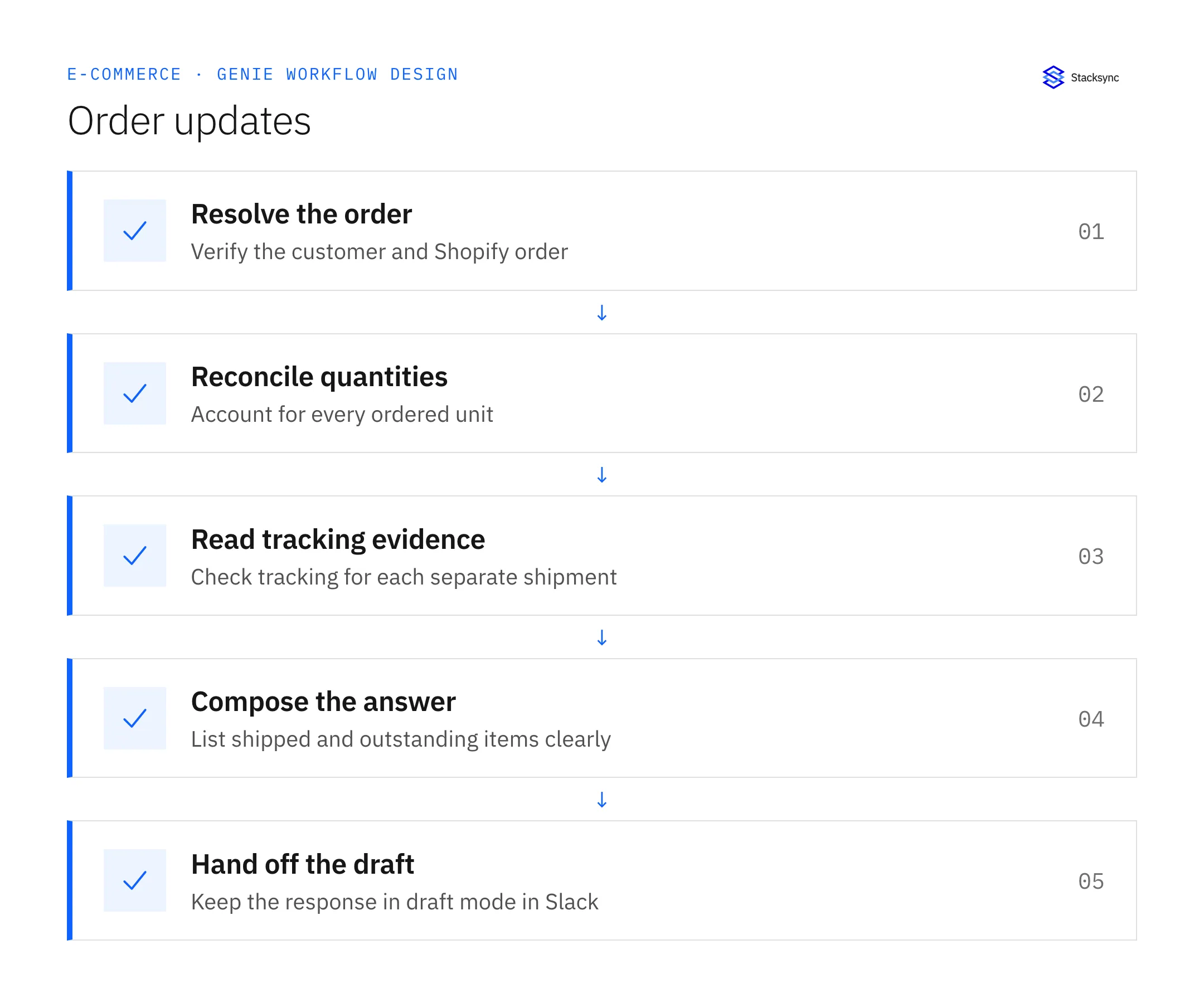
Illustrative exception and recovery
A customer named Jordan has two open orders. One has a delivery scan and the other has no fulfillment. Asking for the order number is the correct next action; choosing the newest order would only conceal the ambiguity.
This example uses fictional records to show the decision logic. It is not a customer case study or a claim of measured results. In a live case, retain the actual record IDs and evidence behind each statement, and replace all illustrative quantities or timing assumptions with the approved operational inputs.
What to record before resuming
A draft Slack reply with one entry per shipment, an explicit outstanding-items section, and internal source references for the reviewer.
Preserve the original finding and the evidence that resolves it. Record which person or system supplied the clarification, which proposal it applies to, and the action now permitted. Do not erase the uncertainty from the history: a later reviewer needs to understand why the case paused and why it resumed.
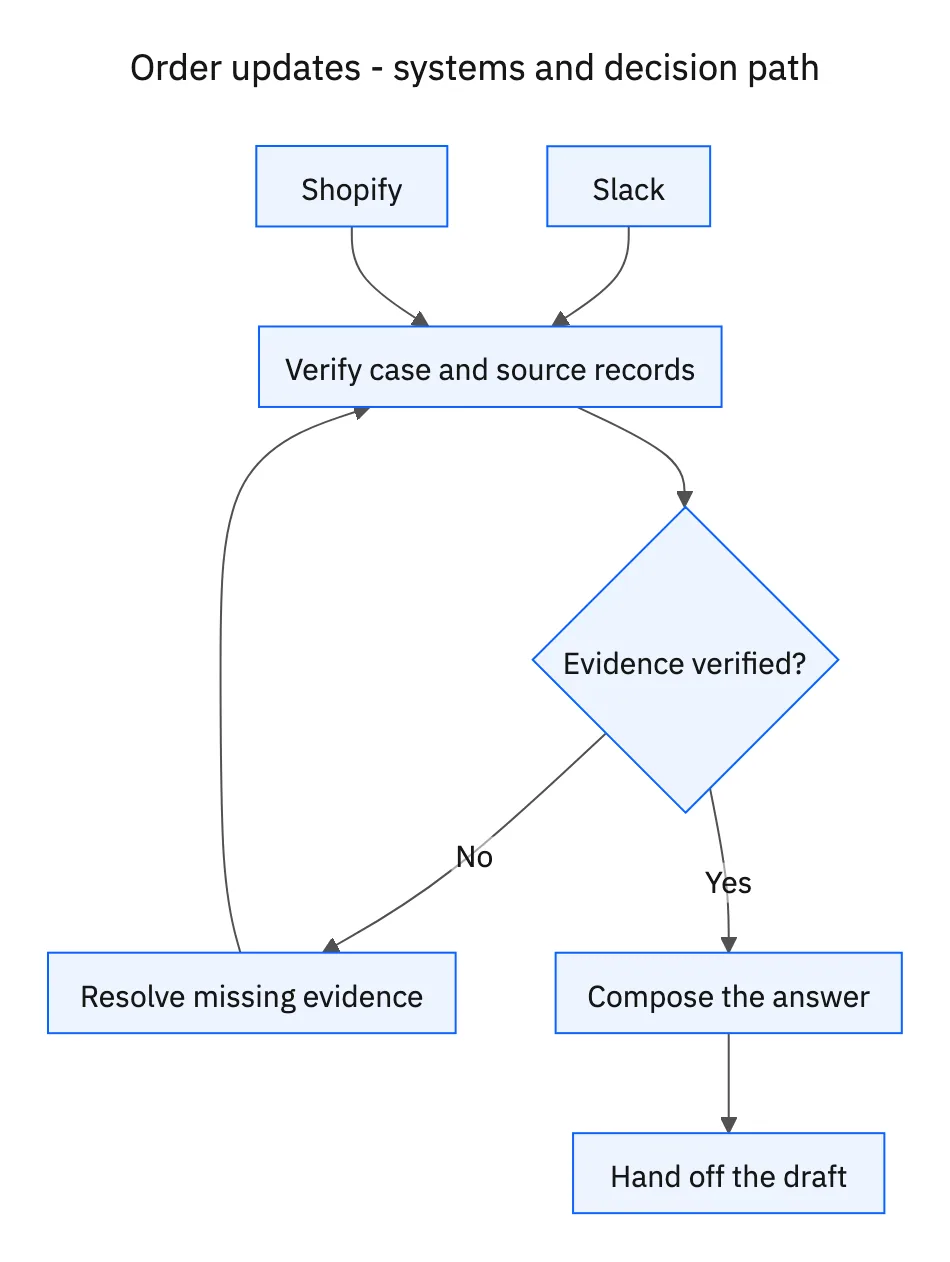
Boundaries that remain in force
- Verify the customer-to-order match before including order details.
- Account for every unit across fulfillment records; separate shipped from delivered.
- Keep this job in draft mode and preserve the Slack conversation context.
- Request an order number when two plausible orders remain.
Review the case before restarting
First verify that the new evidence resolves the original blocker rather than a different issue. Then check whether the case, source records, or proposed action changed during the wait. A response attached to the right ticket can still be insufficient if it refers to an earlier proposal or leaves a required quantity, identity, or approval unresolved.
Run the relevant row from the decision table as a review scenario. Confirm that the job stops at the required boundary, asks for the specified information or decision, and resumes from the confirmed state. If a write or message may already have succeeded, inspect its destination before repeating it; if this job only prepares a draft or report, verify that it stays within that output scope.
- Share of drafts with a verified order match
- Share of replies accounting for all line quantities
- Corrections caused by inaccurate shipment statements
Track unresolved cases by their actual blocker and owner. A case waiting for clarification needs a different next action from one waiting for a confirmed result. Review the evidence when the state changes, and keep any still-unresolved completion condition visible instead of treating a successful intermediate step as the end of the work.

Give your Genie a job description
Copy the job description below. It preserves the scope and decision boundaries of this use case. Configure the referenced systems, record relationships, policies, and approval owners in your workspace before enabling the job.
Paste this into “Give your Genie a job description.” Explore Stacksync Genies.
Apply this in packaged food and snacks: grocery claim and shipment lines
A grocery shortage claim often requires the same split-shipment investigation described here, with retailer receiving evidence added to the timeline. Keep a later truck separate from a confirmed receipt and preserve the approved case conversion before concluding that the claimed quantity is missing.
| Record to reconcile | Responsible owner | Rule to preserve |
|---|---|---|
| Grocery claim | Accounts receivable | Preserve retailer claim and purchase-order references, item, quantity, unit, and reason. |
| Shipment lines | Warehouse | Retain actual shipment quantities and partial-delivery relationships. |
| Retailer receipt | Customer operations | Record what the retailer acknowledged receiving and the associated document date. |
An exception to plan for: Second shipment lacks receipt proof. Mark its delivery status unresolved and request the relevant evidence. Acceptance check for the pilot: the packet distinguishes shipped goods from acknowledged receipts.
The packaged food and snacks hub connects the broader operating context. These guides develop the specific record mappings and decisions for this application:
Implementation references
These first-party references document the underlying records and interfaces. The cross-system sequence, approvals, and completion rules in this article are a proposed operational configuration; validate them against your connected workspace before enabling it.

FAQ
Frequently asked questions










Related articles





