Connect EDI to SaaS Apps Without Custom Middleware
Connect EDI documents to Salesforce, NetSuite, and Shopify through one shared database, without custom middleware or batch delays.
- Author
- Ruben Burdin · Founder & CEO
- Published
- Updated
- Read time
- 13 min read
Why EDI Still Runs on a Separate Track From Your SaaS Stack
Connecting EDI to modern SaaS applications requires bridging two fundamentally different data architectures. EDI relies on batch files, fixed-width segments, and AS2 transport. SaaS applications expect JSON, REST APIs, and event-driven updates. The most effective approach is parsing EDI documents into a shared database layer that every connected application reads from and writes to.
How EDI Became Isolated From the Rest of Your Tech Stack
EDI was designed before SaaS existed. The X12 and EDIFACT standards emerged in the 1970s and 1980s to replace paper purchase orders between manufacturers and retailers. The technology stack built around these standards, including Value-Added Networks, AS2 servers, and flat-file translators, was purpose-built for document exchange between two known parties.
When CRMs, ERPs, e-commerce platforms, and analytics tools arrived as cloud services, they built their own integration patterns around APIs. EDI infrastructure was left alone because it worked and because touching it carried risk. The result is two parallel data architectures: one for trading partner documents, one for everything else.
The Cost of Running Two Separate Data Architectures
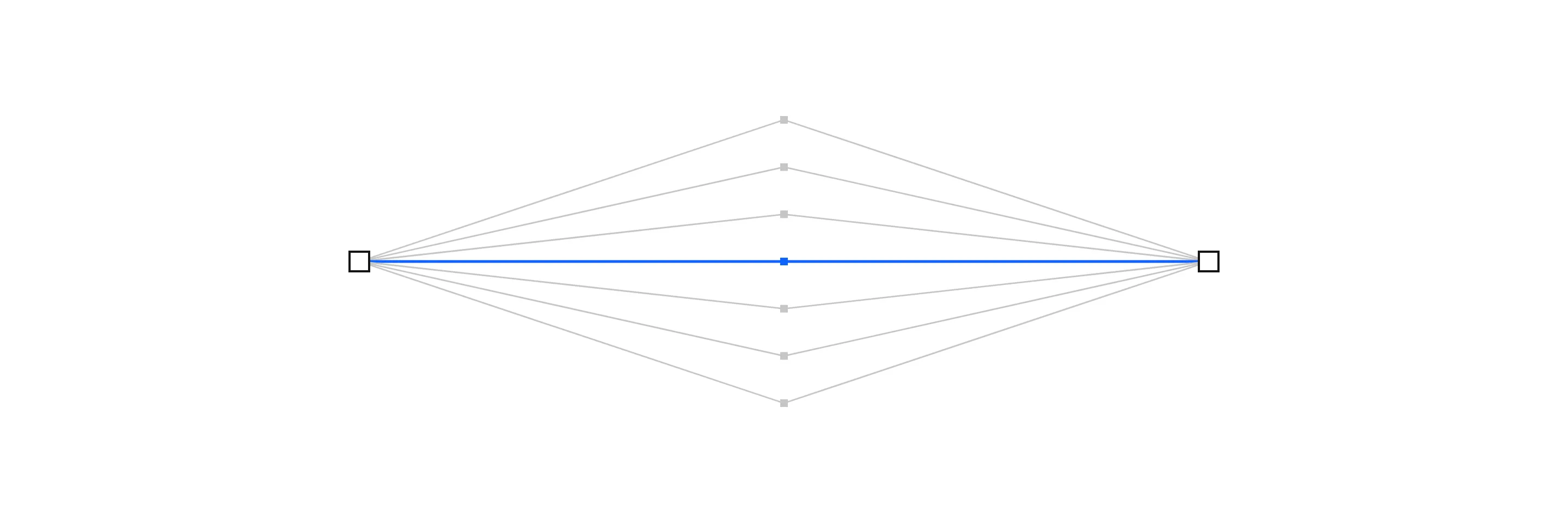
Every order that arrives as an EDI 850 must eventually reach your CRM, your ERP, your warehouse system, and your analytics platform. With separate architectures, each of those destinations requires its own integration path from the EDI translator. Five downstream systems mean five custom scripts, five potential failure points, and five sets of mappings to maintain when a trading partner changes their specifications.
Traditional EDI systems were built for a world where the only destination was a single mainframe. Connecting them to a modern SaaS stack means layering workarounds on top of infrastructure that was never designed for multi-system distribution.
Data Silos That Grow With Every New SaaS Tool
Each new SaaS application added to your stack needs EDI data to function correctly. A customer success platform needs order history. A demand planning tool needs shipment volumes. A returns management system needs original order details. Without a shared data layer, each tool gets its own copy through its own pipeline, and those copies drift out of sync within hours.
What Makes EDI and SaaS Integration Difficult
Different Data Formats: Fixed-Width Segments vs JSON APIs
EDI documents use positional segments with tilde, asterisk, and pipe delimiters. An EDI 850 purchase order contains nested loops that define line items, shipping addresses, and pricing through segment hierarchy. SaaS APIs expect structured JSON with named fields and typed values. Translating between these formats requires parsers that understand both the EDI implementation guide for each trading partner and the API schema of each SaaS destination.
Communication Protocols That Were Never Designed to Talk
EDI transmits documents via AS2, SFTP, or VAN mailbox connections. SaaS applications communicate through HTTPS REST APIs and webhook callbacks. There is no native bridge between these protocols. A system that receives an EDI document over AS2 has no built-in way to forward that data to a Salesforce API endpoint or a Shopify webhook. Custom middleware fills this gap, but each middleware layer adds latency and maintenance cost.
For organizations that still require purpose-built integrations around proprietary systems or specialized workflows, professional API development services can help define secure endpoints, authentication, data models, error handling, documentation, and reliable connections between applications.
Timing Mismatches: Batch EDI vs Real-Time SaaS Events
EDI processing traditionally runs on batch schedules. Documents collect in a mailbox, get picked up at intervals, translated, and forwarded to downstream systems. SaaS applications expect event-driven data. A CRM wants a new contact record the moment a trading partner sends their first order, not at the next scheduled batch run. This timing gap means SaaS applications always lag behind the reality of what is happening in the supply chain.
Schema Differences That Break Standard Mapping Tools
An EDI 856 advance ship notice structures carton-level detail differently than a typical shipping record in a SaaS inventory platform. The EDI standard uses hierarchical levels (shipment, order, pack, item) that do not map cleanly to the flat table structures most SaaS APIs expect. Standard field mapping tools handle simple one-to-one translations but struggle with the nested, conditional segments common in EDI documents.
Three Approaches to Connecting EDI With SaaS Applications
Point-to-Point Custom Integrations
This is the most common approach: custom scripts that read EDI data from the translation output and push it to each SaaS application individually. A Python script parses the translated file and calls the CRM API. Another script pushes the same data to the ERP. A third sends it to the e-commerce platform.
This works at small scale but creates a maintenance burden that grows quadratically. Every new SaaS application requires new scripts for every EDI document type. Every partner specification change requires updating scripts across all destinations. Engineering teams report spending 44 to 61 percent of their time maintaining these pipelines instead of building new capabilities.
Middleware and iPaaS Platforms
Integration platforms like MuleSoft, Workato, and Celigo provide pre-built connectors for SaaS applications and some EDI translation capabilities. They centralize integration logic and reduce the number of custom scripts. The limitations appear at scale:
- MuleSoft charges roughly $250,000 per year for 4 vCores, with costs increasing at each renewal
- Workato bills per task, and loops within EDI processing multiply costs linearly
- Celigo endpoint caps force tier upgrades as you add trading partners
- Fivetran MAR-based pricing creates bill spikes when bulk EDI imports trigger row-level updates
These pricing models create a success tax where the cost of integration grows faster than the value it delivers.
Database-First Synchronization
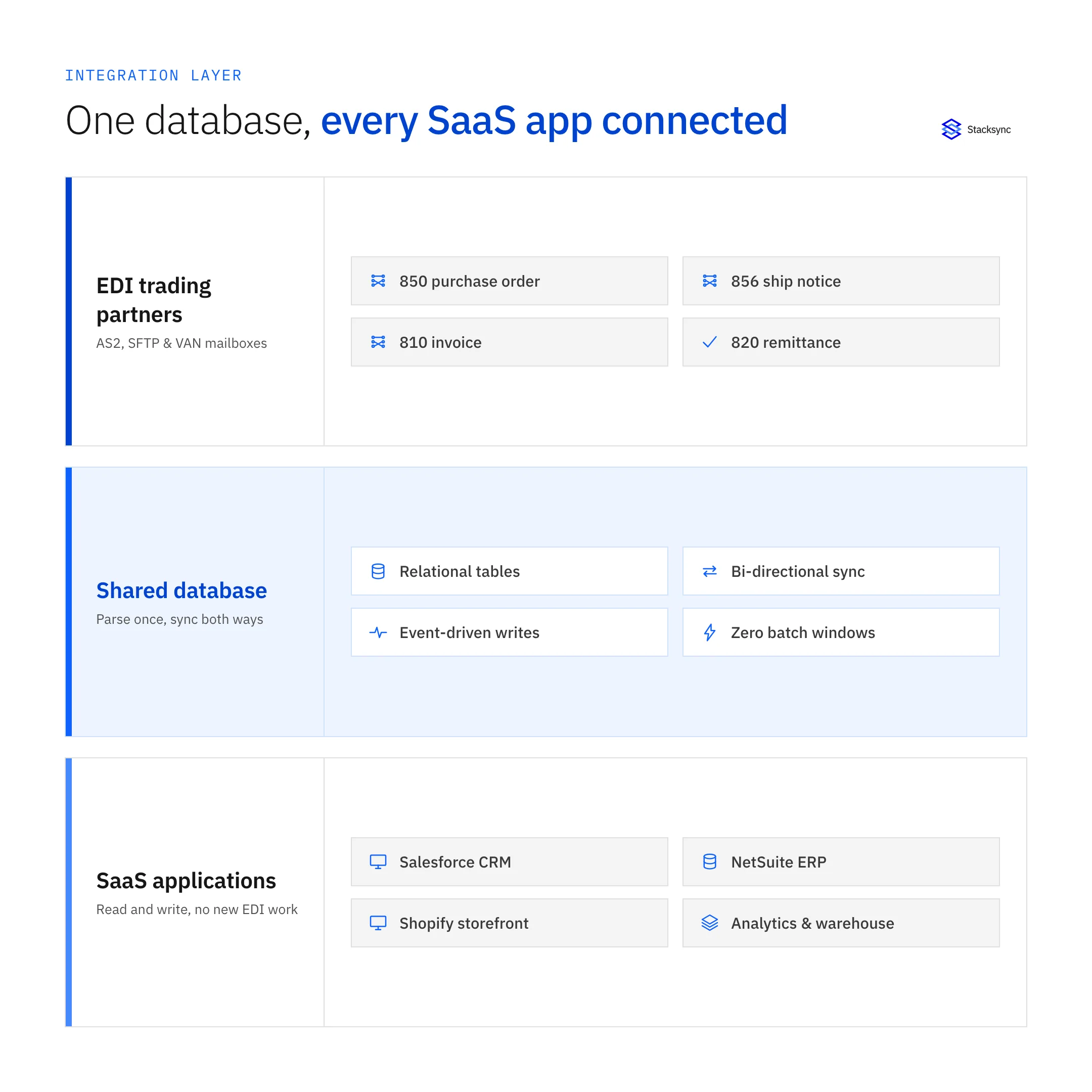
The third approach parses EDI documents directly into database tables and then synchronizes that database with SaaS applications through a bi-directional sync layer. EDI data becomes queryable rows that any connected application can read. SaaS application changes write back to the same database and propagate to trading partners through the EDI channel.
This eliminates the multiplying effect of point-to-point integrations. Instead of building a separate pipeline for each SaaS destination, every application reads from and writes to one shared data layer. Adding a new SaaS tool means connecting it to the database, not building a new EDI integration.
When Each Approach Makes Sense
Point-to-point custom integrations work for organizations with one or two SaaS applications and a small number of trading partners. Middleware platforms suit teams that need workflow automation beyond data movement. Database-first synchronization fits organizations with a growing SaaS stack, multiple trading partners, and a need for real-time data consistency across all systems.
Choosing the Right EDI-to-SaaS Integration Model
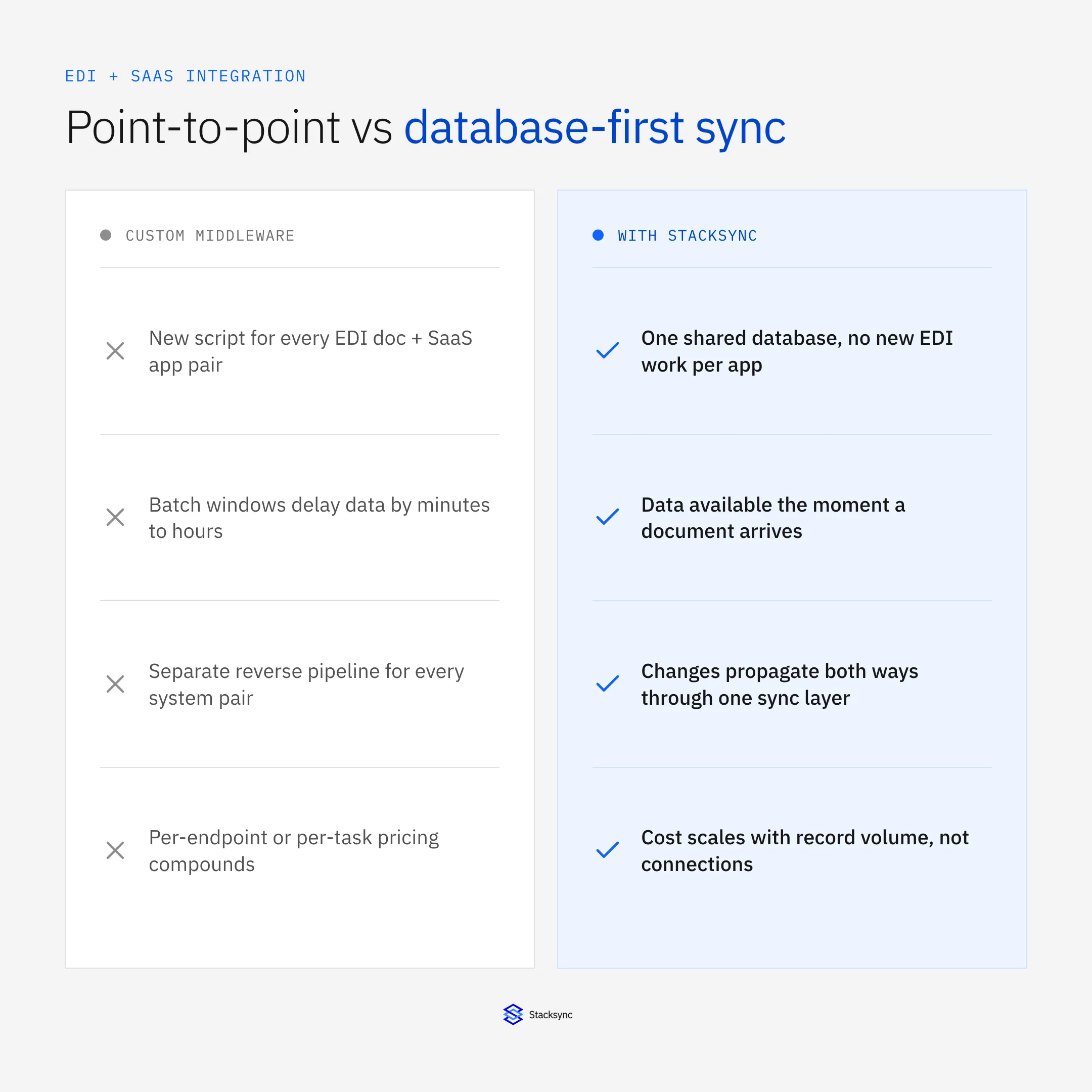
| Category | Traditional Integration | Database-First Sync |
|---|---|---|
| Data Format Handling | Custom parser per partner and document type | Single parse to relational tables at point of receipt |
| Adding SaaS Destinations | New integration script per app per document | Connect app to shared database, no new EDI work |
| Real-Time Availability | Batch windows delay SaaS access by minutes to hours | Data available the moment a document arrives |
| Error Handling | Batch failure blocks all queued documents | Per-document isolation with automatic retry |
| Bidirectional Data Flow | Separate reverse pipeline for each system pair | Changes propagate both ways through one sync layer |
| Maintenance Burden | Grows linearly with partners and applications added | Centralized in one database layer |
| Cost at Scale | Per-endpoint or per-task pricing compounds quickly | Scales with synced record volume, not connections |
Key Takeaways
A shared database layer eliminates the need for separate integration pipelines between every EDI source and every SaaS destination in your stack.
Traditional integration costs grow with every new trading partner and SaaS application. Database sync costs grow with data volume alone.
Bidirectional sync ensures that CRM updates, inventory changes, and financial records stay consistent across both EDI and SaaS systems.
From EDI Documents to Database Rows Your SaaS Apps Can Read
Parsing EDI Into Relational Tables
When an EDI document arrives, a parser converts its segments into relational database rows. An 850 purchase order becomes entries in an orders table, a line_items table, and an addresses table with foreign key relationships. The hierarchical structure of EDI maps directly to normalized relational schemas.
This conversion happens once, at the point of receipt. Every downstream system that needs order data reads from these tables rather than parsing the original EDI document independently. Syncing EDI transactions into PostgreSQL creates a single source of truth that supports both EDI operations and SaaS application consumption.
Using SQL to Transform EDI Data for SaaS Consumption
Once EDI data lives in relational tables, SQL handles the transformation logic that each SaaS application requires. A view can flatten the hierarchical order structure into the format a CRM expects. A materialized view can aggregate shipment data into the summary format an analytics tool requires. SQL-based transformations are familiar to most engineering teams, testable in standard database environments, and version-controlled alongside application code.
Bi-Directional Sync: SaaS Changes That Flow Back to EDI
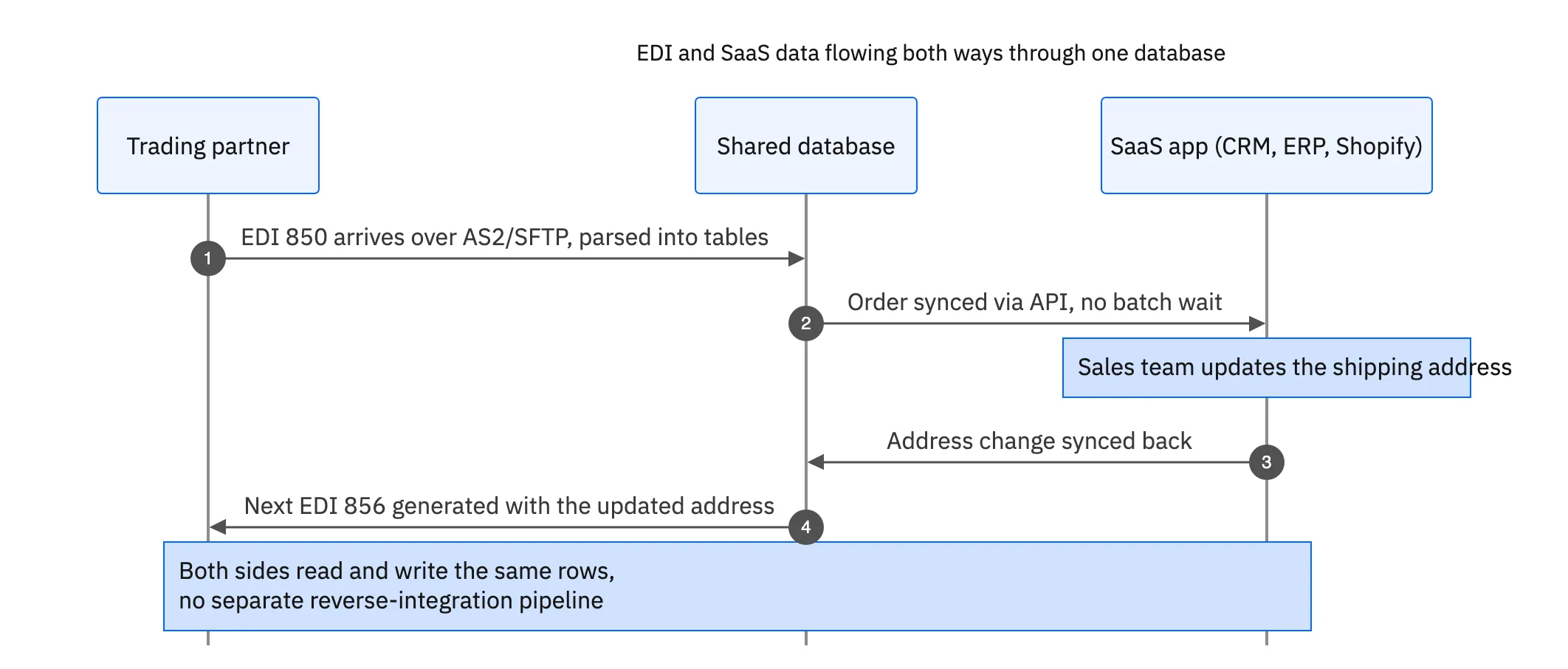
Data does not only flow from EDI to SaaS. When a sales team updates a customer record in the CRM, that change needs to reach the EDI pipeline so future documents use the correct addresses and contact information. When inventory adjustments happen in the e-commerce platform, they need to inform EDI-based allocation and available-to-promise calculations.
Bi-directional synchronization between the database and connected SaaS applications ensures that changes propagate in both directions. Updates in any system reach all others without separate reverse-integration pipelines.
Connecting EDI to Your CRM
Purchase Orders That Populate CRM Records Automatically
When a new trading partner sends their first EDI 850, the database receives the order data. A sync rule detects that the partner does not exist in the CRM and creates a new account with company details extracted from the EDI document. Subsequent orders update the account with transaction history, order volume trends, and compliance performance metrics.
In practice this means specific document types map to specific CRM objects rather than a generic data dump: an 850 purchase order becomes a Salesforce Order or Opportunity, an 810 invoice updates billing records tied to that Account, an 820 payment remittance closes out the associated invoice, and an 856 advance ship notice attaches to the shipment record so support and sales see fulfillment status without switching systems. Because Salesforce has no native AS2 or EDI support, this mapping has to happen at the database layer before data ever reaches the CRM API.
This eliminates the manual process of CRM data entry for trading partners. Sales and account management teams see real-time order activity without waiting for someone to copy data from the EDI system into the CRM.
Customer Data That Stays Current Across EDI and CRM
Address changes entered in the CRM sync back to the database and inform future EDI document generation. When a warehouse address changes, the next advance ship notice uses the updated address without anyone manually editing the EDI translation maps. This prevents the common EDI errors in supply chains that result from stale address data in translation software.
Reducing Partner Onboarding Friction Through CRM Integration
New trading partner onboarding typically requires entering the same information into the EDI system, the CRM, the ERP, and the warehouse management system separately. With a shared database layer, onboarding data entered once flows to all connected systems. EDI integration for ecommerce brands follows the same pattern, where trading partner setup in one system populates every other system that needs the data.

Connecting EDI to Inventory and E-Commerce Platforms
Real-Time Stock Updates From EDI Ship Notices
When a supplier sends an EDI 856 advance ship notice, the database updates inventory allocation records immediately. Any connected e-commerce platform or inventory management system sees the update within seconds rather than at the next batch sync. For retailers managing real-time EDI processing across multiple warehouses and sales channels, this difference determines whether customers see accurate stock counts or get oversold on items already committed elsewhere.
E-Commerce Platforms Reading From Synced Data
Shopify, BigCommerce, and other e-commerce platforms enforce their own API rate limits. Shopify's GraphQL API allows 1,000 cost points per minute. Pulling inventory data by calling the Shopify API directly from EDI workflows burns through these limits and creates bottlenecks during high-traffic periods.
The database layer maps EDI documents to the specific Shopify objects that own that data: an 850 purchase order or a B2B order feed becomes a Shopify Order, an 856 advance ship notice updates the linked Fulfillment record, and ongoing allocation from trading partners writes to Inventory levels per location. Order and customer metadata that does not fit Shopify's default schema, such as trading partner terms or compliance codes, lands in Metafields instead of being dropped or forced into the wrong field.
Instead, the e-commerce platform syncs with the shared database. EDI-sourced inventory updates write to the database, and the e-commerce platform reads from the same source. This decouples EDI processing throughput from e-commerce API constraints.
Preventing Oversells During Peak EDI Volume
During Black Friday, holiday promotions, and flash sales, EDI transaction volume spikes alongside e-commerce traffic. Batch-based inventory sync creates windows where the database and the storefront show different stock counts. A customer completes a purchase against inventory that an EDI-sourced allocation already claimed. Real-time sync between EDI data and e-commerce platforms closes this window and prevents the overselling that leads to cancellations and reputation damage.
What to Evaluate in an EDI-to-SaaS Integration Platform
Pre-Built Connectors for Both EDI and SaaS Systems
Most integration platforms specialize in one side of the equation. Traditional EDI platforms have strong trading partner connectivity but limited SaaS connectors. SaaS-focused iPaaS platforms offer hundreds of application connectors but treat EDI as an afterthought. The right platform handles both: EDI document parsing and transmission alongside native connectors for CRMs, ERPs, databases, and e-commerce systems.
Event-Driven Processing vs Scheduled Batch Jobs
Look for platforms that process EDI documents on arrival rather than on a schedule. The 850, 855, and 856 automation chain depends on immediate processing. A purchase order that waits 15 minutes in a batch queue delays every subsequent document in the response chain. Event-driven processing also distributes ERP load evenly instead of concentrating it into burst windows that trigger rate limit errors.
Security and Compliance for EDI Document Handling
EDI documents contain sensitive commercial data: pricing, quantities, customer addresses, and financial terms. Any platform connecting EDI to SaaS applications needs to meet specific security requirements:
- 01Encryption for data in transit and at rest across all connections
- 02SOC 2 Type II and HIPAA compliance for industries handling regulated data
- 03No persistent storage of document contents during processing
- 04Role-based access controls and single sign-on support
- 05Regional processing options for data sovereignty requirements
Organizations modernizing legacy EDI systems should verify that the replacement platform meets the same or higher security standards than their current infrastructure.
Pricing Models That Scale With Your Trading Partner Network
Adding a new trading partner should not double your integration costs. Platforms that bill per endpoint, per vCore, or per task create escalating expenses as your partner network grows. Pricing based on synced records rather than integration complexity aligns cost with actual data volume rather than architectural overhead. This distinction becomes critical as supply chains expand and the number of EDI-connected partners increases from dozens to hundreds.
Stop Treating EDI as a Standalone System
EDI data is too valuable to stay locked in a separate infrastructure from the rest of your technology stack. Every purchase order, shipment notice, and invoice contains information that your CRM, ERP, inventory system, and analytics tools need in real time. Organizations that connect EDI to their SaaS applications through a shared database layer cut the manual data entry between systems and respond to trading partner activity in seconds instead of hours.
Explore how Stacksync bridges EDI and SaaS by parsing documents directly into your database and synchronizing every connected application in real time, without custom middleware or batch scheduling delays.

FAQ
Frequently asked questions










Related articles