EDI 850 855 856 Automation Challenges and Solutions | Stacksync
Learn why automating the EDI 850, 855, and 856 document chain breaks down and how to fix purchase order, acknowledgement, and ASN workflow failures.
- Author
- Ruben Burdin · Founder & CEO
- Published
- Updated
- Read time
- 15 min read

The EDI 850, 855, and 856 form the core transaction chain in B2B supply chains. A buyer sends a purchase order (850), the seller acknowledges it (855), and the seller sends an advance ship notice (856) when the goods ship. Automating this chain sounds straightforward, but EDI 850 855 856 automation challenges consistently derail operations because each document depends on the one before it, and failures cascade through the entire order-to-shipment cycle.
When the 850-to-855-to-856 flow breaks, the results are tangible: delayed acknowledgements that signal unreliability to buyers, ASN mismatches that generate chargebacks, and manual workarounds that consume EDI team hours on tasks that should run without intervention.
How the 850-855-856 Document Chain Works
The purchase order, acknowledgement, and advance ship notice form a sequential dependency chain where each document triggers the next step in the fulfillment process.
The Purchase Order Starts the Chain
The EDI 850 purchase order initiates the transaction. It contains the buyer's item requests, quantities, pricing, ship-to addresses, and delivery dates. The seller's system must receive the 850, parse it, validate it against internal data, and route it to the appropriate fulfillment workflow. Every downstream document depends on the accuracy and completeness of this initial step.
The Acknowledgement Confirms or Rejects
The EDI 855 purchase order acknowledgement is the seller's response. It tells the buyer whether the order is accepted as-is, accepted with modifications (partial quantities, substituted items, adjusted dates), or rejected. This document is time-sensitive because buyers need confirmation before they can plan receiving, allocate warehouse space, and update their own inventory projections.
The Ship Notice Closes the Loop
The EDI 856 advance ship notice communicates what was actually shipped, how it was packed, and when it will arrive. The ASN uses a hierarchical loop (HL) structure that describes shipment, order, pack, and item levels. Receivers use ASN data to plan dock scheduling, verify incoming goods by scanning barcodes, and reconcile shipments against the original purchase order.
EDI 850 Purchase Order Automation Challenges
Unknown Items Breaking ERP Ingestion
Purchase orders frequently contain item numbers that do not exist in the seller's ERP system. A buyer references a new SKU, uses a different product identifier than expected, or sends an item number from their catalog that has no mapping in the seller's system. When the automation pipeline encounters an unrecognized item, the entire order stalls.
The failure mode matters: if the system silently accepts the order and passes it to fulfillment, the warehouse discovers the problem when it tries to pick a product that has no location, no BOM, and no inventory record. If the system rejects the order outright, the buyer receives no acknowledgement and assumes the seller is unresponsive.
Validation at the Parsing Layer
The solution is catching unknown items during EDI parsing, before the order enters the ERP. Validation rules compare each PO1 line item against the product master and flag unrecognized items immediately. This lets the EDI team resolve the issue (add the item, request clarification from the buyer, or map the buyer's identifier to an existing SKU) without the order disappearing into a failed batch.
Pricing Discrepancies Between Buyer and Seller Systems
The price on the buyer's 850 may not match the price in the seller's catalog, contract, or ERP. This happens when contract pricing updates are not synchronized, when the buyer applies a discount the seller does not recognize, or when currency conversion introduces rounding differences. Pricing mismatches that are not caught early lead to invoice disputes that delay payment by weeks.
Ship-To Address Validation Failures
Purchase orders sometimes arrive with ship-to addresses that are not configured in the seller's system. This is common when a buyer opens a new distribution center, uses a drop-ship address, or specifies a third-party logistics facility. Retailers like Lowe's operate across multiple divisions, and a purchase order routed to an unfamiliar division address can stall if the seller's system lacks that location in its address master.
Without validation, these orders progress through the pipeline until someone in shipping discovers they cannot generate a label for an address that does not exist in the system. By that point, the acknowledgement has already been sent and the fulfillment window is shrinking.
EDI 855 Acknowledgement Automation Challenges
ERP Systems That Do Not Generate 855s Natively
The most common 855 automation failure is that most ERP systems do not produce them automatically. Purchase order acknowledgements require business logic that goes beyond simple data extraction: the system needs to check inventory availability, verify pricing against the PO, confirm shipping capacity for the requested delivery date, and determine whether to accept, modify, or reject each line item.
Because this logic lives across multiple ERP modules (inventory, pricing, logistics), generating a correct 855 requires querying several systems and applying decision rules that many ERPs do not support out of the box. Teams end up creating 855s manually or through fragile custom scripts that break when trading partner requirements change.
Timing Pressure From Trading Partner SLAs
Buyers expect acknowledgements fast. Many retailers require the 855 within 24 hours of sending the purchase order, and some enforce 2-to-4-hour windows. Costco and The Home Depot track supplier responsiveness through compliance scorecards, and late acknowledgements directly affect a supplier's standing and future order volume.
When 855 generation is manual, meeting these SLAs depends on staff availability, time zones, and workload. An order that arrives at 4:55 PM on a Friday might not get acknowledged until Monday morning, well outside the compliance window.
Partial Acceptance Logic
Not every purchase order can be accepted as-is. Inventory shortages, discontinued items, or pricing disagreements require the 855 to communicate line-level acceptance or rejection. Automating this requires the system to evaluate each PO1 line item individually: accept lines where inventory and pricing match, reject lines where the item is unavailable, and modify lines where partial quantities can be fulfilled.
This line-level logic is where most automation attempts fail. Simple auto-accept rules (acknowledge everything as accepted) create downstream problems when the seller cannot actually fulfill the order as stated. The ASN will not match the acknowledgement, and the buyer receives a shipment that differs from what was confirmed.
EDI 856 ASN Automation Challenges
Hierarchical Loop Complexity
The 856 is the most structurally complex document in the chain. Its HL (hierarchical level) loop structure can be several levels deep: shipment level, order level, pack level (tare), and item level. Each level nests inside the one above it, and the relationships between levels must be maintained accurately for the receiver to process the ASN correctly.
A single shipment containing multiple orders, each with multiple cartons, each containing multiple items, produces a deeply nested HL structure. Automating the construction of this hierarchy from warehouse management system (WMS) data requires mapping packing operations, carton assignments, and pallet configurations into the correct HL parent-child relationships.
Partner-Specific ASN Requirements
Different trading partners require different HL structures, different segments within those structures, and different barcode formats. Best Buy requires specific segment combinations for inventory and shipment documents, while CVS and Walgreens enforce healthcare-specific compliance programs with their own validation rules. Organizations that also exchange transportation documents through third-party logistics networks must support specialized flows for partners like CVS Health via Mercury Gate and Walgreens via Mercury Gate, which add motor carrier load tenders and freight status messages to the standard fulfillment chain.
A single ASN template does not work across all partners. The automation system needs partner-specific profiles that control which segments are included, which qualifiers are used, and how the HL hierarchy is structured for each receiver.
Barcode-to-ASN Mismatches
Every carton in a shipment carries a barcode label (typically SSCC/GS1-128) that corresponds to the ASN data. When the receiver scans these barcodes at the dock, the system validates them against the ASN. Mismatches between the physical barcodes and the electronic ASN trigger manual sorting, receiving delays, and chargebacks.
These mismatches happen when the ASN is generated from stale data. If the ASN is built from a batch export taken at 2:00 PM but the warehouse finishes packing at 2:45 PM with substitutions and short-picks, the ASN no longer reflects what is actually on the truck. The barcode labels printed during packing are correct, but the ASN sent to the trading partner is not.
Timing: ASN Must Arrive Before the Shipment
Trading partners expect the ASN before the physical goods arrive at the dock. A late ASN forces the receiving team to process the shipment manually, without advance knowledge of what to expect. This eliminates the efficiency gains that ASNs are designed to provide and creates receiving bottlenecks that cascade through the retailer's distribution operations.
Common Automation Failures Across the 850-855-856 Chain
The following table maps the most frequent automation failures to their root causes and business impact across each document type.
| Failure Point | Root Cause | Business Impact |
|---|---|---|
| 850 rejected by ERP | Unknown item numbers or ship-to addresses not in product or address master | Order stalls, no 855 generated, buyer sees no response |
| 855 sent late | Manual creation required because ERP lacks native 855 generation | Compliance penalty, reduced supplier scorecard rating |
| 855 accepts unfulfillable order | Auto-accept rules skip inventory and pricing validation checks | ASN mismatches original acknowledgement, buyer trust erodes |
| 856 HL structure invalid | WMS packing data not mapped correctly to partner HL requirements | Receiver rejects ASN, shipment processed manually at dock |
| 856 barcode mismatch | ASN generated from batch snapshot, not live warehouse state | Chargebacks from receivers, manual sorting at distribution center |
| 856 arrives after shipment | ASN generation not triggered by shipment event, runs on batch timer | Receiving team cannot plan dock labor, shipment sits unprocessed |
| 810 pricing mismatch | Invoice references 850 prices that changed between order and shipment | Payment delayed weeks while dispute is resolved manually |
Key Takeaways
Most automation failures trace back to validation gaps at the parsing layer or stale data from batch processing schedules.
Late or inaccurate 855 acknowledgements cascade into 856 mismatches and 810 invoice disputes across the full document chain.
Prioritize fixing 855 generation and real-time ASN creation first since they drive the highest chargeback volume.
Why the 850-855-856 Chain Fails as a Unit
Data Does Not Flow Between Documents
The most fundamental automation challenge is that the three documents are often processed by separate systems with no shared data layer. The 850 is received by an EDI translator, the 855 is generated (if at all) by the ERP, and the 856 is built by the WMS. Each system has its own representation of the order, and discrepancies between these representations create mismatches that surface at the worst possible time: when the shipment arrives at the receiver's dock.
An order that is modified between the 855 and 856 stages (quantity adjusted, item substituted, delivery date changed) needs those modifications reflected in every document. When the systems are disconnected, the 856 might reference quantities from the original 850 rather than the updated 855, or the 810 invoice might use pricing from the 850 that was overridden in the acknowledgement.
Change Requests Breaking the Chain
EDI 860 purchase order change requests add complexity to an already fragile chain. When a buyer modifies a purchase order after the 855 has been sent, the seller must process the change, update the order in the ERP, and potentially issue an EDI 865 acknowledging the modification. If the 856 was already in progress, the ASN must be updated or regenerated to reflect the changed order.
Automating this change management across three or four document types requires a shared order record that all documents reference. Without it, each change request creates a reconciliation burden that manual processes struggle to keep up with.
Approaches to Automating the Full Document Chain
Organizations have several options for automating the 850-855-856 flow, each with different trade-offs in control, development effort, and scalability across trading partners.
| Approach | How It Works | Trade-Offs |
|---|---|---|
| ERP Native EDI Module | Built-in EDI within NetSuite, SAP, or Dynamics handles translation inside the ERP | Tight coupling but limited partner flexibility and no cross-system visibility |
| Legacy EDI Translator | Standalone software like Gentran maps EDI to flat files for ERP import on schedule | Proven but batch-only, expensive licensing, one-way data flow |
| VAN With Translation | Value-Added Network converts documents and routes to your system via SFTP or AS2 | Offloads translation but adds per-document cost and limits automation control |
| Custom Middleware | In-house scripts parse, validate, and route documents between EDI and ERP endpoints | Full control but high build time, fragile across partner changes, maintenance burden |
| Integration Platform | Cloud platform parses EDI into database tables with real-time sync to ERP and WMS | Fastest deployment and partner scaling, ongoing subscription but minimal maintenance |
| Managed EDI Service | Third-party provider handles all EDI operations including mapping and compliance | Zero internal effort but limited visibility and dependency on provider response times |
Key Takeaways
ERP-native modules and legacy translators handle basic flows but struggle with multi-partner 855 logic and real-time 856 generation.
Custom middleware gives full control but becomes a maintenance burden as trading partner count and document complexity grow.
Evaluate whether your team needs partner-specific profiles or one-size-fits-all translation before choosing an approach.

Fixing the Chain: What Reliable Automation Requires
A Shared Order Record Across All Documents
The 850, 855, and 856 must reference the same underlying order data. When a purchase order is received, parsed, and stored in a database table, that record becomes the single source of truth. The 855 reads from it to determine what to acknowledge. The 856 reads from it (updated with actual warehouse packing data) to generate an accurate ASN. The 810 invoice reads from the same record to ensure pricing and quantity alignment.
This shared record eliminates the disconnected system problem where each document is generated from a different data snapshot. Changes to the order (via EDI 860) update the shared record, and all subsequent documents automatically reflect those changes.
Event-Driven Document Generation
Batch processing is the root cause of most timing-related automation failures. When 855s are generated on a 30-minute schedule, compliance SLAs that require sub-hour acknowledgement become impossible to meet consistently. When 856s are generated from periodic WMS exports, the ASN will never reflect last-minute warehouse changes.
Event-driven automation triggers document generation in response to specific data changes:
- An incoming 850 triggers immediate parsing, validation, and 855 generation
- A shipment completion event in the WMS triggers immediate 856 generation from live packing data
- A pricing update in the ERP triggers revalidation of any open orders affected by the change
Partner-Specific Profiles at Scale
Each trading partner has different requirements for segment usage, qualifier codes, HL structure, barcode formats, and compliance windows. Scaling automation across 50, 100, or more partners requires a profile-based approach where partner-specific rules are configuration, not code.
Stacksync handles the full 850-855-856 chain by parsing incoming EDI documents directly into database tables, enabling real-time sync between your ERP, WMS, and EDI endpoints. With pre-built connectors for over 200 trading partners, teams automate the entire order-to-shipment flow without building and maintaining partner-specific middleware. Documents are generated from live system data rather than batch exports, ensuring that acknowledgements, ship notices, and invoices always reflect current operational state.
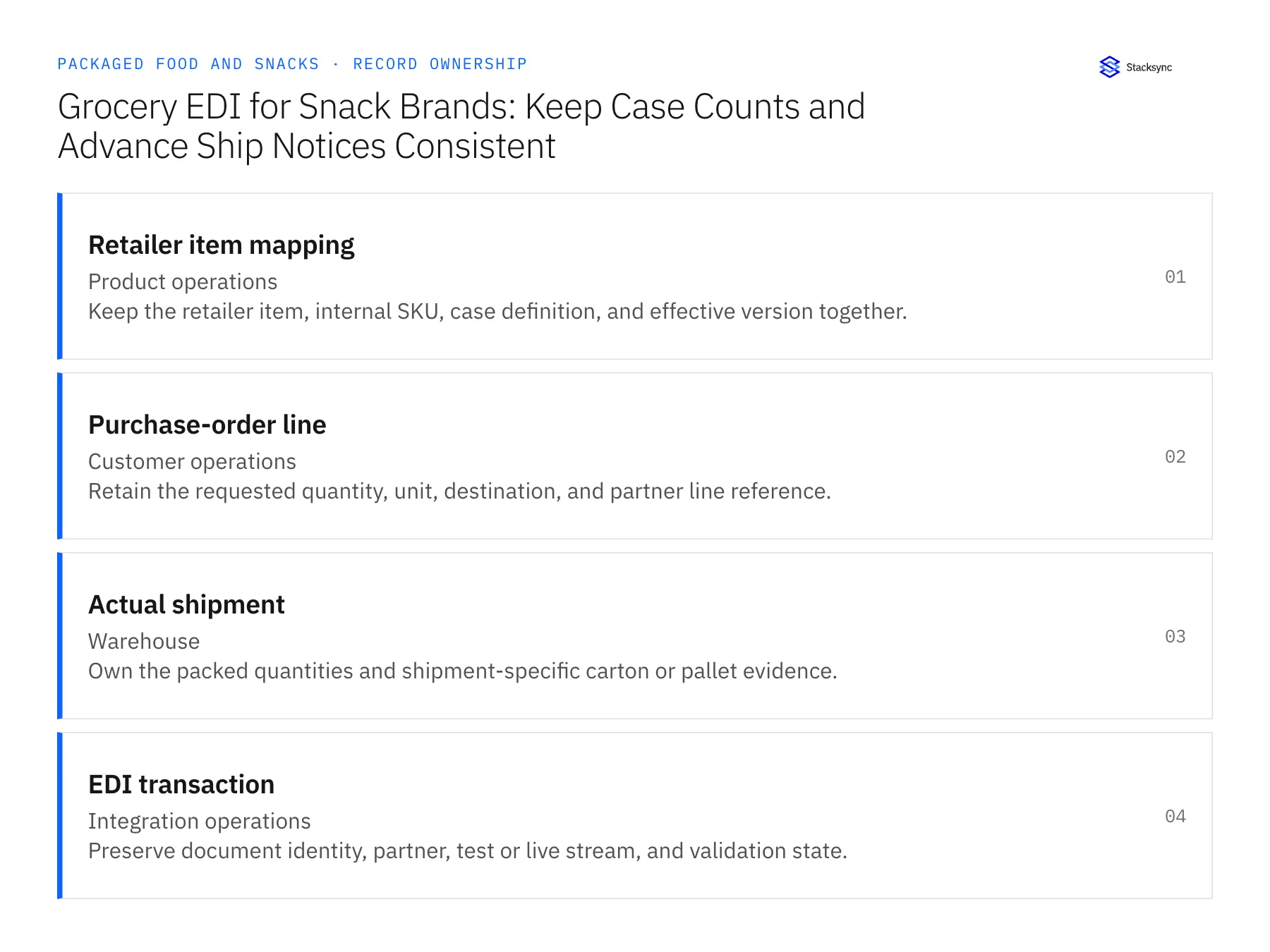
Apply this in packaged food and snacks: retailer item mapping and purchase-order line
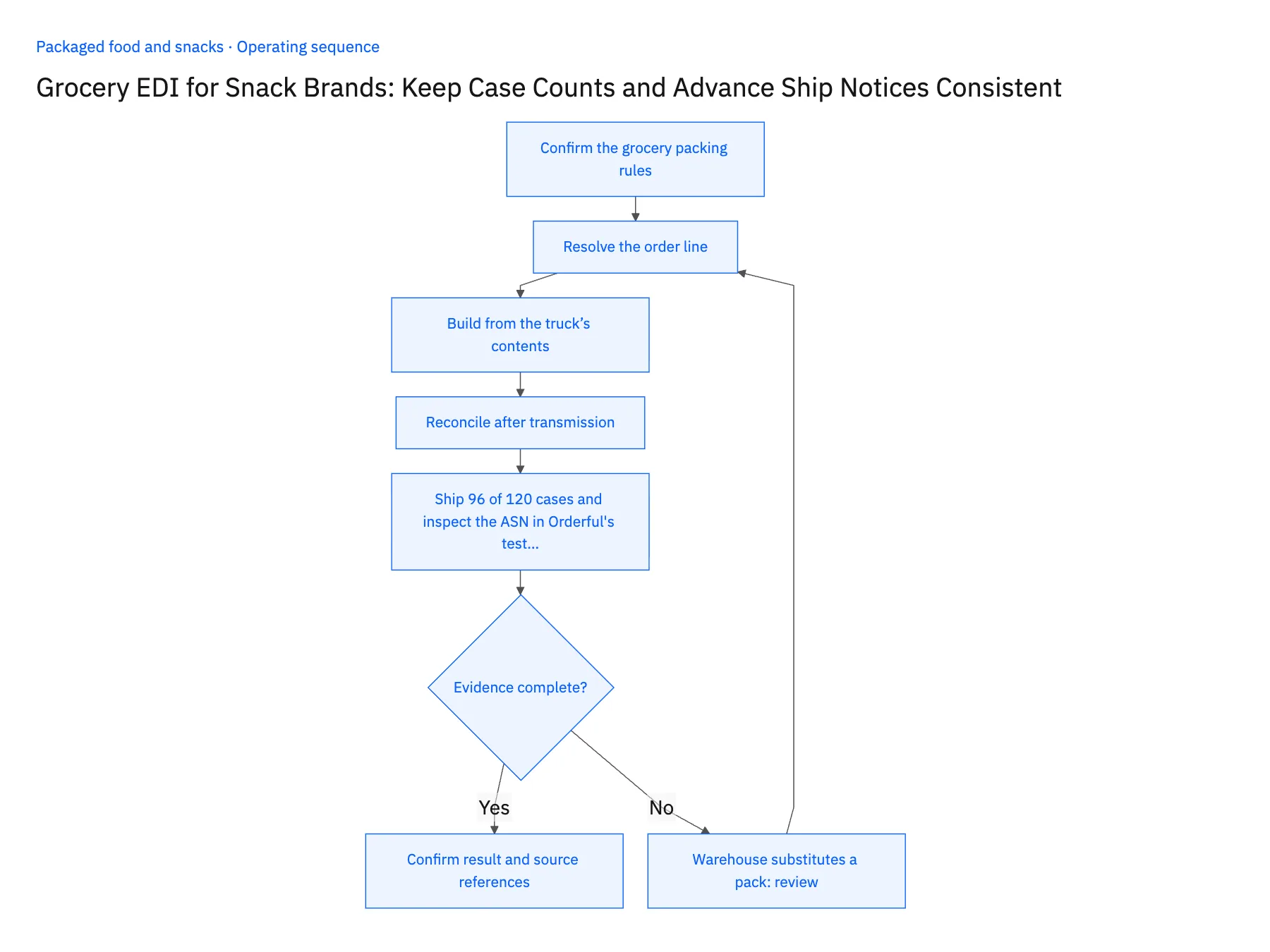
Grocery EDI applies the same order, acknowledgment, and shipment chain to retailer case definitions. Build the shipment notice from actual packed goods and retain the original partner line, especially when a snack order ships in several deliveries.
| Record to reconcile | Responsible owner | Rule to preserve |
|---|---|---|
| Retailer item mapping | Product operations | Keep the retailer item, internal SKU, case definition, and effective version together. |
| Purchase-order line | Customer operations | Retain the requested quantity, unit, destination, and partner line reference. |
| Actual shipment | Warehouse | Own the packed quantities and shipment-specific carton or pallet evidence. |
An exception to plan for: Warehouse substitutes a pack. Require an approved commercial and mapping decision before describing it as the ordered item. Acceptance check for the pilot: each shipment notice describes only the goods on its own shipment.
The packaged food and snacks hub connects the broader operating context. These guides develop the specific record mappings and decisions for this application:
- Grocery EDI for Snack Brands: Keep Case Counts and Advance Ship Notices Consistent
- Grocery EDI Integration for Packaged Food and Snack Brands
Automate the Order-to-Shipment Chain Without the Middleware Tax
The EDI 850, 855, and 856 are not independent documents. They are a chain, and automating them requires treating them as one connected workflow rather than three separate translation problems. Every disconnected system, batch schedule, and manual workaround in this chain is a point where data goes stale, compliance windows get missed, and chargebacks accumulate.
The path forward is a shared data layer that all three documents read from and write to, event-driven triggers that generate documents the moment the underlying data changes, and partner-specific profiles that scale without requiring custom code for each trading relationship.
Ready to automate your EDI document chain? Explore how Stacksync handles EDI with real-time sync, pre-built trading partner connectors, and zero batch windows between your purchase orders, acknowledgements, and ship notices.
FAQ
Frequently asked questions










Related articles