How to Parse EDI Files Into a SQL Database
Learn how to parse EDI X12 files into SQL tables, including PostgreSQL. Step-by-step guide covering segments, loops, schema design, and automated parsing.
- Author
- Ruben Burdin · Founder & CEO
- Published
- Updated
- Read time
- 16 min read
EDI files carry the transaction data that drives supply chain operations, but their raw X12 format is difficult to query, join, or analyze without first converting it into structured database records. Learning how to parse EDI files into a SQL database transforms opaque segment strings into queryable rows and columns that any team can work with using standard SQL.
This guide walks through the full process: understanding X12 file structure, designing SQL schemas that match EDI document hierarchies, handling the parsing logic for segments and loops, and automating the pipeline so new documents are parsed on arrival rather than through manual processing.
What EDI X12 Files Look Like and Why They Need Parsing
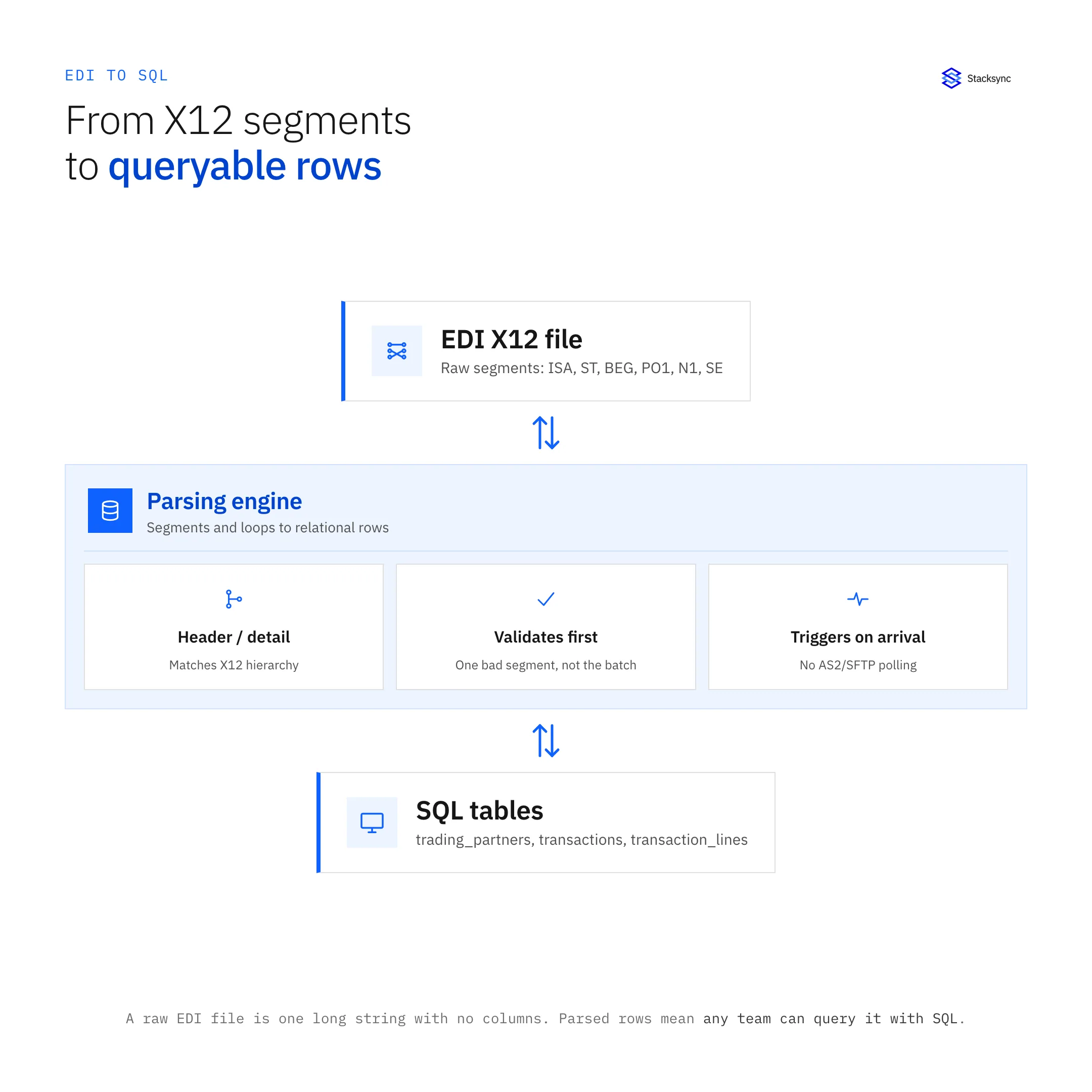
EDI X12 is a data format, not a database. Each file contains a series of segments, where each segment starts with a two- or three-character identifier and contains data elements separated by asterisks. Segments are terminated by tildes. A single EDI file can contain multiple transaction sets, each representing a complete business document like a purchase order or invoice.
Anatomy of an X12 Transaction
An EDI 850 purchase order contains segments arranged in a specific hierarchy:
- ISA and GS segments form the envelope, identifying the sender, receiver, and control numbers
- ST marks the beginning of the transaction set
- BEG contains the purchase order number, date, and type
- PO1 segments contain individual line items with SKU, quantity, unit price, and unit of measure
- N1 segments identify ship-to and bill-to parties with addresses
- CTT provides the transaction total
- SE marks the end of the transaction set
This hierarchical structure is the reason parsing EDI into SQL requires more than splitting text on delimiters. The relationship between header segments (BEG), repeating line items (PO1), and nested address loops (N1) maps directly to parent-child table relationships in a relational database.
Why Raw EDI Files Are Not Queryable
A raw EDI file looks like a continuous string of characters with no line breaks, no column headers, and no data type indicators. Finding all purchase orders from a specific trading partner, or calculating the total value of orders placed in the last 30 days, requires writing a custom parser every time you need an answer.
SQL eliminates this problem. Once EDI data is parsed into database tables, teams can filter, aggregate, join, and export data using queries that take seconds to write and milliseconds to execute. The parsing step converts an unreadable format into a shared, queryable data layer.
Designing a SQL Schema for EDI Documents
The schema design determines how useful your parsed EDI data will be. A well-designed schema preserves the hierarchical relationships in EDI documents while making the data easy to query across document types and trading partners.
Header and Line Item Tables
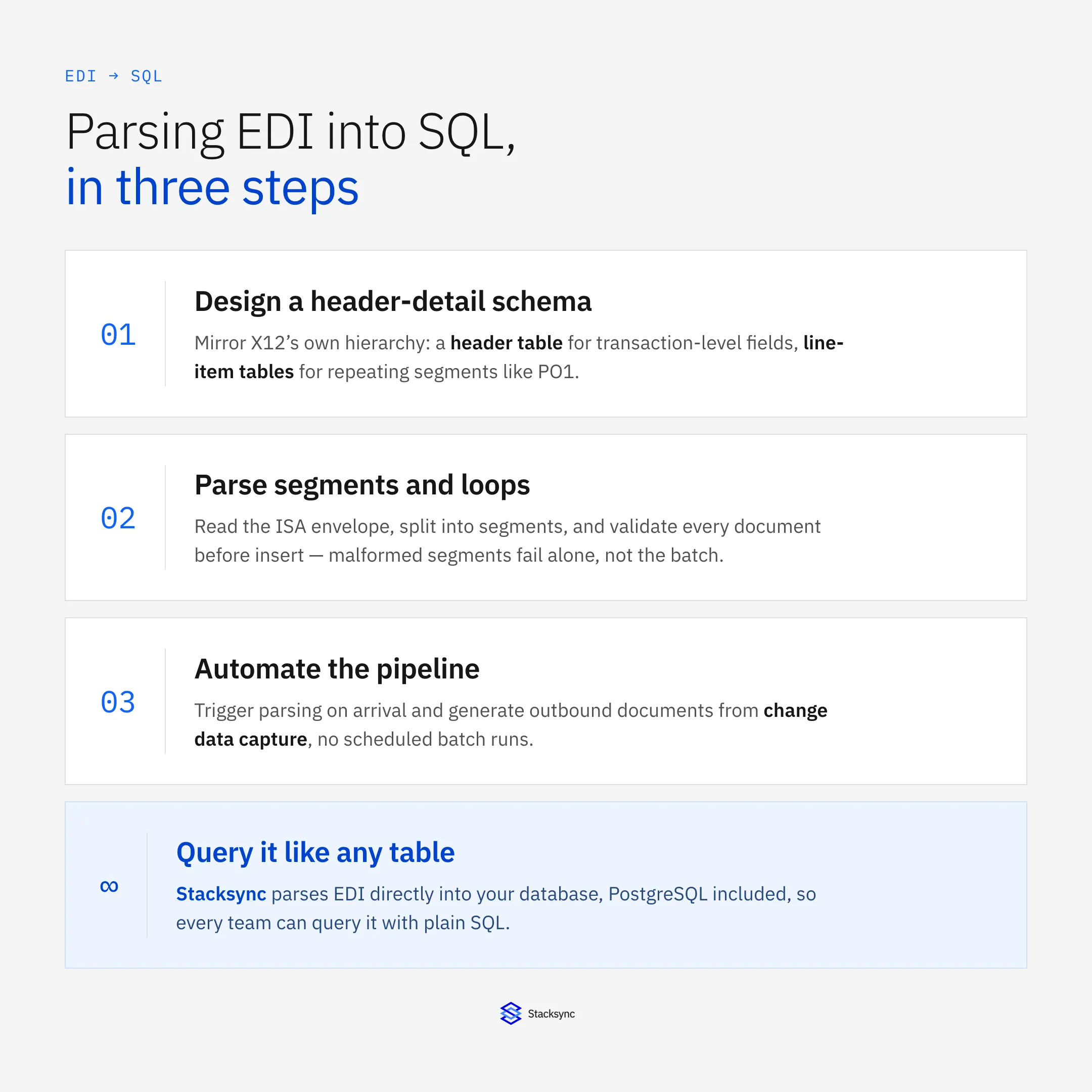
The most effective schema for EDI documents mirrors the header-detail pattern found in the X12 structure itself:
- 01A header table stores transaction-level data: document type, trading partner ID, control number, date, and status
- 02A line items table stores repeating segments like PO1 (line items), with a foreign key referencing the header
- 03Additional tables handle nested loops like addresses (N1), shipping details (TD5), and references (REF)
This normalized structure avoids storing repeating data in single rows with numbered columns (like item_1, item_2, item_3), which breaks when a purchase order has more items than you planned for.
Choosing Data Types for EDI Fields
EDI elements are all transmitted as text, but they represent different data types in practice:
- Dates in EDI use YYYYMMDD format, these should map to DATE or TIMESTAMP columns in SQL
- Quantities and prices are numeric strings that should map to DECIMAL or NUMERIC columns with appropriate precision
- Identifiers like purchase order numbers and SKUs should map to VARCHAR columns
- Status codes and qualifiers should map to VARCHAR with CHECK constraints or reference tables
Enforcing data types at the SQL layer catches formatting errors that would otherwise propagate silently through downstream processes. A purchase order with a non-numeric quantity field fails at insert time rather than during invoice calculation three weeks later.
Handling Multiple Document Types in One Schema
A complete EDI-to-SQL implementation handles multiple document types: purchase orders (850), acknowledgements (855), advance ship notices (856), invoices (810), and potentially dozens more. Two approaches work well:
Shared Header With Document-Specific Detail Tables
All document types share a common header table with columns for control numbers, dates, partner IDs, and document type. Each document type gets its own detail table: po_line_items for 850s, asn_shipments for 856s, invoice_lines for 810s. This keeps queries simple (join header to the detail table you need) while accommodating the different segment structures of each document type.
Fully Separate Table Sets
Each document type gets its own header and detail tables: edi_850_header, edi_850_lines, edi_856_header, edi_856_shipments. This approach provides cleaner separation but makes cross-document queries (like matching purchase orders to their corresponding invoices) require more complex joins.
EDI Document Types and Their SQL Table Structure
Different EDI documents serve different supply chain functions and require different SQL table designs. The following comparison maps the most common document types to their SQL structure and primary use cases.
| Document Type | Key Segments to Parse | SQL Table Structure |
|---|---|---|
| 850 Purchase Order | BEG, PO1, N1, CTT header plus line items with SKU and quantity | Header table with order metadata, line items table with foreign key reference |
| 856 Advance Ship Notice | BSN, HL loops, TD5, REF with hierarchical packing structure | Shipment header, order-level, pack-level, and item-level tables following HL hierarchy |
| 810 Invoice | BIG, IT1, TDS, SAC with line items and summary amounts | Invoice header, line items table, allowances and charges table |
| 855 Order Acknowledgement | BAK, PO1 with line-level status codes for each item | Acknowledgement header with status, line items with accept or reject per item |
| 846 Inventory Inquiry | LIN, QTY, DTM with product identifiers and quantity snapshots | Single table with product ID, quantity on hand, date, and location columns |
| 820 Remittance Advice | BPR, RMR, DTM with payment references and amounts | Payment header table with remittance detail rows linking to invoice references |
Key Takeaways
Each EDI document type has a distinct segment hierarchy that maps to a specific parent-child table structure in SQL.
The 856 ASN is the most complex to parse because its HL loops create a variable-depth hierarchy of shipment, order, pack, and item levels.
Start with 850 and 810 parsing since their flat header-plus-line-items structure is the simplest to implement.
Step-by-Step: Parsing an EDI File Into SQL
Read the ISA Envelope
Every X12 file begins with an ISA segment that is exactly 106 characters long. The ISA segment defines the delimiters for the rest of the file: element separator (position 4, typically an asterisk), sub-element separator (position 105), and segment terminator (position 106, typically a tilde). Read these first because some trading partners use non-standard delimiters.
Split Into Segments and Identify Transaction Sets
Using the segment terminator from the ISA header, split the entire file into individual segments. Then walk through the segments to find ST/SE pairs, which mark the boundaries of individual transaction sets. A single EDI file can contain multiple transaction sets, and each one should be parsed and stored independently.
Parse Header Segments Into a Header Row
For each transaction set, identify the header segments and extract their elements by splitting on the element separator. Map each element to the corresponding column in your SQL header table:
- For an 850: BEG-03 is the purchase order number, BEG-05 is the order date
- For an 856: BSN-02 is the shipment ID, BSN-03 is the shipment date
- For an 810: BIG-01 is the invoice date, BIG-02 is the invoice number
Insert this data as a single row in the header table and retain the generated primary key for linking detail rows.
Parse Repeating Loops Into Detail Rows
Repeating segments like PO1 (line items) appear multiple times within a transaction set. For each occurrence, extract the elements and insert a row into the detail table with a foreign key pointing to the header row. Handle nested loops by tracking the current loop context, particularly important for 856 ASNs where HL segments define a hierarchy that can be several levels deep.
Validate Before Inserting
Before committing parsed data to the database, validate:
- Required fields are present and non-empty
- Dates parse correctly into the target column format
- Numeric fields contain valid numbers
- Control numbers are unique (no duplicate processing)
- Foreign key references resolve correctly
Failed validation should route the document to an error queue with the specific failure reason, not silently drop the transaction.
Handling Multi-Partner Schema Variations
Why the Same Document Type Looks Different Across Partners
The X12 standard defines the structure and allowed segments for each document type, but it leaves significant room for variation. Trading partners choose which optional segments to include, which qualifier codes to use, and how to populate conditional fields. A purchase order from Costco will use different qualifiers, segment combinations, and field conventions than a purchase order from Lowe's, even though both are valid 850 documents.
This variation means a parser built for one trading partner will often fail on documents from another. Handling these differences at the parsing layer rather than the schema layer is critical for scaling to dozens or hundreds of trading partners.
Retailer-Specific Compliance Requirements
Large retailers enforce strict EDI compliance standards that affect how documents must be parsed and validated. The Home Depot supports over a dozen EDI document types across 11 divisions, including transportation-specific documents that require additional parsing logic for motor carrier segments. Best Buy includes inventory inquiry documents (846) that need a different table structure than standard order and fulfillment documents.
Healthcare and pharmacy supply chains add another layer of complexity. Parsing EDI from CVS and Walgreens requires handling document types across multiple compliance programs, and the validation rules differ from general retail EDI. Organizations that also exchange transportation documents through third-party logistics networks need to parse specialized carrier flows from partners like CVS Health via Mercury Gate and Walgreens via Mercury Gate, which include load tenders, freight invoices, and shipment status messages alongside standard supply chain documents.
Canonical Schema With Partner Profiles
The most scalable approach is a canonical SQL schema (one set of tables for all partners) combined with partner-specific parsing profiles. Each profile defines how that partner's EDI maps to your canonical columns:
- 01Map partner-specific qualifier codes to your standard values
- 02Define which optional segments that partner uses
- 03Set default values for fields the partner omits
- 04Configure validation rules specific to that partner's compliance requirements
This approach lets you add new trading partners by creating a new parsing profile rather than modifying your database schema.
EDI Parsing Approaches Compared
Organizations have several options for implementing EDI-to-SQL parsing, each with different trade-offs in development time, flexibility, and ongoing maintenance.
| Approach | How It Works | Trade-Offs |
|---|---|---|
| Custom Scripts | Python or Node.js code reads delimited EDI text and inserts rows via SQL driver | Full control but 2 to 4 weeks per document type, scales poorly across partners |
| EDI Translation Software | Legacy tools like Gentran or EXTOL parse EDI into staging tables on schedule | Proven but expensive licensing, batch-only, limited SQL schema flexibility |
| VAN With Built-In Translation | Value-Added Network converts EDI to CSV or XML before delivery to your system | Offloads parsing but adds per-document fees and limits schema control |
| Open-Source Libraries | Libraries like pyx12, bots, or edifact-parser handle segment splitting and validation | Free and flexible but requires development effort for SQL mapping and maintenance |
| Integration Platforms | Cloud platforms parse EDI into database tables with pre-built connectors and mapping | Fastest deployment, handles partner variations, ongoing cost but minimal maintenance |
| ERP Native EDI Modules | Built-in EDI modules in NetSuite, SAP, or Dynamics parse directly into ERP tables | Tight ERP integration but locked to vendor schema, limited cross-system querying |
Key Takeaways
Custom scripts offer full control but scale poorly when you need to support dozens of trading partners with different conventions.
Legacy translation software adds licensing costs and batch-only processing that limits how quickly parsed data reaches your SQL tables.
Evaluate total cost of ownership across development time, per-document fees, and ongoing maintenance before choosing an approach.
Automating EDI-to-SQL Parsing
From Manual Runs to Event-Driven Pipelines
Manual parsing, running a script against a batch of EDI files collected in a folder, works for low volumes. As transaction volume grows, this approach breaks down. Files accumulate, processing delays increase, and errors require manual intervention to detect and resolve.
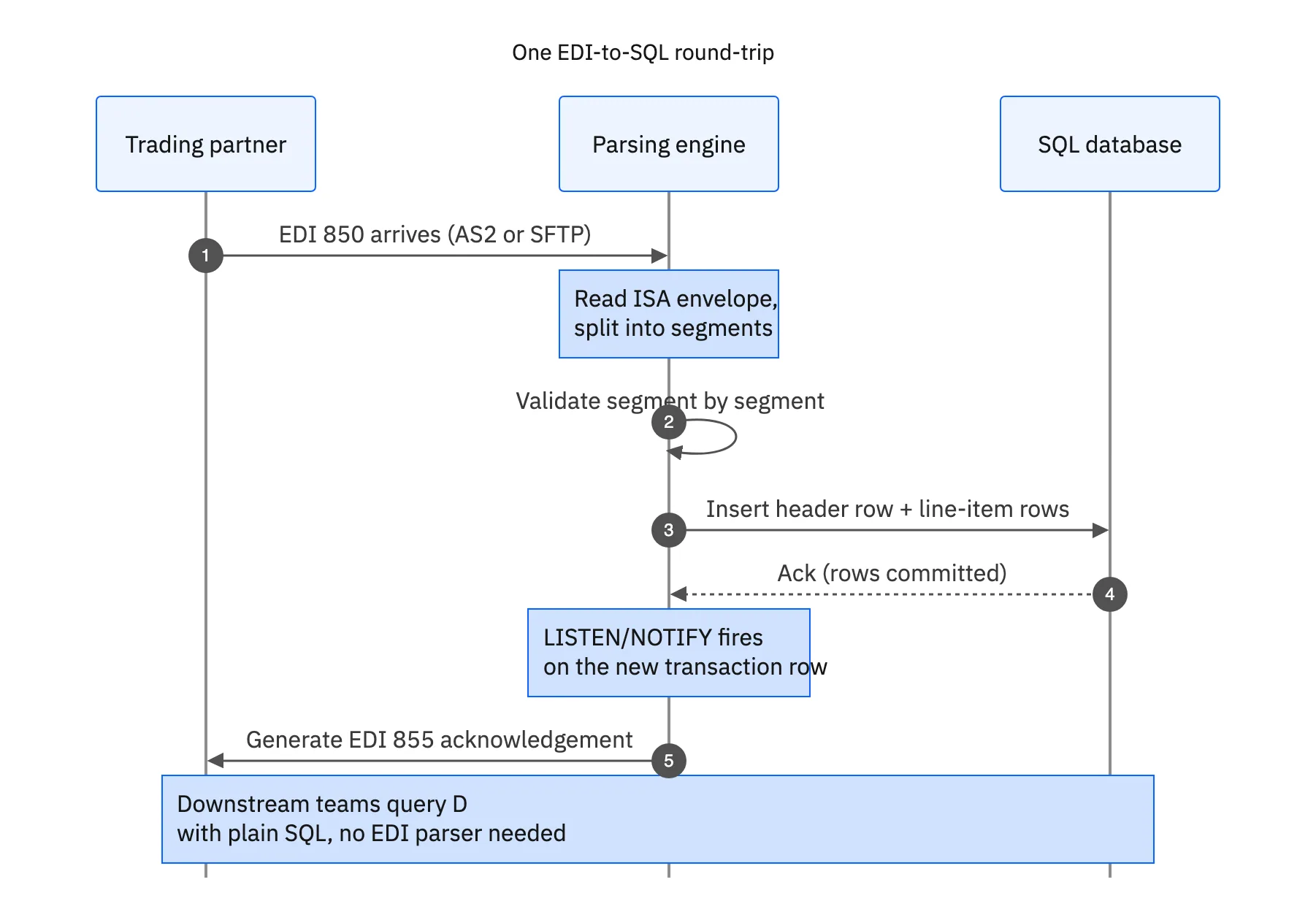
Event-driven parsing triggers automatically when a new EDI file arrives at your AS2 endpoint, VAN mailbox, or SFTP directory. The file is picked up, parsed, validated, and inserted into SQL tables without human intervention. Errors are routed to a dead letter queue with the specific failure context rather than failing silently in a batch.
Change Data Capture for Outbound EDI
Parsing is only half of the EDI-to-SQL pipeline. The other half is generating outbound EDI documents from SQL data. When your warehouse system updates a shipment status in the database, the corresponding ASN needs to be generated and transmitted to the trading partner.
Change Data Capture (CDC) monitors your SQL tables for inserts and updates, triggering outbound EDI document generation when relevant data changes. This eliminates the need for scheduled exports and ensures that outbound documents like ASNs and invoices reflect the current state of your operations rather than a periodic snapshot.
Error Handling and Retry Logic
Production EDI parsing needs error handling that catches problems at the document level, not the batch level:
- Malformed segments should fail the individual document, not the entire batch
- Duplicate control numbers should be detected and rejected
- Validation failures should include the specific field, expected format, and actual value
- Failed documents should be retried automatically with exponential backoff
- Persistent failures should generate alerts for the EDI team

PostgreSQL-Specific Patterns for EDI Data
If your target database is PostgreSQL specifically, a few native features make the event-driven pipeline above easier to build without adding a separate message queue.
LISTEN/NOTIFY for Event-Driven Workflows
PostgreSQL supports LISTEN and NOTIFY for real-time event propagation inside the database itself. When a new EDI transaction row gets inserted, a trigger fires a notification that downstream workflows subscribe to: an acknowledgment generator picks up new purchase orders, a label printer receives advance ship notice data, and an accounting system processes incoming invoices, all without polling the table on a schedule.
A Three-Table Schema That Scales
A schema that separates transaction metadata from line-item detail keeps queries fast as volume grows: trading_partners stores retailer and supplier profiles and compliance requirements, transactions holds header-level data for each EDI document including type, direction, status, and timestamps, and transaction_lines contains line-item detail such as quantities, SKUs, pricing, and shipping instructions. This structure supports JOIN queries that connect EDI data directly with inventory, fulfillment, and financial records already stored in the same database.
Scaling Without New Infrastructure
PostgreSQL handles millions of EDI rows without specialized infrastructure. Connection pooling, read replicas, and partitioning by date or trading partner keep query performance consistent as transaction volume grows, and the transaction log gives you a full audit trail if a trading partner disputes when a document was actually received. Onboarding a new partner does not require new infrastructure, only a new row in trading_partners and a connector configuration.
From Parsed Data to Real-Time Supply Chain Visibility
Querying Across Document Types
Once EDI data lives in SQL, the real value emerges from cross-document queries. Joining a purchase order (850) to its acknowledgement (855), ship notice (856), and invoice (810) gives you a complete order lifecycle view in a single query. Identifying orders that were acknowledged but never shipped, or shipments that were sent but never invoiced, becomes a WHERE clause rather than a manual reconciliation process.
Building Dashboards From EDI Tables
Parsed EDI data in SQL integrates directly with business intelligence tools. Dashboards that show order volume by trading partner, average fulfillment time from PO to ASN, chargeback rates by document type, and inventory accuracy across locations all pull from the same parsed EDI tables. No custom ETL pipeline is required because the data is already structured and queryable.
Stacksync handles the entire EDI-to-SQL pipeline automatically, parsing incoming EDI documents directly into your database tables and converting outgoing data back into compliant EDI formats. With pre-built connectors for over 200 trading partners, teams manage their supply chain data with standard SQL queries rather than raw EDI files, while real-time sync ensures parsed data is always current across every connected system.
Apply this in metal fabrication and machining: partner purchase-order line and release identity
Parsing a metal-fabrication EDI order is only the first step: the resulting records must preserve drawing revision, line identity, and the accepted release. The linked guide applies business validation after parsing so syntactically valid rows do not create ambiguous or duplicate demand.
| Record to reconcile | Responsible owner | Rule to preserve |
|---|---|---|
| Partner purchase-order line | Order management | Preserve customer, PO and line references before translating them into ERP identifiers. |
| Release identity | Customer operations | Use the agreed release or schedule reference to distinguish separate demand under a blanket order. |
| Approved part revision | Engineering | Resolve the customer part and drawing reference against approved manufacturing records. |
An exception to plan for: A repeat transmission uses another envelope identifier. Compare the business release and application history before creating demand. A new transport wrapper does not automatically make the order new. Acceptance check for the pilot: two legitimate releases under one blanket PO remain separately identifiable.
The metal fabrication and machining hub connects the broader operating context. These guides develop the specific record mappings and decisions for this application:
Turn EDI Files Into Queryable SQL Data
Parsing EDI files into a SQL database is the foundation of a modern, data-driven supply chain operation. Raw X12 files are useful for machine-to-machine document exchange, but they become a liability the moment anyone needs to query, report on, or cross-reference transaction data across trading partners.
The parsing pipeline, from reading ISA envelopes through segment extraction, schema mapping, validation, and automated insertion, converts that liability into an asset. SQL-based EDI data supports the queries, dashboards, and cross-document analysis that manual processes and raw file scanning cannot.
Ready to skip the parsing infrastructure entirely? Explore how Stacksync parses EDI documents directly into SQL-ready database tables with real-time sync, pre-built trading partner connectors, and zero manual translation work.

FAQ
Frequently asked questions










Related articles